Assassin's Creed: Valhalla on Nvidia - crashes at splash screen, DX12 unrecognized
Do you have a vkd3d-proton log? Is there any indication D3D12 is being loaded at all?
I don't have the vkd3d-proton log. I do have empty d3d9 and 11 logs and filled up dxgi log. There is no indication that vkd3d is running and I don't know how to force the game to use it. It seems to want to launch using only DXVK. This one is from using the Wine-GE-Proton7-28.
info:  Game: ACValhalla_plus.exe
info:  DXVK: v1.10.3
info:  Built-in extension providers:
info:    Win32 WSI
info:    OpenVR
info:    OpenXR
info:  OpenVR: could not open registry key, status 2
info:  OpenVR: Failed to locate module
info:  Enabled instance extensions:
info:    VK_KHR_get_surface_capabilities2
info:    VK_KHR_surface
info:    VK_KHR_win32_surface
info:  NVIDIA GeForce RTX 3060:
info:    Driver: 515.65.1
info:    Vulkan: 1.3.205
info:    Memory Heap[0]:
info:      Size: 12288 MiB
info:      Flags: 0x1
info:      Memory Type[1]: Property Flags = 0x1
info:      Memory Type[4]: Property Flags = 0x7
info:    Memory Heap[1]:
info:      Size: 11933 MiB
info:      Flags: 0x0
info:      Memory Type[0]: Property Flags = 0x0
info:      Memory Type[2]: Property Flags = 0x6
info:      Memory Type[3]: Property Flags = 0xe
info:  NVIDIA GeForce RTX 3060:
info:    Driver: 515.65.1
info:    Vulkan: 1.3.205
info:    Memory Heap[0]:
info:      Size: 12288 MiB
info:      Flags: 0x1
info:      Memory Type[1]: Property Flags = 0x1
info:      Memory Type[4]: Property Flags = 0x7
info:    Memory Heap[1]:
info:      Size: 11933 MiB
info:      Flags: 0x0
info:      Memory Type[0]: Property Flags = 0x0
info:      Memory Type[2]: Property Flags = 0x6
info:      Memory Type[3]: Property Flags = 0xe
info:  DXGI: NvAPI workaround enabled, reporting AMD GPU
info:  Game: ACValhalla_plus.exe
info:  DXVK: v1.10.3
info:  Built-in extension providers:
info:    Win32 WSI
info:    OpenVR
info:    OpenXR
info:  OpenVR: could not open registry key, status 2
info:  OpenVR: Failed to locate module
info:  Enabled instance extensions:
info:    VK_KHR_get_surface_capabilities2
info:    VK_KHR_surface
info:    VK_KHR_win32_surface
info:  NVIDIA GeForce RTX 3060:
info:    Driver: 515.65.1
info:    Vulkan: 1.3.205
info:    Memory Heap[0]:
info:      Size: 12288 MiB
info:      Flags: 0x1
info:      Memory Type[1]: Property Flags = 0x1
info:      Memory Type[4]: Property Flags = 0x7
info:    Memory Heap[1]:
info:      Size: 11933 MiB
info:      Flags: 0x0
info:      Memory Type[0]: Property Flags = 0x0
info:      Memory Type[2]: Property Flags = 0x6
info:      Memory Type[3]: Property Flags = 0xe
info:  NVIDIA GeForce RTX 3060:
info:    Driver: 515.65.1
info:    Vulkan: 1.3.205
info:    Memory Heap[0]:
info:      Size: 12288 MiB
info:      Flags: 0x1
info:      Memory Type[1]: Property Flags = 0x1
info:      Memory Type[4]: Property Flags = 0x7
info:    Memory Heap[1]:
info:      Size: 11933 MiB
info:      Flags: 0x0
info:      Memory Type[0]: Property Flags = 0x0
info:      Memory Type[2]: Property Flags = 0x6
info:      Memory Type[3]: Property Flags = 0xe
info:  DXGI: NvAPI workaround enabled, reporting AMD GPU
info:  DXGI: NvAPI workaround enabled, reporting AMD GPU
info:  DXGI: NvAPI workaround enabled, reporting AMD GPU
info:  Game: ACValhalla_plus.exe
info:  DXVK: v1.10.3
info:  Built-in extension providers:
info:    Win32 WSI
info:    OpenVR
info:    OpenXR
info:  OpenVR: could not open registry key, status 2
info:  OpenVR: Failed to locate module
info:  Enabled instance extensions:
info:    VK_KHR_get_surface_capabilities2
info:    VK_KHR_surface
info:    VK_KHR_win32_surface
info:  NVIDIA GeForce RTX 3060:
info:    Driver: 515.65.1
info:    Vulkan: 1.3.205
info:    Memory Heap[0]:
info:      Size: 12288 MiB
info:      Flags: 0x1
info:      Memory Type[1]: Property Flags = 0x1
info:      Memory Type[4]: Property Flags = 0x7
info:    Memory Heap[1]:
info:      Size: 11933 MiB
info:      Flags: 0x0
info:      Memory Type[0]: Property Flags = 0x0
info:      Memory Type[2]: Property Flags = 0x6
info:      Memory Type[3]: Property Flags = 0xe
info:  NVIDIA GeForce RTX 3060:
info:    Driver: 515.65.1
info:    Vulkan: 1.3.205
info:    Memory Heap[0]:
info:      Size: 12288 MiB
info:      Flags: 0x1
info:      Memory Type[1]: Property Flags = 0x1
info:      Memory Type[4]: Property Flags = 0x7
info:    Memory Heap[1]:
info:      Size: 11933 MiB
info:      Flags: 0x0
info:      Memory Type[0]: Property Flags = 0x0
info:      Memory Type[2]: Property Flags = 0x6
info:      Memory Type[3]: Property Flags = 0xe
info:  DXGI: NvAPI workaround enabled, reporting AMD GPU
info:  DXGI: NvAPI workaround enabled, reporting AMD GPU
info:  Game: ACValhalla_plus.exe
info:  DXVK: v1.10.3
info:  Built-in extension providers:
info:    Win32 WSI
info:    OpenVR
info:    OpenXR
info:  OpenVR: could not open registry key, status 2
info:  OpenVR: Failed to locate module
info:  Enabled instance extensions:
info:    VK_KHR_get_surface_capabilities2
info:    VK_KHR_surface
info:    VK_KHR_win32_surface
info:  NVIDIA GeForce RTX 3060:
info:    Driver: 515.65.1
info:    Vulkan: 1.3.205
info:    Memory Heap[0]:
info:      Size: 12288 MiB
info:      Flags: 0x1
info:      Memory Type[1]: Property Flags = 0x1
info:      Memory Type[4]: Property Flags = 0x7
info:    Memory Heap[1]:
info:      Size: 11933 MiB
info:      Flags: 0x0
info:      Memory Type[0]: Property Flags = 0x0
info:      Memory Type[2]: Property Flags = 0x6
info:      Memory Type[3]: Property Flags = 0xe
info:  NVIDIA GeForce RTX 3060:
info:    Driver: 515.65.1
info:    Vulkan: 1.3.205
info:    Memory Heap[0]:
info:      Size: 12288 MiB
info:      Flags: 0x1
info:      Memory Type[1]: Property Flags = 0x1
info:      Memory Type[4]: Property Flags = 0x7
info:    Memory Heap[1]:
info:      Size: 11933 MiB
info:      Flags: 0x0
info:      Memory Type[0]: Property Flags = 0x0
info:      Memory Type[2]: Property Flags = 0x6
info:      Memory Type[3]: Property Flags = 0xe
info:  DXGI: NvAPI workaround enabled, reporting AMD GPU
warn:  DxgiAdapter::QueryInterface: Unknown interface query
warn:  17399d75-964e-4c03-99f8-9d4fd196dd62
warn:  DxgiAdapter::QueryInterface: Unknown interface query
warn:  17399d75-964e-4c03-99f8-9d4fd196dd62
When I disable DXVK and leave only VKD3D, the application crashes silently at splash screen without leaving any error messages or log files behind.
sorry for the potential noise, but did you disable the overlay in ubisoft connect, seems that it's currently broken:
https://forums.lutris.net/t/assasins-creed-valhalla-crashes-after-ubisoft-june-27-2022-update/15871
sorry for the potential noise, but did you disable the overlay in ubisoft connect, seems that it's currently broken: https://forums.lutris.net/t/assasins-creed-valhalla-crashes-after-ubisoft-june-27-2022-update/15871
Sounds awfully similar. I'll test it out after work and get back to you guys. Thank you!
Flumm was right about the Ubisoft Overlay. It does prevent the game from starting. Disabling it does the trick. I successfully launched the game with Wine-GE-Proton7-28. It takes about 2,5 minutes from the moment the splash screen shows up, to the game actually opening a window. Which is strange, but it does launch.
Initially the game would only run in the loading screen, then quickly locks up and it's done. I was testing some graphics configurations and came up to a conclusion that I'm able to play the game without crashes by limiting the fps to 30. I'm running this on High, 1080p and it has to run with a 30fps lock. When switching to 60 in game, I can play for a few seconds until it locks again. I noticed that the frame pacing is uneven, even after cache does it's thing. Almost like it stalls a bit sometimes, then has enough time to continue when it's at 30, but not at 60 and up.
I'm not expecting any priority fixes, as this is not a Steam game, so I think we can close this issue. I can also provide some logs or dumps if necessary and if I can learn how to capture them. Would be cool to revisit the performance again in the future.
I agree, it would be nice to have overlay fixed, it used to work fine and only broke after that one Connect update that was already mentioned. It still works in D3D11 games for me so it might be a genuine vkd3d-proton bug that prevents it from working now.
It takes about 2,5 minutes from the moment the splash screen shows up, to the game actually opening a window. Which is strange, but it does launch.
It's compiling stuff in the background, future launches with the same versions of NV driver and vkd3d-proton should be much faster.
Initially the game would only run in the loading screen, then quickly locks up and it's done. I was testing some graphics configurations and came up to a conclusion that I'm able to play the game without crashes by limiting the fps to 30. I'm running this on High, 1080p and it has to run with a 30fps lock. When switching to 60 in game, I can play for a few seconds until it locks again.
This might be NV driver bug from 515 series, can you try downgrading to any 510 driver and checking 60 FPS again? I believe it used to work on 510.68.02 at least but newer 510 drivers might be unaffected too.
This might be NV driver bug from 515 series, can you try downgrading to any 510 driver and checking 60 FPS again? I believe it used to work on 510.68.02 at least but newer 510 drivers might be unaffected too.
Can't do a straightforward downgrade unfortunately and don't want to risk messing something up right now with older rpm fusion drivers, but might try this in some spare time out of curiosity. No promises tho. Might explain a lot if it's a driver bug. Not a huge deal for me to get it running at 60fps. Appreciate the help.
It's compiling stuff in the background, future launches with the same versions of NV driver and vkd3d-proton should be much faster.
Not so sure about that. Was hoping it would be that. Has been pretty much 2 minutes every time. But it does store cache, so it should be fine. But that might also be cause of 515 series drivers.
Hi all! I can confirm that I am experiencing the same issue as jkrhu
The game will immediately lock up with (device lost) after loading screen UNLESS FPS is locked to 30 and vsync is enabled. With said settings the game ran fine until I manually saved. After manually saving, the game froze as usual.
Some context:
- driver: nvidia-vulkan-beta 515.49.14
- gpu: RTX 2070 super
- vkd3d-proton: latest master (09/17/2022)
- dxvk : master (as of a few days ago (09/14/2022))
- wine: wine-tkg - default profile - built today (09/17/2022)
- wine sync stuff: no esync, no fsync just normal wineserver sync
- ubisoft connect: overlay is disabled
- wine dll overrides: overriding d3dcompiler_47 to (native windows) in order to load ubisoft_connect
- Current env vars:
- VKD3D_CONFIG: vk_debug,breadcrumbs,dxr11
- VKD3D_DEBUG: err,info,fixme,warn,trace
- VKD3D_FEATURE_LEVEL: 12_1
- VK_INSTANCE_LAYERS: VK_LAYER_KHRONOS_validation
Here are vkd3d-proton log and vulkan-info dump.
vulkan_info.txt
vkd3d_proton_log.txt
I will attempt to downgrade driver to 510 to see if that changes anything.
To reproduce the issue just start a new game. With non fps locked settings you should see the freeze right after first intro video. If you are continuing a saved game, the freeze should happen right after animus void loading screen.
Saancreed is correct, 510 series drivers solve the problem. 30fps lock is no longer necessary after downgrading.
Can confirm that downgrading drivers to 510 solved the problem on my end.
I can confirm that this problem still occurs on 515.76 drivers, and indeed limiting framerate allows to work around it; once game was started, re-entering menus (which aren't framerate-limited) will cause a freeze.
Game just hangs on a black screen when trying to run the benchmark test of load a save. Using nvidia 515.76 drivers and manjaro linux with 5.19.11 kernel. Limiting frame rate did nothing for me. Edit: game runs fine with 30fps lock and v-sync enabled. Benchmark still won't work.
Running on Nobara, had to rollback the kernel to 5.18 to get the 510 modules to build, but going back to 510 resolved the crash. Unsure if it's a 515 bug or if 515 made changes from 510 that "corrected" behavior that introduces this crash.
With specific regard to the crashing after loading screen, just tested on Gentoo with the new 520 driver on kernel 6.0.1, and resolved.
Glad to hear that! Gona wait for the drivers to release to manjaro testing branch repository so that i can use the pacman to install those
The issue was caused by a broken Ubisoft overlay as well as buggy 515 series drivers. Tested the game again on 520.56.06 and the 30fps lock is no longer necessary. I think it's safe to close this issue now.
Still crashing for me but i think it's my system more than anything else at this point. Gona reinstall my system and try again maybe on the weekend if i have time.
No, this issue is still not resolved, I'm currently gaming with driver version 525.53, using lutris-GE-Proton-7-34, the problem still exists, and can't be fixed by locking 30fps and turning on vsync
I'm still having this exact same problem with AC Mirage in wine 10.4 and vkd3d 2.14.1
Proton versions
ge-proton7-28x2 2022-09
Launch options
VKD3D_CONFIGx1 2022-09VKD3D_DEBUGx1 2022-09VKD3D_FEATURE_LEVELx1 2022-09
Hi,
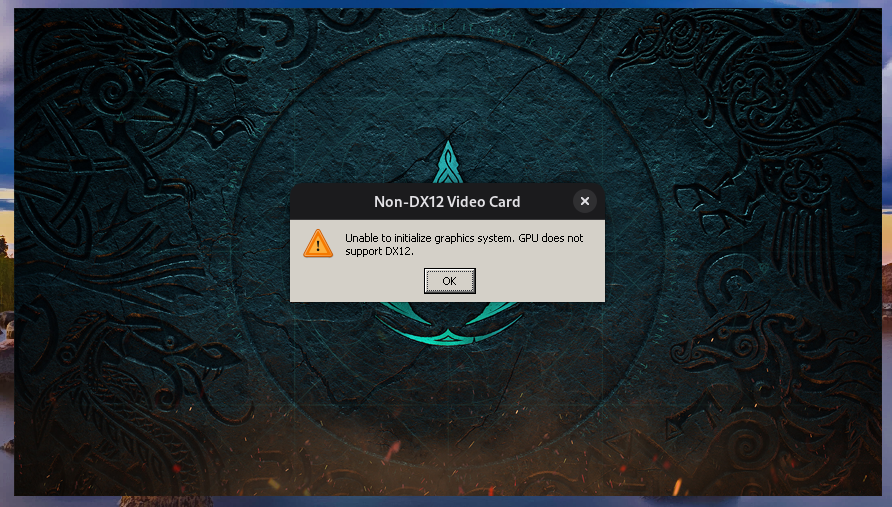
Decided to give the game a try on Fedora 36. Unfortunately I wasn't able to make it work after hours of troubleshooting. Valhalla starts, displays a splash screen, then silently crashes or displays an error about GPU not supporting DX12. I was using Bottles, tried default Soda runner, then newest Wine GE, Lutris, even just Proton GE. No luck. Tried various environment variables like setting DXR 1.1, 12.1 feature level, NVAPI, hide Nvidia GPU, no luck. Tried running the game with -d3d12 launch command, no luck again. Looking at the DXGI and D3D logs created in the install location, it looks like the game tries to run using DXVK and there are no VKD3D logs present.
Is there a way to make this game work? I've seen people with Radeon cards have better chance. If you'd like me to provide some additional stuff, I'll be glad to help.
PC: i5 10400, RTX 3060 (515.65), Fedora 36 (Wayland), 16GB RAM.