Warhammer 40,000: Darktide rendering artifacts
The invalid alignment query does seem to be correct. It's querying for RTV/DSV and the driver reports that we require 64 KiB. Red herring I think.
Could you explain where to reproduce this? Is the scene in the very beginning of the game, or does it require playing deep into the game?
Could you explain where to reproduce this? Is the scene in the very beginning of the game, or does it require playing deep into the game?
Yes. The screenshot I posted was taken roughly 30 seconds after starting the game (in the main "hub" area). The location doesn't seem to matter. The same artifacts can be seen during the tutorial mission (what new players see when they first start the game).
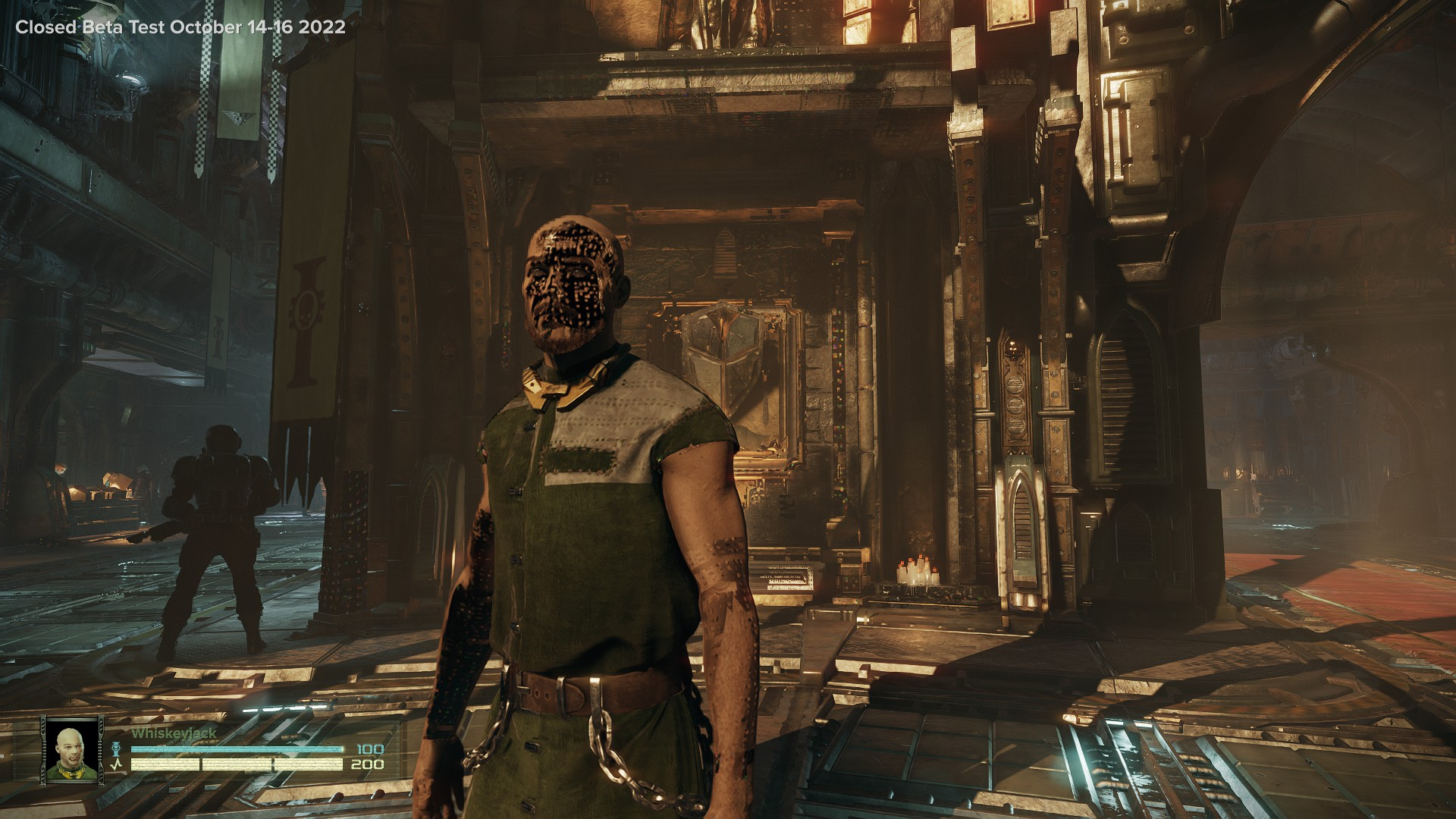
Any time you start up the game it seems to load slightly lower detail textures/meshes/whatever. Those render fine without any visible artifacts. Then after some time the game starts to load high detail stuff and that's when I start seeing artifacts.
Standing still in one spot makes it easier to see artifacts as they show up. If you're moving around a lot then the artifacts appear in random places, sometimes they could be very far away/hard to see. Sometimes the artifacts show up on your character, which is what I think the person on protondb was referring to. Those are hard to miss.
Here's a different angle. This is from the closed beta (earlier build of the game). The artifacts look the same as the current build, however.
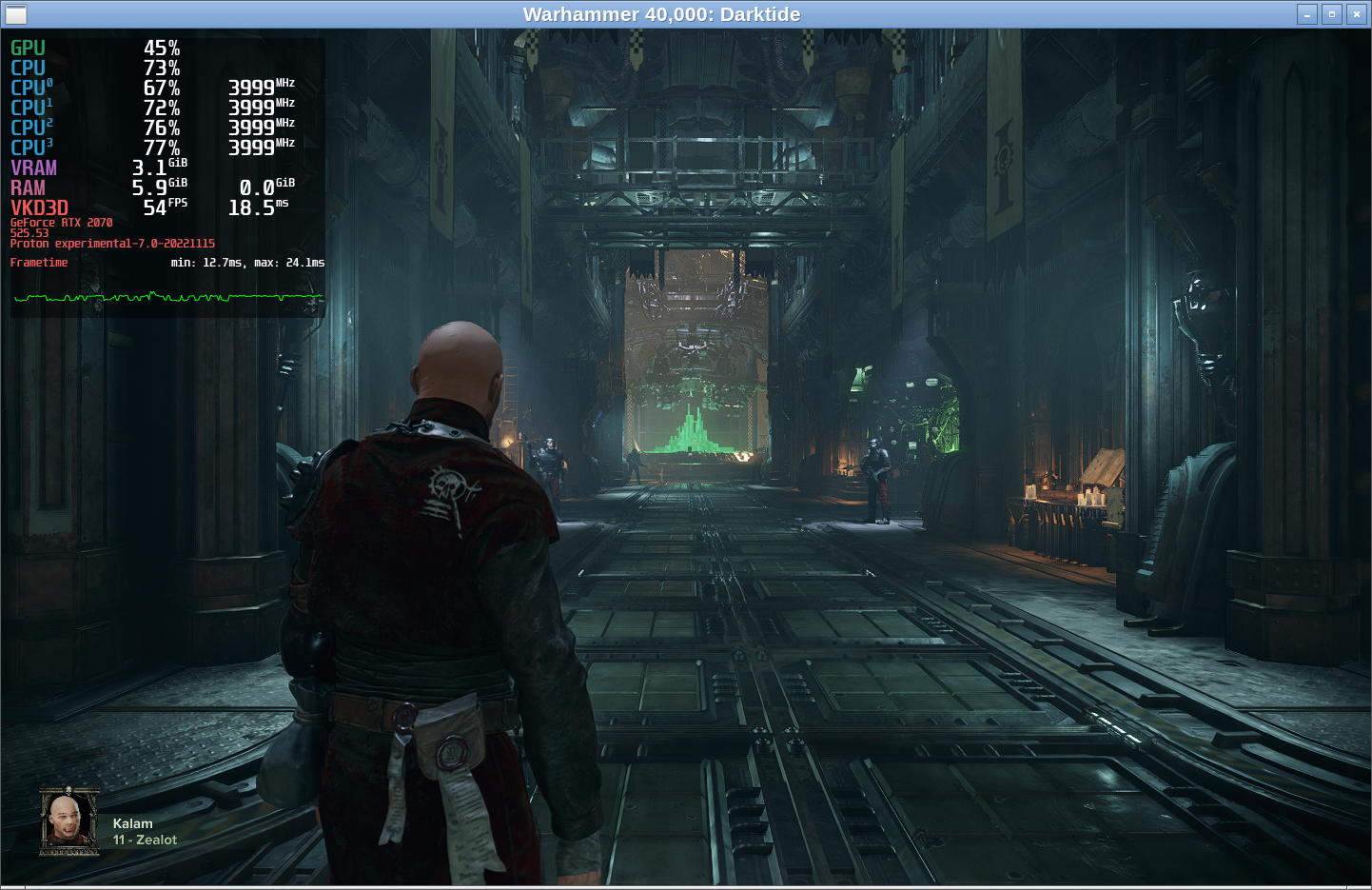
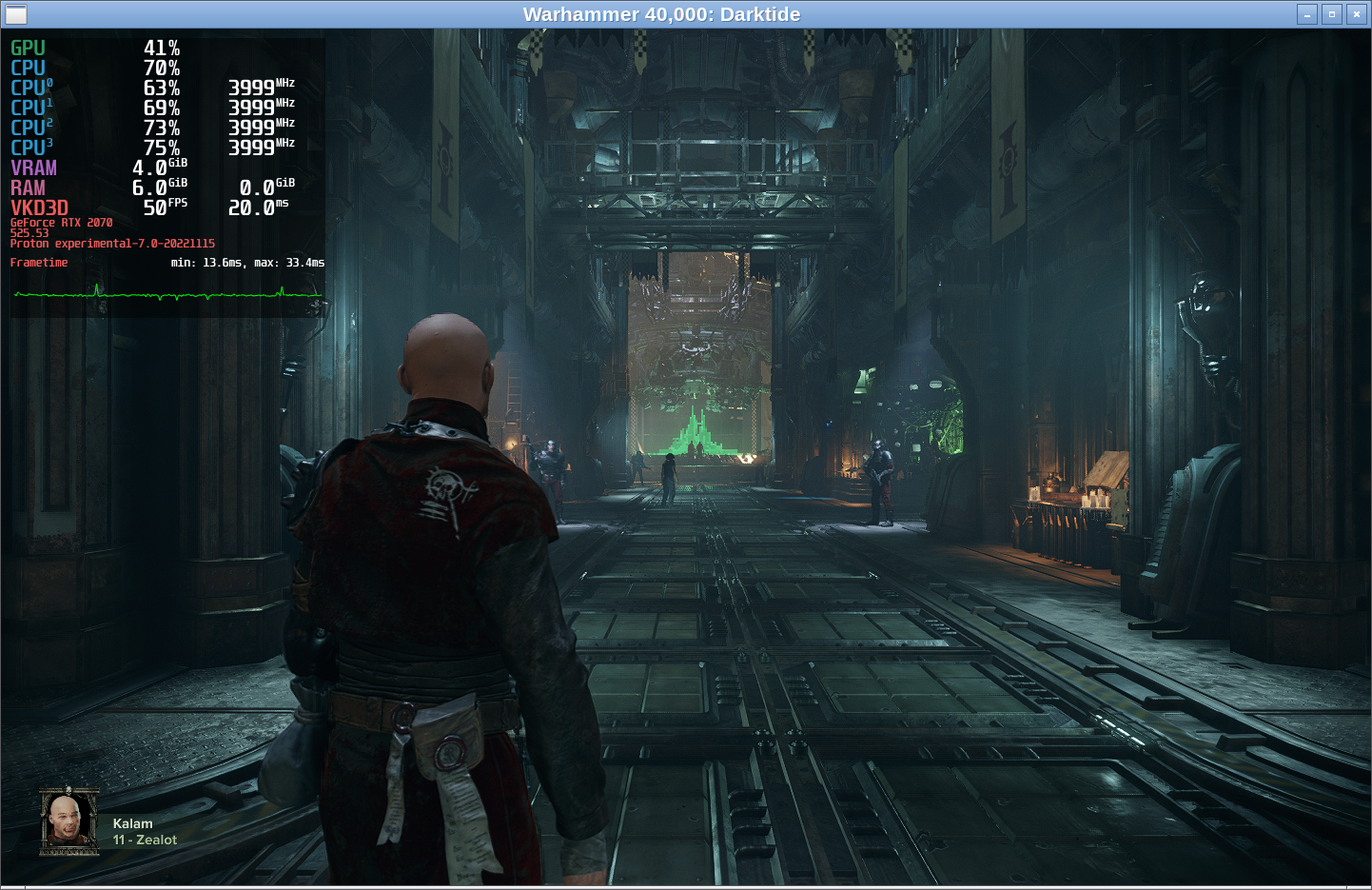
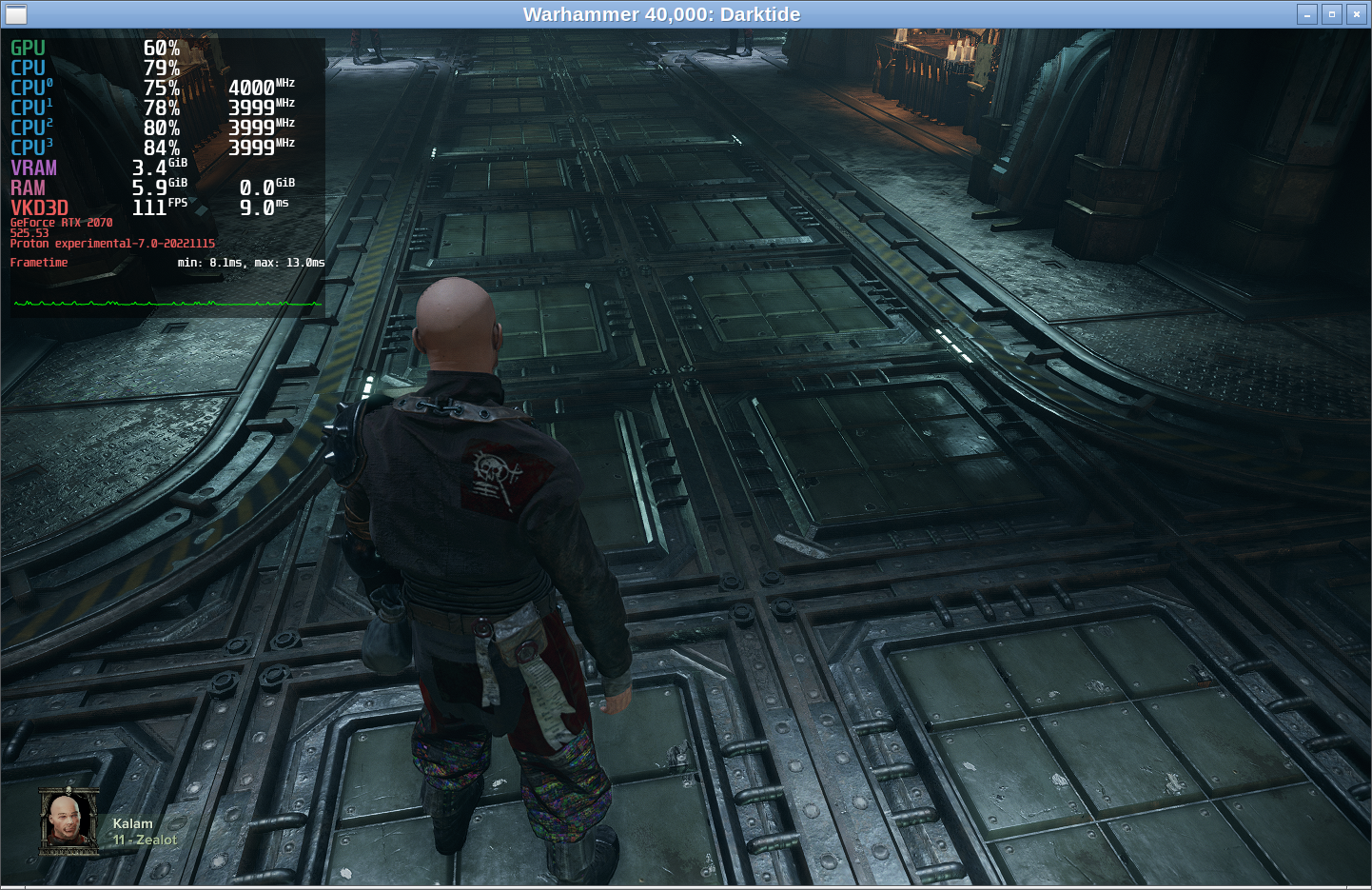
Not sure if it's relevant and I can't say it's 100% reproducible but it feels like the artifacts start to appear whenever mangohud reports VRAM usage close to 4.1 GiB. The game starts off with 2-3 -ish GiB then it goes to 4-4.1 -ish then the artifacts appear and after that VRAM drops back to 3.5-ish as seen on the screenshot.
Could you try VKD3D_CONFIG=no_upload_hvv? That should keep VRAM usage down a bit, maybe it avoids tripping the close-to-OOM detection or something.
No change.
Seconds after the game finished loading:
Got to 4 GiB VRAM after a while:
Then funky pants (and some other artifacts that are hard to see) and a drop to 3.4 GiB VRAM:
vkd3d.log:
https://gist.github.com/coffee-lord/3f14d2c488937f4585561fceec39aee8
I've been running around on:
- RTX 3070
- 525.53
- Latest Proton Bleeding Edge from today
and I really cannot reproduce these texture glitches at all :\
I tried the new 525.60.11 driver, didn't seem to make any difference.
It looks like the 2000 series NVIDIA GPUs are affected the most. I've compiled some statistics based on user reports on protondb:
| GPU | Result |
|---|---|
| 1XXX series and lower | 1 out of 8 reported artifacts |
| 2XXX series | 7 out of 10 reported artifacts |
| 3XXX series | 6 reports, no artifacts |
Data
| GPU | Driver | Kernel | Result |
|---|---|---|---|
| RTX 3080 Ti | 515.65.01 | 5.15.0-47-generic | OK |
| GTX 1660 | 515.57 | 5.18.12-arch1-1 | Heavy Artifacts |
| RTX 2070 | 520.56.06 | 6.0.7-artix1-1 | Heavy Artifacts |
| GTX 1080 Ti | 510.68.02 | 5.17.5-76051705-generic | OK |
| RTX 3080 Ti | 515.65.01 | 5.15.0-47-generic | OK |
| GTX 1080 | 515.65.01 | 5.15.0-53-generic | OK |
| GTX 1060 | 520.56.06 | 6.0.8-zen1-1-zen | OK |
| RTX 3060 Ti | 520.56.06 | 6.0.8-arch1-1 | OK |
| RTX 2070 | 515.48.07 | 5.18.7-arch1-1 | OK |
| RTX 2080 | 520.56.06 | 6.0.8-zen1-1-zen | Heavy Artifacts, Missing Textures |
| GTX 1080 | 520.56.06 | 6.0.8-arch1-1 | OK |
| GTX 1080 Ti | 520.56.06 | 6.0.2-arch1-1 | OK |
| RTX 3080 | 520.56.06 | 6.0.1-arch1-1 | OK |
| RTX 3090 | 520.56.06 | 5.19.17-2-MANJARO | OK |
| RTX 2060 | 510.54 | 5.16.15-zen1-1-zen | Minor Artifacts |
| GTX 1070 Ti | 510.60.02 | 5.17.1-zen1-1-zen | OK |
| RTX 2060 | 470.141.03 | 5.10.0-18-amd64 | OK |
| RTX 2060 | 495.46 | 5.15.10-zen1-1-zen | Missing Textures |
| RTX 3070 | 515.65.01 | 5.18.16-zen1-1-zen | OK |
| RTX 2070 | 470.86 | 5.15.5-76051505-generic | Minor Artifacts, Missing Textures |
| RTX 2070 | 515.65.01 | 5.15.62-2-MANJARO | Minor Artifacts |
| RTX 2080 Ti | 515.76 | 5.19.14-201.fsync.fc36.x86_64 | OK |
| GTX 980 Ti | 520.56.06 | 6.0.1-arch1-1 | OK |
| RTX 2070 ** | 525.60.11 | 5.19.13-zen1 | Heavy Artifacts |
* I excluded reports that failed to launch the game. "OK" means the report didn't mention any graphical artifacts (but a lot of people report poor performance, regardless of artifacts).
** I included my own result in the dataset.
If you need me do any additional testing or whatever, please let me know. I have no experience with vkd3d development/debugging but I do have some experience tinkering with Wine.
https://github.com/HansKristian-Work/vkd3d-proton/tree/hoist-texture-lod-query might help. The game is doing some highly questionable things with textureQueryLOD in control flow that could be causing this.
As of today, game version "Hotfix 1.0.14", Proton experimental-7.0-20221129, I wasn't able to reproduce the issue with or without vkd3d from hoist-texture-lod-query branch. I.e. it seems to just work out of the box now, without any artifacts. Could be an unintentional fix from the devs themselves? In any case, thanks for looking into this issue.
@coffee-lord Hi there. Is it correct that this issue is solved?
@coffee-lord Hi there. Is it correct that this issue is solved?
Yes, I believe so.
Proton versions
proton experimentalx1 2022-12
Launch options
VKD3D_CONFIG=no_upload_hvv?x1 2022-11MANGOHUD=1x1 2022-11PROTON_ENABLE_NVAPI=1x1 2022-11PROTON_HIDE_NVIDIA_GPU=0x1 2022-11VKD3D_DEBUG=warnx1 2022-11VKD3D_LOG_FILE=/tmp/vkd3d.logx1 2022-11VKD3D_SHADER_DEBUG=warnx1 2022-11
Seems like I'm not the only one having this issue. I've seen a few reports like these on protondb/reddit:

I think it only affects Nvidia GPUs, not sure. And it seems to be related to LOD (?). Basically once you start up the game and stand in one place for a while the game starts to load extra detailed textures/shaders in your vicinity but those come up corrupted as you can see in the screenshot. Once it happens for the first time the corrupted textures start to appear everywhere, regardless of LOD.
I think these lines in the log show up roughly at the same time as the first glitched textures:
(you can see that there are no such messages in the first 16% of the log but after that point they appear at regular intervals, which correlates with what I experienced in game)
Running the game on windows on the same hardware doesn't display this issue.
Full system information:
https://gist.github.com/coffee-lord/6a3b7f9165a0c4c3dd77ed3707343b0e
vkd3d.log:
https://gist.github.com/coffee-lord/0adba1aeb46dd2aa3eb48ffc2fded7f4
Launch parameters: