Resident Evil:Village hangs
Both your logs show:
vkd3d_allocate_device_memory: Memory allocation failed, falling back to system memory.
Maybe lowering your graphics settings could help?
I have the exact same issue, but for me it seems to be a driver issue. Syslog shows:
NVRM: Xid (PCI:0000:01:00): 109, pid=15138, name=re8.exe, Ch 0000008e, errorString CTX SWITCH TIMEOUT, Info 0x27c037
Having the same exact problem, tried 20+ different proton versions, every time it freezes at the same place when you walk out of stairs in the first building.
OS: Manjaro Linux x86_64 6.1.1-1-MANJARO
GPU: NVIDIA GeForce RTX 3070
NVIDIA Driver Version: 525.60.11
steam-1196590.log
upd:
By downgrading to NVIDIA Driver Version: 470.161.03 and using Proton-7.0rc6-GE-1 i was able to go trough that freezing point in the game, but i would hardly call it a solution, since game now running less smooth. I guess i will stay on this set up until bug is fixed.
P.S. Denuvo is constantly blocking my game for 24 hours for swapping proton versions too much. It is a great mystery to me how developers are even capable to solve problems with with such malware standing in the way.
The same issue here:
OS: Arch Linux 6.1.3-tkg-cfs
GPU: NVIDIA GeForce RTX 4080
NVIDIA Driver Version: 525.60.11 and 525.78.01
GE-Proton7-43
No log -cant find it
I tried to reproduce this on AMD/RADV, but it seems to work fine there.
Basically, I noticed while playing the game that everything is fine until you get to an abandoned house outside the village. The game will hang after the furniture falls upstairs, and you go around the corner to see it.
Do you have a screenshot or something to explain exactly where things go wrong? I don't know where that is. How long does it take to get here from a new game?
Takes about 5 minutes or something, according to the reddit post linked in the first post here, it's happens in the very first shack you enter after you see the mouse pop up of a closet in the basement.
Ok, that should be quick to repro.
FWIW, there is a bit of a stutter on AMD for me in the exact place it probably hangs on nvidia, no idea if that means anything.
For me its this spot, when you come up from the stairs the color of the air changes, sometimes it was glowing a bit, and immediately after this point the game is stuck
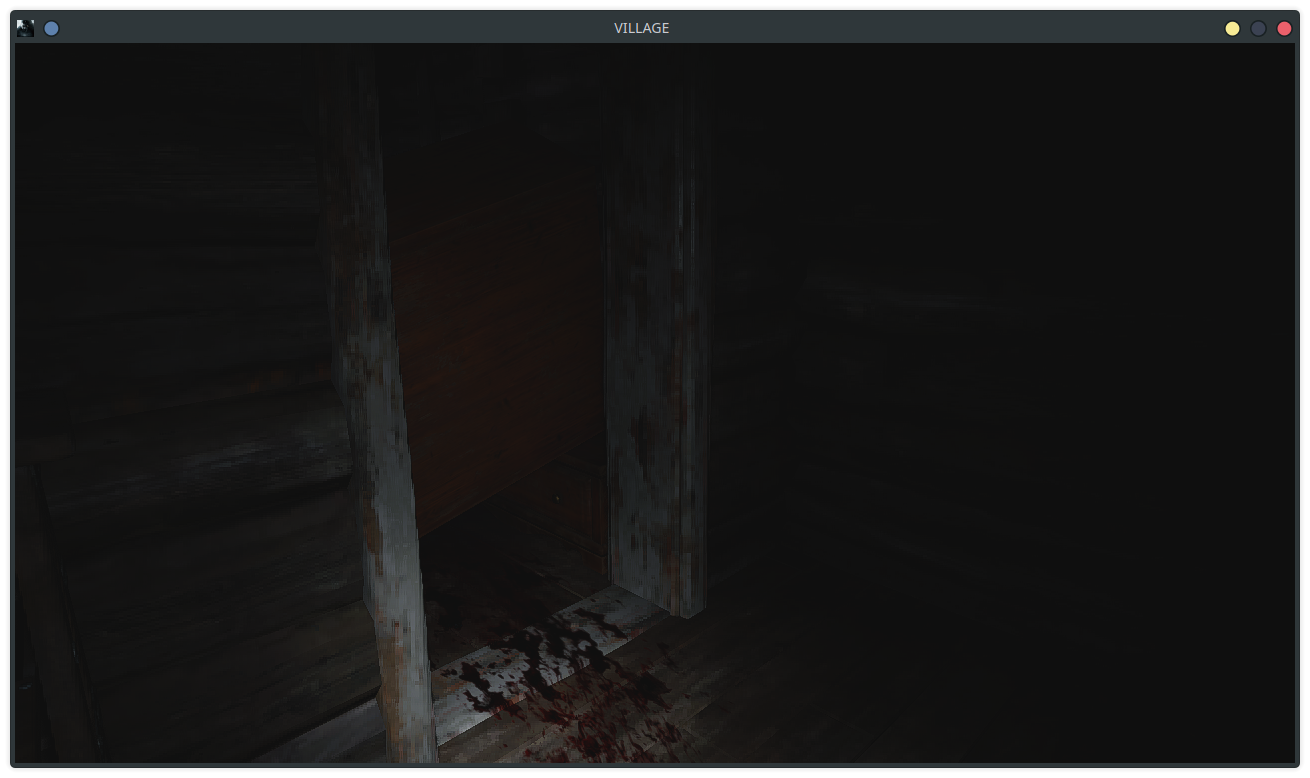
Almost identical to @bananananana-batman .... sometimes i get to see around the corner through the doorway, other times i only see the wall ahead of the stairway before it freezes.

Both your logs show:
vkd3d_allocate_device_memory: Memory allocation failed, falling back to system memory.Maybe lowering your graphics settings could help?I have the exact same issue, but for me it seems to be a driver issue. Syslog shows:
NVRM: Xid (PCI:0000:01:00): 109, pid=15138, name=re8.exe, Ch 0000008e, errorString CTX SWITCH TIMEOUT, Info 0x27c037
My game shows in the options menu that i use 3.84 GB out of 6.97 GB available on graphics memory. If i am running out, i think it is due to some oddity / issue / bug, not that my initial settings are too high for my graphics card.
Could it be a graphics memory leak?
My game shows in the options menu that i use 3.84 GB out of 6.97 GB available on graphics memory.
Those numbers are just an approximation and aren't necessarily accurate.
Those numbers are just an approximation and aren't necessarily accurate.
It looks like @HansKristian-Work already has enough information and is trying to replicate this issue, but on the side, i will use "watch -d -n 0.5 nvidia-smi" to monitor the GPU Usage as i play.
Edit:
Usage while walking in snow: 30% to 40%
Usage while in the house: 20% to 30%, probably because its dark so there is less to render.
Usage at crash: 37% and stays that way for a while. Maybe 5-10 seconds after the crash the usage drops to 0% (which is the standard amount of use i have while RE:8 isnt running)
I'm also starting to maybe connect dots here. I also play Sapiens which used to crash randomly due to an issue with memory. The creator of the game talked with me on discord and created a fix on a new beta branch, which worked.
I am not sure if it is related, but perhaps it's good to take a look at, I made a report a couple of days ago which I updated again yesterday after a lot of tinkering.
Sooooo it goes like this, basically I was playing some high demanding titles(cyberpunk, ready or not, etc) and each took my vram over it's absolutely limit and there were crashes, freezes, poor performance after some time, but when it hit me on a game I had 0 issues with a year ago... I knew something was up.
Finally after a bit of digging I was able to connect the few dots, there seems to be a huge NVIDIA driver bug which consumes as much VRAM as possible even going over the budget, I've made a few comparisons as well as provided perhaps useful information to NVIDIA dev guys about it, the reason I am mentioning this in this thread is because(Not RE: Village, but RE3 remake gave me a similar issue + on the log it says failed to allocate device memory) it's again about VRAM allocation and how it affects the game + crashes.
https://forums.developer.nvidia.com/t/vram-allocation-issues/239678
It could also affect this game it could also not, I'm not sure but something very fishy is going with latest drivers, unfortunately it didn't allow me to boot with driver 495 and 510 to test, but the problem happened somewhere around those two(515 already has the same issues as 525). Not sure what was changed, but now it goes into excessive VRAM usage and does NOT allocate.
EDIT: @Mike2003-1 does the game randomly crash out without filling vram or anything else ? I have the same bug with RE3 Remake(it uses same engine AFAIK)
EDIT 2: This crash/hang also seems very reminiscent of a driver bug that prevents Halo Infinite from working(just closes out), relevant information: https://forums.developer.nvidia.com/t/poor-halo-infinite-performance-and-random-hang/232202/11
EDIT 3: Possibly a VKD3D regression, I don't have access to RE Village to test out on that one, but my hang issues stopped by using Proton-GE 7.41, OP says they have tried with Proton 7.0-5(which hung on both RE2 and RE3 after a while) as well as Proton-GE 7.43, now I know that it was updated to latest git, so quite possibly the issue is some commit which causes it.
@kodatarule: The game will crash in that i can not move. The atmospheric sounds continue and the window stays open, but i am unable to move. Graphics memory does not seem to max out, it actually goes towards zero. Game still takes 3.8 GB of RAM.
It looks like GE-Proton has had some issues lately, based on what they state in their latest build which is 7.47. I tried using their new 7.47, which didn't fix the issue. I also used 7.41 like @kodatarule suggests, and this also doesn't fix the issue.
You should definitely check your syslog for anything NVRM: Xid related.
I'm still betting it is a nvidia bug introduced with the 5.20 or 5.25 series of drivers.
@RiantAnda: I'm not used to looking at this kind of info. I ran:
journalctl -f
... and this is the juice i collected from it:
kernel: NVRM: Xid (PCI:0000:01:00): 109, pid=9124, name=re8.exe, Ch 000000be, errorString CTX SWITCH TIMEOUT, Info 0x2c068
@Mike2003-1: Thanks for confirming the driver issue.
You should run /usr/bin/nvidia-bug-report.sh after the issue happened and then e-mail the produced file with a short description to [email protected]. I already did that, but it may help if more people report this issue.
Hey all, wanted to chime in and say I too am experiencing this. I had a save from a Windows playthrough and I think it might be helpful to point out that the hang around the dresser is just one trigger for a seemingly much larger problem
My save was in Manor Dimitrescu, specifically the sequence where you're going around fighting the three daughters and collecting the mask figures. Every time I got to a certain point the game just completely closed down. The dresser thing also happens to me on new saves. Lady D's dress would actually partially unload and the light fixtures above the masks would spaghettify a bit.
RTX 3060 ti, r5 5600x, 16gb ram, Arch Linux.
Also, I just switched to DKMS, so if someone could point me in the direction of how to downgrade from the most recent Nvidia DKMS driver to a working one, whichever one does work, that'd be greatly appreciated. I'm seeing hints that 470 works but is low performance? I have a Windows partition for emergencies (like this) so it's not the end of the world.
Cheers everyone
I just want to confirm what @MaeveFirstborn is claiming. I have not seen the graphical artifacts they claim to see, but "The cabinet at the top of the stairs in the first house" is not the only place where i see my game freeze.
Before i got to this point, i had a save that started slightly after this point. I was at the first major battle, after which you are saved from Urias by someone on horseback. Randomly in this battle the game will hang in the same way, and i started over thinking there was a rare corruption in my save data. Unfortunately, as my first post indicates, i was mistaken about this.
@MaeveFirstborn Downgrading packages in Arch is documented here.
-You download at least nvidia-dkms and nvidia-utils, then install them with pacman -U <package-names>.
I can't name any known good driver version, but I would start with the 515 series.
If it started happening in more recent drivers, it's worth trying VKD3D_CONFIG=force_initial_transition %command%. It's possible game is not transitioning depth images properly away from undefined and that caused GPU hangs in Spiderman on recent NV drivers.
That definitely sounds possible, the issues I've seen give me all the hallmarks of depth issues. It'd explain what goes on with her dress and the weird flicker of fog before the crash. I'll give it a go after work and report back!!
No dice with force_initial_transition Darn.
I've checked out older vkd3d-proton versions and found that the issue doesn't happen with 2.5.
Seems that v2.6 introduced the hang.
@HansKristian-Work: Any ideas how we could investigate this further?
Bisect?
I couldn't reproduce it at the location mentioned (on the way up from the basement), but I did get it to hang randomly on the way to the house, or on loading back to the previous save point, every other attempt or so. Same as described, image freezes, but audio keeps playing.
GeForce GTX 1660 Ti
Driver version 525.47.04-234
Got the following in the kernel log:
kernel: NVRM: Xid (PCI:0000:08:00): 109, pid=10354, name=re8.exe, Ch 000000f6, errorString CTX SWITCH TIMEOUT, Info 0x7fc07c
Oh, also, in the VKD3D log I got a bunch of memory allocation warnings before the hang.
01e4:warn:vkd3d_allocate_device_memory: Memory allocation failed, falling back to system memory.
01e0:warn:vkd3d_allocate_device_memory: Memory allocation failed, falling back to system memory.
01ac:warn:d3d12_device_MakeResident: iface 000000004c670030, object_count 1, objects 0000000065ecfb78 stub!
01e4:warn:vkd3d_allocate_device_memory: Memory allocation failed, falling back to system memory.
01ac:warn:d3d12_device_Evict: iface 000000004c670030, object_count 4, objects 000000002ddca960 stub!
01ac:warn:d3d12_device_EnqueueMakeResident: iface 000000004c670030, flags 0, num_objects 2, objects 00000000356fafe0, fence_to_signal 00000000006512b0, fence_value_to_signal 267 stub!
01e0:warn:vkd3d_allocate_device_memory: Memory allocation failed, falling back to system memory.
I'm new to Github, if I wanted to download and compile a specific commit, could I do that and then select that specific compatibility layer in Steam?
Oh, also, just wanted to point out, I just checked dmesg for Xid errors as referenced by a previous post and I found:
[+0.000003] NVRM: Xid (PCI:0000:05:00): 109, pid=127872, name=re8.exe, Ch 00000056, errorString CTX SWITCH TIMEOUT, Info 0x2c02c
Which is precisely the same error referenced in that other reply.
According to @RiantAnda the issue was bisected to a particular dxil-spirv commit.
Here are three candidate vkd3d-proton commits to test to verify this. @runar-work
Remember to update submodules after checking out these commits.
- 0251b4045c2f84df4defe751b52e1475b74f3337
- 7986e241f3dd1565b9954a25ca08d3863751cc3c
- db89d403d630f229d35ef88f6be5887ccdf3b6a6
I reproduced the hang with all three commits, and I also tested proton v2.5 and reproduced it there too.
When I first started out it took me about 20 minutes to reproduce, but after a while I could reproduce it consistently after reaching the house and restarting. Then when I tried again later, it took another 20 minutes or so before it froze again.
The memory usage before I started the game before a hang was around 1400/6144 MB. So I made sure to bump up the memory usage by launching a bunch of chromium windows until I had the same starting conditions. I also turned up the texture quality to high. I went to the house, got memory usage to over 5900 MB (seemed to peak in the basement, though it would never hang for me there), selected restart and then it would consistently hang after loading the previous save.
I then downgraded the driver to 515.86.01-237, bumped memory usage like before, and after three attempts didn't get any hangs. Switched back to 525.47.07-237 to double check and it froze again on the first try (reach house -> restart -> hang).
This might be resolved now with the concurrent queue submission fix.
Does that mean that once VKD3D / Proton gets updated it should be fixed?
I'm currently unable to successfully build vkd3d-proton, but the latest proton-ge fixes the issue for me.
Many thanks @HansKristian-Work for looking into this!
I'm currently unable to successfully build vkd3d-proton
Yes there is a regression when building with wine 8.4 that makes compilation fail. Should be fixed for next wine release.
I'm currently unable to successfully build vkd3d-proton, but the latest proton-ge fixes the issue for me. Many thanks @HansKristian-Work for looking into this!
I tried running it with GE 7-53 and although I could get a bit further the game crashed with the Capcom crash reporter though it didn't properly come up with an error code, idk what's going on with that
I get the same stuff with errorString CTX SWITCH TIMEOUT in both Village and RE4 remake. This is with nvidia 2080 Ti on 525.89.02 What I'm currently following is this thread on nvidia forums: https://forums.developer.nvidia.com/t/multiple-cuda-rtx-vulkan-application-crashing-with-xid-13-109-errors/235459/38 as many folks had similar issues. It does sound like a driver issue.
Have there been any updates to this?
I'm currently unable to successfully build vkd3d-proton, but the latest proton-ge fixes the issue for me. Many thanks @HansKristian-Work for looking into this!
I tried running it with GE 7-53 and although I could get a bit further the game crashed with the Capcom crash reporter though it didn't properly come up with an error code, idk what's going on with that
Can confirm that game randomly hangs for me on GE-55 with latest nvidia drivers. Capcom crash reported shows up just as you said.
Does this happen on RE2R as well?
I can confirm it still happens with RE Village and RE4R
RE Village tested with latest GE Wine on Lutris with VKD3D 2.8 on a RTX 3050 mobile gpu
RE4 with proton experimental
On RE4 it usually crashes around the first house and with Village it crashes a bti before the first house
Does this issue still occur on vkd3d 2.9
Does this issue still occur on vkd3d 2.9
Just confirmed, it still does, Xid 109 CTX SWITCH TIMEOUT. As others mentionned, this seems to be a driver issue, not related to VKD3D.
From my limited testing it seems setting VKD3D_CONFIG=single_queue helps although it also impacts performance. Without it re4r freezes about ~2 minutes after loading save file and with it I was able to play for about an hour.
My assumption is that proton-ge 8.3 contains the fix for NVIDIA bug mentioned in release notes of vkd3d 2.9 which seems to be this commit: https://github.com/HansKristian-Work/vkd3d-proton/commit/2a9c5fc522ca1f7b575054575e0127efdefab0b8 as proton-ge vkd3d submodule points to this one https://github.com/HansKristian-Work/vkd3d-proton/tree/f125062ee1278ac8508ab5561e289ec4ce0f406e
I was unfortunately not able to test this in re:village.
This might have been fixed in driver 535 if you use VKD3D 2.9
Currently cannot test so if somebody else can please confirm or deny this
I've been able to play for two hours so far without any crashes or freezes on the latest driver, kernel and vkd3d.
I was affected by the issue before, so in my case it seems to be fixed.
Edit: Nevermind, it happened again after an hour today. Xid 109.
I've been able to play for two hours so far without any crashes or freezes on the latest driver, kernel and vkd3d.
I was affected by the issue before, so in my case it seems to be fixed.
Edit: Nevermind, it happened again after an hour today. Xid 109.
Yeah, huge bummer. Mine still crashes shortly after the red dresser.
Could you guys give this a shot again with current master or Proton experimental? This might have been fixed by some recent work.
Tested just now with 535.98 and https://github.com/HansKristian-Work/vkd3d-proton/pull/1649/commits/87cc08bf44ca4a1990620ab7921c6920011c2876. Using near max VRAM still causes a hang when I reload from a previous save, so doesn't look like anything's changed for me at least.
[ 8636.851764] NVRM: GPU at PCI:0000:08:00: GPU-a8fb3a3a-9dd5-b430-1b78-cb1f1ecd6079
[ 8636.851770] NVRM: Xid (PCI:0000:08:00): 109, pid=27247, name=re8.exe, Ch 000000fe, errorString CTX SWITCH TIMEOUT, Info 0x82c07f
Issue is still present on 535.104.05. Going up from the basement at the beginning of the game causes a hang. Tried few VRAM settings, but doesn't make a difference The game doesn't get even close to full on the 3060.
I have a similar issue but it's a consistent hang in the final boss of the Shadows of Rose DLC. After the transition
to the final phase the game hangs during the voice line. Audio continues while image hangs and the game becomes unresponsive. Tried in Proton GE:8-16( steam-1196590-1.log) and in Proton Experimental( steam-1196590.log)
11844.914:012c:017c:err:vkd3d-proton:d3d12_command_queue_signal: Failed to submit signal operation, vr -4. 11844.914:012c:018c:err:vkd3d-proton:d3d12_command_queue_execute: Failed to submit queue(s), vr -4. 11844.917:012c:0184:err:vkd3d-proton:d3d12_command_queue_execute: Failed to submit queue(s), vr -4. 11859.704:0108:0118:fixme:oleacc:find_class_data unhandled window class: L"[#32769](/issue/HansKristian-Work/vkd3d-proton/32769)" 11859.704:0108:0118:fixme:uiautomation:msaa_provider_GetPropertyValue Unimplemented propertyId 30024 11859.704:0108:0118:fixme:uiautomation:uia_get_providers_for_hwnd Override provider callback currently unim
Occurs at line 34841 and line 41628 respectively.
Just wanted to add a report; I get the hang at the top of the stairs following the mouse/cabinet interaction in the first hut, same as:
For me its this spot, when you come up from the stairs the color of the air changes, sometimes it was glowing a bit, and immediately after this point the game is stuck
and
Almost identical to @bananananana-batman .... sometimes i get to see around the corner through the doorway, other times i only see the wall ahead of the stairway before it freezes.
As with others, the audio keeps going and the game doesn't outright crash, and I'm able to alt-tab to Steam to stop the game from there.
I've tried a few different Proton versions (including latest, experimental, and GE) to no avail, as well as the various launch flags mentioned in this thread. Further, I've dropped my settings to bare minimum, vsync on/off, fullscreen/windowed/borderless, basically everything I can think of.
Two things I've not gotten around to is trying different driver versions or versions of Proton below 8.x, which I realize may be pertinent; hopefully I'll remember to update this post when I make the time to do that.
Specs:
- Arch 6.5.7
- Intel 11700F
- 3080Ti on 535.113.01
Fixed in 545?
At least the Xid 109 hang I had most recently with the RTX 4070 has been fixed. It would always happen when I loaded into the second autosave point with the view of the village where I would barely have time to move before it froze. I tested with 535.113.01 again just to make sure and got an instant Xid 109. No problem with 545.23.06.
I can confirm the game no longer hard freezes
But i am getting huge surters when the game starts to hit max VRAM, which weren't there before
Since I only have 4 GB , it isn't easy to keep VRAM below it
I can also now confirm that as of Nvidia 545.29.02 the game hang no longer occurs on my end.
Assuming this to be resolved now.
I can now confirm happily that, on Debian 12 with the latest Proton-GE and the official Nvidia 550 dkms install, the graphical bugs are gone and the game runs fantastic. Thank you!!
Proton versions
proton experimentalx3 2023-10proton 7.0-5x2 2023-01ge-proton7-43x2 2023-01
Launch options
VKD3D_CONFIG=single_queuex1 2023-05VKD3D_CONFIG=force_initial_transitionx1 2023-02PROTON_LOG=1x1 2022-12VKD3D_DEBUG=warnx1 2022-12
Launch lines
VKD3D_CONFIG=force_initial_transition %command%x1 2023-02PROTON_LOG=1 VKD3D_DEBUG=warn %command%x1 2022-12
Upstream links
- HansKristian-Work/vkd3d-proton/pull/1649x1 2023-08
Hello, i recently posted some issues about my gameplay of RE:8 in r/Linux_Gaming. I managed to get some proton logs but was asked to post my issue here.
Basically, I noticed while playing the game that everything is fine until you get to an abandoned house outside the village. The game will hang after the furniture falls upstairs, and you go around the corner to see it.
Here is the original reddit post: RE:8 hang issue on linux
I can get out of the game with Alt + Tab and get Steam to stop the game.
Using:
Manjaro Linux
NVidia GeForce RTX 3070 Ti
Proton 7.0-5 (Also errors on GE-Proton7-43, but below log is in 7.0-5)
Below is my log. Can someone guide me to figure out what is causing this issue? I am willing to get additional information with guidance.
I did play this game and it worked perfectly a few months ago, so the error should not be hardware related.
steam-1196590.log
Thanks for the help!
Edit: Based on comments for this #1354 similar issue, i have gotten some logs with launch option set to "PROTON_LOG=1 VKD3D_DEBUG=warn %command%", hoping it helps shed more light. To be clear, I am using Native Steam, not Lutris.
steam-1196590.log
Here are my currently installed NVidia Packages
Again, thanks in advance for any help on this issue!