DX12 stop working on nvidia gpu with latest proton experimental and 525 driver
You should update to the latest nvidia driver release in the 525 series, which is 525.85.05. As you can tell from the commit you linked, earlier releases in the 525 series had bugs with present_wait, but those should be fixed now.
@mbriar thank you for the answer!
Looks like 525.78.01 is the latest driver shipped with fedora. So, maybe better to add some more precise version check instead just disabling workaround for the whole 525?
I assume the workaround was removed outright because it didn't seem necessary to keep around a workaround in the code that only affects obsolete versions of a single driver series. You can use VKD3D_DISABLE_EXTENSIONS=VK_KHR_present_wait as environment variable in the meantime until an update is available for your distro.
@mbriar of course I can use this launch options locally. The main reason of creating this issue here is that looks like removing this workaround for the whole 525 driver series is the wrong decision that breaks compatibility. If driver fixed since 525.78 - workaround should be removed if driver version higher than 525.78 as well. Am I wrong?
The workaround was completely removed and there is no driver version check for this at all anymore. There is also no reason for anyone to stay on an old and buggy point release of the 525 series, so keeping a workaround for that seems unnecessary when there are multiple was to fix it (either updating the driver, or using an older version of vkd3d-proton or the env var for the time being.)
Fwiw it happens with 525.85 as well, Optimus system. ( Intel HD 630+ GTX 1050)
With bunch of 0198:err:dxgi_vk_swap_chain_recreate_swapchain_in_present_task: Failed to create swapchain, vr -3. in the log.
Using those disable extensions vars works, otherwise games are just blackscreen. Nothing gets presented on screen.
Oh, I wasn't aware it's still broken on optimus systems, I assume someone already has reported this to nvidia?
fwiw. I cannot reproduce this on my RTX 3060 / UHD 620 laptop. Tried with nvidia-xconfig --prime and no Xorg config. Do you use the open or proprietary kernel module setup?
fwiw. I cannot reproduce this on my RTX 3060 / UHD 620 laptop. Tried with
nvidia-xconfig --primeand no Xorg config. Do you use the open or proprietary kernel module setup?
@HansKristian-Work, I use proprietary probably. The default one NVIDIA driver shipped in fedora RPM Fusion.
Fwiw it happens with 525.85 as well, Optimus system. ( Intel HD 630+ GTX 1050)
Does it reproduce with the gears test in vkd3d-proton? Fullscreen or windowed?
Does it reproduce with the gears test in vkd3d-proton? Fullscreen or windowed?
Should I build it on my machine to check? Or can I download from some place?
Fullscreen or windowed?
On my system both, no any difference.
fwiw. I cannot reproduce this on my RTX 3060 / UHD 620 laptop. Tried with
nvidia-xconfig --primeand no Xorg config. Do you use the open or proprietary kernel module setup?
Prop ( as Pascal doesn't support open kernel stuff ) + hybrid mode aka both igpu and dgpu are active.
If you were testing with an Nvidia only mode ( everything works on NV without a need for an env var or vk icd filename ) that might be why.
@HansKristian-Work
Does it reproduce with the gears test in vkd3d-proton?
I checked on 2 different laptops (fedora+rtx3050, Manjaro+gtx970m). Issue reproduced with gears test on both of them. Driver version is 525.85.05. After adding variable with extensions disabling it runs fine.
Fwiw it happens with 525.85 as well, Optimus system. ( Intel HD 630+ GTX 1050)
Does it reproduce with the gears test in vkd3d-proton? Fullscreen or windowed?
Yes, just tested with latest mainline 525.89.02 and issue is there with demos as well.
Any news on this?
Fwiw it happens with 525.85 as well, Optimus system. ( Intel HD 630+ GTX 1050)
Does it reproduce with the gears test in vkd3d-proton? Fullscreen or windowed?
Yes, just tested with latest mainline
525.89.02and issue is there with demos as well.
Yes it's really sucks(525.89.02 as well). My Manjaro desktop with RX 5700 works very nice whereas my other laptop which use 7700 hq and a 1050 TI runs re2 badly with Manjaro and crash on pop OS just now.
I guess we have to just reinstate this workaround. https://github.com/HansKristian-Work/vkd3d-proton/pull/1477. Does this work for people without having to use hacks?
I guess we have to just reinstate this workaround. #1477. Does this work for people without having to use hacks?
@HansKristian-Work As I remember, the issue started right after the workaround was removed. So, probably it should work fine if it will be restored.
.
Also as I understand (and hope) it's already fixed by nvidia and will come into the next driver release:
https://forums.developer.nvidia.com/t/vk-khr-present-id-wait-causes-device-loss-on-nvidia-525-60-11-on-prime-setup/236510
But it was almost 3 months ago...
I also reported it 2 months ago and they answered that the internal bug was created.
I guess we have to just reinstate this workaround. #1477. Does this work for people without having to use hacks?
@HansKristian-Work As I remember, the issue started right after the workaround was removed. So, probably it should work fine if it will be restored. . Also as I understand (and hope) it's already fixed by nvidia and will come into the next driver release: https://forums.developer.nvidia.com/t/vk-khr-present-id-wait-causes-device-loss-on-nvidia-525-60-11-on-prime-setup/236510
But it was almost 3 months ago...
I also reported it 2 months ago and they answered that the internal bug was created.
OH!! Then I can be optimistic. Thanks! hope nvidia can have better support for older gpus. After all, still lots of people use 1060 and 1050ti
OH!! Then I can be optimistic. Thanks! hope nvidia can have better support for older gpus. After all, still lots of people use 1060 and 1050ti
I was wrong unfortunately. Here is a more recent discussion and no information that the issue will be resolved anytime soon:
https://forums.developer.nvidia.com/t/prime-setup-usage-of-vk-khr-present-id-extension-causes-presentation-failure-on-525-85-05-driver-with-vkd3d-proton-master/240536
OH!! Then I can be optimistic. Thanks! hope nvidia can have better support for older gpus. After all, still lots of people use 1060 and 1050ti
I was wrong unfortunately. Here is a more recent discussion and no information that the issue will be resolved anytime soon: https://forums.developer.nvidia.com/t/prime-setup-usage-of-vk-khr-present-id-extension-causes-presentation-failure-on-525-85-05-driver-with-vkd3d-proton-master/240536
I can somewhat understand. After all it's more like a hardware problem embedded in chip design in the first place.
The workaround is merged, so this shouldn't happen anymore.
The workaround is merged, so this shouldn't happen anymore.
Oh !! That's great!! I'll try it
Thank you!
Here's the history of this bug and why it appeared suddenly:
- Original discovery of the issue: https://github.com/HansKristian-Work/vkd3d-proton/issues/1317
- Where the bug was introduced by re-enabling the extensions since NVIDIA's release notes sounded like the bug had been fixed (it wasn't fixed): https://github.com/HansKristian-Work/vkd3d-proton/pull/1363
- Where Hans decided to re-enable the workaround 2 days ago, until NVIDIA has truly fixed it: https://github.com/HansKristian-Work/vkd3d-proton/issues/1389
Here are the relevant "workaround patch" commits for people who are curious:
- Disables
idandwaitextensions if detecting NVIDIA: https://github.com/HansKristian-Work/vkd3d-proton/commit/9ca8741f892fd4e577786a8b636682fe41429a3b - There was also another recent fix for a NVIDIA hang for another reason: https://github.com/HansKristian-Work/vkd3d-proton/commit/2a9c5fc522ca1f7b575054575e0127efdefab0b8
I have seen comments by NVIDIA engineers in multiple places online regarding the id / wait bug, so they seem to be aware of it. Hopefully a new driver is released in the coming months to fix this for real.
Edit: There's many places on NVIDIA forums that discuss this bug. Here are the primary threads:
- This thread was the reason for the non-working "fix" that came out in a recent driver: https://forums.developer.nvidia.com/t/vk-khr-present-id-wait-causes-device-loss-on-nvidia-525-60-11-on-prime-setup/236510
- https://forums.developer.nvidia.com/t/prime-setup-usage-of-vk-khr-present-id-extension-causes-presentation-failure-on-525-85-05-driver-with-vkd3d-proton-master/240536
- https://forums.developer.nvidia.com/t/in-fedora-37-nvidia-driver-520-56-06-is-buged-and-crash-apex-legend-drm-nv-drm-fence-context-create-ioctl-nvidia-drm-error-nvidia-drm-gpu-id/232940
There are also comments by NVIDIA engineers on various valve/proton GitHub issues, if "nv" in their name is any sign that they work for NVIDIA, so it seems they're aware.
You can look at those other tickets here:
- https://github.com/ValveSoftware/Proton/issues?q=is%3Aissue+is%3Aopen+VK_KHR_present_id
- https://github.com/ValveSoftware/Proton/issues?q=is%3Aissue+is%3Aopen+VK_KHR_present_wait
But it's important that any NVIDIA engineers working on solving this should disable the commits/patches linked above, to test the unpatched VKD3D, otherwise the driver issue will be hidden by VKD3D.
The latest NV beta drivers are supposed to fix this issue:
https://developer.nvidia.com/vulkan-driver
Please try VKD3D_CONFIG=skip_driver_workarounds to confirm that it's indeed working with new driver.
The latest NV beta drivers are supposed to fix this issue:
https://developer.nvidia.com/vulkan-driver
Please try
VKD3D_CONFIG=skip_driver_workaroundsto confirm that it's indeed working with new driver.
Latest beta seem older that latest release, I'm confused
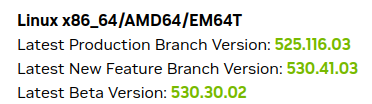
I'm on Arch, on nvidia-dkms 530.41.03-1
latest nvidia-beta-dkms is 530.41.03-1
edit:
Game stops rendering, just hangs and this is the wine stdout: https://pastebin.com/Hga4ZcPZ
The latest beta driver version 525.47.22 from https://developer.nvidia.com/vulkan-driver has a lower version number because it comes from an older branch point, but it has the latest Vulkan driver code including a potential fix for this issue. It would be great if you could give 525.47.22 a try with VKD3D_CONFIG=skip_driver_workarounds and let us know how it goes.
The latest beta driver version 525.47.22 from https://developer.nvidia.com/vulkan-driver has a lower version number because it comes from an older branch point, but it has the latest Vulkan driver code including a potential fix for this issue. It would be great if you could give 525.47.22 a try with
VKD3D_CONFIG=skip_driver_workaroundsand let us know how it goes.
No change.
I'll leave the PKBUILDS with modified patches for anyone on arch to try.
nvidia_beta525.47.22_PKBUILD.zip
unzip and build/install with:
pushd nvidia-utils-beta && makepkg -s && popd; pushd nvidia-beta-dkms && makepkg -s && popd; paru -U nvidia-*/*.zst
Although this issue (like an9949an, not Leopard) appears mostly on laptops, this problem appeared on my PC with one GPU
RTX 2060, KDE Plasma 5.27.5, X11, 6.3.2-arch1-1
After a couple of months it turned out that I had a command in my old-autostart-scripts that enabled ForceFullCompositionPipeline via nvidia-settings (just checked, enabling force composition via GUI also causes this problem), once I removed it from autorun, everything started working fine
https://github.com/HansKristian-Work/vkd3d-proton/pull/1584 removes the workaround on NV 535+.
I'm on nvidia-beta-dkms 535.43.02-1
wine-tkg-valve-exp-bleeding 8.0.45143.20230531-327
will try wine-ge next
Horizon Zero Dawn still hangs, Can anyone confirm?
Here is a video:
@HansKristian-Work
The latest NV beta drivers are supposed to fix this issue:
https://developer.nvidia.com/vulkan-driver
Please try
VKD3D_CONFIG=skip_driver_workaroundsto confirm that it's indeed working with new driver.
Seems like issue is fixed. I tested today on my laptop with intel + rtx3050, nvidia driver 535.43.02 and proton-experimental-8-bleeding-edge. I also added VKD3D_CONFIG=skip_driver_workarounds to launch options.
@ManuLinares , it's probably some other issue don't related to the original one.
The problem is still here on GTX 1080Ti and 535.104.05. I have to use VKD3D 2.9.
If I'm using VKD3D_DISABLE_EXTENSIONS=VK_KHR_present_id,VK_KHR_present_wait the games crash.
Just tried 535.43.09. Now the VKD3D_DISABLE_EXTENSIONS=VK_KHR_present_id,VK_KHR_present_wait variable is working and the games are working as well.
VKD3D_CONFIG=skip_driver_workarounds has no effect at all.
I'm not sure I'm in the right place but the issue is still present with the 570.133.7 Nvidia driver and any version of Proton (GE-9.26, 9.0-4, 8...)
I get the error:
58.497:00f4:0320:err:vkd3d-proton:dxgi_vk_swap_chain_recreate_swapchain_in_present_task: Failed to create swapchain, vr -13
And in the meantime, the game is running with a black screen. (On the Nvidia GPU, I checked)
Adding any of these environment variables does not change anything:
VKD3D_DISABLE_EXTENSIONS=VK_KHR_present_id,VK_KHR_present_wait
VKD3D_CONFIG=skip_driver_workarounds
HOWEVER
Running this command does "fix" the issue until the next reboot:
docker run --rm --runtime=nvidia --gpus all ubuntu nvidia-smi
(Note that running nvidia-smi directly on the host does not fix the issue)
I'm not sure that vkd3d-proton is the actual culprit because I also get a black screen when I try to reboot the entire system on the Nvidia GPU only (on Wayland).
Additional info:
Operating System: Fedora Linux 41
KDE Plasma Version: 6.3.3
KDE Frameworks Version: 6.12.0
Qt Version: 6.8.2
Kernel Version: 6.13.8-200.fc41.x86_64 (64-bit)
Graphics Platform: Wayland
Processors: 24 × AMD Ryzen AI 9 HX 370 w/ Radeon 890M
Memory: 32.7 GB of RAM
Graphics Processor 1: AMD Radeon Graphics
Graphics Processor 2: Nvidia RTX 4060 Mobile
Manufacturer: ASUSTeK COMPUTER INC.
Product Name: ASUS TUF Gaming A14 FA401WV_FA401WV
Related threads
- Warframeprotonopen same upstream bug
- Deep Rock Galacticprotonopen same upstream bug
- The Callisto Protocolprotonopen same upstream bug
- The Outer Worlds: Spacer's Choice Editionprotonclosed same upstream bug
- Deep Rock Galactic: Crashing with Out of video memory trying to allocate a rendering resourcevkd3dopen same upstream bug
Proton versions
proton experimentalx1 2023-06
Launch options
VKD3D_CONFIG=skip_driver_workaroundsx7 2025-03VKD3D_DISABLE_EXTENSIONS=VK_KHR_present_id,VK_KHR_present_waitx4 2025-03VKD3D_DISABLE_EXTENSIONS=VK_KHR_present_waitx1 2023-01
Launch lines
Upstream links
- HansKristian-Work/vkd3d-proton/pull/1584x1 2023-06
- HansKristian-Work/vkd3d-proton/issues/1317x1 2023-03
- HansKristian-Work/vkd3d-proton/issues/1389x1 2023-03
- HansKristian-Work/vkd3d-proton/pull/1363x1 2023-03
- HansKristian-Work/vkd3d-proton/pull/1477x1 2023-03
- ValveSoftware/Proton/issues/6472x1 2023-01
After recent proton updates I have black screen in all dx12 games (tested in cyberpunk, deep rock galactic, little nightmares 2). Game works (i hear the sound, even see in nvidia-settings that GPU busy and vram used) but no image. The same situation with Proton Ge 7.44+ .
DirectX11 games work without issues, older proton versions also work as expected.
The problem can be fixed by adding launch options:
VKD3D_DISABLE_EXTENSIONS=VK_KHR_present_id,VK_KHR_present_wait %command%.Probably this is the commit which produce such behavior.
Here is the issue on proton repo with detailed sysinfo and discussion.