Diablo IV Beta not launching
What happens if you launch with PROTON_ENABLE_NVAPI=1 %command% ?
The game does not load d3d12.dll, this is unlikely to be a vkd3d-proton issue.
Same issue, not starting up, logs:
steam-diablo-iv-2.zip
However, just saw that an user on reddit managed to get it running using some of these settings using Lutris:
lutris-GE-Proton7-19
- dxvk-2.1
- vkd3d-proton-2.8
- Enable D3D Extras =
true - Enable DXVK-NVAPI / DLSS =
false - Esync =
true - Fsync =
true
Environment Variables:
- VKD3D_FEATURE_LEVEL=12_1
And overwriting wine D3D12Core.dll with the games D3D12Core.dll
Curiously, the first log doesn't even load d3d12.dll (or d3d12core.dll). So it's probably just checking the DXGI adapter and isn't happy with something about that.
As a quick thing try to launch without mangohud, if you haven't already. Sometimes rarely it can cause issues.
Logs with MANGOHUD=0:
steam-diablo-iv-3.zip
Using the same settings as the reddit post, I managed to get it running via Lutris.
I can get it running using the following options via Lutris:
- lutris-GE-Proton7-19-x86_64
- DXVK v2.1
- VKD3D v2.8
- DXVK-NVAPI / DLSS = true
- Esync = true
- Fsync = true
No need for DLL overrides
lutris-GE-Proton7-39-x86_64 fails with NO GPU found.
The above workarounds do not appear to work on NVIDIA gpus.
lutris-GE-Proton-7-19-x86_64 w/ DXVKv2.1 and VKD3Dv2.8 returns: "Graphics initialization failed, please ensure that your drivers are up to date and no other 3D applications or games are running and try again."
later versions of lutris-GE-Proton returns: "No GPU Found"
Works fine here on EVGA 3080 RTX (driver 525.85.05), been playing for 45 mins now in-game.
Noting here since it hasn't been stated anywhere else yet. The No GPU Found issue was bisected to commit https://github.com/ValveSoftware/wine/commit/51ce414a1f41fcaa415c4d3b4edd6b96ba711a35
Confirmed reverting it on top of my current build works on both AMD and Nvidia
Requires dxvk 2.1+ and vkd3d-proton 2.8+ to work properly in addition to the reverted commit.
Lutris defaults to dxvk 1.10.1 and vkd3d-proton 2.6 which still cause the issue to occur
Should also be noted that that commit is absolutely not the root cause of the problem and that reverting it will break a whole bunch of stuff.
This should now be solved through Proton Wine (a MR has also been opened for upstream Wine) and dxvk.
- lutris-GE-Proton7-19-x86_64
Too bad that this version is no longer available.
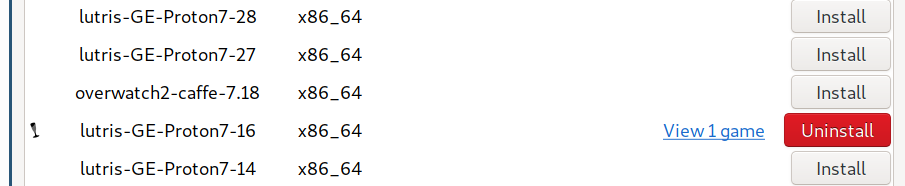
- lutris-GE-Proton7-19-x86_64
Too bad that this version is no longer available.
Try https://github.com/GloriousEggroll/wine-ge-custom/releases/tag/GE-Proton7-40 or the newest https://github.com/GloriousEggroll/wine-ge-custom/releases/tag/GE-Proton7-41 that should have a fix for Diablo IV.
Thank you very much for your reply, @KlumzByte. Sadly, even with version GE-Proton7-41 I get the "no GPU" message (I also have dxvk 2.1 and vkd3d-proton 2.8).
You need proton experimental or newest Proton GE for a propor fix to that.
Wine-GE should also work outside Steam, but if you have a Nvidia GPU make sure you also either use dxvk master or just disable NvapiHack. Enabling Nvapi in lutris might do that not sure actually.
Thanks for your reply. Sadly I can’t compile DXVK myself from master, because glslang-tools is not recent enough on Debian; so I am stuck with the DXVK 2.1 that lutris ships with.
I tried playing with the NVAPI settings in lutris, but no luck.
dxgi.nvapiHack = False is already set in dxvk.conf.
You can find a compiled CI build of dxvk here if that helps https://github.com/doitsujin/dxvk/actions/workflows/artifacts.yml?query=branch%3Amaster
Thanks. I added the latest build from that page to lutris and set the game options to use it, but still "no GPU found".
Which Wine build were you using?
As stated above, I currently use lutris-GE-Proton7-41-x86_64.
Derp. Hmm not sure. Would have to try myself in Lutris later.
As stated above, I currently use lutris-GE-Proton7-41-x86_64.
Try using steam with Proton Experimental, they have applied some fixes.
Already tried that. When I add the Diablo shortcut in Steam and run it with default settings, I get the same error. When I set it to Proton Experimental, I don’t even get the error, but this in the terminal:
Proton: Upgrading prefix from None to 7.0-101 (/home/philipp/.steam/steam/steamapps/compatdata/3761622820/)
fsync: up and running.
wine: Using setpriority to control niceness in the [-10,10] range
ThreadGetProcessExitCode: no such process 7502
ThreadGetProcessExitCode: no such process 7500
ThreadGetProcessExitCode: no such process 7499
ThreadGetProcessExitCode: no such process 7498
ThreadGetProcessExitCode: no such process 7380
ThreadGetProcessExitCode: no such process 7505
[S_API FAIL] SteamAPI_Init() failed; no appID found.
Either launch the game from Steam, or put the file steam_appid.txt containing the correct appID in your game folder.
ThreadGetProcessExitCode: no such process 7607
ThreadGetProcessExitCode: no such process 7544
ThreadGetProcessExitCode: no such process 7538
ThreadGetProcessExitCode: no such process 7532
ThreadGetProcessExitCode: no such process 7510
ThreadGetProcessExitCode: no such process 7507
ThreadGetProcessExitCode: no such process 7501
ThreadGetProcessExitCode: no such process 7497
pid 7503 != 7502, skipping destruction (fork without exec?)
Game process removed: AppID 0 "/home/philipp/.steam/debian-installation/ubuntu12_32/reaper SteamLaunch AppId=3761622820 -- /home/philipp/.steam/debian-installation/ubuntu12_32/steam-launch-wrapper -- '/home/philipp/.steam/steam/steamapps/common/SteamLinuxRuntime_soldier'/_v2-entry-point --verb=waitforexitandrun -- '/home/philipp/.steam/steam/steamapps/common/Proton - Experimental'/proton waitforexitandrun  "env" "LUTRIS_SKIP_INIT=1" "lutris" "lutris:rungameid/21"", ProcID 7377
ThreadGetProcessExitCode: no such process 7519
ThreadGetProcessExitCode: no such process 7379
ThreadGetProcessExitCode: no such process 7378
Uploaded AppInterfaceStats to Steam
It seems that by setting it to Proton Experimental, Steam now somehow believes that this is a steam game.
I think my GPU is just not powerful enough; I only have a GTX 980 with 4 GB of VRAM. While the minimum requirements by blizzard are described as 660 GTX, I have read online that the game sometimes requires 10 GB of VRAM.
Thanks for your reply. Sadly I can’t compile DXVK myself from master, because glslang-tools is not recent enough on Debian; so I am stuck with the DXVK 2.1 that lutris ships with.
I tried playing with the NVAPI settings in lutris, but no luck.
dxgi.nvapiHack = Falseis already set in dxvk.conf.
You don't need to compile anything. Lutris already provides dxvk v2.1 and vkd3d-proton v2.8, (as well as the latest version of dxvk-nvapi). I updated the runtimes for Lutris on thursday so they should have the latest versions now.
My only other thought is maybe you're on an outdated nvidia driver?
I am using 470.161.03, the one that is included in debian.
You can't run any game on recent versions of vkd3d-proton with ancient drivers such as this. It requires at least 510.47 for vulkan 1.3, and better the very latest for more features and bugfixes.
I am using 470.161.03, the one that is included in debian.
Don't use Debian stable to game. You will have a bad time. Include the testing/unstable/experimental repositories to apt to install more recent versions of your drivers (or related tools if you're compiling like glsl-lang tools).
https://packages.debian.org/search?keywords=nvidia&searchon=names&suite=all§ion=all
You can install 530.30 if you include experimental, for example.
Same thing with more recent versions of libvulkan-dev, glsllang-tools, mesa, and so on. For a couple years these have been hitting experimental/unstable within a couple of days of a new version being released (if not the same day).
https://packages.debian.org/search?keywords=glslang&searchon=names&suite=all§ion=all
If you're worried all you have to do is to include the other repos, install what you need, and then comment them out in apt. Nothing else. But don't use Debian stable to play games. If you're going to use Debian, learn to cherry pick the more recent versions of the packages you need from the more recent repos.
Don't use Debian stable to game. You will have a bad time.
Can’t confirm that, WoW runs flawlessly.
I installed the NIVIDA driver 525.89.02 (that is the current production version on the NVIDIA download site) and Diablo runs fine now.
Thanks everyone for your help & patience.
Proton versions
proton experimentalx3 2023-03ge-proton7-41x4 2023-03proton 2.8x3 2023-03ge-proton7-19x4 2023-03ge-proton7-40x1 2023-03proton 2.6x1 2023-03ge-proton7-39x1 2023-03ge-proton7-51x1 2023-03
Launch options
MANGOHUD=0:x1 2023-03VKD3D_FEATURE_LEVEL=12_1x1 2023-03PROTON_ENABLE_NVAPI=1x1 2023-03
Launch lines
PROTON_ENABLE_NVAPI=1 %command%x1 2023-03
DLLs
d3d12.dllx2 2023-03d3d12core.dllx2 2023-03
The upcoming Diablo IV has a running Open Beta this weekend.
On Windows 10 its currently possible to launch the game to show the in-game login menu, using parameter: "Diablo IV.exe -launch"
On Linux pop-os 22.04, using latest GE-Proton7-51 as Non-Steam game, this fails with a popup (i still think you can launch the game even with the popup on windows, this may not be the root issue):
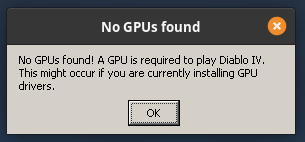
I've gathered the proton logs here:
steam-diablo-iv.zip
glxinfo:
OpenGL vendor string: NVIDIA Corporation
OpenGL renderer string: NVIDIA GeForce RTX 3080/PCIe/SSE2
OpenGL core profile version string: 4.6.0 NVIDIA 525.85.05
glxinfo.zip
Screenshot of the files:

