How to build/let it work for Win7/8.1 like the DXVK?
There's no reason why it shouldn't work on Win7/8.
I'd imagine you might have a slight issue getting up to date drivers.
I built and tested vkd3d-proton on Windows last night with Resident Evil 2 and it worked fine.
Are you using Win7?
When I copy d3d12.dll and dxgi.dll from Proton-GE to the game(RE2) directory, it will show black screen 3-6s" and crash immediately.
My PC:
OS: Win7 64bit
CPU: Intel i7 4790K
GPU: AMD RX Vega56
GPU Driver: 20.8.2
RAM: 32GB DDR3 1600MHz
I built and tested vkd3d-proton on Windows last night with Resident Evil 2 and it worked fine.
Can you share your d3d12.dll and dxgi.dll?
I want to test it on my Win7 PC.
When I copy d3d12.dll and dxgi.dll from Proton-GE to the game(RE2) directory, it will show black screen 3-6s" and crash immediately.
I assume the game checks your OS, automatically falls back to D3D11 and then crashes because DXVK's dxgi.dll does not work with the d3d11.dll provided by Windows.
When I copy d3d12.dll and dxgi.dll from Proton-GE to the game(RE2) directory, it will show black screen 3-6s" and crash immediately.
I assume the game checks your OS, automatically falls back to D3D11 and then crashes because DXVK's dxgi.dll does not work with the d3d11.dll provided by Windows.
I tried to copy DXVK's d3d11.dll to the game directory, it still crash immediately in DX11 mode.
I don't think we can support vkd3d on a Windows OS that has no D3D12 support to begin with. Most games will simply not work or will try to use 12on7 on Windows 7, or fall back to D3D11.
And there's a ton of general problems with using DXVK on Windows that also apply to vkd3d, such as third-party software causing breakage (especially overlays), drivers being too old or shipping broken Vulkan loaders, games not loading our DLLs, etc., which are impossible to fix on our end.
So, no, we will not waste time on Windows 7, and even Windows 10 is shaky at best for the same reasons.
I don't think we can support vkd3d on a Windows OS that has no D3D12 support to begin with. Most games will simply not work or will try to use 12on7 on Windows 7, or fall back to D3D11.
And there's a ton of general problems with using DXVK on Windows that also apply to vkd3d, such as third-party software causing breakage (especially overlays), drivers being too old or shipping broken Vulkan loaders, games not loading our DLLs, etc., which are impossible to fix on our end.
So, no, we will not waste time on Windows 7, and even Windows 10 is shaky at best for the same reasons.
12on7 is not for end-user use, it's for game developers to use.
K0bin said:
(I built and tested vkd3d-proton on Windows last night with Resident Evil 2 and it worked fine.)
So, maybe the game use DX12 without ray tracing part, then VKD3D-Proton can handle it on Windows.
12on7 is not for end-user use, it's for game developers to use.
I'm well aware of what it is and how it works. Doesn't change that vkd3d will simply not work with games loading the 12on7 DLL. This already affects wine in that the Windows version has to be reported as Windows 10 for those games to run at all.
12on7 is not for end-user use, it's for game developers to use.
I'm well aware of what it is and how it works. Doesn't change that vkd3d will simply not work with games loading the 12on7 DLL. This already affects wine in that the Windows version has to be reported as Windows 10 for those games to run at all.
Windows can use AppVerifier's [ highversionlie ] to trick those games.
I guess my point is that we have no reason at all to support an end-of-life operating system that none of us are using anymore and just makes everything much harder than it should be.
@okt04175 Last I checked, it also needed wined3d.dll to work on Windows, in addition to d3d12.dll and dxgi.dll, at least the aforementioned Resident Evil 2 required it. I built the compatible wined3d.dll by using a repository (vkd3d-standalone) now marked as obsolete, but I'm sure you can try & get a more recent one from the latest Wine-staging (or Proton). Can't say if it will be compatible, though. This is one big duct-taping act.
Edit: I've also noticed you're trying to use dxgi.dll from DXVK, and AFAIK this was already mentioned as not being compatible in DXVK installation instructions. You will most likely have to use a different dxgi.dll, maybe, again, from a recent Wine (or Proton).
@RoyShapiro DXVK's dxgi.dll works perfectly fine with vkd3d-proton and you no longer need wined3d.dll.
@K0bin Alas, RE2 clearly thinks otherwise about wined3d.dll. I've just checked - tried deleting wined3d.dll... Oh, well, wined3d.dll is missing error. Put it back, everything works. The d3d12.dll is recent - built yesterday from freshly cloned git. Maybe the new commits removed this dependency within the last 24 hours?
You are correct about dxgi.dll, though. I've just tried using one from DXVK 1.7, and, yes, it works. (Thanks for hint, by the way!)
Oh, and MSI Afterburner monitoring (RivaTuner) started working with the DXVK's dxgi too! That's great!
You need to build it in standalone mode.
@K0bin Yes, right, thanks. I was a bit confused, but option('enable_standalone_d3d12', type : 'boolean', value : true) in meson_options.txt did it for me. Yes, it no longer requires wined3d when used with DXVK's dxgi. Yet, it causes the FPS to tank. Using it with the old setup (non-dxvk dxgi.dll and wined3d.dll) the fps seems a lot higher. Don't know why, yet. Using old dlls may be the wrong way to do it, so I'll keep digging.
@okt04175 If my story about wined3d doesn't apply to you, try editing the specific game's settings directly to use DX12 (depends on the game). It doesn't always work, i.e. it didn't work in Metro Exodus for me, but did work in RE2, where you can edit re2_config.ini to target DirectX12 and work around Dx11 requirement altogether.
I guess my point is that we have no reason at all to support an end-of-life operating system that none of us are using anymore and just makes everything much harder than it should be.
At the beginning, M$ promised to directly provide DX12 support for Win7, but later M$ intends to use DX12 as a means to hard sell Win10 to kill Win7/8/8.1, so I will not give in.
You don't need to change the way of developing VKD3D-Proton, and those who are still using Windows can also discuss in this issue what changes will be made to its compatibility with Windows after each update.
Perhaps one day, VKD3D-Proton can handle all the DX12 code of DX12 games, and Windows users can also find a way to use VKD3D-Proton normally on Windows, at least it should not be immediately denied that VKD3D-Proton is used on Windows feasibility.
@K0bin Yes, right, thanks. I was a bit confused, but option('enable_standalone_d3d12', type : 'boolean', value : true) in meson_options.txt did it for me. Yes, it no longer requires wined3d when used with DXVK's dxgi. Yet, it causes the FPS to tank. Using it with the old setup (non-dxvk dxgi.dll and wined3d.dll) the fps seems a lot higher. Don't know why, yet. Using old dlls may be the wrong way to do it, so I'll keep digging.
@okt04175 If my story about wined3d doesn't apply to you, try editing the specific game's settings directly to use DX12 (depends on the game). It doesn't always work, i.e. it didn't work in Metro Exodus for me, but did work in RE2, where you can edit re2_config.ini to target DirectX12 and work around Dx11 requirement altogether.
@RoyShapiro How to use MSYS2 cmake/Visual Studio to build it?
@okt04175
You don't need to use cmake directly, it should just be installed in MSYS2 along with other deps, also MSYS2 MinGW x64 flavor is used, not vanilla.
The actual build command is
./package-release.sh master ../target --no-package
as stated in the official build instructions https://github.com/HansKristian-Work/vkd3d-proton#the-simple-way
This script builds it for you. That is, assuming all the deps are met & all compilers installed. I found myself commenting out the build_arch 86 lines, as it has it's own deps and isn't particularly useful in practice.
Don't believe there is anything actionable in this issue, so closing.
Now, Win7 can use VKD3D-Proton play Resident Evil 2 in DX12 Mode.

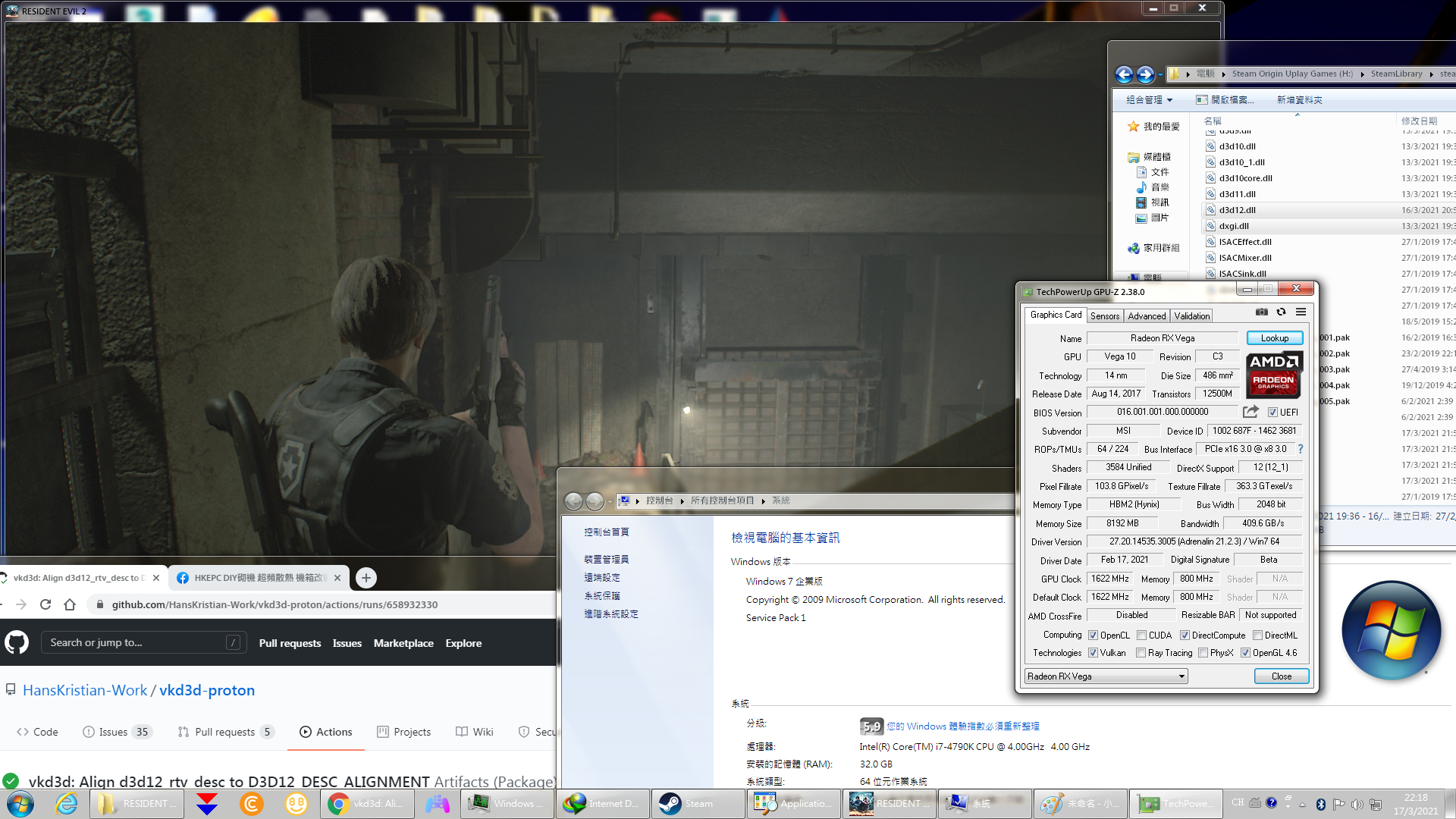
DLLs
dxgi.dllx10 2020-08wined3d.dllx5 2020-08d3d12.dllx7 2020-08d3d11.dllx2 2020-08
VKD3D-PROTON d3d12.dll (Proton-GE's build) with DXVK dxgi.dll (DXVK 1.7.1) doesn't work in Win7 & Win8.1, will anyone create a fork to solve this problem?
My PC:
OS: Win7 64bit
CPU: Intel i7 4790K
GPU: AMD RX Vega56
GPU Driver: 20.8.2
RAM: 32GB DDR3 1600MHz