Assassin's Creed Valhalla crashes / has rendering issues
Mingw builds indeed fail to create files, both shader dumps (game uses exclusively DXBC) and logs.
Not really sure what kind of problem you're having with that, works perfectly fine here.
Anyway, got the game now, unfortunately running it on vkd3d causes GPU hangs which limits the amount of debugging I can do. There's some silly stuff that's easy to fix though.
Nice, I've checked again with 6886bb7f1153a62b54aea5a99196962b190041be and loading screen now works correctly! The game still semi–reliably crashes after loading finishes though. Benchmark behaves in a similar manner, you have a few seconds of running during loading and a crash shortly afterwards.
However, when I enabled trace logging level again, I actually loaded into the game once! Looks much better now than it did before! :frog:
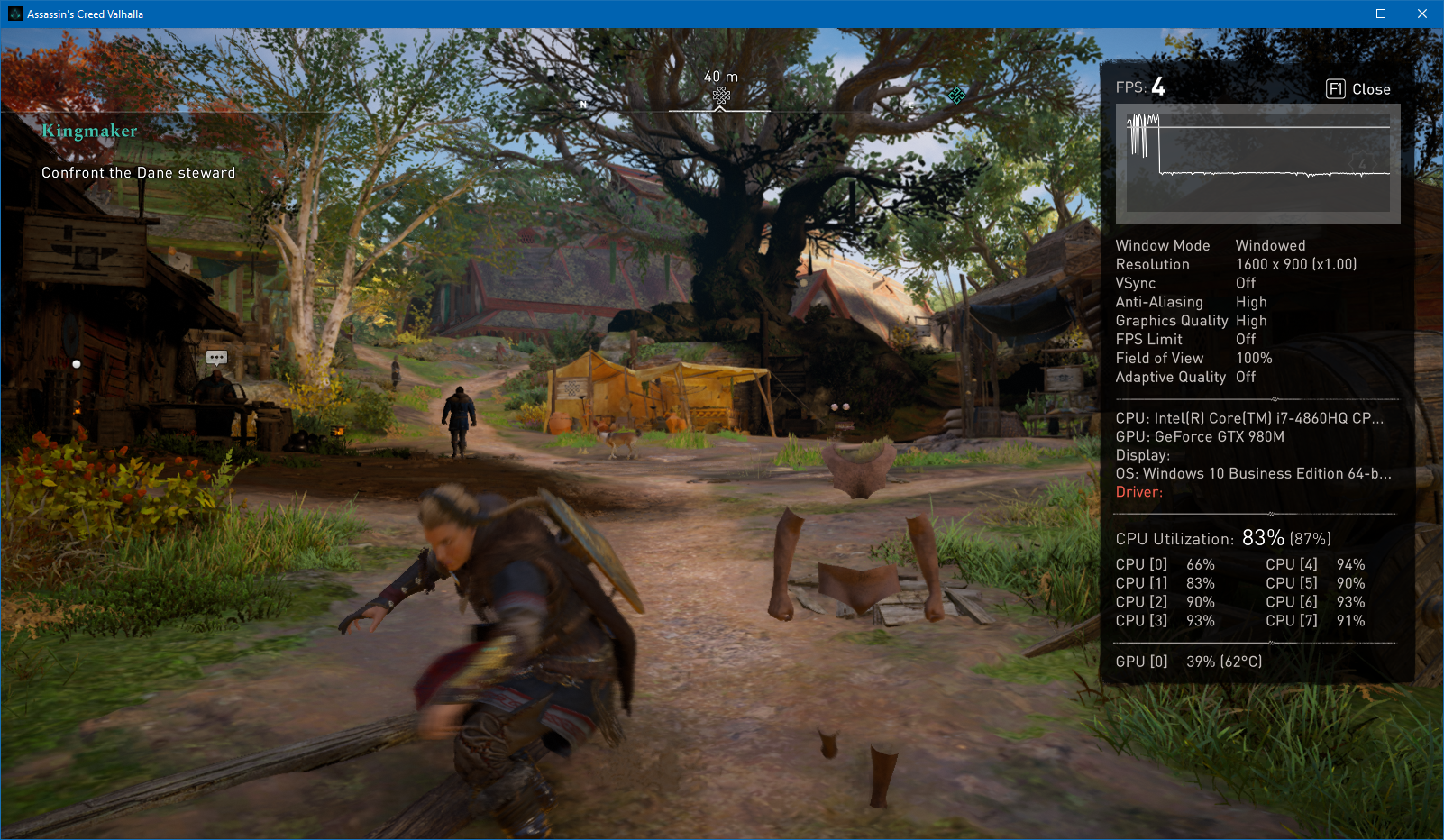
Well, now that I actually got the game to work in Wine, I tried again with 8cbecfb9f6319d2992ef324e17372b418bc877fb and I haven't seen any obvious graphical issues during about half an hour of playtime. There is some stuttering while exploring, but perhaps this is expected and normal.
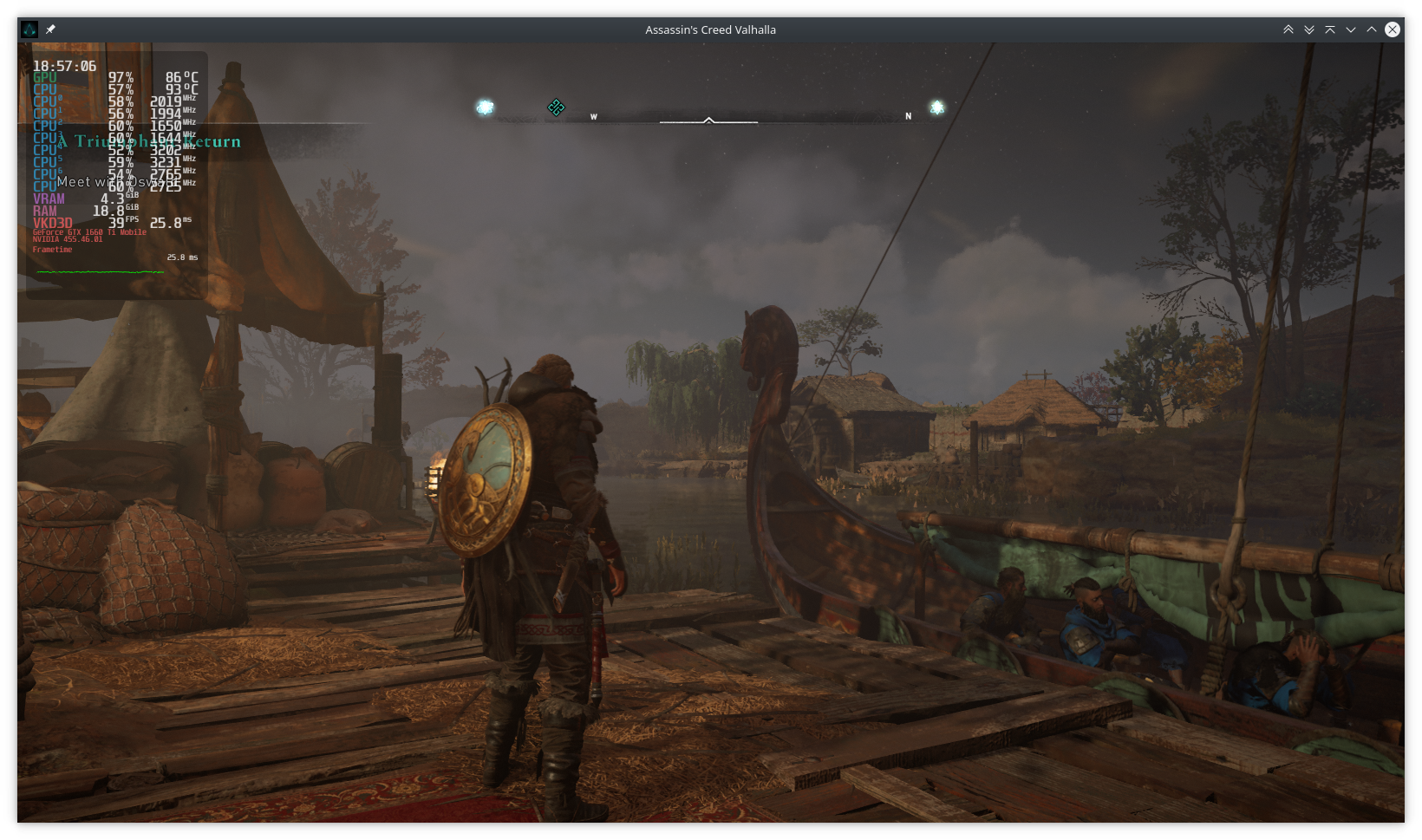
So I'm just going to consider whatever I encountered before to be either fixed by your latest changes or just specific to my ancient Maxwell hardware when combined with usual Windows weirdness. Thank you!
@Saancreed great to see that it works for you. How do you make the game run on wine?
How do you make the game run on wine?
I believe using current wine-tkg with _protonify="true" should just work out of the box now. If it errors out with something like err:ole:com_get_class_object class {715d9c59-4442-11d2-9605-00c04f8ee628} not registered, try again with a fresh Wine prefix.
Also apparently fsync makes frametimes very erratic, consider using just esync instead.
So, I am successfully running the game with wine-tkg, fsync disabled, protonified. Looks great, no visible issues. Performance is a bit odd though. The frame rate does this smooth-stutter-smooth-stutter thing. It's an Nvidia RTX 2070 super with 455 drivers. Before I report an issue, can someone please tell me what logs or traces or whatever else I can provide. Also not sure if a vkd3d issue or wine or Nvidia driver.
The stutter reminded me a lot of all those Origin games on Steam that were also doing stop/go until one removed disk write permissions.
I would try with the latest beta Vulkan driver first.
Performance is a bit odd though. The frame rate does this smooth-stutter-smooth-stutter thing. It's an Nvidia RTX 2070 super with 455 drivers. Before I report an issue, can someone please tell me what logs or traces or whatever else I can provide.
Maybe check perf top to see if the game spends suspiciously long time in Wine library / Nvidia driver calls? On my side there is nothing interesting here, only 0.58% winevulkan.dll.so [.] wine_vkUpdateDescriptorSets as the highest overhead, but that's not much. But since we are both having similar stuttering, I'd just wait for one of the devs to try to reproduce it on their side sometime next week.
However, if you have Windows on the same machine, you could use vkd3d there (with DXVK) and compare results to Wine to check if it's a Wine issue or not. We probably won't be able to exclude Nvidia here though; Philip mentioned that Valhalla most likely doesn't currently run on AMD at all:
only nvidia at this point because none of the amd drivers have all the required features at once
(and last time i tested on amd/windows it was broken there and would eventually just cause a hang)
(and radv doesn't support sparse residency so it probably won't even boot)
since we are both having similar stuttering, I'd just wait for one of the devs to try to reproduce it on their side sometime next week.
@Saancreed Wondering if this should not then be an open issue then.
The game stutters heavily on Windows (native D3D12) on my machine, probably not our issue and even if it is, there's probably very little we can do about it.
@doitsujin The stutters I am getting on wine seem to specifically happen along with this error:
1368:fixme:vkd3d_create_texture_srv: Unhandled min LOD clamp
Yes, known issue, there is no way to implement that in Vulkan right now.
Disable VKD3D logging if that's the reason for your stutter, but there's other issues at play here.
@doitsujin Thanks for the input. That seems to have done the trick. Will also try with WINEDEBUG disabled. At Ultra settgings 2560x1440 seems to be running quite well now.
Excuse me but how did you disabled VKD3D logging?
VKD3D_DEBUG=none %command%, but proton should do that by default in 5.13 iirc.
Excuse me but how did you disabled VKD3D logging?
VKD3D_DEBUG=none %command%, but proton should do that by default in 5.13 iirc.
He's probably also running a stock wine-tkg like myself.
EDIT: I also have WINEDEBUG=-all
Thank you. I thought there's a config file as DXVK's :)
Reopening, found my first graphical issue, black zones like this. This particular spot is Dunwic, East Anglia. Rotating the camera slightly causes them to flicker (on some angles, it renders correctly, on others it does not).
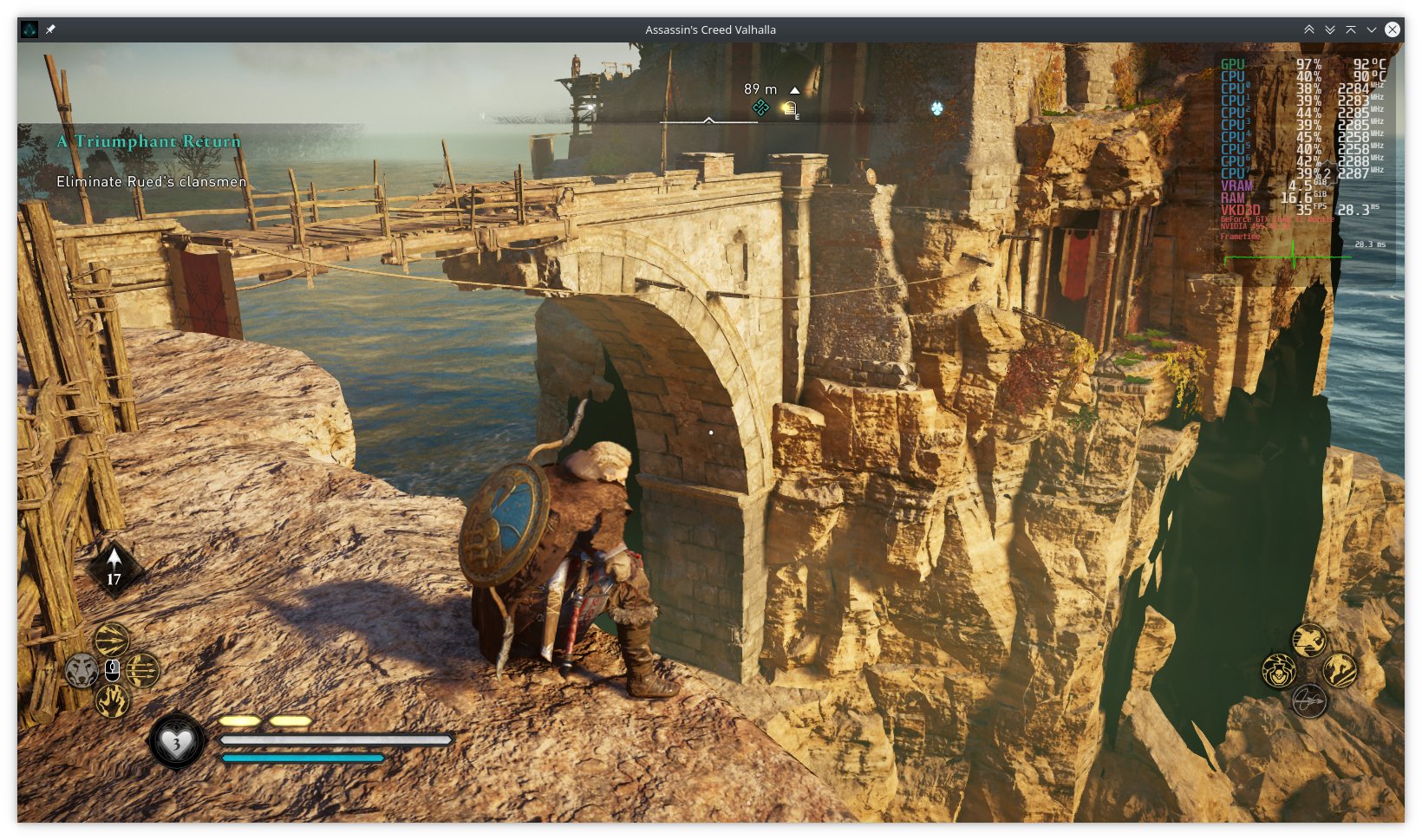
I can reliably reproduce the issue in this spot across multiple runs. The only thing in vkd3d logs with default loglevel (besides the usual Unhandled min LOD clamp spam) is fixme:vkd3d_create_texture_srv: Ignoring plane slice 1..
GTX 1660 Ti Mobile, driver version 455.46.01, vkd3d-proton 9d574892256ea0ce5535e4e080298e1b32af92f7
Since then, I've had the game nullptr itself a couple of times with wine: Unhandled page fault on read access to 0000000000000000 at address 00007EFC6B7DB9B1 (thread 066c), starting debugger... so I guess the issue title is still on point :upside_down_face:
@Saancreed Also seeing this in some places. Also some apparent z-buffering issues with water appearing over ice at some camera angles, and then disappearing when you rotate.
As for your crash. Seems to sometimes crash here when in photo mode and then tabbing out.
Sounds like Z-fighting, not sure if this really is something we can fix? IIRC Odyssey has the same problem on (some) Nvidia drivers with DXVK.
As for the crashes, can you please post a log from when this happens?
As for the crashes, can you please post a log from when this happens?
Sure, I'll post one when it crashes again. Is default loglevel fine for that purpose or should I enable warn / trace instead?
That said, it might as well be a game bug or Wine issue. Valhalla is… not a perfect piece of software in its current state.
trace would be ideal but it's likely the game will run so slow with it that it's completely unusable, even when logging to a file, but I guess you'll just have to see what works. I mostly just want to make sure we aren't missing anything super obvious.
Yeah, trace makes the game unplayable. I got a crash with warn level though: ACValhalla-1606345866.log.gz
This time I used c8f53852f4ff4ce3fd45f48c0eeee6d5f5ff13f2 from yesterday's crash-fix branch.
Hi!
For me, it worked with the latest stable drivers. With the beta one, I got crashes several times when tried to start a new game or load one.
VKD3D built on top of 9cd082 commit.
Even without logs, I have several stutters with my RTX 2060. Is playable on Medium with around 50, 60fps most of the time.
I've tried with Proton from gloriousEggroll 5.21 and also TKG 5.22, both work the same way.
I have the sapi.dll installed manually but I don't know if this makes any difference. Will try removing it and try again later.
Hmm, regarding the flickering textures. I have changed my mind - it does not look like z-buffering issues. It always seems to happen near water. Some rock textures will flicker black.
Hi guys,
for all of us with AMD Radeon cards who are getting the following error message at the first splash screen:
Non-DX12 Video Card
Unable to initialize graphics system. GPU does not support DX12.
should we open a separate issue or is it already incorporated into this issue?
Thanks..
No, please don't. This is a known issue and happens because RADV does not support some features required by this game. They are already aware of that as well and working on it, so please just be patient.
Could try AMDVLK, but on my system that just produces a GPU hang.
Tried several times today with several different Proton and vkd3d-proton releases (including GE 5.21 and TKG 5.22, as reported in a few messages above). I get always an unhandled exception thrown on the AC splash screen (the one with a stylised A).
Dump changes according to the Proton release:
- GE 5.21-1: https://pastebin.com/6EGW5L2t. . no vkd3d-proton log generated;
- TKG-5.22: https://pastebin.com/PiC1Z1Bi. no vkd3d-proton log generated.
vkd3d-proton has been built from the master branch cloned on 30th Nov.
Does anyone have any clue on what I can additionally check or maintain?
Distro is Debian bullseye/testing
kernel release is 5.8.7
Hw has been:
- NVidia GTX 1080 Ti
- NVidia RTX 3090 (received it today).
driver version has been 455.45.01
**** EDIT (4th Dec):
downloaded, built and installed the following components today:
- VKD3D commit c4fbe47
- DXVK commit 0b4e16
but I got exactly the same result. Logs are still the ones above. Is there any other debug/trace info I could provide?
Tried several times today with several different Proton and vkd3d-proton releases (including GE 5.21 and TKG 5.22, as reported in a few messages above). I get always an unhandled exception thrown on the AC splash screen (the one with a stylised A).
Never mind. I made it run and successfully performed the in-game benchmark.
The secret was to create an empty prefix, different than the Ubisoft Connect one.
Here below my additional setup:
- Proton-TKG 6.0rc1.rc3.gfce121fc
- dxvk commit 0b4e16. file d3d11.dll copied in the executable directory;
- vkd3d-proton commit cf4fbe47. file d3d11.dll copied in the executable directory;
- A clean Wine prefix;
- Esync disabled;
- Fsync disabled.
here the result: https://i.postimg.cc/rFGDSCCB/Screenshot-2020-12-07-23-33-33.png
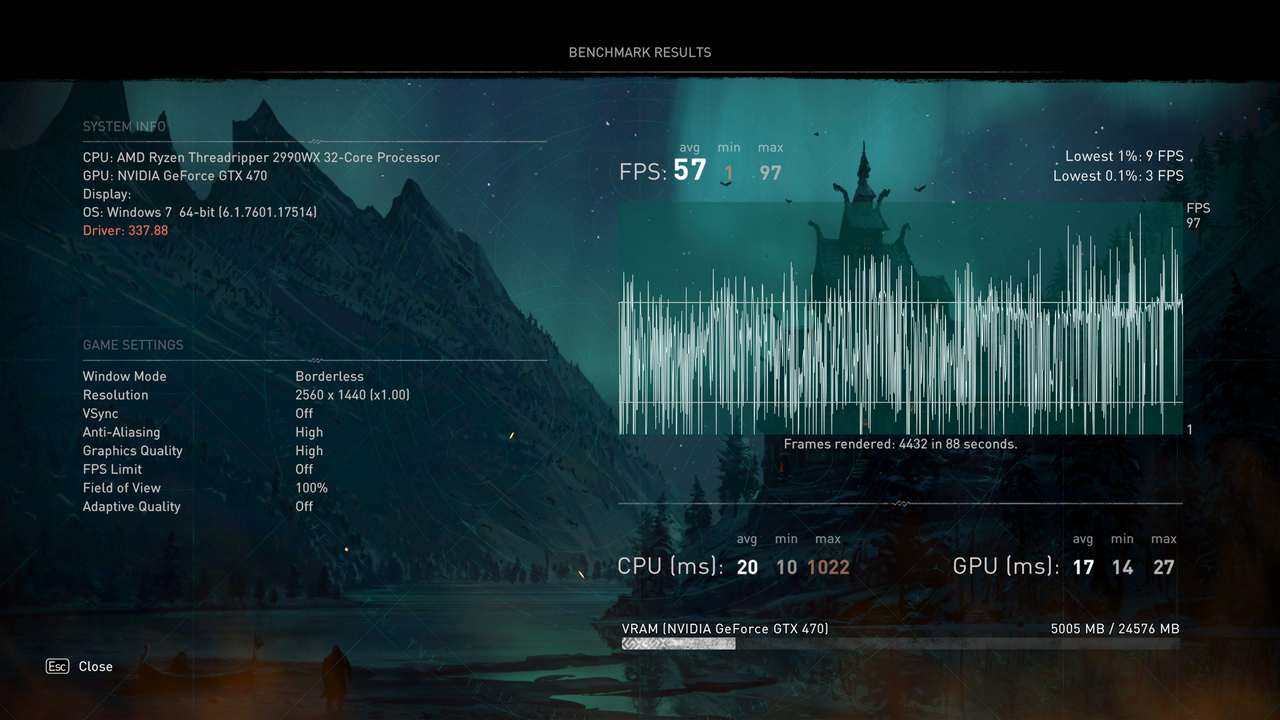
The benchmark seems to hold, however:
- It does not take the right GPU model (but I believe it picks a fallback GTX model);
- There is a significant stuttering and a random distribution of the frame rate (but as far as I understood, it is actually a game issue).
Anything you would like me to check?
Cheers,
Dave
No, please don't. This is a known issue and happens because RADV does not support some features required by this game. They are already aware of that as well and working on it, so please just be patient.
Could try AMDVLK, but on my system that just produces a GPU hang.
Doitsujin,
so I tried the AMDVLK (that was a fun adventure) got passed the DX12 requirement but then got a green psychedelic screen. So unless there is someone out there that has more experience than I do with going between drivers (I don't have much), I think the AMDVLK route is probably not the answer for AMD GPUs either. Going back to sit in the corner and waiting..patiently..
Thanks,
Kilgourian
I found a spot that consistently crashes with current master of vkd3d-proton but works on Windows with native D3D12.
Apitrace from W10 / native D3D12: https://drive.google.com/file/d/1ceuLalBBdUXrimbCrVCI6rs-7CeTP0YE/view
Logs from Wine with VKD3D_DEBUG=trace and Vulkan validation layer: https://drive.google.com/file/d/1Rt-bsiOZL1dlogQAzLxlrAHCmRfq3GOU/view
The crash happens exactly as Havi is about to hit the wooden barricade with his sword. Unfortunately I was unable to replay the trace with vkd3d.
I also have shader dump and Fossilize database but afaik I shouldn't share them here. The stack trace indicates that the error happens in Nvidia's library:
Backtrace here
Unhandled exception: page fault on read access to 0x00000000 in 64-bit code (0x00007fc03f7db9b1).
Register dump:
 rip:00007fc03f7db9b1 rsp:000000001282c710 rbp:00007fbf4e854bd0 eflags:00010246 (  R- --  I  Z- -P- )
 rax:0000000000000000 rbx:00007fbf4e854c00 rcx:00007fbf4e854bd0 rdx:0000000000000036
 rsi:00007fbf4e854a88 rdi:00007fbf4e854c00  r8:0000000000000002  r9:0000000000000000 r10:00007fbf4e854e90
 r11:0000000000000000 r12:00007fbf4e854a88 r13:000000001282c740 r14:00007fbf4e885c70 r15:00007fbf4ef3c720
Stack dump:
0x000000001282c710:  00007fbf4e854c00 00007fbf4e81d090
0x000000001282c720:  000000001282c830 00007fbf4e854a88
0x000000001282c730:  00007fbf4e885c70 00007fc03f62ee28
0x000000001282c740:  00007fbf4ef3c720 00007fc03f796d6b
0x000000001282c750:  00007fc03fbe0101 000000001282c830
0x000000001282c760:  00007fbf4e81d068 000000001282c850
0x000000001282c770:  00007fbf4e81d090 00007fbf4e854a88
0x000000001282c780:  000000001282c830 00007fc03f63d9a5
0x000000001282c790:  00007fbf4ef30101 000000001282c810
0x000000001282c7a0:  000000001282c7f0 00007fbf4e854af0
0x000000001282c7b0:  00007fbf4ebbe8e0 0000000000000001
0x000000001282c7c0:  00007fbf4e58cad0 0000000000000011
Backtrace:
=>0 0x00007fc03f7db9b1 in libnvidia-glvkspirv.so.455.46.0 (+0x5979b1) (0x00007fbf4e854bd0)
  1 0x00007fc03f62ee28 __nvvm_p9Q27wN5qg+0xffffffffffffffff() in libnvidia-glvkspirv.so.455.46.0 (0x00007fbf4e81d090)
  2 0x00007fc03f63d9a5 __nvvm_p9Q27wN5qg+0xffffffffffffffff() in libnvidia-glvkspirv.so.455.46.0 (0x000000001282c850)
  3 0x00007fc03f656bb3 __nvvm_p9Q27wN5qg+0xffffffffffffffff() in libnvidia-glvkspirv.so.455.46.0 (0x000000001282c91c)
  4 0x00007fc03f6579c7 __nvvm_p9Q27wN5qg+0xffffffffffffffff() in libnvidia-glvkspirv.so.455.46.0 (0x000000001282ca34)
  5 0x00007fc03f6583c6 __nvvm_p9Q27wN5qg+0xffffffffffffffff() in libnvidia-glvkspirv.so.455.46.0 (0x000000001282cb00)
  6 0x00007fc03f6585ed __nvvm_p9Q27wN5qg+0xffffffffffffffff() in libnvidia-glvkspirv.so.455.46.0 (0x000000001282cb50)
  7 0x00007fc03f6a0726 __nvvm_p9Q27wN5qg+0x1345() in libnvidia-glvkspirv.so.455.46.0 (0x000000001282cc00)
  8 0x00007fc0e6899e03 _nv018glcore+0xffffffffffffffff() in libnvidia-glcore.so.455.46.02 (0x000000007e592370)
  9 0x00007fc0e689aea8 _nv018glcore+0xffffffffffffffff() in libnvidia-glcore.so.455.46.02 (0x00007fc0e74b5a20)
  10 0x00007fc0e689b71d _nv018glcore+0xffffffffffffffff() in libnvidia-glcore.so.455.46.02 (0x00007fc0e74b5a20)
  11 0x00007fc0e68afd88 _nv018glcore+0xffffffffffffffff() in libnvidia-glcore.so.455.46.02 (0x00007fc0e74b5a20)
  12 0x00007fc0e68b01bd _nv018glcore+0xffffffffffffffff() in libnvidia-glcore.so.455.46.02 (0x0000000000000001)
  13 0x00007fc0e689848d _nv018glcore+0xffffffffffffffff() in libnvidia-glcore.so.455.46.02 (0x0000000000000001)
  14 0x00007fc0e68a30d8 _nv018glcore+0xffffffffffffffff() in libnvidia-glcore.so.455.46.02 (0x00007fbf4f213b00)
  15 0x00007fc0e68a82bf _nv018glcore+0xffffffffffffffff() in libnvidia-glcore.so.455.46.02 (0x00007fbf4f213b00)
  16 0x00007fc0e68a842e _nv018glcore+0xffffffffffffffff() in libnvidia-glcore.so.455.46.02 (0x000000001282e578)
  17 0x00007fc0bd4021f6 _ZL26StubDisplayPowerControlEXTP10VkDevice_TP14VkDisplayKHR_TPK21VkDisplayPowerInfoEXT+0x89875() in libvklayer_khronos_validation.s (0x0000000000000003)
  18 0x00007fc0bd37f177 _ZL26StubDisplayPowerControlEXTP10VkDevice_TP14VkDisplayKHR_TPK21VkDisplayPowerInfoEXT+0x67f6() in libvklayer_khronos_validation.s (0x000000001282e320)
  19 0x00007fc0bc7ea690 _ZNSt6thread11_State_implINS_8_InvokerISt5tupleIJMN9Fossilize13StateRecorder4ImplEFvPS4_bEPS5_S6_bEEEEED0Ev+0xffffffffffffffff() in libvklayer_fossilize.so (0x00007fc0bf9be9d0)
  20 0x00007fc0be101f74 wine_vkCreateGraphicsPipelines+0x93() in winevulkan (0x000000001282e530)
  21 0x000000000026423a d3d12_pipeline_state_create_pipeline_variant+0x62a(state=, key=(nil), dsv_format=0, vk_cache=(nil), vk_render_pass=(nil), dynamic_state_flags=0x2f259e8) [C:\Program Files (x86)\Ubisoft\Ubisoft Game Launcher\games\vkd3d-proton\libs\vkd3d\state.c:3285] in d3d12 (0x000000001282e5c0)
  22 0x000000000026328b d3d12_pipeline_state_init_graphics+0x20f1(state=, device=0x6a0a66a4, desc=0x11282ee00) [C:\Program Files (x86)\Ubisoft\Ubisoft Game Launcher\games\vkd3d-proton\libs\vkd3d\state.c:2897] in d3d12 (0x000000001282e970)
  23 0x0000000000263625 d3d12_pipeline_state_create+0x100(device=0x1282ee30, bind_point=310572544, desc=0x1282ee00, state=0x488559) [C:\Program Files (x86)\Ubisoft\Ubisoft Game Launcher\games\vkd3d-proton\libs\vkd3d\state.c:2985] in d3d12 (0x000000001282edd0)
  24 0x000000000023cfd5 d3d12_device_CreateGraphicsPipelineState+0xfa(iface=(nil), desc=(nil), riid=0x1, pipeline_state=0x1) [C:\Program Files (x86)\Ubisoft\Ubisoft Game Launcher\games\vkd3d-proton\libs\vkd3d\device.c:2583] in d3d12 (0x000000001282ee60)
  25 0x00000001408991e4 EntryPoint+0xe00821c3() in acvalhalla (0x000000001282f210)
  26 0x00000001408795ab EntryPoint+0xe006258a() in acvalhalla (0x0000000089cffc90)
  27 0x000000014088b2ef EntryPoint+0xe00742ce() in acvalhalla (0x0000000000000002)
  28 0x0000000140877ae7 EntryPoint+0xe0060ac6() in acvalhalla (0x0000000000000002)
  29 0x00000001408909d8 EntryPoint+0xe00799b7() in acvalhalla (0x0000000000000001)
  30 0x0000000140b4a260 EntryPoint+0xe033323f() in acvalhalla (0x000000001282f900)
  31 0x0000000140b4a711 EntryPoint+0xe03336f0() in acvalhalla (0x000000001282fa50)
  32 0x000000014179cdb2 EntryPoint+0xe0f85d91() in acvalhalla (0x00000000000003e4)
  33 0x0000000140b66e00 EntryPoint+0xe034fddf() in acvalhalla (0x00000000000003e4)
  34 0x0000000140bc1c91 EntryPoint+0xe03aac70() in acvalhalla (0x00000000000003e4)
  35 0x000000014078dc96 EntryPoint+0xdff76c75() in acvalhalla (0x00000000000003e4)
  36 0x0000000140797259 EntryPoint+0xdff80238() in acvalhalla (0x00000000000003e4)
  37 0x000000014079968a EntryPoint+0xdff82669() in acvalhalla (0x0000000000000370)
  38 0x000000014079719c EntryPoint+0xdff8017b() in acvalhalla (0x0000000000000370)
  39 0x0000000140532e5a EntryPoint+0xdfd1be39() in acvalhalla (0x0000000000000000)
  40 0x0000000140532bd3 EntryPoint+0xdfd1bbb2() in acvalhalla (0x0000000000000000)
  41 0x0000000143edf83c EntryPoint+0xe36c881b() in acvalhalla (0x0000000000000000)
  42 0x000000007b62cda9 EntryPoint+0xffffffffffffffff() in kernel32 (0x0000000000000000)
  43 0x000000007bc5abcc EntryPoint+0xffffffffffffffff() in ntdll (0x0000000000000000)
0x00007fc03f7db9b1: movq	(%rax),%rsi
UPDATE: The above crash was determined to be Nvidia driver bug, reported and fixed in Vulkan driver version 455.46.04:
Fixed a crash from vkCreateGraphicsPipelines when certain blend operations were used with scalar outputs from the fragment shader
Any news on this ? Is there an issue in the mesa tracker to see the state of RADV about this game ? I cannot find it if it exists
I tried to test the game with an AMD Radeon RX 6900XT GPU. System configuration has been the following:
- Kernel: 5.11
- Driver: RADV Mesa 21.1.0-git
- VKD3D-Proton current master release
Outcome has been that the game loads and shows the game engine loading screen (the one with Eivor waiting in the fog), and then:
- Black screen on game environment;
- A complete crash of the whole X11 session after a few seconds, with the restore at the logon screen.
I share the vkd3d trace at this link: https://1drv.ms/u/s!As0ObJeacH4wgbU1a6e9PunMYo4nzw?e=hN48Ix
Anything else which might be useful?
Anything else which might be useful?
Yes, reporting the issue on Mesa's bug tracker. I'm sure Bas and Samuel are already aware of this, but this way at least we'll be able to track progress towards fixing it.
- Kernel 5.11.3-generic
- Driver: RADV Mesa 21.1.0 (git-09bddd6 2021-03-01) // RX 6800XT
- VKD3D-Proton 2.2 in lutris-dxvk directory
- Lutris Wine lutris-6.0-rc1_x86_64 with Esync, no Fsync
Game starts and loads now. It's playable with expected FPS but it's all slow motion (even the menu) and black grid patterns appear on some grass textures.
One thing that keeps puzzling me is where to put d3d12.dll (x64 and x32) because:
- drive_c/windows/syswow64/d3d12.dll links to lutris/runtime/dxvk/[runtime-name]/x32
- drive_c/windows/system32/d3d12.dll links to lutris/runtime/dxvk/[runtime-name]/x64
Logically I'd put vkd3d-proton-2.2/x64 into lutris/runtime/dxvk/[runtime-name]/x32 because it's linked to syswow64
and vkd3d-proton-2.2/x32 into lutris/runtime/dxvk/[runtime-name]/x64 which is linked to system32. Is that correct?
it's all slow motion (even the menu)
That's unrelated to VKD3D-Proton.
One thing that keeps puzzling me is where to put d3d12.dll
System32 is where the actual system DLLs are, so on a 64 bit system those are 64 bit dlls. SysWoW64 (SystemWindows[32]OnWindows64) is used for 32 bit compatibility on 64 bit systems. It's very counter intuitive but that's how it works.
Game starts and loads now. It's playable with expected FPS but it's all slow motion (even the menu) and black grid patterns appear on some grass textures.
Can you try with:
WINEDEBUG=-all VKD3D_DEBUG=none VKD3D_SHADER_DEBUG=none
Some of the performance-killing vkd3d log spam has been fixed in recent commits, but don't think it's in a release yet.
@blckbx Black grass is most likely a Mesa issue and slow motion is most likely a kernel / CPU issue, see here and ~30 comments above this one for more info.
Can you try with:
WINEDEBUG=-all VKD3D_DEBUG=none VKD3D_SHADER_DEBUG=none
Added to little or no avail.
Black grass is most likely a Mesa issue and slow motion is most likely a kernel / CPU issue
Still I can play AC Odyssey on the same system without the tweaks almost natively. It seems it's DX12 which yet is not 100% supported in Mesa. Almost all objects in ACV render surrounded by black shadows (like comics), alpha textures with black grid and in case of fire/smoke/water the framerate drops to half.
But hey it's the first time ACV runs on linux at all so I can wait for things to mature. Just wanted to give a status quo on DX12 with AMD cards with RADV/ACO.
Hello hoomans
Distro: Gentoo
Kernel: 5.10.16-xanmod
mesa:21.-9999
Wine version: Wine-TKG 6.4
GPU: RX 5700
CPU: R7 1800x
So for me the game crashes after Seer's speech and when the camera enters in a hole with light. I can't do a benchmark same issue game crashes, blink the distro > log me out
Unfortunately i don't know for the fps since DX12 is incompatible with DXVK and Mango, i replace all videos before splash screen with .old because better win seconds.
But yeah after i read what you said above i have to be patient and wait for a possible new version for vkd3d.
For log i have the same result "305 vkd3d blah blah"
Hi guys,
for all of us with AMD Radeon cards who are getting the following error message at the first splash screen:Non-DX12 Video Card
Unable to initialize graphics system. GPU does not support DX12.should we open a separate issue or is it already incorporated into this issue?
Thanks..
hello
did anyone find a solution for that error message ?
@nenoro hey do you mind sharing the dlls because i am actually running it on windows 10 and i dont know how to do these steps , i am not really familiar with this stuff or link me a tutorial or some kind explanation of the steps
hi me again
So after i recompile mesa but with the 21.0 instead of 21.1, game runs and doesn't crash after Seer's speech.
winecfg > windows 10 / add vkd3d-proton or classic vkd3d dll to the game folder and here you go.
Mesa 21.1 isn't working for games who use directx 12 i have noticed that when i launched cyberpunk. also i have removed amdvlk maybe i should recompile it but i'm not sure.
Edit 1: unlike C2K77, in valhalla i got lot of stutters low to ultra settings.. esync or fsync both have difficulty to make it stable
Edit 2: game freezes after i choose eivor sexuality fem or male, also cinematics have issue....
Edit 3: game stutters even i switched hybrid control to xbox controller...
Edit 4: i use Proton GE 6.4, i have set this command:
WINEDEBUG=none VKD3D_DEBUG=none VKD3D_SHADER_DEBUG=none wine ACValhalla.exe
the result is no more stutters eivor runs. However i'll give more feedbacks after sleep.
Edit 5: game runs but crashes and the other issue is black line mixed with the environment
Edit 6: Games run well, i turned off nvapi and sapi, only issue is this black texture i don't know how to fix that issue, i use Proton-GE 6.5 even previous runs when i use the commandline in edit 4.
hi me again
So after i recompile mesa but with the 21.0 instead of 21.1, game runs and doesn't crash after Seer's speech.
winecfg > windows 10 / add vkd3d-proton or classic vkd3d dll to the game folder and here you go.
Mesa 21.1 isn't working for games who use directx 12 i have noticed that when i launched cyberpunk. also i have removed amdvlk maybe i should recompile it but i'm not sure.
Edit 1: unlike C2K77, in valhalla i got lot of stutters low to ultra settings.. esync or fsync both have difficulty to make it stable
Edit 2: game freezes after i choose eivor sexuality fem or male, also cinematics have issue....
Edit 3: game stutters even i switched hybrid control to xbox controller...Edit 4: i use Proton GE 6.4, i have set this command:
WINEDEBUG=none VKD3D_DEBUG=none VKD3D_SHADER_DEBUG=none wine ACValhalla.exe
the result is no more stutters eivor runs. However i'll give more feedbacks after sleep.
can you share the dlls ? i really cant do these edits or compilations
@nenoro mangohud does work well with dx12 in Wine games.

I use Lutris for WoW adn it is set in the options for the system (need to select the Vulkan HUD option). Bit trickier in Steam but works there too if you follow this thread: https://github.com/flightlessmango/MangoHud/issues/369
@nenoro mangohud does work well with dx12 in Wine games.
I use Lutris for WoW adn it is set in the options for the system (need to select the Vulkan HUD option). Bit trickier in Steam but works there too if you follow this thread: flightlessmango/MangoHud#369
Not via wine or proton used as wine
Not via wine or proton used as wine
@nenoro Not sure what you're talking about, literally my third comment here has a screenshot of Valhalla running on Wine with MangoHud enabled. And unless you're using Steam Linux Runtime / Soldier or MangoHud is installed outside your $HOME, Proton's Wine should work just as well (but then again, Proton should not be used without Steam).
Anyway, there is a pending Mesa MR that could possibly fix some black stuff on RADV: https://gitlab.freedesktop.org/mesa/mesa/-/merge_requests/10036
You can try building Mesa with these patches applied to see if they improve the situation.
@nenoro Not sure what you're talking about, literally my third comment here has a screenshot of Valhalla running on Wine with MangoHud enabled. And unless you're using Steam Linux Runtime / Soldier or MangoHud is installed outside your
$HOME, Proton's Wine should work just as well (but then again, Proton should not be used without Steam).
Actually i have managed to make it work, the script to install mangohud works only for ubuntu, arch, fedora, solus not for gentoo when you read the code.
Anyway, there is a pending Mesa MR that could possibly fix some black stuff on RADV: https://gitlab.freedesktop.org/mesa/mesa/-/merge_requests/10036
Is this for mesa 21.0 or 21.1-9999 ? Because according to my previous tests valhalla, cyberpunk crashed with 21-9999 (who is 21.1)
the black texture is like a line with square when you see the snow or black texture to cover a big part
You can try building Mesa with these patches applied to see if they improve the situation.
i'll do it i just need to remember how with gentoo which won't be difficult to find the article on gentoo.

See this black line that's my issue for me even the mesa 21-9999 doesn't fix it i have to wait that request on mesa gitlab to be pulled and applied
Actually, this looks awfully similar to #611 (which apparently is not exclusive to AMD), so maybe it's a vkd3d-proton issue and not a Mesa one after all.
Anyway, there is a pending Mesa MR that could possibly fix some black stuff on RADV: https://gitlab.freedesktop.org/mesa/mesa/-/merge_requests/10036
This MR fixes the issue indeed (at least for me).
Without the MR:

With the MR:

i'll play it until mesa i read in the changelog they fixed it. Right now i'm maybe blind to copy the exact patch to apply it during compilation.
So i have tried the fix with mesa-9999 it didn't fix the problem....
Mesa 21.1.0 is out and afaict it includes the fix for black squares in ACV. So, considering that original issues have been fixed and the game should now run correctly both on NV and RADV, I'll go ahead and close this.
@nenoro If Mesa 21.1.0 doesn't solve it for you, I guess you'll have to make and upload an apitrace to let us debug it further.
Anyway, there is a pending Mesa MR that could possibly fix some black stuff on RADV: https://gitlab.freedesktop.org/mesa/mesa/-/merge_requests/10036
This MR fixes the issue indeed (at least for me).
Without the MR:
With the MR:
I still have this issue with latest mesa git of today and latest vkd3d is from 20April22 on my Navi10 with kernel 5.17.4.
@SicLuceatLux can you try with Mesa 22.0 instead, looks like this might be a recent regression in Mesa that caused this issue to come back.
Related threads
- Horizon Zero Dawn 1.11 updatevkd3dclosed same upstream bug
- Major Performance Issues: Horizon Zero Dawnvkd3dclosed same upstream bug
- RE2: VkBufferView creation can overflow available memoryvkd3dclosed same upstream bug
- HDR implementation broken in a couple Deck Playable titles without specific launch optionprotonclosed same upstream bug
- Horizon Zero Dawn performance regression proton experimentalprotonclosed same upstream bug
- Horizon Zero Dawnprotonclosed same upstream bug
- Horizon Zero Dawnprotonclosed same upstream bug
- Horizon Zero Dawn Complete Edition with new update 1.11 - Grass and foliage is artifactingprotonclosed same upstream bug
- Horizon Zero Dawn freezes every 15 minutes! protonclosed same upstream bug
- Horizon Zero Dawn black screen on Fedoraprotonclosed same upstream bug
Proton versions
proton 2.2x1 2021-03
Launch options
VKD3D_DEBUG=nonex6 2021-03VKD3D_SHADER_DEBUG=nonex4 2021-03WINEDEBUG=nonex2 2021-03WINEDEBUG=-allx3 2021-03VKD3D_DEBUG=tracex1 2020-12WINEDEBUGx1 2020-11VKD3D_DEBUG=trace`~x1 2020-11VKD3D_SHADER_DEBUG=tracex1 2020-11
Launch lines
VKD3D_DEBUG=none %command%x2 2020-11
Upstream links
- ValveSoftware/Proton/issues/4125x1 2021-03
DLLs
d3d12.dllx2 2021-03d3d11.dllx1 2020-12sapi.dllx1 2020-11winevulkan.dllx1 2020-11
Running ACV on Windows 10 with
vkd3d-proton(commit d0328e876067dca826eaa3879af37f8764ee0979) allows one to enter main menu as normal, but loading into the game proper doesn't work as expected.The "loading screen", which normally has the main character centered on–screen in the Animus void and allows exploring this endless empty plane, with vkd3d instead shows only a corner fragment of what is visible with native D3D12, stretched over entire application window. Rotating the camera is still possible, but Eivor is nowhere to be found (so some viewport/camera mismatch?)
After loading finishes, the game either crashes within a few seconds without ever showing anything but solid black screen, or renders some broken mess like this. I actually couldn't get as far as this on my most recent build, this screenshot was captured with an older one.
~Here is an apitrace recorded on native D3D12 using Joshie's Alpha 1 release~
~Here is a log file created with
VKD3D_DEBUG=trace~Some fun facts:
Mingw builds indeed fail to create files, both shader dumps (game uses exclusively DXBC) and logs. I wonder if this also applies to pipeline library caches and whether it works correctly in Wine or fails there too.
Setting
VKD3D_SHADER_DEBUG=tracecauses the game to crash within few seconds of launching it.ACV currently doesn't work in Wine at all (or so it seems, even with Speech API hack it still dies because of a stack overflow).
This testing was done on my ancient craptop, (un)fortunately I don't have Windows on my current machine.
Windows 10 Version 2004 (OS Build 19041.572)
Intel Core i7-4860 HQ
Nvidia GTX 980M, driver version 457.17