Final Fantasy VII Remake : Intergrade - VKD3D v2.5
By the way, to quell this problem, you can use the "-dx11" flag when launching the game. However its is still D3D12 that is being used as while in-game, it's VKD3D that is translating.
However, it isn't definitive and appears to have ultimately little effect, since the game will NOT launch if you remove D3D12 libraries:
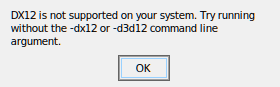
So this looks like there's some race condition happening since given the exact same configuration / launch environment, the game may or may not crash on that.
It mostly does before reaching the main screen but I've seen it happen shortly after being in-game.
If anyone happens to have a working Windows installation, could you run the game with D3D12 apitrace and upload the trace file?
Apitrace seems to work and also replay fine on windows: https://drive.google.com/file/d/1oJVpuJT0hbxuE6E0NleZFvwl6Vz41aiq/view?usp=sharing
The crashes with vkd3d-proton in this game seem a bit random, you can successfully load into the first level and at least play for a bit around 1/5 of the time. With DXVK it seems completely stable.
Here are two traces:
One only on the Menu & the other one with some in-game
The crashes mostly happen either before the Menu or while loading in-game.
Contrary to my previous claims, the game does feature a D3D11 render path. But DXVK is considerably less smooth than VKD3D.
Apitrace seems to work and also replay fine on windows: https://drive.google.com/file/d
Apitrace seems to work and also replay fine on windows: https://drive.google.com/file/d/1oJVpuJT0hbxuE6E0NleZFvwl6Vz41aiq/view?usp=sharing
The crashes with vkd3d-proton in this game seem a bit random, you can successfully load into the first level and at least play for a bit around 1/5 of the time. With DXVK it seems completely stable.
How do you run it with DXVK? I tried running it with the -dx11 argument but the game is still using VKD3D.
@Senshi00 See https://www.pcgamingwiki.com/wiki/Final_Fantasy_VII_Remake_Intergrade#Force_DirectX_11_for_more_consistent_frametimes.
It may depend on your used EGS launcher. It's not functional when passed directly to the executeable, but works when passed through EGS.
Apitrace seems to work and also replay fine on windows: https://drive.google.com/file/d
Apitrace seems to work and also replay fine on windows: https://drive.google.com/file/d/1oJVpuJT0hbxuE6E0NleZFvwl6Vz41aiq/view?usp=sharing
The crashes with vkd3d-proton in this game seem a bit random, you can successfully load into the first level and at least play for a bit around 1/5 of the time. With DXVK it seems completely stable.How do you run it with DXVK? I tried running it with the -dx11 argument but the game is still using VKD3D.
Final Fantasy VII Remake Intergrade\Engine\Binaries\ThirdParty\EOS\epic_emu.ini
After AppName=FFVIIRemakeIntergrade add -dx11, should be like:
AppName=FFVIIRemakeIntergrade -dx11
Be aware of updates, they may revert that.
I can confirm the game is working fine now in D3D12 mode with this change. Thanks!
I confirm it's now Ok as well. Thanks!
Proton versions
proton 6.21-ge-2x1 2021-12
System specs
Operating System: Arch Linux
KDE Plasma Version: 5.23.4
KDE Frameworks Version: 5.89.0
Qt Version: 5.15.2
Kernel Version: 5.15.7-zen1-1-zen (64-bit)
Graphics Platform: X11
Processors: 16 × AMD Ryzen 7 5800X 8-Core Processor
Memory: 62.7 Gio of RAM
Graphics Processor: AMD Radeon RX 6900 XT
Mesa 21.3.1
Game: Final Fantasy VII Remake : Intergrade (Epic Game Store)
Description
The game launched once and when trying to launch it for a second time, it crashes before the menu, displaying:
Logs with VKD3D Warn set: