Dragon's Dogma Dark Arisen
try beta of proton
I believe proton exposes controllers using both the legacy DirectInput interface as well as with Xinput, resulting in games that support both seeing two controllers. A workaround I used is to disable the controllers.

I assume you could only disable the event and js controllers and still use Xinput, I use kb/m though so I haven't bothered to test it.
EDIT: I took a second to test it, seems you can just disable all of those controllers and Xinput will still work.
Ok disabling the joystick in control does fix the joystick movement but not the game from picking up the joystick. That leads to the problem that instead of the xbox button prompts you get the "js button prompts" which is rather confusing cause knowone really anymore knows what (1) is.
So something more is not nice here ... i tried to disable dinput and dinput8 but that let to the game refuse to start.
Okay, so I disabled the event and js pads in wine control.
This does seem to work when Steam Controller support is turned on, and I can map to keyboard/mouse just fine. No gamepad detected at all.
An issue remains with steam controller support turned off. Xinput works, but for some reason, the gamepad is still detected as the (js) at the same time, creating a weird duology where both the xinput and dinput inputs are accepted at the same time.
Just to clarify on my setup, I disabled every controller in proton's wine control, and Xinput still worked. That includes the one with no (js) or (event) suffix.
I've only got the two controllers showing up in Proton's wine control and both are disabled. (making doubly sure I'm in the correct prefix through steamapps/common/compatdata/36500/pfx/)

Despite this, the game still reads both xinput and a (js) suffix controller at the same time. No other games seem to have this issue, though, so this is just a weird quirk with Dragon's Dogma + Xbox One controller.
Temporary solution is still turn off controllers in wine control, use Steam Controller support (which disables xinput as far as I can tell), and bind stuff to keypresses. It's not perfect but it's something.
How exactly are you running wine control? If you're setting WINEPREFIX to the dragons dogma prefix and just using wine control like it sounds like you're doing, the third "controller" won't show up, as shown below (Provided it does exist, maybe it actually doesn't exist on your setup).

You need to use the proton run script, like I had in the upper right corner of the screenshot I posted before.
If you're on Proton 3.7-3, the script will actually be called /tmp/proton_run, but if you're on a beta version you need to enable PROTON_DUMP_DEBUG_COMMANDS as described in the README, and you should find the run script under /tmp/proton_$USER.
@Lightwolf219 Thank you very much for the detailed information. I managed to fix problem with Logitech F710 which behaved exactly like Xbox controller @sorin255 described. By disabling all three controllers game is actually playable with a controller for the first time.

Dragon's Dogma: Dark Arisen - poor performance
Issue transferred from https://github.com/ValveSoftware/Proton/issues/1505.
@MrWissenschaft posted on 2018-09-18T23:45:06:
Is anyone getting bad performance for Dark Arisen? I've seen that loads of people are having success with it but it seems like the latency is crazy, like my character is in slow motion.
Framerate is lowish as well. Any ideas on a fix at all?
@MrWissenschaft commented on 2018-09-18T23:45:45
https://gist.github.com/MrWissenschaft/19d7a73c997a2af6998bf240f6a70dfc
Dragon's Dogma: Dark Arisen - poor performance
Issue transferred from #1505.
@MrWissenschaft posted on 2018-09-18T23:45:06:Is anyone getting bad performance for Dark Arisen? I've seen that loads of people are having success with it but it seems like the latency is crazy, like my character is in slow motion.
Framerate is lowish as well. Any ideas on a fix at all?
I have exact same issue @MrWissenschaft described. My assumption was that my CPU is too weak to run game with consistent frame rate. I get strange slow downs, not only that frame rate is low, but character runs half the speed compared to parts of the game where game runs as expected. Also in some areas I get 60 FPS and game runs great, but in other, looking at the village from distance for example, FPS drops to 5 - 10.
System info: https://gist.github.com/jgacas/64704de0370633b265b2970b97ec7d35
@jgacas Yeah it's very strange! I think my i5 6600k should have enough juice to deal with this though, which makes me think there's something peculiar a-going on, not sure what though
This game works very well on Linux/Steamplay.
Only one thing: I met the gamepad problem too, with my x360 gamepad, the camera spinning around my character.
You can easily resolve this bug:
- open the file config.ini located in
/home/yourprofilname/.steam/steam/steamapps/compatdata/367500/pfx/drive_c/users/steamuser/Local Settings/Application Data/CAPCOM/DRAGONS DOGMA DARK ARISEN/ - change this two lines as this:
MAP_RSTICK_VERT=RX
MAP_RSTICK_HORZ=RY
It's the same x360 gamepad camera bug on wine than "Star Wars the force unleashed" or "Indiana Jones emperor tomb".
I think I found another issue for this game with Proton: Do you see cinematics? For example, this cinematic appears after the tutorial mission:
https://youtu.be/-uA2jLzeH3Q?t=842
This game uses wmv video.
Anyone having issues uploading pawns to the sever? I have access to other people's pawns, but when I rest at an inn I'm told that the server is unavailable.
I'm also having the issue where it says it can't access the servers, but still allows me find and download pawns.
I can't speak for the controller issues as I do not use one. I have encountered the following however:
Frame rate: For the most part, frame rate stays playable, but not spectacular. The worst area I see regularly is the fountain area in gran soren dropping to the mid to low teens, but outside of cities the frame rate is fine. I would consider this a low priority from my experience, but mileage seems to vary.
Mouse Issue: I have resolved this by disabling steam overlay, but I feel it's worth mentioning. After shift+tabbing to use the in game browser for a while, moving the mouse would cause the game to hang, the hang would be short enough to deal with at first but gradually get longer. It would also be longer for larger mouse strokes. Eventually a swipe of the mouse would stop the game for a few whole seconds. Since nobody else has mentioned this, it's probably just my setup (Logitech G600 MMO Gaming mouse on Mint 19) and also a low priority. It may have helped the frame rate a bit, but I think that's just because it's stopped the hangs.
Connectivity: This is the main issue for me, that I believe nstgc and permagreen have mentioned. I can rent other people's pawns, my brother has even shown that he can rent my pawn, but when I rest at an inn I am told that the Dragon's Dogma service is unavailable. In addition, the Ur-Dragon seems to be stuck in offline mode.
I've played through almost the entire campaign and half of Bitterblack Isle at least, so the game works well enough to enjoy.
Here's my steam system info:
System_Information.txt
Hi,
I'm doing some research for my issue at number 1464. That issue deals with cinematic/video playback. Most of the listed games already have a proton log attached to their issue, but this game does not.
Could somebody be so kind as to upload a proton log from a clean install?
I need to search in the proton log for mentions of MF or quartz, so that I can categorize the game.
Thanks for the help!
HonkingGoose
Steam controller is not recognized as a controller. The analog stick does not work at all.
Have you tried with a regular controller?
On Fri, Mar 8, 2019, 4:07 PM Michael Green [email protected] wrote:
Steam controller is not recognized as a controller. The analog stick does
not work at all.—
You are receiving this because you commented.
Reply to this email directly, view it on GitHub
https://github.com/ValveSoftware/Proton/issues/1235#issuecomment-471076629,
or mute the thread
https://github.com/notifications/unsubscribe-auth/AYX5a4ATqoKi39iJ7akXZI0tUvcRU46Vks5vUtEqgaJpZM4WZa20
.
I figured I would try D9VK on DDDA since it was included in 4.11. It gave me a bit of trouble, but I got it working and it seems awesome. From a quick test, my frame rate in Gran Soren is now in the 40s to 70s instead of low teens now!
The problem I ran into at first was rather strange however, it only gave me a window for a split second and closed. I checked the log and it said:
"err: D3D9: EnterFullscreenMode: Failed to change display mode"
So I went into the game's config.ini and set FullScreen=OFF and it launched. Then, just to see, I hit Alt+Enter to try full screen, and it worked with no issues. I checked the video settings in game and it had decided on a 120Hz refresh. It would still crash trying to launch full screen otherwise, but I went back to the config.ini and set FullScreen=ON again and set RefreshRate=120.00Hz instead of 60.00Hz and it launched without issue.
The strange part about this is that my screen is only a 60.00Hz to begin with, so why does the 120.00Hz setting work?
TLDR: If D9VK crashes the game for you, try changing the RefreshRate or FullScreen values in "/drive_c/users/steamuser/Local Settings/Application Data/CAPCOM/DRAGONS DOGMA DARK ARISEN/config.ini"
System info:system_info.txt
Proton_Log (when crashing):steam-367500.log
First off, my system info: https://gist.github.com/nstgc/8adbcbf47613a63185351febb54c17b0
I'll see about posting a crash report sometime later, but its getting late and I don't feel like recovering my system from what I'd call a major crash.
So, with D9VK enabled (and maybe without it), changing vsync from off to on while in game causes a bad crash. Not a kernel panic, but it does lock the system up sufficiently that I need to SysRq+R,E to get to a command line. Even then it takes about 10 minutes before I can do anything on my system at all.
This is not the only game where I've seen something like this. I have a similar issue with Final Fantasy XIV.
UPDATE: disabling the Steam Overlay seems to get me around this issue, which is nice as the Steam Overlay isn't required, but I do prefer to have access to it.
Game installed an ran first time, although I did get a 'not responding' dialogue at first launch which I first clicked 'wait' and the intro video then played. After playing the game for 30 minutes with no issues and good performance, I tried to run the game again, but this is where the trouble began.
I always get the 'not responding' dialogue, clicking 'wait' doesn't help, the dialogue keeps popping up and a black screen is shown in the background. Until eventually I force quit.
I have tried different proton versions, and deleting my config.ini as suggested in other threads, also the Media Foundation workaround (intro videos are wmv) but nothing gets me past this stage.
Proton_Log: steam-367500.log
Issues with the steam controller are fixed, it now works like any other controller as you would expect.
There is crackling audio with proton 5. I am currently using a custom proton build based on wine 5.6 and that fixes the audio issues.
FYI, my tests to see cinematics:
mfplat no
libavfilters no
ffdshow no
wmp9 yes
You could see first cinematic just after the Capcom screen, in the background of "press a key to start"

$ mediainfo title_A.wmv
General
Complete name : title_A.wmv
Format : Windows Media
File size : 54.4 MiB
Duration : 59 s 999 ms
Overall bit rate mode : Constant
Overall bit rate : 7 602 kb/s
Maximum Overall bit rate : 8 050 kb/s
Encoded date : UTC 2011-09-07 08:54:28.750
Video
ID : 2
Format : VC-1
Format profile : MP@HL
Codec ID : WMV3
Codec ID/Info : Windows Media Video 9
Codec ID/Hint : WMV3
Description of the codec : VC-1 - VC-1 Simple/Main Profile
Duration : 1 min 0 s
Bit rate mode : Constant
Bit rate : 8 000 kb/s
Width : 1 280 pixels
Height : 720 pixels
Display aspect ratio : 16:9
Frame rate : 30.000 FPS
Nominal frame rate : 29.970 FPS
Color space : YUV
Chroma subsampling : 4:2:0
Bit depth : 8 bits
Scan type : Progressive
Compression mode : Lossy
Bits/(Pixel*Frame) : 0.289
Stream size : 57.2 MiB
Language : Japanese
For those that are having issue with not being able to upload pawn data to the server the latest version of proton-ge-custom (Proton-5.9-GE-6-ST as of writing) seems to fix this issue.
For me the game launch normally to the main menu but when I choose start new game the game just crash.
Tested with Proton experimental, proton 6.3-8, proton 5.0-10 (also proton 5.9-GE-2, proton 6.21-GE-2 and proton 7.1-GE-2)
Manjaro Linux
Nvidia GTX 970
Nvidia 495.46 drivers
Can you check the amount of Vram consumed by the game?
I don't know what's the best option to check the vram consumption.
I took this screenshot of the system monitor that shows the GPU memory usage when I opened the game until it crashes.

When I test an steam game, I use this DXVK_HUD=api,memory,fps,version,devinfo %command%
Or I use MANGOHUD.
I took this screenshot a second before the game crashes. I configured all the graphics settings to the minimum.
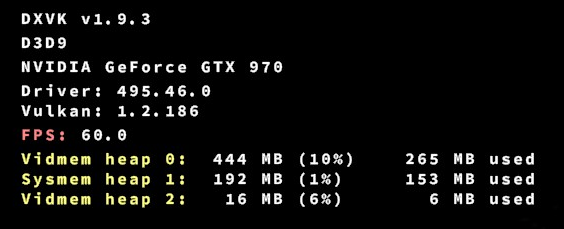
Have you tried deleting the folder 367500 that is inside /steamapps/compatdata , allowing Proton rebuild it again?
I deleted the folder but the game still crashes.
I was reading comments on the Steam forums and I found that this issue affected some players on Windows too and the recommended solution was to move the game's folder to a shorter path. For some reason if the installation path is too long the game will crash.
I tried this solution and now the game starts normally.
Latest Proton (7.0): main screen shows the testing bars. Uploading log ASAP, gonna play a bit more to check if the in-game cutscenes play. It seems older versions just showed a black screen.
@kisak-valve I have found a regression. Videos work when compiling shaders for the first time. After first launch however, they stop working again.
Hello @CygnusTerminal, please add PROTON_LOG=1 %command% to the game's launch options, reproduce the regression, and attach the generated $HOME/steam-$APPID.log to this issue report as a file. (Proton logs compress well if needed.) Also, please note the version of Proton which you know is not affected.
Hello @kisak-valve, seems to be fixed now. But i am having another issue. Every X amount of days, the game would crash on load seemingly out of nowhere. Here is the log with the crash, since every single time until now, enabling logs would make the game behave.
steam-367500.log
I am having a very weird issue with Dragon's Dogma in my fresh install... Whenever I try to open the map, the game immediately crashes; has anyone seen this behavior?
Here are the logs: steam-367500.log
The game itself works fine, the controls work, the audio works fine. The FPS goes from 43 to 60. When you compile the cache it stays at 60 FPS.
The problem is that the connection to the server doesn't work very well, the pawns (npc online) are synchronized across the map, but when using the stone to summon, the connection is lost.
Proton 8.0-2
OS: Ubuntu 22.04.2 LTSKERNEL: 5.19.0-42-genericCPU: AMD FX-8350 Eight-CoreGPU: AMD Radeon RX 460 (polaris11, LLVM 15.0.7, DRM 3.47, 5.19.0-42-generic)GPU DRIVER: 4.6 Table 22.2.5RAM: 16GB
Controller: Dualsense PS5
Game crashes consistently when entering new locations.
steam-367500.log
Game crashes when opening the map. Tried with multiple proton versions, and disabled overlay.
Game crashes when opening the map. Tried with multiple proton versions, and disabled overlay.
Are you using flatpak Steam? I had the same issue in it, but using the distro's package instead fixed that.
System Information
- GPU: RX 5600XT
- Driver/LLVM version: Mesa 23.0.3
- Kernel version: 6.1.37
- Link to full system information report as Gist:
- Proton version: Any, but report on 8.0-2d
Symptoms
Upon loading into the main menu, I'm greeted with a lack of video, which has been replaced with this:
Reproduction
So far based on my testing, it's distro agnostic, wayland/x11 agnostic, and proton version agnostic.
EDIT: Also happens with both BTRFS and EXT4
The biggest thing that I suspect is the culprit is that I have installed my entire OS onto a 512GB USB stick, mostly to test how linux handles it.
I have not experienced this issue on my main Arch/EndeavourOS install, nor my steam deck. I have so far tested this on Nobara and NixOS.
I am unaware if this type of issue has occurred in the past, but I tried to remedy it myself to no avail.
I can't even get this to launch. I've tried Proton 8, 7, and experimental, and I don't even get a window, the play button just comes back after a few minutes of waiting. Is there something special I need to do?
@eyeonus can you attach a log of your session? Add PROTON_LOG=1 %command% to the launch options of the game.
I am having no issues with the current commit of Proton Experimental.
Proton 8: https://pastebin.com/wEjy4kjm
Proton 7: https://pastebin.com/rrRgZtFW
Proton experimental: https://pastebin.com/6KEgG05L
Hello @eyeonus, please copy the contents of Steam Runtime Diagnostics from Steam (Steam -> Help -> Steam Runtime Diagnostics) and put it in a gist, then include a link to the gist in this issue report.
Thanks, these are the sections to focus on: https://gist.github.com/eyeonus/7af29353fe8c65b6ece25b34a0eecea1#file-gistfile1-txt-L77-L90 and https://gist.github.com/eyeonus/7af29353fe8c65b6ece25b34a0eecea1#file-gistfile1-txt-L402-L431.
Your system is configured to use its RX 580. The Vulkan drivers you have installed are 32 bit and 64 bit AMDVLK in addition to also having 64 bit mesa/RADV installed. The RX 580 is part of the GFX8 generation of AMD GPUs, and the AMDVLK v-2023.Q4.1 driver release dropped support for that hardware generation leaving you with no usable 32 bit Vulkan driver installed.
Install 32 bit mesa/RADV and optionally remove the no longer compatible AMDVLK system packages.
Still happening. I've updated the existing gist with updated diagnostic, and here's a new pastebin of the log:
EDIT: For good measure, I also did a full system upgrade and rebooted my machine before trying again.
It's still crashing under experimental too.
https://pastebin.com/aDVr2SXU
Fortunately, it does now run on Proton 7 for me.
@eyeonus can you try using the latest stable release? That being Proton 8.0-4.
It is possible that your drivers don't support Vulkan 1.3 which since 8.x it's a requirement, the architecture of the RX 580 has support for Vulkan 1.3 though, but you're getting winediag:nodrv_CreateWindow Application tried to create a window, but no driver could be loaded. as an error, so let's try to rule that out.
I already tried 8.0-4, it crashes: https://pastebin.com/PjgaH90Y
My game also seems to crash as soon as I open the map. Often this also prompts steam to download some additional files for the game which doesn't fix the issue. Tried with a few different Proton versions. Also not using flatpak steam.
steam-367500.log
On the latest Proton Experimental I can't get past the start screen. Up to the "Press any button" part everything seems okay, but once I press a button and the start graphic fades away like it should, the game seems to get stuck and all I can see is a black screen while the music keeps playing. The game does not progress from this state.
@mattipulkkinen Could you try experimental-bleeding-edge? Another game had a very similar issue on 9.0-x and hopefully the fix will get you past the black screen. Right now the fix is only in 9.0-bleeding-edge 😅
@mattipulkkinen Could you try experimental-bleeding-edge? Another game had a very similar issue on 9.0-x and hopefully the fix will get you past the black screen. Right now the fix is only in 9.0-bleeding-edge 😅
Thanks for the tip. With experimental-bleeding-edge I can get past the start screen and into the game. However, now the start screen itself looks like this:
Here's a new Proton log, in case it helps: proton-log.zip
@mattipulkkinen That is unfortunately "expected" and not actually a bug. The video that the game plays behind the main menu is currently missing from the library of videos that we pull from. Hopefully the video will populate soon :)
@mattipulkkinen That is unfortunately "expected" and not actually a bug. The video that the game plays behind the main menu is currently missing from the library of videos that we pull from. Hopefully the video will populate soon :)
Ah, I see. Unfortunate, but makes sense. Thanks!
Has anyone been able to solve the map CTD issue?
steam-367500.log
steam-367500.log
@ethar42 (and anyone else reproducing the map CTD issue) - we have not been able to repro the crashing when opening the map. This unfortunately makes it very hard to investigate further. For starters: could you please copy your system information from Steam (Steam -> Help -> System Information and Steam -> Help -> Steam Runtime Diagnostics) and put each in a gist, then include a link to the gists in this issue report.
Also - is it possible for you to upload a save file where you are getting the map crash? I'm wondering if the map is only crashing further in-game when more things are attempting to load into it. Could you also upload new logs with Proton - Experimental so that we can take a fresh look?
Hi @alasky17 I used Flatpak Steam when running Dragon's Dogma. Sadly, I do not have any files or anything since I switched Distro.
For Proton versions, I was experimenting with GE-Proton back then but still didn't solve the CTD issue.
I narrowed down the problem was the Flatpak Steam Runtime version. Once I have installed Native Steam and relaunching Dragon's Dogma the map function works and does not CTD.
If you want to reproduce this problem, simply install Steam through Flatpak and download Dragon's Dogma and open the map.
@ethar42 Thank you for the details! That pretty strongly suggests that the issue is having path names that are too long, which has an easy solution. If anyone is still running into the map crashing issue, you can try adding PROTON_SET_GAME_DRIVE=1 %command% as a launch option. If this fixes the crashing, please let me know and I can add it as a default option.
@alasky17 I might be late on this, but I installed Steam through Flatpak and Dragon's Dogma crashed when loading into the world, though setting PROTON_SET_GAME_DRIVE=1 %command% seems to have fixed the issue. Thanks!
@marmottatonante Thank you for the confirmation! Not too late - I'll add gamedrive as the default for the game now -- I just like to wait until I have some confirmation before adding it based on random guesses :)
Proton versions
proton experimentalx3 2024-03proton 8.0-2x1 2023-05proton 5.9-ge-6x1 2020-09proton 3.7-3x2 2018-09
Launch options
PROTON_SET_GAME_DRIVE=1x2 2025-11PROTON_LOG=1x2 2023-11DXVK_HUD=api,memory,fps,version,devinfox1 2022-02MANGOHUDx1 2022-02PROTON_DUMP_DEBUG_COMMANDSx1 2018-09WINEPREFIXx1 2018-09
Launch lines
PROTON_SET_GAME_DRIVE=1 %command%x2 2025-11DXVK_HUD=api,memory,fps,version,devinfo %command%x1 2022-02
Upstream links
- ValveSoftware/Proton/issues/1505x1 2018-09
Dragon's Dogma Dark Arisen doesn't detect controller as an Xbox controller but as a standard joypad. This presents issues as the triggers are read as analog sticks which messes with both the camera and makes me unable to bind them to actions other than movement/camera. It also doesn't read the right stick properly which makes it hard to bind that to the camera as well.
I had this same problem with Wine Steam through Lutris too. Although now I'm able to attempt setting up keyboard mapping through steam controller configuration. This mostly works except the game still insists on trying to use the left anlog stick as an analog stick which is a little bumpy.
Tested with Proton 3.7-3
Ubuntu 18.04
Xbox One Controller (2015 Firmware)
Nvidia GTX 1060 16GB
Nvidia 396.54 drivers
i5-7700HQ