Killing Floor 2
@Mialere I am informing you that you should not type yes in brackets. You should put an x instead: [x].
That will result in a checked checkbox
- [x] See?
- [ ] Example
Perk progress now works, but the game crashes when try to connect to servers or randomly during solo game.
System Information
- GPU: GTX 970
- Driver/LLVM version: NVIDIA 396.54
- Kernel version: 4.4.0-135-generic
- Link to full system information report as Gist
- Proton version: 3.7-6 Beta
I confirm:
- [x] that pressing the
Playbutton in the Steam client is sufficient. - [ ] that runtime config options
are necessary to run the game. - [x] that no workarounds other than the mentioned ones are necessary.
Issues
- [ ] I haven't experienced any issues.
- [ ] There are no issues left open for this game.
- [x] Although I consider the gaming experience equal to Windows there are
remaining issues:- Input: Default Steam Controller profile uses Mouse style input with a temporary clamped/limited range of motion until an actual mouse is used
Can confirm this game works for me out of the box, and runs great. No tweaking around the prefix required, no settings required, it just works. I played a match, got some perk levels, restarted the game and can also confirm that perk progress is saved.
Played with avg 60fps on 980-Ti at 1440p(2k) with settings on ultra. Got 30fps on UHD/4k. Avg for 4K ultra estimated at around 32. The performance is very close to native as we usually see with DXVK, normally it's around 80%.
I've had no crashes whatsoever, although my inventory and the store did not work at some point, at a later launch while playing I noticed they suddenly worked. (May be related to net framework failing to install). It's possible that some fixes in the nvidia vulkan beta driver (396.54.09) are required for the game to be crash free, but as the game worked fine for mimattr as well, I assume that it probbaly isn't.
I played the game a lot yesterday, it was a great experience. Proton version used was 3.16-1 beta. Kernel is 4.18 (manjaro), cpu is 4th gen intel i7.
Nvidia Flex however does not work which is somewhat disappointing. Installing physx did not resolve the issue.
Edit: I also reset my prefix (by deleting it) essentially confirming that perk progress will not get corrupted on first launch (may not be 100% certain for people who have played on windows before, someone who has, has to verify, but it seems likely that it will be fine)
Edit2: The server browser tends to crash the game, it's not certain, I even managed to get it to work twice in a row when joining a friends server, but it was a fluke.
So after 5 hours I finally got it to run under a Radeon 280.
If you have the problem, that "radeon" is set as the Kernel Driver, add the following to your grub config under /etc/default/grub in the GRUB_CMDLINE_LINUX_DEFAULT
radeon.si_support=0 amdgpu.si_support=1 radeon.cik_support=0 amdgpu.cik_support=1 rd.driver.blacklist=radeon radeon.modset=0
than update-grub and reboot
More info on the crashing server browser, from launch.log
[0063.76] Warning: Warning, UKFOnlineGameSearch::SortResults: SortType=7 SortOrder=1 NewSortType=0 NewSortOrder=0 .
[0064.13] ScriptLog: ***Attempting to get player list for server 3
[0064.77] Warning: Warning, UKFOnlineGameSearch::SortResults: SortType=7 SortOrder=1 NewSortType=0 NewSortOrder=0 .
[0069.59] Critical: appError called: Online thread exception:
Fatal error!

Address = 0x40c635b0 (filename not found)
Address = 0xb0eee603 (filename not found)
Address = 0x70003350 (filename not found)

[0069.59] Critical: Windows GetLastError: Success. (0)
[0069.59] Log: === Critical error: ===
Online thread exception:
Fatal error!

Address = 0x40c635b0 (filename not found)
Address = 0xb0eee603 (filename not found)
Address = 0x70003350 (filename not found)
I have no idea what these files could be, but it seems that it is looking for files that don't exist. It does not appear to be fonts.
This is a serious and consistent error for me btw, the only way to avoid it is if I join a server fast enough that it starts loading before the error occurs; i.e. I need to double click a server and hope for the best, however if the server has a password there's no way in besides being invited by someone on the server. The password prompt does not crash the game on it's own.
Hello @Rabcor, can you run ulimit -Hn and verify it is a high value and not 4096?
Killing Floor 2 runs for me from fresh install on RX580 using mesa-git and llvm-svn on arch. Have not checked progress, can check later today.
Hello @Rabcor, can you run
ulimit -Hnand verify it is a high value and not 4096?
$ ulimit -Hn
1048576
This is the default for Manjaro, at least on (very) recent installations (2018 september or later).
Crashing for me when trying to click on the game in Server browser.
Proton log: steam-232090.log
welp. idk what changed but its crashing for me now also.
It always crashed for me in the server browser, except for two times or something, I'm prety sure they were flukes.. The weird thing is though that the game is crashing despite everything actually working, I even tested it just now and I joined some server and got a bugsplat but the game was still running and started loading the map before crashing several seconds later. It's quite bizarre.
I can confirm, that the issue is gone with proton 3.16-4 beta.
Game is no longer crashing when selecting game in game browser.
I can confirm, that the issue is gone with proton 3.16-4 beta.
Game is no longer crashing when selecting game in game browser.
I can confirm this as well, I could've sworn it was crashing yesterday on 3.16-4 though, but it's not crashing for me either right now so maybe it's solved. If it really is solved, this game is safe to whitelist I think. As I mentioned earlier, I have spent a lot of time on this game on Linux (24 hours total right now) and the server browser crash is the only real issue I've encountered.
Here's my sysinfo for reference.
Well, overall performance is very good actually, 60fps and occasional stutterings and framedrops, and this weird bug . Also, I can't access my inventory to manage items, cursor in Steam overlay is invisibile. But so far I'm impressed, the game is very playable

Well, overall performance is very good actually, 60fps and occasional stutterings and framedrops, and this weird bug . Also, I can't access my inventory to manage items, cursor in Steam overlay is invisibile. But so far I'm impressed, the game is very playable
I had that issue before not being able to access inventory or store, but then it quite simply went away after a couple of launches. (Maybe it was the proton version that changed it, are you using the latest one?)
The steam overlay cursor issue is a common problem with proton games.
Well, overall performance is very good actually, 60fps and occasional stutterings and framedrops, and this weird bug . Also, I can't access my inventory to manage items, cursor in Steam overlay is invisibile. But so far I'm impressed, the game is very playable
I had that issue before not being able to access inventory or store, but then it quite simply went away after a couple of launches. (Maybe it was the proton version that changed it, are you using the latest one?)
The steam overlay cursor issue is a common problem with proton games.
You're right, the problem with the inventory is gone, but now there is another problem: The game simply closes with no error messages or whatsoever, and it seems that occur randomly during gameplay
That's a new one, I have never encountered that. How frequently does this happen? what cpu and gpu are you using? what gpu driver? proton version? I'll have to check to see if this also happens over here.
Also, a long shot but are you sure you have enough memory? Could be crashing by running out of memory...
That's a new one, I have never encountered that. How frequently does this happen? what cpu and gpu are you using? what gpu driver? proton version? I'll have to check to see if this also happens over here.
Also, a long shot but are you sure you have enough memory? Could be crashing by running out of memory...
I figured it out, the problem was with the maximum number of open files! How @kisak-valve said, should be a higher value and in Ubuntu MATE by default is 4096, I've increased it to 64000 following these guides https://underyx.me/2015/05/18/raising-the-maximum-number-of-file-descriptors
https://unix.stackexchange.com/a/467789
The game also crashed for me once during gameplay, but I was unable to start it again since then (bugsplat on startup), increasing the maximum number of open files sadly doesn't fix this.
Tried disabling esync, still bugsplats.
Can only launch the game with -dx10, but the performance is awful.
Proton log with just PROTON_LOG=1 %command% as launch options: https://gist.githubusercontent.com/jkhsjdhjs/831a90ff29a42a1b432f2ecb568723ad/raw/60a8cbb80714ed41fc83325a8ea9f2cf5edfa2d6/steam-232090.log
This seems to be an issue with multiple monitors.
After the splash screen one half of a black rectangle of size 1920x1080 appears on the first screen, the other half on the second screen. Then the bugsplat window appears.
So I thought maybe the game crashes because it tries to launch the game horizontally centered over the total resolution of 3840 x 1920 . And voilà, after I disabled my second monitor the game launches fine. I then closed the game, enabled my second monitor and launched the game again, working fine too. But if I launch the game again after this, it bugsplats again.
Steam also installs .NET Framework for me on every launch, making it a very time consuming job to test the game with different launch options / monitor setups.
While I had my second monitor disabled it didn't crash during gameplay, so increasing the limits seems to have fixed that. Thanks @Phraqzy
That's a new one, I have never encountered that. How frequently does this happen? what cpu and gpu are you using? what gpu driver? proton version? I'll have to check to see if this also happens over here.
Also, a long shot but are you sure you have enough memory? Could be crashing by running out of memory...I figured it out, the problem was with the maximum number of open files! How @kisak-valve said, should be a higher value and in Ubuntu MATE by default is 4096, I've increased it to 64000 following these guides https://underyx.me/2015/05/18/raising-the-maximum-number-of-file-descriptors
https://unix.stackexchange.com/a/467789
I see, yeah you should probably raise it higher than that. See: https://github.com/zfigura/wine/blob/esync/README.esync or https://github.com/lutris/lutris/wiki/How-to:-Esync
Hasn't been any updates to proton recently? If so, recent one did break vulkan (dxvk) rendering mode.
Here's the game with dxvk enabled:

Looks like only reflections are rendered. Yo can still see character silhouette
dxvk disabled:

Hello @xDShot, what Proton version and video driver version are you using?
@jkhsjdhjs I've had this exact same problem. I thought I was going crazy because the game was working fine before.
this is the error I get when it crashes:
warn:  DXGI: VK_FORMAT_D24_UNORM_S8_UINT -> VK_FORMAT_D32_SFLOAT_S8_UINT
warn:  DXGI: VK_FORMAT_D24_UNORM_S8_UINT -> VK_FORMAT_D32_SFLOAT_S8_UINT
warn:  DXGI: VK_FORMAT_D24_UNORM_S8_UINT -> VK_FORMAT_D32_SFLOAT_S8_UINT
warn:  DXGI: VK_FORMAT_D24_UNORM_S8_UINT -> VK_FORMAT_D32_SFLOAT_S8_UINT
info:  D3D11CoreCreateDevice: Probing D3D_FEATURE_LEVEL_10_1
info:  D3D11CoreCreateDevice: Using feature level D3D_FEATURE_LEVEL_10_1
info:  Enabled device extensions:
info:    VK_EXT_shader_viewport_index_layer
info:    VK_EXT_transform_feedback
info:    VK_EXT_vertex_attribute_divisor
info:    VK_KHR_dedicated_allocation
info:    VK_KHR_descriptor_update_template
info:    VK_KHR_get_memory_requirements2
info:    VK_KHR_image_format_list
info:    VK_KHR_maintenance1
info:    VK_KHR_maintenance2
info:    VK_KHR_sampler_mirror_clamp_to_edge
info:    VK_KHR_shader_draw_parameters
info:    VK_KHR_swapchain
info:  DXVK: Read 176 valid state cache entries
info:  DXVK: Using 16 compiler threads
info:  DxvkPipelineCompiler: Using 30 workers
Failed to initialize AMD AGS library, status: 4
err:   DXGI: EnterFullscreenMode: Cannot query containing output
err:   DXGI: Failed to set initial fullscreen state
warn:  DXGI: MakeWindowAssociation: Ignoring flags
ERROR: ld.so: object '/home/gloriouseggroll/.local/share/Steam/ubuntu12_32/gameoverlayrenderer.so' from LD_PRELOAD cannot be preloaded (wrong ELF class: ELFCLASS32): ignored.
>>> Adding process 26468 for game ID 232090
AL lib: (WW) ReleaseContext: 0x7f0714001830 released while current on thread
AL lib: (EE) ReleaseThreadCtx: Context 0x7f0714001830 current for thread being destroyed, possible leak!
AL lib: (EE) ReleaseThreadCtx: Context 0x7d65e5b0 current for thread being destroyed, possible leak!
Unable to read VR Path Registry from C:\users\steamuser\Local Settings\Application Data\openvr\openvrpaths.vrpath
Unable to read VR Path Registry from C:\users\steamuser\Local Settings\Application Data\openvr\openvrpaths.vrpath
Unable to read VR Path Registry from C:\users\steamuser\Local Settings\Application Data\openvr\openvrpaths.vrpath
Setting breakpad minidump AppID = 232090
Steam_SetMinidumpSteamID:  Caching Steam ID:  76561197966578639 [API loaded no]
Game removed: AppID 232090 "", ProcID 25990
No cached sticky mapping in ActivateActionSet.pid 25993 != 25992, skipping destruction (fork without exec?)
can confirm - turning off all my monitors except one makes the game work
using -windowed launch option also makes the game work while leaving all monitors on
@kisak-valve mesa and vulkan-radeon version 18.2.4, proton version 3.16-4 selected in Steam Play options
@kisak-valve fixed by downgrading from recent linux kernel linux-4.19.1 to linux-4.18.16
@xDShot, it may be worthwhile to also mention your issue to the video driver vendor.
Compatibility Report
- Name of the game with compatibility issues: Killing Floor 2
- Steam AppID of the game: 232090
System Information
- GPU: Vega 64
- Driver/LLVM version: mesa 18.2.5-2
- Kernel version: 4.19.4
- Link to full system information report as System Report:
- Proton version: 3-16-4 Beta / 3-7-8 (both have issue)
I confirm:
- [x] that I haven't found an existing compatibility report for this game.
- [x] that I have checked whether there are updates for my system available.
Symptoms
The game runs silky smooth on ultra at 1080p with Vsync on at 60 fps (however stutters at 130 fps with Vsync off), but crashes to desktop absolutely randomly either mid-game at any wave or in server browser. The crash-log attached is from a mid-game crash.
Reproduction
Play on a Linux PC with a Vega GPU (although found reports of this on other AMD cards here https://www.reddit.com/r/SteamPlay/comments/9gny9x/periodic_crashing_on_kf2/)
Hello @FogLizard, your log contains eventfd: Too many open files, please run ulimit -Hn and verify it returns a high value and not 4096.
It's 4096 ffs. Of course, I remember seeing a warning somewhere about that, but didn't pay attention to it. I'll test and update tomorrow, thanks.
I personally disabled ESYNC as I didn't notice significant improvements in the game so I don't have to mess with ulimit.
I've set it to million and now it doesn't crash, it's perfect, thanks.
The game frozen in endless mode in between waves while purchasing weapons. I had to kill the process from terminal. Could you please check the log? My specs are in a post 4 posts above.
steam-232090.zip
UPD: The game has frozen again while activating the shop.
steam-232090-2.zip
Crashing on startup with dualscreen environment (Manjaro). The issue disappear when launching with -windowed launch flag.
steam-232090.log
The crash disappeared after updating to proton 3.16 !
Killing Floor 2 (232090) game crashes when voice chat is used by someone in game
Issue transferred from https://github.com/ValveSoftware/Proton/issues/2360.
@opal1974 posted on 2019-02-23T03:53:05:
Compatibility Report
- Name of the game with compatibility issues: Killing Floor 2
- Steam AppID of the game: 232090
System Information
- GPU: GTX 960
- Driver/LLVM version: nvidia 415.27
- Kernel version: 4.18.0
- Link to full system information report as Gist:
- Proton version: 3.16-7 Beta
I confirm:
- [X] that I haven't found an existing compatibility report for this game.
- [x] that I have checked whether there are updates for my system available.
Symptoms
When in game, if someone else in the server (ie not you the player) uses voice chat, it will crash the game most of the time. There seems to be sound issues with this game to begin with, ie samples cutting out if 'interrupted' by another sample, but I don't find any compatibility report related to that. I also note that at least for me, I never actually hear the other players who use the voice channel, but I see the notification on the screen of it and then crash. Absolutely annoying and I am tired of this killing the game.
Reproduction
Seems to happen in 90 percent of cases. Very rarely, someone the silent voice notification will happen it won't crash, but 9/10 it leads to a crash.
A temporary solution is to disable VoIP in game ini files.
re: the mic/sound bug that I reported which was merged here, someone at protondb mentions that KF2's error log after the crash contains the following: F3DAudioCalculate() Filename not found
I have issues with sound stutter (music and in-game NPC voice at least) and Alt-Tab not working in fullscreen mode (I can see some popup windows like KDE app menu but desktop itself and other apps seems to always overlayed by KFGame).
Driver: radv (Mesa 19.0.1/LLVM 8.0.0)
PulseAudio: 12.2
Proton: 3.16-8 Beta
Linux: 5.0.5-arch1-1-ARCH
I'm using KDE on X11.
Can confirm that voice chat instantly crashes the game the second somebody else speaks. Otherwise the game runs perfectly fine, I get a stable 60-ish fps at ultra and have played a good few hours of multiplayer.
One HUGE downside, my perk levels reset to 0 after every game, anyone have any insight?
Edit;
I've managed to fix the perk level issue it seems, at least for now. Hopefully it doesn't bug out and happen again. I had to type the following in the console to reset my stats server-side, apparently they can sometimes become corrupt and this is the only solution.
WARNING This will erase your stats!
resetstats "YourSteamNameHereInQuotations"
After lowering some of the more pointless graphics settings to high, the game is running at a solid 100-130fps most of the time, put a good 4 hours into multiplayer with only one crash when changing level. The voice chat does still cause the game to crash, and I cannot figure out how to disable it (I've tried doing it via the game configs, but it had no effect).
@xDShot Do you have any idea how to fully disable VoIP via the ini files? I've tried myself but I can't seem to disable it.
@exezin configs are located in ~/.steam/steam/steamapps/compatdata/232090/pfx/drive_c/users/steamuser/My Documents/My Games/KillingFloor2/KFGame/Config
in KFEngine.ini disable bHasVoiceEnabled:
[VoIP]
bHasVoiceEnabled=false
in KFGame.ini:
[KFGame.KFGameInfo]
bEnableDeadToVOIP=False
bDisableVOIP=True
bDisablePublicVOIPChannel=True
Make both config files as read-only. Obviously it will prevent from saving some settings if you change in the game, so switch to needed preferences before.
You will sill see notification when someone speaks, but you won't hear them and, hopefully, game will stop crashing.
That seems to have done it, thanks!
I've put an obscene amount of time into this game over the last week or so, still running incredibly well in all cases. The only issue I've had is that a lot of custom maps cause a complete crash, and I had one GPU lockup out of my 40+ hours of gameplay that required me to hard reboot.
I'll attempt to get logs for the custom map crashing. Anyone else experienced the same issue & can share some insight? Custom maps do seem to use custom shaders and a lot of audio stuff, but the few custom maps that do work seem to run fine. (There's a bikini bottom map from spongebob that has a really well made cell-shader setup, that runs fine. As well as another map that plays custom music).
Anyone have any luck getting the editor/SDK running? The splash screen appears for me, loads some stuff and then just closes without an error.
Edit; Attached the log for the sdk.
Edit; New issue thread for the SDK here -> https://github.com/ValveSoftware/Proton/issues/2615
Hello @exezin, Killing Floor 2's SDK has a separate appid and it looks like it uses .NET while the game engine does not, let's treat it like a separate game. Please open a new compatibility report.
I report that I played this game on another machine with Windows 7 pro SP1 and it crashed several times.
That's a good point, I'll open a new thread for the SDK.
Here are the logs from the custom maps crashing the game, about 80% of custom maps I try to load cause a crash.
steam-232090.log
Note that the game crashes a lot especially with custom content so not sure if reporting custom content crashes is a good thing. The past updates made the game more unstable than before (talking about Win7). Also I recently played custom maps without issues so.. Maybe at least list the custom maps you have issues with @exezin and I could check on my side if I too have issues.
@Zorrototo For one, KF-L4D2_DC_C4 crashes for me on Proton, but for a few friends using Windows it runs fine. This happens with a lot of custom maps that work perfectly fine for my friends on Windows so I think its worth investigating, especially if it happens to be related to audio playback of custom files as there are known issues with the audio (VoIP crashing the game, for example).
It's not an inconsistent crash or one off either, it will crash instantly every time without fail on said maps, but they work without issue for anyone on Windows. Custom maps are a large part of KF so I think reporting it as a proton issue is valid.
I don't think it is not worth investigating, but without even anything to work with it is just random statement in my opinion.
OK we got one custom map to test. I'll report and hope others here will too, this way we can confirm the problem or not. Don't hesitate to give me more to test this way if I too have exactly the same instant 100% of the time crashes as you, this will go in your way ;)
Bit busy for the next few days but when I get a chance I'll find some custom maps on the steam workshop that do cause a crash and report back with some logs, that way its easier for others to download and test.
This specific map indeed instantly crashes the game the moment it finishes loading, I tried multiple time and every time it crashes. The relevant log part states:
[0075.71] Log: ########### Finished loading level: 3.668710 seconds
[0079.55] Log: === Critical error: ===
Fatal error!F3DAudioCalculate() Address = 0x7c02cef7 (filename not found)
Address = 0x2 (filename not found)[0079.56] Exit: Executing UObject::StaticShutdownAfterError
[0079.57] Exit: Executing UWindowsClient::ShutdownAfterError
[0079.58] Exit: Executing UWindowsClient::ShutdownAfterError
[0079.58] Exit: UXAudio2Device::ShutdownAfterError
[0079.69] Exit: UAkAudioDevice::ShutdownAfterError
[0079.71] Log: appRequestExit(1)
Here is a zip with game and Proton log https://mega.nz/#!rwAnUYJD!SiYtL8bykdseRe7b4KNsqeHNJuh7Yk3kpI_d01ia5kY
Huh as I suspected, the exact same thing that crashes VoIP :D
Alright, if you want to replicate the crash on your end:
Subscribe to this map via the steam workshop: ScrakesOnAPlane. Then just launch a solo game, it can be any mode (endless, survival, etc) on the map named KF-ScrakesOnAPlane-v1.
Here's my log from this map crashing. Note that this issue is present on a lot of custom maps, some don't crash instantly and crash later on when an event is triggered causing it to play a custom sound.
@exezin got the same problem with West London port from KF1 yesterday.
Yeah there are a few variations on the west london port. There's one that works and the rest crash with the same issue as above.
I just received a Proton update (4.2-4) and I could load the map I reported crashing https://github.com/ValveSoftware/Proton/issues/1328#issuecomment-489505262
Guys try more maps and see if it now works.
I'll also check later if VOIP now works too. Seems promising.
Can confirm the same for me, all of the maps that would previously crash 100% of the time work perfectly fine now. Testing VoIP asap, woop!
Yup, voice chat works!
I'll have to test that on my end - the VOIP was the most major issue though KF2 (had?) alot of slowdowns/long black out at start.
I can see it still tries to do .net installation, so we arent in whitelist territory yet
Long game start is normal and intended, a feature (™) https://forums.tripwireinteractive.com/forum/killing-floor-2/technical-support-ae/the-bug-report-ae/2331378-very-old-issue-during-game-launch?p=2331532#post2331532
So good update it fixed some stuff nice :) I tried more custom maps too and it seems to work. Didn't try VOIP yet.
Long game start is normal and intended, a feature (™) https://forums.tripwireinteractive.com/forum/killing-floor-2/technical-support-ae/the-bug-report-ae/2331378-very-old-issue-during-game-launch?p=2331532#post2331532
So good update it fixed some stuff nice :) I tried more custom maps too and it seems to work. Didn't try VOIP yet.
huh, dont remember that when the game was in beta. Well, the .net trying to install everytime isnt a feature :)
I did a game and no one used voice. Next time Ill just ask someone to say something.
Yep for me the only problem I see in current Proton/KF2 is the .Net reinstalling everytime you start the game.
Had a few games with no one talking :D will have to ask some friends later but I guess it is fixed now, we'll see.
Ok now im getting a hang then quit at launch. Happened about 5 times in a row. No 'splat' notice like the crashes used to give me, it just quits silently.
be sure it is not a random game bug with config files, it can happen, just clean/delete .local/share/Steam/steamapps/compatdata/232090/pfx/drive_c/users/steamuser/My Documents/My Games/KillingFloor2/
I played a few hours tonight. I launch game with no extra proton parameter.
Hello @opal1974, please add PROTON_LOG=1 %command% to the game's launch options, reproduce the crash, and drag and drop the generated $HOME/steam-$APPID.log into the comment box.
In testing that, I just got a bugsplat crash as I was going into a match:
There's a couple err: DxvkMemoryAllocator: Memory allocation failed lines in the log that could be relevant.
Same for me. With or without clean configs.
Also found out that in Launch.log there's a bunch of repeating lines:
[0054.45] Log: Timed out while waiting for GPU to catch up. (500 ms)
There are no such log entries in old logs (e.g, I looked at logs from yesterday).
Did you try with a fresh clean prefix too by deleting whole folder .local/share/Steam/steamapps/compatdata/232090/ (I think it would do the trick just fine)? Maybe something is wrong in your old prefix used by the new proton? I don't know I have no issue on this version personally, custom maps or regular maps.
I just cleared it like you said, splat on launch.
Hum weird can't help more on that mate. Hope you find the origin of issue if it is fixable on your side.
EDIT: I'm on Nvidia
EDIT2: maybe try to verify if other games work properly with Proton? Verify integrity of Proton/Steamworks/game files from Steam?
Checked that today again.
After downgrade proton to 3.16-9 all seems OK now. And it worked well with 4.2 too. So apparently this hang issue was introduced in 4.2-4 and probably affected AMD users so far.
Can confirm that the game is running fine for me on Nvidia (GTX 1070). Crashing much less since the latest proton release (most of the maps now work fine).
Must be something AMD-specific.
Nah, I am GTX 960 Nvidia, never had a AMD card, so its not unique to those.
Did you guys try OTHER games too to confirm it is not a general problem with your Proton 4.2-4 installation? And/or verify the Proton 4.2 integrity in Steam? If you didn't I can only suggest you to try and confirm what happens.
EDIT: also, there may be a common thing in your computers, maybe compare your hardware, operating system, things like that?
@opal1974 I suspect its not a proton bug due to the fact that you said it was working fine at first when the proton update came out, and then suddenly it started crashing at launch later on?
I suppose hardware details could help, including stuff like driver versions etc. And like Zorrototo said, double check that other games work with proton as well, could be something funny with the installation.
As a side note, you can force games to use a specific version of proton from its properties menu in steam, run it in current proton and the previous version and see if the outcome differs.
@exezin I have similar problem and it appeared only after 4.2-4 update, can be reproduced for every game launch and disappear after version downgrade to 3.16-9 and wasn't present at previous version of 4.2.
As for other games. I personally tried GTA V, TES O/V and some other non-UE games and succeed in that.
As for HW, it can be found in log files probably. At least while I was seeking logs on PC yesterday I definitely saw info about drivers in these files.
I think the proper way to share system info is to copy/paste the Steam system info (in Steam main windows, go to Help menu, then click System Information) to a gist this way you're sure it contains all the relevant information about your system.
Here is my system, which works perfectly for KF 2 with Proton 4.2-4: https://gist.github.com/Zorrototo/45e8042df75801724b2306fe61657d2a
Maybe that would help if we all share this system information to help them find why it works for some but not for others.
Here's my system info.
Also found out that horizontal scrolling not working (probably in other games too) and left/right scroll events are mapped to mouse keys 4 and 5.
Since I mapped these on in-game actions everytime I accidentally touch wheel my character throws a grenade.
Tried with freshly updated Proton and reporting: it doesn't work with 4.2-5 too.
I'm sad that not much people participate actively here. That would help so much in having all games better if not completely supported.
Looking through the logs @opal1974 provided I see nothing that stands out to be honest. Do we have any Nvidia users that are having the same issue? Or is it just AMD at the moment?
It's still all working perfectly for me on the latest proton, I've put over 150 hours into the game so far.
@exezin he said he has GTX960.
Also I noticed messages about GPU hanging in KF2 logs. It is kind of relatable.
With 4.2-6 still hangs at startup and last time KF2 also apparently crashed after I tried to close app using Alt+F4.
Here's the fresh log file: steam-232090.log
Hang at startup is normal and expected behavior, also happens on Windows. Unless its a permanent hangup?
@exezin yes, it just stays frozen after startup and it's quite permanent. Same thing every time since 4.2-4
Oof, can't seem to replicate on my end. Still running perfectly fine for me on the latest proton version (I'm on a GTX 1070, very latest drivers).
@gudvinr did you post your system specs/drivers?
@exezin Yes, I did that earlier.
And to avoid further standard questions I also try to delete compatdata after every update. And also already verified integrity. Tried to launch with or without -dx10 switch.
Of course you (and probably others) running fine because there's no other reports there. That's good to know.
As you're the only one reporting your system info since last patches (and with the issue) it is very difficult to try to help besides the basics (delete prefix, clean configs, update everything, and so on..).
Having multiple people with the issue reporting at least their system info could be a good start to find common things, and maybe find where the issue lies if it is really a problem with current Proton.
What I can see in your system info is that first, it is cut down, missing pieces. There is no info under the RAM (where are misc and recent failure reports part?);
I can also see the operating system is not shown there either.
I see you use Kernel 5.1.2, not sure if it is properly supported in your OS that I don't know which one it is.
I see you have HUGE screen resolution on a 4Go video card, this may not be a problem, just noticing it.
I also can see nobody reporting it doesn't work on ProtonDB last week or this week, not a proof of anything, but just noticing it
Maybe it is not Proton issue, or maybe it is because of an incompatibility somewhere with your drivers/kernel/setup.
With nobody (but you) reporting I don't know how Steam can fix if something has to be fixed.
@Zorrototo
As you're the only one reporting your system info since last patches (and with the issue)
That's not true. As I said KF2 is working when I manually switch to 3.16. So apparently the problem was introduced when DXVK was changed from 1.0 to 1.1 and not directly connected with HW/OS.
I also just looked up in package manager logs and there are no records about mesa/radv/kernel updates in that period (between 4.2-3 and 4.2-4).
What I can see in your system info is that first, it is cut down, missing pieces. There is no info under the RAM (where are misc and recent failure reports part?);
Bunch of "Unknown" fields aren't very informational and there are no recent failures. All relevant information is included.
I see you have HUGE screen resolution on a 4Gb video card, this may not be a problem, just noticing it.
Also unlikely since I used it earlier without any problem.
I also can see nobody reporting it doesn't work on ProtonDB last week or this week
Not true. There are some reports. E.g:
Tested multiple versions of Proton (inlcuding; 4.2.5, 3.16.9 beta, 3.16.4 and 3.7.8 beta), none worked (reliably) apart from 3.7.8 beta.
This game has less than 10k active users. Taking into account small Linux userbase it can be just the case when nobody plays. Other people just have popular HW and that's all. Other just may do not care enough.
When I launch the game and just go away it seems to be loading but experiencing severe performance troubles. Mouse not moving, keyboard responds with a huge delay and it tries to render a single frame in a minute or so. I'm attaching steam log and KF2 log too and updated system information:
Launch.log
steam-232090.log
sysinfo
Edit: while trying to dig into other options I found out that setting PROTON_USE_WINED3D variable helps to launch. So one may conclude that this is indeed DXVK issue. But this is not as nearly playable as it was before these hangs.
There's logs when game loads with wined3d:
Launch.log
steam-232090.log
@gudvinr I'm obviously way out of my depth here, but I did some digging through your logs and found a line that might be relevant to something:
Failed to initialize AMD AGS library
I pumped this into google and found a load of people that have had the same problem but on windows, some are talking about iGPU stuff, etc. Might not be helpful but nobody else has had any useful input to your issues so far so I thought it was at least worth looking at?
https://steamcommunity.com/app/232090/discussions/1/224446432329582828/
You could also try some of the solutions listed here I suppose? Seems startup hang/crashing is a common issue.
https://steamcommunity.com/sharedfiles/filedetails/?id=690723315
@exezin thanks for the leads but seems to be dead end.
With WINED3D enabled and with Proton 3.16 this warning also present so unlikely that this is an issue.
But I also compared logs and 3.16 and 4.2 have identical GPU reportings (which differs from WINE3D though).
Tried to follow relevant instructions from your links but they didn't seem to work.
Your note on iGPU made me think about it (since I have iGPU+dGPU combo) but disabling iGPU in BIOS settings didn't help either (and proton still reporting GPUs 0,1 and they are identical so probably that doesn't matter).
I even changed steam avatar as someone suggested, lol.
Guess it's time to dig in and do some bisect on DXVK. But probably that should be reported in dxvk repo directly.
@gudvinr is it possible that its starting up with the wrong GPU? I've seen this be an issue with DXVK before.
@gudvinr is it possible that its starting up with the wrong GPU? I've seen this be an issue with DXVK before.
Probably yes but now it's very unlikely (it's completely disabled) and since iGPU has no outputs at all but in log files my one and only monitor is reported.
Also it works fine with iGPU enabled in 3.16 (and 4.2-3, but they may change detection algorithms so that's not a good point) and with iGPU disabled in 4.2-7 and there's no changes and I can verify that there's only single GPU available in lspci.
Is it me or last KF2 patch does not work well in Proton (I have GTX 1060 with Nvidia drivers 430.14 on Manjaro). I copied my game files over my windows installation and I got perfect performance on Ultra without Real Time Reflection, and WITH Flex (Gibs only). On Linux I now struggle to have 60+ FPS on High settings without Flex.
Maybe not relevant but I just noticed a difference in my Windows and Proton log for the game, check the difference on this link https://github.com/Zorrototo/KF2-temp-logdiff/commit/bd2fd03c82dfafe22a4ecd1c6ba6b782356577be?diff=split Windows log on the left and Linux Proton log on the right for the game, my GPU is not properly detected in the Proton version this is weird.
@Zorrototo Still running fine on my end, same drivers but a GTX 1070. Do you perhaps have an iGPU as well? I've heard tales of Proton detecting the wrong GPU sometimes, so it might be worth disabling your iGPU in the BIOS and see if that makes a difference?
I have it disabled in my bios. Did you check your log to see if you have differences?
Log here, my output seems exactly the same as yours. Performance is fine for me though.
Yep seems like our cards are all the same for the game. Thanks.
I have reset everything and I ended up by setting game to Ultra preset (yeah I had better performance almost like that), then disabled Real Time Reflection and lowered Shadows to High. Then I changed my startup option to
PROTON_NO_ESYNC=1 gamemoderun %command% -nostartupmovies
and I also changed my gamemode.ini file to optimize CPU and GPU see this link or the example containing full options)
I now have proper performance and can enable VSync without issue or disable Vsync and see FPS around 100 FPS average and above 60 online full game. I don't know it's weird.
@Zorrototo It runs great for me but my framerate always felt a little choppy even though it was really high (sat at 120+), I added the same launch commands as you and now its butter-smooth for me. Thanks!
If someone still entertained by me struggling with this game I can now say that 4.2-8 fixed issue for me right away after update.
Cool. For the little weirdness in the windows/linux logs I was comparing above, from what I found on my research, this is because by default in DXVK all NVidia cards are now listed as AMD cards to bypass an issue in some games making nvidia api calls or something like that (nvapi nvapi64), making the card recognized as fake AMD immediately fixed this same issue in all affected games and stopped the huge performance dips caused by the non working looping API calls.
/////20 minutes later//////: here https://github.com/ValveSoftware/Proton/wiki/Changelog#316-4
For Direct3D games (both DXVK and wined3d), Nvidia cards are now reported as if they are actually AMD cards. This prevents games from trying to load the Windows-only nvapi library and crashing or giving very bad performance.
Is it a known issue that every single time I start Steam, then the game, it downloads the SteamWorks Common Redistributable? If I do not close Steam then, I can restart the game over and over without an issue, but as soon as I close Steam, and restart it the following minute, then if I try again to start Killing Floor 2, it downloads again the same files for the SteamWorks Common Redistributable. I can reproduce this 100% of the time. Am I alone or is this an issue for Proton users, or is this an issue affecting the whole Killing Floor 2 player base?
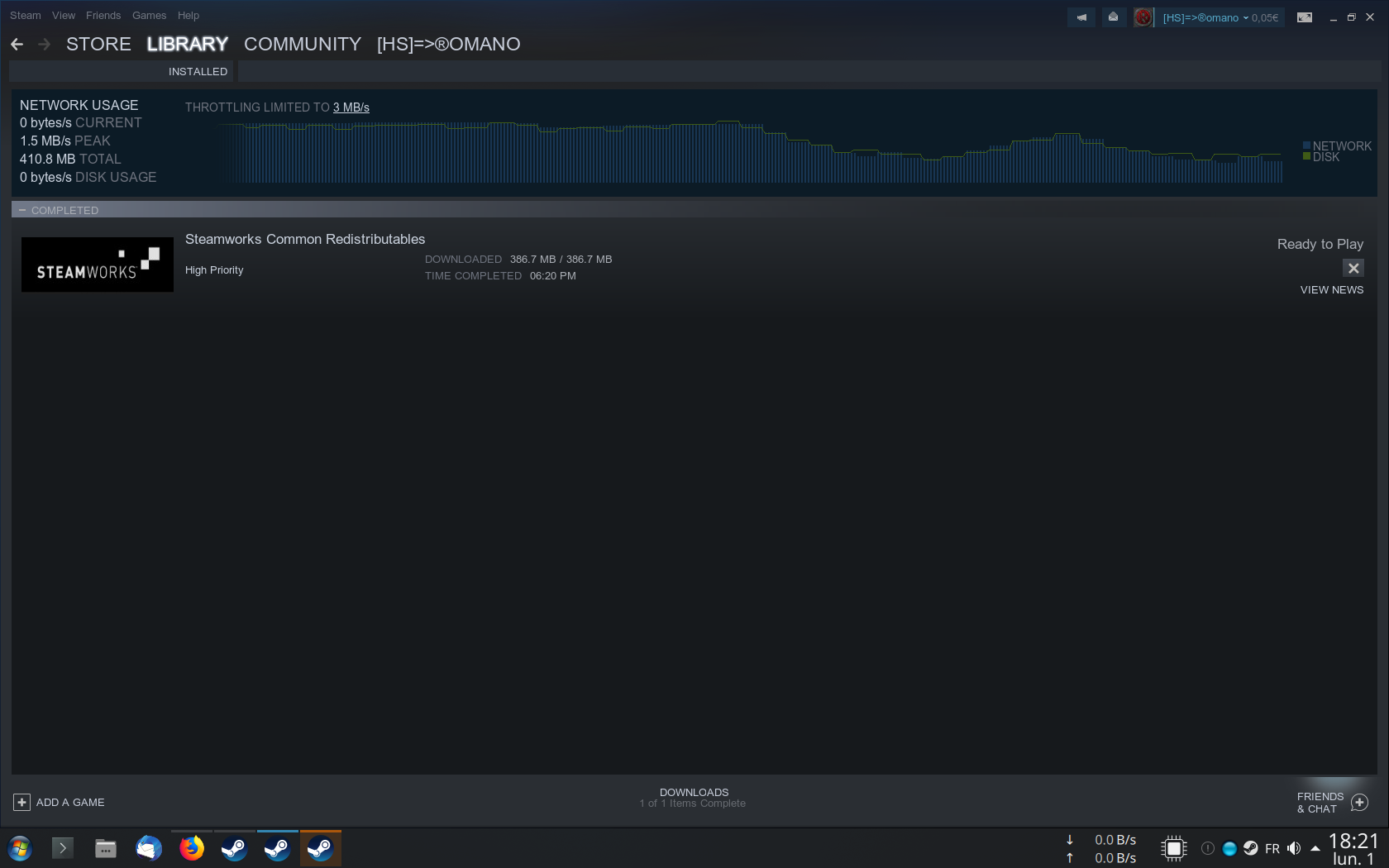
On a side note 100% of the time when you start Killing Floor 2 it also installs the .Net Framework (but not the other redistributable). This one pretty sure is a known and old issue, that would be cool if this could be fixed too, but the real issue for me is the distributable packages which download every time I have to restart Steam (or the computer), because I do not have optic fiber or cable connection, but a low speed DSL connection.
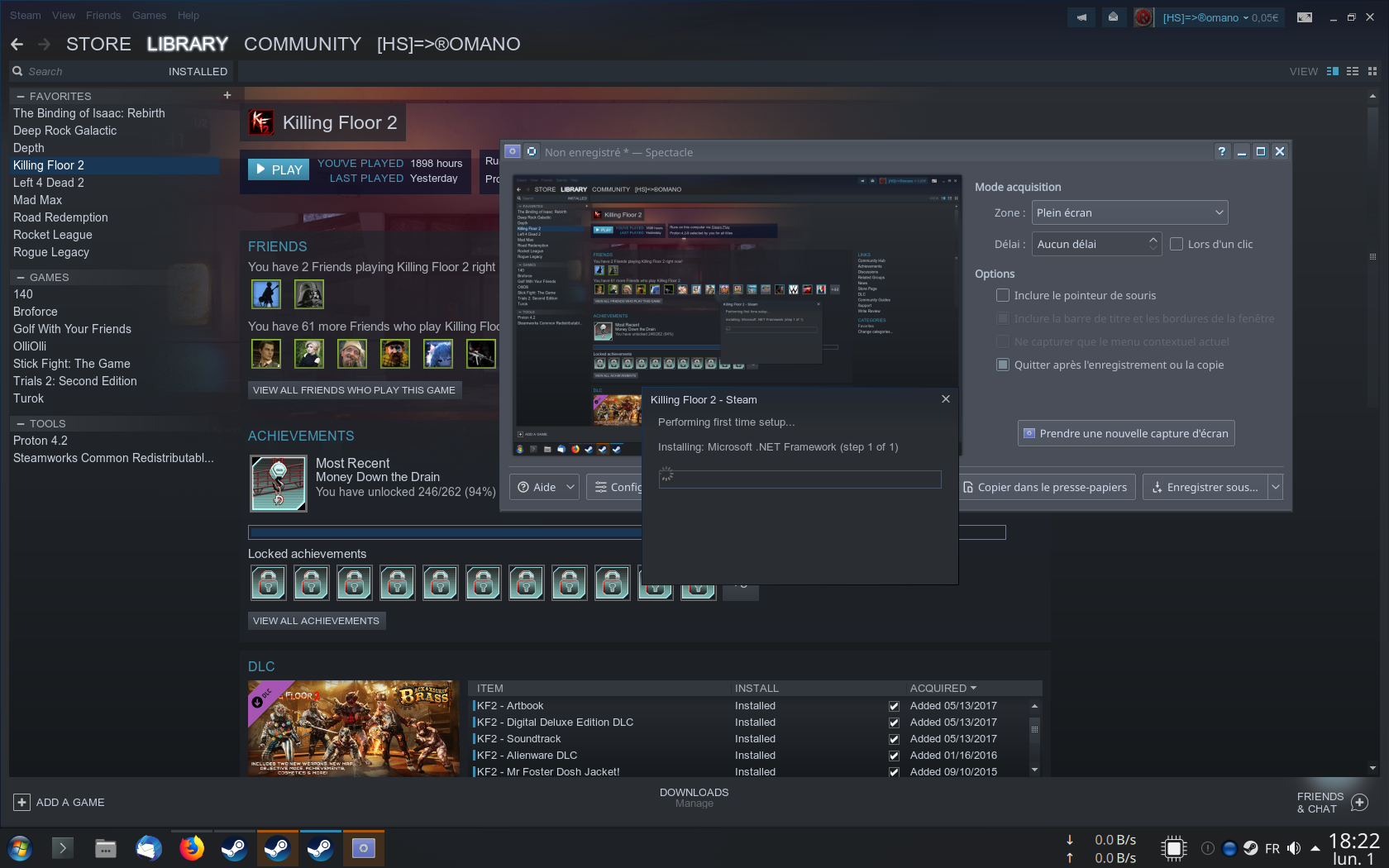
@kisak-valve @exezin @gudvinr anyone?
@Zorrototo It always runs the install for .net every time I start the game, afaik this is a known issue. I don't get the same issue with the Redistributable re-downloading every time I start steam, though.
Perhaps that issue might be related to another game in your library? I've seen others mention it on general issue threads in steam discussions, so it might not be proton-related.
OK Thanks. I didn't find anything in google but now you said that, I found a related issue in the Steam Linux client GitHub https://github.com/ValveSoftware/steam-for-linux/issues/6299
Disabling Shader Pre Caching in Steam client Settings fixed that issue :)
I fixed the issue of Dot Net Framework reinstalling every time you start the game, I used this script https://gist.github.com/Zorrototo/8a3b3c4c60319988b2ecab6ceaeb4bdf that I modified from this comment on Proton issue here https://github.com/ValveSoftware/Proton/issues/24#issuecomment-483227217
Then simply call the script with proton version (currently installed 4.2), and game AppID:
./protoncfg.sh 4.2 232090
It will open regedit on your Killing Floor 2 prefix, from here simply browse to
HKEY_LOCAL_MACHINE/Software/Wow6432Node/Valve/Steam/Apps/CommonRedist/
Then create a new KEY called 3.5, and inside of this key (or folder if you want) create a new DWORD with name 3.5 SP1 with value 1

Exit regedit, start Steam, start the game, no more install of this Dot Net Framework every time you start the game.
@kisak-valve that would be cool if this was fixed in Proton by default. I now know more and will manually fix my games if needed but I'm sure I'm not the only one annoyed by these waiting times and SSD premature wear due to this redistributable installing every time you start the game.
EDIT: I made a little modification to the script above, to be able to use winecfg or regedit on the game prefix without modifying the script, see here http://www.redorchestra2.fr/omano/bludit/using-winecfg-or-regedit-on-a-proton-game-prefix
EDIT2: Script modified to be able to customize the Steam and Library path.
For those using amd cards, how does the game look lately?
ACO is tracking an issue that involves even llvm.
For those using amd cards, how does the game look lately?
ACO is tracking an issue that involves even llvm.
Yeah, it looks... wrong... also the framerate looks worse


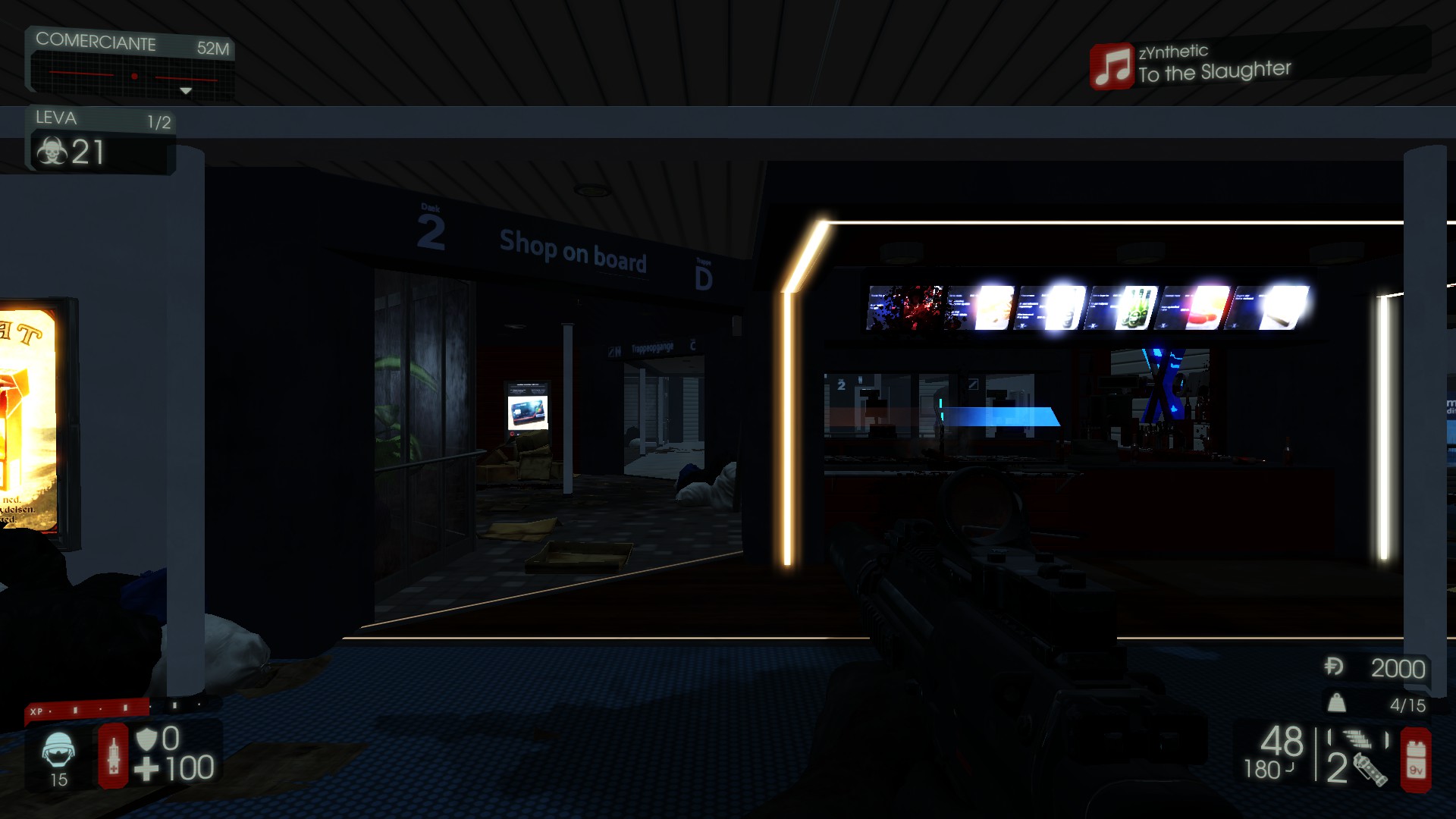


Is that with ACO? LLVM?
Only ACO have this problem, if you use RADV_PERFTEST=llvm %command% everything backs to normal.
You should post your finding here then.
DJ Scully (Digital Deluxe bonus) is gone from character selectiion. Am I the only with such thing?
nwm
If the game fails to sync with your Steam inventory, then you have no extra content.
It's not an inventory item though.
No inventory = no Steam sync = no connection between Steam API and game client = no extra content I guess as It probably has to check for DLC validity through a connection with Steam. Check if you have inventory when you have no DLC character.
It's NOT an inventory item, it's DLC. And I had inventory working.
I understood the DLC is not an inventory item.
EDIT: so, why the 'nvm'? It was a non issue? Was a temporary issue? Fixed itself after restarting the game/steam/computer? It wasn't checked in the DLC tab of the game?
EDIT 2: I guess there was no issue to start with..
Doesn't appear to properly cap mouse pointer inside the game when playing in Gnome Wayland session.
Does anyone experience frequent crashes on online playing?
@xDShot I get the odd crash after a while but only ever when connecting to a server/downloading a map. Those happen just as much on Windows, though.
for this crash @exezin this would probably fix it, this is an issue in the default config files, since I changed it I never crash on map loading/map change, server join. https://forums.tripwireinteractive.com/index.php?threads/game-keeps-crashing-when-joining-a-server-after-i-disconnected-from-previous-one.2331860/#post-2332939 also worth a try @xDShot
cheers!
@Zorrototo It's only a rare crash and its not linux/proton specific but I'll give this fix a shot anyway, thanks!
Great. Now just after I re-installed the game, it crashes just when I launch it. volvoplz

Clues?
Do the basics, verify the files again in Steam in game properties-> Local files, also did you clean the Proton prefix? delete /home/YOU/.local/share/Steam/steamapps/compatdata/232090/
Every time i start game, steam says it's installing .net framework
You can have a look at my personal notes to fix this problem http://www.redorchestra2.fr/omano/bludit/fixing-redistributables-reinstalling-every-time-you-start-a-proton-game or read this comment above that sums it up https://github.com/ValveSoftware/Proton/issues/1328#issuecomment-511651465
Launching Killing Floor 2 installs .NET framework everytime
Issue transferred from https://github.com/ValveSoftware/Proton/issues/3342.
@jazztickets posted on 2019-12-20T19:24:04:
Compatibility Report
- Name of the game with compatibility issues: Killing Floor 2
- Steam AppID of the game: 232090
System Information
- GPU: RX 570
- Driver/LLVM version: mesa 19.3.1
- Kernel version: Arch linux, 5.4.5
- Link to full system information report as Gist: https://gist.githubusercontent.com/jazztickets/41d42605558c161e539360335039be87/raw/fd9ed5620514275aa003d7e36fa22ce50a35b6cc/ryzen
- Proton version: 4.11-11
I confirm:
- [x] that I haven't found an existing compatibility report for this game.
- [x] that I have checked whether there are updates for my system available.
Symptoms
When launching killing floor 2, it installs Microsoft .NET framework everytime.
Reproduction
Launch killing floor 2
@jazztickets read recent Zorrototo's comment.
A little off-topic, but Nvidia FLEX works with the modified Proton version from Glorious Eggroll (because I suppose it reports the video card as Nvidia card when official Proton reports all cards as ATI cards for working around some issues in some games) here https://github.com/GloriousEggroll/proton-ge-custom/releases simply download the latest version (currently 5.0-EG-1) and extract the folder in ~/.local/share/Steam/compatibilitytools.d/ (create folder if it doesn't exist). Then restart Steam and you can globally enable this version in Steam settings, or individually on each game in Properties.
I only tested Gibs for now and Gibs work in Killing Floor 2. Will test Gibs+Fluids later and edit this message.
Note that you shouldn't report issues with this modified version of Proton here, but on his GitHub.
Also note that you see log flood about nvapi in Proton logs with this modified version (part of the issue worked around by reporting all cards as ATI in official Proton).
EDIT: Gibs AND Fluids work https://steamcommunity.com/sharedfiles/filedetails/?id=1991511749 but I noticed this modified version has the old VOIP bug (which has been fixed in Proton 4+) if someone uses VOIP it crashes, so you need to disable VOIP in config files, it will also crash on some custom maps so it is not perfect at all, but at least you can have fun with FLEX in game for a moment if you want.
EDIT2: and now after switching back to official Proton, updating my system, and god know what, I can't have FLEX enabled anymore.. I don't get it, at least I have screenshot proof that I wasn't crazy.. but I don't understand why I can't anymore enable FLEX with the Glorious Eggroll modified Proton..
I'm getting very poor FPS with a Ryzen 7 3700x and a GTX Super 2070.
I am silly, see two comments below.
try PROTON_NO_ESYNC=1 %command% in game properties->startup parameters
I run the game in ULTRA with Ryzen 3600 and GTX 1060... so you have issues or we don't have same definition of 'poor FPS'. Also what resolution do you run the game at, because if you say 8K then that can explain the 'poor FPS'.
edit: contacted me on Steam to troubleshoot
Turns out I borked it because of course I did. @Zorrototo helped point out that I had a very, very dirty prefix and I just needed to delete it and that solved everything. Now running at ~150 FPS on ULTRA. D'oh.
Also as a reminder for everyone, if you randomly crash on map load/server join then you probably need to do as explained here, this is a problem also on Windows because devs changed default values for who knows what reason, and it broke the game for half the player base. here: https://forums.tripwireinteractive.com/index.php?threads/game-keeps-crashing-when-joining-a-server-after-i-disconnected-from-previous-one.2331860/#post-2332939
Killing Floor 2 Game crashes before the boss's presentation
Issue transferred from https://github.com/ValveSoftware/Proton/issues/3876.
@jrrabier posted on 2020-05-16T12:30:54:
Compatibility Report
- Name of the game with compatibility issues: Killing Floor 2
- Steam AppID of the game: 232090
System Information
- GPU: GTX 1050
- Driver/LLVM version: 4.6.0 NVIDIA 440.82
- Kernel version: 5.3.0-7648-generic
- Link to full system information report as Gist: https://gist.github.com/jrrabier/9178379fa0dafcb8c2d8e137c1e3b3e7
- Proton version: 5.0-7
I confirm:
- [x] that I haven't found an existing compatibility report for this game.
- [x] that I have checked whether there are updates for my system available.
steam-232090.log
Symptoms
Since the release of the latest 5.0-7 proton version, the game crashes just before the boss's presentation (just after the wave announcement), redirecting me to the bug report (i already sent some reports), i had no problems with the previous version (5.0-6), i tried with some custom proton versions (5.6-GE-2, 5.8-GE-1-MF), don't have this bug but another... :)
Reproduction
Everytime
Hello @jrrabier, looks like a memory allocation failed three times before giving up.
err:vulkan:init_fs_hack_images vkAllocateMemory: -2
err:vulkan:wine_vkCreateSwapchainKHR creating fs hack images failed: -2
...
err:   D3D11SwapChain: Failed to recreate swap chain
Am i supposed to try something ? or just try another proton version ? and is it possible to switch back to proton 5.0-6 ?
Since last KF 2 updates, the VOIP in game doesn't work anymore. It was changed to use VIVOX communication in game now to allow cross play with EGS players. here is my last session proton log if it can help, but I didn't see anything relevant.
I tried to use VOIP in game and I saw the little icon with other player's names but neither me or us could hear a sound from each other.
It was previously using Steam native thing I think, and it was working back then.
Here is what I filter in the game log file itself, searching for 'vivox'
The issue with Vivox voice chat seems to be that it fail to 'login'
vivoxLoginState != login_state_logged_in
@kisak-valve is the Vivox issue for this game and all others using it tracked or is it something ignored for whatever reason? Not having voice chat in multiplayer games is often an issue.
Game works, but it only starts after 2-3 restarts.
I press play and it shows game logo and black window
I restart it 2-3 times and game starts
Proton experimental
The black screen is normal wait a minute after startup credits finish. This is the normal game behavior.
I've debugged the crash on first start a bit, only to find it behaves exactly the same on native Win10 for me: crashes on first start (or whenever I delete 'My Documents\My Games\KillingFloor2\KFGAME\Config*'), also hangs with a black window for some sufficient time while loading stuff. So probably these issues are not Proton specific.
Since last KF 2 updates, the VOIP in game doesn't work anymore. It was changed to use VIVOX communication in game now to allow cross play with EGS players. here is my last session proton log if it can help, but I didn't see anything relevant.
I tried to use VOIP in game and I saw the little icon with other player's names but neither me or us could hear a sound from each other.
It was previously using Steam native thing I think, and it was working back then.
@Zorrototo Could you please retry the Vivox chat with Proton 5.13-4 and if the issue is still there, attach the full log recorded with the following launch options (which includes the failing voice chat session):
WINEDEBUG=+pid,+loaddll,+timestamp,+seh,+crypt,+bcrypt,+advapi,+cred,+context,+iphlpapi,+winhttp,warn+all,-heap %command%
There is an issue in the native game, that after the intro video (and it is even worse if you skip them), the main menu music is playing, but the interface is freeze on a black screen for long time until you eventually reach the main menu. This issue is fixed in Proton-6.15-GE-2 you can reach the main menu instantly, better than on Windows which is affected like the original Proton.
The problem is that this custom Proton version brings a new issue where you have no connection with the item server (red blinking Item Server Connection on top right in main menu), and your Inventory menu is empty BUT the game still knows your cosmetic items from your Steam inventory, as you can still equip them on the characters directly from the Gear menu (but as said, the Inventory menu itself shows nothing, no cosmetics, no crates, no crafting possible).
I just wanted to bring that to players attention as some may prefer to not have to wait for a minute before reaching the menu. Maybe it can also be a good thing to let people know so maybe someone can figure it out and bring some Proton-GE fixes into main Proton?
Replying to https://github.com/ValveSoftware/Proton/issues/1328#issuecomment-902312644
I'm also having this issue as well, and the seasonal zeds don't seem to load. Did you ever find a fix?
The seasonal zeds don't load because there is no more seasonal event.
If you're talking about a fix for the long black screen before reaching the menu, there is no fix, no. What was "fixed" with Proton-6.15-GE-2 was that this version of Proton GE was broken, and the game had issues communicating with Tripwire's servers, and Steam servers, and it broke things (but seemingly fixed the black screen before reaching the menu, it was going straight to the main menu after starting the game).
So it could be a lead for Tripwire to fix their broken game, maybe some connections and/or loading of stuff from remote servers is making the game hang before reaching the main menu, for sure I went back to official Proton to have my inventory and cosmetic working properly.
So no, there is no fix for the long hang on black screen before reaching the main menu (as I said, this is an issue in the Windows version of the game, on Windows, natively).
I wasn't referring to the loading screen, should have clarified. I know the seasonal events are over as well, but with GE proton, my game did not know that, until I ran Proton Experimental, then everything worked fine, cosmetics, zed skins or lack thereof, and item server connection is in working order.
Guess you can't have it all eh. I'll just use the official proton versions for this game.
Game doesn't show items in "Inventory" tab although items themselves (cosmetics) are applied to character/weapons and shown during playthough.
Compatibility Report
- Name of the game with compatibility issues: Killing Floor 2
- Steam AppID of the game: 232090
System Information
- GPU: AMD Radeon R9 M395X (Tonga)
- Driver/LLVM version: Mesa 21.2.6
- Kernel version: 5.15.6
- Link to full system information report as Gist: https://gist.github.com/jmc-figueira/2407941a58248a76b852d4ec91bfc17a
- Proton version: 1639067376 experimental-6.3-20211209
I confirm:
- [X] that I haven't found an existing compatibility report for this game.
- [X] that I have checked whether there are updates for my system available.
Symptoms
Killing Floor crashes after the splash screen with the error message "BugSplatRC resource DLL not found". No further information is given, other than what might be present in the provided log file. I was not able to identify specifically which DLL might be missing from the game, and verifying the integrity of the game files reports no errors.
Of note is the fact that I'm attempting to run the game on NixOS, so it might be an issue related with the way NixOS packages Steam and associated runtimes, although the existing issues in the nixpkgs repository related to Steam and Proton seem to be resolved as of the present date.
Reproduction
- Install Killing Floor and attempt to run it through Proton Experimental.
- After the splash screen, the game should hang on a black screen and the error message described above should appear.
Hello @jmc-figueira, your log includes err:winediag:NtCreateFile Too many open files, ulimit -n probably needs to be increased. Please check the output of ulimit -Hn and verify it is a high value and not 4096.
The output of ulimit -Hn is 524288
Additionally, the version of systemd in my system is 249.5, which should mean that this step is not required, as per the instructions you linked.
Seems like there is a regression in Proton 7. The game starts without the "normal" issue (it is the same on Windows) of black screen for a minute with main menu music before being able to interact with main menu, and there is no connection to item server, you can't access you in game item inventory. I tried a fresh prefix it is always the same (actually the first time I launched it after deleting the prefix folder, I had no warning about an issue with item server connection, it is only after restarting the game for applying video settings that the issue occurred, and now I can reliably reproduce the issue by deleting the prefix, starting the game -> instant issue no need to restart). This issue is exactly the same as I had in various Proton-GE version, described in this post https://github.com/ValveSoftware/Proton/issues/1328#issuecomment-902312644
Switching back to Proton 6.3-8 has the "normal" issue of freeze black screen before being able to interact with the main menu, and you don't have issue with the item server connection, you can access inventory, you can craft/ items, destroy crates, and equip your items properly as intended.
Here is a log, maybe the issue is related to this error in log, that doesn't exist on Proton 6 276947.229:0134:0138:err:kerberos:kerberos_LsaApInitializePackage no Kerberos support, expect problems
steam-232090.zip
Apparently, Proton Experimental fixes the issue above (meaning the game, like on Windows, hand on black screen on launch before reaching main menu, with music playing, and no network issue with Steam inventory). Hope the changes stay and get merged in Proton 7 at some point.
I noticed tonight that I could hear and talk to people with in game voice chat (Proton Experimental). Not sure if it is fully working or not as it was only one person talking to me.
Vivox starting to work would be related to https://github.com/ValveSoftware/Proton/issues/5827#issuecomment-1126542829.
Just retested with stock proton (7.0-6) after using GE for very long. It seems that current proton stable already has the item server fixes. Didn't try VIVOX, perhaps someone could find a server where people actually try to talk over VIVOX...
I don't know what you're talking about, everything is working fine since very long time now on official Proton 7.
Hi everyone, sorry if this is the wrong place.
KF2 always crashes when I try to join a game online. It works fine when I play offline. I'm using Proton 8.0-3.
Should I paste the logs from the bugsplat window?
You could just do the basics:
- delete the Proton prefix for KF2
~/.local/share/Steam/steamapps/compatdata/232090(or rename it for safe keeping) - verify game files in Steam
But maybe you have the problem that even occurred on Windows:
UPDATE: support has reached me out and this, for now, seems to work:
travel to your ...\Documents\My Games\KillingFloor2\KFGame\Config... directory and open your KFEngine.ini. Once there, run a search for a line containing MaxObjectsNotConsideredByGC=179220. Once you've found it, try changing the value from 179220 to 33476, making sure not to change the values of any other functions.
so the path would be ~/.local/share/Steam/steamapps/compatdata/232090/pfx/drive_c/users/steamuser/Documents/My Games/KillingFloor2/KFGame/Config/KFEngine.ini
Not sure if still relevant but it helped me in the past.
That worked, thanks a lot! I previously applied this change, but on the wrong file (had it in ~/.local/share/steam too).
For some reason Nvidia FleX is not working. I'm not sure what the dependencies are.
Installing a newer PhysX and/or using PROTON_HIDE_NVIDIA_GPU=0 PROTON_ENABLE_NVAPI=1 does not help.
It is sometimes available with a Proton-GE version depending on release version. I never saw the option available in normal Proton.
This feature is broken anyway, on Windows, when you have Gibs+Fluids it tanks the FPS the more you play leading to an unplayable experience. (Just Gibs works kinda though, still the feature was never supported properly it was a gimmick right from start).
Mmh, I never got it to work with recent GE-Proton versions either. I have used FleX in Windows and it runs fine, at least used to, I haven't played it in Windows for a long time tho'.
For sure I had it to work with a few Proton-GE version: https://steamcommunity.com/sharedfiles/filedetails/?id=1991511749
Make sure to delete the prefix every time you try a new Proton version
For sure I had it to work with a few Proton-GE version: https://steamcommunity.com/sharedfiles/filedetails/?id=1991511749
Make sure to delete the prefix every time you try a new Proton version
Yes, perhaps with some older version but not 8.25. I'm pretty sure I had it enabled once in Linux too.
The screenshot was years ago, the first time I had it available but I had it recently too on Proton 7 at least I think.
FYI, cuda support is disabled in wine, you need to use this to get PhysX and Nvida FleX working (on GPU-level):
https://github.com/SveSop/nvidia-libs
To be on the safe side, delete your game prefix first tho'.
I get really erratic performance nowadays.
I go from 150 FPS to huge FPS dips to sometimes 10 FPS, then it comes back to better FPS.
I made a new prefix, same issue.
There was FPS dips before but now it is just unplayable when it goes low FPS like that.
Maybe it is the last game updates that broke something.. or maybe something else on my side.. but this is the only game having this behavior.
I know you're not supposed to use Git as a support channel, but Steam support is not trained for this type of issue. Additionally, Linux users who were affected by the same bug back then suggested I ask here.
I was an early Proton tester and decided to test KF2. Unfortunately, the early Proton version would corrupt your save file. If you recovered your save file, you would receive thousands of loot boxes. It's annoying to browse your items in-game and in the Steam client. Now that KF3 is coming, it's time to revisit the game. Is there any way to have this bloat removed?
@kisak-valve
You need to contact TRIPWIRE's support They can deal with your KF2 inventory.
Am I the only one with bad performance since a few game updates? My FPS can dip to low 20 FPS from 100+, This game was working great at some point but now every time I play I know it will be bad.
//EDIT: just played a game, I get 150FPS with my RX 6800, but in the late waves I dip to 50-30 FPS for a moment before it gets back to higher FPS. Unplayable when it does that.
//EDIT2: I have done many things to start over on fresh clean installation of the game, besides reinstalling the whole OS, and nothing worked. Suddenly two weeks later all my past months issues are gone, game behaves as it should, max performance. I don't know what fixed it though, as it did not fixed itself after the many things I have done but after I have done nothing I can remember.
Is Vivox still an issue? I've tried using voice chat with Proton Experimental, and while I get the voice indicator I'm not able to talk, despite being able to hear the other players.
Proton versions
proton experimentalx6 2024-11proton 8.0-3x1 2023-08proton 6.3-8x1 2022-02proton 6.15-ge-2x2 2021-11proton 5.13-4x1 2020-12proton 5.0-6x1 2020-05proton 3.16x2 2019-06proton 4.2-4x2 2019-05proton 4.2x1 2019-05proton 3.16-4x2 2018-11
Launch options
PROTON_ENABLE_NVAPI=1x1 2024-01PROTON_HIDE_NVIDIA_GPU=0x1 2024-01WINEDEBUG=+pid,+loaddll,+timestamp,+seh,+crypt,+bcrypt,+advapi,+cred,+context,+iphlpapi,+winhttp,warn+all,-heapx1 2020-12PROTON_NO_ESYNC=1x2 2020-03RADV_PERFTEST=llvmx1 2019-08PROTON_USE_WINED3Dx1 2019-06PROTON_LOG=1x2 2019-05
Launch lines
PROTON_NO_ESYNC=1 %command%x1 2020-03RADV_PERFTEST=llvm %command%x1 2019-08PROTON_NO_ESYNC=1 gamemoderun %command% -nostartupmoviesx1 2019-06
Upstream links
- ValveSoftware/Proton/issues/5827x1 2022-05
- ValveSoftware/Proton/issues/3876x1 2020-05
- ValveSoftware/Proton/issues/3342x1 2019-12
- ValveSoftware/Proton/issues/24x1 2019-07
- ValveSoftware/steam-for-linux/issues/6299x1 2019-07
- doitsujin/dxvk/issues/534x1 2019-06
- ValveSoftware/Proton/issues/2615x1 2019-04
- ValveSoftware/Proton/issues/2360x1 2019-02
Compatibility Report
System Information
I confirm:
Symptoms
when you start the Game with the new StemaPlay, all the progress get corrupted, and affects your online stats
Items and so, still remains the same
Reproduction