The codecs and media frameworks support meta-tracker
The problem is that there are games like Obduction that need Windows Media Foundation/Windows Media Feature support as they use a dll not installed otherwise by a wmv player like WMP. https://github.com/ValveSoftware/Proton/issues/327
So its not just being able to play a video, they literally need this dll (and whatever else is tied to it) to playback the video. UE4 games all have the option of needing this dll if it is used in a Windows release for video playback. Possibly Unity games as well.
Although, as long as some version of it can be found by the game (and used), it could even just be a mock one that uses a different means.
While, some games seem to be able to get by with WMP installed as far as I can tell from various posts on the internet, it would be better to go the whole mile and support more than just simple wmv format. WMV is a part of a whole pie.
@byte1024 Oh, I didn't know that more might be needed beside just fixing "simple" .wmv file playback.
I understand your point correctly:
- Some games also require Windows Media Foundation and/or Windows Media Feature support.
- Those games use a dll (and all that is tied to this dll) which is not installed by a wmv player like WMP.
- Therefore just fixing .wmv playback will not solve the whole problem games have with playback.
- So it's better to implement support for the whole "Windows Media Foundation and/or Windows Media Feature" framework.
@byte1024 Oh, I didn't know that more might be needed beside just fixing "simple" .wmv file playback.
I understand your point correctly:
1. Some games also require Windows Media Foundation and/or Windows Media Feature support.

2. Those games use a dll (and all that is tied to this dll) which is not installed by a wmv player like WMP.

3. Therefore just fixing .wmv playback will not solve the whole problem games have with playback.

4. So it's better to implement support for the whole "Windows Media Foundation and/or Windows Media Feature" framework.
It looks like there might even be more. The only log I found in all the links you posted (here: https://github.com/ValveSoftware/Proton/issues/137) needs quartz.dll to find system codecs and uses fmod for in-game sound.
The log for that one shows some stuff used in quartz.dll can't be found:
41489.934:0008:0032:err:quartz:GetClassMediaFile Media class not found
41489.935:0008:0032:err:quartz:GetClassMediaFile Media class not found
41489.936:0008:0032:err:quartz:GetClassMediaFile Media class not found
That's all I noticed in that log, but its easier to find this stuff when you know the filename of the video being played since a search goes right to it if its found in the log.
And an explanation that Wine's quartz.dll is fake and missing stuff.
https://www.winehq.org/pipermail/wine-users/2002-November/009217.html
And the corresponding log entry shows this is still true:
41489.932:0008:0032:trace:module:load_dll L"C:\\windows\\system32\\quartz.dll" is a fake Wine dll
Some seem to say quartz is a part of the WMP install, but quartz is also DirectShow (DirectX media) which was replaced with WMF that I mentioned. https://en.wikipedia.org/wiki/DirectShow
and Microsoft also mentions WMF in the what's new section of DirectShow: https://docs.microsoft.com/en-us/windows/desktop/directshow/whats-new-in-directshow
Its a media pie, all these pieces are a part of it, but Wine has been failing on them and now Proton is too.
Wine has a directshow implementation, which depends on gstreamer. Since we can't depend on the system having gstreamer installed, we will need to build and ship it with Proton. Worse, we also would need to ship the codecs, which may have patent/licensing issues. It hasn't been looked into yet.
Wine does not have a MF implementation yet. There's some work being done on it, but it's not nearly ready. If anyone is looking to contribute to Wine, that may be a decent place to get started.
+1
I have tried a lot of different configurations.
Haven't had any success with codec packs / wmp.
VLC in Proton plays those videos though, so it should be possible.
Tried Proton 3.16-4 beta and 3.7-8
Graphics: AMD RX580
@niikoo Thanks for trying things out. :smile:
I must confess, my understanding of this issue is very limited. @aeikum knows way more about this than me... So @aeikum, could you perhaps give your thoughts on this?
VLC has it’s own codecs, afaik.
+1
it affects all Blazblue games. I tried manually installing quartz into their prefixes which doesn't work with a proton prefix but with a normal wine one.
this also effects the new RE2
Hello @james-munson, the libraries you've shared are not free and it's problematic to redistribute them.
Add the six games that I just have referenced to the list (Windows Media Foundation).
Hi @kisak-valve, I'm thinking of changing the layout/format of this list. But I want your guidance/approval first.
Problem description:
- The list is getting very big and unwieldy.
- I'm not sure this list is actually helpful in its current format.
- The current list seems mostly to be focused on Windows Media Foundation support issues, so it might make sense to retool the list as such.
Current situation:
- Big list, with lots of subcategories.
- Lack of focus on the precise issue that is needing the fix ( .wmv / WMP9 / WMP10 / WMF ).
- Manual labor by me to get the game in the right subcategory ( .wmv / WMP9 / WMP10 / WMF ).
Suggested situation:
Change title of issue to: "[Feature request] Add Windows Media Foundation support to Proton", so that all current issues are included, regardless of current subcategory.
Delete subcategories, and only have one category: Games affected by the lack of WMF support
Questions to you:
- Your thoughts on the current format?
- Subcategories, yes/no?
- Permission to rename the issue to [Feature request] Add Windows Media Foundation support to Proton?
- Permission to remove the subcategories in favor of only one category?
- Should I remove the section: "Thoughts on potential fix:"?
It would be better to ask a Proton dev, but I think it's probably best to split this apart to individual components involved, otherwise the notes on the individual games are of more value. The general idea is that there should be a single actionable issue per issue report.
My impression was that the intent of this feature request was for the codec(s) to be made available, and the frameworks needed to get to that codec creeped in over time.
Yeah, this list is not "one actionable issue per report" anymore. I agree with you that splitting this apart into their components would probably be cleaner.
The problem is, I myself don't know what to look for. I don't know the individual components, so I would need help splitting this issue. I don't know what parts are codec(s) related and which are framework(s) related. If the developer gives me a list of what is codec and framework and how to categorize the games, I'll do the splitting up into new issues myself.
Could you get a developer to look over this, and give their opinion/guidance? I don't know who would be the developer to ping for this, you probably do know who knows most about this.
There is quartz.dll that is needed for mostly older games using .wmv files and then there is also the newer mfplat.dll that is required by mostly newer games.
There is currently a workaround to install mfplat.dll manually into a prefix:https://old.reddit.com/r/linux_gaming/comments/ajyx51/resident_evil_2_playable_with_the_latest_dxvk_and/ef0pqem/
I do not know if or to what extend mfplat.dll can replace quartz.dll to get playback to work for older games.
The problems are understood. We need an mfplat implementation (we have a dev working on this) and we need to make a decision on how WMV and other codecs are to be licensed.
It may be interesting to split games into two categories (mfplat users and quartz users) and also list what codecs are used by each game. This is actually something we're working on internally, so I wouldn't go out of your way to gather this information. But if you have that info already and want to sort it, feel free.
Hi @aeikum thanks for your comments and guidance on how to organize this issue.
I've gone ahead and split all those games into two categories as best as I can. I searched in their respective proton logs for quartz or mf and noted the results.
I found that some games don't yet have a clean proton log attached to their issue, I have commented in their respective issues, to ask for a clean proton log.
I've removed my section "thoughts on potential fix" seeing as you're already having more knowledgeable people looking into it. :smile:
This manual fix will work with games requires mfplat.dll
https://github.com/doitsujin/dxvk/issues/728#issuecomment-459839962
Infectonator 3 : Apocalypse
https://github.com/ValveSoftware/Proton/issues/2193 Also requires mfplat support.
Dead or Alive 6 seems to require MediaFoundation for the story mode, while online multiplayer, controllers, and everything else seems to work.
@z0z0z There is no open issue yet for Dead or Alive 6, so I've added the github search link for the app id in the list. I've also referred to your comment.
I'll fix the listing for DoA 6 when there's an proper issue report.
Edit: there's a ticket for DoA6 now at #2420, so I've edited my list, to include this ticket.
This being implemented would almost instantly make a good percentage of games available via proton.
Is this so hard to implement?
Is this so hard to implement?
They implemented some pieces, it will need some time to be fully implemented. They are half way there, so no need to worry.
But if I install vía winetricks in a protoprefix a software like quartz, may ve possible for some games run video-based cutscenes?
@vjr2 Please read this message: https://github.com/ValveSoftware/Proton/issues/1464#issuecomment-458144128 it explains the status of the project. The main issue is licensing the needed parts for usage in Proton.
@vjr2 you have to install stuff like wmp10, which can’t be installed in a 64bit prefix and proton is 64bit only
Zero Escape collection on steam requires quartz and the MP43 codec. (at least for 999)
https://github.com/ValveSoftware/Proton/issues/1893#issuecomment-478333802
Anyone know how to get that working?
@basxto I would be surprised if it is that simple, but if you want to give it a try, you can get a 64-bit WMP 11 here:
https://www.microsoft.com/en-us/download/windows-media-player-details.aspx
I wrote a script to easily install Media Foundation support in Wine prefixes.
Absolutely in support of this. Excited to see it being worked on.
Hi @kisak-valve, has the Proton team thought about labeling the relevant issues with tags like quartz and Media Foundation and WMVcore.dll? Or would that just clutter up the issue tracker with tags/labels? Maybe that would provide a easier way to search the issue tracker than my list?
I'm just asking, I'm not pushing for or against labeling. :smile:
@HonkingGoose I have done some more testing, here is some additional info for a few more of the games:
#1319
Codecs used: WMV, VC-1 + WMA
Quartz "76044.767:0028:002d:err:quartz:GetClassMediaFile Media class not found"
#1781
Codecs used: WMV, VC-1 + WMA
Log mentions "Microsoft.Xna.Framework.Video.dll", quartz maybe?
#2576
Codecs used: WMV, VC-1 + WMA
#829
Codecs used: WMV, VC-1 + WMA
Quartz "3241.574:0027:0028:err:quartz:GetClassMediaFile Media class not found"
(I have posted the proton and media info logs in each of those issues)
Thank you @AwesamLinux, for your testing work. I've updated my list with your findings.
Star Wars The Force Unleashed 2 - no cinematics at all:
0082:err:quartz:GetClassMediaFile Media class not found
0082:fixme:quartz:VMR9SurfaceAllocatorNotify_AdviseSurfaceAllocator (0x20ce648/0x20ce438)->(...) stub
0082:err:quartz:GetClassMediaFile Media class not found
0082:fixme:quartz:VMR9SurfaceAllocatorNotify_AdviseSurfaceAllocator (0x20ce648/0x20ce438)->(...) stub
0082:err:quartz:GetClassMediaFile Media class not found
0082:fixme:quartz:VMR9SurfaceAllocatorNotify_AdviseSurfaceAllocator (0x20ce648/0x20ce438)->(...) stub
0082:err:quartz:GetClassMediaFile Media class not found
0082:fixme:quartz:VMR9SurfaceAllocatorNotify_AdviseSurfaceAllocator (0x20ce648/0x20ce438)->(...) stub
009b:fixme:imm:ImmReleaseContext ((nil), (nil)): stub
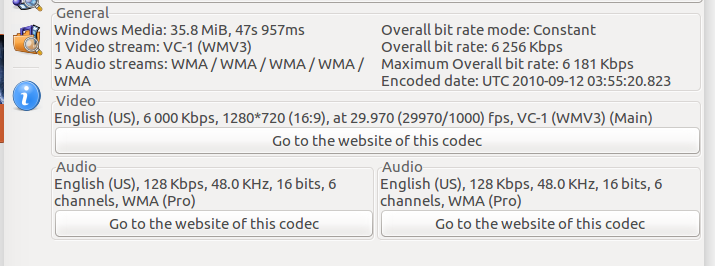
@corvusd Thanks for your comment, I've added the game and codecs to the list.
#666 - No intro/tutorial videos, quartz
$ ffprobe FMV_Intro_OneShot.avi
Input #0, avi, from 'FMV_Intro_OneShot.avi':
  Metadata:
    encoder         : MEncoder SVN-r33883(20110719-gcc4.5.2)
  Duration: 00:00:51.60, start: 0.000000, bitrate: 4298 kb/s
    Stream #0:0: Video: wmv2 (WMV2 / 0x32564D57), yuv420p, 1280x720, 4159 kb/s, SAR 1:1 DAR 16:9, 30 fps, 30 tbr, 30 tbn, 30 tbc
    Stream #0:1: Audio: mp3 (U[0][0][0] / 0x0055), 44100 Hz, stereo, fltp, 128 kb/s
MUST HAVE! Problem with Battlefleet Gothic Armada misson "Hulk" is saved now.
You can add GTA5 to the list though the impact isn't clear as it works for some.
@h1z1 The Self Radio in GTA V does not work due to the lack of an implementation for mfplat:mfsourceresolver_CreateObjectFromURL. I imagine that's the impact it has.
[#2316](url=https://github.com/ValveSoftware/Proton/issues/2316) the game freezes on intro
NickelodeonLogo.mp4 codec:
Video: MPEG4 Video (H264) 1920x1080 30fps 275kbps [V: h264 main L4.0, yuv420p, 1920x1080, 275 kb/s]
TorusLogo.mp4 codec:
Video: MPEG4 Video (H264) 1920x1080 29.97fps 15602kbps [V: Core Media Video (h264 high L4.0, yuv420p, 1920x1080, 15602 kb/s)]
Audio: AAC 48000Hz stereo 256kbps [A: Core Media Audio [eng] (aac lc, 48000 Hz, stereo, 256 kb/s)]
log
WindowsVideoMedia error 0x80004001 while reading ...
Context: Turning DXVA off
Error details: <Empty>
#1905
UE4 game.
Freezes on videos with the message written in the log:
Could not find a native player for file ....mp4
mf.dll and mfplat.dll seems to be mentioned in the log.
Confirming this is still happening on Proton 4.11 with Star Wars the Force Unleashed II:
8865.353:0027:002f:err:quartz:GetClassMediaFile Media class not found
68865.355:0027:002f:err:quartz:GetClassMediaFile Media class not found
68865.357:0027:002f:err:quartz:GetClassMediaFile Media class not found
68865.357:0027:002f:fixme:quartz:VMR9SurfaceAllocatorNotify_AdviseSurfaceAllocator > (0x1cf68c/0x1cf2f0)->(...) stub
Installing xact:
env WINEPREFIX=/$PATH/Steam/steamapps/compatdata/32500/pfx/ winetricks xact
Helps with some in-mission scenes but not the others.
The game still skips important story scenes introducing and ending missions.
any updates on this issue
this is so so so needed
The same way as DX calls are translated to native Linux Vulkan calls, I think maybe is possible to translate WMP calls to native VLC calls, so the videos can be played, of course, if VLC was installed, it is better than nothing
@DanielRios549 Yeah that's definitely possible.
I was told by codeweavers employee that Wine already has the ability to pipe media playback to gstreamer.
I was also told that Proton's Wine is not built with gstreamer support, but don't get excited, because I've never gotten any game with .wmv video playback to play videos, even with Wine built with gstreamer support, and all gstreamer plugins I know of installed (including gst-libav and lib32-gst-libav).
This is probably the second biggest issue that prevents Windows games from being played aside from anti-cheat, I'd love a solution.
This has to happen eventually.
Proton blockers like EAC and wmv playback need to be sorted out.
On Mon, Sep 30, 2019 at 1:46 PM z0z0z [email protected] wrote:
@DanielRios549 https://github.com/DanielRios549 Yeah that's definitely
possible.I was told by codeweavers employee that Wine already has the ability to
pipe media playback to gstreamer.I was also told that Proton's Wine is not built with gstreamer support,
but don't get excited, because I've never gotten any game with .wmv video
playback to play videos, even with Wine built with gstreamer support, and
all gstreamer plugins I know of installed (including gst-libav and
lib32-gst-libav).This is probably the second biggest issue that prevents Windows games from
being played aside from anti-cheat, I'd love a solution.—
You are receiving this because you commented.
Reply to this email directly, view it on GitHub
https://github.com/ValveSoftware/Proton/issues/1464?email_source=notifications&email_token=AK3OXTUDVFFCAFGN22BA7O3QMGHDXA5CNFSM4FVJPG5KYY3PNVWWK3TUL52HS4DFVREXG43VMVBW63LNMVXHJKTDN5WW2ZLOORPWSZGOD74PR6A#issuecomment-536410360,
or mute the thread
https://github.com/notifications/unsubscribe-auth/AK3OXTRVZVO4QEIDOT3PF23QMGHDXANCNFSM4FVJPG5A
.
aeikum explained above why gstreamer support is disabled
That’s only for DirectShow (quartz), but not for Media Foundation, which is meant to supersede the other, as far as I understand
@basxto Media Foundation is meant to replace the old video playback APIs, but Wine supporting Media Foundation won't help any of the older games using those directshow/quartz/wmp playback methods.
Also affects 'Blacksad: Under The Skin' (Unity). Uses media foundation + h264.
Hi @adamdmoss, there is currently no issue for Blacksad: Under The Skin (1003890). Could you maybe make a new issue report, if you have the game, so that we can track its performance in Proton?
See here for scripts to rename all of the video files in a game. You can also revert the video file names back with the second provided script. The 3rd script can create 0 byte video files also.
https://gist.github.com/BillFleming/9cf58245c5544896181ce99cb108edb5
Darksiders Genesis also uses Media Foundation.
Hi @ahmed-elsayed2017, there is currently no issue for Darksiders Genesis (710920). Could you maybe make a new issue report, if you have the game, so that we can track its performance in Proton?
@HonkingGoose I got the issue here with the other guy in game Darksider Genesis, not sure if it is the same problem https://steamcommunity.com/app/710920/discussions/0/1754645970777594912/?tscn=1575636461
Let me know what I can help.
Hi @ahmed-elsayed2017, there is currently no issue for Darksiders Genesis (710920). Could you maybe make a new issue report, if you have the game, so that we can track its performance in Proton?
I have GOG version of this game, and I run it with wine-staging, and it needs <Removed by moderator>
Hello @ahmed-elsayed2017, the workaround you recommended is legally problematic and has been removed. There are other ways to get Media Foundation libraries from a 64 bit Windows 7 install, but we can not condone the distribution of copyrighted libraries by third parties.
Hi @nguyennb9, you can help by opening a issue report for the game. :)
Fill in this form to create a new issue.
Some tips:
- Use this link to check that nobody else has created a issue for this game yet.
- The steam app id can be found on the store page for the game, it's 710920 for this particular game.
- The title for the issue should be: Darksiders Genesis (710920)
- You can tick the boxes
[ ]by marking them with a[x], (do not leave whitespaces in the box, that will not render the tick correctly).
You can find the game's launch options like this:
- Open the Steam client.
- Go to the Library view.
- Right-click Darksiders Genesis.
- From the menu that appears, select Properties.
- Then select Set Launch Options.
Please add PROTON_LOG=1 %command% to the game's launch options, then start the game.
The Proton log will be created in your home directory. It will be called: steam-710920.log
Drag and drop the log into your issue report. It should upload the log.
If the log is too big, zip the log with a tool of your choice, Proton logs should compress well.
I hope this is helpful to get you started.
Greetings,
HonkingGoose
Oops, I follow an unofficial guide to install mfplat and I don't know how to roll back. The game works after that fix so that I think its about the same problem with mfplat.
Is it possible to get a trace of all of the mfplat/mf library calls? I want to look into the Spyro Reignited Trilogy (since the lack of cutscenes seems to affect the ability to use the Y button on the Xbox controller).
When I looked at the logs that the users submitted at #3035 I only found this reference
7299.566:0030:0031:trace:loaddll:load_native_dll Loaded L"C:\\windows\\system32\\mfplat.dll" at 0x13690000: PE builtin
7299.566:0030:0031:trace:loaddll:load_native_dll Loaded L"C:\\windows\\system32\\mf.dll" at 0x6aa00000: PE builtin
Edit: Figure it out. Did some research online and found it that it is called mfplat.
Can add #3400 to this list as well. Flops on wmv files, using the controversial script we don't talk about 'round these parts won't fix it either.
Humm, can an instance of VLC be opened within the game instance? I'm just spitballing here, as this is a massive issue that prevents me from playing one of my all time favorite games on Steam, Catherine.
It was said in this thread that Proton VLC can run the videos, so could that be done in any capacity?
EDIT: Just tried it out, and Catherine's videos are also playable in VLC without any problem.
Those games don’t use libVLC.
I see. This is all a bit over my head, I wish I could contribute with a little bit more weight to the discussion.
also affects trails in the sky (251150)
As a workaround that might be "Legally Possible" to ship; would it be possible to get game developers to agree to steam providing AV1 transcoded versions of their videos and for Proton to ship with a DLL compatibility that auto-plays substituted AV1 videos rather than the game's included content?
As a workaround that might be "Legally Possible" to ship; would it be possible to get game developers to agree to steam providing AV1 transcoded versions of their videos and for Proton to ship with a DLL compatibility that auto-plays substituted AV1 videos rather than the game's included content?
It is easier said than done. Many game developers don't know what Linux is, and don't care either. Actually when Google announced Stadia (which is an optimized Debian Linux distro) gaming companies hired other people to port their games to Stadia, and many games are delayed because of that.
So just to be clear this is much more of a legal issue than a technical issue right? I could invest in checking how WINE works but if it's a legal matter there's not much point in it.
It's just that fixing this issue would perhaps be great for Valve since a lot of Windows games would now work, SteamOS would be a proper alternative OS and the Steam Machine could perhaps be revived or at least be a safe guard against Microsoft. Linux "consoles" would be nice and AMD now has proper drivers and all. Of course it would be very nice for Linux gamers too. Until a lot more Windows compatibility happens Linux gaming will be seen as the niche market.
@unit73e It's a technical issue. In almost every Wine release Zebediah Figura has pushed commits for dshow/quartz/wmp/wmv, stuff needed for video playback of games using video files. We're just waiting for Wine devs to figure it out, which I'm sure isn't easy.
@z0z0z thanks for the info. In that case I'll start checking the source code history as well. Nice to know they're working on it. Perhaps we will have this feature sooner than expected.
How about we (meaning Valve) just license the missing frameworks and codecs old & new from Microsoft? I'd have no problem paying for a "Proton Premium DLC". Yes, Microsoft could refuse or charge exorbitant amounts, but they seem more reasonable lately, and it would look bad for them.
(Maybe some of that could be even be useful on Windows to increase compatibility of older games with Windows 10.)
How about we (meaning Valve) just license the missing frameworks and codecs old & new from Microsoft? I'd have no problem paying for a "Proton Premium DLC".
Valve offers a free solution for Linux users, and you want them to charge Linux users money just to give it to Microsoft?!!!
Wine developers will figure it out as they did with everything else.
How about we (meaning Valve) just license the missing frameworks and codecs old & new from Microsoft? I'd have no problem paying for a "Proton Premium DLC". Yes, Microsoft could refuse or charge exorbitant amounts, but they seem more reasonable lately, and it would look bad for them.
(Maybe some of that could be even be useful on Windows to increase compatibility of older games with Windows 10.)
I agree.
Is a more practical solution for this specific problem... A lot of games can be whitelisted with this.
Respectfully, we understand the problem and have plans to fix it. It's a hard problem. We're working on it. Please be patient.
We're working on it. Please be patient.
Understood. I didn't mean to sound impatient, just suggest that a) sometimes one can throw money at a problem; and b) I don't expect to get everything for free. (... and back to lurking it is.)
Understood. I didn't mean to sound impatient, just suggest that a) sometimes one can throw money at a problem; and b) I don't expect to get everything for free. (... and back to lurking it is.)
If you are willing to pay money at a problem, start donating money for WINE, and CodeWeavers developers that works everyday to provide a better product for you, and everyone using Linux.
This problem, steam CEG and Easy AntiCheat are the three worst obstacles for to release PROTON as a real fully functional thing...
This actually is a very good and practical approach. It can be justified
financially.
On Tue, 21 Jan 2020, 01:30 CSahajdacny, [email protected] wrote:
How about we (meaning Valve) just license the missing frameworks and
codecs old & new from Microsoft? I'd have no problem paying for a "Proton
Premium DLC". Yes, Microsoft could refuse or charge exorbitant amounts, but
they seem more reasonable lately, and it would look bad for them.(Maybe some of that could be even be useful on Windows to increase
compatibility of older games with Windows 10.)I agree.
Is a more practical solution for this specific problem... A lot of games
can be whitelisted with this.—
You are receiving this because you commented.
Reply to this email directly, view it on GitHub
https://github.com/ValveSoftware/Proton/issues/1464?email_source=notifications&email_token=AK3OXTUNYROV2R7WZXFKLQDQ6XNSTA5CNFSM4FVJPG5KYY3PNVWWK3TUL52HS4DFVREXG43VMVBW63LNMVXHJKTDN5WW2ZLOORPWSZGOEJNLPAI#issuecomment-576370561,
or unsubscribe
https://github.com/notifications/unsubscribe-auth/AK3OXTRPHBJM2CUQV7BU47DQ6XNSTANCNFSM4FVJPG5A
.
I'm going to leave here the WINE mirror repository: https://github.com/wine-mirror/wine
I only picked the GitHub mirror because it's easier to explore if you don't want to clone it.
Version 5.0 is going to be released soon. Check the WMV implementation.
Note
If I had any saying in Valve road map I would not agree with paying Microsoft. It's a terrible plan in the long run given Microsoft history and WINE does not seem to be that far from having something working. Nevertheless I understand @fallenguru point of view since it's a big issue but ultimately that's up to Valve to decide. The plan is to bet on WINE, so just like @aeikum suggested, be patient. We're lucky enough that Valve is investing in this at all. In the past it was just a bunch of guys trying to get this working. Those guys get a lot of credit but having the largest digital store backing it up helps a lot as well. I don't think anyone was expecting this to go as smooth, out of nowhere. I think we should all just drop this conversation because the developers must be eager to have this working as well. Just my two cents.
Sadly, it's a little more involved than dropping off a briefcase of money in Redmond and getting back a CD labeled "flawless wmv and wma decoders, and support in Wine on Linux for media foundation, dshow, mci, and xaudio2".
flawless wmv and wma decoders
But ffmpeg exists. Is using gstreamer instead of ffmpeg (libavcodec) really something holding this back?
Version 5.0 is going to be released soon. Check the WMV implementation.
FWIW, I'm running 5.0~rc6 and as far as Windows media frameworks go, it hasn't made a difference.
Sadly, it's a little more involved than dropping off a briefcase of money in Redmond [...]
Just to be clear: I meant just meant licensing the various DLLs and such that are already floating around, installable (or not, in the case of 64-bit WMP) via winetricks and other scripts, that go a long way towards alleviating the problem, but can't be integrated into and distributed with Proton, or even linked here.
We really need this sorted, boys!
Thanks for what you've done, keep up the great work!
@fallenguru https://www.fsf.org/windows/upcycle-windows-7
@fallenguru signed, thank you! :)
@fallenguru https://www.fsf.org/windows/upcycle-windows-7
That'll never happen. Maybe FSF should stick to giving their rubber stamp to 802.11n adapters
Someone recently at work told me about his mantra. No harm asking.
Guess the same applies here.
On Mon, 3 Feb 2020, 21:22 ryester27, [email protected] wrote:
@fallenguru https://github.com/fallenguru
https://www.fsf.org/windows/upcycle-windows-7That'll never happen. Maybe FSF should stick to giving their rubber stamp
to 802.11n adapters—
You are receiving this because you commented.
Reply to this email directly, view it on GitHub
https://github.com/ValveSoftware/Proton/issues/1464?email_source=notifications&email_token=AK3OXTTAIE3QQZMSV4UVBK3RBALAHA5CNFSM4FVJPG5KYY3PNVWWK3TUL52HS4DFVREXG43VMVBW63LNMVXHJKTDN5WW2ZLOORPWSZGOEKT2AFA#issuecomment-581410836,
or unsubscribe
https://github.com/notifications/unsubscribe-auth/AK3OXTSRGH65HU3M3WGQT7DRBALAHANCNFSM4FVJPG5A
.
Workaround enabling the wmp9 verb in winetricks for 64-bit prefixes, tested with Proton 5.0-1.
... now with working link. Sorry.
cant we do mods to play those videos without using windows platform foundation?
(this is not an solution for valve, but may solve in the mean time for end users)
Would "NASCAR Heat 4" be affected by this issue?
Assetto Corsa Competizione have the same problem
Atelier Firis is using quartz and requires ASF support, the video files are using VC-1(WMV3) and WMA (Version 2) codecs.
Workaround enabling the wmp9 verb in winetricks for 64-bit prefixes, tested with Proton 5.0-1.
... now with working link. Sorry.
I used this to install wmp9 into my Proton Call of Juarez Gunslinger prefix and now the wmv cutscenes play perfectly!
this issue is still open, years later.
proton needs to come up with a method to implement this automatically per game
it already installs DirectX, VC++, .Net etc. we need Codec compatibilty reports and automation
winetricks/protontricks/mfinstallers whatever needs
this BLACK SCREEN issue needs more attention
this issue is still open, years later.
proton needs to come up with a method to implement this automatically per game
it already installs DirectX, VC++, .Net etc. we need Codec compatibilty reports and automationwinetricks/protontricks/mfinstallers whatever needs
this BLACK SCREEN issue needs more attention
Everyone knows what needs to be done, and there's some liability concerns over someone like Valve encouraging people to acquire a DLL that can only be legally obtained from a Windows installation.
Every minor Wine release is inching closer and closer to implementing what's needed. If you want it done faster, either volunteer or donate
this issue is still open, years later.
proton needs to come up with a method to implement this automatically per game
it already installs DirectX, VC++, .Net etc. we need Codec compatibilty reports and automationwinetricks/protontricks/mfinstallers whatever needs
this BLACK SCREEN issue needs more attention
Proton has only been a thing since August of 2018, so it's hardly "years later". And as others have said, they're working on it. If you're a lawyer or programmer and would like to donate your time to fix the issue or sort out any legal problems, by all means go ahead.
Until then, though, you'll just have to wait until these problems are worked out.
this issue dates back to wine 2.0, its been fixed and regressed. i dont need a history lesson thanks.
WindowsVideoMedia error 0x80004001 while reading E:/steam/steamapps/common/Death and Taxes Demo/Death and Taxes_Data/StreamingAssets/MenuIntro.mp4

Context: MFCreateSourceReaderFromMediaSource
Error details: <Empty>
Track types:


(Filename: C:\buildslave\unity\build\Modules/Video/Public/Media/WindowsMedia/WindowsVideoMedia.cpp Line: 3112)
this .mp4 is h264, so its not "wmv" only.
this issue dates back to wine 2.0, its been fixed and regressed. i dont need a history lesson thanks.
It's very much possible that a regression did happen at some point while "true" Media Foundation support was being worked on. If you have a specific example, then report it. Until the contributors finish their work, you will have to deal with workarounds breaking, no videos, or not being able to load the game at all.
@Guy1524 Tested your wine branch with Thronebreaker - the intro video works, both with openh264 and ffmpeg (gst-libav). Great!
However, after the intro (either ended or skipped), the game seems stuck at black screen.
@gasinvein That shouldn't be happening, on my end I am able to proceed just fine. Could you send me a log with WINEDEBUG=+mfplat,+timestamp?
@Guy1524 Sure, thronebreaker_wine_mfplat.log. Testing with GStreamer 1.16.2 and wine built with mingw enabled, if that matters.
Thanks, it looks like they're trying to play a .m4v video, which I haven't hooked up yet. I'm in the middle of cleaning up the code and preparing it for upstream, but when I'm in a more stable state I'll update the git repo with that. Alternatively, you can add it yourself and update your prefix w/ wineboot -u. Just add m4v entries here
@Guy1524 Works fine now. Awesome, thanks.
Great work @Guy1524!
Any chance for mp4?
@mozo78 It already does play mp4. Videos in Thronebreaker are mixed mp4/m4v for some reason.
Ah, thank you. I'll try Late Shift and will report you back :) I didn't managed to run this game properly. I installed mfplat and quartz. On the first run everything is looking good except there is no sound when a video is playing. On the second run - black screen and there are no more videos and this is a problem as the whole game is made up of different videos. Now I'll try with the Guy1524! implementation.
Unforunately it doesn't work - black screen:
Late_Shift_wine_mfplat.log
If install mfplat, the game now shows the first splash screen and again there's a black screen after it.
@mozo78 Not sure but it looks like you're missing some gstreamer codecs:
5646.899:0070:err:gstreamer:unknown_type Could not find a filter for caps: "video/quicktime, variant=(string)iso"
5646.899:0009:err:gstreamer:gstdecoder_init_gst Failed to play stream.
5646.899:0071:err:gstreamer:watch_bus decodebin0: Your GStreamer installation is missing a plug-in.
5646.899:0071:err:gstreamer:watch_bus gstdecodebin2.c(4678): gst_decode_bin_expose (): /GstBin:bin0/GstDecodeBin:decodebin0:
no suitable plugins found:
Missing decoder: Quicktime (video/quicktime, variant=(string)iso)
Can you post output with GST_DEBUG=4 env var?
I have Gstreamer installed, it's some Wine problem :)
Here's the log:
Late_Shift_wine_gstreamer.log
@mozo78 Do you have gst-plugins-good installed? You need 32-bit one, if the game is 32-bit.
I have installed x64. Now I install x86 but this doesn't help. The game is x64 though :)
Let us not forget to commend work when it is being done. Slowly getting there people:
[...]
Nikolay Sivov (49):
      mf: Implement GetFullTopology().
      mf: Add a helper to check for session shutdown state.
      mf: Fix GetClock() for shutdown state.
      include: Add IMFFinalizableMediaSink definition.
      mfplat: Use underlying work queue calls more to get rid of duplicated traces.
      rtworkq: Change RtwqPutWorkItem() trace format for consistency.
      mf: Handle shutdown state in GetFullTopology().
      mf: Correctly respond to start attempt from closed state.
      mf: Implement transition to closed state together with sink finalization.
      mf: Match session state names with events.
      mfplat: Implement MFTEnumEx().
      mfplat: Add some MFT-related attributes GUIDs.
      mfplat: Set activation object attributes for enumeration results.
      mfplat: Default to synchronous model for locally registered MFTs.
      mfplat: Implement transform activation object.
      mf: Implement MFGetSupportedMimeTypes()/MFGetSupportedSchemes().
      mf/tests: Fix a test failure on older versions.
      include: Fix VMR9AlphaBitmap definition.
      include: Add some types used for MF pipeline objects.
      mfplat: Remove extra critical section used in sample implementation.
      mfplat: Remove extra critical section from presentation descriptor.
      mfplat: Remove extra critical section from stream descriptor.
      include: Add some MFT flags types.
      include: Update MF resolver flags.
      mf: Partially implement sample copier transform.
      mfplat: Add MFGetPlaneSize().
      mfplat: Implement CopyToBuffer().
      mf: Implement IsMediaTypeSupported() for simple type handler.
      mfplat: Implement IsMediaTypeSupported() for stream descriptor.
      mf: Implement MFGetTopoNodeCurrentType().
      mf: Shutdown samplegrabber event queue on sink shutdown.
      mf: Block samplegrabber stream event calls after stream is removed.
      mf: Improve ShutdownObject() behavior for sample grabber activation object.
      mf: Set shutdown state flag for presentation clock.
      mf: Notify just added sinks with current clock state.
      mf: Do not touch clock state when setting rate.
      mf/tests: Remove tests causing occasional crashes on Windows.
      mfplat: Add MFGetStrideForBitmapInfoHeader().
      mf/tests: Use wide string literals.
      mfplat: Add a stub for 2D system memory buffer object.
      dwrite: Simplify LB22 rule according to Unicode 13.0 algorithm.
      mf: Use single list for topology nodes in current presentation.
      mf/tests: Add a test for default node attributes.
      mf: Handle basic case of sample request/response.
      mf: Send MFT_MESSAGE_NOTIFY_BEGIN_STREAMING message after setting current topology.
      mf: Pass start and flush messages to transform nodes.
      mf: Keep transform node input/output streams map.
      mf: Add support for requesting sample from transform nodes.
      mf: Implement sample delivering to transform nodes.
[...]
@mozo78 You don't need my branch for that game, it uses quartz
I just wanted to try :) Installing quartz helps a little only for the first launch and then again black screen :(
@DistantThunder Does these changes have something to to do with @Guy1524's work?
They don't, however the media session work will be very important in getting UE4 games functional.
As of 422f190, RE2 (Issue #2266 ) now works, provided you have the libav plugins installed, and apply this patch for a bug I found in asfdemux.
I was just checking on #327 (Orbduction in game video playback) and it looks like wine 5.4 has commits that fix this issue; however as far as I can tell with about 5-10 min of looking, Steam's Proton is still only building against 5.0 (or at least a version which is still only stubs), not 5.4.
Since this might actually fix an issue affecting multiple games, could the Steam Beta users (which I'm still signed up for) please get the option of testing a release with wine 5.4 (even if it is in "Development")? It'd be nice during these days we're stuck at home.
Checking a little deeper, I missed some updates that sound like bug / performance fixes after the last commit that made it into wine 5.4:
(The last one included was: mf: Implement sample delivering to transform nodes.)
Adding some of the extra commits up through at least "comctl32/tests: Remove excessive error handling logic." It removes (some) gotos and does targeted local cleanups (rather than a full goto cleanup). The next commit after it, at a glance, looks like expanding a codec ID matrix.
A couple other authors / prefix tags that might be considered...
https://source.winehq.org/git/wine.git/search?s=Derek+Lesho;st=author
https://source.winehq.org/git/wine.git/search?s=Vijay+Kiran+Kamuju;st=author
@mjevans vanilla wine 5.4 does not support this functionality either. Changes you see in commit logs are necessary but not sufficient, and work is ongoing. Regarding Proton versions, they indicate wine version it's based on, while still receiving targeted updates from newer wine releases.
@mjevans
... the option of testing a release with wine 5.4 ...
https://github.com/GloriousEggroll/proton-ge-custom/releases
Thank you for your work @nsivov and also @axredneck for the link to the release (directions on the main page).
Wine 5.4 did actually fix some of the playability issues in Obduction (the lantern in the initial cave is no longer glitchy, at least the handle being in the correct spot), but the videos still don't work.
In case it helps, these are the seemingly notable events when trying to play
Obduction with Proton-5.4-GE-3 + Set Launch Options:
WINEDEBUG="+timestamp,+pid,+tid,+seh,+debugstr,+module" %command%
714682.336:000a:000b:fixme:winediag:__wine_start_process Wine Staging 5.4 is a testing version containing experimental patches.
714686.078:002b:002c:fixme:win:DisableProcessWindowsGhosting : stub
714686.404:002b:002c:warn:module:alloc_module disabling no-exec because of L"dxvk_config.dll"
714687.663:002b:002c:fixme:win:RegisterTouchWindow (0x20090 00000000): stub
714688.110:002b:002c:warn:module:load_dll Failed to load module L"mfplay.dll"; status=c0000135
714688.110:002b:002c:warn:module:load_dll Failed to load module L"mfplay.dll"; status=c0000135
714691.561:002b:002c:fixme:dxgi:dxgi_output_GetDisplayModeList iface 0x1724a930, format DXGI_FORMAT_R8G8B8A8_UNORM, flags 0, mode_count 0x5f87e0, modes (nil) partial stub!
714691.561:002b:002c:fixme:dxgi:dxgi_output_GetDisplayModeList iface 0x1724a930, format DXGI_FORMAT_R8G8B8A8_UNORM, flags 0, mode_count 0x5f87e0, modes 0x1ad45b00 partial stub!
714691.574:002b:002c:fixme:dxgi:dxgi_output_GetDisplayModeList iface 0x1724a4d0, format DXGI_FORMAT_R8G8B8A8_UNORM, flags 0, mode_count 0x5f87c0, modes (nil) partial stub!
714691.574:002b:002c:fixme:dxgi:dxgi_output_GetDisplayModeList iface 0x1724a4d0, format DXGI_FORMAT_R8G8B8A8_UNORM, flags 0, mode_count 0x5f87c0, modes 0xd7d2900 partial stub!
714691.694:002b:002c:warn:seh:OutputDebugStringA "Checking Pak Config"
714760.647:002b:002c:warn:seh:OutputDebugStringA "Resizing viewport due to setres change, 1280 x 800"
I started trying to play the game after changing settings.
714770.131:002b:002c:fixme:msctf:TextStoreACPSink_OnLayoutChange STUB:(0000000017246AE0)
714770.134:002b:002c:fixme:msctf:TextStoreACPSink_OnLayoutChange STUB:(0000000017246AE0)
Each of these are probably an attempt at playing a video.
714857.530:002b:002c:fixme:dxgi:dxgi_output_GetDisplayModeList iface 0x1724e3f0, format DXGI_FORMAT_R8G8B8A8_UNORM, flags 0, mode_count 0x5f8a60, modes (nil) partial stub!
714857.530:002b:002c:fixme:dxgi:dxgi_output_GetDisplayModeList iface 0x1724e3f0, format DXGI_FORMAT_R8G8B8A8_UNORM, flags 0, mode_count 0x5f8a60, modes 0x1ad4b280 partial stub!
714857.551:002b:002c:fixme:dxgi:dxgi_output_GetDisplayModeList iface 0x172454c0, format DXGI_FORMAT_R8G8B8A8_UNORM, flags 0, mode_count 0x5f8a40, modes (nil) partial stub!
714857.551:002b:002c:fixme:dxgi:dxgi_output_GetDisplayModeList iface 0x172454c0, format DXGI_FORMAT_R8G8B8A8_UNORM, flags 0, mode_count 0x5f8a40, modes 0xd7d2b80 partial stub!
715166.802:002b:002c:fixme:dxgi:dxgi_output_GetDisplayModeList iface 0x1725e260, format DXGI_FORMAT_R8G8B8A8_UNORM, flags 0, mode_count 0x5f8a60, modes (nil) partial stub!
715166.802:002b:002c:fixme:dxgi:dxgi_output_GetDisplayModeList iface 0x1725e260, format DXGI_FORMAT_R8G8B8A8_UNORM, flags 0, mode_count 0x5f8a60, modes 0x1ad45380 partial stub!
715166.827:002b:002c:fixme:dxgi:dxgi_output_GetDisplayModeList iface 0x1722b770, format DXGI_FORMAT_R8G8B8A8_UNORM, flags 0, mode_count 0x5f8a40, modes (nil) partial stub!
715166.827:002b:002c:fixme:dxgi:dxgi_output_GetDisplayModeList iface 0x1722b770, format DXGI_FORMAT_R8G8B8A8_UNORM, flags 0, mode_count 0x5f8a40, modes 0xd7d2e00 partial stub!
715174.821:002b:002c:fixme:msctf:ThreadMgr_Destructor Left Over ITfDocumentMgr. Should we do something with it?
715174.821:002b:002c:fixme:msctf:ThreadMgr_Destructor Left Over ITfDocumentMgr. Should we do something with it?
715176.746:002b:002c:fixme:ntdll:EtwEventUnregister (deadbeef) stub.
715176.746:002b:002c:fixme:ntdll:EtwEventUnregister (0) stub.
715176.815:0029:002a:fixme:kernelbase:AppPolicyGetProcessTerminationMethod FFFFFFFFFFFFFFFA, 00000000005FFA80
@mjevans this Proton-GE is unofficial fork
I realize that, but it's the closest I have to being able to see if the bleeding edge works and if it doesn't, provide useful feedback to those who are actually familiar with the project in ways that allow them to be productive.
I realize that, but it's the closest I have to being able to see if the bleeding edge works and if it doesn't, provide useful feedback to those who are actually familiar with the project in ways that allow them to be productive.
I don't think Proton-GE is pulling from @Guy1524's repo yet, therefore you won't be seeing any of his changes yet
Does anyone knowledgeable here can contribute to the question on Ask Patents about whether wmv1/wmv7 patents have expired?
https://patents.stackexchange.com/questions/22253/have-windows-media-video-7-wmv1-patents-expired
From what I understand, here we have a number of games that use this old video coding format.
Is it correct that if it's clear that the patents expired, then Proton could start shipping the decoder?
About WMV3 (Windows Media Video 9) and VC-1
VC-1 is a superset.
https://en.wikipedia.org/wiki/VC-1#WMV3
WMV3 bitstreams fully VC-1 compliant
VC-1 patents are well documented. In the Wikipedia article, the patent section is sourced by an MPEG-LA document that is even updated regularly with expired patents. That's very convenient. (and surprising ^^) So when MPEG-LA will list all of them expired for VC-1, then WMV3(WMV 9) will also become "clean".
So the document can be monitored to know if VC-1 & WMV3 are clean for inclusion in Proton.
Going further
WMV3 is a subset of VC-1 (Simple and Main Profiles) so it should be clean sooner (maybe even today). The thing is someone must find the list of related patents. Any clues about how to reliably find them?
Will it be a safe assumption (enough for Valve) that when WMV3 will be patent free, WMV2 (WMV 8) and WMV1(WMV 7) will also be patent free?
Thanks to the amazing work of Nikolay and Sergio, as well as some low hanging fruit I picked, Remnant, a UE4 game, correctly plays intro video files as of 31a23c8.
Thanks to the amazing work of Nikolay and Sergio, as well as some low hanging fruit I picked, Remnant, a UE4 game, correctly plays intro video files as of 31a23c8.
Looking forward to test when your repo makes its way to Proton-GE
@ryester27 Looks like some fixes are now in Proton-GE
https://github.com/GloriousEggroll/proton-ge-custom/releases/tag/5.5-GE-1
I tested a few games with this, Infliction and Trailmakers worked out of the ones I tried so far. (Infliction was a surprise, as videos on that game have not worked even with the non-legit mf workarounds)
@Guy1524 will you be active on the Proton-GE issue tracker for bug reports?
I tried Strike Vector EX and Raiden V Director's Cut. Strike Vector EX seems to work fine now, but Raiden V freezes on the now loading screen.
Edit: Scratch that about Strike Vector EX. The intro movie plays fine, but the Press Start screen is frozen on the first frame
I re-tested Obduction very briefly, at least one in-game video works (I'll likely try playing more later this week).
With (yes I know it's not an official release ) Proton-5.5-GE-1 https://github.com/GloriousEggroll/proton-ge-custom/releases
Reminds me, I'm also removing the launch options for that longer test... even just loading in to click one button / play the one video was 6.5MB of logs.
WINEDEBUG="+timestamp,+pid,+tid,+seh,+debugstr,+module" %command%
https://github.com/GloriousEggroll/proton-ge-custom/releases/tag/5.5-GE-1
What this does is allows mp4 playback in MANY titles, including UE4 -and- Unity engine games. This fixes a lot (not all, but a lot) of issues surrounding media foundation/mfplat without the need for the 'mf-install' workaround that has legal issues and limitations, and is much safer for us to ship.
Can someone explain the legal difference of the upcoming media foundation changes?
https://github.com/GloriousEggroll/proton-ge-custom/releases/tag/5.5-GE-1
What this does is allows mp4 playback in MANY titles, including UE4 -and- Unity engine games. This fixes a lot (not all, but a lot) of issues surrounding media foundation/mfplat without the need for the 'mf-install' workaround that has legal issues and limitations, and is much safer for us to ship.
Can someone explain the legal difference of the upcoming media foundation changes?
It's all reverse engineered, which is legal if they're not using any of Microsoft's code to achieve the feat
they're not using any of Microsoft's code to achieve the feat
That huge! :D
This take care about the copyright side of things.
But that doesn't work about the patent part right?
Still a much much better situation though. But that still won't mean official inclusion into Proton right? (for the still patent encumbered formats)
or maybe we could use the Ubuntu strategy:
Having a checkbox in the installer about patent encumbered software like for MP3 support. Which I guess leaves the responsibility and legal research work to the users. Is that a correct interpretation?
they're not using any of Microsoft's code to achieve the feat
That huge! :D
This take care about the copyright side of things.But that doesn't work about the patent part right?
Still a much much better situation though. But that still won't mean official inclusion into Proton right? (for the still patent encumbered formats)
or maybe we could use the Ubuntu strategy:
Having a checkbox in the installer about patent encumbered software like for MP3 support. Which I guess leaves the responsibility and legal research work to the users. Is that a correct interpretation?
I could be wrong, but with gstreamer I think the only plugins that are legally questionable to distribute are the ones that they put in their "ugly" plugin package. As of right now, it's only these:
a52dec — Decodes ATSC A/52 encoded audio streams
amrnb — Adaptive Multi-Rate Narrow-Band
amrwbdec — Adaptive Multi-Rate Wide-Band Decoder
asf — Demuxes and muxes audio and video in Microsofts ASF format
cdio — Read audio from audio CDs
dvdlpcmdec — Decode DVD LPCM frames into standard PCM
dvdread — Access a DVD with dvdread
dvdsub — DVD subtitle parser and decoder
mpeg2dec — LibMpeg2 decoder
realmedia — RealMedia support plugins
sid — Uses libsidplay to decode .sid files
x264 — libx264-based H264 plugins
xingmux — Add XING tags to mpeg audio files
If one of these plugins are needed, at the very worst Valve would just need to provide an option to download and install these plugins at the user's request (just like how Linux distros handle it), or provide a fallback option for Proton to use the gstreamer plugins already installed locally by the Linux distro. ASF and mpeg2 are the biggies on that list. x264 is handled in an open-source manner by the openh264 plugin, thanks to Cisco.
Oh, and the patent for MP3 expired in 2017
I could be wrong, but with gstreamer I think the only plugins that are legally questionable to distribute are the ones that they put in their "ugly" plugin package. As of right now, it's only these:
How did you got the list?
I can find a subset of it here:
https://github.com/GStreamer/gst-plugins-ugly/tree/master/ext
Maybe some patent expired since your list :D
I think the only plugins that are legally questionable to distribute are the ones that they put in their "ugly"
What if they also meet the "bad" criteria? (code quality):
https://github.com/GStreamer/gst-plugins-bad/tree/master/ext
x265
opus
We see that there is a mix of codec with and without patent issues.
Don't forget that there's also gst-ffmpeg for a number of codecs/colorspaces: list from cgit.
The formats supported using this plugin are highly dependent on how ffmpeg itself is built. If I remember correctly, some formats that can be enabled at ffmpeg configure-time are patent-encumbered too...
@tuxayo
How did you got the list?
I can find a subset of it here:
https://github.com/GStreamer/gst-plugins-ugly/tree/master/extMaybe some patent expired since your list :D
I got my list from here:
https://gstreamer.freedesktop.org/data/doc/gstreamer/head/gst-plugins-ugly-plugins/html/
Look in the gst folder. You'll see the other ones ;)
https://github.com/GStreamer/gst-plugins-ugly/tree/master/gst
What if they also meet the "bad" criteria? (code quality):
https://github.com/GStreamer/gst-plugins-bad/tree/master/ext
x265
opusWe see that there is a mix of codec with and without patent issues.
Guess they just decided to prioritize categorization based on stability instead of legality (besides, you're probably going to be installing "bad" and "ugly" together anyways) For our purposes, we only care about codecs that game developers actually use. No one is using x265 because of the royalties. The patent problem will occur alot more with older games because of the lack of viable patent-free codecs back in those days.
Although I don't know why ASF/WMV is still used today. Maybe you don't need to pay separate royalties when developing with Media Foundation?
@414n
Don't forget that there's also gst-ffmpeg for a number of codecs/colorspaces: list from cgit.
The formats supported using this plugin are highly dependent on how ffmpeg itself is built. If I remember correctly, some formats that can be enabled at ffmpeg configure-time are patent-encumbered too...
Using FFmpeg doesn't magically absolve you from patent issues. They allow you to compile what formats you want so that it can be redistributed without any legal question. If you visit the FAQ of VLC, they tell you that it's the user's responsibility to pay for any royalties. As a developer of commercial products, Valve has alot less tolerance for legal risk, and just shoving the user's royalty responsibilities into a webpage that no one will read will probably not fly very well
@ryester27
Guess they just decided to prioritize categorization based on stability instead of legality (besides, you're probably going to be installing "bad" and "ugly" together anyways) For our purposes, we only care about codecs that game developers actually use. No one is using x265 because of the royalties. The patent problem will occur alot more with older games because of the lack of viable patent-free codecs back in those days.
To backtrack in the discussion, this means we can't anymore use the following info «but with gstreamer I think the only plugins that are legally questionable to distribute are the ones that they put in their "ugly" plugin package»
And earlier questions of mine was
But that still won't mean official inclusion into Proton right? (for the still patent encumbered formats)
If delegating the choice to the user (provide an option to download and install these plugins at the user's request) would be enough. Then it's not that useful to investigate each format to see which are patent-free now. I say "that useful" because before I though that valid patents were blocking any chance of official Proton inclusion.
Is that a correct conclusion?
Seeing as we're far down the meta rabbit hole already ... What's stopping Proton from falling back to utilising the user's system's decoding capabilities for things Valve doesn't dare ship? Surely dumping data on the system gstreamer/ffmpeg/whatever and hoping for the best can't be illegal anywhere?
Or even something like PROTON_USE_CUSTOM_FFMPEG="$SOMEPATH". Yes, yes, the goal is to have it work out of the box, but ...
I guess they need proper long-term solution for SteamOS anyway.
To backtrack in the discussion, this means we can't anymore use the following info «but with gstreamer I think the only plugins that are legally questionable to distribute are the ones that they put in their "ugly" plugin package»
That is correct. I striked out my claim from earlier
If delegating the choice to the user (provide an option to download and install these plugins at the user's request) would be enough. Then it's not that useful to investigate each format to see which are patent-free now. I say "that useful" because before I though that valid patents were blocking any chance of official Proton inclusion.
Is that a correct conclusion?
It would still be beneficial to find out which formats are patent-free because the gstreamer plugins being included in the Proton builds will still provide the easiest out-of-the-box experience for end users.
Seeing as we're far down the meta rabbit hole already ... What's stopping Proton from falling back to utilising the user's system's decoding capabilities for things Valve doesn't dare ship? Surely dumping data on the system gstreamer/ffmpeg/whatever and hoping for the best can't be illegal anywhere?
Or even something like PROTON_USE_CUSTOM_FFMPEG="$SOMEPATH". Yes, yes, the goal is to have it work out of the box, but ...
That would very much be possible, and I know of a few commercial products that require you to download something like ffmpeg separately, then specify where it's installed within the program settings. What I'm not sure about is if there are different amount of risks between the gstreamer plugin distribution options. I think the main thing is making sure that end users are the ones legally responsible to cough up the royalties (which they will never do, but still)
I finished playing Obduction but I was a bit tired from staying up way too late one night.
With the custom, not-official, compiled by a third party with lots of patches/etc, as mentioned above, bleeding edge Proton-5.5-GE-1...
The only issue I ran across that I don't attribute to the game generally was a black opening screen that didn't display. Pressing Esc (maybe any key) or clicking the mouse brought up the main menu. Everything in game worked as expected (there were some times videos weren't playing on things in the game, but I attribute that to working as intended for puzzles/situations, rather than being broken, as the one area I really thought was broken worked later after I progressed the game a bit).
Re: ryester27 quoting others...
Seeing as we're far down the meta rabbit hole already ... What's stopping Proton from falling back to utilising the user's system's decoding capabilities for things Valve doesn't dare ship? Surely dumping data on the system gstreamer/ffmpeg/whatever and hoping for the best can't be illegal anywhere?
Or even something like PROTON_USE_CUSTOM_FFMPEG="$SOMEPATH". Yes, yes, the goal is to have it work out of the box, but ...That would very much be possible, and I know of a few commercial products that require you to download something like ffmpeg separately, then specify where it's installed within the program settings. What I'm not sure about is if there are different amount of risks between the gstreamer plugin distribution options. I think the main thing is making sure that end users are the ones legally responsible to cough up the royalties (which they will never do, but still)
I am not a laywer: My understanding is that it depends on if the company in question in any way appears to endorse or support infringing upon some perceived state granted monopoly. If it's just listing an external program or interface to utilize, and particularly if the official documentation either uses an external reference that is legally obtained (IE there's either no restrictions in a country, it's free, or it's already paid for) or an example placeholder (but leaves the user unsupported in finding a puzzle piece that fits that shape) then it probably isn't infringing. Of course in the latter case moderation staff would have to also be instructed to purge any 'inciting' documentation from forums/etc.
I was going to add something else, but refreshing my memory was a good call.
https://en.wikipedia.org/wiki/Advanced_Video_Coding#Licensing
It appears that h264 is/was only 'royalty free for free to end users internet video', and that those terms are updated in 5 year blocks of time (not perpetually).
Another question is if the games themselves are paying a royalty already, or if they were instead relying upon a royalty in the OS. In either of those cases Steam and Proton should be able to rely upon the game and/or OS (though in the latter case, clearly reporting what the problem is would be the issue).
Proton-5.6-GE-1 was just released, and looks like they added gst-plugins-ugly, along with partial wmv support, to the repo. Back with Proton-5.5-GE-1, they said in the release notes that reps from Valve specifically said that it was still OK to provide links to Proton-GE within their issue tracker.
If Proton-GE was given the same OK signal for Proton-5.6-GE-1, then that will probably tell us how Valve plans to handle distribution of these questionable plugins
Okay so those who know about it can have the cool patches. Those who don't will have to wait. I'm fine with that.
Who knew a glorious eggroll would be nice enough to share a better version.
I'd just like to throw out there that I am considered an end-user. I don't work for valve. I have no ties to them in anyway in any business means. The 'OK' I received was simply in terms of it not causing legal issues for valve, as all of the material is publicly available, as opposed to copying DLLs from windows and distributing them when they cannot be obtained by any freely available means - which could essentially be considered pirating. My Proton releases are no indication what so ever of what Valve is doing or plans to do with proton.
I'd just like to throw out there that I am considered an end-user. I don't work for valve. I have no ties to them in anyway in any business means. The 'OK' I received was simply in terms of it not causing legal issues for valve, as all of the material is publicly available, as opposed to copying DLLs from windows and distributing them when they cannot be obtained by any freely available means - which could essentially be considered pirating. My Proton releases are no indication what so ever of what Valve is doing or plans to do with proton.
Just speculation on my part. Valve seems to care about the legality of some workarounds being posted in their issue tracker. With openly allowing end users to link to your Proton-GE builds w/ gst-ugly packaged, it might give insight on how Valve plans to distribute the plugins needed for wmv support
Is there any additional information about media support of Proton-5.6-GE-2?
Like does it need additional dependencies installed like gstreamer-plugins-ugly?
Is there information what codecs exactly it handles?
Can we maybe help by sending in sample files?
@jug007 Proton-GE is packaged with the gstreamer dependencies.
looks like 314030 is not listed, but it dont play the videos...
(Guilty Gear X2 #Reload)
I have not tested the STARS office scene in RE3, so if someone could confirm that's working it'd be appreciated.
RE3 still crashes for me on the STARS office scene using the latest build, in case you are still looking for folks to help test this. Let me know if there are any logs or system specs that would be helpful here.
@Elmapul There's no issue yet for Guilty Gear X2 #Reload, if you open one and mention me with @HonkingGoose in the issue, I'll put it in the list for this issue.
@HonkingGoose
done, issues/3976
Thanks for making a report @Elmapul! I've updated this list with your report. 😄 ✨
Media Foundation in Wine! No microsoft components!
1,571 views
•Mar 12, 2020
https://www.youtube.com/watch?v=XMfxBR2vSmI&feature=emb_title
https://github.com/Guy1524/wine/commit/4da3d13aac6a0974d754b209bbc6761cfa06a18e
There are several media/gstreamer-related changes in Proton 5.13, does anyone know which games it has fixed?
There won't be any improvements for Media Foundation-based games in 5.13-1.
We put in a bunch of work improving quartz video between 5.0 and 5.13, so some games may start working (I don't have specific titles, sorry). If you see a color bars pattern appearing now, that's an indicator of our work on certain codecs. You will hopefully see the real video instead of those color bars very soon.
If you see a color bars pattern appearing now, that's an indicator of our work on certain codecs. You will hopefully see the real video instead of those color bars very soon.
Answered my question. Tried Melty Blood last night, and was wondering why I got transferred back to 1990s over-the-air TV at 3AM
@aeikum Good to know, thanks.
@aeikum Is there any need for me to keep updating the list in the top post? Or are you using some other list yourselves nowadays to keep track of the changes?
@aeikum Is there any need for me to keep updating the list in the top post? Or are you using some other list yourselves nowadays to keep track of the changes?
Your list is still very useful, but I don't want to give you any obligations. I appreciate what you've done already.
Answered my question. Tried Melty Blood last night, and was wondering why I got transferred back to 1990s over-the-air TV at 3AM
Time-travelling our users back to the 90s is step one. Strap in for step two.
Your list is still very useful, but I don't want to give you any obligations. I appreciate what you've done already.
Thanks for the appreciation @aeikum! :smile:
Note to all: I'm moving to a "push" based model for this list, as this list is no longer small enough for me to manually check each issue for updates. If you want me to update an item on the list, ping me by mentioning my username and I'll update that item.
Your list is still very useful, but I don't want to give you any obligations. I appreciate what you've done already.
Thanks for the appreciation @aeikum! 😄
Note to all: I'm moving to a "push" based model for this list, as this list is no longer small enough for me to manually check each issue for updates. If you want me to update an item on the list, ping me by mentioning my username and I'll update that item.
Maybe a separate repo with only the issue tracker active would be better? I don't think github frowns upon doing that
I think I'm not understanding what you say @ryester27 :confused:
If I have a new repository where others can open issues, aren't we just duplicating the issues? Now we have a issue on Proton and on my repository? What benefit do you see here?
Do you maybe mean for me to open a new repository with a "master list" in a Markdown table, and then let others contribute to that list via opening pull requests? That would have the added benefit of the list being easily accessible for the Proton developers, as they can just pull the newest list from the repository.
If anybody else has a good idea on how to manage this, please let me know.
@HonkingGoose the second option sounds good
Hi @aeikum and @kisak-valve! :wave:
I was thinking of moving these huge tables to a separate repository where others can then contribute to the list by opening a pull request. I made a basic proof of concept: https://github.com/HonkingGoose/proton_codecs_media_support_tracker
Can you tell me if you like/hate this? If you want me to delete it, just say so, and it's gone. :+1:
Or I can transfer the repository to your organization so that you can manage it under your own umbrella.
Greetings,
HonkingGoose
Oh! This is really awesome! Thanks for linking it, @HonkingGoose
@HonkingGoose Whatever is easiest for you is fine with me.
Well, let's try out my idea. I've done some work on it, and I think I'm ready to accept pull requests.
I've migrated the tables to my repository, and updated the top post with directions.
I think at the very least, the tables are way easier to read and use, now they are split into separate files per framework.
If this thing doesn't work out, I will edit the top post, and put the tables back in the old place. :+1:
It would be rude to tease y'all, right?

In Blair Witch (1092660) cutscenes work in Proton-5.21-GE-1 (issue #3174). As a workaround I need to convert the video files to a free format like VP9 + Vorbis. Unfortunately audio only produces static noise whatever the format I convert the videos to. Do you know of a quick 'n' dirty workaround for this?
In GTA V (and IV) self radio - the station which uses User Music doesn't work.
Scanning for music in-game creates 0byte tables of usermusic files, hence there is a problem reading the files.
I went forth and plainly copied over the Music and the config files from a Windoes installation to the steam/proton install. self radio does show up as an result, but still doesn't "work" and only plays "commercials", hence no files. scanning music files results in losing the ability to choose self radio again.
This is a known problem, and my search to fix this problem led me here. I do not have any debugging (i'm sorry) but i am pretty sure there must be a codec error, or something related to WMF at least.
In GTA V (and IV) self radio - the station which uses User Music doesn't work.
Scanning for music in-game creates 0byte tables of usermusic files, hence there is a problem reading the files.I went forth and plainly copied over the Music and the config files from a Windoes installation to the steam/proton install. self radio does show up as an result, but still doesn't "work" and only plays "commercials", hence no files. scanning music files results in losing the ability to choose self radio again.
This is a known problem, and my search to fix this problem led me here. I do not have any debugging (i'm sorry) but i am pretty sure there must be a codec error, or something related to WMF at least.
maybe its not codec related, maybe the issue is the process to create an list of tracks with time stamps (how long are they) etc...
if any one can figure out the file that register this type of information, it should be trivial to create an script to update the list and call the script as an launching parameter
maybe its not codec related, maybe the issue is the process to create an list of tracks with time stamps (how long are they) etc...
if any one can figure out the file that register this type of information, it should be trivial to create an script to update the list and call the script as an launching parameter
Thanks for the possible insight. As limited as my knowledge is, i am trying to dig further and if i come up with any possible helpful info i might update this comment.
If it is more appropiate to comment on the GTA V specific issue (#37 ) let me know.
So i inspected the usermusic.dbs which ofc had the wrong paths. i tried symlinking the path but it didn't work.
I also tried messing with the contents and using the absolute path in unix style but i didn't expect that to work either way.
Any update on gstreamer in Proton Experimental?
I hear some of these bits were turned on over the weekend. You may see real video now for some games. Proton Experimental generally has better video support than Proton 6.3.
I hear some of these bits were turned on over the weekend. You may see real video now for some games. Proton Experimental generally has better video support than Proton 6.3.
Thanks, I will try it with Assetto Corsa Competizione and GT Legends
@aeikum Thanks. Is there a way to tell in advance which game should show real video, and which not (yet)?
Not really. You may notice some large "shader cache" downloads for some games. Those could be the videos. Note that if you have shader caching turned off, then they won't play.
That's steamapps/shadercache/$steam_id/fozmediav1/video.foz file, right? If this file isn't present, the game videos aren't ready yet?
#3345 is running very well (minus the test TV patterns) with Proton Experimental and Shader Cache enabled.
Experimental is having an interesting effect on Munch's Oddysee:
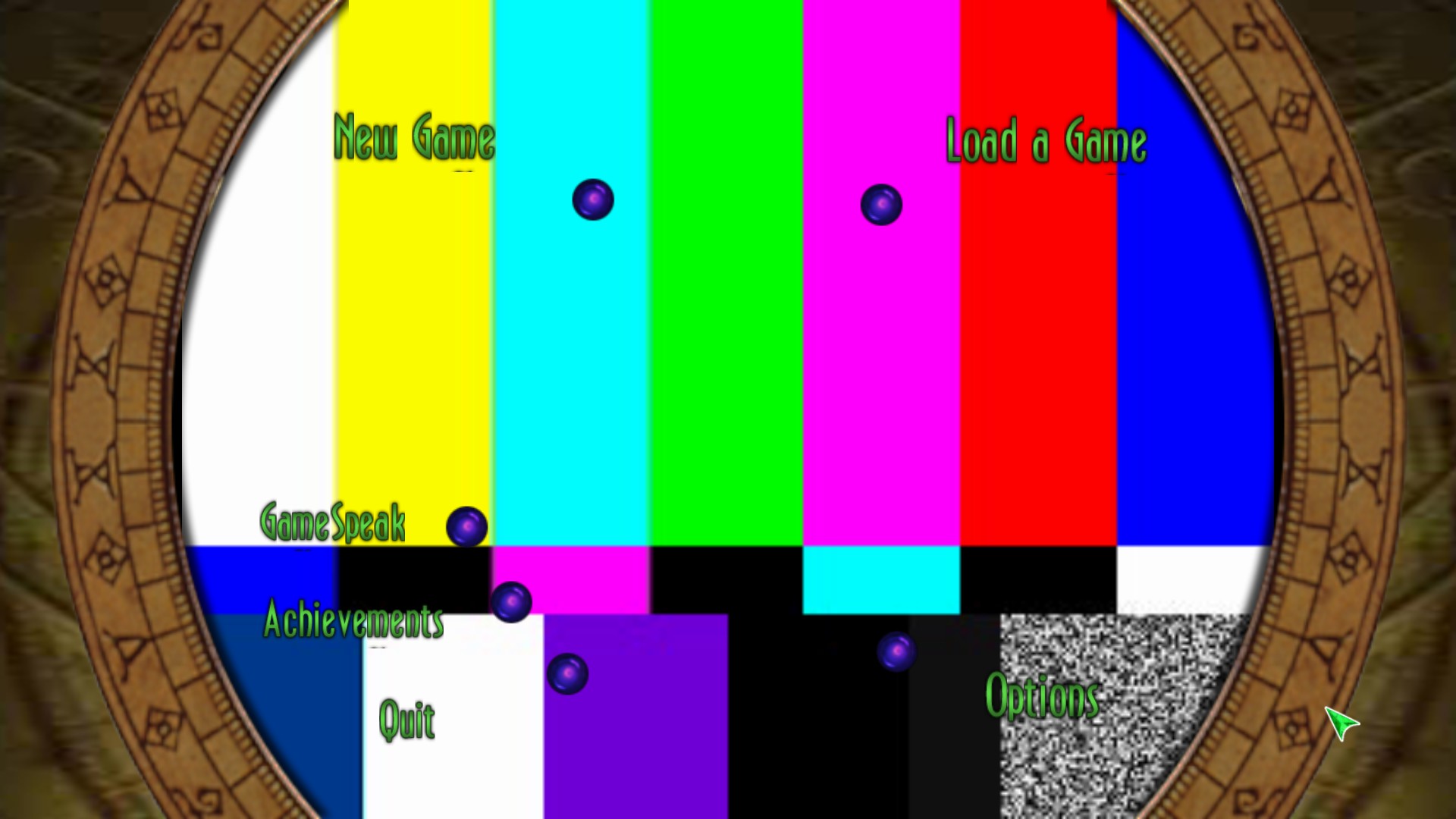
This is because Munch's Oddysee uses videos as its background for some menus. That's why it was the first game I tested.
Not really. You may notice some large "shader cache" downloads for some games. Those could be the videos. Note that if you have shader caching turned off, then they won't play.
Hi, I'm sorry if this was asked before but could there be an option to rely on local host libraries for decoding and not download the videos in the future?
Or on GPU decoder that users already paid for.
Adding to this, Library of Ruina shows the color bars moments after the correct image. Less than half a second, I'd say.
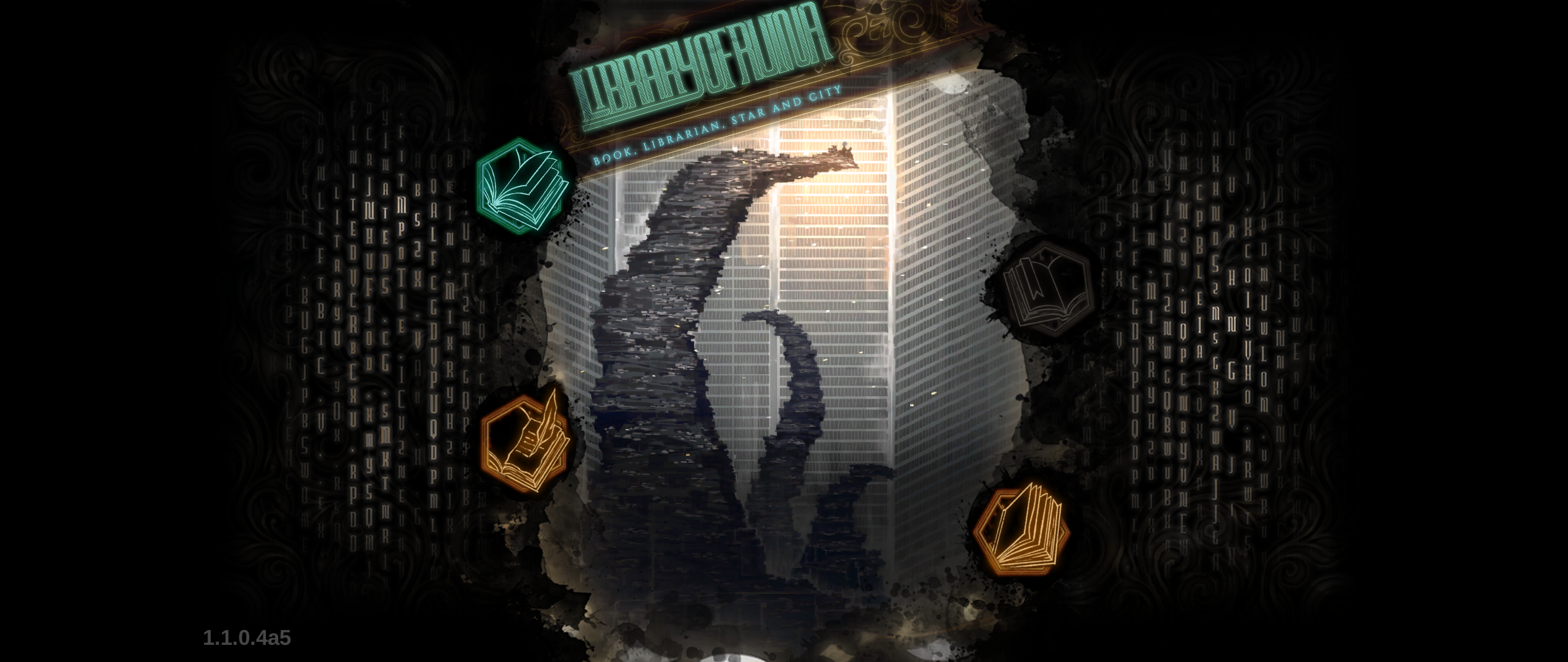
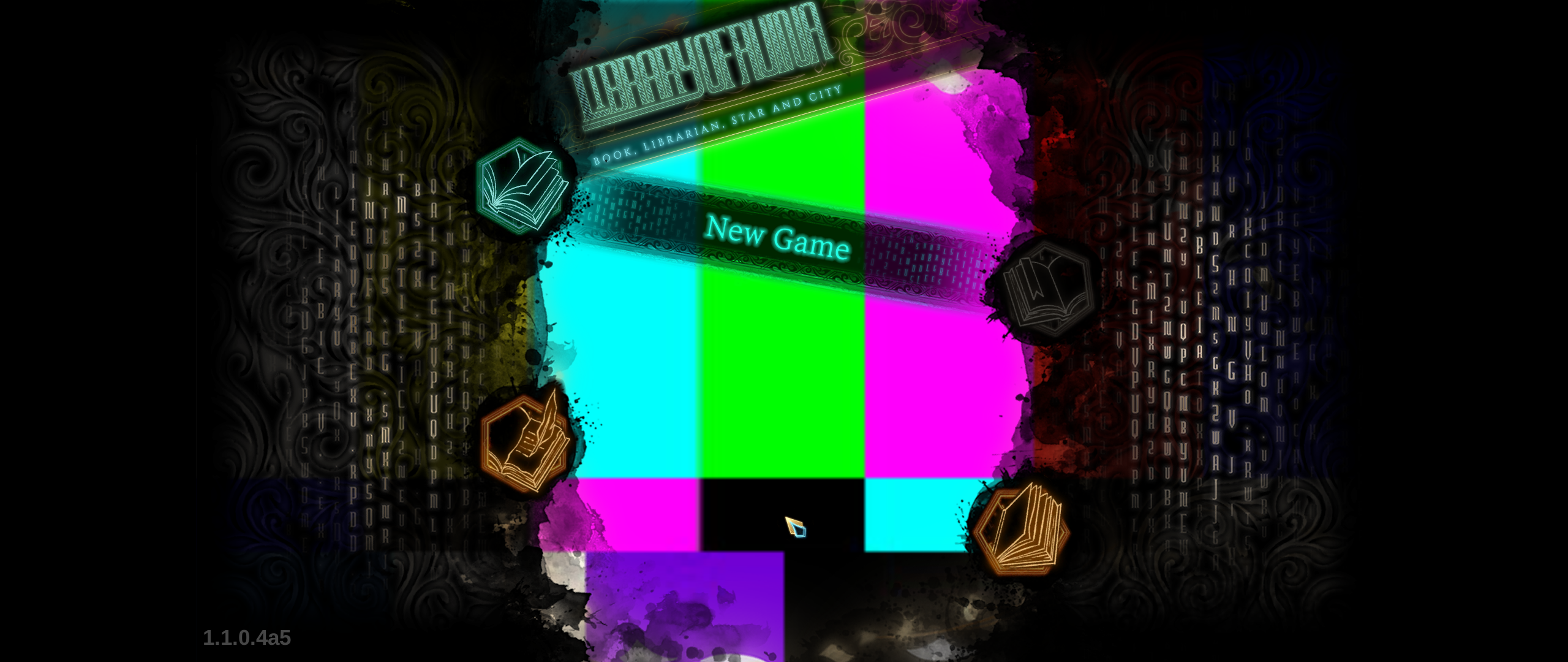
I tried using Proton Experimental and 6.3-4. Both show the same results. Have not tried going into the game yet.
Replying to https://github.com/ValveSoftware/Proton/issues/1464#issuecomment-868393577
Are you in the Steam client beta and do you have shader pre-caching enabled?
The color bars indicate things are working well. They should be working with the correct videos soon.
indeed, colorbars is better than a blackscreen and the game locks up due to wine MF issues.
whether we replace videos with these colorbars or fix the WMF codec/ quartz issues completely
this will be required to play many 1000x of games that a broken because of this.
black or white screen issues for menus, intro cutscenes, (and final ending cutscenes)
mainly the intro things. if games cant start because the menu is broken thats a bit of an issue
if games freeze on a black screen but video audio is playing, thats an issue
"freeze" in the sense there is no way to exit the game
i do appreciate the efforts and testing being done
now with steamdeck comming out, this needs higher priority to solve issues
anywhere between 40-80% of the games i test out (demos, free, prologues, paid, otherwise) require some "patches" to get them working and playable due to this problem alone
The game's not on steam (yet?), but Kingdom Hearts 3 gets stuck on black screen after the opening copyright notices. Apparently some combination of proton + native mf libraries can workaround this issue.
The game's not on steam (yet?), but Kingdom Hearts 3 gets stuck on black screen after the opening copyright notices. Apparently some combination of proton + native mf libraries can workaround this issue.
I got it to work with some version but I forgot what it was :(
Also Kingdom Hearts 1.5 and 2.5 remix (not on steam either) doesn't play pre rendered cut-scenes either. It skips them but you can't complete the game cause the last cut-scene is unstoppable.
Tetris effect's tutorial videos display the colour test.
Capcom arcade stadium displays the colour tests sometimes on the arcade, and sometimes they play. When they do play, they are at a far worse resolution than on windows.
Far as I understand, the color test is waiting on Valve's servers slowly transcoding videos found in depots of games they serve, which will later be supplied as part of shader pre-caching in a format we can run without needing any special licensing. I assume this is fully automated and will eventually make it through all games without needing them to be specifically aware of titles exhibiting that behavior.
That said, that doesn't explain why you'd be seeing them half the time. That seems a bit odd.
@Sanaki Do you know if Steam could transcode the videos locally? Like they did when then compiling vulkan shaders stuff?
In theory, since the framework is present to display the videos when they're present as "shaders", there should be a way for a user to do the transcoding and conversion to the correct format themselves, to skip having to wait for Valve to reach that particular game. That isn't a feature available from steam or proton though, since the whole point of it is getting around licensing issues. Someone with far more knowledge than I have would need to kludge together a method for doing it.
Far as I understand, the color test is waiting on Valve's servers slowly transcoding videos found in depots of games they serve, which will later be supplied as part of shader pre-caching in a format we can run without needing any special licensing. I assume this is fully automated and will eventually make it through all games without needing them to be specifically aware of titles exhibiting that behavior.
Transcoding all videos for all games? Wouldn't gstreamer be able to handle playback of videos that don't have codec licensing issues?
Ah I forgot that Proton GE can do the decoding directly locally, but due to licencing issues, Valve's Proton has to do the server side transcoding route.
Ah I forgot that Proton GE can do the decoding directly locally, but due to licencing issues, Valve's Proton has to do the server side transcoding route.
The Proton repo includes the "base" and "good" gstreamer plugins, while the Proton-GE repo also includes the "bad" and "ugly" plugins. As far as I know, only the ugly plugins are ones that have licensing issues.
Is gstreamer being used for another purpose in the official Proton builds?
Transcoding all videos for all games? Wouldn't gstreamer be able to handle playback of videos that don't have codec licensing issues?
That's basically what some of us are advocating for. Let the user hit the button with some legal text for direct local decoding.
Sounds awesome. Best done once, when switching to Proton
Transcoding all videos for all games? Wouldn't gstreamer be able to handle playback of videos that don't have codec licensing issues?
That's basically what some of us are advocating for. Let the user hit the button with some legal text for direct local decoding.
This has to do with the following:
The Proton repo includes the "base" and "good" gstreamer plugins, while the Proton-GE repo also includes the "bad" and "ugly" plugins. As far as I know, only the ugly plugins are ones that have licensing issues.
They can’t/won’t distribute those gstreamer plugins without licensing them, proton would need to detect/use the installed version of gstreamer, which might be undesired. Since that can’t be mixed (downloading when it’s needed is too slow; local conversion pointless if it’s already downloaded), that might need a special flag for proton to convert locally and show the test image if that fails. It would only benefit advanced users and requires to install external dependencies, maybe even a specific version of them.
(just speaking theoretically based on what I read above, did not really look into it)
They can’t/won’t distribute those gstreamer plugins without licensing them
Yep, I think everyone understands that, I don't see much people here asking for that.
proton would need to detect/use the installed version of gstreamer, which might be undesired
this is exactly the whole point though, undesired but why? We understand shipping the codecs libraries at fault is a no go because of legal. Why would it be undesired to let the libraries already on the users computer being used? After all, it's not Valve that distributes them and it's not as if Proton carries the whole userspace with it. It relies on host system libraries for plenty things already. Why not here? Valve software (and hardware in the prospect of SteamDeck) would still be distributed without WMV/WMA decoding capabilities as I understand?
If Valve legal told them "we never know, don't do it", then this discussion is over. They just need to close that door very clearly as all reasonable parties will agree it's not fair for Valve to take that risk.
Since that can’t be mixed (downloading when it’s needed is too slow; local conversion pointless if it’s already downloaded), that might need a special flag for proton to convert locally and show the test image if that fails.
Why convert when you can decode? There's no re-encoding without prior decoding. See? it's even much simpler.
It would only benefit advanced users and requires to install external dependencies, maybe even a specific version of them.
And as we all know, Steam already embed various options for advanced users. Here's another useful one, sounding a bit better than re-downloading your game medias entirely.
The only explanation I see here (for the local conversion thing) is that legally problematic code cannot ship in wine open source, and Valve doesn't want to maintain a patchset on top of wine as part of Proton. Instead, they could ship a converter that lives outside of wine and feeds transcoded data to the wine processes. To not waste CPU on successive playbacks, this will be cached in the fossilize cache. It may even be possible to redistribute it from there similar to how shader pre-caching works.
I'm not sure if licensing (in terms of obtaining) is really the problem here, Valve probably has the ability to do that. It's more likely that shipping and distributing closed-source or patented algorithms as part of an open source project (or under the licensing terms of the source code) is not possible, and probably very undesired for the core of Proton: wine. The gstreamer media-converter acts as a middle man transcoding proxy, and it opens the possibility to use codecs from outside wine-proton (e.g. through the Steam client and some background processing) to play transcoded media within the Proton container.
It also enables Valve to ship WMA/WMV processing in Steam Deck without having to maintain two different sets of Proton versions, one open-source, and one with licensing issues. Additionally, background downloading in advance instead of live transcoding seems like a very desired option for the Steam Deck, given that the device is supposed to run on batteries.
But to me, it looks like the bits and pieces feeding "outside" transcoded data into the gstreamer plugin is still missing, or it's just not working on all distributions. Or the Steam runtime is just still missing those parts. But the overall idea makes sense to me.
So from that perspective, it's probably more an issue with the license of wine instead of with the license holders.
Anyone having some better explanation?
Is there list of games which already have re-encoded videos as part of downloadable shader cache? Or maybe someone can name a few?
I wonder, that re-encoding would not benefit games which use streaming video (like VRChat does for viewing YouTube videos). On the other hand, I assume YouTube uses the open VP9 codec anyway, so that should theoretically work as well?
I think local transcoding is a must to add, even if valve can transcode every game on steam ever, and transcode them the moment new games go live on steam, that won’t apply to non steam games, which will forever suffer unless local transcoding is added.
As a total "aside", and please forgive the weird idea.
If I'm not wrong and there could be an LGPL way of using certain codecs with Proton as long as certain things are done right, would it be a fair idea for VALVe themselves to propose a (multiple?) Software entry(ies?), on Steam, that Linux users specifically would be able to acquire (fee-free or otherwise), granting them the appropriate license(s) for codecs to be used specifically with Proton?
This could be an alternate way to get all the right codecs in place and pacify the rightsholders while not requiring a behemoth server infrastructure dedicated to transcoding (and archiving) movies.
We would not have chosen this option if we felt a better option was on the table.
Since that can’t be mixed (downloading when it’s needed is too slow; local conversion pointless if it’s already downloaded), that might need a special flag for proton to convert locally and show the test image if that fails.
Why convert when you can decode? There's no re-encoding without prior decoding. See? it's even much simpler.
Sorry, I was just dumb. I meant regular decoding.
on Steam, that Linux users specifically would be able to acquire (fee-free or otherwise), granting them the appropriate license(s) for codecs to be used specifically with Proton?
They would need to buy a decoding licenses from MPEG-LA for the VC-1 pool and maybe other pools. VC-1 alone is $0.20 per unit after first 100k units/year.
Is anyone else having an issue where the transcoded videos play back with completely unusable audio? It seems they might be playing back at the wrong speed also. I had this in RE7 a month or so ago and more recently am running into it with Psychonauts 2 on the latest Proton Experimental and 6.3. In RE7 it didn't prevent playing the game but in Psychonauts the video also never finishes, and while it doesn't crash the "hold ESC to skip" animates but does not actually skip the video, so I can't proceed past the intro video.
Edit: Scratch that, whatever it was with RE7 no longer happens. Guess this is just a Psychonauts 2 issue and not universal.
I have ffmpeg-libs installed on Fedora, it would be nice if this could work then if you had them installed...
Any updates on the list of games where the videos have been transcoded yet?
Does proton still tried to download transcoded video when the codec is supported? Does this mean as the community starts to add support for non-free codecs games like VRChat will start to work?
Any updates on the list of games where the videos have been transcoded yet?
If there is, is not a public list.
Anyway, even if a game videos have been transcoded, that doesn't mean that the work is well done.
Example:
Borderlands 3 intro video, (MARCUS_INTRO.mp4) has been transcoded, but the audio of the transcoded video is english only, when the original video file has 8 audio tracks. My language, Spanish, is track number 5.
With PROTON GE I don't have that problem.
Example: Borderlands 3 intro video, (MARCUS_INTRO.mp4) has been transcoded, but the audio of the transcoded video is english only, when the original video file has 8 audio tracks. My language, Spanish, is track number 5.
This is an interesting note: How does Valve plan to fix this? I think it's not uncommon for games to ship videos localized for multiple languages...
Replying to https://github.com/ValveSoftware/Proton/issues/1464#issuecomment-962671477
Yep, I use Proton GE as well, I'm mostly asking cause I'm curious about the steam deck
Replying to https://github.com/ValveSoftware/Proton/issues/1464#issuecomment-962671477
GE plays the videos locally, they are not transcoded.
Replying to https://github.com/ValveSoftware/Proton/issues/1464#issuecomment-962671841
They could do transcode for every language and send you the right one according your Steam settings.
It's probably an oversight honestly. It should be possible to just transcode with all audio tracks. That said, they need to be aware it's an issue.
Sending based on client settings isn't reasonable though. It's also not helpful for multilingual users who may not keep the client and the game in the same language.
Local transcoding really needs to be enabled somehow, the repo does have a folder called "media converter", so I hope that this is a solution to transcode all videos on first launch of a game if they have not been already done by valve/a non steam game.
Local transcoding really needs to be enabled somehow, the repo does have a folder called "media converter", so I hope that this is a solution to transcode all videos on first launch of a game if they have not been already done by valve/a non steam game.
I want to build on this question. By any chance can this transcoding be accomplished with ffmpeg? If so, writing a simple bash script to bulk convert would be incredibly easy.
If so, writing a simple bash script to bulk convert would be incredibly easy.
It doesn't work this way... The transcoding happens while the videos play, Proton doesn't know of any videos in advance, they could be in any file format, or even encrypted. It just transcodes streams while they pass through the codec layer, and writes a cache of those, regardless of the source (which could be a native file, or embedded in an asset archive of the game).
I'm not even sure if transcoding caches are shared among users yet.
If so, writing a simple bash script to bulk convert would be incredibly easy.
It doesn't work this way... The transcoding happens while the videos play, Proton doesn't know of any videos in advance, they could be in any file format, or even encrypted. It just transcodes streams while they pass through the codec layer, and writes a cache of those, regardless of the source (which could be a native file, or embedded in an asset archive of the game).
I'm not even sure if transcoding caches are shared among users yet.
Ohhhh okay. So I'm guessing those caches are so reencoding doesn't have to happen again? Otherwise that performance hit could be grueling.
Ohhhh okay. So I'm guessing those caches are so reencoding doesn't have to happen again? Otherwise that performance hit could be grueling.
Yep, mostly for that. After looking at the fossilize caches, it looks like transcoded data may already be distributed via swarm. Also, after looking at the comments in the code, I'm not sure if transcoding happens locally, or if it may be done on Valve servers and then distributed back via swarm. The comments say that missing transcoder data would be replaced by a blank video and audio stream, and in that case it would write incoming stream blocks to a fossilize cache. The transcoder is written in rust, I'm not familiar enough with it to see if it would actually transcode live or "offline"...
In any case, the cached input stream would need to be read from the fossilize media cache, then transcoded, and written to the transcoded fossilize cache. It doesn't matter if your local ffmpeg/gstreamer installation does this, or if you receive the transcoded data from the swarm. It just needs to happen somewhere.
Since audio is grabbed from xaudio - and thus from what would be played back - it won't catch localized audio from other languages. It just gets audio from whatever language plays locally. But the murmur hashing of blocks should ensure that localized audio is properly cached multiple times. It doesn't even need to care for multiple audio tracks if I understood the code correctly - it just hashes the input audio blocks, and if it finds a properly transcoded output match, it would play that, resulting in proper localized audio. It uses a hash tree similar to how bittorrent works - thus, when audio streams diverge for different languages, it would switch to the localized stream of the audio.
It's probably an oversight honestly. It should be possible to just transcode with all audio tracks.
When looking at the source, this is actually already taken into consideration. So it may be a bug, or some special corner case in how the game handles audio for multiple languages.
How is there any legal issues with letting users install gstreamer themselves with no involvement from Valve or Steam and if those gstreamer libs exist then Proton uses them for local decoding?
How is there any legal issues with letting users install gstreamer themselves with no involvement from Valve or Steam and if those gstreamer libs exist then Proton uses them for local decoding?
it would be akin to encouraging circumvention of preventative measures w.r.t. codecs, which is if not straight up considered illegal, at the very least an extremely dark-gray legal area for VALVe to put themselves in willingly.
How is there any legal issues with letting users install gstreamer themselves with no involvement from Valve or Steam and if those gstreamer libs exist then Proton uses them for local decoding?
it would be akin to encouraging circumvention of preventative measures w.r.t. codecs, which is if not straight up considered illegal, at the very least an extremely dark-gray legal area for VALVe to put themselves in willingly.
If that's the case shouldn't vlc and gstreamer have been obliterated by the courts by now? Both are very open source and public. I'm struggling to understand why they can decode these formats but valve doing the same just isn't allowed.
I think valve can provide option to optionally use system dependency that user themselves can install to decode the videos. This would not look good for them, in regards of support however. For out of box experience what they are doing makes sense I guess. Alternative is to handwave users to install the needed library, and not sure if you can even be direct with that legally. As well as the grey area of licenses where user is technically committing a "crime". It's dumb, but such is the world.
If that's the case shouldn't vlc and gstreamer have been obliterated by the courts by now?
They cannot simply ship with these codecs (or it is limited to some countries and you'd need to accept some TOS), usually you're installing extra dependencies that do not ship as part of vlc or gstreamer. Especially, those codecs cannot be distributed in binary form as part of a bundled product. It is explained here: https://gstreamer.freedesktop.org/documentation/frequently-asked-questions/legal.html?gi-language=c
That is, if you are in a country which has software patents, and a court tells you that you cannot distribute (say) libmad in source code form, then you cannot distribute libmad at all.
So the fact that you could download vlc with proper codec support, doesn't mean everyone could. And Valve just doesn't want to figure this out as a per-country issue with complicated laws. That would probably also mean they'd need to deploy a local authority representing Valve in each of those countries.
Also, some project distributing those bundled codecs may simply violate the law in some countries: Those projects are not representative for a working solution.
So, yes, Valve could ask people to manually install the needed plugins separately - but that cannot be handled by the target audience, neither it works well when version requirements change: Things would suddenly break. Nobody would want to support that. This proposed solution by Valve completely separates the incompatible licenses from each other: No linking, no bundling, no combination into a single product, no binary shipping, no legal problems. Period. The proposed solution should work for everyone, and can fit everyone's needs. We now need to work out the bugs and kinks.
use system dependency that user themselves can install
No, because:
Using user-provided dependencies also cannot work here because games run in an isolated container, you cannot just inject compatible dependencies from outside here. The proposed layer is a solution to this which could allow external transcoders to work on data from inside of the container.
I'm pretty sure, live transcoding could be added later. Currently, it's offloaded to fossilize databases, and processed somewhere else. Someone could probably create a converter which takes the input fossilize data and creates proper output - locally on your system. Afaik, no such implementation currently exists.
Conclusion: It's pretty futile to still discuss the legal issues when Proton already solved those. ;-)
How is there any legal issues with letting users install gstreamer themselves with no involvement from Valve or Steam and if those gstreamer libs exist then Proton uses them for local decoding?
Well i think it's not nice to tell people: "now, for fully compatibility, download ffmpeg codecs otherwise you will be in dire straits". I remember the Sony PSP had a feature like that, but that was for multimediality support only, not for gaming.
So the fact that you could download vlc with proper codec support, doesn't mean everyone could. And Valve just doesn't want to figure this out as a per-country issue with complicated laws. That would probably also mean they'd need to deploy a local authority representing Valve in each of those countries.
For that matter, i think the whole wine project is an issue for Valve, since i bet the indipendent invention defense would not be accepted in all countries.
Hi folks, the legal speculation on this issue report is drifting off topic. Please try to focus on what can be improved in Proton without putting the entire project at risk.
(This is about the functional problems of media-converter, not legal)
The proposed solution should work for everyone, and can fit everyone's needs.
Conclusion: It's pretty futile to still discuss the legal issues when Proton already solved those. ;-)
Unfortunately the major flaw in the system is that if you're one of the first people to encounter a video cutscene on Linux, then the video doesn't play. You see a placeholder pattern instead.
I have personally been one of these first people in multiple games that pre-rendered video cutscenes start only showing the placeholder pattern, where earlier cutscenes did play because they were already cached from other users.
It also takes days for the cache to come back with a transcoded_video.foz update as I have witnessed.
I'm pretty sure, live transcoding could be added later.
Live transcoding is unrealistic/impossible, between sending the video data, transcoding it (will use 100% of a CPU), and sending it back, there would be unacceptably large pauses in the game for possibly minutes before the cutscene plays. But please prove me wrong.
(This is about the functional problems of media-converter, not legal)
The proposed solution should work for everyone, and can fit everyone's needs.
Conclusion: It's pretty futile to still discuss the legal issues when Proton already solved those. ;-)
Unfortunately the major flaw in the system is that if you're one of the first people to encounter a video cutscene on Linux, then the video doesn't play. You see a placeholder pattern instead.
This should get vastly improved with the Steam Deck launching simply by the increase in other Linux users playing games. Also developers can test their own games which would trigger this or allow Valve QA to (which some developers have been doing even before the Steam Deck just for Linux users), which also would give Valve a chance to prepare the videos prior to public launch.
Unfortunately the major flaw in the system is that if you're one of the first people to encounter a video cutscene on Linux, then the video doesn't play. You see a placeholder pattern instead.
I have personally been one of these first people in multiple games that pre-rendered video cutscenes start only showing the placeholder pattern, where earlier cutscenes did play because they were already cached from other users.
It also takes days for the cache to come back with a transcoded_video.foz update as I have witnessed.
I just tested Munch's Oddysee again and the intro video now works and main menu has a working background! And they look great! Awsome! So I started testing some of the other videos and they're simply displaying the test pattern.
So if I understand this correctly, me trying to play those other videos just now caused them to be flagged and in a week or so, the other videos will be encoded and ready to go?
So if I understand this correctly, me trying to play those other videos just now caused them to be flagged and in a week or so, the other videos will be encoded and ready to go?
Optimally, it should probably take just a few hours (plus uploading the data). In the example of Borderlands 3, the correct videos only lately found their way into my hard disk. Previously, the test pattern showed over months. This may partly be due to the infrastructure not finished - I think in the early beginning, the test pattern was a static video without even recording the data to fossilize. And then, upon Valve moving the feature to "production", this probably created a huge backlog of video data to process. So the systems may still need to catch up, and on the processing side, things may still be partially broken and need to be resubmitted.
The logo videos of Borderlands 3 also have choppy audio for me, not sure if this is some breakage in the transcoding logic, or some performance issue in the code that handles that locally on disk. But if something is broken on the transcoding side, data probably needs to be resubmitted and reprocessed - adding to the backlog.
So only time will tell and we probably need some patience for transcoding backlog to catch up. Meanwhile, all problems that can be observed from that should be reported (like only some in-game videos may render correctly, or broken audio, bad quality, audio/video sync issues...)
I'm not sure what the status of fossilize is, and if it's already supposed to transcode locally if possible. If it does, it's probably useful to have all needed codecs installed locally, and you may want to turn on shader pre-processing (although the naming would be misleading in that case as it processes more than just shader data then, or this means we'd just need to wait until there's an option "video pre-processing").
If i’m understanding this correctly, then wouldn’t this destroy the experience of the first couple of players to reach a game’s ending (hidden scenes) only to find out that the video is broken? Dang…
I’m still hoping that the way it’s implemented is not just on a per user access basis, but based on which games are the most popular and those that have been recently updated…
If i’m understanding this correctly, then wouldn’t this destroy the experience of the first couple of players to reach a game’s ending (hidden scenes) only to find out that the video is broken? Dang…
I’m still hoping that the way it’s implemented is not just on a per user access basis, but based on which games are the most popular and those that have been recently updated…
Did you know penguins will often push each other into the water, as a way of testing to see if there are predators lurking nearby? It sucks for the first few penguins in but the rest surely benefit from it. How appropriate that little piece of information seems here.
So what about launch day for big budget games dependent on this system? That would be an absolute nightmare for the Linux crowd, right? What would this mean for Steam Deck users when The Witcher 4, The Sims 5, or Cyberpunk 2077 2 comes out?
But those failings aside, I'm absolutely loving this system. It's a beautiful problem killer that stands defiantly in the face of all of the industry sandbagging and gatekeeping, and will hopefully solve the issue globally. This all nearly brings a tear to my eye.
So if I understand this correctly, me trying to play those other videos just now caused them to be flagged and in a week or so, the other videos will be encoded and ready to go?
Last week it took Valve one day to have the video ready.
(well not sure if it took one day, i played it (newly) with a missing intro video and the next day the video was available)
Just played the mega man zx collection which does not have transcoded videos atm, so hopefully those should download in a week according to what ive read here.
Sorry to add to the noise.
It is clear to me that Steam/Valve need a solution that works out of the box on something they can legally ship (see also Steam Deck). Thus this whole ambitious transcoding scheme.
It is less clear to my why Proton shouldn't have an option to "hand everything to local gstreamer". If it can play it, fine, if not, not your problem.
I like that finally some headway is being made, I don't like that it looks like Proton and vanilla WINE might become so fundamentally different in their approach to media playback that vanilla WINE would be relegated to second-class citizenship medium-term. I'd prefer a solution that could trickle down (up? across?) to all Linux users, just like all of Valve's work on mesa, just to give one example.
What it boils down to is I'd appreciate some more information on what is actually transcoded where under what conditions etc., in short, how the whole thing works, or is meant to eventually work. I haven't found anything much on that, maybe I just looked in the wrong places.
@fallenguru "hand everything to local gstreamer" isn't that easily possible as it would need to cross the container border: Games run within their own namespace, a container (bwrap), it's chroot on steroids. That means, the Steam runtime ships it's own version of libs that exclude the problematic codecs. Instead, they ship with a plugin that stores video and audio data in a fossilize data file.
The process is described in the media-converter rust sources in the Proton project. Essentially, it says that the plugin can actually access the whole stream and even randomly access it, and it would just chunk, hash and store it. This could be where a transcoder could hook in and try doing it live. With modern processors it could be possible to do this real time and stay ahead of the playback position, if not, it could still defer that to a background process.
The audio handler seems to be a little different: It would only see what's currently in the play buffer. In theory, one could try converting it live but it could never be done without visible latency.
What could be done, tho, is running some converter process over the created caches. Such code doesn't seem to exist in the media-converter sources. What they call "transcoder" (converter) is looking up a chunk from the hash table, and feeding back an already converted chunk in a video/audio format that can be played back. So it expects the converted data to be already present in the cache. Otherwise it will return placeholder data. But this cache lives outside of the bwrap container, and a transcoder you'd run there could access and use your locally installed codecs. It still doesn't solve the problem of first time playback but if someone programmed a converter, it could be done locally without waiting for the cloud to send back converted data.
If it can play it, fine, if not, not your problem.
"if it can play it" would essentially mean that the codec is installed and distributed within the container - which will never happen. So, no, it can't play it. You can only fall-back to a custom compiled Proton which includes the codecs.
The whole process expects that someone (ideally the game creators) already played the videos back into the cache, so the next one (ideally the first-time player already) would get converted data from the cloud. The "media-converter" of Proton is just a gstreamer plugin very much like a codec but instead of actually crunching numbers to convert data, it looks at a hash table to replace incompatible encoded data with compatible encoded data on the fly, transparently, like a proxy. You can think of the hash table as a (very long) URL, and expect it to "download" the video to be played back. Similar to how magnet links work for bittorrent.
I don't like that it looks like Proton and vanilla WINE might become so fundamentally different
I don't think that will happen. After all, this "transcoding" is just a little gstreamer plugin, nothing in wine itself will be changed for that. Most other patches are backports from upstream wine, leaving just a few game and Steam specific hacks that float on top of what comes from upstream wine. The current list of patches looks like a lot but actually there are just a lot of either backports, or proposed patches that have been suggested upstream and most likely end up in a very similar form in upstream wine. So, if someone wants to compile a custom Proton with the needed codecs, it's just a matter of compiling it with a gstreamer with the needed codecs.
Thanks for explaining that clearly @kakra.
I think in the future it would be beneficial as well for this to be in the proton docs or something (if it's not already there, if it is, sorry I couldn't find it) as it's a question everyone is very curious about and I'm sure the devs wouldn't want to be answering this question over and over again especially in an issue tracker.
Really hoping as well that there would be discussions regarding this on the virtual conference, to make sure that devs are aware that this is an issue if they're not already. Also hoping that steam deck verified qa peeps would also pick up on this issue during their reviews as I seriously think that this is gonna be an extremely bad experience for customers.
edit:
Just an update as well that both Haven and PixArk videos are still not working 2 weeks after I've bought and tested them (using Proton Experimental) - reinstalled both as well
@kakra, thank you so much for your detailed explanation (and the pointer to the docs)!
it would need to cross the container border
I'm aware of that argument. Yes, containers do make many things more inconvenient. Then again, all sorts of data have to cross the container boundary anyway. This is just one more case.
I'm looking at this more from a UX perspective. If a user can double-click on a video and it will play no problem, yet that same video won't play (immediately) when played within a game, that's just weird.
The distributed shader cache is genius because it is optional. If you get a cache hit, splendid, no shader stutter; if not, the ride's going to be a bit choppy at first, no real harm done, no internet connection required.
The video cache is different. If you get a hit, you get video, if not, you're screwed. Unlike the shader cache, it's not generated locally as you go, either, you're dependent on the download, so if you've gone somewhere with metered/slow/no connection intending to play a single-player game in the evenings, that's that. There's no way to even know in advance whether the download you have is "complete".
IMVHO, the transcoding solution needs two things before it's ready for prime time:
- Some kind of near real-time solution. Inject some kind of loading animation, some valves and pipes doing steam-punky things, then start the video as soon as possible (local transcoding would help with that).
- A local solution, even if it's only as a fallback. I'll gladly purchase decoding licenses on Steam, but as that apparently isn't an option, some way to have the decoding/transcoding handled system-side.
The whole process expects that someone (ideally the game creators) already played the videos back into the cache [...]
Good luck with that. ^^
The "media-converter" of Proton [...] instead of actually crunching numbers to convert [...] on the fly, transparently, like a proxy.
Well, as long as there is a way to dump the original data and inject transcoded data into the cache locally ...
A hybrid solution could work: For those installations which have proper decoders outside of the container, the "media-converter" could decode data (instead of transcoding it) and maybe send back uncompressed video? This would probably not be very performant because of huge memory copies but it could work. At the same time, the encoded data is recorded to the cache, so it could be sent to the cloud transcoder for others to benefit.
A better solution would probably be to decode the video from inside the container by mapping libraries similar to how it's done with the graphics driver. That's actually what you (@fallenguru) call "just one more case" - except it is not: Programs like ffmpeg have a very unstable ABI and even API, versions are usually not compatible with each other, even at the source code level. Gstreamer makes things a lot better but still has similar problems, AFAIR, gstreamer has a much more stable API but is still ABI-incompatible between versions. So just expecting things to work when you map your locally installed gstreamer and ffmpeg libs into the container for Proton to pick them up... nah, won't work. But even if that worked, the media-convert plugin inside the container could still write the cache data AND decode the video.
API = application programming interface, source code level, changing the API requires source code changes
ABI = application binary interface, library/binary level, changing ABI requires to recompile
A way around ABI/API incompatibilities is usually to bundle your version of the libs with your product - which is actually the problem here and what the whole discussion is about. So we'd be back to the initial condition. This also means that the functionality may suddenly break when either Proton or the distro updates. In the best case, this can be detected and Proton could fall back to the cloud method, in the worst case it will make things crash (usually, that's very easily possible with ABI changes, at least when developers don't properly bump solib versions which usually are versioned according to API/ABI changes).
Yes, containers do make many things more inconvenient.
No, it's usually the other way around. That's the whole point of Proton using containers: They get a stable runtime environment that doesn't depend on the distribution. Otherwise, the situation would be much worse because there are so many important libraries with incompatible ABI changes: openssl, ffmpeg, I don't know what...
The best solution would probably be to just nag game developers about not using proprietary video codecs, and just use open-source or royalty-free codecs or something like that... which sometimes can create problems from another side: Some open-source projects do not allow linking with closed source software or incompatible licences, or it comes with other burdens that the developer is not wanting to handle... Also, licensing may not only cover the software itself but also content within these videos - and it may require that you implement some sort of protection/encryption which not all codecs may support.
I think we just have to live with the lesser evil.
I think we just have to live with the lesser evil.
To use PROTON-GE for those games with mp4 or wmv files?
s a te
"Did you know penguins will often push each other into the water, "
the issue is that no one like being threted like guinea pig, i mean, sure some people dont care, but those who dont care should be the beta testers, not the entire gaming crowd.
its already bad enough that cdpr didnt fully tested cp2077 to the point that it was relased full of bugs, in fact many games had issues like that...
but when the bugs are exclusives to one platform, then its not just the game that people will complaing about but the platform too.
we cant assume that everyone who purchase an steamdeck or install linux is willing to be the beta tester of every game they play, if we push then to see if there are bugs in the water, they will just go back to their old platforms to never look back. (windows, switch, etc)
How is there any legal issues with letting users install gstreamer themselves with no involvement from Valve or Steam and if those gstreamer libs exist then Proton uses them for local decoding?
it would be akin to encouraging circumvention of preventative measures w.r.t. codecs, which is if not straight up considered illegal, at the very least an extremely dark-gray legal area for VALVe to put themselves in willingly.
If that's the case shouldn't vlc and gstreamer have been obliterated by the courts by now? Both are very open source and public. I'm struggling to understand why they can decode these formats but valve doing the same just isn't allowed.
European courts have take a different stance to software patents. Originally software patents were not accepted in USA either (being that ideas and mathematical algorithms were not patentable) but that has changed since then.
So depending where you are it is entirely fine to distribute certain software while somewhere else it is not.
Also there are situations like Cisco has paid license for the H.264 codec binary for Firefox, but you can't distribute your own self-built binary with that same license (you would need to pay again for your own build). You can also distribute other software if you don't build the parts of the software (plugins) that are considered to be encumbered by patents. In the past FreeType library did not build the parts that were under TrueType patent, but after that patent expired the problem was gone as well.
So it also depends on which parts of the software are included and built for distribution. They don't always include everything in every build.
It is a huge problem for distributing software that would work for everyone while also avoiding those mines.
This comment will be off topic, and I apologize in advance, but I just now arbitrarily happened across this.
Based on what I extracted from his insight, it sounds like there are multiple reasons as to why this project is safe. So we're in the clear and everybody can relax now. Everything will be fine. Cheers, gents. 🥂
The best solution would probably be to just nag game developers about not using proprietary video codecs, and just use open-source or royalty-free codecs or something like that...
for games in development, sure they will listen but i doubt anyone is willing to convert for old games.
another thing to consider is fiesize, that is, if anyone cares that all their users will have to download bigger files because some of then want to play in a new platform.
which sometimes can create problems from another side: Some open-source projects do not allow linking with closed source software or incompatible licences, or it comes with other burdens that the developer is not wanting to handle...
im pretty sure that we have at least one good codec for audio and one for video (and probably one for subs) that dont have any distribution issues, or issues being mixed with proprietary code, webm.
if they need an runtime it should be trivial to make an chromium based runtime, and the code certainly can be used, i mean there are tons of proprietary browsers and aplications like discord based on chromium.
Also, licensing may not only cover the software itself but also content within these videos -
can we at least try to contact as many developers as we can about this issue?
something like that:
https://www.theverge.com/2021/10/5/22709918/valve-steam-deck-supported-games-anti-cheat-proton-eac-battleye-epic
and it may require that you implement some sort of protection/encryption which not all codecs may support.
now that is an bigger issue, i dont know how to solve, only a business like valve will be able to solve.
Haven and Pixark videos still doesn’t work a month or two after I’ve tried them out 🤔
Munch's Oddysee's videos aren't working either and I played them at least 17 days ago. There must be a huge backlog.
I get wrong colors on multiple games, but reporting a single example just to demonstrate the problem:
https://imgur.com/a/qCF7BZ2 this is the intro video of The Outer Worlds (the background should be black). I can workaround this using $legallyPuzzlingMFWorkaround but I would like to avoid it.
I'm on Arch, this is the proton log: https://gist.github.com/esistgut/791e7c7f83e9c2ce646d495ac01b666c
Haven and Pixark are working now, not sure if all videos work now though. I would assume that valve would know the videos that are not working, so I'm hoping that those games will be rated appropriately for the steam deck.
Mega man zx collection still displays nothing, however I only now realize its not even displaying the test pattern, so the issues must run deeper than transcoding.
I would assume that valve would know the videos that are not working,
Valve is a lot less omnipotent than you think... They don't know of any videos that haven't been manually triggered by players encountering them ingame.
Mega man zx collection still displays nothing, however I only now realize its not even displaying the test pattern, so the issues must run deeper than transcoding.
Yes, if it doesn't even display the test pattern that means there is unimplemented API functions in Wine for media foundation, quartz/directshow, or whatever it uses.
Replying to https://github.com/ValveSoftware/Proton/issues/1464#issuecomment-1007157190
The reason I'm assuming that valve knows which videos aren't working is cause afaik they coded proton to detect / flag the incompatible videos and convert it on their end. Which means they should be keeping track of it? Please correct me if I'm wrong.
Happening to Witchspring 3 as well
Chronos: Before the Ashes (967390) doesn't show videos.
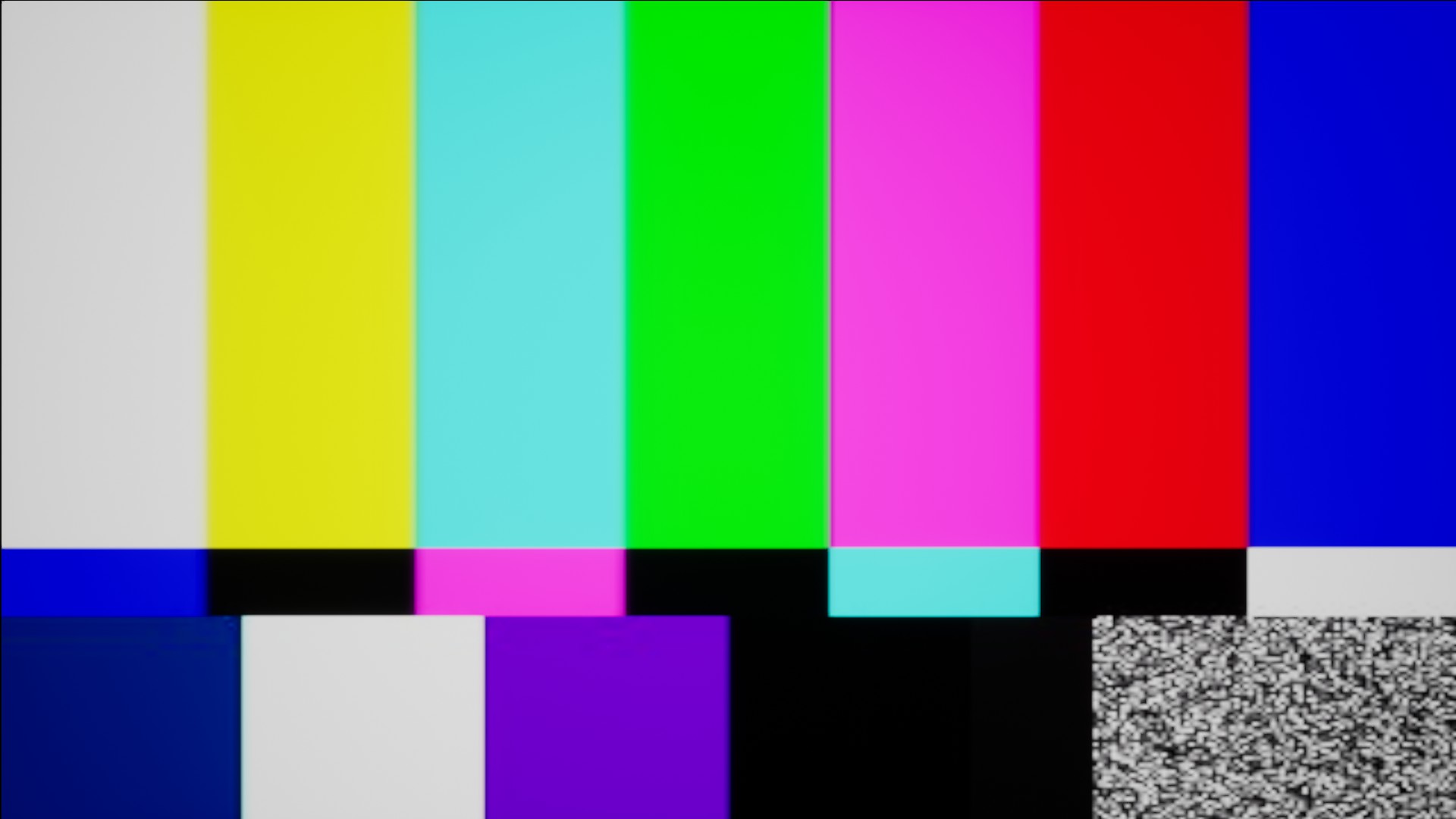

Unlike Borderlands 3, in this case, the bug doesn't affects gameplay.
I tried with Proton GE, but for some reason the game doesn't work with that version of Proton, but it works with official and experimental Proton...weird,
Something is wrong with the Valve version of ffmpeg *.so files:
Or they are missing from the Proton build, or they are located on the wrong folder or they are just bugged.
Detailed example with Borderlands 3 and Proton 7-Experimental :
Intro videos doesn't work and proton log complain about a missing libavfilter.so.7
steam-397540-libavfilter.so.7+.log
(wine:10653): GStreamer-WARNING **: 18:12:19.551: Failed to load plugin '/mnt/InstalledGames/SteamWorks/CASprotonicTests/PROTON/steamapps/common/Proton - Experimental/files/lib64/gstreamer-1.0/libgstlibav.so': libavfilter.so.7: no se puede abrir el fichero del objeto compartido: No existe el fichero o el directorio

(wine:10653): GStreamer-WARNING **: 18:12:19.568: Failed to load plugin '/mnt/InstalledGames/SteamWorks/CASprotonicTests/PROTON/steamapps/common/Proton - Experimental/files/lib/gstreamer-1.0/libgstlibav.so': /mnt/InstalledGames/SteamWorks/CASprotonicTests/PROTON/steamapps/common/Proton - Experimental/files/lib/gstreamer-1.0/libgstlibav.so: clase ELF errónea: ELFCLASS32
winegstreamer error: decodebin0: Your GStreamer installation is missing a plug-in.
winegstreamer error: decodebin0: ../src-gst_base/gst/playback/gstdecodebin2.c(4719): gst_decode_bin_expose (): /GstBin:bin0/GstDecodeBin:decodebin0:
no suitable plugins found:
Missing decoder: MPEG-4 AAC (audio/mpeg, mpegversion=(int)4, framed=(boolean)true, stream-format=(string)raw, level=(string)2, base-profile=(string)lc, profile=(string)lc, codec_data=(buffer)1190, rate=(int)48000, channels=(int)2)
Missing decoder: H.264 (Main Profile) (video/x-h264, stream-format=(string)avc, alignment=(string)au, level=(string)4.1, profile=(string)main, codec_data=(buffer)014d4029ffe10018674d4029965280f0044d3501010140000003004000000f2101000568e9093520, width=(int)1920, height=(int)1088, framerate=(fraction)30/1, pixel-aspect-ratio=(fraction)1/1)

744.624:0124:0208:fixme:mfplat:topology_loader_Load 00000000227BD190, 0000000022A18810, 000000003C60FD08, 0000000000000000.
744.625:0124:0208:fixme:mfplat:audio_renderer_get_service_GetService Unsupported service {866fa297-b802-4bf8-9dc9-5e3b6a9f53c9}, interface {0a9ccdbc-d797-4563-9667-94ec5d79292d}.
744.625:0124:0208:fixme:mfplat:media_source_QueryInterface {6ef2a662-47c0-4666-b13d-cbb717f2fa2c}, 000000003C60FCA8.
winegstreamer warning: videobox0: not negotiated
winegstreamer warning: videobox0: ../src-gstreamer/libs/gst/base/gstbasetransform.c(1431): gst_base_transform_reconfigure_unlocked (): /GstBin:bin1/GstVideoBox:videobox0:
not negotiated
But guess what! The libavfilter.so.7 file can be found on /steam/ubuntu12_64 and is also on my system.
But both version of the same file are different, your version of libavfilter.so.7 has a size of 118,5 kB, meanwhile the libavfiler.so.7 file on my system usr/lib/x86_64-linux-gnu has a size of 3.6MB
If I paste your version of libavfilter.so.7 to /common/Proton - Experimental/files/lib64, now the game complain about a missing libavformat.so.58, which is also located at /steam/ubuntu12_64.
steam-397540-ERROR-libavformat.so.58.log
If I paste the file libavformat.so.58 from /steam/ubuntu12_64 to /common/Proton - Experimental/files/lib64, now the game complain about a missing libavcodec.so.58, which is also located at /steam/ubuntu12_64 too.
If I paste *libavcodec.so.58 from there to /common/Proton - Experimental/files/lib64 , now the game complain about a missing libavutil.so.56
steam-397540-ERROR-libavutil.so.56.log
If I copy libavutil.so.56 from /steam/ubuntu12_64 to /common/Proton - Experimental/files/lib64, now the game complain about a missing libvpx.so.6
steam-397540-ERROR-libvpx.so.6.log
Finally, if I copy libvpx.so.6 from /steam/ubuntu12_64 to /common/Proton - Experimental/files/lib64, intro videos work, including Marcus intro , but Proton Log complain about this:
winegstreamer warning: videobox1: not negotiated
winegstreamer warning: videobox1: ../src-gstreamer/libs/gst/base/gstbasetransform.c(1431): gst_base_transform_reconfigure_unlocked (): /GstBin:bin1/GstVideoBox:videobox1:
not negotiated
286.935:0124:0208:fixme:mfplat:topology_loader_Load 0000000031F81390, 0000000031F71D90, 000000003C60FD08, 0000000000000000.
286.937:0124:0208:fixme:mfplat:audio_renderer_get_service_GetService Unsupported service {866fa297-b802-4bf8-9dc9-5e3b6a9f53c9}, interface {0a9ccdbc-d797-4563-9667-94ec5d79292d}.
286.937:0124:0208:fixme:mfplat:media_source_QueryInterface {6ef2a662-47c0-4666-b13d-cbb717f2fa2c}, 000000003C60FCA8.
291.289:0124:0208:fixme:mfplat:topology_loader_Load 0000000031F81650, 0000000031F725D0, 000000003C60FD08, 0000000000000000.
291.306:0124:0208:fixme:mfplat:audio_renderer_get_service_GetService Unsupported service {866fa297-b802-4bf8-9dc9-5e3b6a9f53c9}, interface {0a9ccdbc-d797-4563-9667-94ec5d79292d}.
291.307:0124:0208:fixme:mfplat:audio_converter_ProcessMessage Unhandled message type 10000003.
291.307:0124:0208:fixme:mfplat:media_source_QueryInterface {6ef2a662-47c0-4666-b13d-cbb717f2fa2c}, 000000003C60FCA8.
winegstreamer warning: videobox3: not negotiated
winegstreamer warning: videobox3: ../src-gstreamer/libs/gst/base/gstbasetransform.c(1431): gst_base_transform_reconfigure_unlocked (): /GstBin:bin3/GstVideoBox:videobox3:
not negotiated
300.511:0124:0208:fixme:mfplat:audio_converter_ProcessMessage Unhandled message type 1.
300.654:0124:0208:fixme:mfplat:topology_loader_Load 0000000031F81710, 0000000031F72E10, 000000003C60FD08, 0000000000000000.
300.658:0124:0208:fixme:mfplat:audio_renderer_get_service_GetService Unsupported service {866fa297-b802-4bf8-9dc9-5e3b6a9f53c9}, interface {0a9ccdbc-d797-4563-9667-94ec5d79292d}.
300.659:0124:0208:fixme:mfplat:audio_converter_ProcessMessage Unhandled message type 10000003.
300.659:0124:0208:fixme:mfplat:media_source_QueryInterface {6ef2a662-47c0-4666-b13d-cbb717f2fa2c}, 000000003C60FCA8.
winegstreamer warning: videoconvert9: not negotiated
winegstreamer warning: videoconvert9: ../src-gstreamer/libs/gst/base/gstbasetransform.c(1431): gst_base_transform_reconfigure_unlocked (): /GstBin:bin5/GstVideoConvert:videoconvert9:
not negotiated
310.011:0124:0208:fixme:mfplat:audio_converter_ProcessMessage Unhandled message type 1.
310.123:0124:0208:fixme:mfplat:topology_loader_Load 0000000031F8BE10, 0000000031F75510, 000000003C60FD08, 0000000000000000.
310.124:0124:0208:fixme:mfplat:audio_renderer_get_service_GetService Unsupported service {866fa297-b802-4bf8-9dc9-5e3b6a9f53c9}, interface {0a9ccdbc-d797-4563-9667-94ec5d79292d}.
310.125:0124:0208:fixme:mfplat:audio_converter_ProcessMessage Unhandled message type 10000003.
310.125:0124:0208:fixme:mfplat:media_source_QueryInterface {6ef2a662-47c0-4666-b13d-cbb717f2fa2c}, 000000003C60FCA8.
319.318:0124:0208:fixme:mfplat:audio_converter_ProcessMessage Unhandled message type 1.
319.481:0124:0208:fixme:mfplat:topology_loader_Load 00000000D84B0B10, 00000000B53D2930, 000000003C60FD08, 0000000000000000.
319.487:0124:0208:fixme:mfplat:audio_renderer_get_service_GetService Unsupported service {866fa297-b802-4bf8-9dc9-5e3b6a9f53c9}, interface {0a9ccdbc-d797-4563-9667-94ec5d79292d}.
319.501:0124:0208:fixme:mfplat:audio_converter_ProcessMessage Unhandled message type 10000003.
319.501:0124:0208:fixme:mfplat:media_source_QueryInterface {6ef2a662-47c0-4666-b13d-cbb717f2fa2c}, 000000003C60FCA8.
328.754:0124:0208:fixme:mfplat:audio_converter_ProcessMessage Unhandled message type 1.
328.853:0124:0208:fixme:mfplat:topology_loader_Load 00000000D84BC310, 00000000B53D31D0, 000000003C60FD08, 0000000000000000.
328.872:0124:0208:fixme:mfplat:audio_renderer_get_service_GetService Unsupported service {866fa297-b802-4bf8-9dc9-5e3b6a9f53c9}, interface {0a9ccdbc-d797-4563-9667-94ec5d79292d}.
328.872:0124:0208:fixme:mfplat:audio_converter_ProcessMessage Unhandled message type 10000003.
328.872:0124:0208:fixme:mfplat:media_source_QueryInterface {6ef2a662-47c0-4666-b13d-cbb717f2fa2c}, 000000003C60FCA8.
While this workaround worked for Borderlands 3, it didn't worked for Chronos: Before The Ashes.
steam-967390.log
Something is wrong with the Valve version of ffmpeg *.so files: Or they are missing from the Proton build, or they are located on the wrong folder or they are just bugged.
Detailed example with Borderlands 3 and Proton 7-Experimental : Intro videos doesn't work and proton log complain about a missing libavfilter.so.7 steam-397540-libavfilter.so.7+.log
that is strange, maybe its a fork, but its ffmpeg is lgpl so valve need to share the code of any modifications.
or this is an extension under other licence?
Battlefleet Gothic: Armada 2 also doesn't play any cinematics, instead showing the same test picture as Chronos: Before the Ashes
#issuecomment-1046181344
I think it's a matter of just different build with different configuration. When I see something with different sizes the questions that pop-up:
- are they both 32- or 64-bit?
- is debug-information stripped? (means: reduced or removed)
- what options were used to build them?
Third point is important: there are tons of different configuration options of what is included and what is not, features that are supported and those that are not. Unlike closed-source programs they can be tailored simply by different build options to a large degree. They aren't monolithic pieces at all these days. Maybe they are just stub-libraries with the bare minimum included, I haven't looked.
Anyway, there's Gstreamer stable 1.20 out and Proton uses 1.18 currently. Also ffmpeg has 5.0 out now. Hopefully Proton is updated soon.
I've noticed since a few weeks that I've started seeing videos instead of the placeholder… except these videos have wrong colors and are heavily distorted (seems like the pixel format and line order are wrong?); I'm not sure this is the best place to report it, but I haven't found a better place nor any existing report of that issue, although I doubt I'm the only one experiencing it.
Proton Experimental and Proton 7.0-1 (earlier versions do not seem to load the videos at all and get stuck instead)
@ClearlyClaire In general, that should be reported on the issue for each game, but it would be convenient if you listed the affected titles here, too.
I haven't kept track of everything, but I recently tried at least Cook-out (in the animated sections of the tutorial) and Haven (the introduction movie) that had this issue. I expected this to be a generic issue with Proton/Steam Play but it indeed seems to work correctly for other games (Satisfactory) that previously displayed the test card pattern for embedded videos.
EDIT: Turns out it's actually reported already for Haven: https://github.com/ValveSoftware/Proton/issues/4433#issuecomment-1041367973
@ClearlyClaire Thank you. We'll take a look at Cook-out and Haven and try to get those working.
Should we ask for a Github label to be created that will help point out the games that are still having video playback issues?
IMO it's not needed. We have no shortage of stuff to work on here, and I think the labels would fall out of date quickly with how much work we are putting into this area.
Is there anyway on our end to check if games have serverside transcoded videos? With proton 7.0 MMZX collection now actually displays the test pattern, but no videos will actually play. Reinstalled the game a few times but nothing, no idea if it's just not transcoded or there's another issue.
@Bitwolfies
Reinstalled the game a few times but nothing, no idea if it's just not transcoded or there's another issue.
Reinstalling the game will do nothing but waste bandwidth.
The thing that gets rid of the test pattern and makes the videos start working is when Steam says there's an update for the game and it's actually a new transcoded_video.foz file.
When will that happen? No one knows, possibly a few days, at some point after a player interacts with a cutscene and sees the test pattern, Valve's server will eventually get around to it.
Using the bleeding edge branch of Proton Experimental, I now see the test pattern during the opening of Atelier Rorona DX 🎉These movies are WMV files, btw
On a different note: Does Valve scan game depots to look for video files that need transcoding?
Using the bleeding edge branch of Proton Experimental, I now see the test pattern during the opening of Atelier Rorona DX tadaThese movies are WMV files, btw
On a different note: Does Valve scan game depots to look for video files that need transcoding?
That will be the right method, but sadly no...
Using the bleeding edge branch of Proton Experimental, I now see the test pattern during the opening of Atelier Rorona DX tadaThese movies are WMV files, btw
On a different note: Does Valve scan game depots to look for video files that need transcoding?That will be the right method, but sadly no...
Does Proton need extra data from "discovering" these videos in-game, before it can be transcoded and used successfully? If not, then there's going to be occasional problems with day 1 players running into unconverted cutscenes that will probably hamper their experience
Anyway for us to generate these offline? The code is in the repo but I don't really see a way to run it, any way we can do it?
For games that allow to view all discovered cut scenes, you can at least load a 100% savegame and go through all cut scenes before you start to play.
Tiny intro videos of Chronos: Before The Ashes still don't works...
They have audio, but no video; just the TV test pattern.
steam-967390.log
Something is still wrong with Valve's version of GStramer.
They have audio, but no video; just the TV test pattern.
The pattern is to be expected if it’s not converted yet. Sounds like video and sound were separate from each other. And the queue is slow, I added (or tried to) some videos three weeks ago and they are still not converted yet.
Guilty Gear X2 #Reload (314030)
the opening video was fixed, it can be watched as soon as you open the game, or in the gallery screen, but there is an video on gallery called Extra, that show the colors bars:
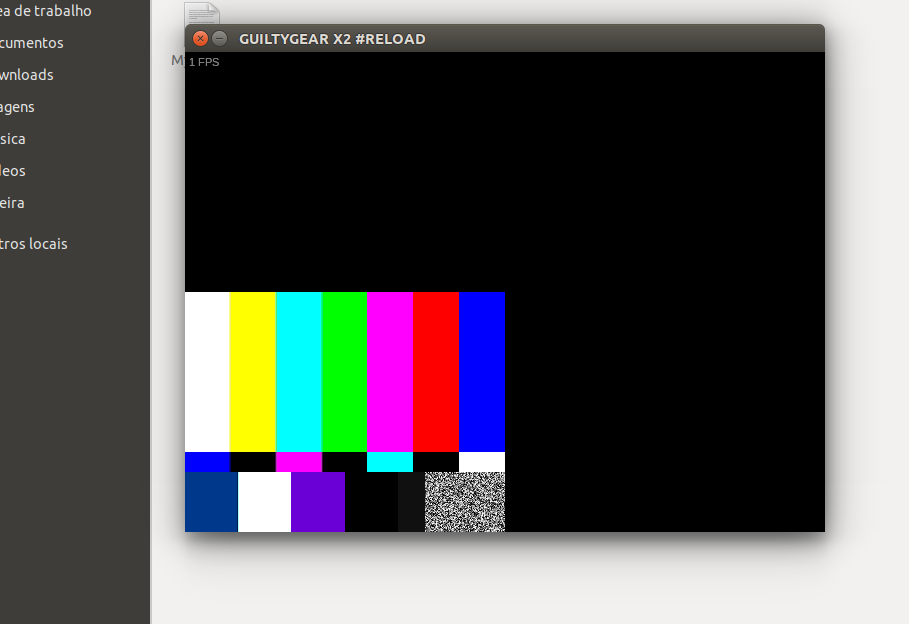
as you can see the color bars dont fill in the whole screen, i suppose they should?
waiting a few seconds on the title screen do work (activate some presentation between 2 characters fighting.)
the game is slow, im pretty sure that my computer can run it faster than that (even on protons, an old version was able to start the fights but not to play the videos) i will try to close a few windows to see if i can get an better performance or maybe its a bug on the new version of proton.
btw: waiting on the buged video (colors bars) may crash the game.
i forgot to mention, before you open the game, you have to chose if you want to open the game or configure the settings, the configure settings windows isnt completely rendered, and you cant resize, you cant read what is writen on the right side of this window.
https://raw.githubusercontent.com/Elmapul/proton-good-metric/main/guilty.png
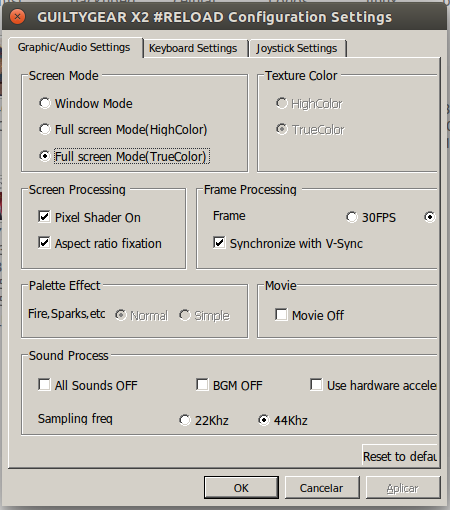
This seems to be a problem for Spyro Reignited Trilogy. MP4 video formats don't play back, it just skips over them. Something related to mfplat.dll
Ditto on Spyro having problems
Out of the box reignited wouldn't play cutscenes at all
I had to reenable shader precaching and download like 2gb of shaders
After that cutscenes would play
Or so I thought
All the cutscenes through Spyro 1 worked till the very last cutscenes
Where it played that color test for a bit then skipped the cutscenes
This game really should not be deck verified if it doesn't work out of the box yet
Guilty Gear X2 #Reload (314030)
had another regression.
the cutscenes arent playing anymore.
honestly i dont remember when they were playing (what version of proton i was using, i will have to guess based on proton relase dates+the time i tested) but now they arent playing.
tested on experimental and proton 4.11-13, the other versions i think it wont even open (7.0-4 take forever to load , i dont know if it will ever open or if something crashed)
Hello @FanderWasTaken, your comment was removed because your workaround references a legally problematic workaround.
Do you have demo which play sounded video at start? In various formats: wmv+wma pro, wmw+wma etc. It was very useful at automated testing.
There was a regression with Rogue Heroes: Ruins of Tasos (787810) which worked prior to April 2024. I thought I'd mention it here due to the following appearing in the logs:
16321.443:0128:01dc:trace:mscoree:DllMain (7BBB0000, 2, 00000000)
16321.444:0128:01dc:warn:threadname:NtSetInformationThread Thread renamed to L"wine_threadpool_worker"
16321.444:0128:01e0:trace:mscoree:DllMain (7BBB0000, 2, 00000000)
16321.444:0128:01e4:trace:mscoree:DllMain (7BBB0000, 2, 00000000)
16321.445:0128:01e0:warn:threadname:NtSetInformationThread Thread renamed to L"wine_threadpool_worker"
winegstreamer error: decodebin0: Your GStreamer installation is missing a plug-in.
winegstreamer error: decodebin0: ../src-gst_base/gst/playback/gstdecodebin2.c(4704): gst_decode_bin_expose (): /GstBin:bin0/GstDecodeBin:decodebin0:
no suitable plugins found:
Missing decoder: Advanced Streaming Format (ASF) (video/x-ms-asf)

0:00:00.181660577 13422 0xd1300900 ERROR   protonmediaconverter videoconv.c:353:video_conv_state_create: MEDIACONV_VIDEO_TRANSCODED_FILE is not set.
0:00:00.181682321 13422 0xd1300900 ERROR   protonmediaconverter videoconv.c:488:video_conv_change_state: Failed to create video conv state, ret -11.
0:00:00.181803439 13422 0xd1300900 ERROR   protonmediaconverter videoconv.c:353:video_conv_state_create: MEDIACONV_VIDEO_TRANSCODED_FILE is not set.
0:00:00.181816485 13422 0xd1300900 ERROR   protonmediaconverter videoconv.c:488:video_conv_change_state: Failed to create video conv state, ret -11.
winegstreamer error: decodebin1: Your GStreamer installation is missing a plug-in.
winegstreamer error: decodebin1: ../src-gst_base/gst/playback/gstdecodebin2.c(4704): gst_decode_bin_expose (): /GstBin:bin1/GstDecodeBin:decodebin1:
no suitable plugins found:
Couldn't set videoconv0 to READYCouldn't set protondemuxer0 to READY
Unhandled Exception:
SharpDX.SharpDXException: HRESULT: [0xC00D36BB], Module: [Unknown], ApiCode: [Unknown/Unknown], Message: Unknown
  at SharpDX.Result.CheckError () [0x00014] in <4756f266f5564a9c96fc162d87cb1b9c>:0
  at SharpDX.MediaFoundation.SourceResolver.CreateObjectFromURL (System.String wszURLRef, System.Int32 dwFlags, SharpDX.ComObject propsRef, SharpDX.MediaFoundation.ObjectType& objectTypeRef, SharpDX.ComObject& objectOut) [0x00079] in <3f89c9e275954d608110909128d5a258>:0
  at SharpDX.MediaFoundation.SourceResolver.CreateObjectFromURL (System.String url, SharpDX.MediaFoundation.SourceResolverFlags flags, SharpDX.ComObject propertyStore, SharpDX.MediaFoundation.ObjectType& objectType) [0x00000] in <3f89c9e275954d608110909128d5a258>:0
  at SharpDX.MediaFoundation.SourceResolver.CreateObjectFromURL (System.String url, SharpDX.MediaFoundation.SourceResolverFlags flags) [0x00000] in <3f89c9e275954d608110909128d5a258>:0
  at Microsoft.Xna.Framework.Media.Song.PlatformInitialize (System.String fileName) [0x00026] in <115d97b957eb41cabade1b29d1e7edf4>:0
  at Microsoft.Xna.Framework.Media.Song..ctor (System.String fileName) [0x00018] in <115d97b957eb41cabade1b29d1e7edf4>:0
  at Microsoft.Xna.Framework.Media.Song..ctor (System.String fileName, System.Int32 durationMS) [0x00000] in <115d97b957eb41cabade1b29d1e7edf4>:0
  at Microsoft.Xna.Framework.Content.SongReader.Read (Microsoft.Xna.Framework.Content.ContentReader input, Microsoft.Xna.Framework.Media.Song existingInstance) [0x00035] in <115d97b957eb41cabade1b29d1e7edf4>:0
  at Microsoft.Xna.Framework.Content.ContentTypeReader`1[T].Read (Microsoft.Xna.Framework.Content.ContentReader input, System.Object existingInstance) [0x00003] in <115d97b957eb41cabade1b29d1e7edf4>:0
  at Microsoft.Xna.Framework.Content.ContentReader.InnerReadObject[T] (T existingInstance) [0x0002d] in <115d97b957eb41cabade1b29d1e7edf4>:0
  at Microsoft.Xna.Framework.Content.ContentReader.ReadObject[T] () [0x00000] in <115d97b957eb41cabade1b29d1e7edf4>:0
  at Microsoft.Xna.Framework.Content.ContentReader.ReadAsset[T] () [0x00006] in <115d97b957eb41cabade1b29d1e7edf4>:0
  at Microsoft.Xna.Framework.Content.ContentManager.ReadAsset[T] (System.String assetName, System.Action`1[T] recordDisposableObject) [0x00080] in <115d97b957eb41cabade1b29d1e7edf4>:0
  at Microsoft.Xna.Framework.Content.ContentManager.Load[T] (System.String assetName) [0x0005a] in <115d97b957eb41cabade1b29d1e7edf4>:0
  at RogueHeroMG.AudioHandler.LoadContent (Microsoft.Xna.Framework.Content.ContentManager content, System.Random random) [0x0010f] in <e9138f76f9284bae81efb1f0b9921562>:0
  at RogueHeroMG.RogueHeroGame.LoadMainContent () [0x00018] in <e9138f76f9284bae81efb1f0b9921562>:0
  at System.Threading.ThreadHelper.ThreadStart_Context (System.Object state) [0x00014] in <f1249a148cfb4110b9a02139e12e4308>:0
  at System.Threading.ExecutionContext.RunInternal (System.Threading.ExecutionContext executionContext, System.Threading.ContextCallback callback, System.Object state, System.Boolean preserveSyncCtx) [0x00071] in <f1249a148cfb4110b9a02139e12e4308>:0
  at System.Threading.ExecutionContext.Run (System.Threading.ExecutionContext executionContext, System.Threading.ContextCallback callback, System.Object state, System.Boolean preserveSyncCtx) [0x00000] in <f1249a148cfb4110b9a02139e12e4308>:0
  at System.Threading.ExecutionContext.Run (System.Threading.ExecutionContext executionContext, System.Threading.ContextCallback callback, System.Object state) [0x0002b] in <f1249a148cfb4110b9a02139e12e4308>:0
  at System.Threading.ThreadHelper.ThreadStart () [0x00008] in <f1249a148cfb4110b9a02139e12e4308>:0
[ERROR] FATAL UNHANDLED EXCEPTION: SharpDX.SharpDXException: HRESULT: [0xC00D36BB], Module: [Unknown], ApiCode: [Unknown/Unknown], Message: Unknown
  at SharpDX.Result.CheckError () [0x00014] in <4756f266f5564a9c96fc162d87cb1b9c>:0
  at SharpDX.MediaFoundation.SourceResolver.CreateObjectFromURL (System.String wszURLRef, System.Int32 dwFlags, SharpDX.ComObject propsRef, SharpDX.MediaFoundation.ObjectType& objectTypeRef, SharpDX.ComObject& objectOut) [0x00079] in <3f89c9e275954d608110909128d5a258>:0
  at SharpDX.MediaFoundation.SourceResolver.CreateObjectFromURL (System.String url, SharpDX.MediaFoundation.SourceResolverFlags flags, SharpDX.ComObject propertyStore, SharpDX.MediaFoundation.ObjectType& objectType) [0x00000] in <3f89c9e275954d608110909128d5a258>:0
  at SharpDX.MediaFoundation.SourceResolver.CreateObjectFromURL (System.String url, SharpDX.MediaFoundation.SourceResolverFlags flags) [0x00000] in <3f89c9e275954d608110909128d5a258>:0
  at Microsoft.Xna.Framework.Media.Song.PlatformInitialize (System.String fileName) [0x00026] in <115d97b957eb41cabade1b29d1e7edf4>:0
  at Microsoft.Xna.Framework.Media.Song..ctor (System.String fileName) [0x00018] in <115d97b957eb41cabade1b29d1e7edf4>:0
  at Microsoft.Xna.Framework.Media.Song..ctor (System.String fileName, System.Int32 durationMS) [0x00000] in <115d97b957eb41cabade1b29d1e7edf4>:0
  at Microsoft.Xna.Framework.Content.SongReader.Read (Microsoft.Xna.Framework.Content.ContentReader input, Microsoft.Xna.Framework.Media.Song existingInstance) [0x00035] in <115d97b957eb41cabade1b29d1e7edf4>:0
  at Microsoft.Xna.Framework.Content.ContentTypeReader`1[T].Read (Microsoft.Xna.Framework.Content.ContentReader input, System.Object existingInstance) [0x00003] in <115d97b957eb41cabade1b29d1e7edf4>:0
  at Microsoft.Xna.Framework.Content.ContentReader.InnerReadObject[T] (T existingInstance) [0x0002d] in <115d97b957eb41cabade1b29d1e7edf4>:0
  at Microsoft.Xna.Framework.Content.ContentReader.ReadObject[T] () [0x00000] in <115d97b957eb41cabade1b29d1e7edf4>:0
  at Microsoft.Xna.Framework.Content.ContentReader.ReadAsset[T] () [0x00006] in <115d97b957eb41cabade1b29d1e7edf4>:0
  at Microsoft.Xna.Framework.Content.ContentManager.ReadAsset[T] (System.String assetName, System.Action`1[T] recordDisposableObject) [0x00080] in <115d97b957eb41cabade1b29d1e7edf4>:0
  at Microsoft.Xna.Framework.Content.ContentManager.Load[T] (System.String assetName) [0x0005a] in <115d97b957eb41cabade1b29d1e7edf4>:0
  at RogueHeroMG.AudioHandler.LoadContent (Microsoft.Xna.Framework.Content.ContentManager content, System.Random random) [0x0010f] in <e9138f76f9284bae81efb1f0b9921562>:0
  at RogueHeroMG.RogueHeroGame.LoadMainContent () [0x00018] in <e9138f76f9284bae81efb1f0b9921562>:0
  at System.Threading.ThreadHelper.ThreadStart_Context (System.Object state) [0x00014] in <f1249a148cfb4110b9a02139e12e4308>:0
  at System.Threading.ExecutionContext.RunInternal (System.Threading.ExecutionContext executionContext, System.Threading.ContextCallback callback, System.Object state, System.Boolean preserveSyncCtx) [0x00071] in <f1249a148cfb4110b9a02139e12e4308>:0
  at System.Threading.ExecutionContext.Run (System.Threading.ExecutionContext executionContext, System.Threading.ContextCallback callback, System.Object state, System.Boolean preserveSyncCtx) [0x00000] in <f1249a148cfb4110b9a02139e12e4308>:0
  at System.Threading.ExecutionContext.Run (System.Threading.ExecutionContext executionContext, System.Threading.ContextCallback callback, System.Object state) [0x0002b] in <f1249a148cfb4110b9a02139e12e4308>:0
With the release of Kingdom Hearts on Steam, I've found that attempting to play the games on Fedora 40 doesn't load the FMVs still, despite the issue apparently being absent on the Steam Deck as reported by multiple outlets. I've already installed all ffmpeg and Multimedia group codecs and tried to force the games to run through Proton GE 9.0-7. The videos do not render.
With the release of Kingdom Hearts on Steam, I've found that attempting to play the games on Fedora 40 doesn't load the FMVs still, despite the issue apparently being absent on the Steam Deck as reported by multiple outlets. I've already installed all ffmpeg and Multimedia group codecs and tried to force the games to run through Proton GE 9.0-7. The videos do not render.
The game has deck specific repos for the cutscenes, this won't download those ones but can you launch the game with SteamDeck=1 %command%? Would like to know if they're just compressed or a different codec.
Replying to https://github.com/ValveSoftware/Proton/issues/1464#issuecomment-2166956800
This completely solved the issue! Played immediately in Re: Chain of Memories. Thank you so much!
So the video codecs are completely fine and non proprietary, the player itself is what fails? What's up with that? This would make the metal gear collection and KH both games that use the same cutscene files internally but require a special command to switch the player? Bypass something? I have no idea.
@kisak-valve Apologies, but is it possible to look into why SteamDeck=1 allows the same supposedly proprietary videos to play in the Kingdom Hearts 1.5 + 2.5 collection? It's absolutely not changing what files its using and this same behavior can also be observed with the metal gear master collection digital comics.
@Bitwolfies May I inquire as to what exactly you have installed? Because simply setting SteamDeck=1 on a clean prefix on desktop Linux does not enable playback of FMV cutscenes in KH 1.5+2.5; all I'm getting is a black screen with audio playback (tested with Proton 8, 9 and Experimental).
Is it somehow possible to download and play the Steam Deck depot on desktop Linux?
Edit: Apologies, the question was supposed to be targeted at @powerofthe69
the player itself is what fails? What's up with that?
FWIW, that isn't surprising at all. There's about a million ways old and new to play media on Windows; some have a working implementation in WINE/Proton, some don't (thus the "media frameworks" in the thread title).
Some game engines do in fact have (debug) options that allow choosing the playback method, and often switching to a different one is all that's required to make videos work on Linux. Any codec issues are orthogonal, on top of that.
@Bitwolfies May I inquire as to what exactly you have installed? Because simply setting
SteamDeck=1on a clean prefix on desktop Linux does not enable playback of FMV cutscenes in KH 1.5+2.5; all I'm getting is a black screen with audio playback (tested with Proton 8, 9 and Experimental).Is it somehow possible to download and play the Steam Deck depot on desktop Linux?
Edit: Apologies, the question was supposed to be targeted at @powerofthe69
Honestly, I'm not entirely sure which codec the game is using. I have ffmpeg-full installed from the rpmfusion repos, and I installed the DNF group "Multimedia" to be safe. Between the two, I'd assume they have any necessary codecs bundled up. I didn't need to find a hack to enable the Steam Deck repos.
Has anyone already tried the variable "SteamDeck=1" on the epic version?
I finally tried it for myself, and yes, SteamDeck=1 allowed playback of video files. I cannot recall exactly at this second but I opened one of the videos in a hex editor, and it mentioned another video player software, one you integrate into your applications.
The videos don't appear to be normal MP4's, nothing I have will play them outside the game itself, and mediainfo won't tell me anything about them.
So we have a bunch of MP4's that can't be played on their own, but can in game either using a built in windows player, or potentially a fallback one when steamdeck=1 is enabled.
I did try it myself and yes, SteamDeck=1 allowed playback of video files. I cannot recall exactly at this second but I opened one of the videos in a hex editor, and it mentioned another video player software, one you integrate into your applications.
The videos don't appear to be normal MP4's, nothing I have will play them outside the game itself, and mediainfo won't tell me anything about them.
So we have a bunch of MP4's that can't be played on their own, but can in game either using a built in windows player, or potentially a fallback one when steamdeck=1 is enabled.
How did you pass this variable to the Epic version? Are you using Epic as non steam or Heroic? Because i got black screen when using Heroic.
@Bitwolfies May I inquire as to what exactly you have installed? Because simply setting
SteamDeck=1on a clean prefix on desktop Linux does not enable playback of FMV cutscenes in KH 1.5+2.5; all I'm getting is a black screen with audio playback (tested with Proton 8, 9 and Experimental).Is it somehow possible to download and play the Steam Deck depot on desktop Linux?
Edit: Apologies, the question was supposed to be targeted at @powerofthe69
You can get the Deck repos if you use something like steam depot manager or boot steam in developer mode and type the right command to download the repo.
However, I can confirm the only changes to the deck videos is simply they're compressed, no other changes were made.
Replying to https://github.com/ValveSoftware/Proton/issues/1464#issuecomment-2168462662
Sorry, I never attempted this on epic, it was meant to be a general post.
Replying to [#1464 (comment)](https://github.com/ValveSoftware/Proton/issues/1464#issuecomment-2168462662)
Sorry, I never attempted this on epic, it was meant to be a general post.
Do you have any ideas to see how to do it for the Epic version? could you check the executables and cutscenes to see if there is anything that could be done?
If you want to use local decoding via a privately-maintained or community fork of Proton that contains ffmpeg and a full gstreamer installation (there are good reasons one may not want or cannot use the server-side transcoding solution being pushed), I suggest outright disabling the media-converter plugin which seems to get in the way and cause skips in cases where local decoding would work even if STEAM_COMPAT*_MEDIA_PATH/MEDIACONV_*_DUMP_FILE is unset in the environment. I've got video playback in a couple of krkrz/mfplat VNs now working without installing a windows mfplat (!) by disabling media-converter and using recent valve-wine bleeding-edge commits (particularly the commit vendored in GE-Proton9-11 for most, and GE-Proton9-7 for a few ones due to regressions in later commits, however if this option is available in the title they may work in GE-Proton9-11 when using -vomstyle=overlay or -vomstyle=layer instead of -vomstyle=mixer or -vomstyle=mfevr or -vomstyle=auto, this is also configurable in the titlebar under 'advanced options' -> 'movie rendering'). When keeping media-converter enabled, they skip.
In the GE-Proton fork, winegstreamer is patched to accept PROTON_AUDIO_CONVERT=0 PROTON_AUDIO_CONVERT_BIN=0 PROTON_VIDEO_CONVERT=0 PROTON_DEMUX=0.
Proton versions
ge-proton9-11x1 2024-08ge-proton9-7x1 2024-08proton 4.11-13x1 2022-09proton experimentalx11 2022-03proton 7.0x1 2022-03proton 7.0-1x1 2022-03proton 6.3x3 2021-11proton 5.21-ge-1x1 2020-12proton 5.13x1 2020-10proton 5.6-ge-2x1 2020-04proton 5.5-ge-1x3 2020-04proton 5.6-ge-1x1 2020-04proton 5.4-ge-3x1 2020-03proton 5.0-1x2 2020-02proton 4.11x1 2019-08
Launch options
PROTON_AUDIO_CONVERT=0x1 2024-08PROTON_AUDIO_CONVERT_BIN=0x1 2024-08PROTON_DEMUX=0`.x1 2024-08PROTON_VIDEO_CONVERT=0x1 2024-08PROTON_USE_CUSTOM_FFMPEG="$SOMEPATH"x3 2020-04WINEDEBUG="+timestamp,+pid,+tid,+seh,+debugstr,+module"x2 2020-04WINEDEBUG=+mfplat,+timestamp?x1 2020-03PROTON_LOG=1x1 2019-12WINEPREFIX=/$PATH/Steam/steamapps/compatdata/32500/pfx/x1 2019-08
Launch lines
SteamDeck=1 %command%x1 2024-06
Upstream links
- ValveSoftware/Proton/issues/7698x1 2024-05
- ValveSoftware/Proton/issues/3035x1 2022-07
- ValveSoftware/Proton/issues/4433x1 2022-03
- ValveSoftware/Proton/issues/1486x1 2020-02
- ValveSoftware/Proton/issues/1420x1 2020-02
- ValveSoftware/Proton/issues/3519x1 2020-02
- ValveSoftware/Proton/issues/2316x1 2019-07
- ValveSoftware/Proton/issues/1893x1 2019-03
- ValveSoftware/Proton/issues/2193x1 2019-02
- doitsujin/dxvk/issues/728x1 2019-01
- ValveSoftware/Proton/issues/137x1 2018-09
- ValveSoftware/Proton/issues/327x1 2018-09
DLLs
mfplat.dllx5 2022-07dxvk_config.dllx1 2020-03mfplay.dllx1 2020-03mf.dllx2 2019-12video.dllx1 2019-05wmvcore.dllx1 2019-04quartz.dllx2 2019-01
Error codes
0xc00d36bbx1 2024-050x80004001x2 2020-02
To all who read this issue report and thread:
I've migrated the tables to my repository at https://github.com/HonkingGoose/proton_codecs_media_support_tracker
If you want to update a table entry, you can open a pull request there. :wink:
This way I don't need to keep track of changes all by myself.
Proton 5.13-1 has improvements for some games. Some
quartzgames may start working now.Quote from @aeikum original comment here
Feature Request
I confirm:
contain this feature already.
Description
There are multiple games which use .wmv (Windows Media Video) files, for their cinematics/cutscenes. These files will not be played back in-game on a standard installation of the game using Proton.
Because I've seen multiple bug-reports with regards to .wmv file playback, I wanted to make a generic request, so it doesn't get lost in between all the specific game issues.
Justification
There are multiple games which have .wmv file playback issues, these games use .wmv for cutscenes, and so are a integral part of the story and experience of the games which use it.
For #137 the fix for .wmv files would probably make the game ready for official whitelist process.
There might be other games which would qualify for whitelisting too, after this feature has been implemented.
Integration into Proton would fix .wmv file playback for the games referenced below.
Risks
References
The old tables can be seen from the edit history. I recommend you use the newer tables in my repository though.