Assetto Corsa
With Wine this game have a lot of problems with .Net installation (dotnet452). Probbably is needed to play it.
There are a lot of games with .net dependencies
Ahhh,the name of the game is "Assetto Corsa", not "Asseto Corsa". I think that correct this will be useful to search this issue
One thing (offtopic), simon50keda, are you the author of the Force Feedback Plugin for Euro Truck Simulator 2 (thanks for it)? Are you still working on it?
same problem here:
ubuntu 18.04
i7 4790k
AMD Radeon RX470 4Gb
16Gb RAM
This game is a mess to get to work, and it's all .net stuff. I have a tutorial on Reddit how I finally got it to work with Lutris, wine, winetricks, various .net tries, and DXVK. Here's hoping AC2, upcoming, is easier to get working.
Link to tutorial in reddit?
I had try but the game still not working, .net app verify say all work ok:-(
It works with this Lutris installer!!!!
https://lutris.net/games/install/8286/view
Take a look on it. I only have to change to Windows Vista in Wine configuration, but I know that there are people that play it "using" Windows 7 in configuration.
It's work on lutris, great.
@leillo1975 what distribution are you using? I tried installing it on Linux Min 19 trough Install on lutris web, installation went by (steam installs, AC was downloaded too) but when it tries to run it, it just creates a window and then dies. :/
I'm running into system argument exception:
https://pastebin.com/raw/2DpSEAgZ
I use Ubuntu 18.04. You set wine configuration to Windows Vista?? I had the same problem, but this change fixed the problem. I recorded a video playing the game with this installer: https://youtu.be/BV9FtJC7a7Y
Uh, later I got it working yeah. But I rain in another problem. Cinnamon or Lutris obviously has problems with making game full screen. During the "race" fps stated ~40 FPS but it surely wasn't anything like that, due to window not being fullscreen thus window manager was doing sth with it.
So did you by any chance change graphics settings somehow or?
I don't make anything special with it. I'm using a fullscreen mode Are you using a virtual desktop?
Nope, at least I haven't switched to it manually. Well I'm gonna purge everything and try again.
Assetto Corsa (244210)
Issue transferred from https://github.com/ValveSoftware/Proton/issues/1669.
@DougBeney posted on 2018-10-02T01:50:10:
Compatibility Report
- Name of the game with compatibility issues: Assetto Corsa
- Steam AppID of the game: 244210
System Information
- GPU: GTX 1050
- Driver/LLVM version: nvidia 396
- Kernel version: 4.15.0-36-generic
- Link to full system information report as Gist
I confirm:
- [x] that I haven't found an existing compatibility report for this game.
- [x] that I have checked whether there are updates for my system available.
Symptoms
Launched game, Steam shows running next to the game's title, then it disappears and nothing else happens. Nothing pops up on my screen except for the "Preparing to Launch Assetto Corsa Steam dialog.
Reproduction
I am actually on a pretty fresh install I just did today. I used KDE Neon which is exactly the same as Ubuntu 18.04 or Kubuntu 18.04 except that it has a newer KDE version.
This should be reproducible on any Ubuntu 18.04 distribution.
Others' have had similar experiences and you can read about them on the unofficial Steam Compatibility Reports: https://spcr.netlify.com/app/244210
@leillo1975 thanks for the Vista trick! That did it for me.
Performance could still use some work. Had frame skipping on full resolution, which is only 1280x1024 btw.
Reproduced on Arch:
Compatibility Report
- Name of the game with compatibility issues: Assetto Corsa
- Steam AppID of the game: 244210
System Information
- GPU: NVIDIA Corporation GeForce GTX 1080 Ti/PCIe/SSE2
- Driver/LLVM version: NVIDIA 415.27
- Kernel version: 4.20.7-arch1-1-ARCH
- Link to full system information report as Gist
- Proton version: 3.16-6 Beta
I confirm:
- [x] that I haven't found an existing compatibility report for this game.
- [x] that I have checked whether there are updates for my system available.
Symptoms
Nothing happens when trying to launch the game. Running the winetricks commands from the Lutris install script makes a terminal pop up for a split second instead.
Attached Proton log is after installing the packages from the Lutris winetricks commands.
steam-244210.log
Update for anyone interested who had issues with running the game (@simon50keda ?):
Installing with Lutris on a 64 bit prefix using their script made it possible to start the launcher. The game itself was crashing, but installing the native d3dx11_43 and d3dcompiler_43 with winetricks made it possible to run the game smoothly. The wheel, FFB and such all work, and there are no graphical glitches.
Update for anyone interested who had issues with running the game (@simon50keda ?):
Installing with Lutris on a 64 bit prefix using their script made it possible to start the launcher. The game itself was crashing, but installing the native
d3dx11_43andd3dcompiler_43with winetricks made it possible to run the game smoothly. The wheel, FFB and such all work, and there are no graphical glitches.
Thanks for the tip, I will update the script
@slavfox what about framerate and online?
@leillo1975 is the script updated already, I might try it this weekend.
Haven't tested online. Frames are around the same I'd get on Windows (1080ti, 3440x1440) at gfx settings maxed, they degrade extremely quickly as you enable the onscreen widgets. With just one or two widgets on screen I'm getting a comfortable 90-100 fps.
@simon50keda update: online works, but framerates are down to ~40.
This is the video compare performance on native windows 10, linux Xorg and linux wayland
https://youtu.be/7kVIZ51evDM
Initially I had "Enable DXVG" enabled and could not get past the launcher. After disabling that, I can get on the track, but everything is quite pink:

Someone take a look to this Lutris installer?
https://lutris.net/games/install/12720/view
This installer uses Steam for Linux and Proton. I try to install it, but it fails on use "protontricks"
Hmmm so if this would be true ... then it should work directly via SteamPlay install? Last time I tried (month ago) I had no luck except with the given lutris installer by leillo1975.
I don't think it works with straight Proton yet... Someone posted on ProtonDB their script for making it work with Proton here: https://pastebin.com/f5eUDcr0. Perhaps that could be merged with the Lutris script?
Well essentially this is it, This are exact steps I had to take with lutris to make it work.
I wonder if a manual .dotnet install isn't necessary anymore after Wine 4.6?
Modified version of the earlier script to be more automated for convenience: https://gist.github.com/Roliga/8493e33e4cbb7eccd4e5f0a831a3990d
I managed to reach the Assetto Corsa launcher with Proton 4.11-10 using a combination of all guides I could find on the internet, including the above scripts, but I can't load in any race, it seems that the resolution option is blank, which doesn't let the game start, as this is a bug that occurs on windows too. I've also tried lowering down all graphic settings, but it still won't load in.
Finally, it worked after reinstalling on proton 4.11-11. For anyone interested, here is what I did.
I created a new prefix as mentioned by /u/timothylake here.
The default launcher did open, but it would not load any race. So I installed Content Manager inside the assettocorsa folder. I had issues with Content Manager.exe , so I renamed it to Content Manager Safe.exe Then I put this to Assetto Corsa Launch Options, as suggested by Tritano here.
~/[steampath]/steamapps/common/'Proton 4.11'/proton waitforexitandrun ~/[steampath]/steamapps/common/assettocorsa/'Content Manager Safe.exe'; PROTON_USE_DXVK=1 echo %command%
Make sure [steampath] is the path to your steam installation, Proton version on the path matches your proton version, and the name of Content Manager matches the name your .exe has.
It works flawlessly, but make sure you turn off the overlay apps, because they cause lag.
Got AC running with good performance, even using Content Manager and Sol thanks to the tip from @Christopher-S-25 ;)
However, the FPS drop caused by the HUD/UI is kinda annoying. But there is a possible patch for the proton-tkg custom build (can be found here). Unfortunately building proton-tkg didn't work for me, so I'm wondering whether there is a way to get this patch included in the official Proton or to apply this separately to an AC bottle/install?
Glad I could help you @MrFuNK1 :D
I haven't tried any custom proton build, because it took me 2 months to find a proper solution for AC to run, so I'm a bit afraid it might break again.
BTW, I can't make Custom Shaders Patch work. Did you install it with Content Manager or manually with JSGME? I've tried both to no avail. It's like as if I haven't installed it at all when I enter a race... I mainly want to have working headlights, I just don't understand what I'm doing wrong. :/
@Christopher-S-25 I really did nothing more than running CM like you suggested and let it install CSP. I only installed Sol manually as suggested in the official guide 😉
Maybe you could share a screen of your config of CSP in CM so that we could compare? But maybe it could also be something related to the setup of Proton!? IIRC I did nothing special but following what the install scripts included 🤔
Aren't the CSP files supposed to go on the MODS folder? Well I just discovered that it doesn't do it at all. And when I press "scan again" on the installation on CM it can't find it and it prompts me to install it again. Maybe I could install CSP on my own somehow? :thinking:
EDIT: I checked again and I realized that it doesn't work with MODS folder, but I don't understand why it doesn't work, since all the other files are in place...
EDIT2: I'm sure it's not working, because I don't even have the custom taskbar although it's enabled in the CM Settings
EDIT3: All files are good, but the game acts as if I never installed it. Any help is appreciated
I cannot start up Assetto Corsa from Steam and also not from Lutris with the Steam Proton Version.
Does anybody have a solution?
I use lutris to play this game, and some days ago I make a petition to his devs to include a Wine-TKG with this fix activated, but i don't have a response. Perhaps if you leave a message on this thread showing interest, they could make it:
https://forums.lutris.net/t/please-include-a-wine-tkg-with-assetto-corsa-fix-activated/8108
@Christopher-S-25 what does the settings page show you? Mine looks like this:

Maybe you have, but still: Did you install all the dependencies that were included in the various install scripts floating around? CSP requires 64bit and Visual C++ Redistributable 2015 (x86) to run. So maybe there is a problem, although I thought that CM does identify any problems with the CSP install and would report.
@Christopher-S-25 and others, please let me apologize: I made a beginners mistake by simply assuming CSP was working because it installed via CM without problems and also all the configuration pages etc. were there. In reality all just appeared to be working, but in the game nothing works. That's a real pity. Again I'm very sorry!
But now I want to know how to get CSP and Sol working even more! Unfortunately it's too late today and I don't have a good idea at the moment where to start. So I will give it another go at one of the next days. In the mean time, any suggestions or tips would be appreciated of course!
No problem @MrFuNK1 . I'm glad I'm not the only one having this issue. I suspect it's the dwrite.dll because when I tried to override it to native (windows) with winecfg, CM would crash with an error from that dll. Practically, it could be a case similar to GTA V, where you have to override dinput8.dll to native (windows) in order for ScriptHookV to work. Anyone with more experience could possibly look on it. I could be wrong, but there is no other reason for it to totally ignore the CSP installation. It won't even throw any error, as if I never installed CSP.
Couldn't resist to do some more testing today. And I do have an result although not a positive.
First I tried to exclude that CM and Steam are somehow causing the error, so I switched to "Replacement" mode as suggested from the "About > Important Tips > Starter" page in CM. But despite this improves the integration, it did solve any CSP issues.
Next, I've set the Windows version to Windows 10 via Winecfg (Vista is not required anymore because I'm using CM) and I've removed the custom starting options for AC from Steam. Again, this did solve the problem.
Then I chose the same approach as @Christopher-S-25 by fiddling with the dwrite.dll. To cut a long story short, the dwrite.dll that seems to come with CSP and is saved in the root AC folder is the one that does the magic of injecting the shader patches into the game engine. Without that dll or a different one (native or builtin) you either get an error message that injecting wasn't possible or AC is just running without the shader patches.
With the CSP's dwrite.dll, the game starts without an error. But unfortunately the screen stays black all the time while the process is actively loading or working or whatever (i.e. it seems it did not die).
So the bottom line is: The CSP's dwrite.dll is required to get CSP working. The "UI patch" consequently should be applied to that one (if possible at all), but also there is something wrong with the CSP's dwrite.dll because seems to not work via Proton.
Maybe someone can assist from this point, telling me how I could get a log of what is going on in the background to identify any issues!?
I would surely want to reach out to the CSP maker(s), but I guess some more precise information will be required to tackle the problems and find solutions.
I did some further digging regarding dwrite.dll and here is the error from CM: 
It's obvious that this is not enough to examine the DLL itself for dependencies, so I ran Dependency Walker on WINE and here is the result: 
Dependency Walker itself popped up an error while scanning the DLL, so maybe I should also try it on a Windows laptop to make sure the DLL is working on windows. Some googling I did suggests that DBGHELP.DLL could be causing problems, like on this reddit post. I'm not really sure though, might as well we contact CSP devs on discord to tell us what's up with dwrite.dll. Or we could first try what caught my eye on the Shaders Patch Page:

The third bullet sounds like it could be the problem we are facing.
That troubleshoot information is outdated or irrelevant if using CM for the installation of CSP:

(the original shaders are still there, so replacing makes no sense)
Also when CM detects that dwrite.dll is missing it would ask you to re-install CSP and will again copy the dwrite.dll:

(CM recognizes this instantly, so renaming of the dwrite.dll immediate let CM show that error)
I will just boot windows in a couple of minutes and set everything up the same way as I did in Linux/Proton. I believe there will be no issue with launching AC with CSP/Sol. But I will report ;)
What doesn't make sense is why CM crashes along with CSP. Does it "preload" dwrite.dll before opening? Isn't it supposed to crash when the actual game opens or something? Anyway, I hope your windows tests are successful so we can make sure it's just wine-related. Then we can gather up all the information we have, and contact the devs. I hope they are willing to help since it's not a windows problem.
Strange, if I'm not mistaken CM did launch on my side even without the dwrite.dll - have you changed the dwrite.dll setup in winecfg?
My AC install on Windows seems a bit messy, but I don't have time to start with a fresh install. Anyway, latest CSP and Sol simply work directly. So it's definitely something that dwrite.dll does that is not supported by or does fight against something in WINE or Proton ;)
I tried running the DLL native again to get a screenshot of the error. Usually DLLs that are meant to mod a game need to run on native (windows), with GTA V and ScriptHookV being a similar case. The weird thing is that, dwrite.dll is able to crash the whole CM app. So I was curious why, since it only mods the game and not CM.
You probably have to set dwrite to "native,builtin" so both application custom module and actual one could be used.
Hmmm interesting, CM did open up, now it gives an error after pressing drive with the recommended version and when installing the latest I just get a black screen. Thanks for the tip @nsivov :P
"native,builtin" is what I have setup as well, so no wonder I did not get that error ;)
Seems like that setup is obviously better, but it won't load in any race now. I've tried turning off as many graphics improvements as possible, but that didn't change anything. I've no idea why it wouldn't load at all. Now it looks more like a game problem instead.
If you disable/remove CSP, you will see that AC launches normally. I'm sure it's an issue with CSP injecting the engine/shaders. So I suggest we should first involve the CSP guys and see where it gets us ;)
So guys, here are some good news for you!
I found, after a whole evening of trail and error, that AC is actually working via CM with CSP and Sol! At least on my end I found a setup of extensions that make CSP and Sol working. Not all those fancy effects are working now or available. Maybe this changes with patches to Proton or CSP in the future. And the greatest surprise: The UI problem is gone (no lag when UI elements are drawn on screen) so FPS are very high and performance is very good now!
So I do now highly recommend everyone to set up the game with CM and CSP. You even don't need to enable any extension, just the basic CSP already seems to fix the font drawing which may is the reason for the UI causing a drop in FPS.
The results from my trail and error was:
Extensions not working at all:
- New loading screens
- Taskbar
- Windscreen FX
Extensions that work but have some limitations:
- Smart mirror (incl. real mirror and pp in rear mirror)
-- only works if virtual mirror is disabled - Track adjustments
-- audio of tyres is exaggerated/distorted in some cases - some solutions: set "New sounds volume" to 0% may fixes distortion in chase cam although tyre squeaking on right channel only (needs verification), in cockpit view the distortion remains unchanged and reducing the tyre audio to 0 (ingame app or settings) is required
-- Weather FX does also influence the sounds - in case of the problems with track adjustments also positively
-- sound may interfer with other users of the driver - Extra FX
-- Temporal anti-aliasing not working
-- Local reflections (SSLR)
-- Ambient occlusion
-- Simple light bounce
-- Volumentric lights
-- Fog blur
I'm curious to see if that works for others as well as it did for me! Let me know so that we may end up with a new instruction on how to set up the game to work on Linux with Steam and Proton properly ;)
EDIT: Should have mentioned that I was using CSP 0.1.39 and Sol 1.4.1 ;)
@MrFuNK1 I just decided to troubleshoot with your method, but the setup of extensions that you said didn't make a difference for me. HOWEVER, I think I found a solution that truly makes the game work!!! Indeed maybe some extensions don't work, I haven't tested it yet. Here's what I did and I was left with my mouth open:
- I went to the Custom Shaders Patch Settings and I turned off all extensions apart from Lighting FX, which is the only thing I care about (hence more testing is needed)
- I went to the General Patch Settings and unchecked EVERYTHING apart from Shaders Patch active (obviously)
My guess is that Optimizations, CPU Optimizations and GPU Optimizations were causing issues during loading (Especially the Multi-threaded and smoother loading options under Optimizations)
If this method works for other people too, I will do more testing to make sure exactly which extensions work as well as with SOL.
I used CSP 0.1.39 without SOL, because I wanted to isolate possible issues from SOL.
EDIT: you can add me on steam if you want @MrFuNK1 :smile:
https://steamcommunity.com/id/Christopher_S_25
Yeah, I should have mentioned that I'm on Intel and NVIDIA with the official drivers. AMD users may not able to use the same features or the other way around. Also I believe you could get more features by setting up Proton with some things. Don't know if DXVK etc. could also make a difference 🤔
Anyhow, it's very good that CSP in the bare minimum configuration can change the game - literally!
With latest Proton (5.0-1) I experienced heavy flickering in CM. Disabling the hardware acceleration for the UI (Settings > Appearance > System: > Disable hardware acceleration for UI (not recommended)) fixed that for me.
On another note: When you are using SOL you will have to install that again if CSP is updated. If one combination works for you, you may consider disabling the automatic updating of CSP through CM.
Actually the CSP x Wine compatability was achieved some time ago around v0.1.25.
I reported Ilya that CM works fine but CSP fails to inject for some reason and after short ping-pong debug session he came out with a set of overrides which nowadays can be found at extension/config/data_alt_mapping.ini file under section called [NAMES_WINE]. After that it became possible to run AC+CM+CSP under Wine.
I noticed some activity in this thread and decided to try Proton another time, so here is my comprehensive and precise guide for running AC+CM+CSP with Proton 5.0-1. It contain some tricks to make most of CSP features work as well as a pair of workarounds to prevent some type of crashes.
AC+CM+CSP
Prerequisites
- protontricks - we will use it to operate on our prefix carefully
Road to working AC+CM
- Select Proton 5.0-1 as a compatibility tool for Assetto Corsa and install the game as usual.
- Try to run the game by hitting "Play" in Steam, it will fail, but it will create a prefix for us.
- Now let's remove the "Wine Mono Windows Support" using the next tool:
protontricks -c "wine uninstaller" 244210
- Install .NET Framework 4.0:
wget https://download.microsoft.com/download/9/5/A/95A9616B-7A37-4AF6-BC36-D6EA96C8DAAE/dotNetFx40_Full_x86_x64.exe
protontricks 244210 winxp
protontricks 244210 shell
cd -
wine dotNetFx40_Full_x86_x64.exe /q
exit
- Install .NET Framework 4.7.1:
wget https://download.microsoft.com/download/9/E/6/9E63300C-0941-4B45-A0EC-0008F96DD480/NDP471-KB4033342-x86-x64-AllOS-ENU.exe
protontricks 244210 win7
protontricks 244210 mscoree=native
protontricks 244210 shell
cd -
wine NDP471-KB4033342-x86-x64-AllOS-ENU.exe /q
exit
- Install Visual C++ 2015 libraries:
protontricks 244210 -q vcrun2015
- Install d3dcompiler_47:
protontricks 244210 d3dcompiler_47
- And switch to Windows 10 mode:
protontricks 244210 win10
- Link the
loginusers.vdffile to let CM detect our Steam ID. Location of the file can vary for different Steam installations, for me it was found in$HOME/.steam/root/config/on one machine and in$HOME/.steam/root/steam/config/on another. Check your installation and correct 2nd command accordingly:
mkdir ~/.steam/root/steamapps/compatdata/244210/pfx/drive_c/Program\ Files\ \(x86\)/Steam/config
ln -s $HOME/.steam/root/config/loginusers.vdf ~/.steam/root/steamapps/compatdata/244210/pfx/drive_c/Program\ Files\ \(x86\)/Steam/config/loginusers.vdf
- Download Content Manager and extract its executable to AC installation directory. Rename it to
Content Manager Safe.exe. - Set custom launch options for Assetto Corsa to
~/.steam/root/steamapps/common/'Proton 5.0'/proton waitforexitandrun ~/.steam/root/steamapps/common/assettocorsa/'Content Manager Safe.exe'; echo %command%
- Now run the game via Steam again, CM should appear and ask about AC location. Hidden directories are not visible in its explorer, so you can get the path by executing something like this in terminal:
echo 'Z:\home\'$USER'\.steam\root\steamapps\common\assettocorsa'
Congratulations!
At this point you should have working Content Manager which is able to run single-user Assetto Corsa games as well as to connect to online servers. Now we can proceed to CSP installation.
Installing CSP
- Keep in mind that Wine+CSP will force to turn down the volume of tyres and surface audio. It will complicate car control because the tires screech will become silent.
- Driver model will disappear, only helmet will remain visible.
- Close CM.
- To make CSP injection possible add a new library override for
dwrite. It should appear with "(native, builtin)" setting. Use the next command to run winecfg and navigate to the "Libraries" tab:
protontricks -c winecfg 244210
- Install CSP using CM by going to Settings > Custom Shaders Patch.
- Switch CSP version to 0.1.42.
⚠️ At this point AC will NOT work, please, proceed to the next section to tweak CSP.
Tweaking CSP
In Content Manager navigate to the Settings > Custom Shaders Patch. The next tweaks are required to make it work as well as it possible with Proton.
- Disable the next extensions completely. Unfortunately, they don't work with Wine yet:
- New loading screen
- Taskbar
- Windscreen FX - actually can be enabled if you remove all the files from the
~/.steam/root/steamapps/common/assettocorsa/extension/sfxdirectory. Windscreen FX depends on SFX by using the rain drops sound for rainy weather and there is a problem which makes it crash when it tries to load audio. - Car instruments - uncheck the "Use odometers" and "Navigators for some cars" ticks to prevent crashing with BMW M3 E30, Audi R8 and some other cars.
- Smart Mirror - will cause crash if you join the server where virtual mirrors are forced on, to avoid it disable the virtual mirror by adding the following setting to the file located at
~/.steam/root/steamapps/compatdata/244210/pfx/drive_c/users/steamuser/Documents/Assetto Corsa/cfg/extension/smart_mirror.ini(create the file if not exists):
[PIECE_0]
ROLE=TOP
- Fake Shadows FX - uncheck the "Properly project shadows on the ground" tick. It will allow to use various FX from Extra FX extension such as Motion blur, Temporal anti-aliasing, SSLR and other.
At this point you should have mostly working CSP. Sadly, the VAO patches are not loaded correctly under Wine, so you will not be able to see the VAO effect, but you can use SSAO or HBAO+ from Extra FX extension (but they consume some extra power).
Distorted audio problem
In Content Manager navigate to Settings > Assetto Corsa > Audio and turn down the "Tyres" and "Surface" sliders. It will disable these sounds for your car, however, it will not disable them for opponents, so they still be able to scare you with EXTRA-loud surface rustle sounds. I asked Ilya about possible solution of this problem and he said that theoretically there is should not be such problem. He said that maybe someday he will make an option to disable sound modifications completely to solve the audio problem, but there is no any eta.
Installing Sol
Download and install Sol 1.4.2 (or newer?) manually, copy the files by hand.
You can skip the extension/config/weather_fx.ini file because newer CSP contain some extra sections besides those which come with Sol 1.4.2, but I don't think that it's very important.
- Enabling Sol applications is breaking something and requires the
assettocorsa/extension/weatherdirectory to be reinstalled from Sol archive. These applications known to partially work for me with clean Wine (non-Proton) installation, but for some reason it was not possible to make them run with Proton yet.
Notes
Proton-5.1-GE-1 is also known to work, but there is a problem with CM Steam ID detection. Linking the loginusers.vdf didn't help me, but eventually it was possible to make Steam ID work by copying CM configs from previously used Proton 5.0-1 prefix. The Proton-5.1-GE-1 build is known for a patch which solves the problem of a slow Kunos in-game UI, if you don't plan to use CSP, you can use this Proton build to improve the UI performance. However, if you use CSP there is no big difference, because CSP fixes UI problems by default with options which can be seen enabled at Content Manager > Settings > Custom Shaders Patch > General Patch settings > Custom fonts rendering section.
Tested with GTX 1060 and Vega 56.
Hello I'm stuck in step 11, where you set launch options for Assetto Corsa to make CM work, the problem is that I have got the game in a NTFS disk which mixes WIndows&Linux games together, so how can you make this command
"~/.steam/root/steamapps/common/'Proton 5.0'/proton waitforexitandrun ~/.steam/root/steamapps/common/assettocorsa/'Content Manager Safe.exe'; echo %command%"
to the one where the actual game is installed in
"/mnt/D232B09032B07B55/Juegos/SteamLibrary/steamapps/common/assettocorsa/" ?
So I don't have to reinstall the entire game + mods, thanks
https://imgur.com/a/kWhXcfN
I'm not sure, but can you can try it like this?
~/.steam/root/steamapps/common/'Proton 5.0'/proton waitforexitandrun /mnt/D232B09032B07B55/Juegos/SteamLibrary/steamapps/common/assettocorsa/'Content Manager Safe.exe'; echo %command%"
It didn't do anything :/, also adding a ~ to /mnt/D232B09032B07B55/Juegos/SteamLibrary/steamapps/common/assettocorsa/'Content Manager Safe.exe'; echo %command%" didn't do anything, it stops.
You don't need to add a ~ to /mnt/... because ~ is a shortcut for the home directory of your user.
Run steam in a terminal to see the error message and make sure that you entered the command correctly because Steam UI makes it a bit tricky to paste text into that textbox.
fsync: up and running.
GameAction [AppID 244210, ActionID 3] : LaunchApp changed task to SynchronizingCloud with ""
GameAction [AppID 244210, ActionID 3] : LaunchApp changed task to SiteLicenseSeatCheckout with ""
GameAction [AppID 244210, ActionID 3] : LaunchApp changed task to CreatingProcess with ""
GameAction [AppID 244210, ActionID 3] : LaunchApp waiting for user response to CreatingProcess ""
GameAction [AppID 244210, ActionID 3] : LaunchApp continues with user response "CreatingProcess"
Game update: AppID 244210 "", ProcID 15878, IP 0.0.0.0:0
Starting app 244210
Adding process 15878 for game ID 244210
GameAction [AppID 244210, ActionID 3] : LaunchApp changed task to WaitingGameWindow with ""
ERROR: ld.so: object '/home/marioarchpc/.local/share/Steam/ubuntu12_32/gameoverlayrenderer.so' from LD_PRELOAD cannot be preloaded (wrong ELF class: ELFCLASS32): ignored.
/bin/sh: -c: line 0: unexpected EOF while looking for matching `"'
/bin/sh: -c: line 1: syntax error: unexpected end of file
GameAction [AppID 244210, ActionID 3] : LaunchApp changed task to Completed with ""
Adding process 15879 for game ID 244210
Game removed: AppID 244210 "", ProcID 15878
Uploaded AppInterfaceStats to Steam
Exiting app 244210
No cached sticky mapping in ActivateActionSet.
@Marioh2451 recheck your custom launch options. Use arrow keys and mouse to navigate over the line of text and make sure that there is no any extra unwanted symbols like, maybe, " or something else.
Also, on GitHub you can use backticks to post terminal output or code: https://help.github.com/en/github/writing-on-github/basic-writing-and-formatting-syntax#quoting-code
@Marioh2451 recheck your custom launch options. Use arrow keys and mouse to navigate over the line of text and make sure that there is no any extra unwanted symbols like, maybe,
"or something else.
Also, on GitHub you can use backticks to post terminal output or code: https://help.github.com/en/github/writing-on-github/basic-writing-and-formatting-syntax#quoting-code
What I did now, is move the game through steam from ntfs disk to steam root, I got it working but the problem is that in step 12, it doesn't really do anything at all, it doesn't show hidden folders as you can look in the image
https://imgur.com/WANzvhx
@Marioh2451 That's correct. It doesn't show hidden folders, but you can paste the line you got by executing that command in your terminal. Just paste it manually by Ctrl+V instead of pressing the "Change" button and opening that browser window.
@Marioh2451 That's correct. It doesn't show hidden folders, but you can paste the line you got by executing that command in your terminal. Just paste it manually by Ctrl+V instead of pressing the "Change" button and opening that browser window.
Okay, but now I have found out a new problem, CM doesn't detect my G29 input, I have rebooted and my G29 is actually working, but it doesn't get to work with CM inputs, I cannot get to put throttle, steering, etc. I have tried launching assetto corsa atm and it crashes, just to get in game options for that
@Marioh2451 Same for me, CM can't detect any controllers when running via Wine/Proton so I have to setup them using Kunos launcher.
@Marioh2451 Same for me, CM can't detect any controllers when running via Wine/Proton so I have to setup them using Kunos launcher.
Oh, i have fixed it by switching to PS3 mode
@Marioh2451 Same for me, CM can't detect any controllers when running via Wine/Proton so I have to setup them using Kunos launcher.
And also, If I want to go to Kunos Launcher, how do I get to it and then change back to CM?
To get Kunos launcher simply remove the launch options command line.
thanks @zezic ! I followed your guide and except for the change of version to install d3dcompiler_47 (only d3dcompiler_43 was available), the rest of the steps went well with Proton5.0.2.
I also skipped the installation of CSP. The game works fine except for the slow performance in-game when multiple UI HUBS are shown, but change Proton.5.0.2 to Proton-5.1-GE-2 solved that!
Game runs very well know!
Tested with GTX 970 / Ryzen 1600X
Somehow FFB broke and it doesn't work again, I have tried reinstalling the complete game and redoing what @zezic has said but game doesn't launch anymore somehow :/
Somehow FFB broke and it doesn't work again, I have tried reinstalling the complete game and redoing what @zezic has said but game doesn't launch anymore somehow :/
Here is a new video with terminal representing the issue @zezic
I just installed AC and followed the instructions here (didn't do the part for the content manager though): https://www.reddit.com/r/assettocorsa/comments/d6ijqs/assetto_on_linux/
However, on launch I get an error that rundll32 couldn't be loaded and then "No video modes available. External component has thrown an exception". In the graphics option the resolutions list is then empty and no race can be started. The in-game benchmark runs and detects the correct resolution though.
Running Arch Linux, Steam (Native) and an nVidia GTX 670. Any thoughts? Thanks!
edit: Nevermind, I was missing the lib32-vulkan-icd-loader package for some reason.
Some extra notes regarding the AC content manager:
- Don't use the "Create start menu option". Not that you should have any reason to do so, but it causes the application to stop launching completely after
- The manager tries to get the user's steam ID from loginusers.vdf, but it doesn't exist inside the prefix. If you want online support, you can workaround this by symlinking or copying
~/.local/share/Steam/config/loginusers.vdfto<steam library dir>/steamapps/compatdata/244210/pfx/drive_c/Program Files (x86)/Steam/config/loginusers.vdf. You'll likely need to create the config subdirectory. - The content manager might offer the option to replace the main executable
AssettoCorsa.exewith the content manager. Although this would likely be a cleaner way to launch the application (you presumably wouldn't need the launch options workaround) it doesn't appear to work for me. - This applies to the game itself as well as the content manager: consider making backups of the game dir and prefix, as there are a number of places where things can break. You can use
cp -a --reflink=autoif you are using BTRFS for fast copies that don't take any extra space, due to its copy-on-write support.
I've updated CSP to the latest version (IIRC version is 0.1.50) and surprisingly the driver hands and body, as well as the pit workers are now visible!
Can anyone confirm?
Aside of this, does latest CSP together with latest SOL work for anyone? When I use the SOL weather system the game crashes, but if I use the default system it does not. Maybe there is an incompatible setting or it's just my system ;)
Edit: I accidentally wrote version 0.1.58, but of course it is 0.1.50 instead ;)
@MrFuNK1 I can confirm that fix for invisible driver arrived to 0.1.50 but what's even more important:
- the distorted sounds of tyres and surfaces are fixed
- VAO patches are working now
- No problems with encrypted tracks like Shutoko
Thanks to Ilya!
The game does not render in VR for me even when setting it to OpenVR mode.
@MrFuNK1 I can confirm that fix for invisible driver arrived to 0.1.50 but what's even more important:
* **the distorted sounds of tyres and surfaces are fixed**

* **VAO patches are working now**

* No problems with encrypted tracks like Shutoko
Thanks to Ilya!
So then, maybe I will try to continue with your guide and install CSP, although the stability of the game is not good enough
@alexbrrsclnt Yeah. I think, now installing the CSP is definitely worth it because most of the problems are gone away. For example, the new loading screen and new taskbar are also working correctly in 0.1.50. Most of the issues were related to the way CSP searches for the functions to hook to and for some functions the algorithm worked different than under real Windows.
Probably, you can skip the whole section called "Tweaking CSP" as most of the functions are actually working for patch v0.1.50. Only thing I've not checked yet is the Smart Mirror behavior. Maybe it's also got a fix.
P.S.: Encrypted tracks like Shutoko Revival Project are also loading correctly with 0.1.50.
Yeah, I contacted x4fab about the bugs, and he is willing to solve all the bugs we have on wine/proton with CM and CSP, like the encrypted cars bug I had with the brand new Impreza 22B mod. So far he has done a great job, please leave a message here if you have any CM or CSP related bug with wine/proton.
So far the known bugs are:
- Custom Fonts Rendering. From what I have heard, it should work with Proton GE, but on normal proton/wine, the race won't load with that option enabled.
- Sol Weather App. I don't know if anyone else has this issue, but when the Sol Weather App is on, I can't load in a race, and some lua script breaks, which requires either Sol reinstall or lua script replacement.
Here are some fixes on the latest CM+CSP version that you might not know:
- The new GUI apps provided from patch are lag-free, even with normal proton/wine.
- There is an option on Settings->Content manager->Appearance called Disable Windows Transparency. Checking this option fixes potential CM crash after starting a race from CM.
- Control settings now work on CM normally. The wheel gets properly detected and every button can be set through CM. (I have a G29 on ps3 mode)
If anyone needs help or more info, just tag/ping me here!
Did'nt try yet to install CSP but since past sunday I have problems in career mode after finish a race (currently final race in intermediate series 1) to get to the next series, because when I close the race in the game and come back to CM, a message says that I have cancelled the race when this is not the case.
Current version of CM (Lite) installed is 0.8.2096.36316 (x86). (Has CM some sort of autoupdate? Edit: so yeah, indeed there is an autoupdate feature in CM).
Another friend has the same problem with CM. He says that launching the native game, there is no problem to advance to the next race (I have to try yet).
Hi, i tried following @zezic guide, but I'm stuck on step 3, this is the output for protontricks -c "wine uninstaller" 244210:
[INFO] Found Steam directory at /home/riccardo/.steam/steam. You can also define Steam directory manually using $STEAM_DIR
[INFO] WINETRICKS environment variable is not available. Falling back to /usr/bin/winetricks
[INFO] Found 1 Steam library folders
[INFO] Found active Proton installation: Proton 4.11
[INFO] Using Proton installation at /home/riccardo/.steam/steam/steamapps/common/Proton 4.11
[INFO] WINE environment variable is not available. Setting WINE environment variable to Proton bundled version
[INFO] WINESERVER environment variable is not available. Setting WINESERVER environment variable to Proton bundled version
Traceback (most recent call last):
  File "/usr/bin/protontricks", line 405, in <module>
    game_appid = int(sys.argv[1])
ValueError: invalid literal for int() with base 10: '-c'
Edit: the proton version is 5.0-5 since I can't found the 5.0-1
@Greifent 5.0-5 will work as well. What's your protontricks version? Run the protontricks --version to check it. If it's less than 1.4, then, please, upgrade it to newer version. Also, as long as CSP got a nice Wine-compatibility update recently I can safely drop about a half of my guide. I will update it after current CSP preview build become public available.
In short terms, you already can omit the next sections of guide if you set the CSP version to 0.1.50:
- Tweaking CSP - the whole section is not needed anymore because all problems were fixed
- Distorted audio problem - fixed as well
Well, I can't run protontricks --version, this is the output:
[INFO] Found Steam directory at /home/riccardo/.steam/steam. You can also define Steam directory manually using $STEAM_DIR
[INFO] WINETRICKS environment variable is not available. Falling back to /usr/bin/winetricks
[INFO] Found 1 Steam library folders
[INFO] Found active Proton installation: Proton 4.11
[INFO] Using Proton installation at /home/riccardo/.steam/steam/steamapps/common/Proton 4.11
[INFO] WINE environment variable is not available. Setting WINE environment variable to Proton bundled version
[INFO] WINESERVER environment variable is not available. Setting WINESERVER environment variable to Proton bundled version
Traceback (most recent call last):
  File "/usr/bin/protontricks", line 405, in <module>
    game_appid = int(sys.argv[1])
ValueError: invalid literal for int() with base 10: '--version'
If I try to upgrade protontricks I can't, I can't even found it in the APT package manager.
@Greifent please, read the protontricks manual: https://github.com/Matoking/protontricks
Oh, I forgot it wasn't in the package manager, I reinstalled it, the version is 1.4.1
I managed to install CSP, do I need to install Sol?
@Greifent that's depends on your taste but most of the CSP users are using Sol as well because it provides nice weather appearance, some post processing tweaks and proper day/night cycle which you probably want to have on most online servers. You can try it and if it came out that you don't like it you can remove it later.
Ok thanks, I'll try to install it, have you any idea if the PS4 controller will work?
What about other mod (vehicle and tracks)?
Thanks for the help
Edit: I managed to setup the controller.
I have tried to launch the game, but it crash:
here is the error
AC\glrenderer.cpp (138): GLRenderer::vertex3f
I think I messed up something, I'm reinstalling everything
It is working without the CPS
@Greifent not all options on CSP work yet. Try disabling some and test again. If that doesn't work, then try reinstalling CSP, disable custom font rendering, and run everything else on default. If that doesn't fix it, maybe you are missing some dependencies. It would be useful to know what's your specs, if you have taken a look at the whole forum so you can confirm nothing of what we have said fixes it for you, if CM crashes after this, what proton you trying to run AC, and general useful info. Apparently, the game issues are different for AMD and NVIDIA graphics cards, and it could also end up being a driver issue. Try making big, sufficient and comprehensive comments, and if the problem persists, next time send a log as well.
@Christopher-S-25 right now I'm using it without CSP and it work fine, I don't care about a custom graphics, I'm doing fine with the default (I also have the details at medium, so I probably cannot use the CPS). BTW I have an I7-7700HQ, 16GB ram, GTX 1050 Mobile 4GB.
I'll retry in the future maybe, in that case I'll try what you said.
Thanks
I just notice an unexpected CPU usage: between 80% and 100%, only with one car at SPA, the only other program open is Spotify, any idea?
Edit: it happen also on other circuits, after 1 or 2 minutes playing
I noticed that other games have problem with the CPU usage, even playing Krunker on chromium sometimes make the CPU go up to 70%, so I don't think it is a game problem.
Solved, I cleaned the fan, now it work perfectly fine.
Interesting fact: adding PROTON_NO_ESYNC=1 to the launch options makes the game work much better on the servers with the very big maps like Shutoko Revival Project when there are many players (like 20 or more). Can anyone confirm?
Interesting fact: adding
PROTON_NO_ESYNC=1to the launch options makes the game work much better on the servers with the very big maps like Shutoko Revival Project when there are many players (like 20 or more). Can anyone confirm?
Will try it
I recently stumbled upon the following problem: AC doesn't load a race and falls back to the main menu after the black loading screen.
However, if I start Steam from the command line, the problem does not appear. It does appear if I start Steam from the menu (Xfce's Whisker Menu), dock (Cairo Dock), Lutris. Any ideas what might be the reason for such a weird behaviour? It seems to have emerged after some update (Arch Linux), but only affects AC, other Proton games like Project Cars work fine.
AC doesn't load a race and falls back to the main menu after the black loading screen.
I am having the exact same issue! I am so glad to have found this Issue here :)
I was hoping that starting steam from terminal woudl do the trick for me too. Sadly it did not :/
I am running on Ubuntu 18.04 LTS.
Edit I got it working! :tada:
I added these launch options: PROTON_NO_ESYNC=1;PROTON_USE_DXVK=1 %command%
And I am using the Proton-5.8-GE-2-MF custom proton from here: https://github.com/GloriousEggroll/proton-ge-custom/releases
Happy racing guys! So happy to play this on Linux :P
Edit 2 Sadly this does not completely fix the issue, maybe not even a bit. It was a coincidence that I was able to run a race. I notice that you have to try a couple of times to get it to load. I hope this can be fixed at some point. :'(
@ccostel Possibly it is a different issue, in my case it 100% reproducibly fails when Steam is launched from GUI and 100% reproducibly works when Steam is launched from terminal.
Update
I used protontricks to config wine to use Windows XP and Boom! It runs and I can race :)
I did have a hiccup though with the career mode. After I finish a challenge mouse clicks don't work :/
Hope this helps others too :)
@Photon89 I had the same error, that AC just worked from the terminal (maybe you remember me from another forum). Today I tried the latest version of Proton from GloriousEggroll, Proton-5.11-GE-2-MF and it seems to work with this one.
Has anybody experienced the issue that certain mods i.e. the Porsche 911 GT America or Shaun Clarks Ginetta GT4 fail to load when trying to start a race? There aren't other reports like this, so I think it's a problem with Wine/Proton, I can't confirm it though.
Content Manager says "Game Crashed - Some texture's format or size might be wrong" when I start a race with the Ginetta GT4 LHD. RHD version works.
I can't get CSP working... reading logs i found this...
13:59:36.805: → [ProcessExtension:242] GetProcessPathUsingManagement(): System.Management.ManagementException: Error code: 0x80041002
	   at System.Management.ManagementException.ThrowWithExtendedInfo(ManagementStatus errorCode)
	   at System.Management.PropertyData.RefreshPropertyInfo()
	   at System.Management.PropertyDataCollection.get_Item(String propertyName)
	   at System.Management.ManagementBaseObject.GetPropertyValue(String propertyName)
	   at System.Management.ManagementBaseObject.get_Item(String propertyName)
	   at AcTools.Utils.Helpers.ProcessExtension.<>c.<GetProcessPathUsingManagement>b__12_0(ManagementObject x)
	   at System.Linq.Enumerable.WhereSelectEnumerableIterator`2.MoveNext()
	   at System.Linq.Enumerable.FirstOrDefault[TSource](IEnumerable`1 source)
	   at AcTools.Utils.Helpers.ProcessExtension.GetProcessPathUsingManagement(Int32 processId) (AcTools)
13:59:36.806: → [ProcessExtension:201] GetFilenameSafe(): Management failed! (AcTools)
13:59:36.819: → [ProcessExtension:208] GetFilenameSafe(): System.ComponentModel.Win32Exception (0x80004005): A 32 bit processes cannot access modules of a 64 bit process.
	   at System.Diagnostics.NtProcessManager.GetModuleInfos(Int32 processId, Boolean firstModuleOnly)
	   at System.Diagnostics.NtProcessManager.GetFirstModuleInfo(Int32 processId)
	   at System.Diagnostics.Process.get_MainModule()
	   at AcTools.Utils.Helpers.ProcessExtension.GetFilenameSafe(Process process) (AcTools)
is this a proton problem or a csp problem?
@ingmarcosp I'm not sure if the next trick will help you, but you can try.
To fix some of CM (and maybe CSP) issues I use a symlink to the Assetto Corsa installation directory. The symlink is placed at some handy path without spaces and special symbols, for me it's /home/zezic/assettocorsa. I use this path like Z:\home\zezic\assettocorsa for the setting called "Assetto Corsa folder" which can be found in CM > Settings > Content Manager > General section.
@ingmarcosp I'm not sure if the next trick will help you, but you can try.
To fix some of CM (and maybe CSP) issues I use a symlink to the Assetto Corsa installation directory. The symlink is placed at some handy path without spaces and special symbols, for me it's
/home/zezic/assettocorsa. I use this path likeZ:\home\zezic\assettocorsafor the setting called "Assetto Corsa folder" which can be found in CM > Settings > Content Manager > General section.
nop it dosen't work...
Proton 5.13 includes the fix for this bug https://bugs.winehq.org/show_bug.cgi?id=46955 which allows the in game apps to work at a reasonable frame rate.
I can't get CSP working... reading logs i found this...
13:59:36.805: → [ProcessExtension:242] GetProcessPathUsingManagement(): System.Management.ManagementException: Error code: 0x80041002
	   at System.Management.ManagementException.ThrowWithExtendedInfo(ManagementStatus errorCode)
	   at System.Management.PropertyData.RefreshPropertyInfo()
	   at System.Management.PropertyDataCollection.get_Item(String propertyName)
	   at System.Management.ManagementBaseObject.GetPropertyValue(String propertyName)
	   at System.Management.ManagementBaseObject.get_Item(String propertyName)
	   at AcTools.Utils.Helpers.ProcessExtension.<>c.<GetProcessPathUsingManagement>b__12_0(ManagementObject x)
	   at System.Linq.Enumerable.WhereSelectEnumerableIterator`2.MoveNext()
	   at System.Linq.Enumerable.FirstOrDefault[TSource](IEnumerable`1 source)
	   at AcTools.Utils.Helpers.ProcessExtension.GetProcessPathUsingManagement(Int32 processId) (AcTools)
13:59:36.806: → [ProcessExtension:201] GetFilenameSafe(): Management failed! (AcTools)
13:59:36.819: → [ProcessExtension:208] GetFilenameSafe(): System.ComponentModel.Win32Exception (0x80004005): A 32 bit processes cannot access modules of a 64 bit process.
	   at System.Diagnostics.NtProcessManager.GetModuleInfos(Int32 processId, Boolean firstModuleOnly)
	   at System.Diagnostics.NtProcessManager.GetFirstModuleInfo(Int32 processId)
	   at System.Diagnostics.Process.get_MainModule()
	   at AcTools.Utils.Helpers.ProcessExtension.GetFilenameSafe(Process process) (AcTools)
is this a proton problem or a csp problem?
I try to fix this by installling the vcredist 2013_x86, but it didnt work...
I think that the problem is that proton doesn't load the right dwrite.dll, from the CM discord tell me that the native only dwrite.dll is needed. when I put only native the game crash:

What do you mean by "right" one? Proton can only use the one that it provides, 32-bit or 64-bit one. Unless application happens to ship with different module reusing same dwrite.dll name. If by putting native one you mean copying module from windows, it won't work.
What do you mean by "right" one? Proton can only use the one that it provides, 32-bit or 64-bit one. Unless application happens to ship with different module reusing same dwrite.dll name. If by putting native one you mean copying module from windows, it won't work.
If you put "native" means, that use the installed on the prefix or the used by the apllication, but in this case, proton is replacing
37133.204:0358:035c:trace:loaddll:build_module Loaded L"Z:\home\koxmoz\assettocorsa\DWrite.dll" at 0x7f1364360000: builtin
this library don't need to be rewrite, that is native of the CSP
I've got the problem that Steam doesn't properly install the game for me. It only installs the 'content' directory and misses out on the rest.
Anyone got a solution to this?
Proton is 5.13-1, if that matters, but actually that's before I even try to start it (which is where proton would come into play).
Edit: for some reason Steam only downloads the DLC and not the main game. Very strange?
Edit2: ok, got that fixed, for some reason steam linux runtime was selected as a tool for this app (I usually don't set specific ones). After removing that it installed correctly. Unfortunately dotnet472 does not install, so stuck there now.
It works with this Lutris installer!!!!
https://lutris.net/games/install/8286/view
Take a look on it. I only have to change to Windows Vista in Wine configuration, but I know that there are people that play it "using" Windows 7 in configuration.
Tried with Lutris. Doesn't work, tried all Windows versions in wine and tinkered for many hours.
Installed Assetto Corsa and enabled Proton 5.13 and still doesn't launch in Steam.
Tried Lutris, doesn't work.
@PAPPL https://github.com/ValveSoftware/Proton/issues/148#issuecomment-585921635 (click on the spoiler to reveal the guide)
Recently reinstalled, works™ on Manjaro and openSUSE TW, and should work on Ubuntu as well. This is pretty much the most comprehensive guide available atm
System info and specs could be useful, if you don't mind
EDIT: Proton 5.13-4 is super weird, it doesn't function as expected, won't work no matter what. Might have to do with the usage of Steam Linux Runtime on this version
At least it works when reinstalling with Proton 5.0-10.
EDIT2: Proton 5.13-4 works perfectly fine, I forgot to change the proton path in the launch options, and I was accidentally using Proton 5.0 on a 5.13 prefix. In case someone gets confused, the launch option for 5.13 should be like this:
~/.steam/root/steamapps/common/'Proton 5.13'/proton waitforexitandrun ~/.steam/root/steamapps/common/assettocorsa/'Content Manager Safe.exe'; echo %command%
Same issue.
Protontricks didnt help.
Using Arch Linux
Hi all! Thanks for this thread!
I followed the zezic guide by recommendation of leillo1975 but got stuck in step11. I got a message saying (something like) "no compat path?".
Until I understand a python batch called "proton" doesn't finish to do what is supposed to do because some problem appears.
Does somebody have any clue?
Thanks again! Marcos
Hello, can you share your custom command you use ?
But... Works the game completely or only the Content Manager?
Well... I have much lower fps than when I tried it through Lutris and still have to check if my wheel and pedals are recognizes, but it works much more straightforward than with Lutris.
I had only 28fps as average in the benchmark with full settings and I had 100 under Lutris. I guess it's something to still work on.
I noted that the computer doesn't enter in "gamemode on". Maybe that's part of the problem...
Thanks again
Edit: I was testing things and my limitant is the CPU usage, that goes to 97% now and under Lutris it was at about 50%
Hello again
I installed it again on Lutris and have about 75fps and 40% of CPU use with full settings. I don't know if the Content Manager and wheel/pedals work, but from the CPU and fps side, it seems much better.
@mcmirande Are you aware of AC fonts rendering problem? Maybe Lutris has Wine version which has the fix applied to deal with it. For regular Proton you can try to install CSP and then on the General Patch Settings tab make sure to enable the both ticks under the "Custom fonts rendering" section.
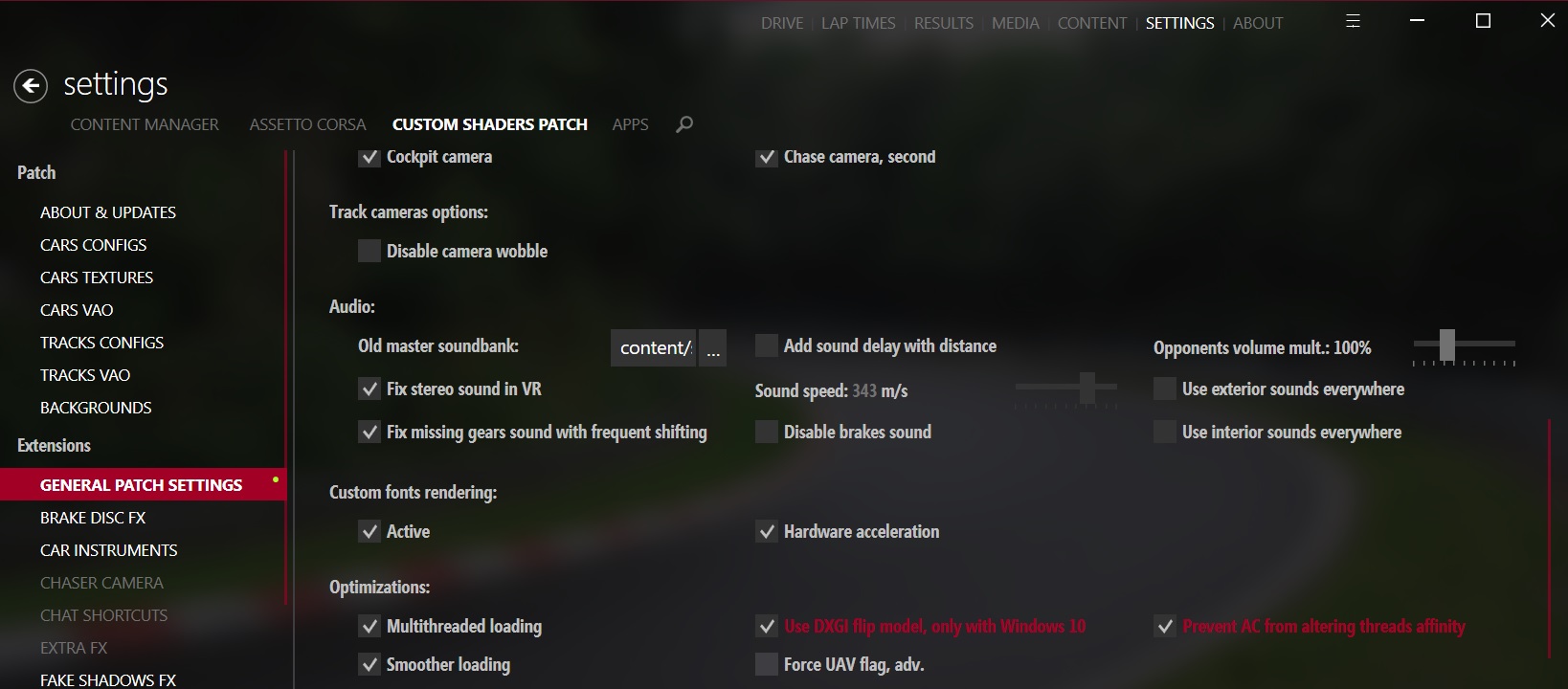
Hi Zezic, thanks for your answer
I wasn't aware of it, but already had these two options selected. I was tweaking other things in CM but nothing changes substantially
@mcmirande Is CSP actually used by game? Have you added the dwrite override in winecfg?
Hi again. I hadn't added to override in winecfg, but nothing changed when I added it.
I don't know if it serves as a clue, but the fonts within AC are different when I enter via Lutris. With Lutris they are something like "Times new roman", while under Proton they are the correct ones.
@mcmirande Can you make sure that CSP is used by AC at all? Did you used your system winecfg or did you used the protontricks -c winecfg 244210?
I used wincfg. With protontricks it works in the same way (with low fps) if I put dwrite as native or builtin, which make me suspect something is wrong about my installation.
But also, I'm guessing what makes the difference between my Lutris and Proton installation. If I understand well, the Lutris one doesn't use CM or CSP at all, isn't it? Is it possible that some of the options of the CM or CSP make AC (more than) twice heavier? I thought the difference was the use of dxvk, but I also read that Proton implements dxvk internally...
I'm sorry for this long thread.
@mcmirande The difference can be because of the next issue: https://bugs.winehq.org/show_bug.cgi?id=46955
It was fixed in Wine 5.11. Maybe your Lutris installation uses newer Wine version or some Wine version which has a fix for that particular issue (some release of Wine TKG, for example).
You can try to check it by pressing Ctrl+H to hide HUD when running the game with Proton. Can you try it? Will it make a noticeable FPS difference?
I update my system (Manjaro) all the time, so I guess I use the latest versions of most programs...
All the comparisons I did are with the Benchmark of AC, that hasn't a HUD, actually.
I'll try just driving in the Proton installation to see if the FPS are really that low to be a problem. Even if the processor is in 97% and I got plain 40 or 45 fps it should be driveable. Maybe I'll just have to wait for an installer of Content Manager for Lutris...
Hello again... I'm very sorry for this long thread... I followed again all steps from the beggining. I reached to put this ~/.steam/root/steamapps/common/'Proton 5.0'/proton waitforexitandrun ~/.steam/root/steamapps/common/assettocorsa/'Content Manager Safe.exe'; echo %command% on "Launch Options" in my Steam. But now I execute it to start CM and after a few seconds the "play" button appears again on Steam
If in the launcher I put only ~/.steam/root/steamapps/common/assettocorsa/'Content Manager Safe.exe'; echo %command% it starts CM, but when I enter AC from there, the FPS are low as I described in previous posts.
@mcmirande Is CSP actually used by game? Have you added the
dwriteoverride inwinecfg?
CSP has his own dwrite.dll file, an proton/wine overwrite it, if you don't overwrite the game may crash... it's a shame because it's a huge improve to graphics.
So back again to try CustomShaderPatch, following @zezic guide in the previous answer, I have manage to install correctly, but as is avised, some issues with audio effects make the experience not 100% satisfactory.
Framerate increases notably and allows to enable as many in-game apps as desired without performance hit. I go from 45-60 FPS to rock solid 80-100 with multiple cars on screen.
Is there any way to provide logs to try solve this last issue with the audio?
It would really be a great improvement to have this Custom Shader Patch in the game, but for me it is basic to hear the wheels skidding. Maybe @GloriousEggroll can keep an eye on it, I've tried to get his attention on his discord without success.
@alexbrrsclnt @leillo1975 What's the version of CSP you using? At some point audio issues were fixed for Wine in CSP and I remember that last time I played I was able to hear tire skidding and volume levels were fine.
@alexbrrsclnt @leillo1975 What's the version of CSP you using? At some point audio issues were fixed for Wine in CSP and I remember that last time I played I was able to hear tire skidding and volume levels were fine.
I'm using Proton-5.21-GE-1 and the CSP recommended version installed by Content Manager, 0.1.60. I'll try with a newer proton version to check if audio works.
Screenshots
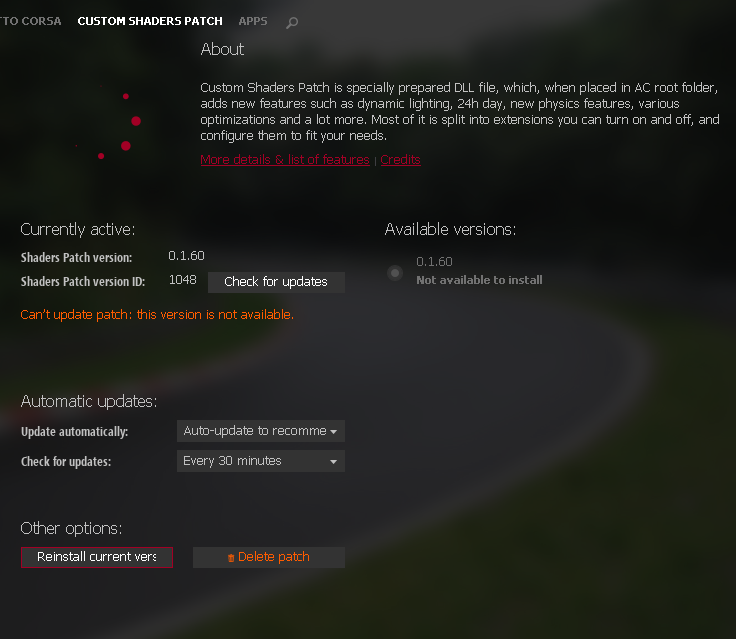
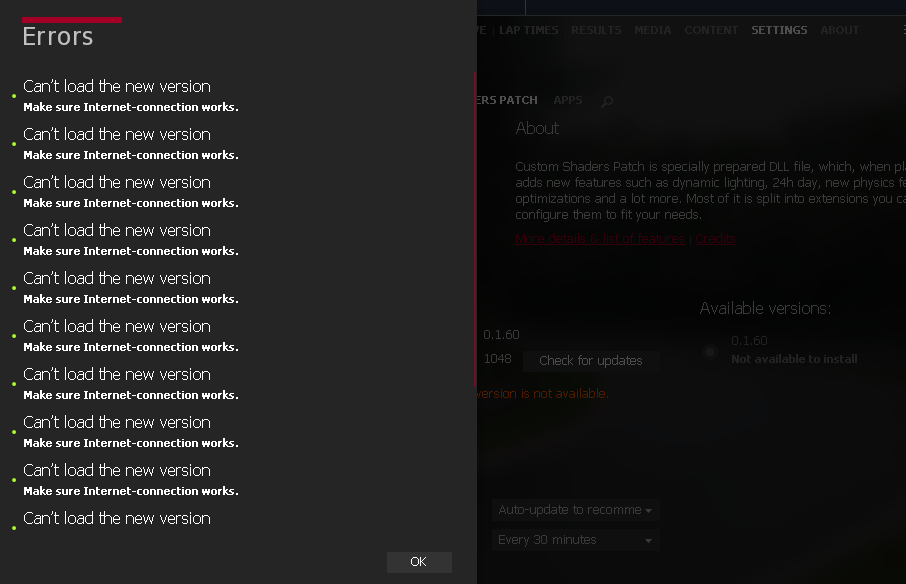
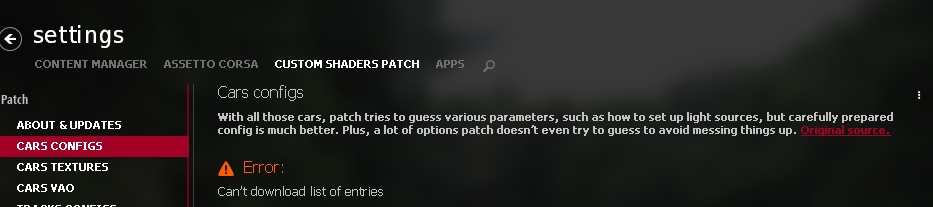
To me it says that there is no internet connection sadly. Of course I have a perfectly working internet connection, and I tried installing the most recent version (0.8.2245.37760) so I cant figure out what's happening.
@exapsy which version of proton are you using? I used to have this problem with Proton 5.0-10. Fixed it by switching to Proton 6.3
@exapsy which version of proton are you using? I used to have this problem with Proton 5.0-10. Fixed it by switching to Proton 6.3
I was using Proton 5.0 like https://github.com/ValveSoftware/Proton/issues/148#issuecomment-585921635 suggested. Using 5+ didn't do me any favors with the setup described in https://github.com/ValveSoftware/Proton/issues/148#issuecomment-585921635 . Did it work for you with this setup? I might retry if it did.
Or if you have different setup and used different methods, what are those?
@exapsy There was an exact Proton 5.0-1 version mentioned. In later Proton 5.0-xx versions I also experienced some problems with network. I didn't remember how I fixed them though.
@exapsy After about 40 prefix retries, my conclusion is that the prefix setup must be done in Proton 5.0, and when done, launch once in Proton 5.0, make sure CM opens, and switch to Proton 6.3
In fact, it was just 2 days ago that I installed Assetto again (moved to Fedora)
@exapsy After about 40 prefix retries, my conclusion is that the prefix setup must be done in Proton 5.0, and when done, launch once in Proton 5.0, make sure CM opens, and switch to Proton 6.3
I'll try that and notify how it went. Just replying in advance for now.
But from what I've experienced, when I do all the prep and switch to another compatibility tool (Proton version in steam game settings), the whole prep is gone and needs to be redone.
Do you have any more information about this? Because I dont wanna be stuck on 1h of installing .NET and win10 again haha 😅 Prep really takes much time :(
@exapsy There was an exact Proton 5.0-1 version mentioned. In later Proton 5.0-xx versions I also experienced some problems with network. I didn't remember how I fixed them though.
It was exactly that. Any other version didn't work at all.
@PAPPL [#148 (comment)](https://github.com/ValveSoftware/Proton/issues/148#issuecomment-585921635) (click on the spoiler to reveal the guide)
Recently reinstalled, works™ on Manjaro and openSUSE TW, and should work on Ubuntu as well. This is pretty much the most comprehensive guide available atm
System info and specs could be useful, if you don't mindEDIT: ~Proton 5.13-4 is super weird, it doesn't function as expected, won't work no matter what. Might have to do with the usage of Steam Linux Runtime on this version~
At least it works when reinstalling with Proton 5.0-10.
EDIT2: Proton 5.13-4 works perfectly fine, I forgot to change the proton path in the launch options, and I was accidentally using Proton 5.0 on a 5.13 prefix. In case someone gets confused, the launch option for 5.13 should be like this:~/.steam/root/steamapps/common/'Proton 5.13'/proton waitforexitandrun ~/.steam/root/steamapps/common/assettocorsa/'Content Manager Safe.exe'; echo %command%
Make sure you adjust your launch option too, in order to match the correct Proton version. I also did this little mistake a while ago, it matters a lot
Any idea on how to launch this with "prime-run"?. I've followed the @zezic guide (thanks for that) and I've got Assetto + CM working but only using Intel Graphics. I want to use discrete Nvidia Graphics. I tried to add "prime-run" in different places in the launch options but it doesn't seem to work. Did anyone have this issue?
Thanks in advance.
Doesn't run for me with Proton 6.3-6 or Proton Experimental, doesn't launch at all.
I've attached the log files from trying to run it:
error.log
steam-244210.log
Assetto Corsa Competizione seems to work perfectly for me.
Hello @ipkpjersi, these look like some lines of interest from your log:
Unhandled Exception:
System.TypeLoadException: Could not load type of field 'AC.Launcher.App:ACshf' (0) due to: Could not load file or assembly 'CEF3, Version=49.0.0.0, Culture=neutral, PublicKeyToken=null' or one of its dependencies.
[ERROR] FATAL UNHANDLED EXCEPTION: System.TypeLoadException: Could not load type of field 'AC.Launcher.App:ACshf' (0) due to: Could not load file or assembly 'CEF3, Version=49.0.0.0, Culture=neutral, PublicKeyToken=null' or one of its dependencies.(1)
Looks like wine-mono had some kind of issue with CEF.
Hi all,
I've recently made progress after two years spent trying to get my wheel to work, and as such I have been trying to get AC running over the past few days. I can get it installed and to open (thanks @zezic) but regardless of what I do, AC never gets past 'Setting defaults". This seems to be somewhat of a common issue, though recommended fixes have had no effect as of yet. AC's log gives the following error as soon as progress halts:
[1012/143603:WARNING:cert_verify_proc_win.cc(108)] Unknown error -2146762482 mapped to net::ERR_FAILED
This persists across reinstalls. Believing it to be a network error, I tried installing winhttp (DCS:World makes use of it under Wine) but that didn't help either, only adding the following to the log:
[1012/144301:ERROR:proxy_config_service_win.cc(136)] WinHttpGetIEProxyConfigForCurrentUser failed: 2
Does anyone have any experience with a similar issue? Nothing has changed since I last installed AC barring the use of dnscrypt-proxy, but AC still ran fine with it enabled before I reinstalled; I have tested with it disabled and it made no difference. I'd appreciate any help.
Edit: With reinstalls not fixing it, I tried transferring it to a different library folder and re-running the setup process, and something in there got it working. Now it's just finding out how to get Wine to recognise my wheel as an actual controller...
Unhandled Exception:
System.TypeLoadException: Could not load type of field 'AC.Launcher.App:ACshf' (0) due to: Could not load file or assembly 'CEF3, Version=49.0.0.0, Culture=neutral, PublicKeyToken=null' or one of its dependencies.
[ERROR] FATAL UNHANDLED EXCEPTION: System.TypeLoadException: Could not load type of field 'AC.Launcher.App:ACshf' (0) due to: Could not load file or assembly 'CEF3, Version=49.0.0.0, Culture=neutral, PublicKeyToken=null' or one of its dependencies.(1)
Looks like wine-mono had some kind of issue with CEF.
Problem still exists with wine-mono 7.0
on latest proton experimental, the launcher works, the showroom works, but can't seem to be able to get ingame,
on the loading screen, after the track loading is done, and it starts loading the cars, the game process dies and it puts me back to the menu
from the proton logs:
wine: Call from 000000007B0124DE to unimplemented function msvcr120.dll.??0_SpinLock@details@Concurrency@@QEAA@AECJ@Z, aborting
I have native, then builtin as override for the prefix, but also tried different combinations, no success
Same problem here. Anybody, who could make it work? In the mean time, does anybody have a howto make it work with the stable Proton version? I followed some howto when I first set it up, but now cannot find it, and what I could find doesn't work...
Replying to https://github.com/ValveSoftware/Proton/issues/148#issuecomment-1146484711
managed to get it working as a last step I added WINEDLLOVERRIDES="msvcr120=n" to my launch parameters to fix this issue, and it even works on ProtonGE7-20.
but I'm not exactly sure which steps actually contributed to the current progress unfortunately
I assume you have done this by installing all the dependencies first, right?
He is telling me
33156.123:02d0:02d4:err:module:import_dll Library MSVCR120.dll (which is needed by L"C:\\windows\\system32\\MSVCP120.dll") not found
33156.123:02d0:02d4:err:module:import_dll Library MSVCP120.dll (which is needed by L"Z:\\media\\Daten\\Steam\\steamapps\\common\\assettocorsa\\acs.exe") not found
33156.124:02d0:02d4:err:module:import_dll Library MSVCR120.dll (which is needed by L"Z:\\media\\Daten\\Steam\\steamapps\\common\\assettocorsa\\acs.exe") not found
still... I tried
$ protontricks 244210 vcrun2013
------------------------------------------------------
warning: Your version of wine  is no longer supported upstream. You should upgrade to 5.x
------------------------------------------------------
Executing mkdir -p /media/Daten/Steam/steamapps/compatdata/244210
------------------------------------------------------
warning: You are using a 64-bit WINEPREFIX. Note that many verbs only install 32-bit versions of packages. If you encounter problems, please retest in a clean 32-bit WINEPREFIX before reporting a bug.
------------------------------------------------------
------------------------------------------------------
WINEPREFIX INFO:
Drive C: insgesamt 36
drwxr-xr-x  9 photon users 4096  4. Jun 21:46 .
drwxr-xr-x  4 photon users 4096  4. Jun 22:46 ..
drwxr-xr-x  2 photon users 4096  4. Jun 22:37 openxr
drwxr-xr-x  4 photon users 4096  4. Jun 21:39 ProgramData
drwxr-xr-x  6 photon users 4096  4. Jun 21:08 Program Files
drwxr-xr-x  8 photon users 4096  4. Jun 21:32 Program Files (x86)
drwxr-xr-x  4 photon users 4096  4. Jun 21:08 users
drwxr-xr-x  3 photon users 4096  4. Jun 21:32 vrclient
drwxr-xr-x 22 photon users 4096  4. Jun 21:42 windows

Registry info:
/media/Daten/Steam/steamapps/compatdata/244210/pfx/system.reg:#arch=win64
/media/Daten/Steam/steamapps/compatdata/244210/pfx/userdef.reg:#arch=win64
/media/Daten/Steam/steamapps/compatdata/244210/pfx/user.reg:#arch=win64
------------------------------------------------------
------------------------------------------------------
warning: /home/photon/.cache/protontricks/proton/GE-Proton7-16/bin/wine cmd.exe /c echo '%AppData%' returned empty string, error message "/home/photon/.cache/protontricks/proton/GE-Proton7-16/bin/wine: line 155: /media/Daten/Steam/steamapps/common/SteamLinuxRuntime_soldier/pressure-vessel/bin/pressure-vessel-launch:  No such file or directory"
------------------------------------------------------
Not sure if the installation has been successful, but it didn't solve the issue.
I assume you have done this by installing all the dependencies first, right?
yep, the comment I made was just in case someone runs into the same issue at the same configuration somehow, I just had to override that dll.
I'm trying to find out which steps did contribute to the final working install, but it already seems like its possible to do it easier than the gists, or other guides so far.
I could make it work following this HowTo (the first 19 points): https://gist.github.com/ANBAL534/8057b5200ace9bdd98795b627e550ba0
The only problem I do still have is that the main menu UI is not fullscreen but rather a rectangle of about the half of my display's area... Any thoughts on how to deal with that? Thanks!
edit: Never mind, I set a virtual desktop in winecfg. :smiley:
Thanks to the hints from https://www.youtube.com/watch?v=EhOXGckeZls I could triple my FPS rate by switching to Proton GE 6.13 from https://www.gamingonlinux.com/2021/07/proton-613-ge-1-is-out-now-with-amd-fidelityfx-super-resolution-resizable-bar/
@Photon89 Could you run protontricks --no-background-wineserver 244210 --gui -q, go to the GUI and hit Select the default wineprefix -> Run uninstaller for me? So I can see what you dependencies you installed.
I'll try from a clean install again but couldn't get it to run; Going to try the latest protontricks & proton on Arch.
Sure! Here are screenshots (had to do two as the window is not resizable and the full list doesn't fit):
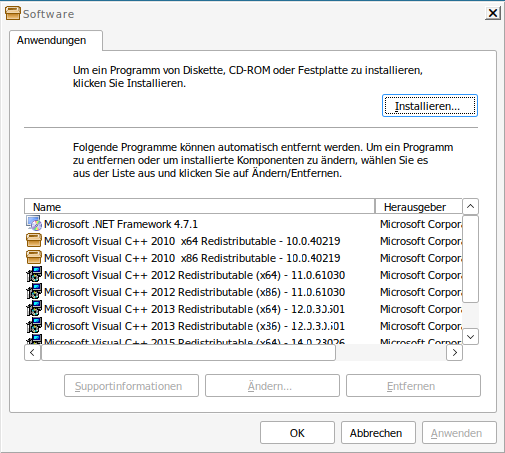
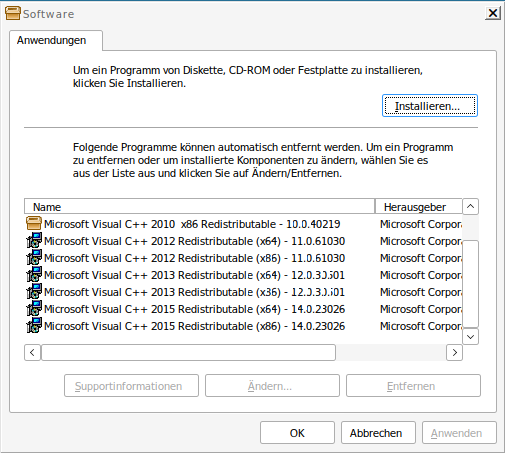
Got the launcher going:
mscoree=native
vcrun2015
d3dcompiler_47
d3dx11_43
dotnet48
win10
protontricks 244210 ${action} -q
Using: GE-Proton7-20 protontricks (1.8.2)
Launch Options: PROTON_LOG=1 WINEDLLOVERRIDES="msvcr120=n" %command%
.NET prompted me to Restart Now or Restart Later:
- I hit
Restart Later, after that I upgraded the prefix to windows 10. - Start the game in Steam, Using
ps -ax | grep 'C:', I can see that .NET was finishing installing using Proton 5. - Got a .NET error popup:
This application could not be started. - Hit Start in Steam again, Steam reinstalled the setup packages & the game started the launcher.
Cannot start a race though, I'll edit if I can get things working with mods.
Some hints in ~/steam-244210.log
[0611/210257:WARNING:cert_verify_proc_win.cc(108)] Unknown error -2146762482 mapped to net::ERR_FAILED
8070.515:012c:026c:warn:debugstr:OutputDebugStringA "[0611/210257:WARNING:cert_verify_proc_win.cc(108)] Unknown error -2146762482 mapped to net::ERR_FAILED\n"
Another hint in ~/.steam/root/steamapps/compatdata/244210/pfx/drive_c/users/steamuser/Documents/Assetto Corsa/logs/launcher_debug.log
[0611/210245:ERROR:network_change_notifier_win.cc(155)] WSALookupServiceBegin failed with: 8
[0611/210257:WARNING:audio_sync_reader.cc(112)] AudioSyncReader::Read timed out, audio glitch count=1
Going to assume this is a SSL issue & going to try to update certs.
Proton 7 GE was broken for me either, Proton GE 6.13 worked: https://github.com/ValveSoftware/Proton/issues/148#issuecomment-1147945240
Nuked the install & got it working:
Using: GE-Proton7-20 protontricks (1.8.2) winetricks: 20220411 - sha256sum: 69856050cfe9d97902dfd68c1ad42a10a4be0fe76660744126d7e3ed75610495
- Set launch options to
WINEDLLOVERRIDES="msvcr120=n;msvcp120=n" %command%, the game ships those libs. - Start once & let Steam install depends. .NET might be still installing in the background on Proton 7, check with
ps -ax. - Run some commands:
protontricks 244210 mscoree=native -q
protontricks 244210 vcrun2013 vcrun2019 d3dcompiler_47 d3dx11_43 -q
protontricks 244210 dotnet48 -q
- Start the game again after
dotnet48finishes installing, hope you like waiting - Goto in settings, hit
Force 32 bit mode& test with the benchmark.
Screenshots
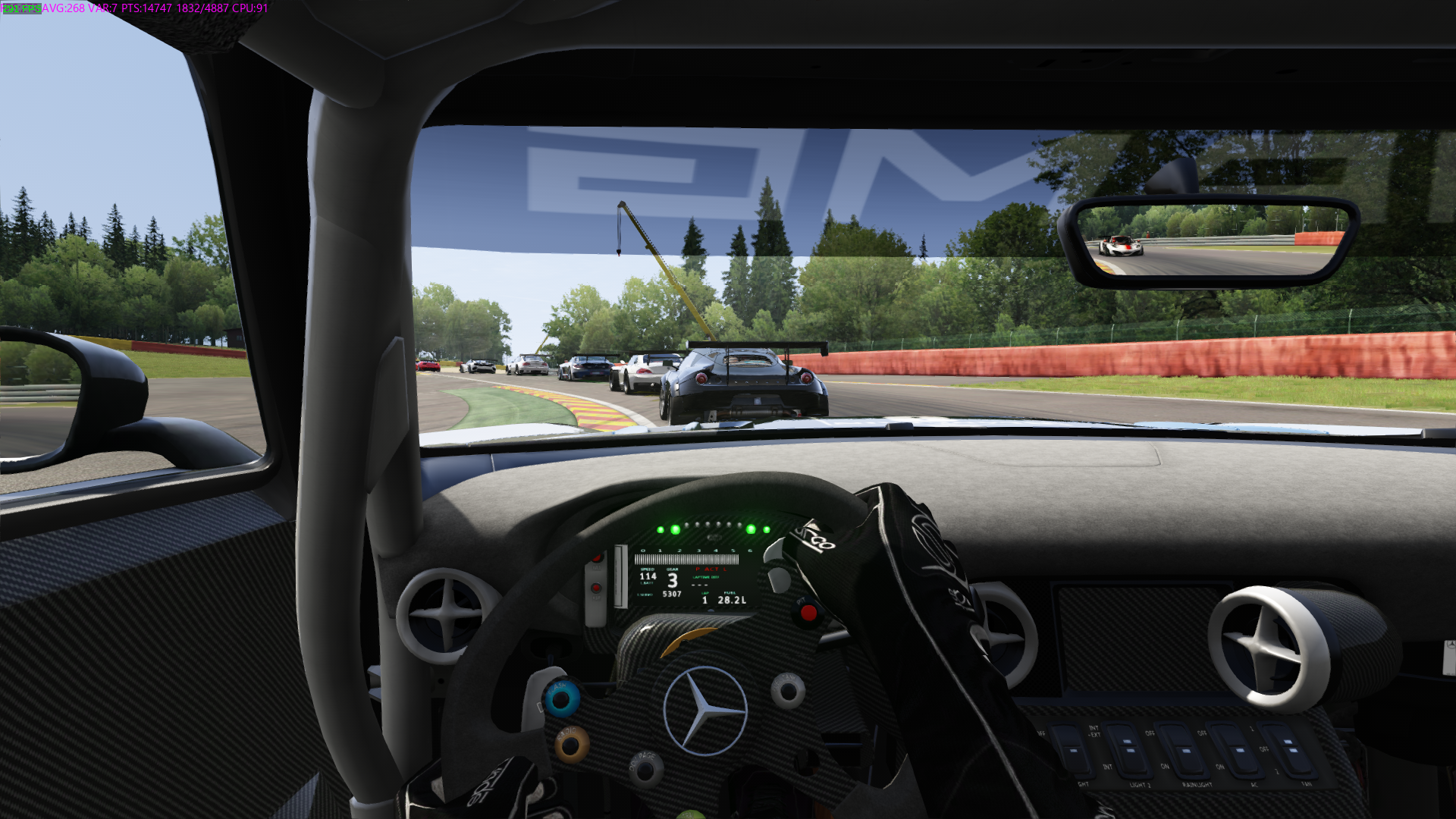
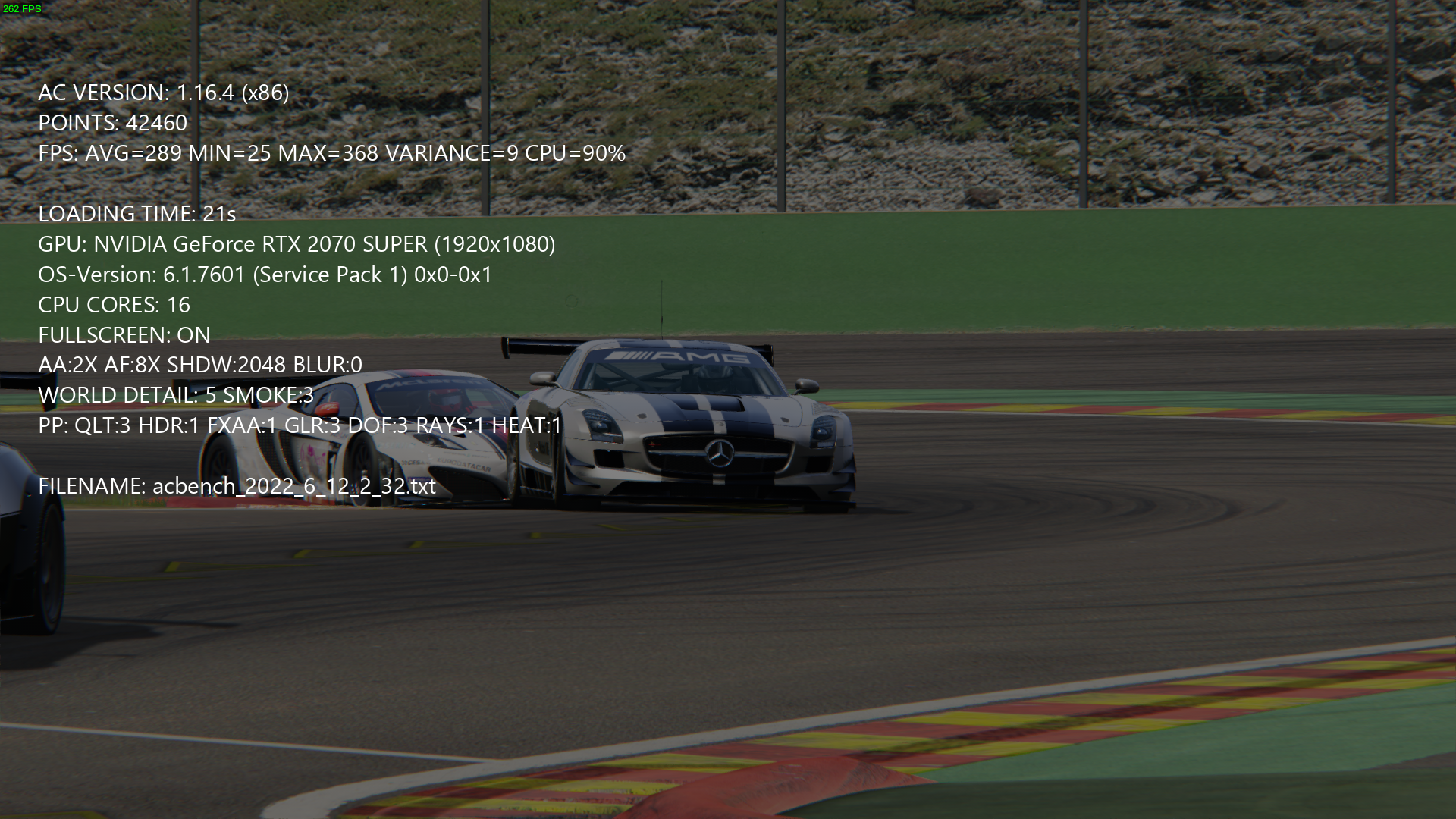
I got less FPS with Proton 6 and couldn't install dotnet48, you could bootstrap with Proton 7 and just downgrade if that doesn't work though.
64-bit issue:
~/steam-244210.log
28550.315:0340:03ec:err:module:import_dll Library MSVCR120.dll (which is needed by L"C:\\windows\\system32\\MSVCP120.dll") not found
28550.315:0340:03ec:err:module:import_dll Library MSVCP120.dll (which is needed by L"Z:\\home\\user\\.local\\share\\Steam\\steamapps\\common\\assettocorsa\\acs.exe") not found
28550.315:0340:03ec:err:module:import_dll Library MSVCR120.dll (which is needed by L"Z:\\home\\user\\.local\\share\\Steam\\steamapps\\common\\assettocorsa\\acs.exe") not found
Running as 64-bit gives that vague message, couldn't resolve the error by removing the bundled libs; Wine mono was removed when I installed .NET and the file exists, dunno why it's complaining.
I'm going to test out VR & see if that works :+1:
Replying to https://github.com/ValveSoftware/Proton/issues/148#issuecomment-1153097616
How did you get the game to launch?
I managed to install dependencies but when I run the game it tries to install them again and fails.
The reinstall happen to me too, I ignored The program failed to start dialog that happens after it finally finishes after awhile; The game started after that, or you can try launching again.
Restarting steam helped with the endless process of the game reinstalling the libraries.
Running as 64-bit gives that vague message, couldn't resolve the error by removing the bundled libs; Wine mono was removed when I installed .NET and the file exists, dunno why it's complaining.
I had problems with the 64-bit version, too. What helped me was specifying the order of the vulkan icd files to be loaded, e.g. for radv
VK_ICD_FILENAMES=/usr/share/vulkan/icd.d/radeon_icd.x86_64.json:VK_ICD_FILENAMES=/usr/share/vulkan/icd.d/radeon_icd.i686.json
in the launch options. That way I can start content manager (which is 32-bit, so the first will fail, but it'll load) and still start the 64-bit Version of acs.exe.
Unfortunately, CSP crashes for me (tried 4-5 versions), it only works with CSP not installed.
Assetto Corsa is not boot
Issue transferred from https://github.com/ValveSoftware/Proton/issues/5991.
@Slemoon posted on 2022-07-14T04:23:05:
Compatibility Report
- Assetto Corsa
- Steam AppID of the game: 244210
System Information
-
GPU: NVIDIA GTX960M
-
Driver/LLVM version: Driver Version: 515.57 CUDA Version: 11.7 LLVM : 14.0.6
-
Kernel version: 5.18.10-zen1-1-zen ( Arch-Linux , Linux-Zen Kernel )
-
Link to full system information report as Gist:
OS: Arch Linux x86_64
Host: 80RN Lenovo Rescuer-14ISK
DE: Plasma 5.25.3
CPU: Intel i5-6300HQ (4) @ 3.200GHz
GPU: NVIDIA GeForce GTX 960M
GPU: Intel HD Graphics 530
Memory: 4690MiB / 11880MiB -
Proton version:7.0-3
I confirm:
- [x] that I haven't found an existing compatibility report for this game.
- [x] that I have checked whether there are updates for my system available.
- [x] I have this game
Assetto Corsa is not boot
Wasn't sure where to post this relatively obscure crash but I'll just link the issue I created on the CSP repo: https://github.com/ac-custom-shaders-patch/acc-extension-config/issues/299
Basically if you're playing AC with CSP on SRP servers with speed traps you'll likely crash at specific places on the map.
Is rainfx working?
Is rainfx working?
Yes.
Yes.
For some reason there is no rain here. I tried reinstalling the game with your old guide and still there was no rain. I've changed to proton experimental and everything is working but still there is no rain. Is there a way I can debug or troubleshoot this? For now I'm using:
CSP 0.1.78;
SOL 2.2.3;
Proton - Experimental.
In the WeatherFX Debug app it's saying that the rain intensity is always at 0% regardless of the Sol's rainfx intensity.
Just to be sure: you are aware that the rain is a paid upgrade?
So you paid for it and added it?
For some reason there is no rain here.
You have to use CSP version from here: https://www.patreon.com/x4fab
Oh. I thought that the rain was paid because the updated version was only available by paying (like a preview) and that they had already released that version with rain to the public. I'm sorry and thanks for the help.
There is another thing. Is anyone else with a extreme low fps exclusively (actually not, I'm seeing now that this happens on some servers with custom cars. So maybe the problem is within some of the cars) on SRP servers? Normally every other server (including those with SRP map) is always at 60+. But for me SRP is always below 10. I will investigate this later.
For me, the game simply doesn't boot up. Here are the logs:
You follow the steps of this message? (Click on ">AC+CM+CSP"):
https://github.com/ValveSoftware/Proton/issues/148#issuecomment-585921635
You can use newest versions of the different libs and software
I got AC working by using just GE-Proton7-47, no additional protontricks etc. GE does dependencies installation all by itself. On first run it makes sense to start steam in terminal to monitor dotnet install which takes quite some time. AC itself only started on second or third run. Only the launcher/menus worked at first, to get into the actual driving I had to force 32-bit in settings. Any tips to get this working in 64bit?
I got AC working by using just GE-Proton7-47, no additional protontricks etc. ...
Ah, I missed the solution posted above by berniyh. I have nvidia, so 64bit works if I launch with:
VK_ICD_FILENAMES=/usr/share/vulkan/icd.d/nvidia_icd.json
Have tried many different methods GE- proton 7-47 make it say it's running but nothing is happening. I'm running the game on steam deck with micro sd card.
I got AC working with Content Manager and Custom Shader Path v1.7.3 working on Arch 6.2.12. Online services work the only thing I can't get running are local servers. I am able to host them and players on local network are able to join them but the LAN tab on Content Manager is empty and not showing any local server. Not when I host them or when they are hosted on other local machines. I have tried hosting it from windows local machine and same result no server in LAN tab.
I got AC working with Content Manager and Custom Shader Path v1.7.3 working on Arch 6.2.12. Online services work the only thing I can't get running are local servers. I am able to host them and players on local network are able to join them but the LAN tab on Content Manager is empty and not showing any local server. Not when I host them or when they are hosted on other local machines. I have tried hosting it from windows local machine and same result no server in LAN tab.
do you mind sharing how you got it to run?
Oh. I thought that the rain was paid because the updated version was only available by paying (like a preview) and that they had already released that version with rain to the public. I'm sorry and thanks for the help.
There is another thing. Is anyone else with a extreme low fps exclusively (actually not, I'm seeing now that this happens on some servers with custom cars. So maybe the problem is within some of the cars) on SRP servers? Normally every other server (including those with SRP map) is always at 60+. But for me SRP is always below 10. I will investigate this later.
It was CPU overload caused by some CSP extensions: Extra FX, "New smoke and dust" on Particles FX and SOL on WeatherFX. Strangely, SOL is having a weird behavior: after starting the game, it uses the CPU a lot and with a various lag peaks, making the game unplayable, but (not always) after some time it starts to not demands too much and the game become more stable.
I saw now this video https://www.youtube.com/watch?v=0dphan7xnXs and I see that WeatherFX is always low, bellow 1ms. I saw this behavior for some seconds, but it was very rare and the common was the CPU usage be above 10ms.
I'm having a weird issue, using proton ge 7-55 and WINEDLLOVERRIDES="msvcr120=n;msvcp120=n" %command% as launch option, game starts fine, but i can only play time attach mode, any other mode results in the loading screen, then back to the menu, and after trying another mode, tim
e attach also stops working, this happens with completely new prefix.
Has anyone else been experiencing this issue? I've attached a log file (its compressed since the original one is 41.3MB).
steam-244210.zip
I got AC working with Content Manager and Custom Shader Path v1.7.3 working on Arch 6.2.12. Online services work the only thing I can't get running are local servers. I am able to host them and players on local network are able to join them but the LAN tab on Content Manager is empty and not showing any local server. Not when I host them or when they are hosted on other local machines. I have tried hosting it from windows local machine and same result no server in LAN tab.
@kaii-lb hi. Just wondering if you can share how you got this working? Seems to be quite the challenge for most mortals!
Only the launcher/menus worked at first, to get into the actual driving I had to force 32-bit in settings. Any tips to get this working in 64bit?
Install and use Content Manager. With Content Manager I can race in 64-bit mode, don't ask me why
Only the launcher/menus worked at first, to get into the actual driving I had to force 32-bit in settings. Any tips to get this working in 64bit?
Install and use Content Manager. With Content Manager I can race in 64-bit mode, don't ask me why
just use any new proton (i used wine-ge-8-8), create a seperate prefix, use winetricks to download vcrun2015 and d3d11 and dotnet48. thats all, it runs with content manager (altho original launcher doesnt work). should work with steam and proton but i didn't want to mess things up
Using GE-Proton 8.14 with manually installed dotnet via protontricks I am able to run both Content Manager and launch a game. However, starting a race is unreliable, and I seem to need to frequently restart CM. Some maps also straight up don't work like Shutoko Revival Project (in all these cases I get a "Race Cancelled" popup and rarely a crash message about inireader). If you have any tips I would appreciate it.
For posterity here's what worked for me:
- Install game, set compatibility to proton GE 8.14 (maybe proton experimental also works)
- Run once for prefix setup
protontricks 244210 dotnet472 corefonts- add additional fonts to assettocorsa/content/fonts/system (link for fonts in some other guide)
- Add ContentManager.exe to assettocorsa game folder, rename to
Content Manager Safe.exeto avoid CEF HW acceleration (or so I'm told) - set launch options to
c="%command%";sh -c "${c::-17}Content Manager Safe.exe'" - symlink loginusers.vdf as specified in other guides
protontricks 244210 winecfg, then add library override fordwrite.dll(native, builtin)- run game, content manager should now work
- install CSP through Content Manager, latest version is ok.
- install 1.80 preview (available through patreon). If I install the preview directly the dwrite.dll is missing and the game crashes. Seems like at least having a previous version install first is necessary, or downgrade then upgrade. The latest version of CSP that worked for me through the non-preview options was 1.77.
After this I get to play modded tracks and rain works as expected.
For the past few weeks, Assetto Corsa has worked for me with Content Manager.
Now suddenly, the game will run for awhile then shut down. I haven't been able to get a log, but has anyone got the same problem?
If I remove the launch options for Content Manager, I can play the base game fine, but I really want Custim Shader Patch and that stuff
https://drive.google.com/file/d/1L8k6IzUIOkWYXf2i0_wHhOcDLi53y2Rr/view?usp=sharing
Here is the log I'm getting whenever Content Manager refuses to launch
@radgeRayden does the new Taskbar in CSP work for you?
@radgeRayden does the new Taskbar in CSP work for you?
@lodriguez
Everything is still working fine after updating CSP. What am I looking for in the interface? Does this seem correct for you?
@radgeRayden yes, that looks good, I can't get the taskbar or Lua apps to work. Thanks, at least now I know it's worth another try.
Edit:
I found the problem, I had to install dsp after adding the dwrite overwrite. (before I installed it without the dwrite overwrite)
winegstreamer error: source: Forbidden
winegstreamer error: source: ../src-gst_good/ext/soup/gstsouphttpsrc.c(1688): gst_soup_http_src_parse_status (): /GstBin:bin0/GstURIDecodeBin:uridecodebin0/GstSoupHTTPSrc:source:
Forbidden (403), URL: https://rr4---sn-a5msenes.googlevideo.com/videoplayback?expire=1698836632&ei=ONxBZY-xCIuykAOWwZzYCA&ip=108.93.74.1&id=o-ADniEOgqPwp1ISdVTBesbg190vigH_rFAOiXdhnoKgjz&itag=22&source=youtube&requiressl=yes&hcs=ir%2C&mh=_m&mm=31%2C29&mn=sn-a5msenes%2Csn-a5meknsd&ms=au%2Crdu&mv=m&mvi=4&pl=21&initcwndbps=1053750&spc=UWF9f0lPR9WLST7TNf_4HN5uT00xRSohHce9FXYQHA&vprv=1&svpuc=1&mime=video%2Fmp4&cnr=14&ratebypass=yes&dur=9402.595&lmt=1698751494807889&mt=1698814858&fvip=4&fexp=24007246&beids=24350018&c=ANDROID&txp=3308224&sparams=expire%2Cei%2Cip%2Cid%2Citag%2Csource%2Crequiressl%2Cspc%2Cvprv%2Csvpuc%2Cmime%2Ccnr%2Cratebypass%2Cdur%2Clmt&sig=AGM4YrMwRAIgesx_rLXJFU5UezaDKy44EliJeWVdyNmV2pE4ouixQMECIDL_SAF7jIzaZpffSdbp0TspwINs8AuXROSjC3hzvkxU&lsparams=hcs%2Cmh%2Cmm%2Cmn%2Cms%2Cmv%2Cmvi%2Cpl%2Cinitcwndbps&lsig=AK1ks_kwRAIgf2JuICKr993xnQXkT0OwwczDqVuLI6pvPU8mRfxmUeUCIFudzYQdcJa3C3fXkhm-3pLN51c6NkW9379IK_viqFGT
, Redirect to: (NULL)
winegstreamer error: source: Internal data stream error.
winegstreamer error: source: ../src-gstreamer/libs/gst/base/gstbasesrc.c(3132): gst_base_src_loop (): /GstBin:bin0/GstURIDecodeBin:uridecodebin0/GstSoupHTTPSrc:source:
streaming stopped, reason error (-5)
Using CSP, if I try to watch a YouTube video in a car, the video fails to play.
I noticed similar things regarding YouTube videos on Wine/Proton 8. For example, Firefox tabs on Wine 8 crash when trying to play YouTube videos (or really any multimedia content). I haven't been able to test Chromium-based browsers since they always fail to install with Wine 8, but I'm sure they probably spit out similar things.
Firefox on Wine 8 spits this out when attempting to play multimedia content
wine: Call from 000000007B013AD7 to unimplemented function ucrtbase.dll.imaxdiv, aborting
UPDATE: I was able to fix Firefox's issue by dropping in a native ucrtbase.dll file into Firefox's directory and setting an override for it. I tried doing the same thing for Assetto Corsa, but it did not help whatsoever.
UPDATE 2: On the same car displays, maps don't work either as it results in it simply showing a distorted view of the home screen until I press the home button on it. These logs might be relevant:
2044.787:0114:0118:err:ole:com_get_class_object class {ff48dba4-60ef-4201-aa87-54103eef594e} not registered 2044.787:0114:0118:err:ole:com_get_class_object no class object {ff48dba4-60ef-4201-aa87-54103eef594e} could be created for context 0x1 2044.787:0114:0118:err:tabtip:create_uia_event_handler Failed to create IUIAutomation interface, hr 0x80040154
2045.633:0120:0130:err:ole:CoGetContextToken apartment not initialised
2046.327:0120:0124:err:combase:RoGetActivationFactory Failed to find library for L"Windows.Foundation.Diagnostics.AsyncCausalityTracer"
UPDATE 3: Using a fix for the YouTube issue fixes the problem.
I'm still searching for a solution to get this dammit game working, doing all kind of protontricks... Value help us! It should not that hard to run this game with Proton.. AC is still a very popular game among the sim racers.
3495.867:0128:012c:trace:loaddll:build_module Loaded L"C:\\windows\\system32\\kernelbase.dll" at 7B000000: builtin
3495.867:0128:012c:trace:loaddll:build_module Loaded L"C:\\windows\\system32\\kernel32.dll" at 7B600000: builtin
3495.868:0128:012c:err:module:fixup_imports_ilonly mscoree.dll not found, IL-only binary L"AssettoCorsa.exe" cannot be loaded
3495.868:0128:012c:err:module:LdrInitializeThunk Importing dlls for L"Z:\\media\\melroy\\Data\\SteamLibrary\\steamapps\\common\\assettocorsa\\AssettoCorsa.exe" failed, status c0000135
3495.895:0030:0134:warn:threadname:NtSetInformationThread Thread renamed to L"wine_threadpool_worker"
3495.895:0030:0138:warn:threadname:NtSetInformationThread Thread renamed to L"wine_threadpool_worker"
3495.896:0030:013c:warn:threadname:NtSetInformationThread Thread renamed to L"wine_threadpool_worker"
3495.897:0030:0034:fixme:ver:GetCurrentPackageId (000000000021FEA0 0000000000000000): stub
pid 158205 != 158204, skipping destruction (fork without exec?)
Happy new year -,-
EDIT: I guess dotnet v4.7.2 doesn't nice on 64-bit bottles. I will try dotnet461 or dotnet462 or something.I also don't know why Proton will create a 64-bit proton bottle by default.
@melroy89 Installing it via steam with the latest Proton-GE version worked for me. No hacks needed, just a lot of patience (it installs some things in the background, but you dont see that, just that the game is running but nothing happens)
@melroy89 Installing it via steam with the latest Proton-GE version worked for me. No hacks needed, just a lot of patience (it installs some things in the background, but you dont see that, just that the game is running but nothing happens)
I removed the 'bottle' from steamapps/compatdata/244210. So I should do a clean creation. I installed Proton GE v8.25, followed the instructions (it's installed at /home/melroy/.steam/root/compatibilitytools.d/GE-Proton8-25/ now). I selected GE-Proton8-25 as compatibility tool under Steam.
With GE-Proton I intially still got `System.TypeLoadException: Could not load type of field 'AC.Launcher.App:ACshf' (0) due to: Could not load file or assembly 'CEF3, Version=49.0.0.0, Culture=neutral, PublicKeyToken=null' or one of its dependencies..
However, the problem was easily solved. GE-Proton 8 requires Proton 5.... That doesn't sound like that, but it is true. Steam gave me a small and short pop-up about Proton v5 requires.
Which make sense once I opened the protonfixes/gamefiles/244210.py file, however this not documented correctly! And GE-Proton nor Steam will automatically install Proton 5 for you. So you need to switch the compatibility tool manually to proton 5 to get this dependency, after all I suspect most people only have Proton 8 or Proton Experimental installed by now:
""" Game fix for Assetto Corsa
"""
#pylint: disable=C0103

from protonfixes import util

def main():
    """Fixes default launcher and ACM."""

    # Fixes Assetto itself and Content Manager. Version 4.5.2 does not seem to start.
    # Although CefSharp from Content Manager might have a higher requirement, it seems to
    # always crash on the GPU process so it doesn't really matter.
    # NOTE: needs to come first as it wipes the prefix
    util.protontricks_proton_5('dotnet472')  # seems to really need things from Proton 5 currently
    # Fixes Content Manager (black windows)
    util.protontricks('d3dx11_43')
    util.protontricks('d3dcompiler_47')
After 15 mins.. I get.. yeey:
I didn't gave up. So I closed everything once again (incl. Steam). And tried again for the 8th time.. Now I got it working:
I already forgot that, but yeah, proton 5 is needed. Grat work for figuring it out yourself! I remember seeing these errors my self and sitting hours there and trying to fix it.
@radgeRayden I see you said you were able to get weather effects working with the preview. I have the preview installed and everything else works quite well, however when I select, for example, heavy rain + extended physics I get rain sounds, but no rain effects like rain on the windscreen or rendered in the view. Did you run into that?
I can answer that. Rain is not part of the standard CSP version. You need to get the paid version from petrion (which contains rainFx)
@tim-gromeyer I am a patron and have the "lights-patch-v0.2.3-preview1-full" version. Is there something else I need? My understanding was that preview version plus the current version of Sol was all that was required.
I'm still on 1.80 but it should work. Maybe check your RainFX Settings in CSP? It worked out of the box for me. I haven't Player for some time now, so I don't know much about it anymore. I'm using pure, but as far as I know, SOL should work just fine.
Yeah rainFX seems to be enabled. Here are some screenshots of the CSP/CM and a short video of starting in the pits. You can see the sky is correct, and the audio is correct, but the effects aren't there.
https://github.com/ValveSoftware/Proton/assets/11936535/c8c5de38-bd3e-4926-a26e-63e8f218535d
It's not that big a deal since I'm not sure I really want to drive in the rain anyway and the feature is experimental, it's just weird that lots of people seem to be able to get it working on windows but it doesn't seem to work as the instructions say it should in proton, even though everything else with CM/CSP does for me.
@radgeRayden I see you said you were able to get weather effects working with the preview. I have the preview installed and everything else works quite well, however when I select, for example, heavy rain + extended physics I get rain sounds, but no rain effects like rain on the windscreen or rendered in the view. Did you run into that?
Yes at some point I had no rain working and also visual glitches as well as races not always starting. Everything worked fine after I retraced the installation process and fixed anything that looked off. Have you tried my guide step by step from the beginning?
PS: I tried things myself including the track you tried. It seems like it may be track dependant. I have no rain on silverstone either but it works correctly on a track like SRP. Seems like it doesn't need to be a modded track: Black Cat also has working rain. It seems you know the rain is working because your wipers are doing something.
PPS: After that I tried silverstone again and now rain works. So maybe just run a different track and maybe that fixes some config internally? Idk
Silverstone GP on 0.2.3-preview1 with working rain:
@radgeRayden thanks for the response, I did follow your guide (thanks for putting together that list of steps by the way!). I have had this all installed for quite some time though and I didn't start from scratch, so it's possible there's some old configuration leftover from an old version of CSP.
I tried a few tracks and nothing seemed to make rain appear. If I can find enough time I'll wipe everything and start over. Or maybe just wait for the public release of the current CSP with rainFX which might be more stable.
EDIT: I fixed it (and reported what appears to be a bug to the CSP creator)
CSP (lights-patch) is supposed to install dwrite.dll into the assettocorsa game root when new versions of CSP are installed. This mechanism doesn't work, or at least works inconsistently however. I had a dwrite.dll file in my game root directory but it was not for the preview version. It was for some older public version of the patch
The one I had from a fresh install of CM+CSP:
] > sha256sum dwrite.dll
1d4ddc8702bff4fed40a5648afc666d1c3fc8eee0b7272bc31d38485a6f8df64 dwrite.dll
The one shipped with the patch:
] > sha256sum ./lights-patch-v0.2.3-preview1-full/dwrite.dll
2ac68e042623a651f8932b8cd80022b4f6ce357f7de6d83f519b960a17ead02a ./lights-patch-v0.2.3-preview1-full/dwrite.dll
So by manually unzipping the lights-patch preview and copying dwrite.dll from there to $HOME/.steam/root/steamapps/common/assettocorsa it now rains as it should.
The logs I found in custom_shaders_patch.log looked like this, which led me to suspect dwrite.dll was somehow the problem. I ran strings on it and found the not available yet string and then checked its checksum against the version that was in the preview lights-patch zip file.
./custom_shaders_patch.log:2024-02-09T15:22:34:538 [00544] | INFO  | Extension `Rain FX` enabled, settings loaded
./custom_shaders_patch.log:2024-02-09T15:22:34:538 [00544] | INFO  | Extension `Rain FX` disabled: not available yet
I hope this helps someone!
I got AC working with Content Manager and Custom Shader Path v1.7.3 working on Arch 6.2.12. Online services work the only thing I can't get running are local servers. I am able to host them and players on local network are able to join them but the LAN tab on Content Manager is empty and not showing any local server. Not when I host them or when they are hosted on other local machines. I have tried hosting it from windows local machine and same result no server in LAN tab.
When I enter the LAN server tab in the main menu of the game I get the error Cannot retrieve list of servers at the bottom.
This happens instantly, without a noticeable network delay.
The error massage sounds like this error is different from the a situation where simply no servers are present. It sounds like the game is able to detect that it is unable to discover servers, even if there were some.
Looking at the reports on the internet, this has often happened to windows users, too, but on the online tab.
There are no verified solutions to the reported problems.
Now I ask myself if there is some kind of windows network library missing (like the older directplay) or more general: What could be the problem that the game cannot fetch the list?
Maybe this is really a bug inside the game, triggered here.
What I asleep don't know is, if it happens to others, too.
Did anyone successfully discovered a local network server in AC using proton? Do you get the same error?
There seems to be at least a workaround.
https://github.com/gro-ove/actools/issues/102#issuecomment-1942395727
For me it doesn't come up with any windows or anything that it crashed or any windows at all and just says "running" forever doing nothing
For me, trying to use 0.2.3-preview causes the game to not launch races and fail with "Can't find g_pPfxcontext.
How do I fix this?
For me, trying to use 0.2.3-preview causes the game to not launch races and fail with "Can't find g_pPfxcontext.
How do I fix this?
This also happens to me with any version greater than 0.1.79. I don't know what I'm missing because 0.1.78 and 0.1.79 work perfectly.
There is a but report about that problem here:
https://github.com/ac-custom-shaders-patch/acc-extension-config/issues/430
Since I'm currently the only one reporting it, perhaps you can add details about your proton version in combination with CSP version there.
This would make fixing it easier for the developer.
edit: maybe also report if the workarounds mentioned there work for you.
For me, trying to use 0.2.3-preview causes the game to not launch races and fail with "Can't find g_pPfxcontext.
How do I fix this?This also happens to me with any version greater than 0.1.79. I don't know what I'm missing because 0.1.78 and 0.1.79 work perfectly.
How does 0.1.79 work for you, since it crashes for me (with a different error)
There is a but report about that problem here: ac-custom-shaders-patch/acc-extension-config#430
Since I'm currently the only one reporting it, perhaps you can add details about your proton version in combination with CSP version there. This would make fixing it easier for the developer.
edit: maybe also report if the workarounds mentioned there work for you.
I installed 0.2.3-preview and I used the workaround of disabling memory caching and it fixes the problem.
How does 0.1.79 work for you, since it crashes for me (with a different error)
Most probably https://github.com/ac-custom-shaders-patch/acc-extension-config/issues/316
The preview of 0.1.79 works for me now.
I installed 0.2.3-preview and I used the workaround of disabling memory caching and it fixes the problem.
Good to know. What distro and proton version are you using?
I installed 0.2.3-preview and I used the workaround of disabling memory caching and it fixes the problem.
Can you tell me which proton version you are using?
I installed 0.2.3-preview and I used the workaround of disabling memory caching and it fixes the problem.
Can you tell me which proton version you are using?
Proton 9 (I switched from GEProton8.something)
I'm getting a Wine/Proton crash whenever I try to view server information that has images through Content Manager (see screenshot attached). In this case the EuroRacers server has an image in their server information. The image actually loads fine, if I am fast enough I can scroll all the way to the bottom of the image before the error is thrown.
I have tested both GE-Proton8-26 and Valve's Proton Experimental, both crash in the same way. The only workaround is to not use Content Manager, but rather use the vanilla launcher as it does not load images.
Attached below is my Proton log file, if anyone can identify which DLL or component is missing or responsible for the crash it would be great.
steam-244210.log
Hey all! What version was the last good one for Proton or GE? I've never got it working before, will try to avoid the ones you've mentioned
I'm getting a Wine/Proton crash whenever I try to view server information that has images through Content Manager (see screenshot attached). In this case the EuroRacers server has an image in their server information. The image actually loads fine, if I am fast enough I can scroll all the way to the bottom of the image before the error is thrown.
You could create an issue for this or ask at
Hey all! What version was the last good one for Proton or GE? I've never got it working before, will try to avoid the ones you've mentioned
I use protonGE9-1 and it works great, beside a font issue.
cant start asseto corsa with proton 9.0.2
Issue transferred from https://github.com/ValveSoftware/Proton/issues/7848.
@wowfilip999 posted on 2024-06-20T02:01:00:
Compatibility Report
- Name of the game with compatibility issues:
- Steam AppID of the game: 244210
System Information
- GPU: nvidia rtx 4060 ventus 2x black 8G OC
- Video driver version: 01:00.0 VGA compatible controller: NVIDIA Corporation Device 2882 (rev a1)
- Kernel version: 6.5.0-41-generic
- gist https://gist.github.com/wowfilip999/2ef29e261c8b9fdffae7521d493ffc69 (full info)
- Proton version: proton 9.0.2
-OS: Ubuntu 22.04.4 LTS
-Window system :X11
I confirm:
- [x] that I haven't found an existing compatibility report for this game.
- [x] that I have checked whether there are updates for my system available.
Symptoms
cant start the game
proton log:https://gist.github.com/wowfilip999/53fa4c23db342b64620e8e8248a38c24
Here are some fixes on the latest CM+CSP version that you might not know:
* The new GUI apps provided from patch are _lag-free_, even with normal proton/wine.

* There is an option on Settings->Content manager->Appearance called **Disable Windows Transparency**. Checking this option fixes potential CM crash after starting a race from CM.

* **Control settings** now work on CM normally. The wheel gets properly detected and every button can be set through CM. (I have a G29 on ps3 mode)
I found recent crashes / freezes /not responding of content manager and disabling transparency solved that for me.
imental insta
i have same issue with you but i dont understand how to solve it :(
Could not load file or assembly 'CEF3
where i need define these code ? @melroy89 could you make it more details how to solve ? i use sequoia crossover CXPatcher .
""" Game fix for Assetto Corsa
"""
#pylint: disable=C0103

from protonfixes import util

def main():
    """Fixes default launcher and ACM."""

    # Fixes Assetto itself and Content Manager. Version 4.5.2 does not seem to start.
    # Although CefSharp from Content Manager might have a higher requirement, it seems to
    # always crash on the GPU process so it doesn't really matter.
    # NOTE: needs to come first as it wipes the prefix
    util.protontricks_proton_5('dotnet472')  # seems to really need things from Proton 5 currently
    # Fixes Content Manager (black windows)
    util.protontricks('d3dx11_43')
    util.protontricks('d3dcompiler_47')
Command error text:
Unhandled Exception:
System.TypeLoadException: Could not load type of field 'AC.Launcher.App:ACshf' (0) due to: Could not load file or assembly 'CEF3, Version=49.0.0.0, Culture=neutral, PublicKeyToken=null' or one of its dependencies.
where i need define these code ? @melroy89 could you make it more details how to solve ? i use sequoia crossover CXPatcher .
Just to be clear, you are referring to: https://github.com/ValveSoftware/Proton/issues/148#issuecomment-1873478320
- I removed up the Steam library bottle directory, from my Steam data directory:
SteamLibrary/steamapps/compatdata/244210 - Then, I installed GE-Porton8-25 back in the days, that is installed in my case at:
~/.steam/root/compatibilitytools.d/GE-Proton8-25/ - GE-Proton again contains a fix for this game, which is located in my case at:
~/.steam/root/compatibilitytools.d/GE-Proton8-25/protonfixes/gamefixes/244210.py - The workaround script is using
protontricks_proton_5, so we also need to install Proton 5 in Steam. And no, you do Not need to make changes to this code. It's just for reference. - So GE-Proton8 requires Proton 5. Install Proton 5 by just going to Assetto Corsa Properties under Steam -> Compatibility -> Select Proton-5.0 or Proton-5.13 from the drop-down menu. This will install Proton v5 as well!
- Now switch back to GE-Proton8.
That being all said..... No need anymore in 2024! Just install GE-Proton9, yes GE-Proton-9-11 or higher fixed this.
When using GE-Proton 9, the fix for Assetto Corsa is now located here: ~/.steam/root/compatibilitytools.d/GE-Proton9-11/protonfixes/gamefixes-steam/244210.py. And this Python script no longer depends on Proton 5 (which was a bug anyway in the script, meaning no need to download Proton 5).
The latest GE-Proton version at this moment is v9-20. And I just followed the Native installation section.
Replying to https://github.com/ValveSoftware/Proton/issues/148#issuecomment-2495544111
thanks but i already solved by just install microsoft .net 4.5.2 and now i can enter the game with 80-90 fps .
now i looking for other discuss = install content manager ( still doesnt work ) hehe
Got the game installed and working, however my fps is a LOT lower compared to Windows, making it unplayable on some heavier modded maps like SRP and others. I'm running with an NVIDIA RTX 3070, my fps is over 200 on Nordschleife on windows and on my linux install it's only about 105.
Got the game installed and working, however my fps is a LOT lower compared to Windows, making it unplayable on some heavier modded maps like SRP and others. I'm running with an NVIDIA RTX 3070, my fps is over 200 on Nordschleife on windows and on my linux install it's only about 105.
With what? Just Proton or GE-Proton? Or Wine? You don't give any information. Also what mods are installed?
But expect lower performance under Linux in general, because again these games are developed for Windows. Don't blame Linux, blame game studios like KUNOS-Simulazioni Srl for not releasing a Linux native game.
With what? Just Proton or GE-Proton? Or Wine? You don't give any information. Also what mods are installed?
But expect lower performance under Linux in general, because again these games are developed for Windows. Don't blame Linux, blame game studios like KUNOS-Simulazioni Srl for not releasing a Linux native game.
I'm using GE Proton 9-21. Mods installed are just the basic csp + pure.
I understand the performance should be lower but this is unplayable on many tracks. I play other games on linux which have a much, much smaller fps impact.
If you have many gauges, it reduces the performance a lot. I only use a simple speedometer and a map, which gives me a decent performance. As soon as I add further gauges, the performance drops significantly.
If you have many gauges, it reduces the performance a lot. I only use a simple speedometer and a map, which gives me a decent performance. As soon as I add further gauges, the performance drops significantly.
i only have a very basic hud, with the built in leaderboard, timer, and speedometer. disabling all ui does not improve the fps at all
And without mods?
And without mods?
still about 0.6x fps compared to windows.
Are you explicitly selecting your graphics card using
DXVK_FILTER_DEVICE_NAME? My CPU has a built-in GPU which takes priority
unless this env var is set. Went from ~120FPS up to ~300FPS with NVIDIA
3060 12GiB.
Cheers,
David JM Emmett
On Mon, 23 Dec 2024 at 19:26, Fazzi @.***> wrote:
And without mods?
still about 0.6x fps compared to windows.
—
Reply to this email directly, view it on GitHub
https://github.com/ValveSoftware/Proton/issues/148#issuecomment-2560198779,
or unsubscribe
https://github.com/notifications/unsubscribe-auth/AABUBTI6XAEI7SXATHLDZR32HBPXFAVCNFSM4FRBGRIKU5DIOJSWCZC7NNSXTN2JONZXKZKDN5WW2ZLOOQ5TENJWGAYTSOBXG44Q
.
You are receiving this because you are subscribed to this thread.Message
ID: @.***>
I cannot play with proton any version. Even tried to put 5.X to get the patch and return to any of the newer versions... all of them get the same:
wine: using kernel write watches, use_kernel_writewatch 1.
Setting breakpad minidump AppID = 244210
Steam_SetMinidumpSteamID: Caching Steam ID: 76561198050258890 [API loaded no]
wine: using kernel write watches, use_kernel_writewatch 1.
Adding process 106520 for gameID 244210
Unhandled Exception:
System.TypeLoadException: Could not load type of field 'AC.Launcher.App:ACshf' (0) due to: Could not load file or assembly 'CEF3, Version=49.0.0.0, Culture=neutral, PublicKeyToken=null' or one of its dependencies.
pid 106427 != 106426, skipping destruction (fork without exec?)
Game Recording - game stopped [gameid=244210]
Any idea on how to fix this?
I just got some success running it on the latest Proton GE, but the audio was crackling depending on the engine RPM.
Are you explicitly selecting your graphics card using
DXVK_FILTER_DEVICE_NAME? My CPU has a built-in GPU which takes priority unless this env var is set. Went from ~120FPS up to ~300FPS with NVIDIA 3060 12GiB. Cheers, David JM Emmett
My computer does not have any integrated graphics. The only graphics device is my nvidia rtx 3070.
Any idea how I can get acstuff.club links to open in content manager through wine?
I'm using Plasma (latest on arch) and you can just drag/drop links onto content manager. This works for .zip/.7z data as well as links to servers (I usually click "drive" and drop in the top right of the CM window.
Running on no hesi (http://nohesi.gg) servers, their custom gui is not rendering. I debugged enough to find out it has to do with CEFsharp so I'm going to dig back through this thread for hints.
I followed this tutorial to get going, which was pretty much flawless: https://www.youtube.com/watch?v=8qy_RQr8LbM
I'm seeing great performance, Nvidia 4080super on an ultra-wide monitor. All settings maxed. I don't know if it is better on windows, I do not dual boot.
Assetto Corsa (244210)
Issue transferred from https://github.com/ValveSoftware/Proton/issues/8907.
@Oliwierob posted on 2025-07-15T15:51:30:
Compatibility Report
- Name of the game with compatibility issues: Assetto Corsa
- Steam AppID of the game: 244210
System Information
- GPU: Radeon rx 6950xt
- Video driver version: amdgpu
- Kernel version: 6.15.6-zen1-1-zen
- Link to full system information report as Gist:
- Proton version: Proton Hotfix
I confirm:
- [x] that I haven't found an existing compatibility report for this game.
- [x] that I have checked whether there are updates for my system available.
Symptoms
i try to launch ac on steam, it says running for a moment then just exits
Reproduction
download assetto corsa on steam
try to launch it
https://gist.github.com/Oliwierob/485f49bb0b3a9bf77d7c36f807a56a6d
i tried following this https://github.com/ValveSoftware/Proton/issues/148#issuecomment-585921635
idk if it's relevant
Assetto Corsa dotnet issues
Issue transferred from https://github.com/ValveSoftware/Proton/issues/8919.
@gumbax3455 posted on 2025-07-20T12:59:05:
Compatibility Report
- Name of the game with compatibility issues: Assetto Corsa
- Steam AppID of the game: 244210
System Information
- GPU: AMD Radeon RX 7800 XT
- Video driver version: Mesa 25.1.4
- Kernel version: 6.15.5
- Link to full system information report as Gist: https://gist.github.com/gumbax3455/41c6788b0fb0accf4edbf569739d8942
- Proton version: Proton GE 9-2
I confirm:
- [x] that I haven't found an existing compatibility report for this game.
- [x] that I have checked whether there are updates for my system available.
Symptoms
Assetto Corsa wont launch / is stuck in a "running state" without actually running
I've tried a lot of other guides that install dotnet packages manually, or via a script. However none of these get me further. I reinstalled assetto corsa after each try and deletet the prefix folder.
At this point I dont see where my mistake is. I believe that something more systemwide is broken since deleting everything should resolve every thing that i broke during my testing. But it doesnt
Other people said that some update broke my dotnet packages. But steam reinstalls them every time i delete the folder, right? So there couldnt be anything broken left.
Reproduction
Install Assetto Corsa
Try launching it with Proton GE 9-2 / Doesnt launch with any other proton version either
Proton Log: https://pastebin.com/DyCpSQ
I just tried my current AC installation which was made with just proton-ge and without some special instructions (since proton-ge can now run the game without special tweaks needed) some time ago.
I ran the game last time about a half or a quarter year ago and it worked fine.
I use archlinux and proton-ge in version 10.8.
Running the game today, I got multiple error messages that say .NET 4.8 is needed for this program and it is not installed. I got the option to install it. I hit No. The game launched after approving all error messages.
After installing dotnet48 through protontricks the game starts without error messages.
(This is meant as a recent experience report - not as a solution to the recent reported problem. Since it is related to .NET - as the recently reported problem - I thought it helps to report it here.)
Good luck.
for me this worked today 31 July 2025 (On arch)
- delete pfx 244210
- set game to GE-PROTON 10.7 [could potentially work with other proton versions, just don't use the one you want to end up on]
- start game --> wait until game crashes
- set game to GE-PROTON 10.8
- start game --> wait until you get dotnet errors
- do you want to install dotnet 4.8 -> no (2x)
- game crashes (for me!)
- run in console: protontricks --no-background-wineserver 244210 -q dotnet48
- start game --> game works
The instructions in https://github.com/ValveSoftware/Proton/issues/148#issuecomment-3139931026 worked for me, too today.
I also run archlinux, but used proton-GE in version 10-12 for the initial run (and crash) before running it with 10-8.
I am also having this issue, the game just keeps running as per indicated by steam but makes no effort to show up on screen. Before installing dotnet 4.8, it would crash on 10.7 and 10.8 proton versions, at least the process stops according to steam, as opposed to staying running on newer Proton, but in no combination am I able to get it to launch. Also running Arch here.
Update: Skill issue on my end. I did this before and now happened again, I was just missing lib32-vulékan-radeon. It is a bit strange that this failure seems completely silent
I run AC from Steam like this: "/usr/share/steam/compatibilitytools.d/proton-ge-custom/proton" waitforexitandrun "/path/to/your/SteamLibrary/steamapps/common/assettocorsa/Content Manager Safe.exe"; echo %command%
What I did today was:
- Delete prefix 244210
- Keeping AC installed and already patched with CSP and content manager (CM)
- Keep game set to proton-GE (version used is GE_Proton10_25)
- Start game --> wait until getting dotnet errors
- Answer no to dotnet install suggestions messages
- Run in console
protontricks --no-background-wineserver 244210 -q dotnet48and wait for it to finish - Start game - game should start and show CM setup, where the Steam user name is missing
- Steam user has to be linked into prefix to get it configured in CM with
ln -s ~/.steam/root/config/loginusers.vdf ~/path/to/your/SteamLibrary/steamapps/compatdata/244210/pfx/drive_c/Program\ Files\ \(x86\)/Steam/config/loginusers.vdf - Start game again - the steam user should now appear in CM
- Continue with setup of CM and try to start a race
edit: try this, perhaps I find some time to test this with an unmodified AC installation if it fails for you
The instructions here https://github.com/ValveSoftware/Proton/issues/148#issuecomment-3139931026 also worked for me yesterday. I'm on debian testing, using asdf to manage the ProtonGE versions. I used the exact same versions, 10-7 and then 10-8.
I then had some crashes trying to run the in-game benchmark, so I had to remove old content from an attempt to install the Custom Shader Patch / CSP. I think deleting the 244210 didn't actually clear that. Works fine after that point.
I tried as This comment
It is not work for me, I used Proton-CachyOS,Proton-GE 10.32, Proton-GE 9.20, and installed dotNet 48, and any other need runtime.
But It crashed again and again.
My computer spec.
             .',;::::;,'.                 ne0w0r1d@Ne0-Cyrene
         .';:cccccccccccc:;,.             -------------------
      .;cccccccccccccccccccccc;.          OS: Fedora Linux 43 (KDE Plasma Desktop Edition) x86_64
    .:cccccccccccccccccccccccccc:.        Host: ROG Zephyrus M16 GU603ZM_GU603ZM (1.0)
  .;ccccccccccccc;.:dddl:.;ccccccc;.      Kernel: Linux 6.19.6-cachyos1.fc43.x86_64
 .:ccccccccccccc;OWMKOOXMWd;ccccccc:.     Uptime: 1 hour, 15 mins
.:ccccccccccccc;KMMc;cc;xMMc;ccccccc:.    Packages: 3674 (rpm), 43 (flatpak), 11 (linglong)
,cccccccccccccc;MMM.;cc;;WW:;cccccccc,    Shell: zsh 5.9
:cccccccccccccc;MMM.;cccccccccccccccc:    Display (AUOC199): 2560x1600 @ 1.25x in 16", 165 Hz [Built-in]
:ccccccc;oxOOOo;MMM000k.;cccccccccccc:    DE: KDE Plasma 6.6.2
cccccc;0MMKxdd:;MMMkddc.;cccccccccccc;    WM: KWin (Wayland)
ccccc;XMO';cccc;MMM.;cccccccccccccccc'    WM Theme: Breeze
ccccc;MMo;ccccc;MMW.;ccccccccccccccc;     Theme: Breeze (Dark) [Qt], Breeze-Dark [GTK2], Breeze [GTK3]
ccccc;0MNc.ccc.xMMd;ccccccccccccccc;      Icons: breeze [Qt], breeze [GTK2/3/4]
cccccc;dNMWXXXWM0:;cccccccccccccc:,       Font: Noto Sans (10pt) [Qt], Noto Sans (10pt) [GTK2/3/4]
cccccccc;.:odl:.;cccccccccccccc:,.        Cursor: Breeze_Light (24px)
ccccccccccccccccccccccccccccc:'.          Terminal: konsole 25.12.2
:ccccccccccccccccccccccc:;,..             Terminal Font: Iosevka Nerd Font Mono (11pt, Light)
 ':cccccccccccccccc::;,.                  CPU: 12th Gen Intel(R) Core(TM) i7-12700H (14) @ 4.70 GHz
                                          GPU 1: NVIDIA GeForce RTX 3060 Mobile / Max-Q [Discrete]
                                          GPU 2: Intel Alder Lake-P Integrated Graphics Controller @ 1.40 GHz [Integrated]
                                          Memory: 3.91 GiB / 7.47 GiB (52%)
                                          Swap: 2.25 GiB / 23.47 GiB (10%)
                                          Disk (/): 506.39 GiB / 911.57 GiB (56%) - xfs
                                          Local IP (wlo1): 192.168.2.54/24
                                          Battery (ASUS Battery): 81% [AC Connected]
                                          Locale: zh_CN.UTF-8
Replying to https://github.com/ValveSoftware/Proton/issues/148#issuecomment-3139931026
Retested this guide today. Still works. Running the first two times takes quite a while. Possibly start steam from the console so you can see proton-GE download and install various files and dll's
I deleted the game and the prefix for testing and here are my personal notes to make it work with Content Manager and CSP (2.11):
- Delete prefix
- Remove launch command if it exists
- Run with a recent GE-Proton (tested with GE-Proton11-5-x86_64) - it should take a while, but launch the first time
- Set language in game and quit
- Run with GE-Proton9-27 for Content Manager and CSP to work without issues
- The game starts with errors about rundll32: Click no (a few times)
- For Content Manager
- Steam user has to be linked into prefix to get it configured in CM with
ln -s ~/.steam/root/config/loginusers.vdf ~/path/to/the/SteamLibrary/steamapps/compatdata/244210/pfx/drive_c/Program\ Files\ \(x86\)/Steam/config/loginusers.vdf
- Steam user has to be linked into prefix to get it configured in CM with
- CSP
- Install fonts (mentioned in https://github.com/ac-custom-shaders-patch/acc-extension-config/issues/316#issuecomment-1555725535)
There are crashes of the CM when finishing a race and returning to CM from the session. This should be solved by adding the launch parameter WINEDLLOVERRIDES="uiautomationcore=b" (or setting a dll override in protontricks winecfg for uiautomationcore)
(Source: https://www.protondb.com/app/244210#Crc6HsxD64)
Proton versions
ge-proton11-5x1 2026-08ge-proton9-27x1 2026-08proton 10.7x1 2025-07proton 10.8x1 2025-07proton hotfixx1 2025-07proton 5.0x11 2024-11proton 5.13x5 2024-11ge-proton8-25x2 2024-11ge-proton9-11x1 2024-11proton 9.0x1 2024-06proton experimentalx6 2024-03ge-proton8-26x1 2024-03proton 8.14x1 2023-09ge-proton7-47x2 2023-01ge-proton7-20x2 2022-06
Launch options
WINEDLLOVERRIDES="uiautomationcore=b"x1 2026-08DXVK_FILTER_DEVICE_NAMEx2 2024-12WINEDLLOVERRIDES="msvcr120=n;msvcp120=n"x2 2023-06WINEDLLOVERRIDES="msvcr120=n"x2 2022-06PROTON_LOG=1x1 2022-06WINEPREFIXx1 2022-06PROTON_NO_ESYNC=1;PROTON_USE_DXVK=1x1 2020-06PROTON_NO_ESYNC=1`x2 2020-06PROTON_USE_DXVK=1x1 2020-01
Launch lines
WINEDLLOVERRIDES="msvcr120=n;msvcp120=n" %command%x2 2023-06PROTON_LOG=1 WINEDLLOVERRIDES="msvcr120=n" %command%x1 2022-06PROTON_NO_ESYNC=1;PROTON_USE_DXVK=1 %command%x1 2020-06
Upstream links
- ValveSoftware/Proton/issues/8919x1 2025-07
- ValveSoftware/Proton/issues/8907x1 2025-07
- ValveSoftware/Proton/issues/7848x1 2024-06
- ValveSoftware/Proton/issues/5991x1 2022-07
- show_bug.cgi?id=46955x2 2021-03
- ValveSoftware/Proton/issues/1669x1 2018-10
DLLs
dwrite.dllx13 2024-01kernel32.dllx1 2024-01kernelbase.dllx1 2024-01mscoree.dllx1 2024-01ucrtbase.dllx1 2023-11msvcr120.dllx3 2022-06msvcp120.dllx2 2022-06dbghelp.dllx1 2020-01dinput8.dllx1 2020-01
Error codes
0x80040154x1 2023-110x80004005x2 2020-100x80041002x2 2020-10
Afterwards I went and enable user preferences of proton and here is a log file:
steam-244210.log
System specs:
Linux Mint 19 Cinammon
i7-3770k
16 GB RAM
GTX 660 Ti 2GB