Call of Juarez
For you is a guide to get newer versions of LLVM & Mesa
Officially is Mesa 18.2.0 and LLVM 7.0.0 out but ubuntu user can use LLVM 8.0.0 and Mesa 18.3 (18.2.99)
https://github.com/ValveSoftware/Proton/blob/proton_3.7/PREREQS.md
i have Ubuntu 18.04 and i will update to 18.10 in October with Mesa 18.2 LLVM 7.0.0.
I also have the game crash in Dx10 but also have it got o a black screen launching in DX9. I added PROTON_LOG=1 %command% to the game's launch and got the following log:
I had to compress it due to the 10MB size limit.
I have checked whether there are updates for my system available and I am up to date
System Information:
Distro: Manjaro
GPU: RX 580 8GB
Driver/LLVM version: Mesa 19.1.5/8.0.1
Kernel version: 5.2.11-1-MANJARO
Proton version: 4.11-4
https://gist.github.com/Simmonz/50b503b751ffc94613ca233f0e6745ec
System Information
- GPU: RX VEGA 56
- GPU Driver: 19.3.0-devel (git-ac175fb 2019-09-14 bionic-oibaf-ppa)
- Kernel version: 5.2.14-050214-lowlatency
- Distro version: Linux Mint 19.2 Tina (64 bit) (Cinnamon)
- Proton version: 4.11-4
Compatibility Report
Game appears to work perfectly in DX9 using launch option "PROTON_USE_D9VK=1 %command%". Without D9VK there are graphical glitches with the shadows, as pictured below:
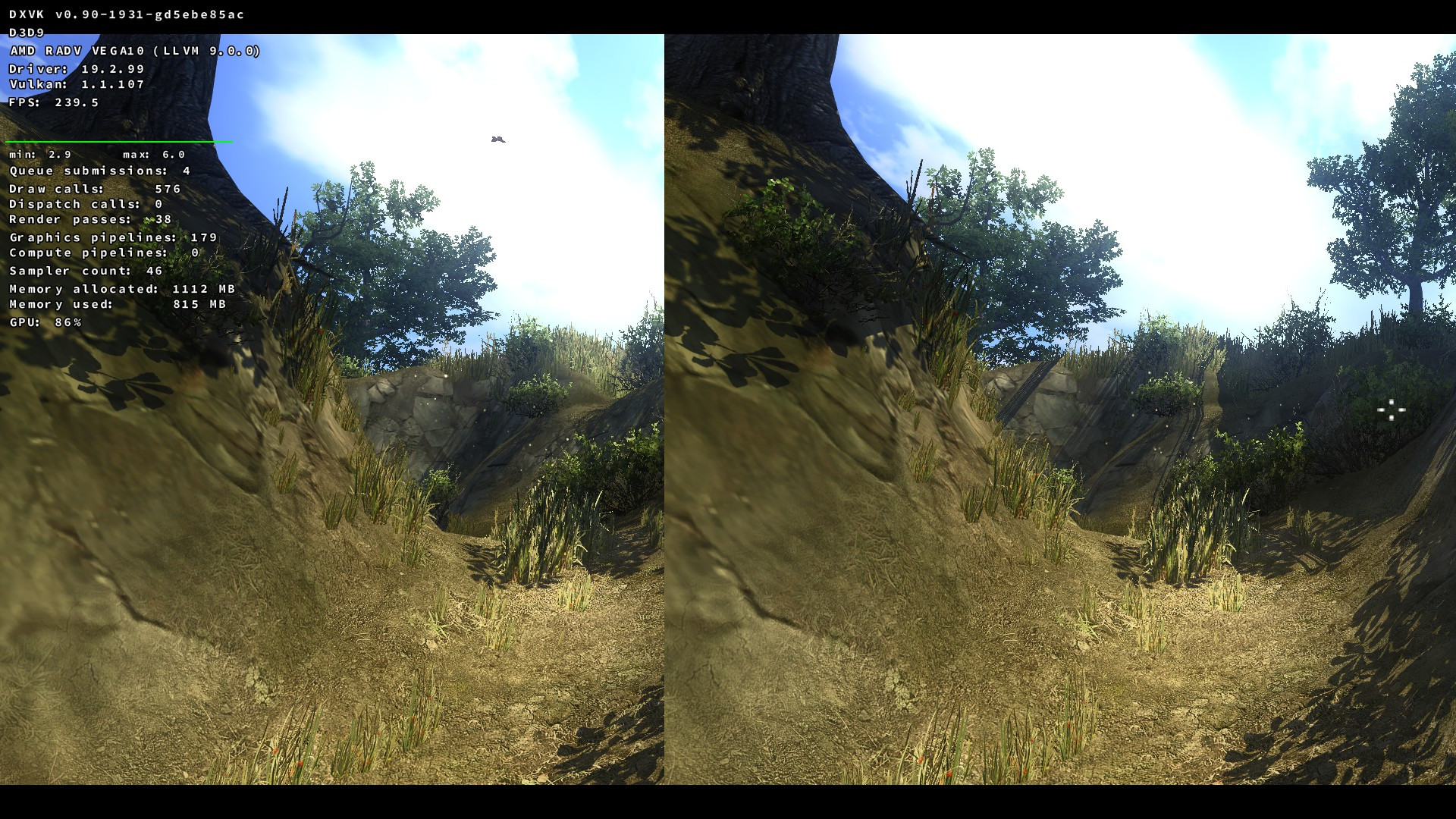
(notice the shadows on the hill in the distance, left looks like proper rendering with D9VK)
Remaining Issues
- Launching the game in DX10 there is no video, just a black screen (you can hear audio though)
steam-3020-proton-4.11-4-dx9.log
steam-3020-proton-4.11-4-dx9-d9vk.log
steam-3020-proton-4.11-4-dx10.log
system_info.txt
I have a problem. I can play the game fine but when chapter 9 ended the whole game crashes and also crashes cinnamon on Linux Mint. The game crashes on DX10 but plays on DX9. I'm using Proton 9.0 but tried 8.0-5 and GE Proton 8-32 it always crashes when starting a new mission after chapter 9.
https://gist.github.com/Perfectlynk/a48603f146e9f23bc7020898774a7c7a
Hello @Perfectlynk, can you reproduce the crash with a current build of mesa from a PPA like oibaf or kisak-mesa?
X connection to :0 broken (explicit kill or server shutdown). in your Proton log hints towards a video driver issue which kicked the user session out from underneath the game. I would also check dmesg for any relevant hints.
@Perfectlynk could you provide a save file for chapter 9?
@simifor I have provided a save file but it doesn't say if it's chapter 9, but I think it should be. You should wake up in a tent with a fire and an old man sitting by it. Unfortunately I do not think this is the end of chapter 9, but if it is then you should be on a horse in-front of the tent.
Also I forgot to mention that I made it past C9 and made it to C10 by lowing the graphics settings all the way to low. Why this helped is unknown as the game plays fine with max graphics after I have loaded into the next chapter. I have tried lowing each individual setting to low and see if that helps but it still crashes.
Quick save should be the end of chapter 10, you are in-front a brown door and save should be C9.
@kisak-valve I have never done it a PPA thing before so I'm hesitant to do it. When I have time, I'll back up my data and create time-shift and have a look.
Tested out Call of Juarezs Dx10 mode on my oled deck, on 8.0-5 and onward, the game crashes if I launch it that way, but if I drop down to 7.0-6, it launches but the screen is completely black with the audio still playing.
The game crashes with DX10 because it requires D3DCompiler_33.dll
I updated to kernel 6.5.0-26 and have latest Mesa Drives 24.0.3 installed through software sources. It no longer crashes, when loading the next level. Thank you.
DX10 still doesn't work when having the latest. For D3DCompiler_33.dll do we need to wait for update through proton or something or download it and add it manually?
Proton versions
proton 9.0x1 2024-03proton 4.11-4x1 2019-09proton 3.7x1 2018-09
Launch options
PROTON_USE_D9VK=1x1 2019-09PROTON_LOG=1x1 2019-09
Launch lines
PROTON_USE_D9VK=1 %command%x1 2019-09
DLLs
d3dcompiler_33.dllx2 2024-03
Compatibility Report
System Information
GPU: RX480
Driver/LLVM version: Mesa 18.0.5 /6.0.0
Kernel version: 4.15
Link to full system information report as Gist:
https://gist.github.com/matou68/540a6d83918ef279b16374f3d7fa34b2
Proton version:3.7.6 beta
I confirm:
steam-3020.log
Symptoms
the game crashes on startup in direct X 10 mode. the game run fine in direct X 9
Reproduction