MudRunner
NVidia 940m, NVIDIA Driver Version: 390.48, Proton play 3.7-8
I can confirm that it works perfectly and with same FPS as windows
Sadly enough I do not experience the same result as you guys. The game crashes after 20-40 min and I have no idea why (since I can't make it to log things).
Proton: 3.16-4, Nvidia 415 with PROTON_USE_WINED3D enabled.
The game don't work with D9VK (@Joshua-Ashton), it keeps stopped in loading screen. If you don't use D9VK works as normal with FFB support in Logitech Wheels. @thomas15v , to avoid the crash of the game use "PROTON_FORCE_LARGE_ADDRESS_AWARE=1 %command%" in Game Launch Options .
I can't repro the fullscreen bug but I did fix the only rendering I found (wrt. bloom).
I need to see if your fullscreen is Wine/Proton + D9VK exclusive however.
Yes, that bug only happens when using Wine + D9VK and doesn't happen on fullscreen with D9VK + Windows
With proton 5 I need to use PROTON_USE_WINED3D=1 otherwise it won't run properly in fullscreen. It doesn't crash, just gets stuck, if you alt-tab it'll progress until you move the mouse or something, then the screen freezes again, runs ok in window mode. Using PROTON_USE_WINED3D=1 it works fine.
nvidia 440.59 drivers.
Proton 5.0-3 if I remove PROTON_USE_WINED3D=1 and alt-tab my way through the menu I can play fine once I get into the game. Once in the game I can't alt-tab out. To exit the game, I go back to the menu and hit exit, nothing happens, alt-tab twice and then I get confirmation and can quit.
I'll spend some time in game and see how it goes, let me know if logs would be useful.
Thanks.
Oh, if I go into the map I need to keep alt-tabbing to do anything so still not really playable without PROTON_USE_WINED3D.
Update for 5.0-4 the game works great now without PROTON_USE_WINED3D. Still can't alt-tab out of the game but no big deal. nvidia 440.64 on plasma on X. Seems to have fixed a small issue with water surface texture also.
In my case game crashes when I try to open tutorial game crashes.
According to protondb other people also have this issue.
Game from epic, launched using heroic launcher.
Logs: Bulbul-lastPlay.log
System info: https://gist.github.com/pktiuk/3e8bb0f3390e5989617799bc448f0251
Pop_os 20.04
Nvidia 470
Proton 6.3
Hello @pktiuk, please add PROTON_LOG=1 %command% to the game's launch options and attach the generated $HOME/steam-$APPID.log to this issue report as a file. (Proton logs compress well if needed.) Also, please copy your system information from Steam (Steam -> Help -> System Information) and put it in a gist, then include a link to the gist in this issue report.
Hi @kisak-valve,
This is not game from steam. I can't run it through steam without legendary because DRM (I added executable as a non steam game and set Compatibility tool to Proton and I got: Invalid parameter EOS_Auth_Credentials. Token reason: must be null or empty)
Logs and config are attached in my previous comment.
For me, the game stucks on the loading screen itself with a black screen having just the copyright information of the game.
Hello @dipanshparmar, please add PROTON_LOG=1 %command% to the game's launch options and attach the generated $HOME/steam-$APPID.log to this issue report as a file. (Proton logs compress well if needed.) Also, please copy your system information from Steam (Steam -> Help -> System Information) and put it in a gist, then include a link to the gist in this issue report.
Hello @kisak-valve, below is the requested data:
- Log file
steam-675010.log - System information (gist)
https://gist.github.com/dipanshparmar/dde9cee493d027ff1b6681b8a18d52fc
Skimming through the log, here are some possible lines of interest:
688.980:0110:0198:warn:debugstr:OutputDebugStringA "Info,Terrain| File level_dlc3_01 buffered (0.00000 s)."
[...]
695.479:0110:0198:warn:debugstr:OutputDebugStringA "Info,Terrain| File level_dlc3_01 loaded."
[...]
700.493:0110:0114:err:sync:RtlpWaitForCriticalSection section 0000000140BB0590 "?" wait timed out in thread 0114, blocked by 0198, retrying (60 sec)
708.322:0110:0114:err:sync:RtlpWaitForCriticalSection section 0000000140BB0590 "?" wait timed out in thread 0114, blocked by 0198, retrying (60 sec)
720.957:0110:0198:warn:debugstr:OutputDebugStringA "Info,Game| Drive started."
[...]
amdgpu: Not enough memory for command submission.
err:   DxvkSubmissionQueue: Command submission failed: VK_ERROR_DEVICE_LOST
This makes me suspect that the game was having a hard time with thread synchronization, but it seems like it might have recovered? It might be interesting to test the game with the launch options set to PROTON_NO_ESYNC=1 %command% and see if that has any effect. Alternatively, you could try any linux 5.16 or newer kernel to test the game with fsync enabled.
On a separate line of thought: If the blocked thread is unrelated, then this might an AMD APU related snafu. You could try newer drivers from a PPA like oibaf or kisak-mesa and see if that behaves any better. Also, while it comes with a performance penalty, wined3d has a history of using less vram compared to DXVK. It might be interesting to test with the game's launch options set to PROTON_USE_WINED3D=1 %command%. It should be noted that PROTON_USE_WINED3D is not considered a supported launch option.
So I tried adding the launch options PROTON_USE_WINED3D=1 %command% and PROTON_NO_ESYNC=1 %command% both separately but the game never launched. It just says 'running' for a long time and then stops.
I didn't try updating the drivers and the kernel yet.
So I updated the drivers using the kisak-mesa ppa and now the game stucks as before but this time with a crash message.
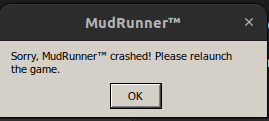
So I updated the drivers using the kisak-mesa ppa and now the game stucks as before but this time with a crash message.
@kisak-valve should I try updating the kernel now and test with fsync enabled or just let it be?
An updated Proton log would be nice to ponder.
Here you go:
steam-675010.log
Here I'm not using any launcher options other than the log one. This run was only with the updated mesa drivers.
Also, when using the PROTON_USE_WINED3D=1 %command% launch options and the updated kisak-mesa drivers, I can get to this loading screen

And I can also hear the game music but after a few seconds the same crash message appears.
Here is the log file with updated kisak-mesa drivers and PROTON_USE_WINED3D=1 %command% launch option:
steam-675010.log
Another run where the crash message never appeared but I was asked to force quit the game with the updated mesa drivers and the launch options set to PROTON_USE_WINED3D=1 %command%
steam-675010.log
In the second and third Proton log, Command: ['/home/dipansh/.local/share/Steam/steamapps/common/MudRunner/MudRunner.exe', 'PROTON_USE_WINED3D=1', '/home/dipansh/.local/share/Steam/ubuntu12_32/reaper', 'SteamLaunch', 'AppId=675010', '--', '/home/dipansh/.local/share/Steam/ubuntu12_32/steam-launch-wrapper', '--', '/home/dipansh/.local/share/Steam/steamapps/common/SteamLinuxRuntime_soldier/_v2-entry-point', '--verb=waitforexitandrun', '--', '/home/dipansh/.local/share/Steam/steamapps/common/Proton - Experimental/proton', 'waitforexitandrun', '/home/dipansh/.local/share/Steam/steamapps/common/MudRunner/MudRunner.exe'] is strange. I'm guessing you have more than one %command%. %command% gets substituted for the command Steam uses to launch the game, and the current implementation is flexable enough to let us put something before it (like setting environment variables). Combining PROTON_USE_WINED3D and PROTON_LOG should look something like PROTON_LOG=1 PROTON_USE_WINED3D=1 %command% while testing.
Looking at the first log, err:x11drv:update_net_wm_fullscreen_monitors Failed to get xinerama fullscreen monitor indices. looks like a new hint, but I don't know what to suggest next in terms of troubleshooting.
Nevermind! My launch options were set to PROTON_LOG=1 %command% PROTON_USE_WINED3D=1 %command%, but after setting them to PROTON_LOG=1 PROTON_USE_WINED3D=1 %command% and updating the mesa drivers, the game runs like a charm. Everything seems to be working fine. THANK YOU SO SO MUCH :D

Keep in mind that PROTON_USE_WINED3D is not a supported launch option, but since we now know it works with the DirectX to OpenGL, that hints that there's an issue with either DXVK or mesa/RADV.
Hi, I wanted to add some feedback:
Here there are losses in graphic quality, textures, images that are a little blurry.
This happens when accessing the map many times, and during the gameplay, in several areas the textures decrease or increase, in any scenario of the game.
It is very noticeable in the compass that points north to south, and also in the textures of the trunks, fog, water, etc.
In any graphic configuration this happens, everything at the maximum or minimum.
During the gameplay also, in the big picture, at random moments the game has a mini pause and opens Google Chrome, with the epic games authentication page, but the game remains open. When returning to the game with alt+tab, the game loses fps. This fps loss bug appears on Proton 8.0-4 RC
Proton 8.0-3
Lenovo ideapad 3 15itl6 82md
Intel i3 1115g4
Official Steam, .deb
Kubuntu lts
4gb ram, 4gb swap
Thank you in advance 👍😅
Hello, adding feedback. During gameplay, at a random moment, this message appeared. The steam client was in offline mode.
Proton 8.0-4
Steam .deb
Kubuntu 23.10 Wayland
Hello, the screen turns off after 10 minutes, if you don't do anything in the game after opening the gameplay.
Proton 8.0-5
Lenovo ideapad 3 15itl6 82md
Intel i3 1115g4
Steam .deb
Kubuntu lts
4gb ram, 20gb swap
btrfs
abnt2 utf8 ptbr
thanks
The Beta version of the Steam Client itself crashes when either joining a multiplayer game or when someone connects to a hosted multiplayer game. Switching to the regular version of the Steam Client fixes the issue.
I'm on Debian Sid with an RX Vega 56 using the amdgpu driver and a Ryzen 3900X.
Hello @Djhg2000, was the Steam client beta from the 26th or the 28th?
Note: This update was re-released December 28th to fix a Steam client crash on macOS and Linux when playing some games. -- https://steamcommunity.com/groups/SteamClientBeta/announcements/detail/521985143331621025
Hello @kisak-valve, thank you for the quick response!
Latest beta version of the Steam Client does indeed seem to have fixed the crash. The crash was experienced a couple of days ago (on a LAN party the night between the 26th and 27th). Apparently I forgot to post the comment at that time and I didn't verify it today, sorry about that!
Hi, my Xbox 360 controller isn't working in-game. I've tried multiple Proton versions, but the issue persists. Any advice?
Interestingly, the EGS version running via Heroic Games Launcher works fine. Even the Steam version, when launched through Heroic, has no issues - the controller is detected perfectly there.
I’m aware that Heroic uses ProtonGE, but using the same ProtonGE version in Steam didn't change anything.
Proton versions
proton 8.0-5x1 2024-02proton 8.0-4x2 2023-10proton 8.0-3x1 2023-09proton 6.3x1 2021-10proton 5.0-3x1 2020-02
Launch options
PROTON_USE_WINED3Dx6 2023-01PROTON_USE_WINED3D=1x8 2023-01PROTON_LOG=1x4 2023-01PROTON_LOGx1 2023-01PROTON_USE_WINED3D=1'x1 2023-01PROTON_NO_ESYNC=1x2 2023-01PROTON_FORCE_LARGE_ADDRESS_AWARE=1x1 2019-11
Launch lines
PROTON_LOG=1 PROTON_USE_WINED3D=1 %command%x2 2023-01PROTON_LOG=1 %command% PROTON_USE_WINED3D=1x1 2023-01PROTON_USE_WINED3D=1 %command%x4 2023-01PROTON_NO_ESYNC=1 %command%x2 2023-01PROTON_FORCE_LARGE_ADDRESS_AWARE=1 %command%x1 2019-11
Whitelist Request
System Information
I confirm:
Playbutton in the Steam client is sufficient.are necessary to run the game.
Issues
remaining issues: