Age of Mythology: Extended Edition
ok i try to play tale of the dragon, but for me working good
ok i try to play tale of the dragon, but for me working good
is the DLC working fine for you? cinematics played through? could you win a stage?
Hello @Israphel
Can you look into the Tale of the Dragon DLC assets folder and check what file-type is used for the cinematic? The file will probably be called something like "cinematic" "intro" "movie" "prologue".
It might be that the cinematic doesn't play correctly, because its a .wmv file.
Do you know which folder is that? And the cinematics look like "in-game" and not actually videos, are you sure they're videos?
There's an "avi" folder with some bik and aom files. The bik files are Bink Video 640x480. But those videos are for the intro, credits and such, not the missions.
Also the cinematics start but eventually they don't progress. But you can see the characters with their "idle movement" and the background as well (wind, water, etc).
@Israphel
On game folder location:
I don't have the game, so i cant really tell where the game assets folders will be for sure, but I'm guessing the path to the game's common directory will be something like this:
'~/.steam/steam/steamapps/common/Age of Mythology: Extended Edition'
So after you get to the game's central directory you can search around a bit for folders or files called "cinematic" "intro" "movie" "prologue" or something like that.
On the "in-game" cinematics:
If the cinematic are looking just like normal game-play, they will probably not be video files. But you say that the cinematics don't actually move, so that would mean that the game does render the needed bits for the cinematic, but doesn't actually animate the bits.
On the intro and credits videos:
Are the intro and credits videos playing for you in the game?
The intro and credits (bik files) work, they're at:
steamapps/common/Age of Mythology/avi
And the campaign transitions I'm sure they're in-game.
So the characters enter the scene. they start talking, and suddenly they don't continue the dialog (you still see the last subtitle). But everything else moves; they "breathe", the background moves, etc.
And when you win a DLC campaign you hear the winning sound, but nothing happens, you get stuck.
Maybe I should record a video.
@Israphel
Hmm well according to what you are saying, it sound like these campaign transitions are all in-game rendered scenes, so they have nothing to do with video file playback.
You also say that the intro and credits file work, so that's not an issue.
There are a lot of games that have problems with .wmv file playback, and I thought that this game was one of those games...
But we've worked out now that the intro and credits play normally. And that the problem is with the in-game, in-engine cutscenes (which have nothing to do with video playback).
Maybe a small video or a series of screenshots would help clarify what's going on, but that would only be for the benefit of the Proton developers.
I don't have anymore advice or help to offer, so for further support you'll have to wait on somebody who knows this stuff. :+1:
Yesterday I tried random missions from the original campaing and the original extension (Titans). They all work.
But the China DLC just plays a little bit and then nobody keeps talking.
Thanks!
Age of Mythology crashes upon start with error message "Initialization Failed Direct3D initialization failed. Frequent cause is an old or corrupted driver."
Issue transferred from https://github.com/ValveSoftware/Proton/issues/2310.
@TheAnimatedFreak posted on 2019-02-04T15:02:33:
Age of Mythology crashes after starting up using proton 3.7-8. Gives error "Initialization Failed Direct3D initialization failed. Frequent cause is an old or corrupted driver."
I have a AMD card so I upgraded it using the oibaf repository at ppa:oibaf/graphics-drivers to get the vulkan stuff working. I installed libvulkan1, mesa-vulkan-drivers and vulkan-utils but it didn't help
I tried different Environment Variable options in the launch option such as PROTON_USE_WINED3D
but it didn't help.
I also tried different version of proton such as 3.7-8 beta, 3.16-4 and 3.16-6 beta but none of these even start the game up.
I generated this log file using PROTON_LOG
steam-266840.log
But I don't know what to read from it. I also have the log file that the game itself generated
startup.txt
According to it, it seems to have problem rendering things. It falls back to use D3D11 mode but it fails to use that too.
At this point I've tried everything, I've read others threads on here but nothing seems to be working. According to protondb.com others have gotten this game working with the same version of proton and even similar hardware. But no such luck for me.
My specs
OS: Kubuntu 18.10
CPU: AMD Ryzen 5
GPU: AMD Radeon RX 570
RAM: 16GB
If there is anything missing in the issue I'll gladly provide it.
Cheers
Hello @TheAnimatedFreak, can you verify you have mesa-vulkan-drivers:i386 with something like apt policy mesa-vulkan-drivers:i386?
Hello @TheAnimatedFreak, can you verify you have
mesa-vulkan-drivers:i386with something likeapt policy mesa-vulkan-drivers:i386?
Hi
Yes I can and it seems like I do not
this is the output
N: Unable to locate package mesa-vulkan-drivers:i386?
N: Couldn't find any package by glob 'mesa-vulkan-drivers:i386?'
N: Couldn't find any package by regex 'mesa-vulkan-drivers:i386?'
I can't find a package called mesa-vulkan-drivers:i386 in my repository, is it maybe called something else on Ubuntu?
I do have
libglapi-mesa:i386
libgl1-mesa-dri:i386
libglx-mesa0:i386
libgl1-mesa-glx:i386
Hi after installing this driver
https://launchpad.net/ubuntu/cosmic/i386/mesa-vulkan-drivers/18.2.2-0ubuntu1
It works flawlessly. Thank you for pointing me towards the right direction.
@TheAnimatedFreak do you have the DLC? Maybe you can try to recreate my issue
@TheAnimatedFreak do you have the DLC? Maybe you can try to recreate my issue
I did have more issues with the DLC and even a crash. But I did manage to complete it and I didn't need to skip any cut scenes, although they where laggy as hell.
I'm having an issue when I try to play online. I get into a match and after a short time I get kicked back to the start menu and if I try to access the online menu again it tells me a networking error has occurred and that i need to restart the game.
I'm having a new issue on a fresh installation. It's a Lenovo Thinkpad Carbon X1 (2018) with Archlinux:
https://gist.github.com/Israphel/9bf312b0970e593f7e160ae8d7b714cc
Hello @Israphel, please give https://github.com/ValveSoftware/steam-for-linux/issues/6045#issuecomment-462116649 a read and see if it is relevant to you.
Hey! it seems that Steam didn't download the required shared runtimes initially (Microsoft stuff). I restarted a few times and finally the download dialog appeared. About Proton, 3.16 works.
Age Of Mythology: dxvk::DxvkError
Issue transferred from https://github.com/ValveSoftware/Proton/issues/3228.
@RastaTux posted on 2019-11-17T22:02:34:
Compatibility Report
- Name of the game with compatibility issues: Age Of Mythology (Extended Edition)
- Steam AppID of the game: 266840
System Information
- GPU: NVIDIA GM107M [GeForce GTX 850M]
- Driver/LLVM version: nvidia-driver-435
- Kernel version: 5.3.0-23-generic
- Link to full system information report as Gist: https://gist.github.com/RastaTux/ff6648dbf7dde9681c09eb601c3e7a31
- Proton version: 4.11-8
I confirm:
- [X] that I haven't found an existing compatibility report for this game.
- [X] that I have checked whether there are updates for my system available.
Symptoms
When the title screen starts, the game breaks (Also happens when i bypass the launcher). The game worked before, this issue happens since I installed some bumblebee things. Unfortunally, i don't know what i exactly did.
PS: I have a double graphics card setup, the NVIDIA is the second one.
Reproduction
Start the game with proton steam play activated.
Hello @RastaTux, can you try adding WINEDLLOVERRIDES="dxgi=n" %command% to the game's launch options and see if it has an effect?
Hello @kisak-valve, that did the trick! Thanks a bunch - I've already played 1,5 hours without any issue! :)
Hello @kisak-valve, that did the trick! Thanks a bunch - I've already played 1,5 hours without any issue! :)
Do the DLC cinematics work for you?
Wow, I wanted to test that for @Israphel, so started the Laptop again after my work today and started it... after a short splash screen, the game gets black and i get the message Direct3D initialising failed.
Any idea, @kisak-valve ?
Hello @RastaTux, looks like the the vulkan driver stack failed to initialize like your previous log:
err:vulkan:wine_vk_instance_load_physical_devices Failed to enumerate physical devices, res=-3
err:vulkan:wine_vkCreateInstance Failed to load physical devices, res=-3
err:   DxvkInstance::createInstance: Failed to create Vulkan instance
err:   D3D11CreateDevice: Failed to create a DXGI factory
Maybe check if vulkaninfo from vulkan-tools gives a sane output? You don't need to copy/paste the output, just check if it uses the video card you expected.
It's a bit tricky since my laptop has an integrated Intel and a dedicated nvidia graphics card. The vulkaninfo just shows me the Intel integrated graphics card as GPU0. When trying to use primusrun %command% for Age of Mythology, the game even won't start and produce a steam-id.log. I guess, something about my bumblebee installation broke. :/
@kisak-valve: So vulkaninfo seems to bring me a sane output - but it's taking my Intel GPU0, not my NVIDIA... I have bumblebee installed - but as mentioned earlier i can't run the game by optirun/primus %command%. I'm not sure I have to though since it worked without it last time...
@RastaTux When we switched from using dxvk's dxgi to wine's dxgi in Proton 4.11-8, it changed the GPU selection and reporting process which had an impact on some dual GPU setups (#3215 ) .
I created a custom build with a potential solution which would use the dedicated GPU instead of the built-in one, and uploaded it with the lock code "dual" here: https://www.codeweavers.com/xfer/alasky/dxgi-dual-gpu-hack/
It would be interesting if this build fixed the breakage with Age of Mythology for you. To test this build:
- Remove the
WINEDLLOVERRIDES="dxgi=n" %command%launch option temporarily for testing. - Create a directory called "compatibilitytools.d" inside "~./steam/steam/" (assuming you don't already have this folder).
- Put the tarball into ./steam/steam/compatibilitytools.d
- Untar the ball
- Restart Steam
- "dxgi-dual-gpu-hack" should now be selectable from the dropdown menu for proton versions.
@alasky17 Tried that, now I don't get an error, it just crashes on launch screen - No matter if using game launcher or skipping it... :/
Age of Mythology Extended Edition crashes on launch. XML parsing error in xFonts.xml
Issue transferred from https://github.com/ValveSoftware/Proton/issues/6387.
@Eldhrimer posted on 2022-12-12T23:59:09:
Compatibility Report
- Name of the game with compatibility issues: Age of Mythology: Extended Edition
- Steam AppID of the game: 266840
System Information
- GPU: RX 570
- Driver/LLVM version: Mesa 22.3.0/LLVM 14.0.6
- Kernel version: 5.15.0-56-generic
- Link to full system information report as Gist: Full System Info
- Proton version: 7.0.5
- FLATPAK Version of Steam
I confirm:
- [ x] that I haven't found an existing compatibility report for this game.
- [x ] that I have checked whether there are updates for my system available.
Symptoms
When launching the game with either the bypass launcher or the normal way the game launches in full screen and a pop up appears that says:

When clicking the only button, "Ok", the game loads the splash screen and a pop up appears that says:
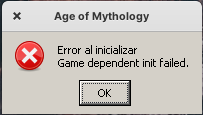
After that the game closes.
Reproduction
It happens 100% of the time.
Regarding the comment above with my issue, the issue in question is not present in my laptop running Fedora with a non Flatpak Steam. Any ideas of what could be? My laptop is truly awful in performance for that game, just squeezing a barely 20 fps
Game displays an error dialog with Proton 8.0-1, but works with 7.0-6.
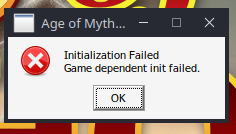
Log file: steam-266840-proton801.tar.gz
Specs
- GPU: RX 6700 XT (Mesa 23.0.2)
- Kernel: 6.1.24
- O.S: Arch
Issue fixed with the latest Proton 8.0-1 hotfix. Thanks, folks.
Issue fixed with the latest Proton 8.0-1 hotfix. Thanks, folks.
Just in case this was unclear since we have a branch called Proton Hotfix -- this was fixed with the 8.0-1d bump, so folks can select 8.0-1 :) Also, while I am already commenting - @ranplayer thank you for the clear regression report. We were so busy I did not get a chance to respond earlier, but this was one of the reports that led to 8.0-1d :)
AOM is crashing for me whenever I try and start a match on 8.0-1d.
I am running this on Fedora 37 under Flatpak, and it runs fine under Proton 7.0.
Of interesting note is in Age of Mythology Logs startup.txt reporting EXCEPTION CAUGHT: Unknown at 0x7B04EE27 in 0x00F5ED60 at base address 0x7B000000
Kernel Version: 6.2.12-200.fc37.x86_64
Driver: AMD AMD Radeon Graphics (gfx1036, LLVM 15.0.7, DRM 3.49, 6.2.12-200.fc37.x86_64)
Hello @mmnmnnmnmm, err:msvcrt:_invalid_parameter (null):0 (null): (null) 0 looks like a line of interest in your log.
The only minor issue I've noticed with this game using Proton versions from 9.0-4 (until Experimental 2025-12-23) is that the cinematics don't play.. we get a black screen (AOM Cinematics, Titan Cinematics - accessible through the media button on the main menu).
Proton 10.0-4 (logs): steam-266840.tar.gz
Specs:
- OS: Arch
- Kernel: 6.12.61
- GPU: RX 6700 XT (Mesa 25.2.7)
- CPU: Ryzen 7 5700G (8c/16t)
- DE: Plasma 6.5.3 (wayland)
A problem running Age of Mythology: Extended Edition
Issue transferred from https://github.com/ValveSoftware/Proton/issues/9833.
@JimmiPachonGomez posted on 2026-05-29T12:47:41:
Compatibility Report
- Name of the game with compatibility issues: Age of Mythology: Extended Edition
- Steam AppID of the game: 266840
System Information
- GPU: Intel Iris Xe Graphics (Alder Lake-P GT2)
- Video driver version: i915 (Mesa llvmpipe LLVM 20.1.8)
- Kernel version: 6.17.0-29-generic
- Link to full system information report as [Gist] https://gist.github.com/JimmiPachonGomez/82e7179dcb059893db26c5f115794135
- Proton version: Proton Experimental
I confirm:
- [x] that I haven't found an existing compatibil
ity report for this game.
- [x] that I have checked whether there are updates for my system available.
Symptoms
The game worked perfectly on May 27th using Proton Experimental. However, starting May 28th, the game crashes immediately after the initial loading screen.
If I use the launch option PROTON_USE_WINED3D=1 %command%, the game manages to launch and bypasses the crash, but the performance drops severely, making the game run extremely slow and unplayable.
Reproduction
- Launch Age of Mythology: Extended Edition via Steam with Proton Experimental.
- Wait for the initial loading screen to appear.
- Observe the crash to desktop right after the loading screen finishes.
- (Alternative) Add
PROTON_USE_WINED3D=1 %command%to launch options, start the game, and observe extreme performance degradation.
Hello @JimmiPachonGomez, https://gist.github.com/JimmiPachonGomez/82e7179dcb059893db26c5f115794135#file-gistfile1-txt-L199-L200 and https://gist.github.com/JimmiPachonGomez/82e7179dcb059893db26c5f115794135#file-gistfile1-txt-L261-L280 are the sections of your extended diagnostic information to focus on. Something's gone awry with your video driver setup and mesa's being forced to render on your CPU (llvmpipe) to run at all.
Hello @JimmiPachonGomez, https://gist.github.com/JimmiPachonGomez/82e7179dcb059893db26c5f115794135#file-gistfile1-txt-L199-L200 and https://gist.github.com/JimmiPachonGomez/82e7179dcb059893db26c5f115794135#file-gistfile1-txt-L261-L280 are the sections of your extended diagnostic information to focus on. Something's gone awry with your video driver setup and mesa's being forced to render on your CPU (llvmpipe) to run at all.
@kisak-valve
Thanks! The problem was that my graphics card settings were messed up (no idea why). In case anyone else runs into this, I ran this command:
glxinfo | grep -E "OpenGL renderer|DRI"
For Intel, it should say something like: OpenGL renderer string: Mesa Intel(R) Iris(R) Xe Graphics (ADL GT2)—or whatever model you're using. If it shows something other than your graphics card, LLMs can help you fix it.
Related threads
- Age of Mythology won't start (no crash)protonclosed same game
- Shadow of the Tomb Raiderprotonopen same upstream bug
- DOOM 2016 crashes at beginning of level 6.protonclosed same upstream bug
- Proton updated to 3.16-7, However DXVK_HUD displays version 0.94steamclosed same upstream bug
- Proton doesn't create compatdata folder when game launched from a NTFS diskprotonclosed same upstream bug
- 3.16 Beta breaks where 3.7-8 worksprotonclosed same upstream bug
- Games not runprotonclosed same upstream bug
- Garry's Mod no longer startsprotonclosed same upstream bug
Proton versions
proton experimentalx1 2026-05proton 10.0-4x1 2026-01proton 7.0x1 2023-04proton 8.0-1x3 2023-04proton hotfixx1 2023-04proton 4.11-8x1 2019-12proton 3.7-8x1 2019-02
Launch options
PROTON_USE_WINED3D=1x1 2026-05WINEDLLOVERRIDES="dxgi=n"x2 2019-12PROTON_LOGx1 2019-02PROTON_USE_WINED3Dx1 2019-02
Launch lines
PROTON_USE_WINED3D=1 %command%x1 2026-05WINEDLLOVERRIDES="dxgi=n" %command%x2 2019-12
Upstream links
- ValveSoftware/Proton/issues/9833x1 2026-05
- ValveSoftware/Proton/issues/6387x1 2022-12
- ValveSoftware/Proton/issues/3228x1 2019-11
- ValveSoftware/steam-for-linux/issues/6045x1 2019-03
- ValveSoftware/Proton/issues/2310x1 2019-02
Compatibility Report
System Information
I confirm:
Symptoms
The game works, but the DLC new campaign called "Tale of the Dragon" is buggy when compared to Windows. The cinematics just won't advance unless you skip them, and every time you win a scenario you're stuck unless you cheat.
I know the game had had some bugs with Windows as well, but not at this level.
I'm checking if someone is trying to play the DLC.
Reproduction
Play the DLC (not the old campaign)