APB Reloaded
For reference: err:module:LdrInitializeThunk Main exe initialization for ... failed, status c0000017
This is also a problem for me
System Information
- GPU: R9 M280x
- Driver/LLVM version: (BONAIRE, DRM 3.27.0, LLVM 7.0.0) Mesa 18.2.5 , OpenGL 4.4
- Kernel version: 4.19.4-1-MANJARO
- Link to full system information report as System info
- Proton version:3.16-4 beta
APB uses Battle-eye, I wouldn't hold much hope in getting it to work.
If you get through this wall there'll be another one.
They've recently moved away from Battleye to a different anti-cheat product. That said, it's probably best to wait for the engine update which is probably weeks away as of this moment before doing anything compatibility wise.
it won't run even if there a engine update or anti cheat because it require a wine kernel patch it's needs GetProcessDEPPolicy or DEP Policy to be enable unless littleorbit makes a native linux port or someother way it won't run anytime soon
The new 64-Bit update works, I've put about 30hours on it on Linux since the big update. However, clicking Start on the launcher doesn't actually launch the game. It requires manually launching the game's own .exe.
As an example, here's my launch command:
'/home/unaccounted4/Jogos/Steam/Proton - Experimental'/proton waitforexitandrun '/home/unaccounted4/Jogos/Steam/APB Reloaded/Launcher/APBLauncher.exe' && '/home/unaccounted4/Jogos/Steam/Proton - Experimental'/proton waitforexitandrun '/home/unaccounted4/Jogos/Steam/APB Reloaded/Binaries/APB.exe' -nosteam %command%
The game also crashes randomly. Log with crash below.
steam-113400.log
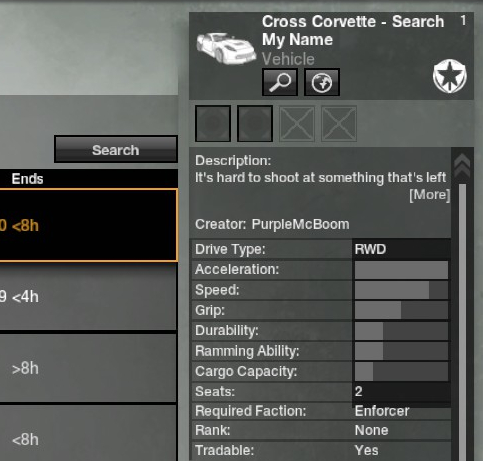
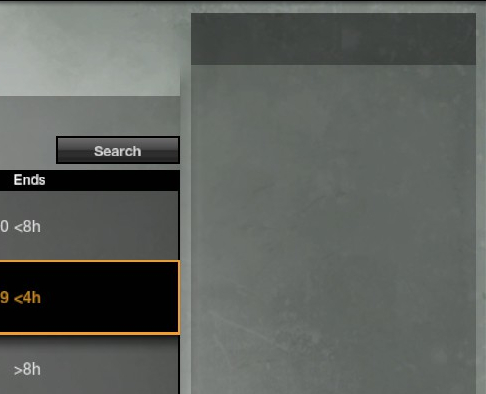
The Marketplace (player shop) sometimes doesn't show the preview on the right side pane like it's supposed to.
How it's supposed to look:
How it looks for most of the items:
Also it requires the BattlEye Runtime to be installed, as that is what it now uses for Anti-Cheat.
See below
Steam System Info: https://gist.github.com/Unaccounted4/f31da1a24601a49087bbca4f1ad47603
Yesterday (2023/04/27) APB reloaded was updated and the anticheat provider changed to Easy Anti-Cheat.
This has caused Proton 8.0 and Experimental to stop working (crashes after the EAC popup), however the game can still be played with official Proton 7.0-6 and GloriousEggroll's builds such as Proton 7-55-GE.
A custom launch command is still necessary to disable in-game Steam account integration.
%command%; PROTON_LOG=1 $HOME/.local/share/Steam/ubuntu12_32/reaper SteamLaunch AppId=113400 -- $HOME/.local/share/Steam/ubuntu12_32/steam-launch-wrapper -- $HOME/.local/share/Steam/steamapps/common/SteamLinuxRuntime_sniper/_v2-entry-point --verb=waitforexitandrun -- "${STEAM_COMPAT_TOOL_PATHS%%:*}"/proton waitforexitandrun "$STEAM_COMPAT_INSTALL_PATH/Binaries/APB.exe" -nosteam
Steam system information:
https://gist.github.com/telqor/dc588e2046dce4bafe367de5ba0004be
I have also attached logs of a successful startup with Proton 7, as well as an unsuccessful attempt with Proton 8. The successful Proton 7 log is compressed due to its large size.
steam-113400-proton8.log
steam-113400-proton7.tar.gz
Note that Proton 8 solves several visual glitches related to the interface such as text being shown incorrectly in the in-game mail system.
With the EAC update the game was giving me an error about an "unregistered executable (APB.exe)" with my previous launch command. Using the one provided by @telqor does allow the game to run. Though like this it launches APB.exe twice if you click the Start button rather than just closing the launcher. The first time it crashes upon loading into the main menu (and trying to start the Steam account integration). The second time it launches it works as expected.
The second time it launches it works as expected.
Which Proton version are you using?
7.0-6, same as above.
On the current game build the launcher now works fine and there is a way to prevent autologin crashes until the game is reinstalled. The following terminal command should take care of it:
echo -e '[LoginSettings]\nbUseSteamLogin=False' >> "$HOME/.steam/steam/steamapps/common/APB Reloaded/APBGame/Config/APBMachineOptions.ini"
After doing this, which adds two lines to APBMachineOptions.ini, the game should work with no special launch options at least on Proton 7.0. Unfortunately 8.0 is still unusable unlike with the previous BattlEye patch, so the random crashes which were also fixed with 8.0 remain.
The kernel log shows the following on every attempted start with Proton 8.0:
[ 678.027682] wine64[25627]: segfault at 30 ip 00007fbaefbb8cc8 sp 00007ffc357b6968 error 4 cpu 11 in memfd:7c1bcead-bf37-501c-a2f9-d11d0c (deleted)[7fbaef800000+4f4000] likely on CPU 11 (core 20, socket 0)
[ 678.027687] Code: 00 74 26 48 83 3d 2f 72 34 00 00 74 0a 83 c8 ff f0 0f c1 47 10 eb 09 8b 47 10 8d 50 ff 89 57 10 85 c0 7f 05 e9 59 0f 04 00 c3 <65> 48 8b 04 25 30 00 00 00 48 8b 40 60 c3 48 83 c8 ff c3 65 48 8b
@telqor As mentioned in the other issue - this should be fixed with experimental-8.0-20230505 :)
Can confirm. With the latest Experimental and the two lines @telqor mentions added to Config/APBMachineOptions.ini APB: Reloaded launches without the need for any additional launch options.
A player told me that this commit
https://github.com/ValveSoftware/wine/commit/024fc9ac0c9ae31d54efbdd90bb51d30a55326e6
is causing input delay problems in the game since its introduction.
His words:
when you are using your wasd keys to move, sometimes you can keep moving even if the key stops being pressed
full speed movement, not sliding due to fps or anything like that

[Me] have you tested if this happens on native Windows?

doesnt happen
neither happens on proton previous to that commit
or on proton patched to revert that commit
I cannot confirm this, but leaving it here anyway.
SARD Anticheat has been removed completely as of 27/03/2025, the game now works flawlessly for me with Proton Hotfix, no more stuck inputs, or starting issues.
@GuardianLiarus
SARD Anticheat has been removed completely as of 27/03/2025, the game now works flawlessly for me with Proton Hotfix, no more stuck inputs, or starting issues.
The launcher/patcher for me either freezes or doesn't render. Did you do something to fix that?
EDIT: nvm, I was using Proton-GE. Experimental doesn't work either, but Hotfix does indeed!
The OTW (Open Test World) version of APB reloaded's launcher does not work anymore, they switched from Gecko to a WebView2 based launcher to show their embeded news, and thus the launcher does not start anymore.
OTW Can be downloaded from here, patches from here are very likely to go live and thus break linux compatiblity very soon.
A friend of mine who is much more experienced with linux gave me the two steps needed to get the game working:
-
Use his patched wine mono
https://github.com/telqor/wine-mono/releases/download/wine-mono-10.1-tq/wine-mono-10.1.0-x86.msi -
Use this older version of the Evergreen Microsoft Edge WebView installer
<Link removed by moderator>
I am not experienced with making patches to linux so i have no idea what he did to make it work, but i assume someone smarter here could figure it out haha.
Just spreading the knowledge around.
Hello @GuardianLiarus, a workaround you linked is legally problematic and has been removed.
Just as an update, the game is currently unplayable due to a kernel level anticheat, it's an inhouse anticheat called GFAC or Gamersfirst Anticheat.
The game is still shown as "playable" on steam.
Proton versions
proton hotfixx2 2025-06proton 8.0x2 2023-04proton 7.0x1 2023-04proton 7.0-6x1 2023-04
Launch options
PROTON_LOG=1x1 2023-04STEAM_COMPAT_INSTALL_PATHx1 2023-04STEAM_COMPAT_TOOL_PATHSx1 2023-04
Compatibility Report
System Information
I confirm:
steam-113400.log
Symptoms
The game exit (crashed) immediately after start
Reproduction
Just launch the game