King's Bounty: Armored Princess
Hello @Selmi, you may have better luck with nvidia 396.54 or newer.
you mean beta version? 396.18 seems to be latest on nvidia site
from stable versions there is latest 390.87
in ubuntu repositorey latest is this one I have
In general, https://www.nvidia.com/Download/Find.aspx?lang=en-us is the reliable place to check what is available on nvidia's site and has 396.54 as well as 410.57.
There's also a quick start guide at https://github.com/ValveSoftware/Proton/blob/proton_3.7/PREREQS.md#nvidia.
thank you, quick start guide is perfect for me
i was using search on https://www.geforce.com/drivers, it seems to be not updated for a long time
tested with 396.54, no difference
steam-3170.log
probably same problem can be reproduced also by simply changing graphic quality settings in options from main menu and confirm them. i set everything from highest (default) to lowest
probably same problem also happened in montero dungeons when i wanted to enter abanonded mines. unfortunately i don't have save which i wanted to keep and then deleted...
however i played these two locations using windows 10 so i can confirm that if these two places will be fixed then game is perfectly playable and can be finished
Wine 4.18
fix 35223 King's Bounty Crossworlds crashes in the new campaign when entering the sea tower on the first island
King's Bounty: Armored Princess crash after changing "Objects" (graphical setting) to "Low" (3170)
Issue transferred from https://github.com/ValveSoftware/Proton/issues/3412.
@mikkovedru posted on 2020-01-05T17:45:55:
Compatibility Report
- Name of the game with compatibility issues: King's Bounty: Armored Princess
- Steam AppID of the game: 3170
System Information
Distro: Linux Mint 19.2 Tina
Kernel: 5.3.0-24-generic
GPU Driver: NVIDIA 440.44
GPU: NVIDIA GeForce GTX 650
CPU: Intel Core i7-4790K @ 4.00GHz
Proton: 4.11-11
I confirm:
- [X] that I haven't found an existing compatibility report for this game.
- [X] that I have checked whether there are updates for my system available.
Symptoms
King's Bounty: Armored Princess crashes after changing "Objects" (graphical setting) to "Low". Error message is strange:
Application aborted!
C:\work\\skyfallen\\tbm\\BMRender\mode.cpp(4045): DirectX call failed: 256, 256, code=0x80004001 (-2147467263)
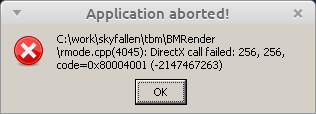
The relevant information:
- The Whitelist issue #1073.
- Issue #1580.
- https://www.protondb.com/app/3170
- The only report with a similar sounding problem is found here: https://github.com/ValveSoftware/Proton/issues/1580#issuecomment-426546586
- Multiple reports about the same low fps (10) problem that I also encountered.
- has information about the crashes in the Tower in the first island as well as crashes in some Mines/Dungeons. I haven't encountered such problem (yet?).
Reproduction
- Run the game
- Go to
Options - Change
Objectssetting toLow - Press
Apply
I can also confirm the original bug report by @Selmi about the game crashing while trying to enter the Mirror Tower on Elon Island.
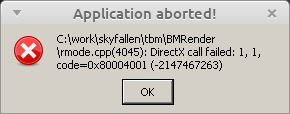
My system info:
Distro: Linux Mint 19.2 Tina
Kernel: 5.3.0-24-generic
GPU Driver: NVIDIA 440.44
GPU: NVIDIA GeForce GTX 650
CPU: Intel Core i7-4790K @ 4.00GHz
Proton: 4.11-11
Steam deck (beta client), the game works (played on the sparate monitor due to 1280x720 resolution does not suite the game). both on 8.0-4 and experimental proton builds, however, the game hangs randomly after 10-15 of the start.
Proton versions
proton 3.7x1 2018-09
Upstream links
- ValveSoftware/Proton/issues/3412x1 2020-01
Error codes
0x80004001x1 2020-01
Compatibility Report
System Information
I confirm:
steam-3170.log
Symptoms
Game crashes everytime I try to enter Mirror Tower on Elon Island. Sometimes to black screen with mouse cursor while game musis still plays and everything cleans up after pressing esc. Sometimes it crashed directly to desktop
Otherwise game works perfectly for me
Reproduction
use this savegame
Elon (1).zip
and try to enter tower in front of princess