Rebel Galaxy
I can confirm it to be working very well. There is just one minor issue I encountered: When docked at a station or hailing other ships, the screen occasionally goes black for 1-2 seconds. But never during the real-time game play. So while being annoying, it does not affect actual game play in any bad way.
GPU: AMD RX 580
OS: Kubuntu 18.04.1 bionic
Proton 3.16-4 Beta has serious problems with rebel galaxy.
Running with esync crashes the game after config menu,
running without allows you to create a new game but crashes shortly thereafter.
This also leads to further problems like steam not closing thanks to rebel galaxy considered running, your mouse dissapearing thanks to rebel galaxy not properly closing the borderless fullscreen and turning steamchildmonitor unresponsive thus hindering steam restart.
All these problems do not appear with proton version 3.7-8.
I cannot recommend whitelisting this game unless it is possible to force an older Proton version for specific games or it becomes known as to why rebel galaxy behaves so much worse for newer proton versions.
System Information
-
System: Parrot OS 4.3 (64 Bit) (Based on Debian Testing) -
CPU: Intel Core i7-7700K CPU -
GPU: GTX 1050 ti(4gb) -
Driver/LLVM version: 4.6.0 Nvidia 390.87 -
Kernel version: 4.18.0-parrot10-amd64 -
Proton version: 3.16-4 Beta
Hello @Ano-Nymus, since disabling esync makes a difference, please run ulimit -Hn and confirm it is a high value and not 4096.
Additionally, please add PROTON_LOG=1 %command% to the game's launch options and drag and drop the generated $HOME/steam-$APPID.log into the comment box.
You may have better results with nvidia 396.54.09 from their vulkan dev branch.
I confirm that ulimit -Hn shows the value 1048576, as is common with debian based distros.
I also confirm that starting rebel galaxy with 3.16-4 Beta will cause aforementioned bugs.
More specifically:
Running Rebel Galaxy with or without Esync while using DX3D11 causes crash after options menu, as will esync with opengl.
Running rebel galaxy without esync but with opengl starts the game but causes crash after returning to main menu, while not freeing the mouse.
The mouse will still behave as if the game was running but invisible, making it impossible to click anything. This can be solved by manually closing all steam related processes from task manager. (or closing processes with kill).
One additional note:
While using task manager i realised that multiple steamchildMonit processes where opened, possible an unrelated bug that must be addressed.
Images of config menu added, as well as Proton Logs for all seperate settings:
(D3D11 without Esync) steam-290300.log
(DX3D11 with Esync) steam-290300.log
(Opengl with Esync) steam-290300.log
(Opengl without Esync) steam-290300.log
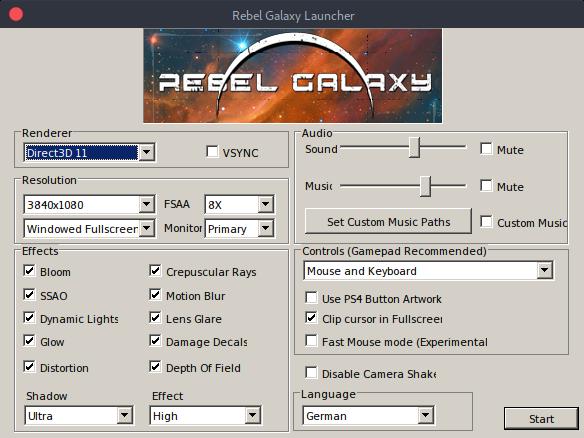
Further testing showed that all bugs are triggered after an initial bug where multiple steamchildMonits open at the same time, which happens when opening rebel galaxy with dx3d11, causing a crash.
Closing additional steamchildMonits before restarting with opengl allowes game to run fine. It is not related to the proton version, as it happens on both 3.7-8 and 3.16-4 Beta.
I mistook it as an version issue thanks to restarting steam due to swapping proton version
Logs related to the initial DX3D11 bug:
(Start Proton 3.7-8, Esync and DX3D11, Crashes after config and fails to stop SteamchildMonit) steam-290300.log
(Start Proton 16.3-4 Beta, Esync and DX3D11, Crashes after config and fails to stop SteamchildMonit) steam-290300.log
Crashes on start up with all graphics options on Proton 4.x (latest). Graphics options in it's launcher make no difference.
Junk.
Hello @tomchiverton, please add PROTON_LOG=1 %command% to the game's launch options and drag and drop the generated $HOME/steam-$APPID.log into the comment box. Also, please copy your system information from Steam (Steam -> Help -> System Information) and put it in a gist, then include a link to the gist in this issue report.
Sorry, uninstalled for a refund now.
AS you know, Steam only allow this for 2 weeks / 2 hours run time and I was on
the limit fighting it.
Proton versions
proton 16.3-4x1 2018-11proton 3.7-8x1 2018-11proton 3.16-4x1 2018-11
Launch options
PROTON_LOG=1x2 2019-12
Whitelist Request
System Information
I confirm:
Playbutton in the Steam client is sufficient.are necessary to run the game.
Issues
remaining issues: