Valkyria Chronicles 4
Your GPU doesn't support Vulkan, but your processor's integrated graphics do.
You won't be able to run any DX11 game in Proton without a Vulkan supported GPU, unless you fallback to using Wine's native D3D11 OpenGL implementation which is much slower than Vulkan.
Run games with this in launch options, don't expect good performance with that GPU and Wine's D3D11 though.
PROTON_USE_WINED3D %command%
Hi,
@z0z0z , I tested all parameters, it doesn't work.
I suppose my hardware is a bit too old.
Like I said on another computer, without GPU (Mesa 18.2.2 Intel HD Graphics 620 - Intel i5-7200U), the game seems to launch.
I also tried on another computer Nvidia GPU on Archlinux. The game seems to launch too.
My report may be not "right" due to my hardware.
Meant to say this
PROTON_USE_WINED3D=1 %command%
Need the =1
Yeah still not working.
No clue then, perhaps Wine d3d is trying to use OpenGL features that aren't available on the r600 driver yet.
There's also this but I think this is very outdated, it says your GPU only supports OpenGL 3.3
https://www.x.org/wiki/RadeonFeature/
(6850 is BARTS Northern Islands)
The only thing I could think of is try setting this in launch options.
MESA_GL_VERSION_OVERRIDE=4.5COMPAT PROTON_USE_WINED3D=1 %command%
Still not work.
glxinfo returns : OpenGL version string: 3.1 Mesa 18.2.2
I should definitely not have a compatible hardware for this game.
Valkyria Chronicles 4 (790820)
Issue transferred from https://github.com/ValveSoftware/Proton/issues/2212.
@Gryzbastian posted on 2019-01-12T13:40:47:
Compatibility Report
- Name of the game with compatibility issues: Valkyria Chronicles 4
- Steam AppID of the game: 790820
System Information
- GPU: GTX 970 nvidia
- Driver/LLVM version: NVIDIA 415.25
- Kernel version: 4.19.13-1-MANJARO
- Link to full system information report as Gist:https://gist.github.com/Gryzbastian/56365bf931549a2c3496fd6c70f91a48
- Proton version: 3.16-4 (tryed also 3.7-8)
I confirm:
- [x] that I haven't found an existing compatibility report for this game.
- [x] that I have checked whether there are updates for my system available.
Symptoms
After launching the game i get popup saying that
"The server is not reachable, check your Internet connection and click "Retry".
In case the problem persists, click "Next" to open the support website in the default browser."
I assumed that denuvo is having trouble connecting to the internet, i am sure my internet connection is fine, problem persists even on disabled firewall. There is on problem on windows machine connected to the same router.
Reproduction
launch the game
Valkyria Chronicles FPS Performance issues
Issue transferred from https://github.com/ValveSoftware/Proton/issues/2315.
@yokiraamato posted on 2019-02-06T00:00:01:
Compatibility Report
- Name of the game with compatibility issues: Valkyria Chronicles 4
- Steam AppID of the game: 790820
System Information
Arch Linux:
- GPU: GTX 960m
- CPU: AMD FX-8320E Eight-Core @ 8x 3.2GHz
- RAM : 8GB
- Driver/LLVM version: nvidia 415.27-4
- Kernel version: 4.20
- Link to full system information report as Gist:
- Proton version: * 3.7-8
I confirm:
- [ ] that I haven't found an existing compatibility report for this game.
- [x] that I have checked whether there are updates for my system available.
Symptoms
in main menu it runs smoothly no problems at all but when it starts the match ingame it starts a terrible fps drop like 10-20 fps while on windows i have like 60 fps no problem
Reproduction
Launch the game in steam with proton 3.7-8, press load game / new game wait until the actual game start (no dialogues) then it starts the terrible fps drop
Framerate is still low on Nvidia with 430.40 and Proton 4.11-1.
Disabling esync has no effect.
Falling back to directx9 or using opengl instead of vulkan, make the game no start at all. Using d9vk also did not help.
No change with Proton 4.11-7 and Nvidia 435.21 for me.
According to doitsujin, this performance issue is a game bug: https://github.com/doitsujin/dxvk/issues/1421#issuecomment-583851491
Any reason you have got all these non standard options? noesync oldglstr
I use use noesync and nofsync because it was necessary on VC1. Afer some crash I use oldglstr, because the doc explain some old game can crash without it some why not. It seems with VC4 noesync, nofsync and oldglstr don't change anything.
Note completely different : Because of my crash I play with VC4 settings. I don't know if you fix your framerate performance, but I notice enable v-sync ingame seems to improve fps.
Slackware64-Current
Proton: 1638789187 proton-6.3-8c
NVIDIA GTX 1070, using Driver version 495.46
Issue: Game froze and is using a lot of memory.
Here is my PROTON_LOG=1
https://gist.github.com/EpicureanGit/a0b03e28d20b590ae48f03b7ef0349cc
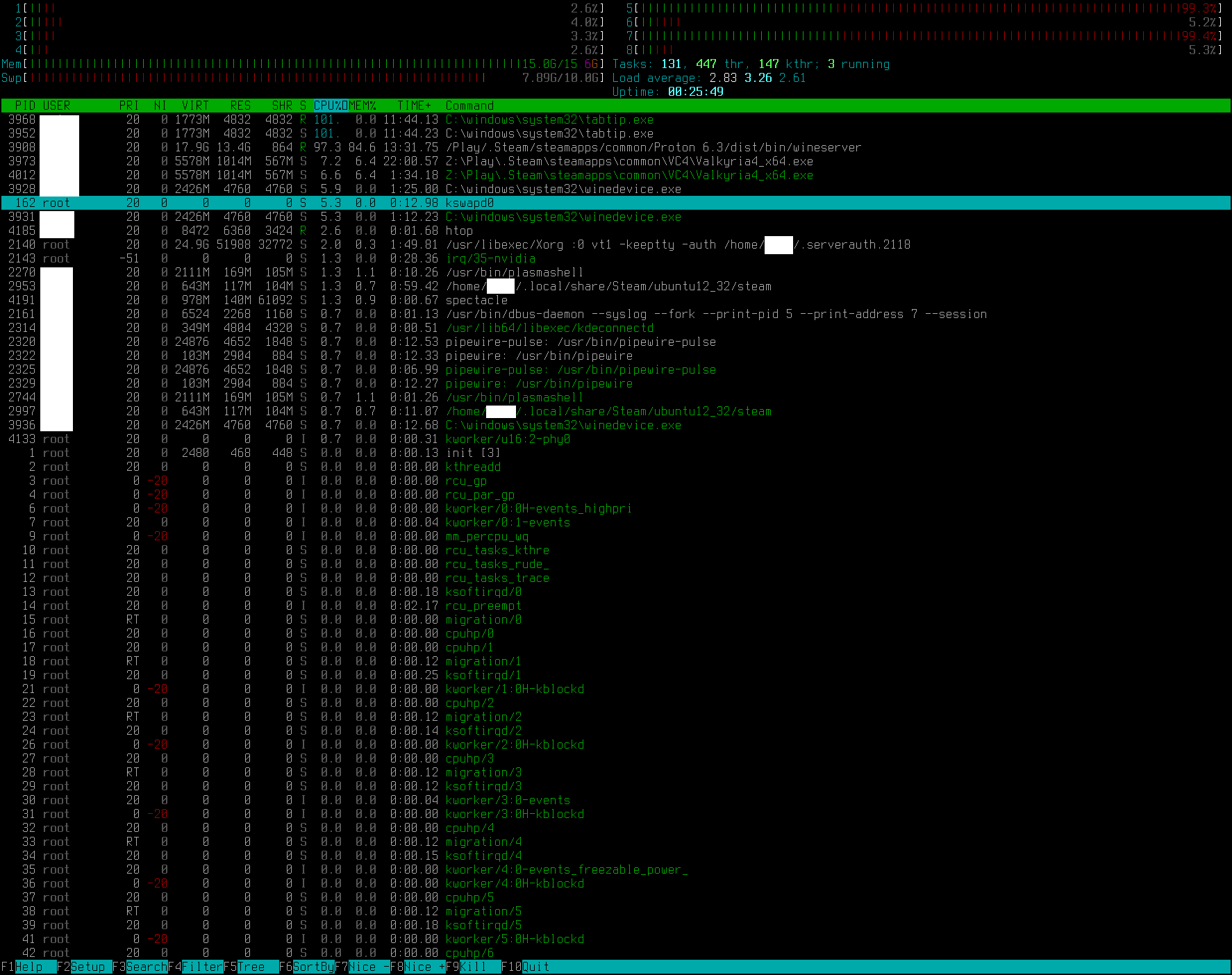
I was able to use the Windows key to get back to desktop, switched to another virtual desktop to check htop and take a screenshot. It shows tabtip.exe and wineserver using a lot of CPU. Most of my 16GB of RAM is used by wineserver, and almost 7.89GB of my swap is being used too. I cut out my user's name from the screenshot.
Slackware64-Current
Linux 6.6.8
GTX 1070
NVIDIA Driver 445.29.06
Steam Version: 1702079146
Steam Client Build Date: Thu, Dec 7 7:33 PM UTC -08:00
Steam Web Build Date: Fri, Dec 8 6:30 PM UTC -08:00
Steam API Version: SteamClient021
Proton: 1703018341 experimental-8.0-20231219
PROTON_LOG=1 https://gist.github.com/EpicureanGit/1876752dd7ab9e646fbbec8e97582ca0
System Information: https://gist.github.com/EpicureanGit/e1cdbb16799067869925b7a16d1bba3b
Steam Runtime System Information: https://gist.github.com/EpicureanGit/10f01b21c38b0a4bac1198ed7c5d3db5
Game controllers connected to PC:
Bus 001 Device 013: ID 0079:187c DragonRise Inc. FightStick
Bus 001 Device 014: ID 0925:0005 Lakeview Research Gamtec.,Ltd SmartJoy PLUS Adapter
Bus 002 Device 007: ID 044f:b10a ThrustMaster, Inc. T.16000M Joystick
Symptoms:
If more than 1 game controller is connected them the game will continuously move the camera up. I can use my PS2 controller connected to my Smartjoy adapter to make the camera move down using R-stick down but it will go back to up when I let go of the R-stick. This effects zooming in as a sniper as well. I switch to targeting mode as a sniper and the camera immediately zooms in. The Mouse wheel can be used for zooming and it is effected as well.
Reproduction: Play the game with more than one controller connected to your PC.
@kisak-valve Not sure why but if I use gamescope with this game but through Big Picture mode in Steam, specifically, controller inputs don't work. 🤔
It works with these same launch options in desktop mode for some reason, but I've got no idea why.
(To clarify, this method works around a bug to let the Steam overlay work but not for all games; overlay works if I do this for this game, but with the caveat I mentioned.)
env -u LD_PRELOAD ENABLE_GAMESCOPE_WSI=1 gamescope -e --nested-refresh=60 -w 3840 -h 2160 -f -R --rt --force-grab-cursor --hide-cursor-delay 3000 --fade-out-duration 200 --prefer-vk-device --adaptive-sync --hdr-enabled --hdr-itm-enable -- env LD_PRELOAD="${LD_PRELOAD}" DXVK_HDR=1 PULSE_LATENCY_MSEC=60 gamemoderun %command%
Also noticed that sometimes there's certain glitches that happen periodically.
- When defeating enemy units that provide the enemy team with CP (command/action points), there's an animation that plays to show the "point" representation breaking into pieces, but the animation sometimes plays improperly on the breakage part - where instead it vanishes for some reason (Issue with DXVK maybe? Don't know)
- This one is much less frequent but I'm sure is probably rooted in DXVK: sometimes, when a player unit's ability triggers, the background color animation that plays when the character gets shown on the screen (to represent the ability triggering) flickers white for a moment (maybe once or twice)
- This one is a bit ambiguous and I'm not exactly sure if this is tied to DXVK or Proton itself: sometimes, when a player unit attacks an enemy (on the player's turn), the character just sort of sits and stares at the enemy until they decide to attack (I think I've only seen this happen with firearms?). It's unclear to me if this is because an ability is triggering and the short video clip for it just isn't appearing for whatever reason. (Likewise, I'm not sure if this is related to the vanishing CP visual bug I mentioned before)
- Sometimes the audio for the game cuts out for a moment (and it seems to be a bit more frequent the longer the session is, but it usually happens during cutscene dialogue, with the other notable occurrence being some menu SFXs - like confirmation sounds in the save menu)
- When characters blush in cutscenes, the VFX for it "blinks" on an interval
NOTE: This log is actually lzma compressed! I had to add the .gz extension both because gzipping it wasn't compressing the log enough (the log is 1.4GBs) and because Github won't take a file ending in the .lzma extension. Just remove the .gz extension after downloading the archive and it should open correctly.
- Proton Log
- System Info gist
- Proton Version: 9.0-4d
Symptoms: If more than 1 game controller is connected them the game will continuously move the camera up.
I have a similar issue to this but with no controller connected. The game seems to detect some sort of input so that when I'm looking at the menu the cursor is just constantly cycling through. Someone posted about this on ProtonDB with the solution of disconnecting the keyboard, that's not practical for me as I'm using a laptop.
Proton versions
proton 6.3-8cx1 2022-02proton 4.11-7x1 2019-11proton 4.11-1x1 2019-08proton 3.7-8x1 2019-02
Launch options
DXVK_HDR=1x1 2025-02PROTON_LOG=1x2 2023-12PROTON_USE_WINED3D=1x2 2018-10MESA_GL_VERSION_OVERRIDE=4.5COMPATx1 2018-10PROTON_USE_WINED3Dx1 2018-10
Launch lines
LD_PRELOAD="${LD_PRELOAD}" DXVK_HDR=1 PULSE_LATENCY_MSEC=60 gamemoderun %command%x1 2025-02MESA_GL_VERSION_OVERRIDE=4.5COMPAT PROTON_USE_WINED3D=1 %command%x1 2018-10PROTON_USE_WINED3D=1 %command%x1 2018-10
Upstream links
- doitsujin/dxvk/issues/1421x1 2020-02
- ValveSoftware/Proton/issues/2315x1 2019-02
- ValveSoftware/Proton/issues/2212x1 2019-01
Compatibility Report
System Information
Proton Log : https://gist.githubusercontent.com/Inglebard/09317febae8a51c4b5b90545c5fe060d/raw/d71966f0b5bbcfef29269d4ca64f9f0360d6a3da/gistfile1.txt
Symptoms
The game crash at start.
But please notice, I test this game on another computer, without GPU (Mesa 18.2.2 Intel HD Graphics 620 - Intel i5-7200U). The game start as expected but is really slow (cause it a recent game and requires a GPU).
Reproduction
Please note : maybe my hardware is is too old