SOULCALIBUR VI
Hello @zKhrona, please add PROTON_LOG=1 %command% to the game's launch options and drag and drop the generated $HOME/steam-$APPID.log into the comment box.
Hey @kisak-valve, thanks, I updated it with the log now.
SOULCALIBUR VI: no connection to online servers (544750)
Issue transferred from https://github.com/ValveSoftware/Proton/issues/1784.
@sudodude posted on 2018-10-19T15:39:59:
Compatibility Report
- Name of the game with compatibility issues: SOULCALIBUR VI
- Steam AppID of the game: 544750
System Information
- GPU: GTX 1050 Ti
- Driver/LLVM version: nvidia 410.57
- Kernel version: 4.18
- Link to full system information report: Gist
- Proton version: 3.16-3
I confirm:
- [x] that I haven't found an existing compatibility report for this game.
- [x] that I have checked whether there are updates for my system available.
Symptoms
No online play/connection to online server available.
Reproduction
Start the game, an error message appears: Network data could not be retrieved. If you begin the game in this state, you will be unable to use online features.
Also, a wine error message appears after exiting the game.

This network deal is pretty serious; apparently if you start up the game at all in Proton, you can't even go online anymore in Windows.
https://steamcommunity.com/app/544750/discussions/0/1735468061770563880/
Yep, it seems like some account flagging, I emailed Bandai to see if there is anything that could be done to fix it. I've done some testing on Windows, in fact I'm the one quoted in the PSA you linked actually.
@kisak-valve Requesting an XAudio2 label for this game...
Just as and Update: It seems I'm able to go online now, at least on Windows, I don't know if I will still be able to go online on Linux right now, and to be honest, I don't wanna try it right now and risk not being able to go online again.
But, Bandai responded to my email a few hours ago saying that they aknowleged the online problem and redirected it to their internal team. This might be the result of peoples report on this.
ALso, since I'm not going to Linux right now, I can't test if the cutscenes are still not triggering. Hopefully someone can test it out.
The issue with the SOULCALIBUR VI network error is now understood to be caused by a bug in the Proton Steamworks implementation of leaderboards data. The bug causes the Steam client to upload corrupt entries to the backend, which causes the game client to fail network initialization on all platforms. We will be deploying a fix in Proton as well as deleting the corrupt data for affected accounts. Due to the design of online data for that title, it also appears that affected accounts end up fixing themselves after a couple days of not attempting to log in through Steam Play. It's possible there are more network issues masked by this one, but none are known as of yet. There are also other issues affecting this title at the moment, such as missing FMVs and occasional client freezes on startup.
As with any issue specific to Steam Play, please remember to get support directly from Valve through this tracker, rather than reaching out to the original developers directly. This is especially important in this early beta stage, as these issues are largely outside their control, and developers of Windows titles are not typically equipped to deal with these issue reports.
It would seem the only cutscene now not triggering for me is the one on the title screen.
I have a different network problem, the region of my game: Its shown as world map while i would like it to show as region Europe. Not sure how the game determines that. According to https://steamcommunity.com/app/544750/discussions/0/1735468061763660479/ it can be set in the windows control panel. My experiments doing something similar in wine weren't successful. Changing LC_MESSAGES or LC_CTYPE, setting LC_ALL all came to nothing. My system locale is already set to de_DE.utf8.
$ locale
LANG=de_DE.UTF-8
LC_CTYPE="de_DE.UTF-8"
LC_NUMERIC="de_DE.UTF-8"
LC_TIME="de_DE.UTF-8"
LC_COLLATE="de_DE.UTF-8"
LC_MONETARY="de_DE.UTF-8"
LC_MESSAGES=en_US.utf8
LC_PAPER="de_DE.UTF-8"
LC_NAME="de_DE.UTF-8"
LC_ADDRESS="de_DE.UTF-8"
LC_TELEPHONE="de_DE.UTF-8"
LC_MEASUREMENT="de_DE.UTF-8"
LC_IDENTIFICATION="de_DE.UTF-8"
LC_ALL=
I bought the game on winter sale, so a few things to add here. First, I have the same situation as the previous commenter: my region is not properly detected. And I also get the error dialog on exit.
Next and more pressingly: it does not work for me at all on Proton 3.16-6. I just get a dialog box that says "the server is not reachable." I have to use Proton 3.16-4 to make it start, but it does work fairly well when I do. So something between 3.16-5 and 3.16-6 broke SCVI's Denuvo implementation.
Aside from not being able to fight US players only looking for other US players, I took my PS4 D2-rank skills and went through an absolute tear through ranked mode with whoever I could fight. It'd be perfect if my region was set properly, and if videos worked.
Hello @TiZ-EX1, please copy your system information from steam (Steam -> Help -> System Information) and put it in a gist, then include a link to the gist in this issue report. Also, with Proton 3.16-6, please add PROTON_LOG=1 %command% to the game's launch options and drag and drop the generated $HOME/steam-$APPID.log into the comment box.
@kisak-valve thank you, here is the gist with my system info. And here is steam-544750.log.
err:winediag:schan_imp_init Failed to load libgnutls, secure connections will not be available. looks like the line of interest in the log.
Probably goes along with Support for gnutls >= 3.0, which should fix many networking issues with games. Note the Steam runtime doesn't ship this yet, so your distribution will need to provide it. For users on distros that don't provide this, Steam Play will still use the Steam runtime library as before. When the Steam runtime is updated, this will be available for all users. In our testing, we saw improvements in Eve Online, DOOM (2016) multiplayer, and HELLDIVERS. in 3.16-6. Maybe check if you have the libgnutls30 package and if adding it makes a difference?
I already have it installed. Do I need the 32-bit version too? (EDIT: I have the 32-bit one installed already too.)
Hi there. So I got SCVI to work in Proton 3.16-6 by exporting STEAM_RUNTIME_PREFER_HOST_LIBRARIES=1. So I guess some interaction between the runtime and the host libraries was causing stuff to not work.
Now I just have the regional trouble. All the guides for fixing this on Windows say you have to set your region and country in the control panel. HKCU/Control Panel/International in the prefix's registry looks right though, identical to my Windows VM at work.
The recent runtime update that added gnutls 3 allows SCVI to work on my system with Proton 3.16-6 without STEAM_RUNTIME_PREFER_HOST_LIBRARIES=1.
i would like to add that i too am experiencing issues mentioned in this compatibility report:
- title screen image missing (image)
- cutscenes missing, presumably, because after selecting story mode and after the loading screen the screen stays black indefinitely. there is increased cpu usage but no change after more than four minutes. this prevents story mode from being played
- no videos/cutscenes are ever playing if there are some

the game starts and exits cleanly, no wine error messages appear on start or exit.
arcade mode can be played and completed and training mode also works.
here is my system info and a PROTON_LOG, where proton 3.16-6-beta was selected and steam was started with "export STEAM_RUNTIME_PREFER_HOST_LIBRARIES=1".
i have so far also tried it with proton 3.7-8, without STEAM_RUNTIME_PREFER_HOST_LIBRARIES, with steam-native and using wine 4.0 with lutris and windows steam, with the exact same issues.
Small update:
- The region of the game needs to be set at HKEY_USERS\S-1-5-21-0-0-0-1000\Control Panel\International\Geo with a String of the name Nation. Here is a registry file setting it to germany:
sc6_region.zip - From the logs the game seems to use mfplat to play the videos but even installing that may not be enough. I have yet to make the game play the videos.
Thank you so much for figuring out the region fix!! My laptop's dGPU is out of commission until my replacement battery arrives--it uses it to stablize the extra power draw--but as soon as it arrives I'll be so happy to be free from the misery of PS4 netplay. <3
I may just run the game on the Intel iGPU to test the region fix and also see how it does anyways. Regarding videos, did you install anything in addition to mfplat, or just that?
@TiZ-EX1 I used https://github.com/tonix64/python-installcab to install all DLLs of that framework.
I added a line in the python script for mfplay, I installed only the 64bit version.
@kisak-valve @TiZ-EX1 it looks like the regression tag can be removed since the problem centered on the gnutls30 update which is now out of the beta and into general population steam-runtime?
Tentatively removed.
Confirming the region fix. USA's country code is 244, and region is set correctly when I check my player license in-game.
Do the logo still not visible? I wonder why that happened. By the way I'm from Chile and I didn't have issues with my network region
The title screen logo, as well as other in-game cinematics, likely require Media Foundation.
Is there a way to install media foundation in the game prefix?
SoulCalibur VI - Problems with patterns and stickers
Issue transferred from https://github.com/ValveSoftware/Proton/issues/2716.
@Kolbarten posted on 2019-05-19T22:14:08:
Compatibility Report
- Name of the game with compatibility issues: SoulCalibur VI
- Steam AppID of the game: 544750
<System Information copy / paste omitted, please see [#2716](/issue/ValveSoftware/Proton/2716)>
I confirm:
- [X] that I haven't found an existing compatibility report for this game.
- [X] that I have checked whether there are updates for my system available.
<Excessively long copy spew omitted, please see [#2716](/issue/ValveSoftware/Proton/2716)>
Symptoms
In Soul Calibur VI, during Proton 4.2-3 install, it ran smoothly, with some rare crashes. But with 4.2-4, anytime a character with an added sticker or pattern appear in battle, the game either crashes or gets really slow. It only happens to created characters who have added textures. When using the original cast, even Tira, who has tattos, the game runs as well as before.
I use a custom character who makes very extensive use of patterns and stickers, and I don't notice any problems. I've been playing this game very extensively through Steam Play, even gone as far to use it as a tournament setup in a pinch. My current GPU is a 2070 Max-Q, and my previous one was a 1060. I notice your GPU is a 750. Is it possible that GPU generation differences are part of the problem?
EDIT: I did just remember something, though. When Proton 4.2-4 came out, I upgraded DXVK to 1.2 immediately. Could you try upgrading DXVK in your Proton installation? If that doesn't help, it could be that your GPU doesn't support the Vulkan extension used in DXVK 1.1.1. You could try downgrading DXVK to 1.0 to see if it affects things positively.
I'll be honest, as always, Linux and Ubuntu are still new things to me, although I'm learning quite fast what to do and what not to do.
When you mencioned the GPU, I tweaked on Nvidia X Server Settings a bit to see what happened. Now the game runs as smooth as before, although with a rare crash when adding or moving a sticker.
Now there's another problem, one that has been mencioned before here and on ProtonDB: the story mode's prologue doesn't work. I click it, the screen goes black and so it stays until the game is closed from outside. The game doesn't show a crash report or anything of the sort, it just freezes on the black screen indefinitely. Has someone found a solution already?
In-game videos require Media Foundation. The title screen isn't affected because it's not waiting for the video to finish to do anything, but other cinematics are.
@TiZ-EX1 Did you get the in game video to play?
Ah, I did not. Sorry, that's my bad. I misread earlier comments on the issue.
Proton 4.2-8 causes "failed to retrieve network data" error which disallows usage of network features. Same as #2629 maybe?
Can confirm, 4.2-8 break the network functions for this game. Setting this game to proton 3.16 makes it work again.
It's better to use the beta branch that rolls back to 4.2-7. Library -> Tools -> Proton 4.2, right click, Properties -> Betas -> 4.2-7 in the dropdown.
Per "Fixes for multiplayer functionality in Mordhau, SOULCALIBUR VI, and others with problems from 4.2-8." in the Proton 4.2-9 update, please opt out of the Proton 4.2 beta branch and retest the networking issue.
Seems to work again with 4.2-9.
Also confirming it works with 4.2-9. DXVK 1.2.3 on top also gets rid of the error dialog on exit.
SOULCALIBUR VI does not start. No errors appear. The game just stops running. Even the logo does not appear. Tried to run on all available proton versions with the same result.
Proton logs can be downloaded here:
https://www.dropbox.com/s/qdl4viqxg8mydoc/steam-544750.zip?dl=0
Sorry even the zipped log file has a size 43.6MB. Therefore, I can not upload it here.
My system information:
https://gist.github.com/mrvldmr/f37d8cdb625fea38fe013b51389032cb
Please help
Hello @mrvldmr, you're most likely encountering #2927.
Hello kisak-valve, thank you for pointing on this issue. After I added Kernel Boot Parameter clearcpuid=514 the game was able to run on Proton 4.2-9. Performance is not perfect because the game occasionally freezes for a less than second but otherwise everything works well
The game run great with proton 4.2-9, but I get a black screen with 4.11.
For the videos, I am using : <Link removed by moderator> From what I can tell, they are launching with this (but since I do not have windows, I can compare with the windows version).
Hello @ElricleNecro, the workaround you posted is legally problematic and has been removed.
@kisak-valve ok, sorry, I did not realise the license of MF would not allow that.
Title Screen and Story Mode FMVs won't display in SoulCalibur VI through Steam Play Proton
Issue transferred from https://github.com/ValveSoftware/Proton/issues/3340.
@AngelStepStyle posted on 2019-12-19T13:41:56:
Compatibility Report
- Name of the game with compatibility issues: SoulCalibur VI
- Steam AppID of the game: 544750
System Information
- GPU: RX 590
- Driver/LLVM version: Mesa 19.2.8
- Kernel version: 5.4
- Link to full system information report as Gist: N/A
- Proton version: 4.11.10
I confirm:
- [x] that I haven't found an existing compatibility report for this game.
- [x] that I have checked whether there are updates for my system available.
Symptoms:
I've been trying to get SC6 to run through Steam Play Proton on any Linux distro and so far I had no luck getting the title screen and story mode FMVs to display. Any help would be nice. =)
Reproduction:
Run through Proton. Play the game.
It's been a while since I last played this game, but I found a few more problems with it that I think are worth reporting.
I also changed my hardware recently so here is my updated setup:
System Information
- GPU: RX 5700 XT
- Driver/LLVM version: AMDGPU 19.1.0 | Mesa 19.3.4 | LLVM 9.0.0
- Kernel version: Linux 5.5.6-149.current
- Link to full system information report as Gist: https://gist.github.com/zKhrona/9d102e199fb12297e380ffe910253a4f
- Proton version: 5.0-3
Symptoms:
Loading 2B character model on the select screen or trying to enter a game with her on either side results in the computer hanging while the music of the game menu still plays, but I'm unable to switch workspaces, alt + tab or even get to a TTY, forcing me to hard shutdown my system. I don't really know if this is a Proton/Game issue exactly, so I decided to post it here for some insight.
Looking at my journalctl, I found these two entries the moment the system froze:
mar 05 21:14:29 jojo-solus kernel: [drm:amdgpu_job_timedout [amdgpu]] *ERROR* ring gfx_0.0.0 timeout, signaled seq=14461568, emitted seq=14461570
mar 05 21:14:29 jojo-solus kernel: [drm:amdgpu_job_timedout [amdgpu]] *ERROR* Process information: process SoulcaliburVI.e pid 24132 thread Soulcalibu:cs0 pid 24175
Hello @zKhrona, are you seeing the same with RADV/ACO?
@kisak-valve Hey, after testing with ACO enabled on the game's launch options it worked, I also tested again without it to see if it would change anything, and it also worked, maybe it is only a shader issue?
I will also reinstall the game and see if it hangs again, just to be sure it was not something with my system that time it failed, even tho it failed before that a few times a while back.
You've most likely encountered a teething issue with LLVM 9's Navi support. If you can reliably reproduce the issue with mesa built against LLVM 10 or ACO, then please report the issue to your video driver vendor.
Yeah, I think you're right. Upon testing it again by reinstalling the game, it didn't crashed/hanged my system without ACO. It is most likely a bug/issue in LLVM 9 with Navi. I will make sure to test it again when LLVM 10 is released and available in my distro and report it if I can see it as a constant issue, thanks.
SoulCalibur6 does not start appid = 544750
Issue transferred from https://github.com/ValveSoftware/Proton/issues/3817.
@jeromealane1 posted on 2020-04-29T22:40:01:
Does not work on any version of proton including the Glorious eggroll versions and using <Workaround removed by moderator> for this hardware configuration. Crashes after installing c++
linux mint 19
inxi
CPU: 24-Core (3-Die) AMD Ryzen Threadripper 3960X (-MT MCP MCM-)
speed/min/max: 1867/2200/3800 MHz Kernel: 5.3.0-40-generic x86_64
Up: 2d 7h 51m Mem: 16267.5/31982.8 MiB (50.9%)
Storage: 2.73 TiB (85.5% used) Procs: 725 Shell: bash 4.4.19 inxi: 3.0.27
lspci | grep NVIDIA
21:00.0 VGA compatible controller: NVIDIA Corporation GP102 [GeForce GTX 1080 Ti] (rev a1)
Is this issue being looked at?
Which drivers are you using, and what version? How did you install them?
Using nvidia-driver-440(recommended) installed through Linux mint driver manager
Log time then, I guess. Add PROTON_LOG=1 %command% to the game's launch options and drag and drop the generated $HOME/steam-$APPID.log into the comment box.
I figured it out. its related to this issue https://github.com/ValveSoftware/Proton/issues/2927
guess this can be ignored now.
Can you confirm that adding clearcpuid=514 to your kernel boot options gets SCVI running?
Yea clearcpuid=514 added to the /etc/default/grub GRUB_CMDLINE_LINUX_DEFAUT then doing sudo update grub will get this game to run on ryzen 3000. Also updating to kernel 5.4 will work as well.
Update 2.25, which just came out, broke the game in Steam Play. I tried with Proton 5.0-9, 4.11-3, and 5.9-GE-5-ST. It doesn't even make it to the splash screen. Running Steam in the terminal doesn't show anything of interest. Patch notes aren't out yet so we don't know if they put some sort of anti-cheat into the system. Other players who are able to get in on Windows didn't get any sort of notices on startup. What are the next steps to figure out what went wrong here?
@HugLifeTiZ can confirm this is broken for me on linux mint 20. I get this when running the game
dmesg
[881165.383437] wineserver[514282]: segfault at 7f7b96e520d8 ip 00007ff16cc26c68 sp 00007fff6046f510 error 6 in gameoverlayrenderer.so[7ff16cc1a000+37000]
when running with proton log 1 i see the same thing
ERROR: ld.so: object '/home/jerome/.steam/ubuntu12_32/gameoverlayrenderer.so' from LD_PRELOAD cannot be preloaded (wrong ELF class: ELFCLASS32): ignored.
ERROR: ld.so: object '/home/jerome/.steam/ubuntu12_64/gameoverlayrenderer.so' from LD_PRELOAD cannot be preloaded (wrong ELF class: ELFCLASS64): ignored.
ERROR: ld.so: object '/home/jerome/.steam/ubuntu12_64/gameoverlayrenderer.so' from LD_PRELOAD cannot be preloaded (wrong ELF class: ELFCLASS64): ignored.
ERROR: ld.so: object '/home/jerome/.steam/ubuntu12_32/gameoverlayrenderer.so' from LD_PRELOAD cannot be preloaded (wrong ELF class: ELFCLASS32): ignored.
esync: up and running.
ERROR: ld.so: object '/home/jerome/.steam/ubuntu12_32/gameoverlayrenderer.so' from LD_PRELOAD cannot be preloaded (wrong ELF class: ELFCLASS32): ignored.
Perhaps this has something to do with it.
Soul Calibur VI fails to launch as of its newest patch
Issue transferred from https://github.com/ValveSoftware/Proton/issues/4182.
@motmontheinternet posted on 2020-09-10T07:58:44:
Compatibility Report
- Name of the game with compatibility issues: Soul Calibur VI
- Steam AppID of the game: 544750
System Information
- GPU: Radeon Vega 56
- Driver/LLVM version: Mesa 20.0.8
- Kernel version: 5.7.1
- Link to full system information report as Gist: https://gist.github.com/motmontheinternet/58f6e258c1998809feb314046f4f7f8f
- Proton version: 5.0-9 (also tried earlier stable builds)
I confirm:
- [ X] that I haven't found an existing compatibility report for this game.
- [ X] that I have checked whether there are updates for my system available.
Can't upload error log because it's 1.5 GB in size.
Symptoms
SC6 released an update a few hours ago that seems to have broken Linux compatibility, apparently this is happening to multiple people. This thread linked indicates that the issue might be that the patch updated Denuvo and now the game won't run.
https://steamcommunity.com/app/544750/discussions/0/2953754543764162810/
Hello @motmontheinternet, in general Proton logs compress well in an archive, but even after compression a log of that size is most likely going to be unwieldy.
If new Denuvo anti-tamper is involved, maybe adding PROTON_USE_SECCOMP=1 %command% to the game's launch options will have an effect.
After trying different prefixes and trying (and failing) to generate a log using Flatpak Steam, I started getting a dialog box.
Sorry, something went wrong, for solutions, please visit:
https://support.codefusion.technology/scvi_sdf9734jf/?e=88500006&l=english
That strongly suggests updated/more aggressive DRM. I tried PROTON_USE_SECCOMP=1 %command% and it had no effect.
This doesn't bode well for Tekken 7. It has a fourth season of updates coming in the future, and if they pushed more aggressive DRM to SoulCalibur VI, then it's likely Bandai Namco will do the same for Tekken 7. Except since Tekken 7 is actually on the official whitelist, it's going to look even worse when it fails to launch in the same manner. Does Valve have any means and/or pull to contact Bandai Namco and be like, "hey, this DRM business, could you, like, not???"
Hello @HugLifeTiZ, once you hit the Denuvo Anti-Tamper's 5 activations per 24 hour limit, no amount of tinkering will sidestep it. You'll need to wait until tomorrow before testing more.
Ew, gross. :( So is that 24 hours from the first attempt, or 24 hours from the most recent attempt?
Okay so I imagine a lot of us who want to test and try to figure out a fix are currently locked out due to the Denuvo activation limit, and won't be able to try anything until tomorrow. I don't want to create too much noise for @kisak-valve or anyone else invested in Calibur on Linux, but if we're looking at five activation attempts per 24 hours per tester, then I imagine we need to come up with a game plan of sorts to make the most out of each attempt we get.
I know we have one player who did manage to generate a log. Is there anywhere for @motmontheinternet to upload that unwieldy log in case we can't figure out anything that works?
I know PROTON_USE_SECCOMP=1 %command% is gonna be the first item up on our todo list. If there's anyone invested in this who hasn't hit the activation limit yet, we'd love to see how that goes for you.
What are some other things we should try? I imagine we want to make a list and have maybe only a couple of people try it per thing on the list so that we don't spend all our activation attempts.
And is there any recourse for us at all if nothing works and the game just stays broken?
I stopped trying to launch the game around 14 hours ago, I'll stay off it and I'll be ready to test the game in about 24 hours from now when I get home from work.
I should add that I didn't know about the limit of five launches and I didn't bother to create a log until after that limit of 5, so my log might just be some DRM nonsense and not be worth looking at. I'll of course make new a new one first thing tomorrow.
So I tried launching the game with and without PROTON_USE_SECCOMP=1 %command%.
GloriousEggroll's Proton-5.9-GE-5-ST
- Without the
SECCOMPlaunch option, the game refuses to launch, clicking on theSTOPbutton on the library closes the game.
- Log: steam-544750(5.9-GE-5-ST - NO SECCOMP).log (I got this log for last and I believe I just hit the Denuvo limit, so I don't know if it will be useful.)
- With the
SECCOMPlaunch option, the game successfully launches, but it hangs after the title screen. I had to openHTOPand issue aSIGKILLto properly close the game.
Default Proton-5.0-9
- Without the
SECCOMPlaunch option, the game refuses to launch, clicking on theSTOPbutton on the library closes the game.
- Log: steam-544750(5.0-9 - NO SECCOMP).zip (The original log was more than 800mb, so I compressed it.)
- With the
SECCOMPlaunch option, the game successfully launches and I'm able to get to the main menu without problems, other than videos not working because the default Proton doesn't have the recent work on Media Foundation yet.
Patch notes for the game do not mention anything about changes to drm. Is it possible that drm was triggered from multiple sign on attempts?
https://media-center.bandainamcoent.eu/games/soulcalibur6/sc6_battle-adjustment225_En.pdf
@Khrona98 Thank you so much for doing some testing! That is very, very promising news, and I'm looking forward to testing SECCOMP tomorrow. 5.9-GE-ST won't work because some SAR fixes are needed for SCVI to not hang at the title screen. GloriousEggroll is already aware of that and some release notes mention it.
@jeromealane1 Those notes won't mention anything like that. Those are the battle adjustment notes; stuff competitive players care about. The general patch notes page is here and is more likely to say anything about DRM... but it doesn't. I feel like they should disclose DRM updates.
Okay so I was finally able to retest and get back into the game. Of course, all my testing caused me to hit the stupid activation limit again, so no Calibur for me until tomorrow afternoon, but I did get in and successfully test 2.25.
To summarize ahead of the steps I did: PROTON_USE_SECCOMP=1 is now required to play SoulCalibur VI. Of critical note: it seems the option PROTON_USE_SECCOMP=1 does absolutely nothing in the Flatpak version of Steam. Between that and some games not being able to see gamepads, the Flatpak version of Steam is not worth using. Use the distro package.
-
First, I tested just adding
PROTON_USE_SECCOMP=1to the launch options of the already installed SCVI in Flatpak Steam. The application stalled out and did not reach the splash screen, just as before. -
I then added
PROTON_LOG=1to try and get a log, but it didn't make one in any of the expected locations and it still didn't work. -
I then completely uninstalled and reinstalled the game and tried to run it that way with the added env var. No good.
-
Then I installed the distro version of Steam, reconfigured it the way I liked, added
PROTON_USE_SECCOMP=1andPROTON_LOG=1to the SCVI launch options, and gave it a go. It started successfully! But it once again didn't make a log anywhere. -
I restored my save file symlink and reinstalled my mods, then ran it again without
PROTON_LOG=1. It seemed to be running pretty smoothly; all I did was take a couple CaS OCs into training at Murakumo Shrine and do a few wall combos. -
To make sure it wasn't just that the Flatpak version of Steam is fundamentally broken, I removed
PROTON_USE_SECCOMP=1and attempted to run the game again. I did not reach the splash screen. -
I put the variable back and re-ran the game. This time I got the stupid Denuvo activation limit dialog. D'oh!!
So yeah, that was the science I did today. And now I'm locked out again. Uggghhhhh...
I played a bunch of SCVI this weekend on my PC, including offline at a socially distant trial local session. The PROTON_USE_SECCOMP=1 fix continues to work, as well as for offline mode. I was kind of curious whether going offline would tick it off somehow but it was fine.
I've played SCVI yesterday, 2 times without the PROTON_USE_SECCOMP=1 on, so it refused launching. After stumbling on this issue, I've turned it on and I've been playing the game without issues for a an hours and, while the game still was running, put my pc into sleep mode. When I woke the PC up a few hours later, it crashed. I don't know if it's the DRM's fault or it has to do something with my computer going into and out off sleep mode. Anyway, I decided to call it a day since it was quite late.
I just tried starting the game again and now I get the infamous dialog with the link to https://support.codefusion.technology/scvi_sdf9734jf/?e=88500006&l=english as well :/
Edit: somewhat 5 hours later, the game works again.
Does anyone know a fix for lag? I'm running SC6 on a pretty decent rig and the game's extremely slow in battle for some reason - like, not even low frame rates, just sluggish gameplay - like the air's made of molasses or something.
Looks like the game might broken again on the recent patch.
Using linux mint 20
proton 5.13
the game goes to black screen then crashes. Sometimes I get an unhelpful error message.
Can anyone confirm if the patch is working for them?
I'm using Proton 5.21-GE-1 and it's working for me. When does the game go to black screen? Immediately upon launch, or after the developer logos?
After the splash screen and before the dev logos it crashes. Proton 5.13 was working before the patch for me but now it only works with the GE version. Used proton 5.9-GE-7-ST to get the game to work.
So last night the 2.30 patch dropped for SC6 and I tried running the game several times. I could always get the splash screen to show, however I was only able to get the game to launch with Proton-5.21-GE-1. The first launch worked fine and I closed the game to try and see if I could get the 5.13 to work but gave up. I then tried to launch again with 5.21-GE, but the game locked up my entire computer and showed random red/green/blue/white pixels all over my screen, the same thing happened when attempting with 5.21-GE again. That was it for the night.
Fast forward to today, and the game is giving me DRM complaints regardless of what version of Proton I am using or whether or not I set "PROTON_USE_SECCOMP=1 %command%" in launch options or not.
Looks like Namco doesn't want customers.
It worked for me with Proton-5.21-GE-1, with 5.13 it was impossible. "PROTON_USE_SECCOMP=1" must be included.
I haven't had any trouble starting it yet. Maybe we need to talk specs? I'm on Xubuntu 20.04, distro Steam, NVidia 450.80.02. One thing I should also mention is that I have disabled containerization in Soldier so that Optimus works on my setup.
Also, remember that if you get the DRM dialog for any reason, you're on hold for 24 hours. It sucks but we can't get around it.
Looks like Namco doesn't want customers.
There are, like, six of us.
I haven't had any trouble starting it yet. Maybe we need to talk specs? I'm on Xubuntu 20.04, distro Steam, NVidia 450.80.02. One thing I should also mention is that I have disabled containerization in Soldier so that Optimus works on my setup.
Also, remember that if you get the DRM dialog for any reason, you're on hold for 24 hours. It sucks but we can't get around it.
Looks like Namco doesn't want customers.
There are, like, six of us.
how to disable the containerization??
Mint 19.3
Mesa 20
Tried with ACO and LLVM just to make sure it's not some ACO bug.
I am able to get the splash screen to show with Proton 5.0-10 however it just stays there forever without progressing. Every other version won't start period. I'm doing this with PROTON_USE_SECCOMP=1 %command% enabled because that doesn't seem to bother the DRM limit no matter how much I test that way.
This is now working in proton 5.13-3. Just played some matches online today.
Nope, still does not work for me. Game just won't launch.
error.log
Edit: added error log.
Hello @motmontheinternet, your log contains pressure-vessel:ERROR:../pressure-vessel/runtime.c:2441:collect_vulkan_layers: assertion failed: (details->resolved_library != NULL) which points towards https://github.com/ValveSoftware/steam-runtime/issues/306.
Hello, I'm using the steam client provided proton. On 6.3.8 (current) and on Experimental, the game works fine (Arcade, Online and "Libra of soul" mode). On Story mode, there's a black screen. The log shows this:
winegstreamer error: decodebin1: Your GStreamer installation is missing a plug-in.
winegstreamer error: decodebin1: ../src-gst_base/gst/playback/gstdecodebin2.c(4719): gst_decode_bin_expose (): /GstBin:bin1/GstDecodeBin:decodebin1:
no suitable plugins found:
Missing decoder: H.264 (High Profile) (video/x-h264, stream-format=(string)avc, alignment=(string)au, level=(string)5.1, profile=(string)high, codec_data=(buffer)01640033ffe1001f67640033ac2ca401e0089f97015202020280000003008000001e4ed0b1689001000568eb735250, width=(int)1920, height=(int)1080, framerate=(fraction)30/1, pixel-aspect-ratio=(fraction)1/1)
Greets!
Story mode can't be played right now because it makes use of videos and thus needs Media Foundation. Every other part of the game works fine, even Libra of Soul. Libra does not use videos because it shows your custom character, thus it needs to render all the cutscenes in real-time.
Thanks for the information!
Using DualSense controller (ps5 controller) with ubuntu 22.04:
- When steam input is enabled, the controller is not recognised at all. Steam Input needs to be disabled completely for this game.
- In Creation mode -> edit manually, pressing the right trigger to spin the character makes the character spin forever instead of stopping once the trigger is released. This is solved only by quitting the game.
This problem exists in proton experimental and in proton 7.0-1.
This problem does NOT exist with Proton-7.2-GE-2, but it does exist in later GE versions.
So I've been testing out SCVI on a new-to-me computer that has become my new main computer. On my old computer, I was running Arch Linux with XFCE 4.16. On my new computer, I'm running KDE Neon 5.24, with Plasma 5.24.
Coincidentally, it seems like Proton 7.0 dropped while I was getting situated with the new computer, so I also ended up testing Proton 7.0. SCVI has been running just fine on Proton 7 for the purpose of local matches. But not for online matches.
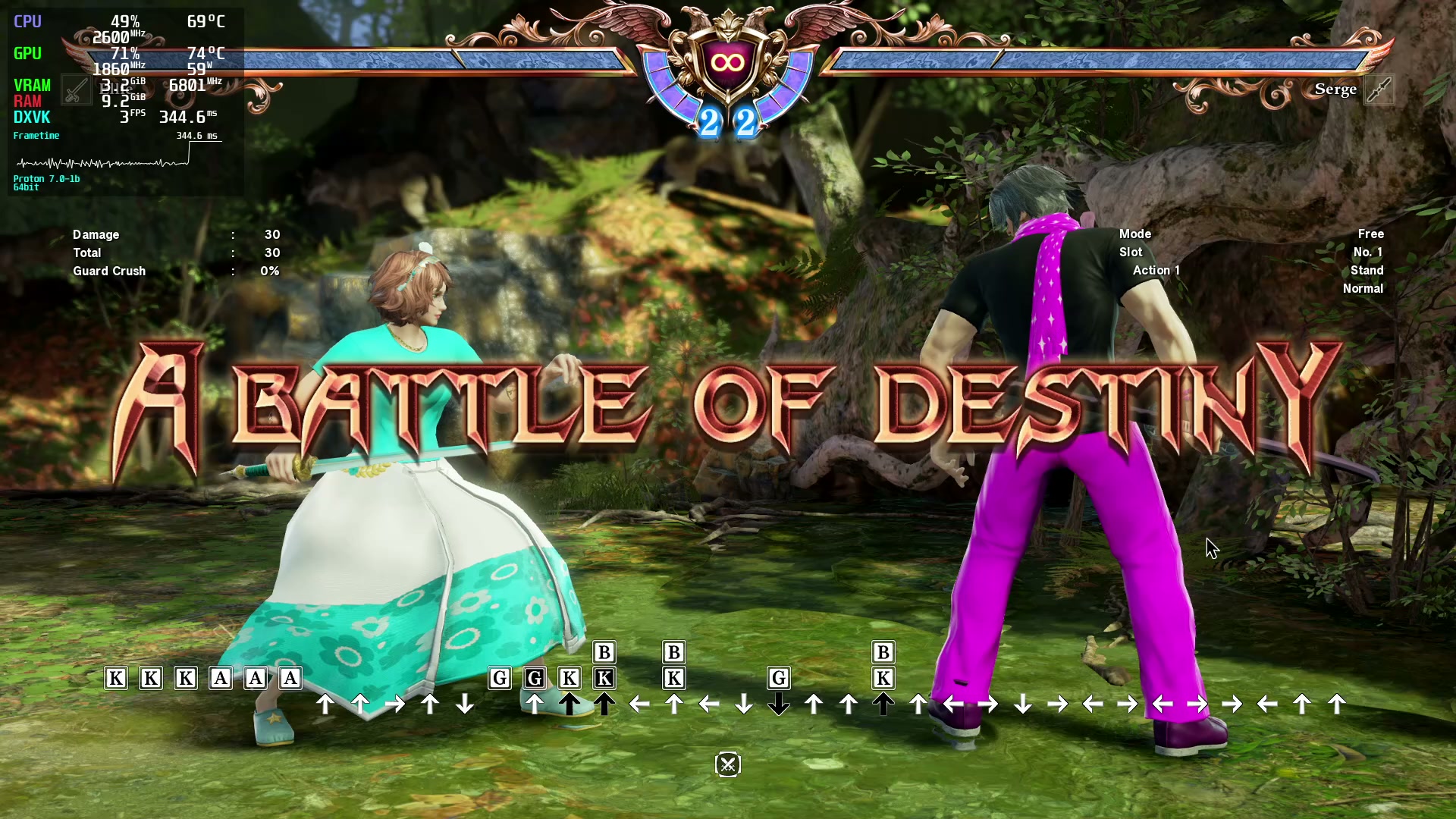
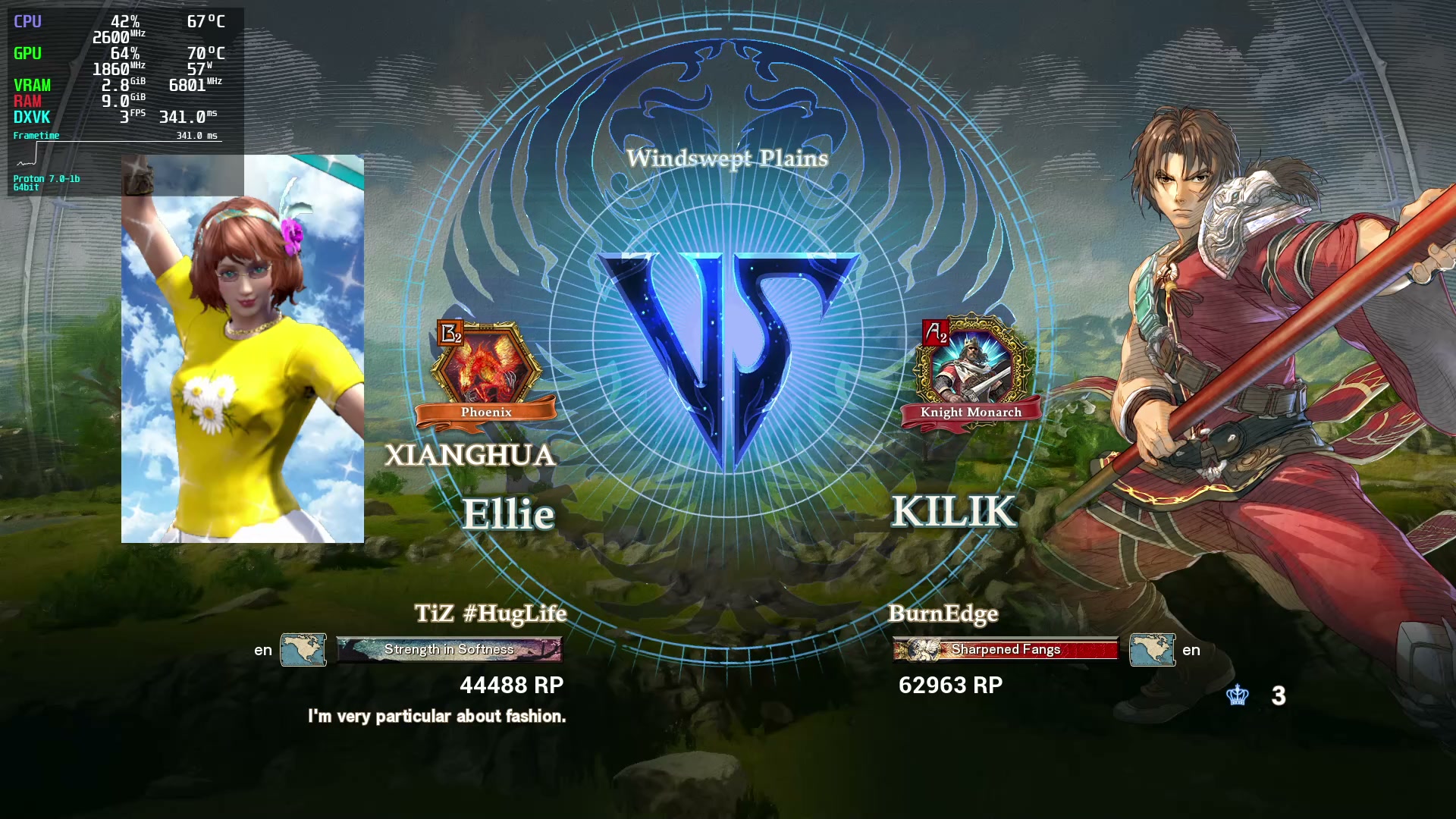
It seems like network activity causes FPS to drop meteorically. I first noticed it when I was in training mode; sometimes when I turned on standby to wait for an opponent, FPS would instantly drop from steady 60 to like 5. I thought it was some sort of quirk, but when I actually matched with an opponent, I noticed that it stuck, and it did so permanently. I had to quit on this poor guy because I did not want to know what it would be like for him once we actually got in game. The reason I think that network activity is some sort of trigger is because it would sometimes happen instantly upon turning on standby, like it's evaluating someone for suitability to match up against, and then not at all until I hear the matchup found sound. SCVI isn't an especially active game so it takes a while to find opponents in ranked queue, and any time I do find someone and have to quit, I inconvenience another person and take a hit to my ranking points.
Screenshot of training mode, getting the matchup:
Screenshot of the agonizing wait at the VS screen:
I drafted up this post several days ago and since then, I have also tested Proton 6.3 and GE-Proton 7-9. Both of those versions exhibit this issue as well. This issue does not occur with other games; Splitgate has been performing just dandy network-wise. EDIT: even other Proton games, like Windjammers 2, are fine.
What should I be doing to find out what the cause of this issue is and how to eliminate it? Are there any ideas that come to mind?
EDIT: It's not happening in Tekken 7 either; the game that would be most similar to this one in terms of netplay.
@HugLifeTiZ Can you generate a steam system report on the new system?
And a proton log where the issue occurs.
Here is my Steam system report: steam-sysinfo-stealth.txt
And here is my proton log for a session where I made the issue occur twice: steam-544750.log The first time I made the issue occur, I noticed the FPS drop and immediately turned off standby. The second time I made it occur, as soon as I noticed the FPS drop, I let it sit until the matchup actually confirmed, and then immediately exited so that I wouldn't inconvenience the other player (and hopefully not lose rank points).
I also recorded a video of it happening with OBS Studio. First occurrence at 0:24, second occurrence at 1:16.
@HugLifeTiZ I'm guessing running with this doesn't make a difference right?
PROTON_NO_ESYNC=1 %command%
@Blisto91 Just tried it, no dice.
Okay, so I have another finding. You may have noticed that the video I posted and the screenshots I posted have different FPS drops. It turns out the reason for that is that the worse my connection is, the worse the lag spike is. The screenshots I took, I took them at home. At home, the FPS drops to 6. At work, where I have a university-grade connection, and where I recorded the video, the FPS drops to 30.
Both conditions still render the game unplayable online (I mean, more than it already is without rollback), but the fact that the network conditions affect just how badly this issue crops up should hopefully provide some sort of clue.
I just did a whole lot of testing, and it made me realize I put myself on a wild goose chase. All the clues I found pointed me in different directions combined with something I took to be true but was actually false. I had a huge writeup of all the testing steps I did, too!
I thought I had tested Proton 6.3 right, but I must have done something wrong. Maybe I didn't make a fresh prefix and that influenced the problem, or maybe I saw something that caused me to false flag the issue as still occurring. Some clues led me to think I should try 6.3 again, and I did. I am not experiencing the network activity FPS drops on Proton 6.3 with a fresh prefix, but I am experiencing them on Proton 7.0 and every variant based on it; experimental and all GE releases based on 7.
There is some sort of regression for network handling in Proton 7 that is affecting SoulCalibur VI. It may be affecting other games. I don't know why it's not affecting Tekken 7, the most similar game to it.
Anyways, I apologize for not having tested correctly, especially if it means you all were on a wild goose chase too. 🙁
Okay so something happened at home that made me afraid that I had spoken too soon... but after yet further investigation, it allowed me to realize that there are two issues running in parallel. They are probably linked to a deeper issue somewhere beyond my reach.
So I am pretty sure I actually did test Proton 6.3 way back when and did indeed find that the issue still occurs. At home. At home, I use a type-C dock that has an ethernet port. At work, where I was successfully able to play some sets on Proton 6.3 without any FPS drops after I was off the clock, it doesn't occur. At home, with my type-C dock, it was still happening even on Proton 6.3. But I did notice that it was happening less severely. Instead of single-digit FPS drops (and hence slow motion, since the game will only run at 60), it was in the 20-30s.
I decided to try unplugging from the type-C dock and going directly to the ethernet port on my laptop, just like at work. And indeed, the issue did go away once the type-C dock was no longer involved in network activity.
At work, this issue still occurs on Proton 7.0. So we have two issues running in parallel:
- A regression from Proton 6.3 to Proton 7.0 that causes network activity in certain games to tank the FPS.
- A problem somewhere in the stack regarding type-C docks, or mayhaps even adapters, that causes network activity in certain games to tank the FPS.
- The intersection of both: combine Proton 6.3 and a type-C dock for single-digit FPS whenever network activity occurs.
I didn't test wifi because I am not a blasphemous heathen who plays fighting games on wifi. I only have the one type-C dock, and I think it's too late to send it back because other games were working just fine and I tossed the packaging.
This issue stands to be extremely relevant for the SoulCalibur VI experience on Steam Deck. It doesn't have anything but a type-C port, and type-C docks or adapters are going to be pretty much the only way to get ethernet into it.
The sooner I get my Steam Deck, the sooner I can start testing this issue in more depth. I'm part of Q2. Hopefully I get the email to finalize my purchase in the next couple of batches. I'm happy to continue spending time--and potentially money if I need other type-C docks to test further--but I need to be able to buy and receive my Steam Deck if I'm going to do that.
I just tested a Dell WD19S at work, one of the nicest type-C/thunderbolt docks that you can get. I used the same ethernet cord going into it that I normally plug directly into the laptop, that gets me 20ms ping times vs 40-50ms at home and very smooth matches for when I'm playing off the clock (like waiting to go somewhere in the other direction from where I live). And it has the exact same behavior. Any network activity at all results in the game dropping to 20-30FPS and going slow-motion.
EDIT: I also tried a Belkin ethernet to type-C adapter. No other dock stuff going on; just ethernet to type-C. Same behavior.
It's hard to tell how much of this is the kernel's fault vs how much is Proton's fault vs how much is SoulCalibur VI's fault (since it doesn't happen in other Proton games like Tekken 7). But I tried on two different kernel versions: KDE Neon ships 5.13.0-39 in its repositories, and I also installed 5.17.0-2.3 from Liquorix.
So type-C networking, at least on this computer, is causing SCVI to lag badly during network activity. As soon as I get a Steam Deck, I can give more information.
I don't know what to do next and it feels like I'm talking to a wall. I don't know if anyone cares about these updates, or even hears them. At least I can play the game online again, but I'd rather keep the ethernet plugged into the type-C dock.
I do read your posts, but don't have much to add since i don't own the game.
I support your journey tho :grin:
Next time SCVI goes on sale, I'll buy it for anyone who wants to help work on this issue.
Back at it again with more findings.
Remember when I said that I wouldn't test on wifi because only heathens play fighting games on wifi? Well, I accidentally tested on wifi, because I didn't realize my ethernet wasn't plugged in at the other end, and discovered that playing on wifi has the exact same effect during network activity.
So that made me wonder if what was actually happening was that wifi was being prioritized over other adapters. When I disabled wifi and used the type-C dock again, it was still occurring. But the fact that wifi made the issue occur meant that it's not a type-C-specific problem. I grabbed the old USB3 ethernet adapter I was using with my old computer, and discovered that it makes the problem occur too.
So every network adapter I can conceivably connect to my computer other than the built-in ethernet makes this problem occur. While that does create a sense of relief that the Deck is probably not in any trouble, it is very confounding; what's so special about the built-in ethernet on this computer???
@HugLifeTiZ Hi, I've looked into this problem and I have been unable to recreate it. Can you check to see if this works for you on Proton 7.0-4 and Proton Experimental please? I did test this with a Linux Desktop and Steam Deck.
@AJuujarvi Hi there. I've tested this again on my laptop, which is now running Kubuntu 22.04 instead of KDE Neon. It is still happening on that computer with Proton 7.0-4, Experimental, and 6.3-8f while it is connected to my Dell WD19S at work to get ethernet. Interestingly, I also caught a condition where when I was in the slowdown state and went back to the menu, the game permanently dropped to 17FPS.
I have not had a chance to test the three versions on a regular ethernet connection yet.
I do not experience any such problems on the Steam Deck while it is connected to my much cheaper dock at home. It runs SCVI with the default Proton, probably 7.0, and everything works fine. That tells me that a hardware quirk on my laptop is responsible for my misery. :(
SOULCALIBIUR VI Modding Tool - VODKALIBUR (544750)
Issue transferred from https://github.com/ValveSoftware/Proton/issues/7092.
@ThisNekoGuy posted on 2023-09-13T00:14:48:
Compatibility Report
- Name of the application with compatibility issues: Vodkalibur
- Steam AppID of the game: 544750
System Information
- GPU: RTX 2080 Ti
- Video driver version: Nvidia 535.104.05
- Kernel version: 6.4.12-tkg-gentoo-gcc-zen2
- Link to full system information report: Gist
- Proton version: 8.0-3c
I confirm:
- [x] that I have checked whether there are updates for my system available.
Symptoms
The Souldcalibur VI modding tool (Vodkalibur) fails to run in Proton 8.0-3c:
. . . (non-error output)
58077.006:011c:0120:err:ole:apartment_add_dll couldn't find function DllGetClassObject in L"C:\\\windows\\\\system32\\\\uiautomationcore.dll"
58077.006:011c:0120:err:ole:com_get_class_object no class object {ff48dba4-60ef-4201-aa87-54103eef594e} could be created for context 0x1
58077.006:011c:0120:err:tabtip:create_uia_event_handler Failed to create IUIAutomation interface, hr 0x800401f8
. . . (non-error output)
58077.920:0130:0134:err:module:fixup_imports_ilonly mscoree.dll not found, IL-only binary L"VODKALIBUR.exe" cannot be loaded
58077.920:0130:0134:err:module:LdrInitializeThunk Importing dlls for L"Z:\\\mnt\\\\chonker\\\\Gaming\\\\SteamLibrary\\\\steamapps\\\\common\\\\SoulcaliburVI\\\\vodkalibur\\\\VODKALIBUR.exe" failed, status c0000135
. . . (non-error output)
Reproduction
- Launch Soulcalibur VI
- Close the game after reaching the main menu
- Run
winetricks -q wmp11 d3dcompiler_47 arialon the game's compatdata prefix (pfxfolder) location (vanilla Winetricks is required forwmp11to install) - After that, run
protontricks(using the GUI is fine, just be sure to enablesilent installin the menu; I used the flatpak) to installdotnet48(This will use Proton) - After that is complete, download
vodkalibur(A Soulcalibur VI modding tool) - Make a folder inside of the root of the Soulcalibur VI game folder called "vodkalibur" (
mkdir -p /path/togame/folder/vodkalibur) - Place the executable in that folder
- Add
eval $(echo "PROTON_LOG=1 %command%" | sed 's|SoulcaliburVI/Binaries/Win64/SoulcaliburVI.exe|vodkalibur/VODKALIBUR.exe|')to the game's launch options - Click
Launchin Steam
Sysinfo: https://gist.github.com/NoXPhasma/d4aa3253640c214493066ef6f3d8b5bb
I have to disable the Steam Overlay or the game will crash at the first screen. No matter which proton version I use. I can't provide a log file, as it is 3,6GB large.
Rendering errors in Soulcalibur 6 (Snow-Capped Showdown stage)
Issue transferred from https://github.com/ValveSoftware/Proton/issues/8037.
@amverweij posted on 2024-08-29T17:59:59:
Compatibility Report
- Name of the game with compatibility issues: Soulcalibur 6
- Steam AppID of the game: 544750
System Information
- GPU: AMD Radeon RX 6800
- Video driver version: Mesa 24.1.3
- Kernel version: 5.15.162-gentoo-x86_64
- Link to full system information report as Gist: https://gist.github.com/amverweij/0b6c075e1a7cd8ebd85108e0bac36e97
- Proton version: 9.0-2
I confirm:
- [x] that I haven't found an existing compatibility report for this game.
- [x] that I have checked whether there are updates for my system available.
Symptoms
The Snow-Capped Showdown stage does not render correctly on my machine:
It used to render correctly in the past. All other stages render correctly.
Reproduction
- From the main menu, choose BATTLE->VERSUS->Start VS Battle
- Pick your favorite character and opponent, anyone will do
- Select the Snow-Capped Showdown stage
- Start playing. Rendering errors occur mostly around the center of the stage. It happens each and every time.
Hello @amverweij, what's the most recent time that you know the stage rendered as expected? Are you able to tell if the misrendering is from a video driver, Proton, or game update?
@kisak-valve : I wish I would know that. I mostly play online matches (2000h on this game). Stage selection is random, and this stage does not come up very often.
I tried using Proton Experimental, Proton 8, Proton 9, all with the same results.
I tried downgrading Mesa to 20.0.9, also same result.
It used to work. I know I updated my system (Gentoo is rolling release). I know I got steam updates too. And since some time, I just can't play on this one particular stage anymore.
I also used to have the debug assertion + subsequent crash that is mentioned above in this bug report, but that seems to be fixed for me. I haven't seen that in a long time.
@kisak-valve : My earliest screenshot of this screen corruption is from the 14th of August. I did have it once or twice before that day.
It must be a video driver or Proton that is misbehaving, since Soulcalibur 6 did not get any updates since 2020.
I tried reproducing the issue yesterday.
I tried:
- Proton Experimental Bleeding Edge + Nvidia
- Proton 9.0.2 + Nvidia
- Proton 9.0.2 + Steam Deck
Max graphics settings every time and it always rendered correctly.
It also works correctly on my ryzen laptop, with AMD graphics. But that one doesn't use the RX 6800. And neither can it do 4K.
Op 31 aug 2024 13:07, om 13:07, Robin Kertels @.***> schreef:
I tried reproducing the issue yesterday.
I tried:
- Proton Experimental Bleeding Edge + Nvidia
- Proton 9.0.2 + Nvidia
- Proton 9.0.2 + Steam Deck
Max graphics settings every time and it always rendered correctly.
--
Reply to this email directly or view it on GitHub:
https://github.com/ValveSoftware/Proton/issues/1780#issuecomment-2322863423
You are receiving this because you were mentioned.Message ID: @.***>
Replying to https://github.com/ValveSoftware/Proton/issues/1780#issuecomment-2318533087
Uninstalling and re-installing has solved my issue.
So I have this weird issue with lines of dialogue where, when my character's name is mentioned in Libra of Soul mode (one of the story modes), the rest of the line of dialogue following is omitted with one odd exception. The exception being that there's some lines of dialogue where all but the last character of the name is said on a line, but the final character is written on the next line (I'm not sure why that is). I have screenshots and a log of when this happened (it happened several times in one sitting with a 100% reproduction rate).
There seems to be a network regression. I am unable to create a room. To reproduce, Network > Casual Match > Create Room prints "A network error has occurred." Here are my test results against various versions of proton. Only 5.13-6 seems to allow me to create a room. Even on more recent proton versions that have the network error, I am able to see leaderboards. In these, I am not able to join/create casual rooms.
- tests
** 5.13-6
create room ok
** 6.3-8
crash on launch
** 7.0-6
crash on launch
** 8.0-5
Network > Casual Match > Create Room
A network error has occurred.
** 9.0-4
A network error has occurred.
** proton hotfix
A network error has occurred.
** proton experimental
A network error has occurred.
EDIT: attached 5_good after 5.13-6 created a room successfully. 9_error.log is with 9.0-4 after the network error has occurred. 9_error_then_exit is also 9.0-4 but I fully exited the program.
Hello @namtsui, please add PROTON_LOG=1 %command% to the game's launch options, reproduce the regression, and attach the generated $HOME/steam-$APPID.log to this issue report as a file. (Proton logs compress well if needed.)
@namtsui couldn't reproduce the issue on my computer, for me proton 9/exp/hotfix let me create a room without showing an error, though I didn't try actually connecting with anyone else
Tried connecting through an usb wifi adapter, as well as tethering from my phone. I wonder if connecting to your network through different means will have an effect for you, or if using a vpn changes anything.
Thanks for the test @simifor. This got me prodding some more. I am on guixsd using nonguix to install steam. Running flatpak steam instead, I am able to connect like you experienced on proton 9. It seems like it could be an issue with the way nonguix packages steam. I'll open an issue there. Nonguix creates a container using guix's functionality and bundles dependencies. Maybe something is different between the two environments.
nonguix's steam recipe: https://gitlab.com/nonguix/nonguix/-/blob/master/nongnu/packages/game-client.scm
edit:
opened issue here https://gitlab.com/nonguix/nonguix/-/issues/381
9657.501:00d0:00d4:warn:seh:dispatch_exception RPC_S_SERVER_UNAVAILABLE exception (code=6ba) raised
err:kerberos:kerberos_LsaApInitializePackage no Kerberos support, expect problems
err:ntlm:ntlm_LsaApInitializePackage no NTLM support, expect problems
Here are some possible leads (might be red herrings) as found by lazynekogami digging through the posted proton logs. Maybe missing kerberos / samba / ntlm_auth / winbind?
@namtsui those are red herrings, you'll see them in just about every proton log, they look scary but don't really have any ill effects.
Related threads
- SOULCALIBIUR VI Modding Tool - VODKALIBURprotonclosed same game
- SOULCALIBUR VI: no connection to online serversprotonclosed same game
- Doom Eternal - Initial month of feedbackprotonclosed same upstream bug
- Monster Hunter Worldprotonopen same upstream bug
- Doom Eternalprotonopen same upstream bug
- Microsoft Flight Simulator (2020)protonopen same upstream bug
- DEATH STRANDINGprotonopen same upstream bug
- Hogwarts Legacyprotonopen same upstream bug
- Borderlands 3protonopen same upstream bug
- STAR WARS Jedi: Fallen Orderprotonopen same upstream bug
Proton versions
proton experimentalx6 2025-03proton hotfixx1 2025-03proton 9.0x2 2024-08proton 8.0-3cx1 2023-09proton 7.0-4x2 2022-10proton 6.3x3 2022-04proton 7.0x3 2022-04proton 7.0-1x1 2022-03proton 7.2-ge-2x1 2022-03proton 5.13-3x1 2020-12proton 5.0-10x1 2020-12proton 5.21-ge-1x2 2020-12proton 5.13x2 2020-12proton 5.9x1 2020-12proton 5.21x1 2020-12
Launch options
PROTON_LOG=1x6 2025-03PROTON_NO_ESYNC=1x1 2022-03PROTON_USE_SECCOMP=1x9 2020-12PROTON_USE_SECCOMP=1"x1 2020-12PROTON_LOGx1 2019-02
Launch lines
PROTON_NO_ESYNC=1 %command%x1 2022-03PROTON_USE_SECCOMP=1 %command%x6 2020-12
Upstream links
- ValveSoftware/Proton/issues/8037x1 2024-08
- ValveSoftware/Proton/issues/7092x1 2023-09
- ValveSoftware/steam-runtime/issues/306x1 2020-12
- ValveSoftware/Proton/issues/4182x1 2020-09
- ValveSoftware/Proton/issues/2927x1 2020-05
- ValveSoftware/Proton/issues/3817x1 2020-04
- ValveSoftware/Proton/issues/3340x1 2019-12
- ValveSoftware/Proton/issues/2716x1 2019-05
- ValveSoftware/Proton/issues/1784x1 2018-10
DLLs
mscoree.dllx1 2023-09uiautomationcore.dllx1 2023-09
Error codes
0x800401f8x1 2023-09
Compatibility Report
System Information
I confirm:
Steam Log
steam-544750.log
Symptoms
The game main menu is empty, with no logo, but fully operational, I believe the game has a video playing after entering for the first time, but it simply doesn't play, trying to manually trigger any cutscenes in the galery mode also doesn't work.

Also, the game says there is no Network data available, so I can't get online.
There is one more problem, this window appears after exiting the game:
Reproduction
Any video/main menu trigger. And trying to get online on the menu/loading the game.
Updates
After some testing I found that even on Windows, after having played the game on Linux, I can't connect to the servers. Some other people seem to be having the same problem from what I've seen on the Steam Forums. Even with a new save data and on Windows, I think playing on Linux right now somewhat flags the account, or something like that preventing from going online.
I emailed Bandai and got a response that their team was aware of the online issues, and that it was redirected to and internal team to see if it could be fixed.
It seems that right now I can finally go to online on Windows, as I don't wanna risk not being able to go online again if I play on Linux, I'm gonna wait and see if someone tests and see if they can play online on a Linux Distro and also if the cutscenes issue is still present or not.