Final Fantasy XIII
@rcgamer29 env WINEPREFIX="/mnt/internalhdd/SteamGames/steamapps/compatdata/292120/pfx" WINEPATH="/mnt/internalhdd/SteamGames/steamapps/common/Proton 3.16/dist/bin/wine64" winecfg <- is this how you changed the wineprefix to XP?
@rcgamer29 env WINEPREFIX="/mnt/internalhdd/SteamGames/steamapps/compatdata/292120/pfx" WINEPATH="/mnt/internalhdd/SteamGames/steamapps/common/Proton 3.16/dist/bin/wine64" winecfg <- is this how you changed the wineprefix to XP?
This is what i have been using for the most WINEPREFIX="/mnt/Steam Games/Steam Linux/steamapps/compatdata/292120/pfx" WINEARCH=win64 wine winecfg
Also once .net is installed switch it back to windows 7.
thank you, this worked great - game launcher opens, game starts - seemed to get stuck at the square enix splash screen (white background) - maybe I was being impatient, will check later when I get back from work - tyvm :)
@rcgamer29 game does launch fine, but with keyboard plugged in, it acts as if down key is being held, only playable if i unplug the keyboard
@rcgamer29 game does launch fine, but with keyboard plugged in, it acts as if down key is being held, only playable if i unplug the keyboard
hi, you fix this? i want to know, for me the same issue with AC unity, i need to press a button to make stable the camera
@rcgamer29 game does launch fine, but with keyboard plugged in, it acts as if down key is being held, only playable if i unplug the keyboard
I don't have that issue. Just the control freezes like I said in my first post.
Fixed a similar issue in another game - https://manerosss.wordpress.com/2016/05/31/fix-mouse-detected-as-joystick/
it hasn't fixed it for FF13, but if i unplug the keyboard, launch the game, and replug it works - so it must be a similar issue
It runs out of the box now with Proton 4.2 without messing with the prefix at all. Although it does try to install .NET every time.
Some caveats:
-
You can't easily quit the game.
To truly quit the game:- Press escape, and it'll ask if you want to quit, but it doesn't let you click it, and then the game seems to be shut down (but it's not).
- Start the game again, and you'll get a clickable button to quit it.
-
The controller acts weird:
This isn't a wine problem, since it happens on windows as well.There are some workarounds to make things work ok, with a minimum of fuss, until Square Enix fixes their PC port. The problem (based on what i understand) is that the Xinput code is homegrown.- Use Steam's own controller support. I'm doing it via Big Picture Mode and it fixes the camera positioning, and rotated controller buttons.
- Various menus get stuck. As mentioned earlier, you do have the press the shoulder buttons to allow it to move again. You don't have to press them all though, just the left one a few times. It's slightly annoying, but it's not that bad.
Oops, ignore that linked issue.. I couldn't tell the difference between a a V and X!
Hi, following the repo policy I think this is where we could speak about all FF XIII problems.
Has anyone successfully played @1440p without the weird low res bug diagonalicaly splitting the screen if half correct rez/half bad rez?
It was solved on Windows through various tricks and utilities but when using the ffxiii-fix dll, it works on everything but that one bug.
@kisak-valve With the latest version of Proton Experimental, it stopped working, it closes when executing "Play", it works without problems with 6.3 with the following parameters:
WINEARCH=win32 PROTON_FORCE_LARGE_ADDRESS_AWARE=1 %command%
Proton Log Experimental:
steam-292120Experimental.log
Proton Log 6.3:
steam-292120_Proton6.3.log
My actual gist:
https://gist.github.com/iWeaker4you/d65a7e64b0056b923b9fe961cd0b0ea6
Final Fantasy XIII
Issue transferred from https://github.com/ValveSoftware/Proton/issues/5604.
@guibou posted on 2022-02-22T15:07:16:
Compatibility Report
- Name of the game with compatibility issues: Final Fantasy XIII
- Steam AppID of the game: 292120
System Information
-
GPU: Intel Iris XE
-
Driver/LLVM version: Mesa 21.3.5
-
Kernel version: 5.16.4
-
Link to full system information report as Gist:
https://gist.github.com/guibou/d84a33f50dd82cdfa512a3b847604775#file-system-log
(Note the interesting missing VRAM informations). -
Proton version: I tried all of the one available on steam at current time
I confirm:
- [X] that I haven't found an existing compatibility report for this game. (There are, but not for my GPU)
- [X] that I have checked whether there are updates for my system available.
https://gist.github.com/guibou/d84a33f50dd82cdfa512a3b847604775#file-steam-292120-log
Symptoms
I can start the game, I ends on the "launcher", and whatever the settings I'm using, the game fails with the following error message:
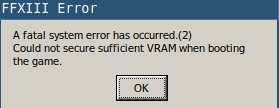
Reproduction
Start the game, on the launcher, click Start game, and see the error message.
Hello @guibou, almost all Intel graphics chipsets including your system do not have discrete memory, so no detected VRAM is both not surprising and possibly a red herring. err:wgl:X11DRV_WineGL_InitOpenglInfo couldn't initialize OpenGL, expect problems looks like a line of interest from your log.
It might be worthwhile to mention your issue to your video driver vendor.
@kisak-valve Super good point! There may be a problem with my OpenGL setup. I just tried, I'm able to run 32 and 64 bits OpenGL programs, but perhaps there is something different due to steam setup. I'll have a look.
For me, the game just doesn't open after the launcher. No error or anything.
Here is a proton log: steam-292120.log
Hello @OpenSauce04, please copy your system information from Steam (Steam -> Help -> System Information) and put it in a gist, then include a link to the gist in this issue report.
Here @kisak-valve:
https://gist.github.com/OpenSauce04/c096cea85d5fc7c5adf94c5c621a9dfe
Thanks, https://gist.github.com/OpenSauce04/c096cea85d5fc7c5adf94c5c621a9dfe#file-steamsysteminfo-txt-L293 looks like your issue, from 32 bit AMDVLK being installed on your system and https://github.com/GPUOpen-Drivers/AMDVLK/issues/315.
@kisak-valve Massive thanks! I uninstalled lib32-amdvlk and the game immediately started working
Hello!
Letting you guys know that there is a regression for this game in latest Proton builds. I tried running on Proton 8, Proton Experimental, tried even Proton GE 7-55. The game stalls with no drive activity and loads extremely slowly. It takes solid 2-3 minutes for it to go past the splash screen. There are also huge stalls when loading new parts of the game, even like a battle or exiting them. Every load is extremely lenghty.
Then I tried the latest Proton 7.6 and it's all good there. Loads fast, no stalling. A bit of a shame that newest builds break it, cause GPL helps a ton in new versions. Maybe worth investigating or maybe even worth forcefully setting Proton 7.6 as the recommended version for the time being, to not break the compatibility.
Specs: Fedora 38, 6.2.11 Kernel
CPU - i5 10400
RAM - 16GB
GPU - RTX 3060, 530.41.03 driver
Hello @jkrhu, please add PROTON_LOG=1 %command% to the game's launch options, reproduce the regression, and attach the generated $HOME/steam-$APPID.log to this issue report as a file. (Proton logs compress well if needed.) Also, please copy your system information from Steam (Steam -> Help -> System Information) and put it in a gist, then include a link to the gist in this issue report.
By Proton 7.6 do you mean Proton 7.0-6?
Hello!
Yes, I misspoke and meant Proton 7.0-6. Got the required files for you. Sorry for not doing it the first time. Proton Experimental is the affected version. On 7.0-6 works well, so I provided the comparison. Thanks!
Hi!
Came back to this thread to let you know, that the regression has been fixed. I'm running FF 13 on Proton Experimental and to my surprise, it runs without problems. Thank you for your great work!
I'm seeing a new issue where the camera goes absolutely insane after a short time playing on any Proton version. From my experience, the issue either happens as soon as you load the game or more commonly after finishing the first battle of the session. Here's a video:
https://streamable.com/i29ojs
Here's my system information: https://gist.github.com/OpenSauce04/f5f1be5d4506dbe6c31be4d58f67c387
Yes, the game camera stutters like crazy without using this - https://github.com/rebtd7/FF13Fix
Absolutely necessary addition to the game. It would happen to me, even when the game only ran using Proton 7.
Also ignore the DXVK part of the fix when you're running this on Linux. It's for people running DXVK on Windows. Fix works perfectly with the standard guide.
Proton versions
proton experimentalx4 2023-05proton 7.0-6x2 2023-04protonexperimentalx1 2023-04proton 7.6x2 2023-04proton 4.2x1 2019-04proton 3.16x2 2018-10
Launch options
PROTON_LOG=1x1 2023-04PROTON_FORCE_LARGE_ADDRESS_AWARE=1x1 2021-04WINEARCH=win32x1 2021-04WINEPREFIX="/mnt/internalhdd/SteamGames/steamapps/compatdata/292120/pfx"x2 2018-10WINEARCH=win64x1 2018-10WINEPREFIX="/mnt/Steam Games/Steam Linux/steamapps/compatdata/292120/pfx"x1 2018-10
Launch lines
Upstream links
- ValveSoftware/Proton/issues/5604x1 2022-02
steam-292120.log
I got around the .net issue by changing the prefix to xp. Now the game starts and runs fine (with some crashes) but the controller input seems to just freeze up a lot. You have to press all the shoulder buttons several times and then it works fine again for a little while.