Timelapse
It seems that Proton 6.3 has changed some things for the better. I tested in Proton 6.3-5 just now and was able to actually start up the game. However, it was still ultimately unplayable. So far, it displays the opening movie and brings up the actual game screen. I can even move around successfully, albeit only in a very limited fashion. See, it doesn't actually change the screen resolution. This version of Proton only blanks the screen and puts the game itself in the top-left corner. Here's a screenshot to illustrate:
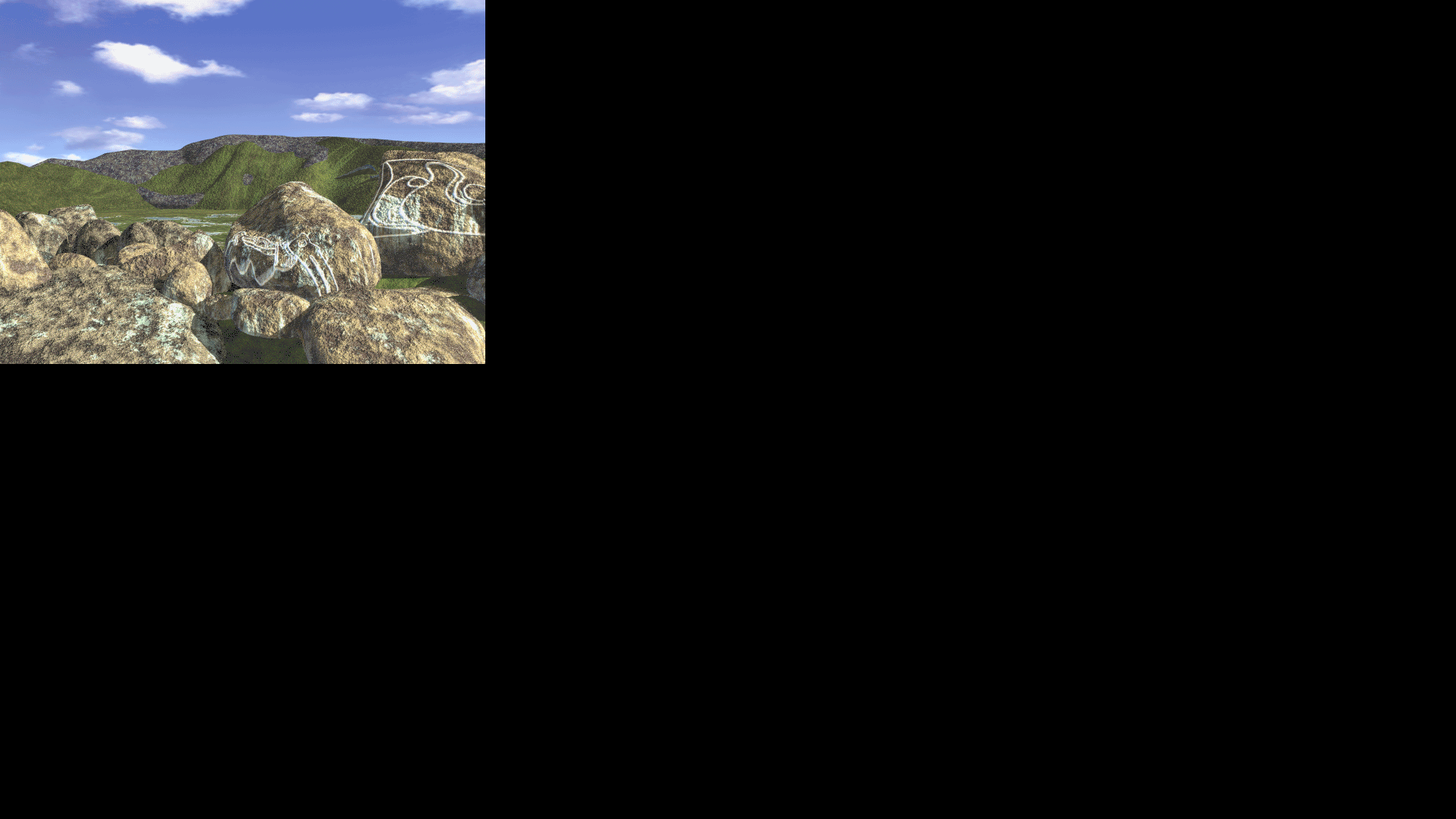
Now for the kicker: The reason I can only move in a limited fashion is because while the mouse cursor changes based on where it is on the entire screen (i.e. left side of the screen turns left, right side turns right, center top moves up, etc.), I can actually only interact with the game in that small 640x480 part of the screen in the top-left. This limits my interaction within the game to turning left/u-turn and moving forward, wherever each are applicable.
The last issue is noticeable when trying to use the spacebar to open the menu. It simply blanks the screen. Pressing the spacebar again will return to the game screen the way it should, but only if don't move the mouse too much. The mouse cursor seems to change as if all the menu options are being presented properly, but they're actually spread across the entire screen, same as the movement detection area. If you move the mouse from one option to another, the game seems to lose the ability to render anything and will just switch between two blank screens, even though the mouse cursor will update for both screens. It only seems to return to the game screen properly if you do not move it onto another option. Moving it in between options to the regular arrow cursor seems fine, but not onto another option where the hand cursor appears again.
Alt-F4 closes the game just as it does in native Windows, so keyboard shortcuts all seem to be working as intended. It's just the graphical issues at this point that, near as I can tell, seem to be caused due to the screen resolution not matching the 640x480 it's intended to run on.
Finally, I also tested this on GloriousEggroll's latest Proton environment (6.10-GE-1 as of this writing) and it still displayed the color selection dialog, although it didn't freeze when selecting an option like Proton 3.16 does. Instead, it just gracefully exits the game.
This is a log I produced using Proton 6.3-5 where I opened the game, moved around a bit inside the part of the screen that recognizes inputs, opened the menu using the space bar, moved the cursor to cause the eternal blank screen, and toggled between the menu and game a few times.
steam-433580.log
I've got a workaround that makes the game playable by running it "fullscreen" in a simulated 640x480 display window.
- (1) Use Xephyr to simulate a 640x480 display in a window. in a terminal:
Xephyr -screen 640x480 :1 - (2) Instruct steam to launch Timelapse on that display. Launch options are:
DISPLAY=:1 %command%
Mouse interaction works. I was able to pick up the camera and the journal.
The menu issues that @Yowlen described are still a problem. As a workaround you have to use keyboard shortcuts; CTRL-J for Journal, CTRL-S for Save, CTRL-O for Load Game, etc. I tested that saving and loading works.
And occasionally the screen will go black when moving to a new frame, but moving forward + backward it will load on the second try.
Of course the window is pretty small. I don't think it's possible to scale Xephyr - it really is fixed at 640x480 pixels - but if I scale my display down as low as it goes (1280x720) it looks ok; see screenshot.
Tested on both Proton 8.0-3 and Experimental
OS: Linux Mint 21.2
KERNEL: 5.15.0-83-generic
CPU: Intel Core i5-9600K @ 3.70GHz
GPU: NVIDIA GeForce GTX 1060 6GB
GPU DRIVER: NVIDIA 525.125.06
RAM: 32 GB
The game is very playable now on Proton 9.0-2. It launches in fullscreen and scales the game correctly without cropping the image incorrectly, mouse and keyboard interaction both fully functional.
Remaining issues:
- Menu still doesn't work
- Occasional black screens when moving between stages, but moving forward+backward will load on the second try
Tested and confirmed on my end as well. Some will load with the forward+backward method, but not all of them.
I ran it with PROTON_LOG=1 enabled and these lines are the ones that stand out:
87480.950:012c:0130:err:x11drv:xinerama_get_fullscreen_monitors Failed to get xinerama fullscreen monitor indices.
87480.950:012c:0130:err:x11drv:update_net_wm_fullscreen_monitors Failed to find xinerama monitors at (0,0)-(640,480)
Based on the timestamps on the lefthand side, they're the only lines I can find with consistency at every blank screen I encountered. There were some from shortly after the game loaded up and I tried to enter the menu, and again a few minutes later when I reached the camp area down by the beach and encountered more blank screens.
If I had to guess, this is the reason the screen isn't rendering properly on those scenes. Solve this, and the game will probably work perfectly.
I played it through all of Anazasi but now I am in the Maya's world and the game crashes every time I try to solve the "win three times" minigame with frogs, spiders and scorpions. Sometimes I get a out of memory error message, but in most cases the game just freezes. Has anyone observed this problem? I am currently playing with GE-Proton9-11 but have tried several versions without improvement.
@LysirisMalven if you have the .SAV file handy can you attach it? I can try to reproduce on my system too just to gather more data
Unfortunately I don't have a save file from shortly before that mini game anymore. I solved it under a windows installation of steam.
Just as a small update, I recently switched to KDE and can confirm that Timelapse works in Wayland with Proton 10, but crashes on boot with Proton 9. The black screen issues are still present, so the xinerama thing I mentioned in an above post is likely a symptom, not a cause. I couldn't find anything else in Proton's logs back then, and I can't really find anything now either.
Basically, we're stuck. We'd need some sort of debug tool that isn't part of regular Wine/Proton builds to try to figure anything else out, and I don't have the coding skills necessary to do that.
The game uses an ancient Windows API called WinG for rendering. It's 8-bit palettized, meaning colors are stored in a lookup table. To do fade transitions (like going to the menu or moving between scenes), the game rewrites that table to all black and back. On real Windows this changed the hardware palette instantly. Wine just... doesn't do that part. It updates an internal object and calls it a day. So the screen goes black and never comes back.
The fix is two files that go in the game folder. A small wrapper EXE and a DLL. The wrapper replaces TL.EXE and injects the DLL into the real game process. The DLL intercepts palette changes and does what Wine should be doing: updates the bitmap's color table and redraws the window.
palette_fix.c
#include <windows.h>
#include <stdio.h>

static FILE *g_log;
static HBITMAP g_wing_bmp;
static HWND g_game_hwnd;
static RGBQUAD g_last_palette[256];
static int g_palette_valid;

static void logmsg(const char *fmt, ...)
{
    if (!g_log) return;
    va_list ap;
    va_start(ap, fmt);
    vfprintf(g_log, fmt, ap);
    va_end(ap);
    fflush(g_log);
}

typedef BOOL (WINAPI *pAnimatePalette_t)(HPALETTE, UINT, UINT, const PALETTEENTRY *);
static pAnimatePalette_t real_AnimatePalette;

typedef UINT (WINAPI *pSetPaletteEntries_t)(HPALETTE, UINT, UINT, const PALETTEENTRY *);
static pSetPaletteEntries_t real_SetPaletteEntries;

typedef UINT (WINAPI *pRealizePalette_t)(HDC);
static pRealizePalette_t real_RealizePalette;

typedef BOOL (WINAPI *pBitBlt_t)(HDC, int, int, int, int, HDC, int, int, DWORD);
static pBitBlt_t real_BitBlt;

static void update_dib_and_reblit(UINT iStart, UINT cEntries, const RGBQUAD *rgbq)
{
    if (!g_wing_bmp || !g_game_hwnd) return;

    HDC tmp = CreateCompatibleDC(NULL);
    if (!tmp) return;
    HGDIOBJ old = SelectObject(tmp, g_wing_bmp);
    if (old) {
        SetDIBColorTable(tmp, iStart, cEntries, rgbq);

        HDC wdc = GetDC(g_game_hwnd);
        if (wdc) {
            RECT cr;
            if (GetClientRect(g_game_hwnd, &cr) && cr.right > 0 && cr.bottom > 0) {
                if (cr.right > 640 || cr.bottom > 480) {
                    SetStretchBltMode(wdc, COLORONCOLOR);
                    StretchBlt(wdc, 0, 0, cr.right, cr.bottom,
                               tmp, 0, 0, 640, 480, SRCCOPY);
                } else {
                    BitBlt(wdc, 0, 0, 640, 480, tmp, 0, 0, SRCCOPY);
                }
            }
            ReleaseDC(g_game_hwnd, wdc);
        }
        SelectObject(tmp, old);
    }
    DeleteDC(tmp);
}

static void update_dib_only(UINT iStart, UINT cEntries, const RGBQUAD *rgbq)
{
    if (!g_wing_bmp) return;
    HDC tmp = CreateCompatibleDC(NULL);
    if (!tmp) return;
    HGDIOBJ old = SelectObject(tmp, g_wing_bmp);
    if (old) {
        SetDIBColorTable(tmp, iStart, cEntries, rgbq);
        SelectObject(tmp, old);
    }
    DeleteDC(tmp);
}

static void on_palette_change_animate(UINT iStart, UINT cEntries, const PALETTEENTRY *ppe)
{
    if (!g_wing_bmp || !ppe || cEntries == 0) return;
    RGBQUAD rgbq[256];
    UINT count = (cEntries > 256) ? 256 : cEntries;
    for (UINT i = 0; i < count; i++) {
        rgbq[i].rgbRed       = ppe[i].peRed;
        rgbq[i].rgbGreen     = ppe[i].peGreen;
        rgbq[i].rgbBlue      = ppe[i].peBlue;
        rgbq[i].rgbReserved  = 0;
    }
    update_dib_and_reblit(iStart, count, rgbq);
}

static void on_palette_change_quiet(UINT iStart, UINT cEntries, const PALETTEENTRY *ppe)
{
    if (!g_wing_bmp || !ppe || cEntries == 0) return;
    RGBQUAD rgbq[256];
    UINT count = (cEntries > 256) ? 256 : cEntries;
    for (UINT i = 0; i < count; i++) {
        rgbq[i].rgbRed       = ppe[i].peRed;
        rgbq[i].rgbGreen     = ppe[i].peGreen;
        rgbq[i].rgbBlue      = ppe[i].peBlue;
        rgbq[i].rgbReserved  = 0;
    }
    update_dib_only(iStart, count, rgbq);
}

static int palette_changed(const RGBQUAD *rgbq, UINT count)
{
    if (!g_palette_valid) return 1;
    for (UINT i = 0; i < count && i < 256; i++) {
        if (rgbq[i].rgbRed   != g_last_palette[i].rgbRed ||
            rgbq[i].rgbGreen != g_last_palette[i].rgbGreen ||
            rgbq[i].rgbBlue  != g_last_palette[i].rgbBlue)
            return 1;
    }
    return 0;
}

static void save_palette(const RGBQUAD *rgbq, UINT count)
{
    if (count > 256) count = 256;
    for (UINT i = 0; i < count; i++)
        g_last_palette[i] = rgbq[i];
    g_palette_valid = 1;
}

static void on_realize_palette(HDC hdc)
{
    if (!g_wing_bmp) return;
    HPALETTE pal = (HPALETTE)GetCurrentObject(hdc, OBJ_PAL);
    if (!pal) return;
    PALETTEENTRY pe[256];
    UINT n = GetPaletteEntries(pal, 0, 256, pe);
    if (n > 0) {
        RGBQUAD rgbq[256];
        for (UINT i = 0; i < n; i++) {
            rgbq[i].rgbRed       = pe[i].peRed;
            rgbq[i].rgbGreen     = pe[i].peGreen;
            rgbq[i].rgbBlue      = pe[i].peBlue;
            rgbq[i].rgbReserved  = 0;
        }
        if (palette_changed(rgbq, n)) {
            save_palette(rgbq, n);
            update_dib_and_reblit(0, n, rgbq);
        }
    }
}

static void patch_iat(HMODULE mod, const char *target_dll, const char *func_name,
                      void *hook, void **original)
{
    PIMAGE_DOS_HEADER dos = (PIMAGE_DOS_HEADER)mod;
    if (dos->e_magic != IMAGE_DOS_SIGNATURE) return;
    PIMAGE_NT_HEADERS nt = (PIMAGE_NT_HEADERS)((BYTE *)mod + dos->e_lfanew);
    if (nt->Signature != IMAGE_NT_SIGNATURE) return;
    DWORD imp_rva = nt->OptionalHeader.DataDirectory[IMAGE_DIRECTORY_ENTRY_IMPORT].VirtualAddress;
    if (!imp_rva) return;
    PIMAGE_IMPORT_DESCRIPTOR imp = (PIMAGE_IMPORT_DESCRIPTOR)((BYTE *)mod + imp_rva);

    for (; imp->Name; imp++) {
        const char *dll_name = (const char *)((BYTE *)mod + imp->Name);
        if (lstrcmpiA(dll_name, target_dll) != 0)
            continue;

        PIMAGE_THUNK_DATA orig_thunk = (PIMAGE_THUNK_DATA)((BYTE *)mod + imp->OriginalFirstThunk);
        PIMAGE_THUNK_DATA thunk = (PIMAGE_THUNK_DATA)((BYTE *)mod + imp->FirstThunk);

        for (; orig_thunk->u1.AddressOfData; orig_thunk++, thunk++) {
            if (orig_thunk->u1.Ordinal & IMAGE_ORDINAL_FLAG)
                continue;
            PIMAGE_IMPORT_BY_NAME import_name =
                (PIMAGE_IMPORT_BY_NAME)((BYTE *)mod + orig_thunk->u1.AddressOfData);
            if (lstrcmpA((const char *)import_name->Name, func_name) == 0) {
                DWORD old_protect;
                VirtualProtect(&thunk->u1.Function, sizeof(void *),
                               PAGE_READWRITE, &old_protect);
                if (original && !*original)
                    *original = (void *)thunk->u1.Function;
                thunk->u1.Function = (ULONG_PTR)hook;
                VirtualProtect(&thunk->u1.Function, sizeof(void *),
                               old_protect, &old_protect);
                logmsg("  patched %s!%s\n", target_dll, func_name);
                return;
            }
        }
    }
}

static BOOL WINAPI hooked_AnimatePalette(HPALETTE hPal, UINT iStart,
                                          UINT cEntries, const PALETTEENTRY *ppe)
{
    BOOL ret = real_AnimatePalette(hPal, iStart, cEntries, ppe);
    on_palette_change_animate(iStart, cEntries, ppe);
    return ret;
}

static UINT WINAPI hooked_SetPaletteEntries(HPALETTE hPal, UINT iStart,
                                              UINT cEntries, const PALETTEENTRY *ppe)
{
    UINT ret = real_SetPaletteEntries(hPal, iStart, cEntries, ppe);
    on_palette_change_quiet(iStart, cEntries, ppe);
    return ret;
}

static UINT WINAPI hooked_RealizePalette(HDC hdc)
{
    UINT ret = real_RealizePalette(hdc);
    on_realize_palette(hdc);
    return ret;
}

static BOOL WINAPI hooked_BitBlt(HDC hdcDst, int x, int y, int w, int h,
                                  HDC hdcSrc, int sx, int sy, DWORD rop)
{
    if (hdcSrc && w == 640 && h == 480 && GetObjectType(hdcSrc) == OBJ_MEMDC) {
        if (!g_wing_bmp) {
            HBITMAP hbm = (HBITMAP)GetCurrentObject(hdcSrc, OBJ_BITMAP);
            if (hbm) {
                BITMAP bm;
                if (GetObjectA(hbm, sizeof(bm), &bm) && bm.bmBitsPixel == 8) {
                    g_wing_bmp = hbm;
                    logmsg("Captured WinG bitmap=%p %dx%d 8bpp\n",
                           hbm, bm.bmWidth, bm.bmHeight);
                }
            }
        }
        if (!g_game_hwnd) {
            g_game_hwnd = WindowFromDC(hdcDst);
            if (g_game_hwnd)
                logmsg("Captured game HWND=%p\n", g_game_hwnd);
        }
    }
    return real_BitBlt(hdcDst, x, y, w, h, hdcSrc, sx, sy, rop);
}

static void install_hooks(void)
{
    HMODULE exe = GetModuleHandleA(NULL);

    patch_iat(exe, "GDI32.dll", "AnimatePalette",
              hooked_AnimatePalette, (void **)&real_AnimatePalette);
    if (!real_AnimatePalette)
        patch_iat(exe, "GDI32.DLL", "AnimatePalette",
                  hooked_AnimatePalette, (void **)&real_AnimatePalette);
    if (!real_AnimatePalette)
        real_AnimatePalette = (pAnimatePalette_t)GetProcAddress(
            GetModuleHandleA("gdi32.dll"), "AnimatePalette");

    patch_iat(exe, "GDI32.dll", "SetPaletteEntries",
              hooked_SetPaletteEntries, (void **)&real_SetPaletteEntries);
    if (!real_SetPaletteEntries)
        patch_iat(exe, "GDI32.DLL", "SetPaletteEntries",
                  hooked_SetPaletteEntries, (void **)&real_SetPaletteEntries);
    if (!real_SetPaletteEntries)
        real_SetPaletteEntries = (pSetPaletteEntries_t)GetProcAddress(
            GetModuleHandleA("gdi32.dll"), "SetPaletteEntries");

    patch_iat(exe, "GDI32.dll", "RealizePalette",
              hooked_RealizePalette, (void **)&real_RealizePalette);
    if (!real_RealizePalette)
        patch_iat(exe, "GDI32.DLL", "RealizePalette",
                  hooked_RealizePalette, (void **)&real_RealizePalette);
    if (!real_RealizePalette)
        real_RealizePalette = (pRealizePalette_t)GetProcAddress(
            GetModuleHandleA("gdi32.dll"), "RealizePalette");

    patch_iat(exe, "GDI32.dll", "BitBlt",
              hooked_BitBlt, (void **)&real_BitBlt);
    if (!real_BitBlt)
        patch_iat(exe, "GDI32.DLL", "BitBlt",
                  hooked_BitBlt, (void **)&real_BitBlt);
    if (!real_BitBlt)
        real_BitBlt = (pBitBlt_t)GetProcAddress(
            GetModuleHandleA("gdi32.dll"), "BitBlt");

    logmsg("Hooks: AP=%p SPE=%p RP=%p BB=%p\n",
           real_AnimatePalette, real_SetPaletteEntries,
           real_RealizePalette, real_BitBlt);
}

BOOL WINAPI DllMain(HINSTANCE hinst, DWORD reason, LPVOID reserved)
{
    if (reason == DLL_PROCESS_ATTACH) {
        DisableThreadLibraryCalls(hinst);
        g_log = NULL;
        install_hooks();
    }
    else if (reason == DLL_PROCESS_DETACH) {
        if (g_log) fclose(g_log);
    }
    return TRUE;
}
loader.c
#include <windows.h>
#include <stdio.h>

int WINAPI WinMain(HINSTANCE hInst, HINSTANCE hPrev, LPSTR cmdLine, int nShow)
{
    char dir[MAX_PATH];
    GetModuleFileNameA(NULL, dir, MAX_PATH);
    char *slash = strrchr(dir, '\\');
    if (slash) *(slash + 1) = 0;

    char dll_path[MAX_PATH];
    snprintf(dll_path, MAX_PATH, "%spalette_fix.dll", dir);

    char exe_path[MAX_PATH];
    snprintf(exe_path, MAX_PATH, "%sTL_real.EXE", dir);

    STARTUPINFOA si = { .cb = sizeof(si) };
    PROCESS_INFORMATION pi = {0};

    if (!CreateProcessA(exe_path, NULL, NULL, NULL, FALSE,
                        CREATE_SUSPENDED, NULL, dir, &si, &pi)) {
        char msg[256];
        snprintf(msg, 256, "Failed to start TL_real.EXE: %lu", GetLastError());
        MessageBoxA(NULL, msg, "palette_fix loader", MB_OK);
        return 1;
    }

    LPVOID mem = VirtualAllocEx(pi.hProcess, NULL, MAX_PATH,
                                MEM_COMMIT | MEM_RESERVE, PAGE_READWRITE);
    if (!mem) goto fail;

    if (!WriteProcessMemory(pi.hProcess, mem, dll_path, strlen(dll_path) + 1, NULL))
        goto fail;

    HMODULE k32 = GetModuleHandleA("kernel32.dll");
    FARPROC pLoadLib = GetProcAddress(k32, "LoadLibraryA");

    HANDLE thread = CreateRemoteThread(pi.hProcess, NULL, 0,
                                       (LPTHREAD_START_ROUTINE)pLoadLib,
                                       mem, 0, NULL);
    if (!thread) goto fail;

    WaitForSingleObject(thread, 5000);
    CloseHandle(thread);
    VirtualFreeEx(pi.hProcess, mem, 0, MEM_RELEASE);

    ResumeThread(pi.hThread);
    CloseHandle(pi.hThread);
    CloseHandle(pi.hProcess);
    return 0;

fail:
    TerminateProcess(pi.hProcess, 1);
    CloseHandle(pi.hThread);
    CloseHandle(pi.hProcess);
    MessageBoxA(NULL, "DLL injection failed", "palette_fix loader", MB_OK);
    return 1;
}
Build these 2 files
i686-w64-mingw32-gcc -shared -o palette_fix.dll palette_fix.c -lgdi32 -luser32 -O2 -Wl,--enable-stdcall-fixup
i686-w64-mingw32-gcc -o TL.EXE loader.c -lgdi32 -luser32 -O2 -mwindows
Now rename the existing TL.EXE in the game folder to TL_real.EXE. This new name is important because the launcher that we just compiled has to pick it up. Then move the 2 compiled files to the game folder. I've only tested it in the first area of the game, but it seems to work fine.
Thank you for that information. If I'm reading it right, it looks like your workaround manually makes Wine update the palette for this call, which tells me Wine technically supports updating the palette, but it just doesn't do it for this particular call.
And that would mean the proper solution would be to make Wine update the palette when this call is made.
Please correct me if I'm wrong on any of this.
Proton versions
ge-proton9-11x1 2025-06proton 9.0-2x1 2024-06proton 8.0-3x1 2023-09proton 3.16x1 2021-06proton 6.3x1 2021-06proton 6.3-5x1 2021-06
Launch options
PROTON_LOG=1`x1 2024-06
Launch lines
DISPLAY=:1 %command%x1 2023-09
DLLs
gdi32.dllx1 2026-04kernel32.dllx1 2026-04palette_fix.dllx1 2026-04spalette_fix.dllx1 2026-04
Compatibility Report
System Information
I confirm:
Symptoms
Gets to dialog about switching to 256 colors, then freezes. When I disable the Steam Overlay, the symptoms get reduced to not even opening a window whatsoever. It's impossible to close the game under both situations, forcing me to exit Steam itself and force the game to shut down with it.
The log here is with the Steam Overlay enabled. With the Steam Overlay disabled, the only message in the log is the one about
gameoverlayrenderer.sonot getting preloaded.steam-433580.log
Reproduction
Install & start the game. For the 2nd part, disable the Steam Overlay in the game's properties.