Battlefield: Bad Company 2
Multiplayer works for me. Although currently from testing, loading server browser has 10% chance of crashing the game. Theres also a chance of punkbuster crashing in the background and that forces you out of a server, if you are in one.
@tr37ion Not tested Proton but can confirm both BC2 installation and gameplay function as expected using DX11 on Ubuntu 16.04 LTS (x64) with Wine Staging 3.14 and DXVK 0.70:
Additionally used:
winetricks corefonts directx9 win7export WINEDLLOVERRIDES="msdmo=b"
Hope that helps.
System:    Host: blad-pc Kernel: 4.18.4-1-MANJARO x86_64 bits: 64 Desktop: Xfce 4.12.4
           Distro: Manjaro Linux
CPU:       Topology: 6-Core model: AMD FX-6100 bits: 64 type: MCP L2 cache: 2048 KiB
           Speed: 2285 MHz min/max: 1400/3300 MHz Core speeds (MHz): 1: 1552 2: 1585 3: 3623 4: 3623
           5: 1876 6: 1756
Graphics:  Device-1: AMD Pitcairn PRO [Radeon HD 7850 / R7 265 / R9 270 1024SP] driver: amdgpu
           v: kernel
           Display: x11 server: X.Org 1.20.1 driver: amdgpu unloaded: modesetting
           resolution: 1360x768~60Hz
           OpenGL:
           renderer: AMD Radeon HD 7800 Series (PITCAIRN DRM 3.26.0 4.18.4-1-MANJARO LLVM 8.0.0)
           v: 4.5 Mesa 18.3.0-devel (git-93b8b987d0)
Run game without installing Punkbuster. Game working but having a lot fps drops/freezes
Overall the same experience that BLadZer had. The low FPS and the minifreezes made it unplayable.The single player campaign had some extreme desync between NPC talk and subtitles. I did install punkbuster though (and it did so without problems). So it appears PB is not the source of the FPS problem?
Archlinux, kernel 4.18.5
GPU: RX480 4GB, CPU: i5 3570K
Driver: amdgpu, mesa: 18.1.7-1
Enlightenment window manager in X session.
I'm sorry I can't quite remember which version of Proton I used. it was either 3.7-3 or 3.7-4. I refunded the game so I can't test again right now. Do NVidia users get better performance at the moment?
@Rayniac The mini freezes could be from shader caching. Given its campaign, assets won't always be the same as you would find with the multiplayer experience, hence it always stuttering. PB won't be at fault, has nothing to do with the game's inner-workings. It only affects multiplayer side, since servers require it to run in the back.
Also forgot to state, I tested the game with a GTX 980.
@FedoraTipper You might be onto something there.
My most recent system upgrade has made a noticeable difference (and improvement) to the FPS.
mesa: 18.1.7-1 -> 18.1.8-1 (and lib32-mesa also of course)
linux: 4.18.5.arch1-1 -> 4.18.6.arch1-1
vulkan-radeon: 18.1.7-1 -> 18.1.8-1
steam: 1.0.0.55-1 -> 1.0.0.56-1
Edit: forgot to mention: tested on Proton 3.7-5 beta
When I first spawned it took a while to see anything (just like last time) and when I did the game was freezing a lot (just like last time) but then the freezes became less frequent and usually only appeared again when I ran to a different place or when I aimed down the sights. If I aimed down the sights again it was usually smooth, unless I turned to face a different direction or changed location. If the freezes weren't there I think the game might be playable now on my setup.
If there's anything else significant here I surely don't know what it was:
Full update log
> $ cat /var/log/pacman.log | grep -i upgradedupgraded s-nail (14.9.10-1 -> 14.9.11-1)
upgraded libva-mesa-driver (18.1.6-1 -> 18.1.7-1)
upgraded wayland (1.15.0-1 -> 1.16.0-1)
upgraded mesa (18.1.6-1 -> 18.1.7-1)
upgraded mesa-vdpau (18.1.6-1 -> 18.1.7-1)
upgraded vulkan-radeon (18.1.6-1 -> 18.1.7-1)
upgraded weston (4.0.0-1 -> 5.0.0-1)
upgraded linux-firmware (20180815.f1b95fe-1 -> 20180821.1d17c18-3)
upgraded linux-firmware (20180821.1d17c18-3 -> 20180825.fea76a0-1)
upgraded linux (4.18.4.arch1-1 -> 4.18.5.arch1-1)
upgraded geogebra (6.0.472.0-1 -> 6.0.487.0-1)
upgraded upower (0.99.7-1 -> 0.99.8-1)
upgraded librsvg (2:2.44.0-1 -> 2:2.44.1-1)
upgraded sudo (1.8.23-2 -> 1.8.24-1)
upgraded ghostscript (9.23-2 -> 9.23-3)
upgraded vim-runtime (8.1.0279-1 -> 8.1.0333-1)
upgraded gvim (8.1.0279-1 -> 8.1.0333-1)
upgraded hexchat (2.14.1-6 -> 2.14.2-1)
upgraded libssh (0.8.1-2 -> 0.8.2-1)
upgraded fontconfig (1:2.13.0+15+gc60ed9e-1 -> 1:2.13.1-1)
upgraded gobject-introspection-runtime (1.56.1-1 -> 1.56.1-2)
upgraded keyutils (1.5.10-2 -> 1.5.11-1)
upgraded lib32-fontconfig (1:2.13.0+15+gc60ed9e-1 -> 1:2.13.1-1)
upgraded lib32-keyutils (1.5.10-1 -> 1.5.11-1)
upgraded librsvg (2:2.44.1-1 -> 2:2.44.2-1)
upgraded electron (2.0.7-1 -> 2.0.8-1)
upgraded wine (3.14-1 -> 3.15-1)
upgraded geoclue2 (2.4.11-1 -> 2.4.12-1)
upgraded cantarell-fonts (1:0.101-1 -> 1:0.110-2)
upgraded gcc-libs (8.2.0-2 -> 8.2.1+20180831-1)
upgraded gcc (8.2.0-2 -> 8.2.1+20180831-1)
upgraded lib32-gcc-libs (8.2.0-2 -> 8.2.1+20180831-1)
upgraded dxvk-win64-bin (0.70-2 -> 0.71-1)
upgraded dxvk-win32-bin (0.70-2 -> 0.71-1)
upgraded dxvk-bin (0.70-2 -> 0.71-1)
upgraded cantarell-fonts (1:0.110-2 -> 1:0.111-1)
upgraded fontconfig (1:2.13.1-1 -> 2:2.13.0+15+gc60ed9e-1)
upgraded gnupg (2.2.9-1 -> 2.2.10-1)
upgraded gsfonts (20170829-1 -> 20180524-1)
upgraded libtirpc (1.0.3-2 -> 1.1.4-1)
upgraded lib32-fontconfig (1:2.13.1-1 -> 2:2.13.0+15+gc60ed9e-1)
upgraded libdrm (2.4.93-1 -> 2.4.94-1)
upgraded lib32-libdrm (2.4.93-1 -> 2.4.94-1)
upgraded libjpeg-turbo (1.5.3-1 -> 2.0.0-1)
upgraded lm_sensors (3.4.0-4 -> 3.4.0+5176+dcf23676-1)
upgraded re2 (20180801-1 -> 20180901-1)
upgraded steam (1.0.0.55-1 -> 1.0.0.56-1)
upgraded zita-alsa-pcmi (0.2.0-4 -> 0.3.2-1)
upgraded zita-resampler (1.6.0-2 -> 1.6.2-1)
upgraded ghostscript (9.23-3 -> 9.24-2)
upgraded gsettings-desktop-schemas (3.28.0+1+g85521dc-1 -> 3.28.1-1)
upgraded wayland-protocols (1.15-1 -> 1.16-1)
upgraded p11-kit (0.23.13-2 -> 0.23.14-1)
upgraded ca-certificates-mozilla (3.38-1 -> 3.39-1)
upgraded dbus (1.12.10-1 -> 1.12.10-2)
upgraded nspr (4.19-1 -> 4.20-1)
upgraded nss (3.38-1 -> 3.39-1)
upgraded firefox (61.0.2-1 -> 62.0-1)
upgraded lib32-nspr (4.19-1 -> 4.20-1)
upgraded lib32-nss (3.38-1 -> 3.39-1)
upgraded nodejs (10.9.0-1 -> 10.10.0-1)
upgraded tslib (1.16-1 -> 1.17-1)
upgraded udisks2 (2.7.7-1 -> 2.8.0-1)
upgraded coreutils (8.29-1 -> 8.30-1)
upgraded curl (7.61.0-2 -> 7.61.1-1)
upgraded file (5.33-3 -> 5.34-1)
upgraded glib2 (2.56.2-1 -> 2.58.0-1)
upgraded ghostscript (9.24-2 -> 9.24-5)
upgraded json-c (0.13.1-1 -> 0.13.1-2)
upgraded lib32-curl (7.61.0-1 -> 7.61.1-1)
upgraded libcurl-compat (7.61.0-1 -> 7.61.1-1)
upgraded lib32-libcurl-compat (7.61.0-1 -> 7.61.1-1)
upgraded libcurl-gnutls (7.61.0-1 -> 7.61.1-1)
upgraded lib32-p11-kit (0.23.13-2 -> 0.23.14-1)
upgraded lib32-libcurl-gnutls (7.61.0-1 -> 7.61.1-1)
upgraded mesa (18.1.7-1 -> 18.1.8-1)
upgraded lib32-mesa (18.1.7-1 -> 18.1.8-1)
upgraded lib32-vulkan-radeon (18.1.7-1 -> 18.1.8-1)
upgraded libarchive (3.3.2-2 -> 3.3.3-1)
upgraded libva-mesa-driver (18.1.7-1 -> 18.1.8-1)
upgraded linux (4.18.5.arch1-1 -> 4.18.6.arch1-1)
upgraded mesa-vdpau (18.1.7-1 -> 18.1.8-1)
upgraded polkit (0.114-1 -> 0.115+3+g8638ec5-1)
upgraded qt5-location (5.11.1-2 -> 5.11.1-3)
upgraded sudo (1.8.24-1 -> 1.8.25-1)
upgraded tumbler (0.2.1-2 -> 0.2.2-1)
upgraded vulkan-radeon (18.1.7-1 -> 18.1.8-1)
After a steam update I tested with Proton 3.7-6 beta. No improvements.
Then I edited Bad Company 2's settings .ini and set DxVersion=9 and it helped a lot!
The FPS was a little too low to be playable (maybe around 20-40-ish?) and the freezes were still there (but far less frequent) And I managed to kill someone in multiplayer so that's something :dagger: :)
Works great for me on i7 5960x and GTX 1070, zero crashing and always above 100 FPS.
Performance wise this works great for me, starts up no problem and I could join a multiplayer game.
However, like a lot of games, the mouse is non-functional due to my multi-monitor setup. The mouse just hits the side of the game window and stops moving, meaning I can only look around in a small arc.
Hope this gets fixed soon, it's the primary issue stopping me from playing many games :/
Anyone else not seeing server pings in the server browser? It's showing "-" for me for every one of them.
Battlefield: Bad Company 2
Issue transferred from https://github.com/ValveSoftware/Proton/issues/1610.
@CrackedCrafterz posted on 2018-09-26T18:50:06:
Whitelist Request
- Name of the game to be whitelisted:Battlefield: Bad Company 2
- Steam AppID of the game: 24960
System Information
- GPU: RX 570 4GB
- Driver/LLVM version: 18.2.1/6.01
- Kernel version: 4.18.9-arch1-1-ARCH
- Link to full system information report as Gist:
- Proton version: 3.7-6 & 3.7-6 Beta also works
I confirm:
- [ x] that pressing the
Playbutton in the Steam client is sufficient.
Issues
- No issues here
The latest proton beta update resolves the mouse issue for me and this game runs near perfect. I'm getting a consistent 200fps at the max possible settings, multiplayer with punkbuster works etc.
The only issue now is the micro-stutter every now at then, I think its mostly down to assets loading into the game (or maybe shader cache?) because it calms down a bit after a while of gameplay.
The latest proton beta update resolves the mouse issue for me and this game runs near perfect. I'm getting a consistent 200fps at the max possible settings, multiplayer with punkbuster works etc.
The only issue now is the micro-stutter every now at then, I think its mostly down to assets loading into the game (or maybe shader cache?) because it calms down a bit after a while of gameplay.
Yeah its the shader cache
Bad Company 2 is working much better for me now. It's not clear to me what was responsible for the improved performance but this is what I have done:
1.Ditched Enlightenment for Xfce
2. Used Steam runtime (with proton 3.7-7beta) instead of native
3. Upgraded my
system.
Processor Information: CPU Vendor: GenuineIntel CPU Brand: Intel(R) Core(TM) i5-3570K CPU @ 3.40GHz CPU Family: 0x6 CPU Model: 0x3a CPU Stepping: 0x9 CPU Type: 0x0 Speed: 4200 Mhz 4 logical processors 4 physical processors HyperThreading: Unsupported FCMOV: Supported SSE2: Supported SSE3: Supported SSSE3: Supported SSE4a: Unsupported SSE41: Supported SSE42: Supported AES: Supported AVX: Supported CMPXCHG16B: Supported LAHF/SAHF: Supported PrefetchW: UnsupportedOperating System Version:
Linux 4.x (64 bit)
Kernel Name: Linux
Kernel Version: 4.18.12-arch1-1-ARCH
X Server Vendor: The X.Org Foundation
X Server Release: 12001000
X Window Manager: Xfwm4
Steam Runtime Version: steam-runtime-beta-release_2018-06-14
Video Card:
Driver: X.Org AMD Radeon (TM) RX 480 Graphics (POLARIS10, DRM 3.26.0, 4.18.12-arch1-1-ARCH, LLVM 7.0.0)
Driver Version: 4.4 (Compatibility Profile) Mesa 18.2.1
OpenGL Version: 4.4
Desktop Color Depth: 24 bits per pixel
Monitor Refresh Rate: 60 Hz
VendorID: 0x1002
DeviceID: 0x67df
Revision Not Detected
Number of Monitors: 1
Number of Logical Video Cards: 1
Primary Display Resolution: 1920 x 1080
Desktop Resolution: 1920 x 1080
Primary Display Size: 20.91" x 11.77" (23.98" diag)
53.1cm x 29.9cm (60.9cm diag)
Primary VRAM: 4096 MB
Sound card:
Audio device: Realtek ALC887-VD
Memory:
RAM: 11952 Mb
Miscellaneous:
UI Language: English
LANG: en_US.UTF-8
Total Hard Disk Space Available: 200912 Mb
Largest Free Hard Disk Block: 148654 Mb
VR Headset: None detected
Recent Failure Reports:
- Disabled vsync in the DE's compositor settings. (the improvement after doing this was immediately obvious and substantial: The game would "stabilize" quicker and it would eliminate a majority of the microstuttering)
I'm getting 90-120fps .I still have the same problems exezin has: The stuttering because of this shader cache thing. Also, for some reason, after an hour of gameplay or so my fps would mysteriously drop to 5-10 and stay there until I left the server. This stopped happening after I re-enabled Steam overlay and enabled Steam's fps counter. Why? I don't know but I'll take it.
Then there is also the issue of the in game server browser not displaying server pings. I can see my ping while in a lobby but not in the server browser. This one has to be a Proton issue, right?
Bad Company 2 is working much better for me now. It's not clear to me what was responsible for the improved performance but this is what I have done:
1.Ditched Enlightenment for Xfce
2. Used Steam runtime (with proton 3.7-7beta) instead of native
3. Upgraded mysystem.
- Disabled vsync in the DE's compositor settings. (the improvement after doing this was immediately obvious and substantial: The game would "stabilize" quicker and it would eliminate a majority of the microstuttering)
I'm getting 90-120fps .I still have the same problems exezin has: The stuttering because of this shader cache thing. Also, for some reason, after an hour of gameplay or so my fps would mysteriously drop to 5-10 and stay there until I left the server. This stopped happening after I re-enabled Steam overlay and enabled Steam's fps counter. Why? I don't know but I'll take it.
Then there is also the issue of the in game server browser not displaying server pings. I can see my ping while in a lobby but not in the server browser. This one has to be a Proton issue, right?
Nope its not a proton issue
Nope its not a proton issue
Why not?
Because the server browser is officially dead. Thats why you only can find server for exact names or IP´s
Now I don't know what you're talking about CrackedCrafterz, the server browser works for me. Pushing the search button gives me a list of servers. Only the pings don't show for whatever reason (I can still sort them by ping anyway). Also the whole main menu is kinda laggy. If I move my mouse across the screen, the highlighting of the menu items is several frames behind of where the mouse really is. This is really nitpicking though ;)
What he meant is that this game is really old and won't be receiving any other updates, the ping is broken on Windows too so it is not a Proton issue.
Strange. It was still working for me on windows around the start of 2018. Oh well.
The game unable login to EA account. (It show error message "A connection error occurred, if this happen during account creation press cancel and then login with your new account.")
This happens after enter serial key.

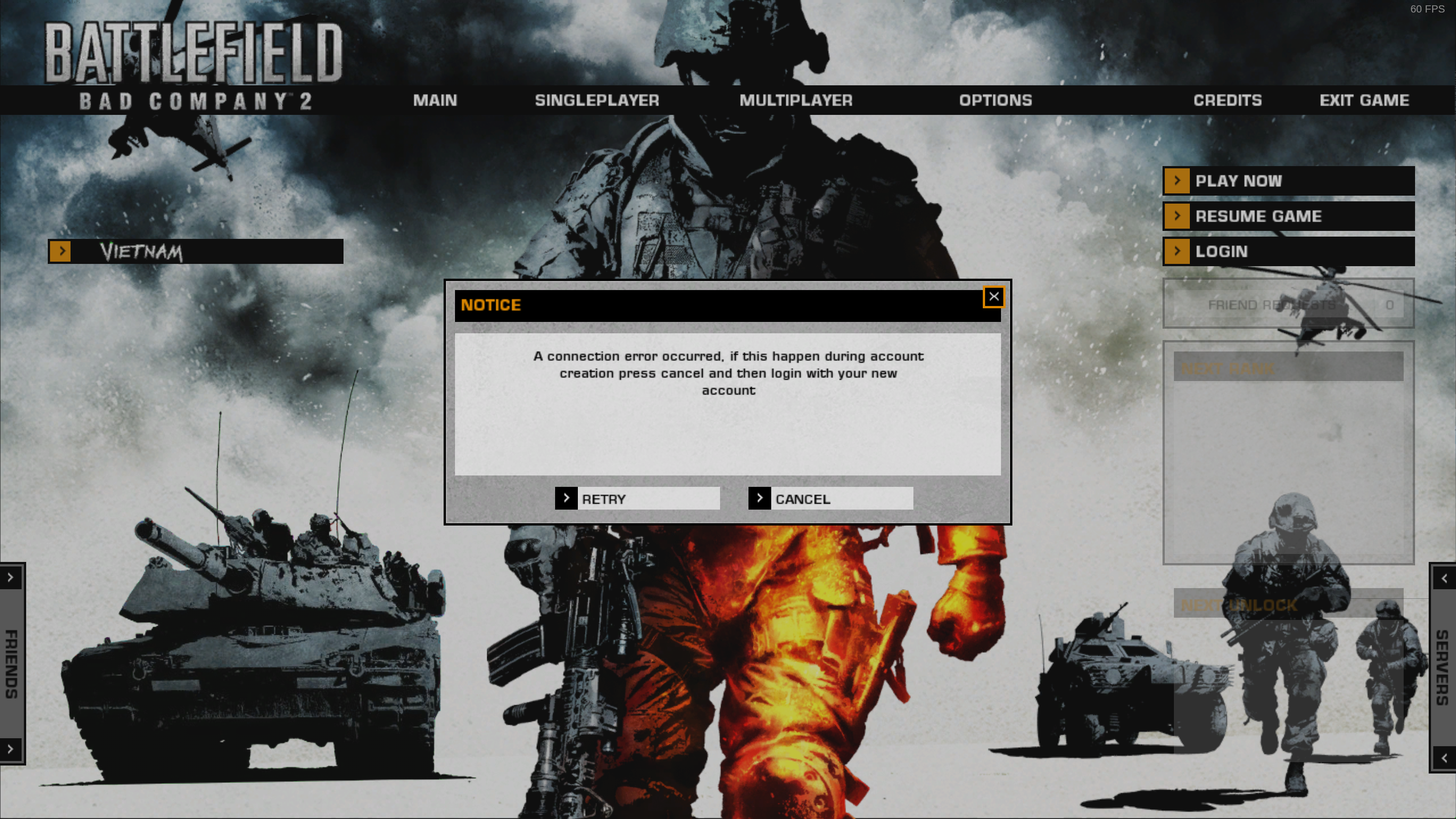
If I had not correctly entered the password for an existing account, then I would not have been allowed to enter the serial key.
$ inxi -bM
System:    Host: localhost.localdomain Kernel: 4.19.0-1.fc30.x86_64 x86_64 bits: 64 Desktop: Gnome 3.31.2
           Distro: Fedora release 30 (Rawhide)
Machine:   Type: Desktop Mobo: ASUSTeK model: ROG STRIX X470-I GAMING v: Rev 1.xx serial: <root required>
           UEFI: American Megatrends v: 0901 date: 07/23/2018
CPU:       8-Core: AMD Ryzen 7 2700X type: MT MCP speed: 2245 MHz min/max: 2200/4000 MHz
Graphics:  Device-1: Advanced Micro Devices [AMD/ATI] Vega 10 XL/XT [Radeon RX Vega 56/64] driver: amdgpu v: kernel
           Display: wayland server: Fedora Project X.org 1.20.3 driver: amdgpu resolution: 3840x2160~60Hz
           OpenGL: renderer: Radeon RX Vega (VEGA10 DRM 3.27.0 4.19.0-1.fc30.x86_64 LLVM 7.0.0) v: 4.5 Mesa 18.3.0-rc2
Network:   Device-1: Intel I211 Gigabit Network driver: igb
           Device-2: Realtek RTL8822BE 802.11a/b/g/n/ac WiFi adapter driver: r8822be
Drives:    Local Storage: total: 11.36 TiB used: 6.99 TiB (61.5%)
Info:      Processes: 451 Uptime: 1d 2h 45m Memory: 31.34 GiB used: 21.94 GiB (70.0%) Shell: bash inxi: 3.0.27
Proton 3.16-4 beta
steam-24960.log
@kisak-valve
Whitelist Request
- Battlefield: Bad Company 2 24960
- 24960
System Information
- GPU: RX 570
- Driver/LLVM version: Mesa 18.3 & LLVM 7
- Distro: Sabayon
- Link to full system information report https://gist.github.com/Alexander88207/72c104e4d0f59898cc4ede2fce2de25a
- Proton version: 3.16-5
I confirm:
- [✔] that pressing the
Playbutton in the Steam client is sufficient. - [✗] that runtime config options are necessary to run the game.
- [✔] that no workarounds other than PROTON_* env variables are necessary.
Issues
- [✔] I haven't experienced any issues.
- [⌛] There are no issues left open for this game. Some have problems, some don't have problems, needs more reports.
Is anyone seeing an issue with this game and Proton 3.16-5 that would block this game from being whitelisted?
Well... Sometimes BC2 hangs and stops responding but that is very rare. I get it like, once every 15-30 hours of playtime or so. Not enough to be a nuisance. I don't even remember when it happened last so it might be that some driver update already fixed that.
The main menu still shows significant input lag. Those are all of my issues right now so yeah, it's quite playable.
The game unable login to EA account. (It show error message "A connection error occurred, if this happen during account creation press cancel and then login with your new account.")
This happens after enter serial key.
If I had not correctly entered the password for an existing account, then I would not have been allowed to enter the serial key.
$ inxi -bM
System:    Host: localhost.localdomain Kernel: 4.19.0-1.fc30.x86_64 x86_64 bits: 64 Desktop: Gnome 3.31.2
           Distro: Fedora release 30 (Rawhide)
Machine:   Type: Desktop Mobo: ASUSTeK model: ROG STRIX X470-I GAMING v: Rev 1.xx serial: <root required>
           UEFI: American Megatrends v: 0901 date: 07/23/2018
CPU:       8-Core: AMD Ryzen 7 2700X type: MT MCP speed: 2245 MHz min/max: 2200/4000 MHz
Graphics:  Device-1: Advanced Micro Devices [AMD/ATI] Vega 10 XL/XT [Radeon RX Vega 56/64] driver: amdgpu v: kernel
           Display: wayland server: Fedora Project X.org 1.20.3 driver: amdgpu resolution: 3840x2160~60Hz
           OpenGL: renderer: Radeon RX Vega (VEGA10 DRM 3.27.0 4.19.0-1.fc30.x86_64 LLVM 7.0.0) v: 4.5 Mesa 18.3.0-rc2
Network:   Device-1: Intel I211 Gigabit Network driver: igb
           Device-2: Realtek RTL8822BE 802.11a/b/g/n/ac WiFi adapter driver: r8822be
Drives:    Local Storage: total: 11.36 TiB used: 6.99 TiB (61.5%)
Info:      Processes: 451 Uptime: 1d 2h 45m Memory: 31.34 GiB used: 21.94 GiB (70.0%) Shell: bash inxi: 3.0.27
Proton 3.16-4 beta
steam-24960.log
I second this. After entering the serial key, the game will claim it did not reach a server and then keeps on asking for me to type in the key over and over again. I can't get past that, no matter what.
@kisak-valve So no gameplay for me to test it further.
@Alexander88207 @Rayniac I guess you guys were only able to report on the game's performance by using a crack..? If so, please let me know. Thank you.
The last time I played this game via Proton was months ago but I was able to log into my EA account and I could play just fine without any issues FWIW. I may have time to check again soon, not sure.
The last time I played this game via Proton was months ago but I was able to log into my EA account and I could play just fine without any issues FWIW. I may have time to check again soon, not sure.
I don't think you're gonna be able to replicate the serial key bug because that's the kind of check the game runs just once. Unless...you back it up, uninstall and then reinstall it? Whatever, any help is appreciated.
Please make you sure that you run steam with runtime btw we dont cracked it
@Alexander88207 OK I'm sorry for what I'm about to ask, for it might sound stupid but..
Please make you sure that you run steam with runtime btw we dont cracked it
What's that supposed to mean?
@Alexander88207 OK I'm sorry for what I'm about to ask, for it might sound stupid but..
Please make you sure that you run steam with runtime btw we dont cracked it
What's that supposed to mean?
if you open the steam system info what can you read at steam runtime?
i have Steam-Runtime-Version: steam-runtime-beta-release_2018-11-23
@Alexander88207 OK I'm sorry for what I'm about to ask, for it might sound stupid but..
Please make you sure that you run steam with runtime btw we dont cracked it
What's that supposed to mean?
if you open the steam system info what can you read at steam runtime?
i have Steam-Runtime-Version: steam-runtime-beta-release_2018-11-23
Same here:
Steam Runtime Version: steam-runtime-beta-release_2018-11-23
@rdlf4 hmm....
@rdlf4 no, no crack here. Just the steam version downloaded normally.
maybe the activation fails but playing is possible
@rdlf4 no, no crack here. Just the steam version downloaded normally.
Now that you mentioned, I have to say, my Steam version was downloaded from Valve's website.
The reason I decided not to go with the one from the repos/Linux Mint Software Manager is because I was experiencing some odd behavior from it some time ago, like games not launching, creating desktop shortcuts failed left and right, and whatnot.
maybe the activation fails but playing is possible
Only one way to find out. I mean, don't get me wrong, I bought the game from the store just like any of you did. So when the game's mechanism fails to validate itself, what else should I resort to? I'm all ears for some workaround but at the end of the day I'm a consumer who bought something and cannot use it. Leaving a crack out of equation, what else should I go for?
The game launches just fine, supports my resolution but as far as I know there isn't much Proton can do for me when it comes to EA's crappy validation service.
@rdlf4 no, no crack here. Just the steam version downloaded normally.
Now that you mentioned, I have to say, my Steam version was downloaded from Valve's website.
The reason I decided not to go with the one from the repos/Linux Mint Software Manager is because I was experiencing some odd behavior from it some time ago, like games not launching, creating desktop shortcuts failed left and right, and whatnot.maybe the activation fails but playing is possible
Only one way to find out. I mean, don't get me wrong, I bought the game from the store just like any of you did. So when the game's mechanism fails to validate itself, what else should I resort to? I'm all ears for some workaround but at the end of the day I'm a consumer who bought something and cannot use it. Leaving a crack out of equation, what else should I go for?
The game launches just fine, supports my resolution but as far as I know there isn't much Proton can do for me when it comes to EA's crappy validation service.
Can you test it now with Proton 3.16-6?
Changelog: Support for gnutls >= 3.0, which should fix many networking issues with games. Note the Steam runtime doesn't ship this yet, so your distribution will need to provide it. For users on distros that don't provide this, Steam Play will still use the Steam runtime library as before. When the Steam runtime is updated, this will be available for all users. In our testing, we saw improvements in Eve Online, DOOM (2016) multiplayer, and HELLDIVERS.
Ubuntu: libgnutls30:i386 libldap-2.4-2:i386 libgpg-error0:i386 libsqlite3-0:i386
Arch: lib32-gnutls
Fedora: gnutls gnutls-devel
Solus: libgnutls libgnutls-devel libgnutls-32bit libgnutls-32bit-devel
OpenSuse: libgnutls.so.30 libgnutls-devel libgnutls.so.28
Gentoo: gnutls
Can you test it now with Proton 3.16-6?
Changelog: Support for gnutls >= 3.0, which should fix many networking issues with games. Note the Steam runtime doesn't ship this yet, so your distribution will need to provide it. For users on distros that don't provide this, Steam Play will still use the Steam runtime library as before. When the Steam runtime is updated, this will be available for all users. In our testing, we saw improvements in Eve Online, DOOM (2016) multiplayer, and HELLDIVERS.
That sounds tempting. Getting it right now.
As for my distro (Linux Mint 19, which is based on Ubuntu 18.04), my hands are tied. For now.
Fingers crossed libgnutls will be yesterday's news after 3.16-6.
I can confirm Proton 3.16-6 fixes libgnutls-related issues.
In other words, FUCKING YEAH! About DAMN time! WHERE'S MY GUN?!
COME AT ME, BUGS!
Err. Sorry. It's been fixed.
I can confirm Proton 3.16-6 fixes libgnutls-related issues.
In other words, FUCKING YEAH! About DAMN time! WHERE'S MY GUN?!COME AT ME, BUGS!
Err. Sorry. It's been fixed.
Edit: As i Mentioned, it has been fixed. For HELLDIVERS.
As for Bad Company 2, it keeps asking for a serial key to type in.
sigh So where do I go from here?
OK so I've made a few developments so here comes a quick update about Bad Company 2.
There is no activating the serial key from within the game, so I took it to EA's account from https://www.ea.com. From there, it was just a matter of going to account --> Account Settings --> Redeem Product Code and entered my BFBC2 product code. That does enable you to play multiplayer, which is always good news.
Now, to the bad part: while the single player campaign does work with no tweaks to the launcher options (other than DRI_PRIME=1 %command% so that Steam lets my dGPU handle the rendering), unfortunately Bad Company 2 hangs every-freaking-time, as if it was constantly building up a cache, but never ends doing that! So every two or three steps I take in-game, the game hangs loading stuff, then lets me go, then hangs again and again. It's annoying and it goes without saying, this gets me killed by the bots all the time.
I wonder whether there is a workaround to deal with that by entering a launcher option? If so, please let me know.
Also, I've been looking up for bots. If you know how to make bots work in BC2 via SteamPlay, please share it here. Thanks.
@rdlf4 hm.. for me in multiplayer i have stuttering too but it ends sometime...
What drivers are you using?
@rdlf4 hm.. for me in multiplayer i have stuttering too but it ends sometime...
What drivers are you using?
I'll let my terminal output handle that one for you:
rodolfo@rodolfo-Aspire-A515-41G:~$ inxi -G Graphics: Card-1: Advanced Micro Devices [AMD/ATI] Carrizo Card-2: Advanced Micro Devices [AMD/ATI] Polaris12 Display Server: x11 (X.Org 1.19.6 ) drivers: ati,amdgpu (unloaded: modesetting,fbdev,vesa,radeon) Resolution: [email protected] OpenGL: renderer: AMD Radeon R7 Graphics (CARRIZO, DRM 3.23.0, 4.15.0-43-generic, LLVM 7.0.0) version: 4.5 Mesa 18.3.0 - padoka PPA
And this is the same inxi -G command, only with my dGPU:
rodolfo@rodolfo-Aspire-A515-41G:~$ DRI_PRIME=1 inxi -G Graphics: Card-1: Advanced Micro Devices [AMD/ATI] Carrizo Card-2: Advanced Micro Devices [AMD/ATI] Polaris12 Display Server: x11 (X.Org 1.19.6 ) drivers: ati,amdgpu (unloaded: modesetting,fbdev,vesa,radeon) Resolution: [email protected] OpenGL: renderer: Radeon 500 Series (POLARIS12, DRM 3.23.0, 4.15.0-43-generic, LLVM 7.0.0) version: 4.5 Mesa 18.3.0 - padoka PPA
EDIT: Also, to better handle my issue with the game, I've attached a terminal output after starting Steam from the terminal and then trying to launch the game (badcomperr.txt) as well as the output from PROTON_LOG=1 (steam-24960.log).
badcomperr.txt
steam-24960.log
EDIT2: One more note: setting PROTON_USE_WINED3D11=1 as a launcher option does start the game, but performance is terrible. I'm trying to run it with DRI_PRIME=1 only (which tells Steam to let my dGPU handle the rendering).I was running this game off my HDD with DRI_PRIME=1 only and it was running flawlessly, but using WINED3D11 does make performance suffer a lot.
After Proton 3.16-7, I decided to revisit Bad Company 2.
I gotta say, the game could run very well, for what I've experienced. However when running a mission for the first time, the game lags. Badly. Like very often. It just freezes, then comes back. And every time that happens, FPS takes a nose dive, then goes back up. Then it freezes and the cycle continues.
I thought PROTON_NO_ESYNC=1 would handle that. But it doesn't. And this is where it gets confusing: once a mission has been finished, if I replay it, everything runs smoothly. Like some random freezes still occur but they rarely do. And that behavior can be reproduced even after I exit the game and then launch it again.
I wonder why that is.
I've tried this game with these launch options set: DRI_PRIME=1 PROTON_NO_ESYNC=1 %command%
Any ideas as to why the game randomly freezes on me when playing a mission for the first time?
So, the mouse issue is back for me. I run a 3-monitor setup and the mouse in the game hits the edge of the game window and stops, preventing me from turning around at all. Can't seem to find a workaround and this makes it totally unplayable which is unfortunate because the game runs flawlessly at 200fps on ultra with 2xMSAA.
Edit; lol this might make you laugh, I've found the solution. Bad company 2 doesn't actually give you the option to set fullscreen/windowed etc. It just does whatever the hell it wants to do. I found that pressing alt+enter forces it into some mode (I can't even tell if its fullscreen or windowed, I'm on BSPWM so I force it to be fullscreen myself). This seems to resolve the mouse issue.
EDIT: encountered the bug only on the official EA server. Could reproduce twice, then didn't happen again.
Game runs flawlessly here. 140~200fps maxed out. cfg.txt
Except for Laguna Presa sky in Conquest (rush mode works fine):

steam-24960.log
EDIT: settings to low didn't change that bug btw
Is it NVIDIA?
yes as the log says, GTX 1070, driver 430.26
I guess you should report this problem to dxvk or nvidia because this dont happens with amd.
EDIT: encountered the bug only on the official EA server. Could reproduce on others. Happens on Atacama Desert conquest on another EA server as well.


EDIT 2: Atacama Desert conquest works on non-EA servers, with PB enabled.
Battlefield Bad Company 2 - BFBC2 - Proton 14.11-12 - initial observations
Issue transferred from https://github.com/ValveSoftware/Proton/issues/3433.
@BETLOG posted on 2020-01-15T13:20:55:
System Information
-
GPU:
Gigabyte Technology Co., Ltd GK106 [GeForce GTX 660] -
Driver/LLVM version:
NVIDIA-SMI 435.21 Driver Version: 435.21 CUDA Version: 10.1
OpenGL version string: 4.6.0 NVIDIA 435.21
libglu1-mesa Version: 9.0.0-2.1build1 -
Kernel version:
4.15.0-74-generic -
Link to full system information report as Gist:
-
Proton version:
Proton 14.11-12 -
Launch Options
DXVK_HUD=fps,gpuload vblank_mode=1 position=top-right PROTON_LOG=1 %command% -
GPU:
Gigabyte Technology Co., Ltd GK106 [GeForce GTX 660] -
Driver/LLVM version:
4.6.0 NVIDIA 435.21
libglu1-mesa 9.0.0-2.1build1 -
Kernel version:
4.15.0-74-generic -
Link to full system information report as Gist:
https://gist.github.com/BETLOG/1f0d05777036289fd4b1f7aab0660e92
I confirm:
- [X] that I haven't found an existing compatibility report for this game.
- [X] that I have checked whether there are updates for my system available.
Symptoms
This is more of a general comment than a specific issue.
-
I had been using the prior 14.10.... and when I went looking for a newer version I noticed that 14.11-12 did not appear until I DE-selected the "Force the used of a specific.." checkbox, and then re-enabled
-
The mouse, general framerate, and GPU load of a small BFBC2 game today felt quite nice.
But... -
Then the game crashed while I was flicking between rear view and in-tank view. It crashed in such a horrible way that audio looped, and screen went black. My desktop and alt-tabbing was present, but completely unuseable. I was able to ctrl-alt-F2 into a TTY, but killing steam proved to be impossible. So I soft rebooted.
This was such an unusual experience that I promptly wrote a script to kill -9 anything wine/wineserver/steam/bfbc2 related, and bound a hotkey to it.
Then I played another game, and again it felt quite slick. As the game ended and 'your team lost' cutscene played.. the game vanished.. to desktop. Graceful, but not as expected.
NOTE: I record all games using ffmpeg. And launch BFBC2 via a script that monitors various keybinds and conveniences. So this may or may not be related, and can be included if required.
Reproduction
I suspect something similar will happen every second round I play, and i will be reverting to the specially-installed 14.11-9rc... all too soon. Which sucks, because crashing aside 14.11-12 seems quite efficient. But the type of crashing is distasteful enough to be avoided if possible.
@BETLOG commented on 2020-01-15T13:49:43:
Strange. I just attempted to have another game, and despite again being a less populated server the mouse felt horrible, with an almost imperceptible stutter that occasionally became disturbingly obvious as the mouse lagged when moved suddenly. Very bad.
Also I'll have to check the video ....after I re-encode the first one with seeking that was made during the first crash... but Im sure the framerate was 2/3 of the earlier 'good' game with the awful crash and the GPU running at 100% instead of 60%-ish.
Similarly, after quitting the most recent game in disgust, several minutes later I realised that my fans were still thrashing., and sure enough steam was sitting there chewing 25%+ of my cpu. As I watched it and added filters for wine/bfbc2/steam to see the list properly it magically subsided and released its resources. Quite strange.
The only thing I have done since last reboot about an hour ago was the tests required to post the system reports above... but I'll reboot again now and see if the next game is useful or not.
Very strange.
[update]
Nope, still bad mouse and frequent small pauses when I go to move the mouse suddenly.
I'm stunned that it can go from feeling so good to being total crap.
[update again]
Had a quick game with 14.11-9rc, and despite not being the smoothest ever, it's still a lot better than 14.11-12 is now. If it could go back to the way it was when I first started using it, and not crash so brutally, that would be great.
[and another game with 14.11-12..update]
Seems better, but the server was a different one and nearly empty.
As before: it's been several minutes since I quit the game and stopped recording, and yet
/home/user/.steam/ubuntu12_32/steam -console
is still eating 25% CPU. ie: 100% of one core. After what I guess is about 5 minutes it has subsided.
I'm also a bit suspicious of
/bin/bash /home/user/.steam/ubuntu12_64/steamwebhelper.sh -lang=en_US -cachedir=/home/user/.steam/steam/config/htmlcache -steampid=1743 -buildid=1578700296 -steamid=0 -steamuniverse=Public -clientui=/home/user/.steam/clientui --enable-blink-features=ResizeObserver,Worklet,AudioWorklet --enable-media-stream --enable-smooth-scrolling --disable-accelerated-video-decode --log-file=/home/user/.steam/steam/logs/cef_log.txt
and how "--disable-accelerated-video-decode" might be playing with my
ffmpeg... -hwaccel cuvid ....-vcodec h264_nvenc
video recording.
I've spent today playing with a mixture of 14.11-9rc, and mostly 14.11-12
Being able to contrast them against each other makes the differences apparent.
9rc Is pretty good, but it has a very subtle grainy feeling to mouse movement. Continuously, and seems to increase slightly after a few hours continuous use.
12 however feels almost slippery, in a better way, straight out of the gate, but also slowly degrades with a similar but more pronounced grainy feeling to mouse movement, but it also seems to lag more increasingly as time passes, and although I didn't get quite as many instances of the mouse noticeably pausing for what feels like 50-200ms before moving as directed.. it was apparent that the transition from slippery-sexy-good to sometimes-laggy-bad was causing my game to suffe before I quit. I suspect framerate was similarly degrading, as a couple of times i noticed stupid numbers like 40fps flick across the hud, when 60-140+ is fairly typical.
I didn't have any crashing, rather had one sudden vanishing of the entire application after what might have been a high-ping kick. Earlier in the session I got numerous disconnections from EA (which drops you from the game onto the menu), at first I wondered if they were related to 14.11-12, but I also had it happen under 14.11-9rc
14.11-12 seems to almost always eat 100% of one core, and produce 25% cpu load after quitting the game. I'm pretty sure this is what starts to degrade the game performance, but I have not been checking in order to actually make a direct correlation. In one instance it didnt seem to start loading the CPU until almost a minute after I had quit the game.
[update]
During OS system update today I see there is a bunch of mesa/nvidia updates. So I ran 14.11-12 again for a few hours today, and it performed admirably. No crashing, no residual CPU usage, no self-resurrecting 'SteamChildMonit' process. There was however very, very slightly more mouse latency than usual, and *possibly indirectly related (as it seems ot indicate some clumsy code rewrites) I also found that my evrouter script failed again, because someone writing the updates changed the name of the logitech entry ...again
evrouter -D /dev/input/event*
'Logitech Performance MX'
is usually how it appears, but every so often they randomly change it to:
'Logitech Unifying Device'
TL:DR; maybe this system update pulled my machine into line with what steam is pushing, and maybe evrouter is whats failing to play nice with proton - but i cant play for any length of time without half my mouse binds, so no real motivation for me to try to quantify that guess.
Stutter/Micropausing
FIX?: using an actual nvidia card
.steam/steam/steamapps/common/Battlefield Bad Company 2/dxvk.conf
dxgi.nvapiHack = False
and I find that setting the max fps to twice my screens hard limit seems to improve it a little
DXVK_FRAME_RATE=120 %command%
and/or
/.steam/steam/steamapps/common/Battlefield Bad Company 2/user.cfg
GameTime.MaxVariableFps 120
Proton-5.1 and above randomly lose window focus at the worst possible moment:
https://bittube.tv/post/6f07b0bb-fd38-458d-afd2-63183e1ba986
Seems to be fixed by re enabling auto capture:
Suggest whitelisting 24960 to use this by default on effected proton versions
protontricks 24960 winecfg
graphics tab > auto cap mouse in fullscreen windows
Proton versions
proton 5.1x1 2022-02proton 14.11-12x1 2020-01proton 3.16-7x1 2019-03proton 3.16-6x4 2018-12proton 3.16-4x2 2018-12proton 3.16-5x1 2018-12proton 3.7x3 2018-10proton 3.7-6x1 2018-09proton 3.7-5x1 2018-09
Launch options
DXVK_FRAME_RATE=120x1 2022-02PROTON_LOG=1x2 2020-01DXVK_HUD=fps,gpuloadx1 2020-01PROTON_NO_ESYNC=1x1 2019-03PROTON_USE_WINED3D11=1x1 2019-01WINEDLLOVERRIDES="msdmo=b"x1 2018-08
Launch lines
DXVK_FRAME_RATE=120 %command%x1 2022-02DXVK_HUD=fps,gpuload vblank_mode=1 position=top-right PROTON_LOG=1 %command%x1 2020-01DRI_PRIME=1 PROTON_NO_ESYNC=1 %command%x1 2019-03DRI_PRIME=1 %command%x1 2018-12
Upstream links
- ValveSoftware/Proton/issues/3433x1 2020-01
- ValveSoftware/Proton/issues/1610x1 2018-09
Arch Linux
Kernel 4.18.3
Proton 3.7
Nvidia GTX 1070 - nvidia-vulkan 396.51
KDE Plasma 5.13.4
KDE Framework 5.49.0
Qt 5.11.1
GFX settings MA
Had some issues on first start. Punkbuster popped up got everything green, but game crashed.
Then second start some Punkbuster dialogues pop up. I just cancelled them and game started anyways. Probably Multiplayer is not working. Not sure as I have no EA account for that game so far.
Starting the campaign with max GFX settings seem to work just fine.
Steam Overlay mouse cursor is missing as written in #168.