The Room Two
This appears to be working again with nvidia driver version 415.25, but broken with 410.78.
Whitelist Request
- Name of the game to be whitelisted: The Room Two
- Steam AppID of the game: 425580
System Information
- GPU: system 1: GTX 770, system 2: Intel HD Graphics 3000
- Driver/LLVM version: system 1: 4.6.0 NVIDIA 418.43, system 2: 3.0 Mesa 18.3.3
- Distro version: Fedora 29
- Link to full system information report as Gist: 1 2
- Proton version: 3.16-4
I confirm:
- [x] that pressing the
Playbutton in the Steam client is sufficient. - [ ] that runtime config options are necessary to run the game.
- [ ] that no workarounds other than PROTON_* env variables are necessary
Issues
- [x] I haven't experienced any issues.
- [x] There are no issues left open for this game.
- [ ] Although I consider the gaming experience equal to Windows there are remaining issues:
Additional comments
I played this game from start to the end on the system with NVIDIA card [1] - experienced no issues whatsoever.
Some reports on protondb indicate, that Mesa users (or perhaps AMD users) have some problems, so I retested using Intel integrated card [2] - performance was very low (it's an old card), but the game worked perfectly (perhaps due to newer Mesa - my system uses 18.3 and issues were reported on 18.1 and 18.2).
Alt-tabbing behaviour works as it should.
Paging @kisak-valve to relabel this issue :)
Is anyone seeing an issue that would block switching this over to a whitelist request?
Like Dreamer said, Nvidia seems fine at the moment. I've not run the game on my Mesa powered Intel graphics laptop in a few months. Last time I tried it was crashing at start up. I think that was back in November, but maybe I was using a Mesa version with issues. I'll pull it out and try again with the latest drivers.
Works on my Nvidia system, but not on my Intel graphics system. I get the following error as well as have to manually kill the process. I am attaching a screenshot of the error, steam log, and system info.
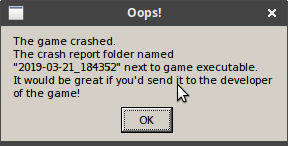
I can confirm the crash with RADV, proton 4-2.3 still crashes.
Nothing extracted yet.
Compatibility Report
System Information
I confirm:
steam-425580.log
Symptoms
After playing through the first 3 chapters with intermittent breaks I completed chapter 3 and quit the game. Upon trying to start the game to play chapter 4 the game crashes on launch with an error box. The user is forced to send a term signal to end the game's execution.
Reproduction
Play The Room Two through the first 3 chapters and quit. Then restart the game. An error box appears.