Hitman 2
@sergio91pt is your Steam library located on NTFS partition by any chance "Z:\media\sergio\ldata\LinSteam2" ?
@nsivov No, ext4
/dev/mapper/luks-43b62179-8920-4f09-bbdb-2c7ed7ea4c7f on /media/sergio/ldata type ext4 (rw,nosuid,nodev,relatime,data=ordered,x-gvfs-show)
I have a similar issue except no game window appears after clicking the play button on the launcher.
steam-863550.log
Edit: I was able to get it running by rolling my RX 580 driver back to Mesa 18.2.2. Seems there was a botched Vulkan extension in Mesa 18.3.0.
Vendor: Intel Open Source Technology Center (0x8086)
Device: Mesa DRI Intel(R) UHD Graphics 630 (Coffeelake 3x8 GT2) (0x3e92)
Version: 18.2.2
Works fine for me. Could be a driver issue.
System Information
- GPU: RX 570
- Driver/LLVM version: Mesa 18.3.2 & LLVM 7.0.1
- Distro version: Sabayon
- Link to full system information report as Gist
- Proton version: 3.16-6
Notes:
- Runs fine out of the box
HITMAN 2 launcher crash with Proton 3.16-6
Issue transferred from https://github.com/ValveSoftware/Proton/issues/2328.
@hardware posted on 2019-02-10T14:26:30:
Compatibility Report
- Name of the game with compatibility issues: HITMAN 2
- Steam AppID of the game: 863550
System Information
- GPU: RTX2080
- Driver/LLVM version: 415.27
- Kernel version: 4.20.7
- Link to full system information report : Gist
- Proton version: 3.16-6
I confirm:
- [X] that I haven't found an existing compatibility report for this game.
- [X] that I have checked whether there are updates for my system available.
Symptoms
With Proton 3.16-6 beta, the game launcher does not launch at all.
No log files are generated under $HOME/steam-$APPID.log in that case.
If I use Proton 3.16-4, I can launch the game but online mode does not work.
If I use Proton 3.7-8, I can launch the game and online connectivity work out of the box.
Reproduction
- Switch Proton to 3.16-6
- Launch the game
- Game Launcher crash
Do you have an idea to find some logs about this issue ?
user_settings.py :
user_settings = {
    # logs are saved to $HOME/steam-$STEAM_APP_ID.log, overwriting any previous log with that name
    "WINEDEBUG": "+timestamp,+pid,+tid,+seh,+debugstr,+module",

    "DXVK_LOG_LEVEL": "info",

    # Enable DXVK's HUD
    "DXVK_HUD": "fps,devinfo,frametimes,memory,version"

    # Use gl-based wined3d for d3d11 and d3d10 instead of vulkan-based dxvk
    # "PROTON_USE_WINED3D": "1",

    # Disable d3d11 entirely
    # "PROTON_NO_D3D11": "1",

    # Disable in-process synchronization primitives
    # "PROTON_NO_ESYNC": "1",
}
Game's launch options :
PROTON_LOG=1 %command%
I found some logs in /tmp/dumps.
So with Proton 3.16-6 beta :
Loaded Config for Local Override Path for App ID 863550: /home/hardware/.local/share/Steam//controller_base/empty.vdf
[863550]Non-Steam Controller Configs Enabled: 1
GameAction [AppID 863550, ActionID 1] : LaunchApp changed task to ProcessingInstallScript with ""
Cannot open assembly '/home/hardware/.local/share/Steam/legacycompat/iscriptevaluator.exe': File does not contain a valid CIL image.
sh: /data/steam/steamapps/common/HITMAN2: Is a directory
sh: /home/hardware/.local/share/Steam/steamapps/common/Steamworks Shared: Is a directory
[2019-02-10 16:43:50] Startup - updater built Feb  2 2019 17:21:33
[2019-02-10 16:43:50] Vérification de l'installation...
[2019-02-10 16:43:50] Verification complete
installscript_posix.cpp (357) : Assertion Failed: strCommonRedistForeignInstallPath != ""
installscript_posix.cpp (357) : Assertion Failed: strCommonRedistForeignInstallPath != ""
Installing breakpad exception handler for appid(steam)/version(1549129917)
assert_20190210164419_25.dmp[10401]: Uploading dump (out-of-process)
/tmp/dumps/assert_20190210164419_25.dmp
Cannot open assembly '/home/hardware/.local/share/Steam/legacycompat/iscriptevaluator.exe': File does not contain a valid CIL image.
installscript_posix.cpp (418) : Assertion Failed: Standalone evaluator returned error code for app 863550
installscript_posix.cpp (418) : Assertion Failed: Standalone evaluator returned error code for app 863550
GameAction [AppID 863550, ActionID 1] : LaunchApp changed task to SynchronizingCloud with ""
GameAction [AppID 863550, ActionID 1] : LaunchApp changed task to SiteLicenseSeatCheckout with ""
GameAction [AppID 863550, ActionID 1] : LaunchApp changed task to CreatingProcess with ""
GameAction [AppID 863550, ActionID 1] : LaunchApp waiting for user response to CreatingProcess ""
GameAction [AppID 863550, ActionID 1] : LaunchApp continues with user response "CreatingProcess"
Game update: AppID 863550 "", ProcID 10405, IP 0.0.0.0:0
Loaded Config for Local Override Path for App ID 863550: /home/hardware/.local/share/Steam//controller_base/empty.vdf
>>> Adding process 10405 for game ID 863550
GameAction [AppID 863550, ActionID 1] : LaunchApp changed task to WaitingGameWindow with ""
ERROR: ld.so: object '/home/hardware/.local/share/Steam/ubuntu12_32/gameoverlayrenderer.so' from LD_PRELOAD cannot be preloaded (wrong ELF class: ELFCLASS32): ignored.
ERROR: ld.so: object '/home/hardware/.local/share/Steam/ubuntu12_32/gameoverlayrenderer.so' from LD_PRELOAD cannot be preloaded (wrong ELF class: ELFCLASS32): ignored.
Cannot open assembly '/data/steam/steamapps/common/HITMAN2/Launcher.exe': File does not contain a valid CIL image.
GameAction [AppID 863550, ActionID 1] : LaunchApp changed task to Completed with ""
Game removed: AppID 863550 "", ProcID 10405
>>> Adding process 10406 for game ID 863550
assert_20190210164419_25.dmp[10401]: Finished uploading minidump (out-of-process): success = yes
assert_20190210164419_25.dmp[10401]: response: CrashID=bp-6af94246-d0ba-4293-89e6-44f152190210
assert_20190210164419_25.dmp[10401]: file ''/tmp/dumps/assert_20190210164419_25.dmp'', upload yes: ''CrashID=bp-6af94246-d0ba-4293-89e6-44f152190210''
Issue seems to be here :
GameAction [AppID 863550, ActionID 1] : LaunchApp changed task to ProcessingInstallScript with ""
Cannot open assembly '/home/hardware/.local/share/Steam/legacycompat/iscriptevaluator.exe': File does not contain a valid CIL image.
Similar issue : https://github.com/ValveSoftware/Proton/issues/2295 @ProtonIssuesTempAcct
Dump :
assert_20190210164419_25.zip
Proton 3.16-6 Beta : "File does not contain a valid CIL image" error.
Proton 3.16-4 : No error
Proton 3.7-8 Beta : "File does not contain a valid CIL image" error.
Proton 3.7-8 : No error
This issue seems related to the beta versions of Proton with my computer.
@hardware have you tried re-downloading the versions that are failing? You can delete the folder at .steam/steam/steamapps/common/Proton 3.16 Beta and then verify the integrity of any game while the Beta version is selected to trigger it to re-download.
Hitman 2 crashes unless i add that lauch option:
LANG=C %command%
After that it boots but starts as a minimized window ; out of focus. A simple alt tabbing is necessary to see game window.
3.16-7 Beta
which version of Hitman you have installed? try to download the patch in it's local folder, and check your GPU settings and lower the resolution.
The problem with the mouse in Hitman 2
Issue transferred from https://github.com/ValveSoftware/SteamOS/issues/680.
@vladislavyuzbekov posted on 2019-06-18T16:20:22:
Your system information
- Steam client version: 1560817063
- SteamOS version: 2.0:1:2.190
- Opted into Steam client beta?: [Yes/No] Yes
- Opted into SteamOS beta?: [Yes/No] Yes
- Have you checked for updates in Settings > System?: [Yes/No] Yes
Please describe your issue in as much detail as possible:
Describe what you expected should happen and what did happen.
The wireless mouse does not work in the game, but it works if you hold the mouse button down.
@kisak-valve commented on 2019-06-18T16:47:02:
~Hello @vladislavyuzbekov, this issue should also be mentioned to the game's dev(s).~
@dubigrasu commented on 2019-06-18T17:56:48:
@vladislavyuzbekov
That's something that unfortunately happens frequently with Proton titles played through "steamcompmgr", which is SteamOS's window manager.
- OS: Arch Linux
- GPU: NVIDIA GeForce RTX 2080
- Driver/LLVM version: Nvidia 430.26
- Kernel version: 4.19.57
- Proton version: 4.2-9
I don't know where to report this since I am not sure if it's a Proton issue. I bought the game and played for over 15 hours. I am not getting any card drops. I am stuck at "4 card drops remaining".
Played the game using these two ways:
- No launch option
- Launch option set to -skip_launcher
Hitman 2: PS4 controller doesn't work with Proton 4.11
Issue transferred from https://github.com/ValveSoftware/Proton/issues/2963.
@skeevy420 posted on 2019-08-07T21:05:51:
Compatibility Report
- Hitman 2
- 863550
System Information
- GPU: MSI RX 580 4GB Armor
- Driver/LLVM version: Mesa 19.1.99 (mesa-aco)/LLVM 9
- Kernel version: 5.2.4 to 5.2.6; 4.19.61, 4.19.62; 5.2.5 & .6 are fsync enabled.
- My system information report
- Proton version: 4.11
I confirm:
- [ ] that I haven't found an existing compatibility report for this game.
- [X] that I have checked whether there are updates for my system available.
Including the log from 4.11 where it doesn't work and the log from 4.2 where it does work.
4.11 -- steam-863550-4.11.log
4.2 -- steam-863550-4.2.log
Symptoms
PS4 controller doesn't work with Hitman 2. Wireless or wired makes no difference and both have the same results.
Reproduction
Turn on a PS4 controller and try to play the game. Controller doesn't work. Controller settings in menu are inaccessible. Revert to Proton 4.2 and it works perfectly.
Enabling PS4 controller configuration in Steam's controller settings leaves the PS4 controller in desktop mode when in-game. Allows accessing controller settings in-game but nothing there is helpful to this issue. Enabling that option in Steam was not necessary for 4.2 nor is it necessary for other games I've played with Proton 4.11.
Additional Notes
Have tried:
Mesa 19.1.3 stable with llvm 8
mesa-git & mesa-aco both with llvm 9 & llvm 10
five different kernel versions; two with fsync (listed above)
Proton builds with different patches from Tk-Glitch
unplugging my keyboard since I saw that in another controller issue
using xinput with Proton 4.11
All have the same results.
I also deleted compatdata/863550 when changing Proton versions and when trying different things to try to figure this out.
@TacoDeBoss commented on 2019-08-08T21:16:29:
I can replicate with my Xbox One S pad - simply go to any game's Properties and enable Steam Input Per Game Setting to "Forced On" and watch as your controller completely ceases to work.
@skeevy420 commented on 2019-08-08T21:53:45:
Just tested with Proton 4.11-2 and it has the same results.
Thanks for reporting the controller regression. I can reproduce this and it should be fixed in an upcoming release.
Proton 4.11-3 contains a major change to how we report controllers to games. This should fix HITMAN 2's PS4 controller regression. Please retest.
Well, after testing, I can say that it's partially resolved. It only works after enabling both Steam Overlay and Playstation Configuration Support. Once those are enabled, it works great and I had a great time playing it with FSync and ACO last night. Thanks.
I say partially because with the Proton 4.2 series neither of those options were a hard requirement to get my DS4 to work. It just worked regardless of what options I set within Steam.
Unrelated to the above, there's an issue when VSync is enabled in-game. Both mouse and controller input for looking around have issues and this effects every Proton release from 4.2-1 until now. I've never tried Hitman 2 with earlier than 4.2-1.
When VSync is enabled in-game, it's almost impossible to look around with a mouse because it goes wild and tries to look in 32 directions when moving. With a controller, it gives the appearance of choppy/laggy FPS and that the game may be running slow as well as the stick "gets stuck" in one direction and will keep trying to look in that direction until I jiggle the right stick. Setting the in-game FPS/Vsync method from 60FPS to 30FPS has no effect on that nor does enabling/disabling vsync in xorg.conf, KWin, or via libstrangle have any effect there.
It runs perfectly with the above settings to get my DS4 working and the in-game VSync disabled.
This may be related to #2895
HITMAN 2 is now broken as of the latest update, fails to detect the GPU properly and claims it doesn't support DX11.
Proton Log: https://gist.github.com/LiamDawe/e619b8fb30ed8c41c3248063fa44cc5e
System info: https://gist.github.com/LiamDawe/1c47d164934d9d87508cde18f60da66c
Hello @LiamDawe, what is the last known working Proton version for you and this game?
So far I've tested Hitman 2 with Mesa from master and Mesa from ACO-master and both of those with DXVK from master, DXVK 1.4, & DXVK 1.3.4 via TKG Proton builds; and both mesa builds with Proton 4.11-6.
All have that same "DllMain.cpp:22 Attached GfeSDK.dll" in their terminal output.
@kisak-valve
For me it was 4.11-5 and/or Proton-TKG built last night with DXVK from git master. Both quit working as of the update Hitman 2 update this morning.
I think the Proton release at the same time is just unfortunate timing.
@kisak-valve it worked fine on most Proton versions, the game update is what broke it.
Seems like it wants some proprietary AMD extension library and fails when it can't find it.
0031:0032:Call KERNEL32.LoadLibraryA(00ca08c8 "atiadlxx.dll") ret=00c92236
0031:0032:Ret  KERNEL32.LoadLibraryA() retval=00000000 ret=00c92236
0031:0032:Call KERNEL32.LoadLibraryA(00ca08b8 "atiadlxy.dll") ret=00c95328
0031:0032:Ret  KERNEL32.LoadLibraryA() retval=00000000 ret=00c95328
0031:0032:Call ntdll.RtlFreeHeap(00010000,00000000,00fc0090) ret=00c98b70
0031:0032:Ret  ntdll.RtlFreeHeap() retval=00000001 ret=00c98b70
0031:0032:Call KERNEL32.GetUserDefaultUILanguage() ret=1400c06d6
0031:0032:Ret  KERNEL32.GetUserDefaultUILanguage() retval=00000409 ret=1400c06d6
0031:0032:Call user32.MessageBoxW(00000000,1418deb70 L"Failed to initialize DirectX. This game requires a DirectX 11-capable graphics card.",141679d30 L"HITMAN 2",00000010) ret=14109dcf8
Can confirm it doesn't launch.
Works for me (radv) again with Proton 4.11-6 after deleting its prefix (".../SteamLibrary/steamapps/compatdata/863550").
Edit: Nope, was because I had set "dxgi.customVendorId = 10de" by mistake via global DXVK conf. Well, this works as a workaround, but perhaps there's a better solution.
Also works for me and my RX 580 after replacing HITMAN2/Retail/amd_ags_x64.dll with the one made with dxvk-ags with the header configured to use AGS 5.1. Uploaded my dll.
If using nvidia vendor ID works, perhaps we should just set dxgi.nvapiHack for Hitman 2 in DXVK.
@doitsujin Can confirm setting dxgi.nvapiHack=False gets Hitman 2 playable again. It does load nvapi, but gets in-game no problem.
Edit: It occurs to me this fixes it for nvidia users but probably not AMD users. I guess we want something like dxgi.customVendorId=10de as DXVK has for some other games.
Also works for me and my RX 580 after replacing HITMAN2/Retail/amd_ags_x64.dll with the one made with dxvk-ags with the header configured to use AGS 5.1. Uploaded my dll.
Did the uploading as txt perhaps destroy the file's header? It doesn't work for me.
Possibly. Zipped it up this time. Didn't realize those were allowed :blush:
amd_ags_x64.zip
Thanks. Riddle solved: It works with proton-tkg, but not proton 4.11-6 offered via Steam.
@aeikum
I think it has to do with amd_ags since the game does work when that file is replaced with the one created with dxvk-ags using 5.1 (it's set to use 5.2 by default). I'm playing it right now w/o setting any dxgi values and it's working great.
Edit...didn't realize I was still using a proton-tkg build...gonna retest....
@skeevy420 Yes, I think you're right. We do already ship an amd_ags implementation, but it's mostly an empty stub. We shipped that way back at Proton's launch to support Wolfenstein. I think these days we prefer to use vendor overrides when possible, but it's hardly a settled issue.
Vendor overrides don't seem to solve this particular issue; even when reporting my GPU as an Nvidia card it still fails to run.
AGS is annoying to support because the different library versions aren't compatible to each other in any way. I'm not sure which version the Wolfenstein library is written against, but if it's anything other than 5.1 or maybe 5.0 it's not going to work. Edit: Looks like Proton ships a 5.1 dll so it should work by just setting the amd_ags_x64 override to builtin.
Vendor overrides don't seem to solve this particular issue; even when reporting my GPU as an Nvidia card it still fails to run.
Dumb question: Did you correctly put dxvk.conf in the game's main dir "HITMAN2", not "Retail"?
It definitely works here when setting its path globally via environment variable.
@aufkrawall are you on Nvidia?
I did confirm that the option applies correctly by looking at the log files. I'm using a global dxvk config.
@doitsujin
Just wanted to say that the ags dll you posted above is working for me with 4.11-6.
@doitsujin Yep, the fix works for me too. Created dxvk.conf, added
[HITMAN2.exe]
dxgi.customVendorId=10de
and replaced the amd_ags_x64.dll with the modified one, all go under HITMAN2/Retail.
Works for me too (GTX1650). I put the config file with dxgi.nvapiHack=False in the retail folder.
What is the different between putting dxgi.nvapiHack=False and dxgi.customVendorId=10de?
Also, thanks for this thread - was quite unhappy when I wanted to spend the evening with the new map, Haven.
One is Nvidia specific I believe, the other tricks games into thinking it's an Nvidia card. But, unsure.
@doitsujin I tested that out and no dice. It tries to call agsDriverExtensionsDX11_CreateDevice which we don't implement. I'm surprised the nvidia vendor override didn't work for you. I've been testing on nvidia, can try on AMD later.
Vendor overrides don't seem to solve this particular issue; even when reporting my GPU as an Nvidia card it still fails to run.
AGS is annoying to support because the different library versions aren't compatible to each other in any way. ~I'm not sure which version the Wolfenstein library is written against, but if it's anything other than 5.1 or maybe 5.0 it's not going to work.~ Edit: Looks like Proton ships a 5.1 dll so it should work by just setting the
amd_ags_x64override tobuiltin.
Tried setting the override to builtin and no luck. Also replaced the one under pfx/drive_c/windows/system32/ with the one posted and removed earlier and set to builtin with also no luck. Using disable didn't work either.
Can confirm that setting the dll to be builtin didn't work.
Also works for me and my RX 580 after replacing HITMAN2/Retail/amd_ags_x64.dll with the one made with dxvk-ags with the header configured to use AGS 5.1. Uploaded my dll.
replaced the original dll with the one you uploaded and it worked perfectly. I am also using a rx 580
Also, as a fair warning, replacing the DLL breaks the game if you try and play the game on Windows in DX11 mode (even if you use DXVK). Just set the game to DX12 Mode on Windows to mavoid having to verify the game cache each time. Useful for dualbooters like myself.
Vendor overrides don't seem to solve this particular issue; even when reporting my GPU as an Nvidia card it still fails to run.
@doitsujin Can you double-check your results here? I just tested on an AMD machine and setting the vendor to 10DE via dxvk.conf allowed the game to start.
Is anybody else experiencing controller issues after the last Proton and/or Hitman update?
In particular, aiming down is a struggle and my controller gets un-calibrated by while playing.
OS: ubuntu 19.04
Proton: 4.11-6
And as a side note thank you @skeevy420 for the dll.
@Dylan-Brotherston What controller are you using? Wired, bluetooth, or something else? Do you have Steam controller configuration turned on or off?
Wired Xbox-one controller.
Steam input per-game is forced on for hitman 2.
Is anybody else experiencing controller issues after the last Proton and/or Hitman update?
In particular, aiming down is a struggle and my controller gets un-calibrated by while playing.OS: ubuntu 19.04
Proton: 4.11-6And as a side note thank you @skeevy420 for the dll.
Yeah, but my controller issues are related to my DS4 right stick deadzone (it needs to be a hair bigger else looking tends to get stuck going slowly left unless I precisely center the right stick).
I had issues in the past with VSync and my right stick acting wonky with this game and setting dxgi.syncInterval = 1 in the game's dxvk.conf helped.
@Dylan-Brotherston For what it's worth, I played a couple minutes with a wired Xbox One controller with Steam configuration both turned on and off and saw no problems. There weren't any changes between 4.11-5 and 4.11-6 that were directly related to controller support.
The latest update borked my game. But adding the .conf into to /Retail folder fixed the issue for me.
DXVK 1.4.1 has fixed the amd_ags_x64 issue now
Currently unable to launch any missions. Game crashes when trying to start a mission. Attached log for reference.
steam-863550.log
Same here, game crashing after the mission loading screen. https://pastebin.com/jAyV871p
I tried to run the game with DX12 and Proton 4.11-8 (vkd3d), but it doesn't even launch.
steam-863550.log
https://gist.github.com/NoXPhasma/9c4497ebcb8838352716c93460353eab
Hitman 2 (with DX12 selected): game and benchmark both crash
Issue transferred from https://github.com/ValveSoftware/Proton/issues/3196.
@NotMrFlibble posted on 2019-11-09T03:14:58:
Compatibility Report
- Name of the game with compatibility issues: HITMAN 2
- Steam AppID of the game: 863550
System Information
- GPU: RX 570
- Driver/LLVM version: Mesa 19.2.3/7.1.0
- Kernel version: 5.3.9
- OS: Devuan beowulf
- Proton version: 4.11-8
I confirm:
- ☑ that I haven't found an existing compatibility report for this game.
- ☑ that I have checked whether there are updates for my system available.
Symptoms
Silent crash on launch. Log file says exception, code=80000003.
No problems if DX11 is selected.
Reproduction
In the launcher, select DX12: ‘“Options” → “Graphics API” → “Direct3D 12”. Then either save the settings and launch the game, or use benchmark mode. (In the latter case, the launcher will continue to run.)
Log
<Log omitted, please see [#3196](/issue/ValveSoftware/Proton/3196)>
Seems like there is some weirdness with the new VKD3D integration. The launcher now looks to be using WineD3D's GPU detection (which seems to use OGL, and detects an older card). This also breaks ReShade because it thinks the game is running with OGL (but the game itself does correctly use DXVK once launched).
See error:
> 15:05:28:474 [00054] | INFO  | Redirecting wglChoosePixelFormat(hdc = 0000000000260049, ppfd = 000000000022C600) ...
15:05:28:474 [00054] | INFO  | > Dumping pixel format descriptor:
15:05:28:474 [00054] | INFO  |   +-----------------------------------------+-----------------------------------------+
15:05:28:474 [00054] | INFO  |   | Name                                    | Value                                   |
15:05:28:474 [00054] | INFO  |   +-----------------------------------------+-----------------------------------------+
15:05:28:474 [00054] | INFO  |   | Flags                                   | 0x25                                    |
15:05:28:474 [00054] | INFO  |   | ColorBits                               | 32                                      |
15:05:28:474 [00054] | INFO  |   | DepthBits                               | 0                                       |
15:05:28:474 [00054] | INFO  |   | StencilBits                             | 0                                       |
15:05:28:474 [00054] | INFO  |   +-----------------------------------------+-----------------------------------------+
15:05:28:486 [00054] | INFO  | > Returning format: 5
15:05:28:486 [00054] | INFO  | Redirecting wglSetPixelFormat(hdc = 0000000000260049, iPixelFormat = 5, ppfd = 000000000022C600) ...
15:05:28:486 [00054] | INFO  | Redirecting wglCreateContext(hdc = 0000000000260049) ...
15:05:28:486 [00054] | INFO  | > Passing on to wglCreateLayerContext ...
15:05:28:486 [00054] | INFO  | Redirecting wglCreateLayerContext(hdc = 0000000000260049, iLayerPlane = 0) ...
15:05:28:489 [00054] | WARN  | Window class style of window 0000000000020118 is missing 'CS_OWNDC' flag.
15:05:29:260 [00054] | ERROR | Failed to install hook for glFramebufferTextureARB with status code 8.
15:05:29:260 [00054] | ERROR | Failed to install hook for glFramebufferTextureEXT with status code 8.
15:05:29:344 [00054] | ERROR | Failed to install hook for glFramebufferTextureLayerARB with status code 8.
15:05:29:587 [00054] | INFO  | Redirecting wglCreateContextAttribsARB(hdc = 0000000000260049, hShareContext = 0000000000000000, piAttribList = 000000000022C510) ...
15:05:29:587 [00054] | INFO  | > Requesting core OpenGL context for version 4.4 ...
15:05:29:590 [00054] | WARN  | Window class style of window 0000000000020118 is missing 'CS_OWNDC' flag.
15:05:29:892 [00054] | INFO  | Redirecting wglDeleteContext(hglrc = 0000000000011000) ...
15:05:29:892 [00054] | INFO  | Redirecting wglDeleteContext(hglrc = 0000000000013001) ...
15:05:29:893 [00054] | WARN  | CreateDXGIFactory1 failed with error code 0x887a0004!
EDIT: Just needed to use native DXGI:
WINEDLLOVERRIDES="dxgi=n"
It wasn't working with winecfg for some reason.
It wasn't working with winecfg for some reason.
I think the Proton script itself sets WINEDLLOVERRIDES (but takes into account the value you already set, if any), which is why this doesn't work.
Thanks, that confirms it. That's more convenient than using winecfg anyway, was just unaware of it.
With the WINEDLLOVERRIDES="dxgi=n" it now allows to start in D3D12 but immediately goes

log
1197 warn: DxgiAdapter::QueryInterface: Unknown interface query^M
Running on Ubuntu bionic, Kernel 5 (futex), Nvidia 440.
Yeah, D3D12 won't work with dxgi=n. That's actually why it's not the default anymore.
This is probably one of those games that'll require a manual patch from within VKD3D to work, I'd expect.
Still not launching with DX12 on Proton 5.0-3

Textures of leaves have this weird black border when using proton 5.0-5, but they are normal when using proton 4.11-13.
Textures of leaves have this weird black border when using proton 5.0-5, but they are normal when using proton 4.11-13.
The black border is the texture alpha. For some reason, your game isn't accepting the alpha channel values and ignoring it. Cannot confirm on my end, as I've not had this issue. What GPU/ Mesa stack you using @JWolvers ?
Using a RX 5700XT and mesa 20.0.2
The weird thing is this only happens on moving objects like leaves, but static flowers are fine.
RX 570, Mesa 20.0.2. Looks fine here; specifically, no transparency problems noticed.
I checked with AMDVLK but the issue remains.
I still can't play the game, it crashes when clicking play on any level, and also crashes when trying to run the benchmark. Excuse the zip file, apparently the log file was too large for GitHub.
proton 5.13 dx12 crash on start
Reaches launcher but crashes after briefly loading game window on 5.13-4. Runs perfectly on 5.0-10.
Hello @MurdoMaclachlan, please add PROTON_LOG=1 %command% to the game's launch options and attach the generated $HOME/steam-$APPID.log to this issue report as a file. (Proton logs compress well if needed.) Also, please copy your system information from Steam (Steam -> Help -> System Information) and put it in a gist, then include a link to the gist in this issue report.
Whoops, sorry about that.
System info here
Proton log here
Thanks, looking at the log, audio failed to initialize for some reason:
ALSA lib pcm_dmix.c:1108:(snd_pcm_dmix_open) unable to open slave
INFO: OpenAudioDevice failed: ALSA: Couldn't open audio device: No such file or directory
INFO: Assertion failed: 0 && "Failed to open audio device!"
then the game falls over with an unhandled access violation (c0000005).
So there's a weird blending issue on Haven Island

The spot can be found here and on the private island.

Is this a proton bug or a game bug?
Replying to https://github.com/ValveSoftware/Proton/issues/2121#issuecomment-770428558.
This is a game bug. The devs updated Hitman 2 just before christmas, and it broke the sand blending when they updated the sand textures.
Compatibility Report
- Name of the game with compatibility issues: HITMAN 2
- Steam AppID of the game: 863550
System Information
- GPU: AMD Radeon RX 5700XT (Driver: Mesa 21.1.0-devel (git-b4d1764 2021-03-05 focal-oibaf-ppa)
- CPU: Radeon R9 3900X
- Linux Distro: Ubuntu 20.04
- Kernel Version: 5.8.0-44-generic
- Proton Version: 5.13-6 (also happens in every Proton version except 4.11-13)
Symptoms
- Game wont launch on any Proton version, including GE and experimental, except for 4.11-13. However, when launched on Proton version 4.11-13, the audio doesnt work.
- Launcher loads on every Proton version, but clicking "Play" immediately causes the game to crash.
- A week or two ago, I was able to get the game to launch using version 5.0-10. However, despite nothing changing in my system configuration since then except for routine updates, this solution no longer works.
What I have tried:
- Reinstalling the game
- Reinstalling my graphics drivers
- Resetting the wine prefix by deleting Hitman 2's pfx folder under compatdata
- Switching between DX11 and DX12
- Installing Proton-GE and trying to launch it with that.
Reproduction
Always reproducible.
Hello @cray12399, I suspect you've encountered https://gitlab.freedesktop.org/mesa/mesa/-/issues/4396. Can you try temporarily disabling lavapipe with something like:
sudo mv /usr/share/vulkan/icd.d/lvp_icd.i686.json /usr/share/vulkan/icd.d/lvp_icd.i686.json.disabled
sudo mv /usr/share/vulkan/icd.d/lvp_icd.x86_64.json /usr/share/vulkan/icd.d/lvp_icd.x86_64.json.disabled
and see if that has an effect?
@kisak-valve Thanks for the quick response! Your solution fixed the launching issue! However, Hitman still doesn't have any audio for me on any Proton version.
It might be worth noting that I am using a Creative Sound Blaster Audigy FX sound card, but when I launched it previously a 2 weeks ago, I still had the card and the sound worked perfectly.
EDIT:
Additionally, it seems that the game still won't launch in DX12 mode, which isn't a big deal, but I find that it might be worth mentioning.
Rendering bug. Can't usefully tell whether this is radv or dxvk.
“Three-Headed Serpent” – standing on the terrace outside Héctor Delgado's room, looking towards the water. There are some sheets, acting as a roof, over the area below. These are not rendered correctly; there is flickering as the viewing angle is changed. (Shadow bug?)
Mesa 21.0.0 & 20.3.x
LLVM 11 (1fdec59bffc1, from apt.llvm.org)
Linux 5.11.2
Steam build datestamp 1615510515
Proton 5.13-6 & experimental
RX 5600 XT
Supersampling: 1.00
Texture filtering: anisotropic 4×
Screen-space shadow: on
Motion blur: off
Dynamic sharpening: moderate
Simulation quality: best
Other settings: high
Hi @kisak-valve,
The AMD RADV / Mesa drivers label can be removed. I confirmed that the issue stated above is a Game Bug and can be reproduced on both AMD and Nvidia at any graphical preset (Confirmed on Linux and Windows with both DX11 & 12).
Both exhibit severe flickering on the awning drapes when the camera is moved. Nvidia has even worst shadow artifacting.
| Windows Nvidia | Windows AMD |
|---|---|
 |
 |
With recent Proton-Experimental, mouse and keyboard input doesn't work correctly for me, as it erroneously expects gamepad controller input, and such a device isn't even connected.
Hello @aufkrawall, about how long ago (what date) do you know it was behaving like it was supposed to? Can you check how the game behaves with Proton 5.13-6 and 6.3-2?
It seems all Proton versions are affected, I've tested from Experimental to 5.0-10. So this is probably an issue of the runtime (e.g. SDL)? The cursor always jumps back to the middle of the screen and also keyboard input isn't correctly recognized, thus I can't navigate the game's main menu. It was still working 2-3 weeks ago, also with Experimental.
One less severe issue: It would be nice if it wasn't required anymore to specify WINEDLLOVERRIDES="dxgi=n" in order to make it start with D3D12/VKD3D-Proton, as it has gotten much faster in CPU bound scenes than the game's D3D11 renderer + DXVK.
Turns out it was due to a hardware change, the RGB controller of my new mainboard confuses input device handling. This udev rule has solved the issue for me: https://bbs.archlinux.org/viewtopic.php?pid=1948148#p1948148
Edit: Better solution: https://www.reddit.com/r/ASRock/comments/kax86r/asrock_led_controller_as_joystick_recognized/gi3s58u/?utm_source=reddit&utm_medium=web2x&context=3
hitman 2 (863550) doesnt start
Issue transferred from https://github.com/ValveSoftware/Proton/issues/4962.
@CrCrate posted on 2021-07-12T08:29:41:
upon pressing play after a few seconds it just goes back to play, no windows opens and nothing happens. PROTON_LOG is extremely unhelpful as theres pretty much nothing in it
experimental
======================
Proton: 1625839307 experimental-6.3-20210709
SteamGameId: 863550
Command: ['/media/dumbass/ext/SteamLibrary/steamapps/common/HITMAN2/Launcher.exe']
Options: {'forcelgadd'}
SteamLinuxRuntime: v0.20210317.0-0-ge09b2e6
pressure-vessel: 0.20210415.0+srt1 scout 0.20210415.0
soldier: 0.20210415.0 soldier 0.20210415.0
======================
3.16-9
======================
Proton: 1554732609 proton-3.16-9
SteamGameId: 863550
Command: ['/media/dumbass/ext/SteamLibrary/steamapps/common/HITMAN2/Launcher.exe']
======================
Hello @CrCrate, the short logs hints that Proton is failing to initialize, before it tries to run the game launcher.
Maybe your issue is filesystem related? What filesystem are you using with /media/dumbass/ext/SteamLibrary/?
it was, turns out I was using a drive formatted ntfs. used ext4 and it works perfectly now, thanks :D
This game worked two weeks ago on Proton 6.3 (I think it was 6.3). Now it crashes my entire GPU and I need to restart my graphical session (It freezes, monitors flash to black and back again to a frozen image. Sound still plays.).
I'm running a Ryzen 5900x, RX 6800 XT. Arch Linux on kernel 5.12.15. Running SwayWM (Wayland compositor). I have attached logs.
steam-863550.log
Edit: log pasted twice for some reason.
We got a regression. The game is unable to contact Hitman servers with Proton Experimental but the connection works perfectly fine with 6.3-6
Hello @Managor, please add PROTON_LOG=1 %command% to the game's launch options and attach the generated $HOME/steam-$APPID.log to this issue report as a file. (Proton logs compress well if needed.)
I retract that statement. Changing back to experimental and it allows me to connect normally again.
I'm actually unable to connect to the Hitman 2 servers using Proton Experimental.
PROTON_LOG=1 log:
https://gist.github.com/gardotd426/fa6f5ee08a9b69b6131e9b469ae99692
The failure to connect should be fixed in today Experimental update.
Crashes on DX12, no problems with DX11. Using Fedora 35 with everything up-to-date on R5 3600 + RX 580 system.
Here's the log.
Hello @farukr1, info: Driver: 2.0.210 in your log suggests that you're using AMDVLK. Can you also test if the same behavior happens with mesa/RADV?
Hello @farukr1,
info: Driver: 2.0.210in your log suggests that you're using AMDVLK. Can you also test if the same behavior happens with mesa/RADV?
Thanks, can confirm game works fine on DirectX12 with RADV.
System Information
- GPU: Nvidia RTX 2080 Super
- Driver: 510.54-1
- Arch Linux 5.17.1-arch1-1
- Proton Experimental, 7.0, etc.
DirectX 12 mode with Nvidia GPU is pretty wonky. Performance wise, the game appears to run well enough but the graphics are completely messed up. Probably more of a vkd3d-proton issue I reckon, figure it might be worth putting here regardless.
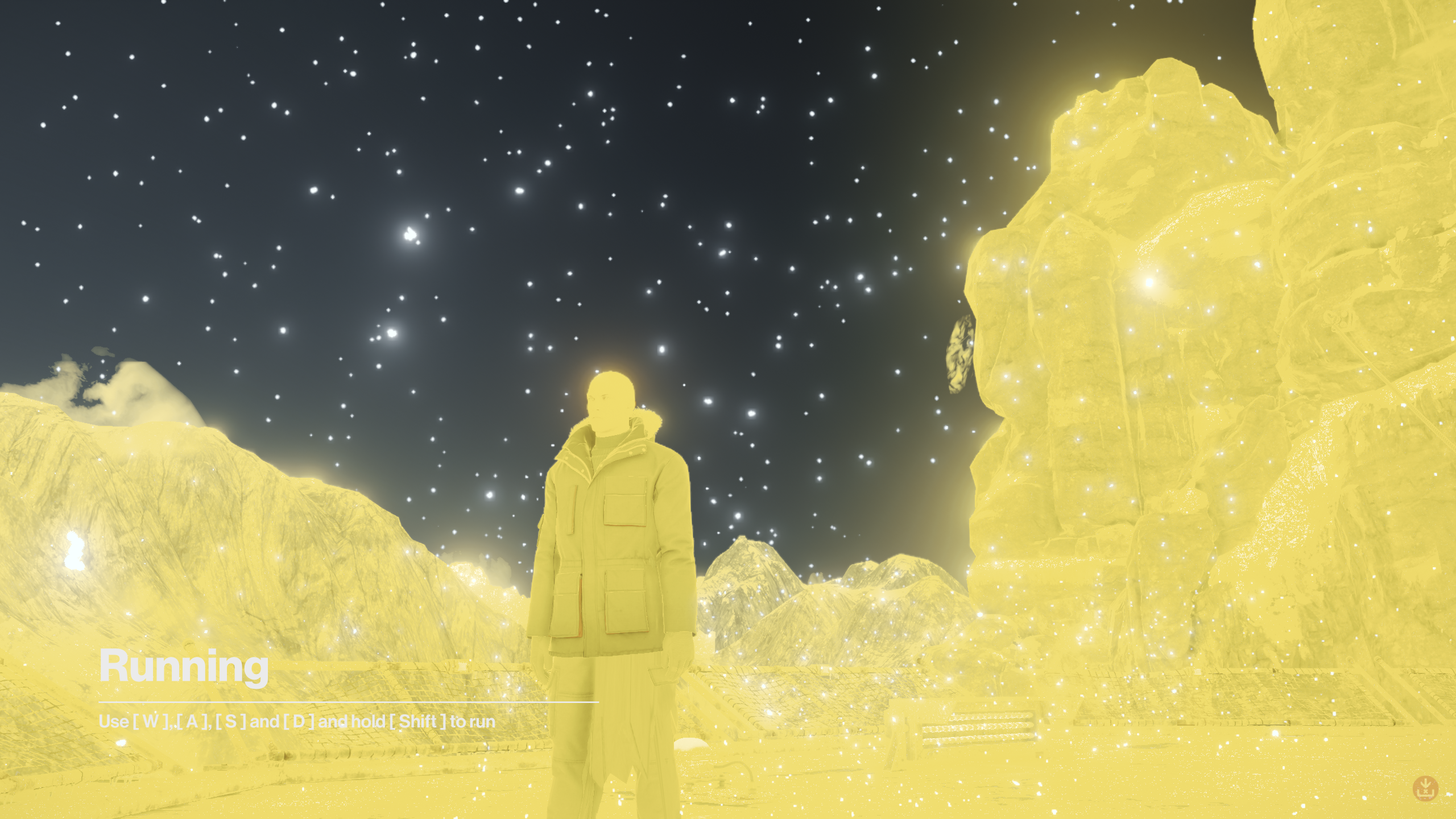
Running the game with DirectX 11 is fine, however.
Replying to https://github.com/ValveSoftware/Proton/issues/2121#issuecomment-1086184749
I have nothing technical to say, just that this looks like an anime opening. VKD3D is very finnicky, and does work with Hitman 3, curiously enough.
Hello @bernharl, are you still experiencing the GPU lock up mentioned in https://github.com/ValveSoftware/Proton/issues/2121#issuecomment-881765907 on an up to date system?
Hello @bernharl, are you still experiencing the GPU lock up mentioned in [#2121 (comment)](https://github.com/ValveSoftware/Proton/issues/2121#issuecomment-881765907) on an up to date system?
No, it doesn't happen anymore :)
Proton versions
proton experimentalx4 2022-04proton 6.3x1 2021-07proton 3.16-9x1 2021-07proton 5.13-6x2 2021-04proton 5.13x1 2020-11proton 4.11-13x2 2020-03proton 5.0-5x2 2020-03proton 5.0-3x1 2020-02proton 4.11x2 2019-11proton 4.11-8x1 2019-11proton 4.11-6x3 2019-09proton 4.2x2 2019-08proton 4.11-3x1 2019-08proton 4.11-2x1 2019-08proton 3.16x1 2019-02
Launch options
PROTON_LOG=1`x1 2021-09PROTON_LOG=1x3 2021-09PROTON_LOGx1 2021-07WINEDLLOVERRIDES="dxgi=n"x3 2021-04WINEDLLOVERRIDESx1 2019-11DXVK_HUDx1 2019-02DXVK_LOG_LEVELx1 2019-02PROTON_NO_D3D11x1 2019-02PROTON_NO_ESYNCx1 2019-02PROTON_USE_WINED3Dx1 2019-02WINEDEBUGx1 2019-02
Launch lines
LANG=C %command%x1 2019-03
Upstream links
- ValveSoftware/Proton/issues/4962x1 2021-07
- ValveSoftware/Proton/issues/3196x1 2019-11
- ValveSoftware/Proton/issues/2963x1 2019-08
- ValveSoftware/SteamOS/issues/680x1 2019-06
- ValveSoftware/Proton/issues/2295x1 2019-02
- ValveSoftware/Proton/issues/2328x1 2019-02
DLLs
amd_ags_x64.dllx4 2019-09atiadlxx.dllx1 2019-09atiadlxy.dllx1 2019-09gfesdk.dllx1 2019-09
Error codes
0x887a0004x1 2019-11
Compatibility Report
System Information
I confirm:
steam-863550.log
Symptoms
The launcher works but the game crashes a couple seconds after the game launches in fullscreen. The screen is always black when it crashes.
Reproduction
Always reproducible.
Solution
The problem seems to be caused by this bug, related to Nvidia prime/optimus and gdm3 on Ubuntu.
The solution is to run
sudo vulkaninfo. It fails without sudo and the command needs to be run again after rebooting.