THE KING OF FIGHTERS XIII STEAM EDITION
Known issue with the game, even under Windows. Two different solutions have been proposed to fix it, you'll have to try to see what works for you:
- Enabling v-sync in the graphics settings.
- Playing in Windowed or Borderless Windowed mode.
Please let us know if that fixes the issue.
the following steps solved the problem for me:
1 - Enabling v-sync in the graphics settings.
2 - Playing in Windowed or Borderless Windowed mode.
3 - Open two youtube videos (1080p) on Google Chrome
4 - Reduce the game priority on CPU.
I haven't been able to reproduce the speed issue. Game works perfect for me. Tried the tutorial, arcade, versus and playing with the options. Everything is solid.
- Ubuntu 16.04 (KDE Neon)
- GTX 980
- Nvidia drivers 396.51
- Kernel 4.15.0
The King of Fighters XIII (222940) Videos doens't play
Issue transferred from https://github.com/ValveSoftware/Proton/issues/3753.
@Lucario24 posted on 2020-04-11T00:40:14:
Compatibility Report
- Name of the game with compatibility issues: The King of Fighters XIII
- Steam AppID of the game: 222940
System Information
- GPU: Radeon RX 550
- Driver/LLVM version: 4.5 Mesa 19.2.8
- Kernel version: 5.3.0-46-generic
- full system information report: Gist
- Proton version: 4.11-13
I confirm:
- [x] that I haven't found an existing compatibility report for this game.
- [x] that I have checked whether there are updates for my system available.
Symptoms
The game plays fine. However. videos don't play. Whenever a video is mean to play, it just get skipped and the game continues. For axample, there is an opening video at the beggining, who just gets skipped and the game goes directly to start screen. I know this must some be another case of the media foundation issue since the game uses wmv videos.
I tried many workarounds in order the solve this:
- Using another oficial proton version (5.0-5): Game doesn't start.
- Using unofficial oficial proton versions (proton 4.11-GE-1, 4.21-GE-2, 5.4-GE-3, 5.5-GE-1): Game doesn't start.
(the following methods are with proton 4.11-13, also I attached logs for each one. Every method was made after manually deleting a modified game's prefix and letting steam create a clean one)
-
Install mf, ffdshow, directshow and other codecs with protontricks: Game works, but videos are skipped
-
Install wmp9 with winetricks and a workaround (because of the 64 bits issue) mentioned for the user fallenguru here: Game works, but videos are skipped
steam-222940-WMP9.log
<Workarounds removed by moderator>
It is worth mentioning that the first time I started the game after installing it, the opening video WORKED normally, this is also mentioned by an unknown user in a report here. Thats the only time I saw a video working normally after all this time playing the game.
Reproduction
The King of Fighters XIII crashes just after the SNK/Playmore logo
Issue transferred from https://github.com/ValveSoftware/Proton/issues/4901.
@zelfir posted on 2021-06-15T19:59:47:
Compatibility Report
- Name of the game with compatibility issues: The King of Fighters XIII
- Steam AppID of the game: 222940
System Information
- GPU: RTX 2070 Super
- Driver/LLVM version: Nvidia 465.31
- Kernel version: 5.12.9-300.fc34.x86_64
- Link to full system information report as Gist: https://gist.github.com/zelfir/f757abc479e47fc5b5d5202d37aaf6f8#file-gistfile1-txt
- Proton version: 1623347030 experimental-6.3-20210610
I confirm:
- [v] that I haven't found an existing compatibility report for this game.
- [v] that I have checked whether there are updates for my system available.
Symptoms
The game crashes just after the SNK/Playmore logo
Reproduction
Always
steam-222940.log
Game crashes on launch with Proton 6.3 and Proton 7.0. The current workaround is to specify the -v parameter through the Launch Options
Logs:
steam-222940-proton7.tar.gz
Specs:
- GPU: GTX 970
- Driver: 510.54
- Kernel: 5.15 (futex2 patched)
- O.S: Manjaro
- KDE/X11
Works fine with Proton 7.0, Mesa 21.3.5, kernel 5.16.11 (Gnome/Wayland, AMD).
Movies/videos don't play but game is playable.
Referencing media tracking issue: #1464
Updating the state of this game on latest Proton Experimental (10/2/2023).
My PC Info: https://gist.github.com/KibaGasteiz/f90ab0f1bd5509e4139fa99b79c1c067
Starting the game without launch commands and the game crashes when intro movie should start.
LOG:
steam-222940.log
Starting the game with "%command% -v" so we skip the movies, we get to the menu but... inverted sprites just wont show, making the game unplayable.
LOG and some screenshots:
steam-222940.log
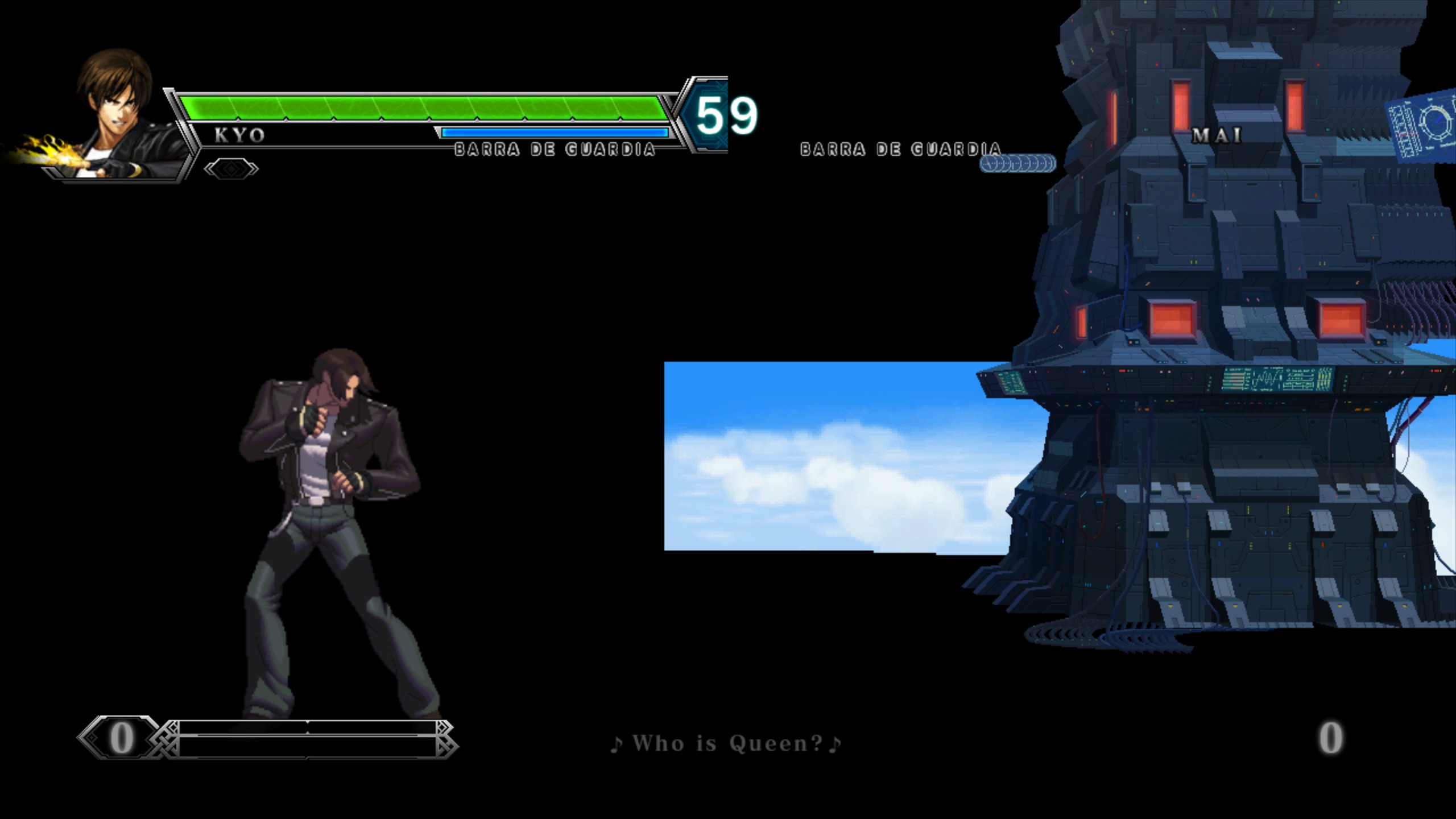
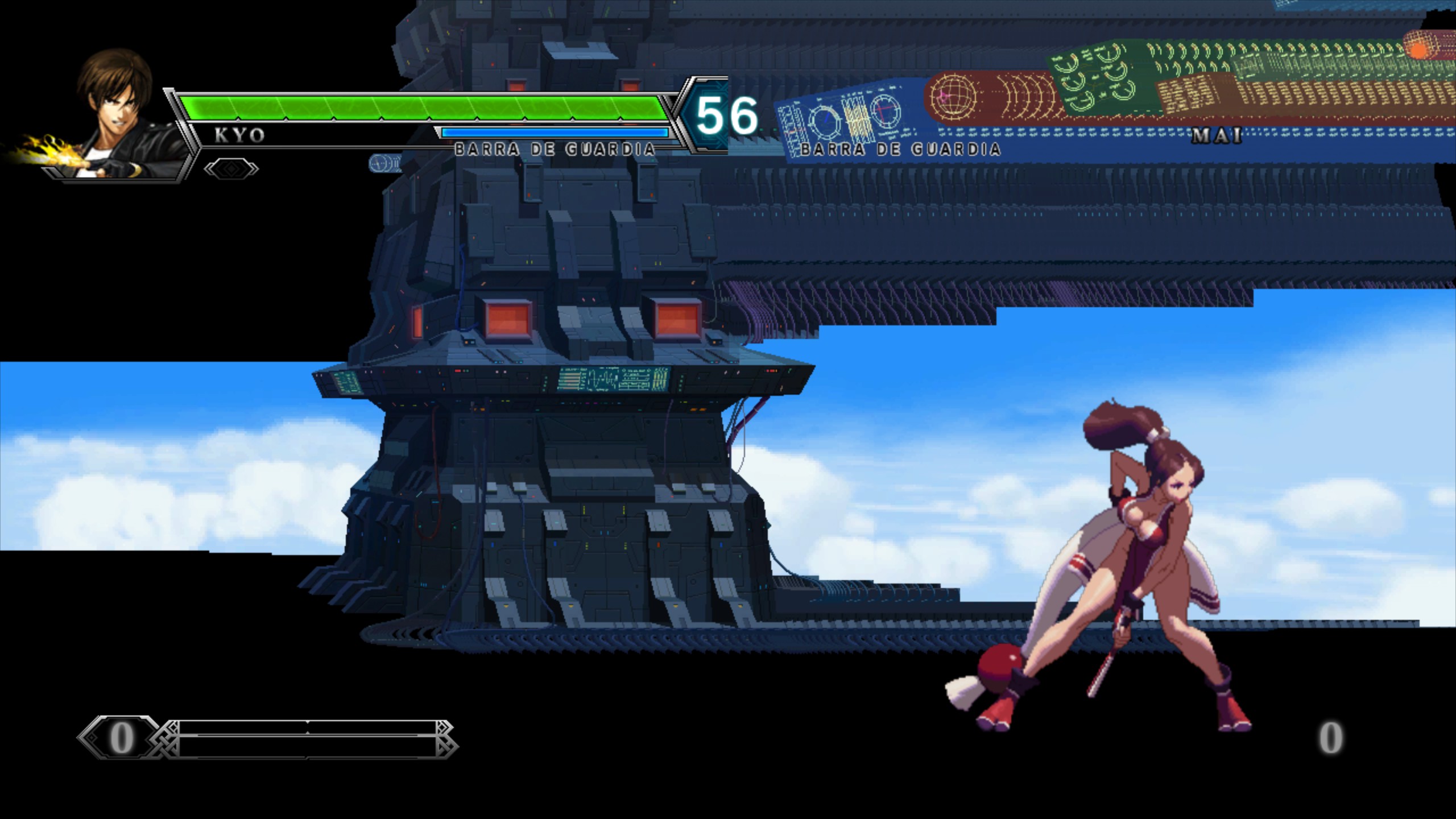
Game still crashes on launch for Proton 7.0-6 and 8.0-1. The current workaround is to supply the -v parameter.
Log file:
steam-222940.tar.gz
Specs:
- O.S: Arch
- Kernel: 6.1.24
- GPU: RX 6700 XT (Mesa 23.0.2)
I can confirm that on deck with the latest proton Experimental version, the logos play fine, but it silently crashes to the game page when it gets to the part where it tries playing the intro fmv.
Guess these lines might have clues.
Unhandled exception: page fault on read access to 0x00000000 in 32-bit code (0x00520dc7).
1480.786:0214:0218:fixme:dbghelp:elf_search_auxv can't find symbol in module
The method to skip the movies still works, but the visuals are still glitchy and not showing properly.
Edit: I can confirm the last version the graphics looked fine on was 4.11-13, I couldn't get the game working on 5.0-10 to check, but all versions past that had the broken graphics in matches, and also the 2p character on the character select seemed to be invisible save for their reflection.
Edit 2:
Tested it on my w11 laptop, confirmed its a dxvk issue cause it's happening on there too.
Graphical issue in question seems to be fixed up on dxvks end (least on windows since it happened on there too), guess that should be fixed whenever proton pulls in the latest dxvk dev build, unless it's already in bleeding edge
Yes, the game works fine now on Proton Experimental, with the only problem still being the videos not playing and crashing the game.
So we still need to use launch parameter: "%command% -v"
I also tested again on deck to reconfirm with proton Experimental, the graphics look fine now too, so it seems like the broken fmvs needing to be skipped is the last issue keeping this game from working on deck.
Visually looks fine on oled deck with latest stable, but the %command% -v is still needed to avoid the crash when the video plays.
Still present as of the rebase to wine 9.0
Retested with Experimental on latest nightly, game no longer crashes on my oled deck when playing the intro fmv, assuming this likely fixes similar cutscenes in the game too.
Believe the game is ready to be Retested for deck support now
Proton versions
proton experimentalx4 2023-06proton 7.0-6x1 2023-04proton 7.0x2 2022-02proton 6.3x1 2022-02proton 4.11x1 2020-04proton 4.11-13x1 2020-04
Launch lines
%command% -vx3 2023-12
Upstream links
- ValveSoftware/Proton/issues/4901x1 2021-06
- ValveSoftware/Proton/issues/3753x1 2020-04
The game is accelerated. The characters move very fast. It is impossible to play.