Nosferatu: The Wrath of Malachi
Hello @Gryxx, with Proton 3.16-6, please add PROTON_LOG=1 %command% to the game's launch options and drag and drop the generated $HOME/steam-$APPID.log into the comment box.
Looks like Downwell has the same regression.
Duplicate of https://github.com/ValveSoftware/Proton/issues/685. Should be fixed by the next proton 3.16 release though.
Whitelist Request
- Name of the game to be whitelisted: Nosferatu: The Wrath of Malachi
- Steam AppID of the game: https://steamdb.info/app/283290/
System Information
- GPU: GTX 760
- Driver/LLVM version: NVIDIA 440.36
- Distro version: Arch
- https://gist.github.com/shoober420/1215c40214cf70e1fabb760b5bd2a341
- Proton version: 4.11-9
Works great out of the box. Add "PROTON_USE_D9VK=1" to launch options for best results. Highly recommended to use a resolution patch (https://community.pcgamingwiki.com/files/file/788-nosferatu-the-wrath-of-malachi-widescreen-fix/).
Hello @Gryxx, are you still experiencing the regression you previously reported?
Additionally, is anyone seeing an issue that would block this game from being whitelisted?
@kisak-valve No, not since 3.16. As far as i've tested game runs flawlessly
Game works fine with proton 5.0-2.
Although it may have been overlooked by those who didn't run this game on Windows, there is a pre-rendered cutscene video which is supposed to play upon starting a new game, after the loading screen. This cutscene does not play for me when I use Proton versions 3.7-8, 3.16-9, 4.2-9, 4.11-13, and 5.0-10.
The cutscene does play when using Proton 5.13-6, but then there is an extreme drop in performance relative to the earlier Proton versions. The cutscene also works when using Proton 6.3-6, but with the same in-game performance issue, and additionally the graphics are far too dark. Meanwhile, with the current version of Proton Experimental, the game doesn't fill the screen and thus the menu isn't fully visible, so I can't even start a new game.
I'm using Linux Mint 20.2 (kernel version 5.4.0-84-generic). My GPU is a Radeon HD 7950, and I realize that it's quite old now — so I generally assume that any performance issues I experience might not occur newer hardware — but my assessment of the performance with Proton 5.13-6 and newer is simply a comparison to the performance with Proton 5.0-10 and older. On my system, the performance goes from nearly perfect (<= 5.0-10) to practically unplayable (>= 5.13-6), so it's a shame that the Proton versions with good performance are the same ones with no support for the opening cutscene.
the cutscenes are MPEG-1 format
WMF not working for them, they get skipped.
Proton 4.11, 5.0, 5.13, 6.3
horrible FPS in Proton 5.13 & 6.3
incorrect color palette (darkness) in Proton 6.3
game runs fine in Proton 4.11 & 5.0 except the cutscenes
using proton-ge the cutscenes play properly with no issue, however the FPS is like 5.13 & 6.3
6 FPS
edit
using winetricks i was able to get Proton 5.0 working with the videos
one of the codecs or other not sure which exactly
cinepak
directshow (installs quartz)
icodec indeo
l3codecx mpeg-3 audio codec
- i can further test which one exactly when im done playing...
&
also the game is D3D8, so dxvk isnt being used
so there must have been a wine regression from 5.0 to 5.9/5.13 for DX8 games?
i found a wrapper for d3d8 to limit the FPS since the game doesnt appear to have vsync or any game options
using
winetricksi was able to get Proton 5.0 working with the videos
one of the codecs or other not sure which exactly
Thanks, @arrowgent. I tried installing these with Protontricks, and I think I've narrowed it down: it seems to be quartz.dll that gets the cutscene working with Proton 5.0-10. Using directshow also works, but it's probably overkill, as it includes quartz which seems to work just as well by itself. After deleting the ~/.steam/root/steamapps/compatdata/283290 directory containing the game's Wine prefix and then launching the game once to create a fresh prefix, I ran protontricks 283290 quartz, and when I started the game again, the cutscene worked.
Unfortunately, it might be a bit unstable. Sometimes the game seems to freeze at the loading screen just before the cutscene is supposed to play. I saw this both with the directshow tweak and with the quartz tweak, so I tested them many more times and couldn't figure out what had happened. Maybe it was just taking an unusually long time to load and I was too impatient.
Edit:
After some more testing (all with Proton 5.0-10), I think I figured out the loading screen freeze. Maybe it's just a coincidence, but here are my observations:
- If I delete
~/.steam/root/steamapps/compatdata/283290, launch the game, start a new game, and get past the point where the cutscene is skipped before exiting the game, then applying thequartztweak results in a freeze at the loading screen next time I start a new game. - If I delete
~/.steam/root/steamapps/compatdata/283290, launch the game, and exit without starting a new game, then applying thequartztweak gets the cutscene working. - Getting past the "new game" loading screen before applying the
quartztweak seems to result in the creation of agstreamer-1.0folder inside~/.steam/root/steamapps/compatdata/283290, so maybe GStreamer somehow breaks the ability to play the video withquartz.dll.
Considering these results, I think the appropriate steps are as follows:
- select Proton 5.0-10 in the game's properties window;
- delete
~/.steam/root/steamapps/compatdata/283290; - launch Nosferatu and then close it without starting a new game;
- run
protontricks 283290 quartz.
Performance is poor with Proton 7.0-1 as well, so Proton 5.0-10 is still the latest version I'd recommend using.
On the bright side, I've found that disabling winegstreamer.dll with the environment variable WINEDLLOVERRIDES="winegstreamer=" prevents the loading screen freeze described in my previous post. (Apparently I was right that it had something to do with gstreamer-1.0, but I never investigated it further until today.) This eliminates the need to delete the prefix, and then launch the game but avoid reaching the point where a cutscene fails to play, before installing quartz.dll to fix the cutscenes.
(The game still needs to have been launched at least once so that the prefix exists before running Protontricks, but that's just basic Protontricks usage. Meanwhile, if the prefix was created by a newer version of Proton, one may still need to delete it and let Proton 5.0-10 create a fresh one before running Protontricks, or it may fail with a "permission denied" error — but actually, this might apply only to those whose Winetricks is outdated as mine, because a fix for this appears to have been merged: https://github.com/Winetricks/winetricks/pull/1847)
In light of this, my recommended steps for fixing this game can be simplified:
- select Proton 5.0-10 in the compatibility tab of the game's properties window;
- add
WINEDLLOVERRIDES="winegstreamer=" %command%to the launch options in the general tab of the game's properties window; - run
protontricks 283290 quartz.
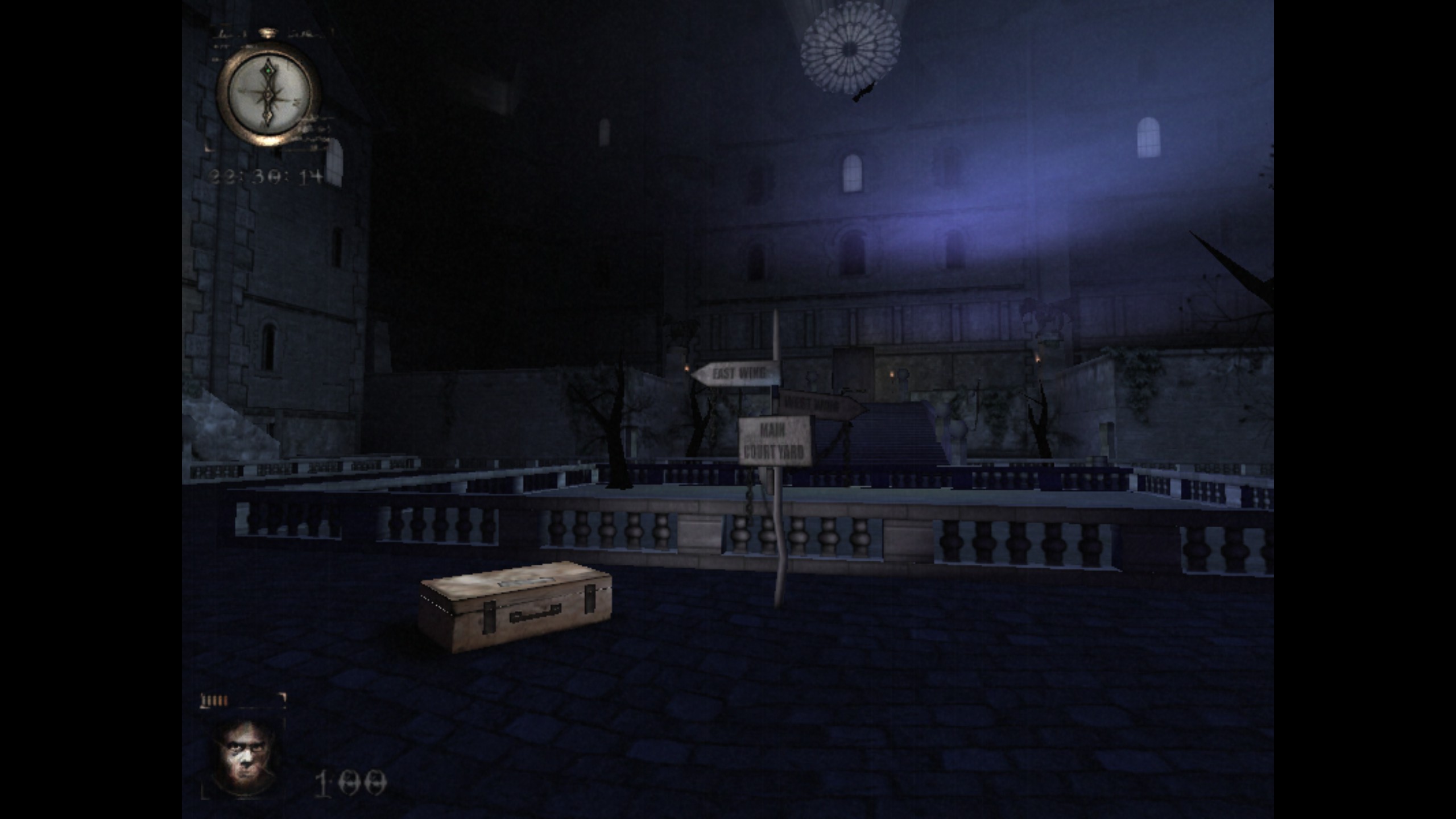
I decided to run a comparison between Proton 8.0-2 and 5.0-10, and found that not only is 8.02 still far slower, but the game appears crushingly black on my end. The same is the case on 7.0-6.
8.0-2:
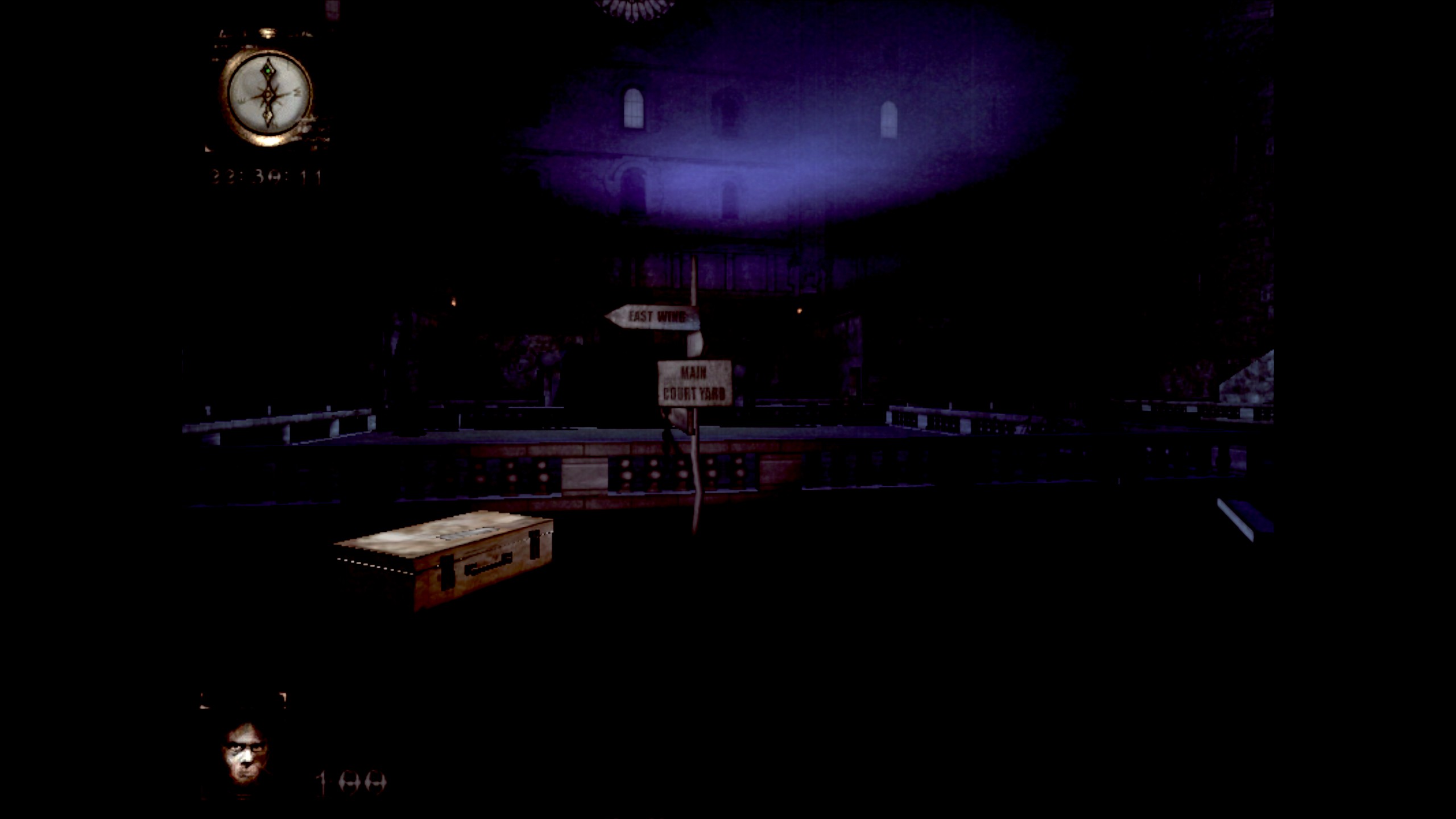
5.0-10:
- GPU: RX 6600
- Driver/LLVM version: Mesa 22.0.5/LLVM 14.0.5
- Kernel version: 5.16.0-5mx-amd64
- Link to full system information report as Gist
steam-283290_proton-8.0-2.log
steam-283290_proton-5.0-10.log
Hello @thasreal, can you test some Proton versions between Proton 5.0 and 8.0 and note what the oldest version is darker than affected / newest that doesn't show the visual regression?
Gladly.
Moving from Proton 5.0-10 to 5.13-6 introduces the performance regression noted previously in the thread, but leaves the game's colouration untouched. The jump to 6.3-8, however, darkens the game and coincides with a massive increase in log size (476.3 KiB to 13.9 MiB).
steam-283290_proton-5.13-6.log
steam-283290_proton-6.3-8.log
Just use the Proton 3.16. Steam need to add the missing file. protontricks 283290 quartz will add the missing file. Must have the protontricks install first.
By the way there is a start.exe for changing the screen size and some other stuff. But you have to use the Lutris 5.1.3 beta in order to use it. Which will require these. Wine 5.0 and winetricks -q amstream quartz mfc42. Must have the dgvoodoo2 is enabled on the Lutris beta 5.1.3 so it will works better. Make sure that you set Wine 5.0 to Proton 3.16 after you get done set everything up on Lutris beta 5.1.3. Note: can't use past Wine 5.0 because it will lag.
By the way there is a start.exe for changing the screen size and some other stuff. But you have to use the Lutris 5.1.3 beta in order to use it. Which will require these. Wine 5.0 and winetricks -q amstream quartz mfc42. Must have the dgvoodoo2 is enabled on the Lutris beta 5.1.3 so it will works better. Make sure that you set Wine 5.0 to Proton 3.16 after you get done set everything up on Lutris beta 5.1.3. Note: can't use past Wine 5.0 because it will lag.
Actually, that's another good point: the game's settings menu doesn't seem to work within Proton and can't be launched from within Steam, so Proton players are stuck with the default settings unless they edit the registry.
@thasreal Thank you for reporting the regressions! The details on which proton version has which behavior were very helpful. We'll be looking into both of these. Gamma support is a hard problem to solve, but we are working on improving it :)
Results of launching the game with Proton 8.0-3 a few minutes ago:
- I'm no longer seeing the severe performance problems that I saw with Proton 5.13-6, 6.3-8, and 7.0-6.
- I'm no longer seeing the gamma issue (i.e. way-too-dark graphics) that I saw with Proton 6.3-8 and 7.0-6.
- The opening cutscene still works, unlike with Proton 5.0-10 and older.
I cannot confirm that the game works perfectly, because I just opened it to test the graphics/performance and didn't go beyond the opening area, but issues I noticed before appear to be resolved.
The performance and gamma issues still occur on my end, although I suspect they come from my using an out of date mesa version.
I may have been too quick to say that performance was fixed with Proton 8.0-3 — or maybe something changed between that version and Proton 8.0-5.
After testing the game with Proton 9.0-3 and seeing no obvious issues, I went and tried the previous Proton versions again, and found that Proton 8.0-5 was slow by comparison. Although performance with Proton 8.0-5 is noticeably better than with the previous three versions (7.0-6, 6.3-8, and 5.13-6), it's still significantly worse than with Proton 9.0-3 (the latest stable version as of today).
Even Proton 9.0-3 might not be ideal in terms of performance, though. Based on limited testing, it looks like the game's frame rate is a bit higher with Proton 5.0-10 and older. Of course, then the cutscenes don't work (at least not without the tweaks I mentioned previously: WINEDLLOVERRIDES="winegstreamer=" %command% in the launch options and protontricks 283290 quartz). Proton 9.0-3 seems to run the game well enough, and the cutscenes work.
I see that SteamDB shows Proton 8.0-3 as the recommended version for Steam Deck, and I wonder if the latest stable Proton would be a better choice there, but I haven't tested the game on that hardware.
@michaelneverwins Thank you for the follow-up and for checking to make sure the steamdb pin is ideal :). Confusingly, "proton-8.0-3" actually is an alias that points to "proton-stable" which is currently set for Proton 9.0, so this game is actually set to use Proton 9.0 by default. The double-check is still greatly appreciated!
I don't know what may have changed, aside from the fact that I'm now using an AMD Radeon RX 6600, but with at least some Proton versions for which I'd previously reported cutscenes working out-of-the-box (namely Proton 9.0, 8.0, and 7.0), I'm now seeing SMPTE color bars, at least for the new-game cutscene. (I didn't bother to re-test with 6.3 or 5.13 because I can see that 7.0 still runs the game with the same bad performance and overly dark graphics as before.) I've never seen good documentation of whatever magic Steam/Proton does with pre-rendered video playback, and it's only from comments here and there that I know it has something to do with server-side transcoding and the shader cache, so I'm not sure if changes to my system could explain the cutscenes no longer working.
In any case, it seems this can still be fixed with the same tweaks I had used to get cutscenes working in Proton 5.0-10, i.e. running protontricks 283290 quartz and adding launch options WINEDLLOVERRIDES="winegstreamer=" %command%. I've tested this with Proton 9.0-4 just now.
@michaelneverwins Is shader pre-caching enabled on your end? Settings > Downloads has the option.
If it was already enabled check the contents of your shadercache folder and enter the 283290 folder, say if there's a file called transcoded_video.foz. Also wipe your prefix, add this to your launch parameters PROTON_LOG=1 %command% and start a new game so the game attempts to play the starting video, then upload here the resulting steam-283290.log file that will appear in your home folder
I deleted both ~/.steam/debian-installation/steamapps/compatdata/283290/ and ~/.steam/debian-installation/steamapps/shadercache/283290/ [edit: yes, deleting the latter was silly, see edits at the end], put only PROTON_LOG=1 %command% in the launch options, launched the game with Proton 9.0-4, and attempted to play the "new game" cutscene (which again showed as color bars in this test). Here's the log produced:
Ignoring a bunch of wrong ELF class: ELFCLASS64 warnings, I think the relevant parts begin at line 3263.
Firstly there's an error about missing GStreamer plugins. This probably has nothing to do with transcoded_video.foz and is just the reason for the original (un-transcoded) video not playing. I know there are some GStreamer plugins that I don't have installed on my system — for example, while I do have gstreamer1.0-plugins-bad and gstreamer1.0-plugins-ugly as dependencies of some other package(s), I don't have gstreamer1.0-plugins-bad:i386 and gstreamer1.0-plugins-ugly:i386, which I assume would tend to be more relevant to a 32-bit game — so maybe the original video would play even without my aforementioned tweaks if I installed those packages, or maybe not. (Would it even use my system's GStreamer plugin packages? Or would it just use whatever is provided by Proton and Steam Linux Runtime?) It's possible that I had more GStreamer plugins installed last time I tested this game, because I do remember installing some of these packages for a different (non-Steam) game long ago, but I really don't know if this could be the reason that cutscenes worked before. The last comment in which I reported cutscenes working with Proton 9.0 is dated after my last fresh install of Linux Mint 22 (but before the upgrade to 22.1).
The next part of the log is an error about failing to read transcoded_video.foz, and I assume that's simply the result of the file not existing at all.
I do have "Enable Shader Pre-caching" enabled in my download settings, and after having run this test, I'm not seeing a file named transcoded_video.foz. I am seeing an empty file at ~/.steam/debian-installation/steamapps/shadercache/283290/placeholder-video-used, which (based on the name) I assume is expected to be there after color bars are displayed.
Edit: Whatever problem I'm having with transcoded videos might have nothing to do with Nosferatu: The Wrath of Malachi in particular.
shadercache subfolder did have a transcoded_video.foz (Bully: Scholarship Edition), and I renamed that folder (12200 -> 12200.bak) before launching the game. Again I got color bars for the opening cutscene which had worked before. A new folder was created in shadercache, but again it has the placeholder-video-used file. Should I expect transcoded videos to be re-downloaded if I delete (or, in this case, rename) the shader cache and then immediately run the game again? Or do I need to wait for Steam to regenerate the cache eventually? I've double-checked that I have "Enable Shader Pre-caching" enabled, as well as "Allow background processing of Vulkan shaders" but I don't know if that part matters here.Edit again: I completely uninstalled and re-installed Nosferatu: The Wrath of Malachi (after deleting its prefix and shader cache again), and this created a new shader cache folder with the transcoded_video.foz. With that, the cutscene works again without any tweaks. So it seems the problem is that transcoded_video.foz isn't re-downloaded if it's lost after installing the game. Deleting the ~/.steam/debian-installation/steamapps/shadercache/283290/ for testing purposes at the start of this post, therefore, obviously didn't help. But for the record, the video was already not working at that point, so maybe I had previously wiped out that shader cache without realizing it.
One last edit: I've used <details> tags to collapse some irrelevant things above because I'm sorry that this comment became so needlessly long.
One more thing, not about cutscenes but rather about the performance issues with some older versions of Proton: It occurs to me that this game uses Direct3D 8 (at least according to PC Gaming Wiki), so using D8VK might improve performance. However, I think it's only with Proton 9.0 or newer that D8VK can be easily enabled (with PROTON_DXVK_D3D8=1 in the launch options), and performance with Proton 9.0 was already "good enough" (in my rough estimation not based on any careful benchmarking) — but for what it's worth, adding PROTON_DXVK_D3D8=1 to the launch options does seem to make the performance with Proton 9.0 even better (just based on a very quick test).
@michaelneverwins I don't think steam becomes immediately aware it's missing shader files when you delete them manually, and deleting them manually should never be needed. I think restarting the steam client might make it aware the files are missing (or reinstalling like you did in this case, as the game is small anyway). Glad to know the game is working now.
One more thing (or actually many things), regarding the start.exe launcher used for changing settings (e.g. game resolution) as mentioned in earlier comments: I decided to try to get it working, and it's a mess, which requires more explanation than I wanted to write. There are some things that are relevant to Proton compatibility (bold below). The rest might be helpful to users.
First of all, before we even get into Proton compatibility issues, this executable is already a nuisance because the Steam client doesn't offer an option to run it (and I assume that's the game developer's fault). Steam only knows how to run the game executable, Nosferatu.exe, thereby skipping the launcher and its settings menu. Windows users can probably just open up the game folder and double-click start.exe, but on Linux we would want to run this executable using the same prefix that Steam's Proton uses to run the game itself.
One way to do this is by putting bash -c 'exec "${@/Nosferatu.exe/start.exe}"' -- %command% in the launch options (which of course requires bash; I've also seen a few other variations on this method of executable name replacement, one involving sed).
Initially, when I tried this, it failed outright; no window appeared at all. Prepending PROTON_LOG=1 to the launch options revealed an error about MFC42.DLL. I ran protontricks 283290 mfc42 and tried again, and this time a window did open, but it showed SMPTE color bars and then closed after a few seconds. This is with transcoded_video.foz already in the shader cache, by the way. So it seems there are additional videos played by start.exe which are not transcoded yet, and apparently the video playback fails hard enough to crash the launcher window.
So again I tried my old method of fixing in-game cutscenes (because it effectively circumvents the transcoded video playback now failing for start.exe): I ran protontricks 283290 quartz and prepended WINEDLLOVERRIDES="winegstreamer=" to the launch options. After doing this, the launcher window opened without crashing, and I was able to change settings and start the game at a higher-than-default resolution. The videos played by the start.exe launcher still didn't actually work — instead of color bars on start-up, there were a few seconds of black which I found I could skip by clicking, and when starting the game from the launcher window, another short video played audio only — but it seems these are just short logo videos (pan.mpg and idolfx.mpg in the game's shellmedia folder), so I don't care. The in-game opening cutscene still worked.
Unfortunately, all of this effort to get functionality on par with Windows is probably just masochism on my part, because the start.exe launcher is apparently half-broken even for Windows users. As noted on PC Gaming Wiki, the launcher fails to save the chosen settings for next time unless a key is manually added to the Windows registry. Indeed, the same is true under Proton: start.exe didn't save my settings until after I appended the line [Software\\Wow6432Node\\Idol FX\\Nosferatu] to ~/.steam/root/steamapps/compatdata/283290/pfx/system.reg. Moreover (and also noted on PC Gaming Wiki), whether saved to the registry or not, custom settings are not used unless the game is launched via start.exe. In other words, we can't just run start.exe once to configure the game and then expect the chosen settings to be loaded when running Nosferatu.exe directly.
What I don't see on PC Gaming Wiki as of the time of this post, and what I will now document here for posterity, is the reason that running start.exe is seemingly required for non-default settings: start.exe runs Nosferatu.exe with command-line arguments. This is great because it means we can disregard start.exe and just pass those arguments ourselves once we understand what they are.
When I clicked through the launcher without changing anything, it ran Nosferatu.exe with the arguments -adapter=0 -tq=0 -tf=0 -aa=0 -lg=1 -lt=1 -pd=1 -s=1 -w=800 -h=600 -d=32. When I set the screen mode to 1600x1200x32, chose high settings, and explicitly set texture quality to 32-bit, it used the arguments -adapter=0 -tq=32 -tf=2 -aa=4 -lg=2 -lt=2 -pd=2 -s=1 -w=1600 -h=1200 -d=32. It should be fairly obvious how the abbreviated options correspond to the settings in the menu: texture quality (default, 16-bit, 32-bit); texture filtering (bilinear, triliear, anisotropic); antialiasing (off, 4 samples); level geometry (low, medium, high); level textures (low, medium, high); particle detail (low, medium, high); sound (disabled, enabled); and screen mode.
If the two videos played by start.exe can get transcoded, then maybe it will be possible to make the launcher work as well as on Windows. In the meantime, I'm going to reset the game's prefix, append those Nosferatu.exe arguments to my usual launch options (which will now be MANGOHUD=1 PROTON_DXVK_D3D8=1 %command% -adapter=0 -tq=32 -tf=2 -aa=4 -lg=2 -lt=2 -pd=2 -s=1 -w=1600 -h=1200 -d=32 where MangoHud provides a frame rate cap), and forget about it.
For those who can figure out how to set their desired graphics settings by way of those arguments to Nosferatu.exe, there should be no real need to bother with start.exe at all, and thus no need for any protontricks usage — that is, assuming all of the in-game cutscene videos have actually been remotely transcoded. (There are more cutscenes after the readily testable new-game intro, if I remember correctly, but I haven't done a full play-through recently.)
Edit: I suppose I really should have mentioned that all of the testing above was done with Proton 9.0.
@michaelneverwins for videos to be transcoded users have to run into them first, I don't know exactly how many, but it's my understanding several users are needed for validation. It's possible you might be the first person to run the configuration tool for this game, so there wouldn't be compiled shaders for it yet.
@simifor, in that case I would encourage everyone to run protontricks 283290 mfc42 and then use bash -c 'exec "${@/Nosferatu.exe/start.exe}"' -- %command% in the launch options... for science :)
Actually, that reaches only the first video*, because the launcher window crashes after the color bars. However, if I rename the game's shellmedia/pan.mpg and try again, I can get past the first video. Doing this causes an error pop-up with IDS_CANT_RENDER_FILE -> shellmedia\pan.mpg which needs to be clicked away, and then the launcher window is initially all black (instead of color bars), but clicking the black area makes the launcher menu visible. Clicking "play" from there results in color bars for the second video (and no crash; the game runs after the second video fails to play).
(*Edit: Again, this is with Proton 9.0. When I try running start.exe with Proton 10.0, the launcher window doesn't seem to want to open at all, but then renaming shellmedia/pan.mpg has the same effect as with Proton 9.0.)
Proton versions
proton 9.0x6 2025-09proton 10.0x1 2025-09proton 9.0-4x2 2025-08proton 5.0-10x7 2025-08proton 8.0-3x3 2024-09proton 8.0-5x1 2024-09proton 9.0-3x1 2024-09proton 5.13-6x2 2023-08proton 6.3-8x1 2023-08proton 3.16x3 2023-05proton 5.0x3 2023-05proton 8.0-2x1 2023-05proton 7.0-1x1 2022-03proton 4.11x1 2021-10proton 5.13x1 2021-10
Launch options
WINEDLLOVERRIDES="winegstreamer="x4 2025-09MANGOHUD=1x1 2025-09PROTON_DXVK_D3D8=1x1 2025-09PROTON_LOG=1`x1 2025-09PROTON_DXVK_D3D8=1`x1 2025-08PROTON_LOG=1x3 2025-08PROTON_USE_D9VK=1"x1 2019-12
Launch lines
MANGOHUD=1 PROTON_DXVK_D3D8=1 %command% -adapter=0 -tq=32 -tf=2 -aa=4 -lg=2 -lt=2 -pd=2 -s=1 -w=1600 -h=1200 -d=32x1 2025-09WINEDLLOVERRIDES="winegstreamer=" %command%x3 2025-08
Upstream links
- ValveSoftware/Proton/issues/685x1 2019-01
DLLs
mfc42.dllx1 2025-09quartz.dllx2 2022-03winegstreamer.dllx1 2022-03
Compatibility Report
System Information
I confirm:
Symptoms Regression in Proton 3-16-6-beta
Reproduction