rFactor 2
Yesterday I try to play online, and the game downloads all the mods, tracks and cars that it needs, loads everything and go to monitor, but a few seconds later the game crash and go to launcher
One user of the rFactor 2 forums post this about the Force Feedback in Linux (Steam Play) for rFactor 2:
https://forum.studio-397.com/index.php?threads/linux.61014/#post-958655
Can someone with the necessary knowledge keep an eye on it? This work perhaps activate Force Feedback on Automobilista and could be used in the Native version of Euro Truck Simulator 2
Could be nice, thx for the 32Bit Tip. Launcher and game start without problems, recognizes my Thrustmaster T500 RS, keys are assigned except clutch.
Steering input isn't smooth at all, turns heavy left and right. Not playable with this wheel.
About playing in 64 bit mode. I found this in Steam Forums:
" You can get the game to run in 64bit mode by replacing rFactor 2/Bin64/d3dcompiler_43.dll with the version found here: https://github.com/samhocevar/d3d4linux
Getting 64bit support is crucial to prevent the game from crashing when It uses > 4GB of RAM
(I have no ideia what the difference is between the two versions of the dlls, but wine doesnt like the one bundled with the game)"
Don't start with 3.16-4beta. Take a look on this. With 3.7.8 runs well
Testing 3.16-6 Beta, the game works again
Hey, Thanks for keeping this issue up to date - I've checked the forum posts and such to get r2 working on Wine/Stream, I've a G27 wheel here to use with it. I'll try reproduce the game running for starters, and report back in future. For now - just a thanks for your efforts on documenting the current state! -Harry
The game runs with the last Proton (4.2), but Force Feedback stills not working.
@leillo1975: does RF2/64 bit still require the d3d4linux workaround with proton 4.2?
@leillo1975: does RF2/64 bit still require the d3d4linux workaround with proton 4.2?
.... I don't know. My game is patched a lot of time ago.
BUT I HAVE A GREAT NEW ABOUT THIS GAME.
With Proton 4.2-3 I can play online !!!!! In this moment, there is only needed that the force feedback works for the game to be fully functional. Has anyone tried it with the latest versions of Wine?
Someone has tested this game with an G920 wheel? This controller has some effects included in the driver that G29, G27 or DFGT don't include. I found this in GamingOnLinux
"ETS2 and ATS are the only games I know that use the predefined effects of the force feedback system (spring, damper, inertia, friction and periodic effects). All other games calculate everything themselves and only use constant force effects. The logitech wheels (except G920) support spring and damper in hardware, but this is not implemented in the official Linux driver. The G920 supports all effects in hardware and all are available in the driver. There are no other (currently sold) wheels with a force feedback driver although it appears that Feral managed to make support for others on their own. Technically there is no reason why that stuff can't be implemented in user space. "
Perhaps this is the problem. Some time ago there was a project (ff-memless-next) who tried to include these on the kernel, but were finally discontinued:
https://lkml.org/lkml/2014/4/26/115
https://github.com/edwin-v/linux-hid-lg4ff-next
It would be a good thing if someone took up that job again, because it's very likely that a lot of games that work with Proton, but don't have Force Feedback, would work correctly.
The force feedback for Linux documentation is at https://www.kernel.org/doc/html/v5.2/input/ff.html
It doesn’t look like it would be that hard to either roll your own tests (or better, use fftest, if possible). Then you’d know for sure.
I’m vaguely interested, but doubt I have the time at the moment. (I have a G29)
I am surprised to see it uses a completely different driver, though. (hidlg4ff vs. hid-logitech-hidpp)
Edit: it also looks like the official Linux support for the g29 is ~18 months newer than lg4ff-next. I haven’t actually looked at the code.
... and after reading the thread, it seems there were valid/good reasons for the code (as posted back in 2014) to not make it in.
It looked like there was quite a bit of “I think it would be better to...” going on. Also, developers from Logitech jumped onboard and offered help in what was previously pure reverse engineering.
There are no doubt other threads that could tell more of the story.
In the last build (1114) the game don't show the launcher and is not possible to play it. Please, take a look to the log
steam-365960.log
Hello @leillo1975, err:steamclient:create_win_interface Don't recognize interface name: SteamClient019 in the log hints that the game bumped to a steamworks sdk release that's not in Proton yet.
It worked again with 4.11-3. Thanks!
Hello @leillo1975,
err:steamclient:create_win_interface Don't recognize interface name: SteamClient019in the log hints that the game bumped to a steamworks sdk release that's not in Proton yet.
It worked again with 4.11-3. Thanks!
The game don't load again. The same problem with a new steamworks sdk?
There's no hint of a missing steamworks interface, so something else is going on here.
The log does have a bunch of access violations (c0000005) before the game crashes on a null pointer.
wine: Unhandled page fault on execute access to 0x00000000 at address (nil) (thread 0043), starting debugger...
Also, it's not clear if this is a Proton regression because the game got an update about 6 hours ago.
It's not only my problem, in the linux-unofficial room of rFactor 2 official discord channel, more users have the same problem like me. Is it the same for the users here?
I can get to the launcher but when starting the actual game it crashes after the splash screen.
Attacched log.
steam-365960.log
system info.txt
As some user discovered in the rFactor2 linux discord the crash is due to the newly added intro movie.
As a workaround renaming or removing this file should make it work again.
/home/yourusername/.local/share/Steam/steamapps/common/rFactor 2/Core/UIData/PREGAME.avi
It would have to see what kind of video it is and what codec it uses to know why Proton doesn't play it.
I think you must see this article on reddit. Finally we can play rF2 with FFB with all the effects on Linux :
https://www.reddit.com/r/linux_gaming/comments/dypf2q/newlg4ff_a_much_more_complete_new_driver_for_our/
Good work @berarma !!!
At the moment only works with Wine, because Proton 4.11-8 has broken FFB in some games, but in the next version it will be fixed:
https://github.com/ValveSoftware/Proton/issues/3194#issuecomment-555558839
With the last version of proton (4.11-10), and using the @berarma 's new Linux Logitech Wheels Driver (new-lg4ff) , the game has a good Force Feedback. Good Work!
Hi just to mention my experience, Gentoo using the new-lg4ff driver, Logitech GT driving force wheel, force feedback only works using the 32bit executables (thank you thank you thank you @berarma ) , using 64bits the wheel works as well, but no FFB. I'm also playing with dualshock controllers, the FFB works in fftest but no luck in rFactor2. (I've also tried to disable the controllers in Steam, same result).
Are you using inverted/negative ffb? Try it
El mié., 1 ene. 2020 15:58, Rubén Gómez [email protected] escribió:
Hi just to mention my experience, Gentoo using the new-lg4ff driver,
Logitech GT driving force wheel, force feedback only works using the 32bit
executables (thank you thank you thank you @berarma
https://github.com/berarma ) , using 64bits the wheels works as well,
but no FFB. I'm also playing with dualshock controllers, the FFB works in
fftest but no luck in rFactor2. (I've also tried to disable the controllers
in Steam, same result).—
You are receiving this because you were mentioned.
Reply to this email directly, view it on GitHub
https://github.com/ValveSoftware/Proton/issues/245?email_source=notifications&email_token=AAEGXDPPQRHUFXNXADSADILQ3SVR5A5CNFSM4FREXGEKYY3PNVWWK3TUL52HS4DFVREXG43VMVBW63LNMVXHJKTDN5WW2ZLOORPWSZGOEH5GWLQ#issuecomment-570059566,
or unsubscribe
https://github.com/notifications/unsubscribe-auth/AAEGXDOS7SAL3FPXLJ2JKW3Q3SVR5ANCNFSM4FREXGEA
.
Hi just to mention my experience, Gentoo using the new-lg4ff driver, Logitech GT driving force wheel, force feedback only works using the 32bit executables (thank you thank you thank you @berarma ) , using 64bits the wheel works as well, but no FFB. I'm also playing with dualshock controllers, the FFB works in fftest but no luck in rFactor2. (I've also tried to disable the controllers in Steam, same result).
It shouldn't matter 32 or 64 bits. It could be be some system misconfiguration but I don't even know what it could be.
You should open an issue in the new-lg4ff project where it could get more attention.
There are a problem with online multiplayer races. If you play a single player race with multiple AI's there are no problem, but if this race is against another players online, in Linux your car is much slower than the rest of the cars. You can better see this problem here:
https://youtu.be/CEcS-dn6gBI
One Studio-397 (rFactor2) developer tell us on the rFactor 2 Linux discord room the following:
"Marrs:
Well, a car that appears to go much slower is usually caused by the physics thread running too slow (not making it in its allocated time slot). You can easily test that via the graph you can enable with Ctrl-C. The purple horizontal bar should not go all the way to 100% (ideally stay below 50% really)."
" believe you can (judging on the videos you've shown). I don't know the cause. Something in the network stack maybe that is slower? Hard to say.""
Assetto Corsa Competizione has a similar problem on Online Races, that makes us suspect a problem with Wine/Proton online component
@berarma provided some logs of online playing to the rfactor2 devs, they have looked into them and here are some of their conclussions:
Marrs:
Let's start with the good news. The graphics look good. As we could also see in the video, a steady framerate, nothing erratic really.
Now the bad news. The physics are behaving erratic, and in the "top 3" of code segments that we measure are two that are directly related to network communication. So it's safe to say that our hunch was right, there is something going on with the networking emulation. That is about all we can see on our side, so if you want to know more, you'd have to start profiling OS functions and compare Windows to Linux.
Is there any way to trace the network functions while playing to be able to find anything wrong?
Is there any way to trace the network functions while playing to be able to find anything wrong?
I have launched the game with "PROTON_LOG=1 %command%" and played a online session. This is the generated log file.
If we can tune the logging to check only for the network code, please, let us know how.
There are a problem with online multiplayer races. If you play a single player race with multiple AI's there are no problem, but if this race is against another players online, in Linux your car is much slower than the rest of the cars. You can better see this problem here:
https://youtu.be/CEcS-dn6gBI
One Studio-397 (rFactor2) developer tell us on the rFactor 2 Linux discord room the following:"Marrs:
Well, a car that appears to go much slower is usually caused by the physics thread running too slow (not making it in its allocated time slot). You can easily test that via the graph you can enable with Ctrl-C. The purple horizontal bar should not go all the way to 100% (ideally stay below 50% really)."" believe you can (judging on the videos you've shown). I don't know the cause. Something in the network stack maybe that is slower? Hard to say.""
Assetto Corsa Competizione has a similar problem on Online Races, that makes us suspect a problem with Wine/Proton online component
I can confirm that the network problem with this game is also related with Wine. I test it with Lutris and Wine 5.2 and have the same problem
The Studio-397 dev that @alexbrrsclnt mentions, accompanied his comments with two graphs. I think they provide pretty good information and I insert them into the message:
@berarma provided some logs of online playing to the rfactor2 devs, they have looked into them and here are some of their conclussions:
Marrs:
Let's start with the good news. The graphics look good. As we could also see in the video, a steady framerate, nothing erratic really.

Now the bad news. The physics are behaving erratic, and in the "top 3" of code segments that we measure are two that are directly related to network communication. So it's safe to say that our hunch was right, there is something going on with the networking emulation. That is about all we can see on our side, so if you want to know more, you'd have to start profiling OS functions and compare Windows to Linux.

Is there any way to trace the network functions while playing to be able to find anything wrong?
The second graphic is very similar to the frametimes of this Assetto Corsa Competizione Online Multiplayer video:
https://youtu.be/cEoahOxIWqc
In our opinion this could be the same problem
I have created an entry on the Wine Bug tracker to try to get more info about this issue.
https://bugs.winehq.org/show_bug.cgi?id=48668
This command in the launch options will log networking code calls:
WINEDEBUG=+seh,+winhttp,+winsock,+wininet %command%
And the log file for a network race. I'm just standing in the pit:
steam-365960.log.gz
According to the game developers, there seems to be something running very slow in the network code compared to the game running on Windows. Another user has reported performance problems on servers hosting the game when there's many clients connected.
I've created a profile file with sysprof. It's been recorded while inside an online race to show the issue:
A lot of time is spent inside network calls that send and receive data through the network. Most of the time goes into the function igb_rd32 in the kernel that in turn calls the function readl which reads data from the hardware. I don't know if the problem is the kernel misbehaving, the driver being slow, or Proton doing too many calls to the kernel. Or even a mix of all these.
There's also a mutex consuming some significant time related to the same calls. A high number of concurrent calls to that function could be the cause.
Maybe someone with more knowledge of the network stack or the kernel could help.
EDIT: I just noticed the syscap file only shows the correct function names when the right version of kernel debugging info is in the system. It will show incorrect funcion names otherwise. Sorry, I'll make a new post with the right info.
Here's more information about the networking issue. In online races, the physics threads run slower than they should, and it only happens in online races, offline works with the physics thread under 50% CPU use, like it should.
The following data was taken while standing in the pit in an online training session.
Sysprofile screenshot showing the slowest system call:

Sysprofile screenshot showing the second slowest system call:

Strace ouput of the 3 slowest threads using the "-r" option:
rfactor2_all_1.strace.gz
rfactor2_all_2.strace.gz
rfactor2_all_3.strace.gz
Using Wireshark, I did a comparison between Proton and Windows on the datagram upload rate to the server. Proton was sending UDP datagrams at a rate ranging from about 161 to 181 per second. When I did the same test on Windows the rate was 270 per second.
I wonder if we can understand; what is the relationship between telling the server where we are in the client, and handling the car's physics that causes the former to affect the latter in such a way?
@berarma
I put the possible (hacky) fix here: https://bugs.winehq.org/show_bug.cgi?id=48668
It would be great if you could test it.
@gofman It works perfectly now! I haven't done a proper race yet, but everything is very smooth now with or without other cars. Thank you very much! You did a wonderful job!
Here's a Proton build 5.0-7 with both patches applied: http://www.mediafire.com/file/zz1p2kabyt5ffmy/proton_5.0-local.7z/file
These are the patches for reference:
https://github.com/ValveSoftware/Proton/issues/1420#issuecomment-639084670
https://bugs.winehq.org/show_bug.cgi?id=48668#c7
I've applied both patches but it's the second one that fixes the multiplayer issue in rFactor2.
@berarma
I put the possible (hacky) fix here: https://bugs.winehq.org/show_bug.cgi?id=48668
It would be great if you could test it.
@GloriousEggroll , can you include this fix on your next Proton-GE?
Here is a sane version: https://www.winehq.org/pipermail/wine-devel/2020-June/167775.html
For your testing pleasure: http://www.mediafire.com/file/7zc3875pe8koyoh/proton-5.0-9-rf2-acc.7z
Both latest ACC and rF2 patches are applied to the latest Proton 5.0-9.
Proton-5.9-GE-ST don't work out of the box:
https://github.com/GloriousEggroll/proton-ge-custom/releases/tag/5.9-GE-4-ST
EDIT: FFB in Logitech G29 don't work with new-lg4FF. Please, @GloriousEggroll , take a look to this issue.
Did some get working plugins?
I don't know if this is the best place to notify this, but with nvidia 460 driver, the game gives me a very low framerates (20-25fps). With 450 driver, fps goes to usual rate.
Probably, this is a Nvidia and not a Proton issue, but I don't know where I can report this issue.
I don't know if this is the best place to notify this, but with nvidia 460 driver, the game gives me a very low framerates (20-25fps). With 450 driver, fps goes to usual rate.
Probably, this is a Nvidia and not a Proton issue, but I don't know where I can report this issue.
I can confirm this issue
I don't know if this is the best place to notify this, but with nvidia 460 driver, the game gives me a very low framerates (20-25fps). With 450 driver, fps goes to usual rate.
Probably, this is a Nvidia and not a Proton issue, but I don't know where I can report this issue.
Same here. The game was working perfectly at +90fps with drivers 450.80.02, now it's unplayable at around 20fps with drivers 460.32.03. My GPU is RTX2070 Super.
I am having huge performance issues with rF2 either.
i am having 200-300 FPS in Windows and under Proton roughly around 50-70 which feel like 30fps on my Ryzen 5950x and RTX 3090.
I am having huge performance issues with rF2 either.
i am having 200-300 FPS in Windows and under Proton roughly around 50-70 which feel like 30fps on my Ryzen 5950x and RTX 3090.
What version of the Nvidia Driver you are using?
460.32.03
Arch Linux 64
Try to use 450. I suppose that this change will increase your framerate. In my case with 460, I get 20-25fps. With 450, 90-100
I cant, my RTX3090 at least needs 455 ;).
Is possible to install 455? Before installing 460 driver, this was my driver. After install 460, I couldn't back to this (not listed on the drivers install window) and had to install 450.
You also can try the new 460 driver released today:
https://www.phoronix.com/scan.php?page=news_item&px=NVIDIA-460.39-Linux-Driver
i haven those Arch packages inside my cache anymore.
so its not that easy and i dont want to do crappy things to my arch setup.
i have windows installed seperately for this.
One day everything i need runs on linux and i switch forever ;).
When the new 460 driver is on the Ubuntu PPA, I will try it, and if it works I will report here.
Bad News , Nvidia 460.39 driver has the same problem as the previous version. Low FPS again. Can someone at @NVIDIA take a look on this problem?
EDIT: Seems that Red Dead Redemption 2 have the same problem. I just wrote a message on the Linux Nvidia developers forum. The post I started is this:
https://forums.developer.nvidia.com/t/low-fps-on-rfactor-2-proton-with-460-linux-driver/166910
New nvidia 460.56 driver version, and the regression remains unresolved. Back to 450.... Please, @Nvidia, can you check the driver? At this rate, rFactor 2 users are going to stay on version 450 forever.
Yeah, we can't keep stuck using an old version of the driver only for this game. Web need this fixed. Thanks!
I just downloaded and installed the new version 460.67 and the problem still occurs... can nobody take a look? Back to 450
same here! opensuse, kernel 5.3 and nvidia 460.67
Did the game as a whole stop launching for anyone else? I can't even open the settings configuration (even with the offline trick shared in the OP). Tried Proton GE and several official Proton versions all the way back to 3.9 as well as all beta channels for the game. Is there a text file I could edit the configuration directly? On Arch + i3, BTW. Game used to work fine last time I checked (a few months ago).
Did the game as a whole stop launching for anyone else? I can't even open the settings configuration (even with the offline trick shared in the OP). Tried Proton GE and several official Proton versions all the way back to 3.9 as well as all beta channels for the game. Is there a text file I could edit the configuration directly? On Arch + i3, BTW. Game used to work fine last time I checked (a few months ago).
It's working for me as always. Have you changed the Steam launcher parameters?
@berarma, IIRC I was running it without any particular parameters; I tried different Proton launch parameters but nothing works so far.
I've also noticed that DiRT Rally 2.0 (which I had just bought and was about to launch for the first time) also failed despite having a "Gold" rating on ProtonDB, so I decided to look beyond rFactor 2. I am starting to think my problem might be related to a well-documented problem Arch-Soldier problem, but the proposed solution hasn't worked yet.
[SOLVED]
I've finally figured out what was wrong on my (Arch) system:
dxvk-binwas not installedamdvlkandlib32-amdvlkwere installed (I only have an Nvidia card here)
After installing dxvk-bin and removing the two AMD packages, I was able to run vulkaninfo and get no errors. No idea what happened there, because as I wrote before I was running DXVK games fine just a few months prior. Anyway, reading this documentation was what ultimately helped me debug.
Dear @ValveSoftware and Codeweavers devs (@aeikum @kisak-valve ... ) . I'm here to ask you for help with Nvidia. If you read the last messages of this thread, you can see that in the last versions of the nvidia drivers, there are a regression that makes the game work much more slow than normal. With 450 drivers this problem don't happen. The problem is that this driver, besides being obsolete little by little, don't allow the execution of other games with Proton, so every time we play rFactor 2 we have to install version 450, and when we want to play other games, such as GRID 2019, we have to go back to a more current version, such as 460, 465 or the brand new 470.
We would like to ask you (as we are several fans of this game on Linux), to please intercede for us with the Nvidia developers. I know from an personal communication with one of them that the problem has been debugged months ago, but despite that they haven't put the solution in any of the new versions since then.
Newer GPUs don't work with driver 450 so this game is unplayable on those cards. This regression could affect some other games but maybe not so noticeably.
It looks like nVidia 470.63.01 with "Fixed a Vulkan performance regression that affected rFactor2." in the changelog will be interesting to test once it is available for your distro's preferred packaging flavor.
It looks like nVidia 470.63.01 with "Fixed a Vulkan performance regression that affected rFactor2." in the changelog will be interesting to test once it is available for your distro's preferred packaging flavor.
Yes, I'm waiting for the Ubuntu PPA to update and test it. I don't know if you or/and @aeikum had anything to do with it, but is good to finally see this after more than 6 months after reporting it.
It looks like nVidia 470.63.01 with "Fixed a Vulkan performance regression that affected rFactor2." in the changelog will be interesting to test once it is available for your distro's preferred packaging flavor.
Yeah, sure we will test it once the driver's update arrive to the PPA. Took a long time, but finally we are almost there!
Although I haven't tried flat screen recently, back a year or so ago when I tried it it was running pretty well. Only now that I tried it in V, even on the lowest possible settings I can't seem to get 45 FPS stable even, which is far less than half I get on windows
Although I haven't tried flat screen recently, back a year or so ago when I tried it it was running pretty well. Only now that I tried it in V, even on the lowest possible settings I can't seem to get 45 FPS stable even, which is far less than half I get on windows
Are you using Nvidia? See comments above yours.
Although I haven't tried flat screen recently, back a year or so ago when I tried it it was running pretty well. Only now that I tried it in V, even on the lowest possible settings I can't seem to get 45 FPS stable even, which is far less than half I get on windows
Are you using Nvidia? See comments above yours.
nope, AMD 6800XT
I have the following setup:
- Logitech G29
- Leo Bodnar Pedal Cable (I've modded my pedals to have a load cell)
- A random USB handbrake HID device from Amazon. (Works as an input device)
I've noticed that if I use Proton <= 5.0-10 -- all three of the USB devices are usable. If I use any newer version of Proton - 5.13-6, 6.3-7 or Proton Experimental, no other USB device appears.
Does anybody have an explanation for this? Was USB support changed that drastically between Proton versions?
Thanks.
Interesting what you say about the usb in new versions of Proton. I think know this can be useful for all people that like the sims and use a lot of devices. @xpander69
Interesting. I looked at #5126, and decided to compile/test sdl-jstest myself.
sdl-jstest -l: Only shows the G29 wheel.
sdl2-jstest -l: Shows all three devices.
It's not at all clear if there's a relation between the two (or if Wine even uses SDL), but it is interesting to see identical behavior with sdl-jstest.
5.13 and up started using bwrap and the runtime. So i guess if running flatpak steam it cant find things because its sort of sandbox inside sandbox so called. I dont really get whats the problem though. my G920 is nicely detected. my USB handbreak however isn't because it uses axis8 as a handbreak and wine(proton) doesn't know more than 6 axis afaik. As a workaround i bind it with antimicroX for games to be able to use it. IIRC theres work going on with that
5.13 and up started using bwrap and the runtime. So i guess if running flatpak steam it cant find things because its sort of sandbox inside sandbox so called. I dont really get whats the problem though. my G920 is nicely detected. my USB handbreak however isn't because it uses axis8 as a handbreak and wine(proton) doesn't know more than 6 axis afaik. As a workaround i bind it with antimicroX for games to be able to use it. IIRC theres work going on with that
A question about the handbrake, with antimicroX works like a key (digital, not analog...), right? Or you can use AntimicroX to emulate a analog axis?
The truth is that the developers could keep an eye on this issue, because it is a very big handicap for simulators...
A question about the handbrake, with antimicroX works like a key (digital, not analog...), right? Or you can use AntimicroX to emulate a analog axis? The truth is that the developers could keep an eye on this issue, because it is a very big handicap for simulators...
Works like a key. Which is still fine for rally games imo, as i just tap the handbreak once to take hairpins, but yeah iirc someone wrote that they are working on new SDL backend for wine, to get more than 6 axis in, so this thing will probably start to work without the need of AntimicroX soon
I hope this will happen. There are more people with your same problem (https://github.com/ValveSoftware/Proton/issues/5126) , and I am interested in buying a handbrake like yours....
Works like a key. Which is still fine for rally games imo, as i just tap the handbreak once to take hairpins, but yeah iirc someone wrote that they are working on new SDL backend for wine, to get more than 6 axis in, so this thing will probably start to work without the need of AntimicroX soon
Proton is already using SDL. Where did you read about that limitation? It might be something easy to fix.
Interesting. I looked at #5126, and decided to compile/test
sdl-jstestmyself.
sdl-jstest -l: Only shows the G29 wheel.sdl2-jstest -l: Shows all three devices.It's not at all clear if there's a relation between the two (or if Wine even uses SDL), but it is interesting to see identical behavior with
sdl-jstest.
@berarma, take a look
Interesting. I looked at #5126, and decided to compile/test
sdl-jstestmyself.
sdl-jstest -l: Only shows the G29 wheel.sdl2-jstest -l: Shows all three devices.
It's not at all clear if there's a relation between the two (or if Wine even uses SDL), but it is interesting to see identical behavior withsdl-jstest.@berarma, take a look
Yes, I know, but I'm more interested on @xpander69's affirmation that Proton doesn't support more than 6 axes.
Yeah, but from what i gathered SDL needs to be patched to identify more than 6 axis or something. Herbert from Linux Gaming Dev discord channel talked about it iirc, i would have to search the backlog to find it
edit: found
Herbert — 10/08/2021
the only limitation is about finding HID usages to name the axis
[12:50 PM]
i can see that the sdl joystick backend is still limiting to 6 axis, that could probably be increased

Xpander | Arch KDE — 10/08/2021
yeah thats what i was observing also that anything above 6 didnt get detected

Herbert — 10/08/2021
in build_joystick_report_descriptor if you want to patch and try

1

Xpander | Arch KDE — 10/08/2021
i dunno why the hanbreak with just 1 "button" is axis8 though
[12:52 PM]
why not start with lower ones
[12:52 PM]
thanks i can try maybe later

Herbert — 10/08/2021
or you can also try with SDL backend disabled
[12:53 PM]
i think the udev backend has less limitations
[12:53 PM]
not completely sure though
[12:53 PM]
fwiw there's a registry option to disable sdl
[12:53 PM]
https://wiki.winehq.org/Useful_Registry_Keys
Yeah, but from what i gathered SDL needs to be patched to identify more than 6 axis or something. Herbert from Linux Gaming Dev discord channel talked about it iirc, i would have to search the backlog to find it
edit: found
After looking at SDL code, I think it supports as many axes as the Linux kernel, so many. The Windows backend is limited to 6 axes though, but that's not used in Proton.
Looking at Proton, there seems to be a limit of 8 axes. Enabling debug output for the dinput subsystem should show information about detected joysticks and axes.
OMG it does work actually now yes. I sware it didnt register month ago when i tried.
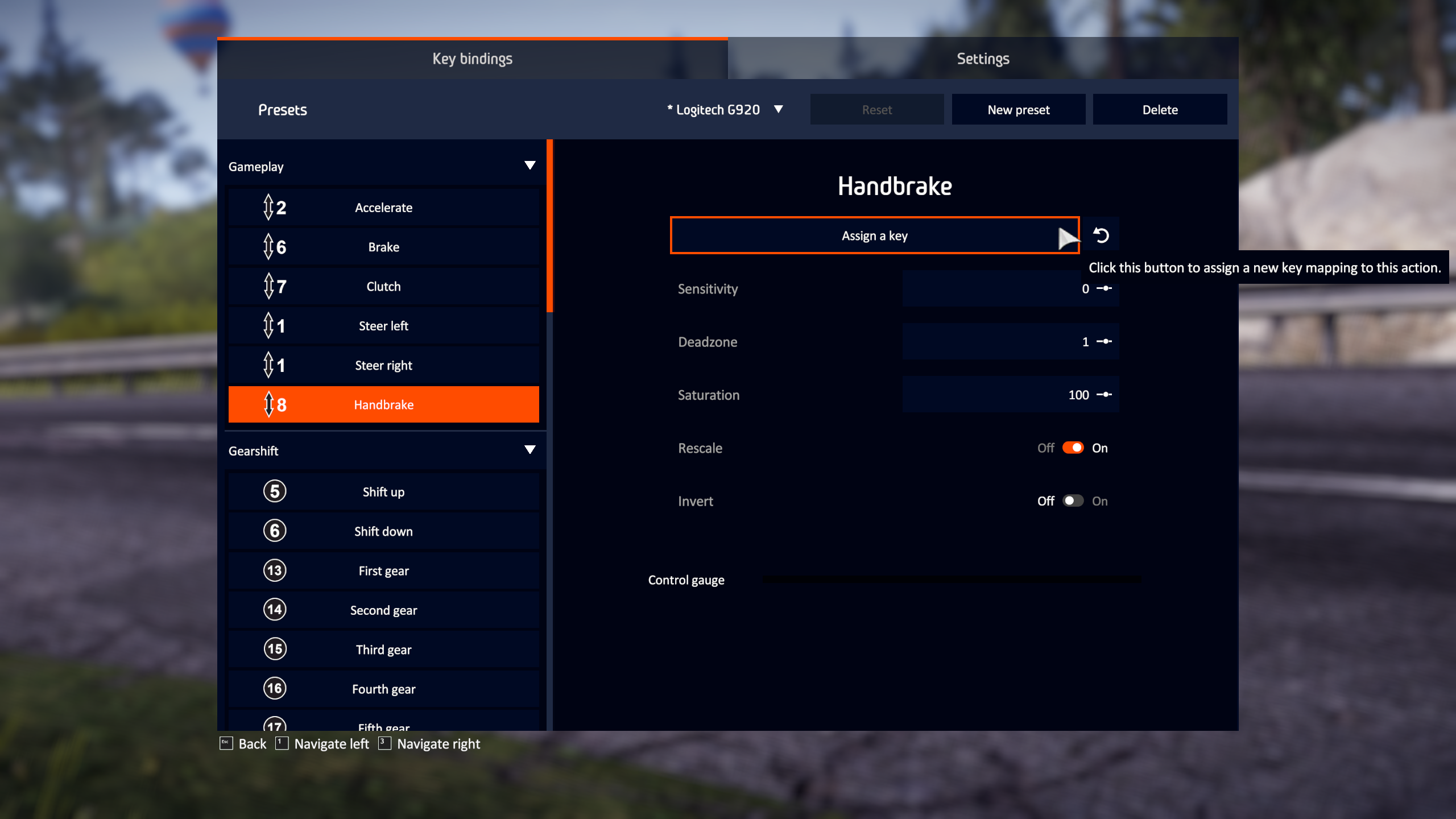
shows nicely it got accepted as axis 8 in the game also.
OMG it does work actually now yes. I sware it didnt register month ago when i tried. !
shows nicely it got accepted as axis 8 in the game also.
What game?
What game?
thats WRC 10 with proton-experimental, I don't have rFactor 2 to try
@martinezpenya has a similar problem with a Leo Bodnar adaptor to use the G27 pedals with another Wheel (T300RS), but he can't use it on games. He tried RaceRoom and Assetto Corsa Competizione .
Another Question, with official last version of proton you can assign the handbrake?
my handbreak is detected by steam as
Local Device Found
  type: 2341 8036
  path: sdl://0
  serial_number:  - 0
  Manufacturer:
  Product:      Arduino LLC Arduino Leonardo
  Release:      101
  Interface:    -1
Assetto Corsa Competizione doesn't even have handbreak option in the menus and it wont get detected for other stuff either with proton 6.3-7. Don't have RaceRoom
edit: i Don't wanna mess with my WRC10 prefix to switch to different version. But i would assume it will work with 6.3-7 also. just when i bought the game the FFB fixes where in the experimental only, but now 6.3 has been updated also
Assetto Corsa Competizione doesn't even have handbreak option in the menus and it wont get detected for other stuff either with proton 6.3-7. Don't have RaceRoom
RaceRoom is free with some tracks and cars. You can try it without problems. About Assetto Corsa Competizione, you can try the handbrake assign it to a throttle , brake or clutch to see if it works.
Hello @xpander69, please try to keep this compatibility report focused on rFactor 2. If you don't have the game, then the discussion should continue on #5143 (for WRC 10 experiences) or one of the issue reports that are focusing specifically on steering wheel accessories.
I have the following setup:
* Logitech G29

* [Leo Bodnar Pedal Cable](https://www.leobodnar.com/shop/index.php?main_page=product_info&products_id=187) (I've modded my pedals to have a load cell)

* A random USB handbrake HID device from Amazon. (Works as an input device)
I've noticed that if I use Proton <=
5.0-10-- all three of the USB devices are usable. If I use any newer version of Proton -5.13-6,6.3-7orProton Experimental, no other USB device appears.Does anybody have an explanation for this? Was USB support changed that drastically between Proton versions?
Thanks.
I have a G29 and nothing has changed for me with the latest Proton versions. Have you tried to play with only the G29 connected to the computer?
There are reports of unconventional devices failing on Proton/Steam. See #5126.
I have a G29 and nothing has changed for me with the latest Proton versions. Have you tried to play with only the G29 connected to the computer?
There are reports of unconventional devices failing on Proton/Steam. See #5126.
The problematic part is the USB devices which are not the Logitech G29 (The Leo Bodnar Pedals & Generic HID handbrake).
They work great if Proton <= 5.0-10 - as I originally reported.
Replying to https://github.com/ValveSoftware/Proton/issues/245#issuecomment-949788650
Can you check to see if it's the same issue as #5126?
Can you check to see if it's the same issue as #5126?
The very first line in my response was:
Interesting. I looked at #5126, and decided to compile/test sdl-jstest myself.
As far as I can tell, yes, it's the same issue.
Kernel/udev:
Devices created by udev and the kernel:
G29 Wheel:
/dev/input/js0
/dev/input/by-id/usb-Logitech_G29_Driving_Force_Racing_Wheel-event-joystick
Leo Bodnar Pedal Controller
/dev/input/by-id/usb-Leo_Bodnar_Logitech®_G25_Pedals_B75139-event-joystick
Generic handbrake
/dev/input/js1
/dev/input/by-id/usb-Vitaly__mega_mozg__Naidentsev_$'\302\210'$'\302\210'$'\302\210'$'\302\210'ODDOR-handbrake_MMJoy2-20160801-if01-event-joystick
Userspace Tests
evtest: works fine with the devices.
sdl-jstest -l: Only shows the G29 wheel.
sdl2-jstest -l: Shows all three devices.
Proton <= 5.0-10 works fine. Anything higher does not work. The behavior is identical in other emulated games. I'll add this to 35125 while I'm at it...
I've found regressions related to controller input with Proton 7.0-1.
I use a Logitech G29 wheel. I have to set the FFB of the wheel controller to negative, before it would work on the default value: positive.
The order of the controller devices has changed. I use a Hatire head tracking device and the wheel controller was Joy 1 and the hatire was Joy 2. Now the hatire is Joy 1 and the wheel is Joy 2. Thus my previous profile has stopped working and I have to reconfigure controllers.
Another thing, and the most critical, is that I can't no longer setup all the axes in the Hatire. The Hatire is configured as a virtual joystick using OpenTrack. I checked that it's working correctly using joytest. With previous Proton versions I could setup all the Hatire axes in the game to look around in the cockpit view, now there's some axes that will only work in the positive range, so I can set Z+ to look up but I can't set Z- to look down. It simply won't register.
All of this worked well until Proton 6.3-8 and the Experimental version based on it. Switching back to that version fixes all the issues.
Hi @berarma, thanks for the report!
It would be really helpful to debug and hopefully fix you issue if you could attach a log file, captured by changing the game "Launch options" to PROTON_LOG=1 WINEDEBUG=+timestamp,+pid,+tid,+seh,+unwind,+loaddll,+dinput,+xinput,+hid,+plugplay %command%. The log file will then be a file named steam-365960.log located in your home directory. Doing it for both Proton 7.0 and 6.3-8, and saving the file each time as it gets overwritten otherwise.
You can then reset the "Launch options" to its empty default afterwards as it will otherwise create the log every time you run the game, and clutter your home directory.
@rbernon, here they are:
@rbernon: I've tried the "bleeding-edge" beta since I'm following other similar cases but it hasn't changed anything. I guess it's intended and we can expect more fixes.
I can add some more details after testing with this new build.
The OpenTrack virtual joystick registers as RX for the horizontal axis and RY for the vertical axis using Proton 6.3-8, now it registers RY for the horizontal axis and nothing for the vertical axis using Proton Experimental Bleeding-Edge. In joytest-gtk the horizontal axis is axis 3 and the vertical axis is axis 4.
The G29 pedals are detected by the game as half pressed when the game starts. I can see it in the calibration settings and when in the game. The values are: throttle 50%, brakes 38%, clutch 59%. The moment I touch a pedal they're reset to 0% and start working normally. It looks like some uninitialized values in the controller state. This doesn't happen with Proton 6.3-8.
Thanks for looking into this.
I've tried Proton 7.0-3 and the issues are still the same. On top of that, the game froze and made the mouse buttons unresponsive on all applications running. I had to kill wineserver so it would work again.
Can I do something to help debug these regressions?
Hi, a log with the same debug channel as https://github.com/ValveSoftware/Proton/issues/245#issuecomment-1044738007 would perhaps help.
It is incredible that after almost half a year of development of this version 7.0 still has not been corrected this regression that affects the steering wheels in car games, and we have to use version 6.3-8 (thank goodness).
Hi, a log with the same debug channel as https://github.com/ValveSoftware/Proton/issues/245#issuecomment-1044738007 would perhaps help.
I did in a posterior comment. Do I have to repeat it?
If some recent release made it worse, yes please. If it's the same since 7.0-1 probably no need to.
I don't know if this is the best place to notify this, but with nvidia 460 driver, the game gives me a very low framerates (20-25fps). With 450 driver, fps goes to usual rate. Probably, this is a Nvidia and not a Proton issue, but I don't know where I can report this issue.
The old problem is here again with the 515 version, @NVIDIA:
https://forums.developer.nvidia.com/t/regression-low-fps-on-rfactor-2-proton-with-460-linux-driver/166910/38?u=leillo1975
I don't know if this is the best place to notify this, but with nvidia 460 driver, the game gives me a very low framerates (20-25fps). With 450 driver, fps goes to usual rate. Probably, this is a Nvidia and not a Proton issue, but I don't know where I can report this issue.
The old problem is here again with the 515 version, @NVIDIA: https://forums.developer.nvidia.com/t/regression-low-fps-on-rfactor-2-proton-with-460-linux-driver/166910/38?u=leillo1975
No it is not, it's completely fine I retested the game using proton experimental and 515.57... You are most likely experiencing something else that I'm unable to reproduce on both xorg and wayland sessions
I have a request. In fact, the game works very well since some time, without problems whatsoever in local or online mode. Thanks to a third party initiative called Low Fuel Motorsport there is now a renewed up trend in concurrent players in the game, thanks to a regular set of daily races with a rating system. For now is in beta, but the participation is very promising.
Thanks to proton, we Linux users finally can live on same level as windows users, almost! In the simracing community there are a plethora of third party apps to enhance the experience of the games like rFactor2. By accessing the data that games provide, these apps show more accurate information, or provide extra features that games lack.
Example of these apps :
- CrewChief: a team radio engineer. It's free open source software
- TinyPedal: is an open-source overlay application for racing simulation.
- RacelabApp: Another overlay application originally designed for iRacing, but since the entrance of LFM beta for rFactor2, also now provides beta support for this game
All of these apps use the information provided by the game via shared memory map plugin.
We are now in the situation that to reach the same level of feature parity than windows users, we also want to use this type of apps. But the problem is that each of them have their problems when we try to use them via wine.
For example, CrewChief is a .NET based app, that requires this framework to be installed in the wine prefix, but even the installer refuses to run due to wine's default policy of run in administrator mode. That's the same issue that affects RacelabApp.
The case of TinyPedal is the more appealing to linux users because is a python based app. We could even use a native version of the app without the need of run the windows .exe via wine (this also finish in the app crashing).
The problem with the native version is that the app uses the shared memory in a way that is only valid for windows processes. We have opened a ticket in the Wine tracker to ask if is there a chance of wine to provide the same level of support for linux apps to access the shared memory of the game data that is available in windows.
This comment is a request for comments in the community of proton devs, to know if this is a feasible task, because this work could improve this game and others in simracing like Assetto Corsa, Assetto Corsa Competizione, Automobilista 2, Project Cars 2 and maybe even more.
Let me know if more data is needed, or if help is needed to try some proton versions that could provide these feature.
(Sorry for my english, I have tried to explain the situation in the best possible way.)
The case of TinyPedal is the more appealing to linux users because is a python based app. We could even use a native version of the app without the need of run the windows .exe via wine (this also finish in the app crashing). The problem with the native version is that the app uses the shared memory in a way that is only valid for windows processes. We have opened a ticket in the Wine tracker to ask if is there a chance of wine to provide the same level of support for linux apps to access the shared memory of the game data that is available in windows.
Shouldn't it work if you run that in the same prefix as rF2?
(To do that use steamtinkerlaunch. I use that to make use of my TrackIR5 in Proton via linuxtrack.)
But I agree, in the long term, Proton should provide easier ways to install and run 3rd-party applications in the same prefix as the game at the same time.
For example, CrewChief is a .NET based app, that requires this framework to be installed in the wine prefix, but even the installer refuses to run due to wine's default policy of run in administrator mode. That's the same issue that affects RacelabApp.
For crew chief I used protontricks to install .net 4.72 with proton 5.0 and install it, it seems to run fine when disabling naudio in settings , otherwise I get cut out adio after some time. The .net install takes maybe half an hour to an hour to complete with my 8 core cpu, after that I backed the prefix up to have a basis for later , as switching proton version somehow sometimes broke things later and if zou want to "try again" , you have to do it all over again.
All of these apps use the information provided by the game via shared memory map plugin. We are now in the situation that to reach the same level of feature parity than windows users, we also want to use this type of apps. But the problem is that each of them have their problems when we try to use them via wine.
I used shared memory to access data from Automobilista 2 , so how I understand shared memory is some sort of "file" that can not be accessed from outside of the running wine process , inside however it worked for me with AMS2 , so either the rfactor2 shared memory is different or the setup/startup was not correct.
For testing I basically started winefile with proton 7 (crew chief also installed with winefile and .net will run but not install with newer proton):
/home/user/.local/share/Steam/ubuntu12_32/reaper SteamLaunch AppId=365960 -- /home/dino/.local/share/Steam/ubuntu12_32/steam-launch-wrapper -- '/home/user/.local/share/Steam/steamapps/common/Proton 7.0'/proton waitforexitandrun 'winefile'
Install crewchief with winefile and also launch it from there , also launch rfactor2 , that is how it worked for ams2,
steamtinkerlaunch could be used as well , I am not sure how to use this , maybe jsut let it start winefile as well for testing?
tldr;
- backup and clean your compdata 365960 folder
- set compatibility to use proton 5.0
- protontricks 365960 -q dotnet472
- make coffe/tea , watch tv, make laundry, clean dishes
- set proton version to use to 7.0
- install and launch crewchief and set it to use sharded rfactor mem
- launch rfactor from winefile as well
Tested with Proton 10.0-1 (beta) and there are graphical artifacts when on track. Broken polygons that resemble shadows are flickering from time to time. It worked well up to Proton 9.0-4.
Hello @berarma, please add PROTON_LOG=1 %command% to the game's launch options, reproduce the regression, and attach the generated $HOME/steam-$APPID.log to this issue report as a file. (Proton logs compress well if needed.) Also, please copy the contents of Steam Runtime Diagnostics from Steam (Steam -> Help -> Steam Runtime Diagnostics) and put it in a gist, then include a link to the gist in this issue report.
Hello @berarma, please add
PROTON_LOG=1 %command%to the game's launch options, reproduce the regression, and attach the generated $HOME/steam-$APPID.log to this issue report as a file. (Proton logs compress well if needed.) Also, please copy the contents of Steam Runtime Diagnostics from Steam (Steam->Help->Steam Runtime Diagnostics) and put it in a gist, then include a link to the gist in this issue report.
Thanks, looking around a bit, DXVK's minimum driver version was bumped to NVIDIA 550.54.14 between Proton 9.0 and 10.0 (https://github.com/doitsujin/dxvk/wiki/Driver-support). Are you able to check how the game behaves with a newer driver series than 535.xx which you're currently using?
Proton versions
proton 9.0x1 2025-05proton 10.0-1x1 2025-05proton 9.0-4x1 2025-05proton 5.0x2 2022-12proton 7.0x2 2022-12proton experimentalx5 2022-07proton 7.0-3x1 2022-06proton 6.3-8x2 2022-02proton 7.0-1x1 2022-02proton 6.3-7x2 2021-10proton 5.9x1 2020-07proton 5.0-9x1 2020-06proton 4.11-8x1 2019-11proton 4.2x2 2019-05proton 4.2-3x1 2019-05
Launch options
PROTON_LOG=1x4 2025-05WINEDEBUG=+timestamp,+pid,+tid,+seh,+unwind,+loaddll,+dinput,+xinput,+hid,+plugplayx1 2022-02WINEDEBUG=+seh,+winhttp,+winsock,+wininetx1 2020-03
Upstream links
- show_bug.cgi?id=54015x2 2022-12
- ValveSoftware/Proton/issues/1420x6 2022-11
- ValveSoftware/Proton/issues/148x1 2022-11
- ValveSoftware/Proton/issues/3748x1 2022-11
- ValveSoftware/Proton/issues/908x1 2022-11
- ValveSoftware/Proton/issues/1321x1 2021-10
- ValveSoftware/Proton/issues/5126x1 2021-10
- ValveSoftware/Proton/issues/3143x1 2021-07
- ValveSoftware/Proton/issues/3291x1 2021-01
- show_bug.cgi?id=48668x4 2020-06
- ValveSoftware/Proton/issues/3194x1 2019-11
DLLs
d3dcompiler_43.dllx1 2018-10
EDITED 2020-03: At this moment the game works with problems on online multiplayer (our car is more slow than the others), and you don't have FFB support on Logitech Wheels using the kernel driver. This can be fixed using new-lg4ff. The rest of the game works great with Steam Play/Proton
OLD:
_Like in Wine, this game don't have the Force Feedback functionality, and is a pity because is very important in racing simulation games.
It also have a problem when you trying to run it. You must force it to run in 32 bit mode. To enable 32 bit mode you must mark the checkbox in the settings button on launcher.
If you have problems with this launcher (it closes) you must set Steam in disconnected mode, run the game and change to 32bit on settings. Then put again Steam on connected mode and Play it_