Proton not starting, vrclient.dll not found
I'm no expert, so this could be wrong, but I checked and my Proton 4.2 contains that file.
You could try verifying the integrity of the files for Proton 4.2
If you don't know how to do that: go into your library menu and click on "Tools", just above "Downloads", you should be able to scroll down and find Proton 4.2.
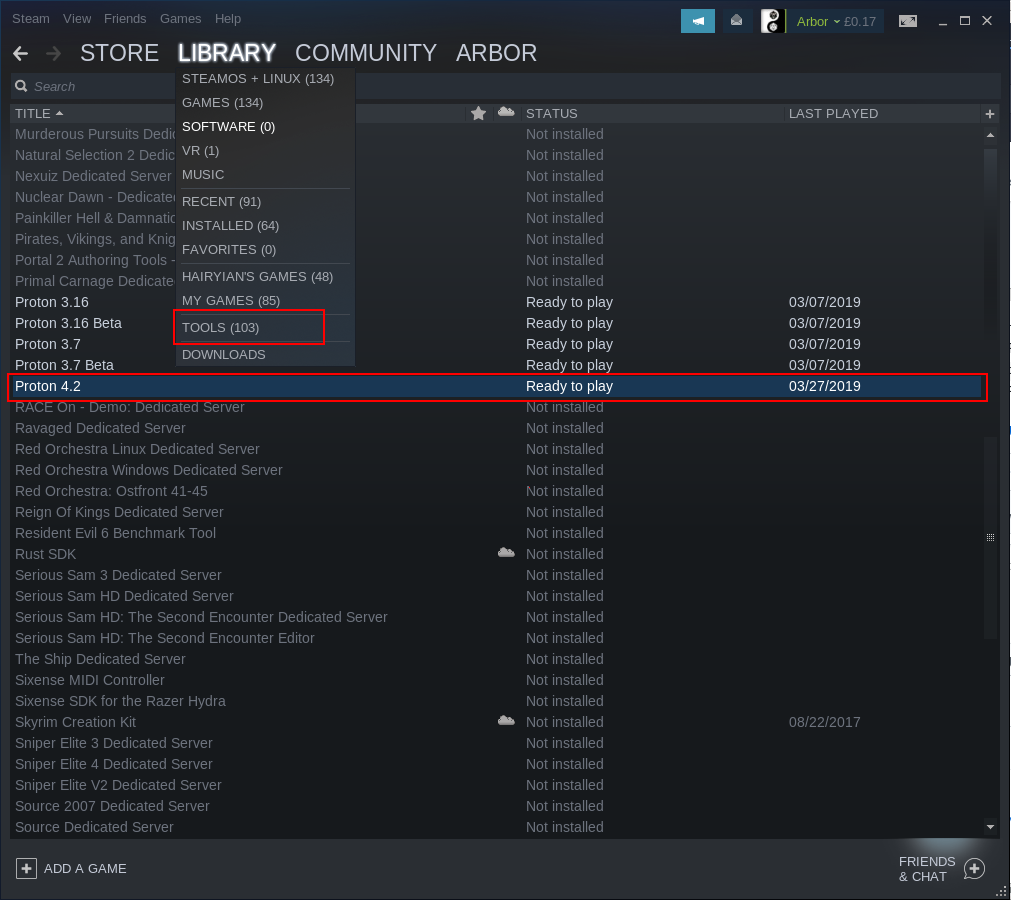
Right click on it and go into "Properties"
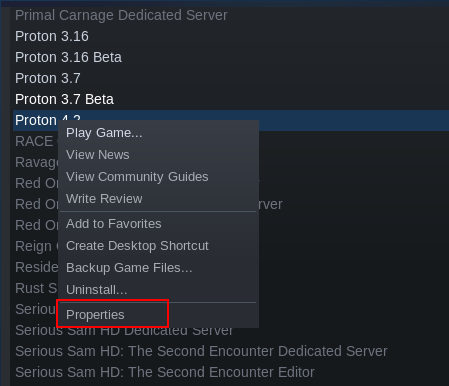
Now switch to the "Local Files" tab, then "Verify Integrity of Tool Files".
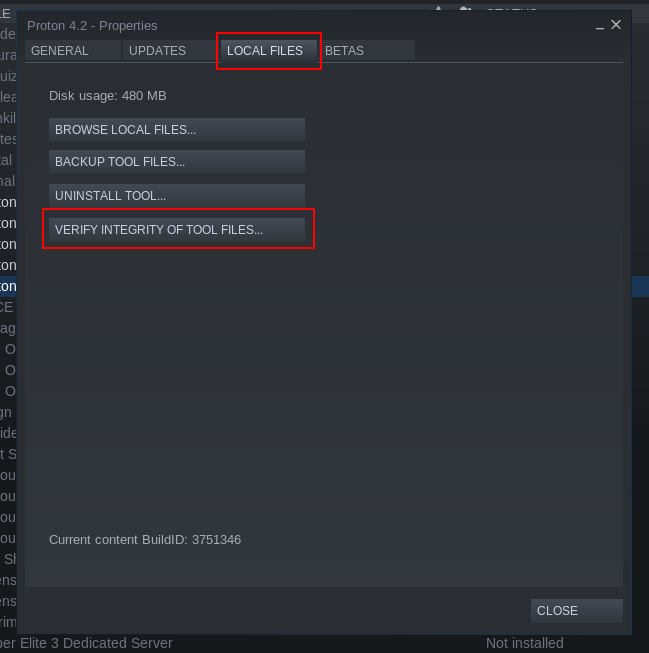
This will check through the files for Proton 4.2 and download any that are missing.
This tends to work with a lot of missing files in games, so it's worth a shot for ones in Proton as well. Hopefully, this helps, but as I said, I'm not an expert so I could be totally off. Either way, it can't do any harm to try.
I've verified the integrity of files and no issues were found, the Proton 4.2/dist/lib folder just does not exist
The entire lib folder doesn't exist?
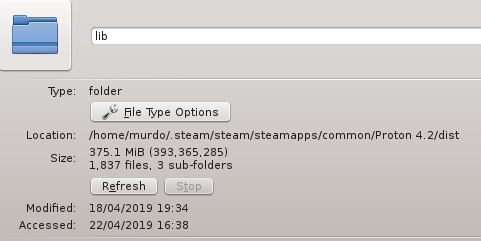
That's most of Proton that's missing (375.1MB/480MB, so ~78%). I've no idea why that hasn't been flagged by the verify, but at least now we know the problem is larger than just the one file.
I've looked in the Proton folder and there's a file called proton_dist.tar.gz, I've exported it and renamed the folder to dist and all the files are there. Looks like steam has issues with installing Proton. Also, Proton weights 1,3 GB and steam is saying it's 480 MB, proton_dist.tar.gz itself is 504 MB
Hm, that's interesting. Perhaps the installing and size calculation issues should be flagged as a separate issue?
Verify requires proper support for any files (example: config files are not marked to verify because they would then be overwritten and user settings reset). Don't know how Valve has it set up here but if its not working then that seems to answer that.
[Besides Steam thinking files exist when they don't, or something else but then that would mean verify needs to be fixed as well or the problem causing verify to fail in a way not wanted needs to be fixed, etc..]
Perhaps switching the global Proton version in use and restarting Steam will trigger a change? Can't tell if you did that or setting for each game.
Of course, a reset of Steam might work as well, etc. Probably something will at some point even if its nuking the Steam install.
Obviously though you have a problem to be fixed.
We package all of the Wine files into a tarball for Steam distribution reasons. We then unpack the tarball when Proton is first run for a given update. We decide whether to unpack based on the presence and contents of the dist/version file. If it doesn't exist or differs from the version file, then we remove the dist folder and unpack the tarball. I don't know what would cause the dist folder to be unpacked incorrectly. Perhaps you ran out of disk space at some point? I think we don't handle that case particularly well.
I have the same issues. I went through the same steps to try and fix it, like verifying files, un/reinstalling proton. Verifying passes without a problem, but the whole lib thing is still missing.
Uninstalling doesn't work, due to an error something about missing shared resourced? I switched to a different proton version, then I could delete 4.2 (from within Steam), and reinstalled it. The problem persisted about missing lib and unable to play.
I browsed to the Proton dir and extracted proton_dist.tar.gz, got the following error:
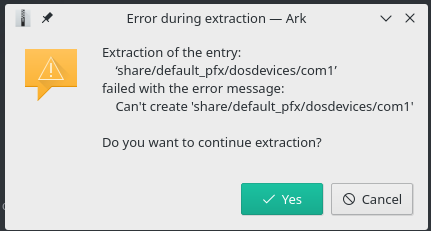
I can extractlib and lib64 fine, but it goes wrong with share. However, after putting both lib dirs into
dist, Proton works!
My guess: something in share breaks extraction, so lib and lib64 don't get extracted?
Potentially 2 new/related bugs:
Is it a bug that I cannot uninstall a broken install?
How come verification passes when entire directories are missing?
Got hit by this one too, similar set up.
I have ~/Games/steamapps set as a symblolic link to my Windows Steam/steamapps folder added as another Steam Library.
Closing steam, Deleting Proton4.2 its corresponding manifest and compatdata folder from and trying again with both 4.2 and 3.16 ended up with the same problem.
I copied the game files to the linux system, deleted the proton, manifest, compatdata, opened steam ran the game proton 4.2 downloaded and it ran OK.
Disk space at least for me its not the issue, my windows and linux drive have over 100GB of free space. May be its a filesystem issue?
@joder666 double check if your Windows partition is not mounted read-only (not by looking at fstab, but by trying to actually write a file). Here's long and detailed explanation.
I browsed to the Proton dir and extracted
proton_dist.tar.gz, got the following error:
If you cannot extract a tar.gz file then either you have a problem with your system or the compressed file is corrupted. You might want to solve that first before jumping onto something else.
(There can only be those 2 situations here)
@joder666 double check if your Windows partition is not mounted read-only (not by looking at fstab, but by trying to actually write a file). Here's long and detailed explanation.
Yes my NTFS drive it is write-able.
I have the same problem, where extracting the proton_dist.tar.gz on a NTFS drive won't work for me, it will abort with the same error as described above. It works without problems on an EXT drive, though.
Hello, I'm trying to play Doom 2016 with Proton 4.2 but when I start a game it doesn't open, the console outputs this:
I'm using the latest version of Manjaro with 4.20 kernel and GTX 1050Ti with 418.56 proprietary driver
The partition with Proton and Doom is NTFS and the options for it in fstab are
ntfs-3g defaults,exec,uid=1000,gid=1000 0 0Older versions of Proton don't start because it says the game executable file does not exist
Full log: steam-log.txt