Double Dragon Trilogy
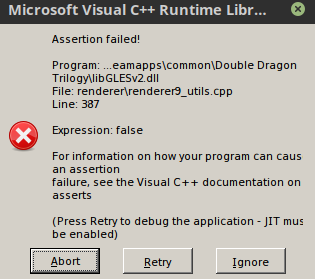
Can confirm getting these error messages launching the game, clicking ignore on them eventually gets you into the game.
steam-314150.log
system_info.txt
Distro: Linux Mint 19.1 Tessa (64 bit)
GPU: Vega 56
Driver/LLVM version: Mesa 19.1.0-devel/9.0.0
Kernel version: 5.0.10-050010-lowlatency
Proton version: 4.2-3
Not sure when this started, but there has been a regression in this game that makes it unplayable. Instead of the skip-able errors, you get a dialog box that says 'An Unknown exception has occurred' and only an OK option which closes out the game.
Hello @opal1974, fixme:vulkan:X11DRV_vkCreateWin32SurfaceKHR Application requires child window rendering, which is not implemented yet! in the log points towards https://bugs.winehq.org/show_bug.cgi?id=45277.
This would have appeared with DXVK/D3D9 getting enabled by default in Proton 5.0. You could try PROTON_USE_WINED3D=1 %command% in the game's launch options.
Hey, you're right. Using the "PROTON_USE_WINED3D=1 %command%" command allows the game to be launched, and the old error where you had to click close 3 times no longer happens! So that is it.
Proton versions
proton 5.0x1 2020-06
Launch options
PROTON_USE_WINED3D=1x2 2020-06
Launch lines
PROTON_USE_WINED3D=1 %command%x2 2020-06
Upstream links
- show_bug.cgi?id=45277x1 2020-06
Compatibility Report
System Information
I confirm:
Symptoms
You get several Microsoft Visual C++ Runtime Library error messages on launch; clicking 'ignore' for them gets you in game, but I also noticed sometimes settings were not saved too. Didnt notice any other problems w ith 15 min play.
steam-314150.log
Reproduction
Play the game, happens every time