Zero-K
Hello @RafaelLinux, please add PROTON_LOG=1 %command% to the game's launch options, get the game to download a map, and drag and drop the generated $HOME/steam-$APPID.log into the comment box.
I put it in "Set launch options". Near 3 minutes to dowmload 18MiB ("Altored Artic" map). It would take a maximum of 20 seconds from Lutris. However, the path you wrote doesn't exist in my file system.
If I look for 334920 under ".steam", I can see:
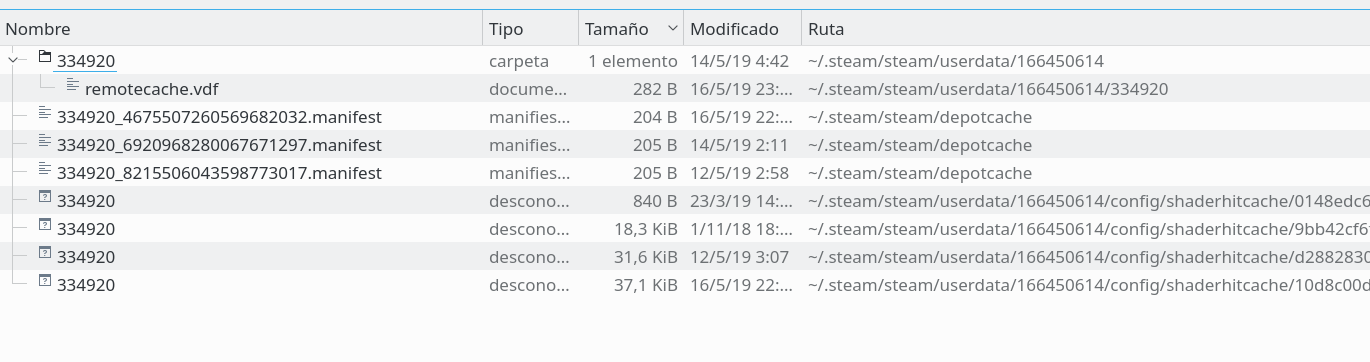
I searched for "steam*.log" in my "$HOME/Juegos/Steam" path, but there is not any log file.
Am I forgetting something?
Proton should write logs to your home folder by default, maybe it's hiding in plain sight?
Just as a side note, there exists a native Linux build of the game (available via beta key). Feel free to debug Proton though. Map downloads all happen through the dotnet wrapper.
Proton should write logs to your home folder by default, maybe hiding its in plain sight?
MY FAULT, the file was exactly where you said, but I supossed it will be in a subfolder, cause I have my Steam installation under a soft link.
Launch options
PROTON_LOG=1x1 2019-05
Compatibility Report
System Information
Computer Information:
Manufacturer: Unknown
Model: Unknown
Form Factor: Desktop
No Touch Input Detected
Processor Information:
CPU Vendor: GenuineIntel
CPU Brand: Intel(R) Core(TM) i5-6600K CPU @ 3.50GHz
CPU Family: 0x6
CPU Model: 0x5e
CPU Stepping: 0x3
CPU Type: 0x0
Speed: 3900 Mhz
4 logical processors
4 physical processors
HyperThreading: Unsupported
FCMOV: Supported
SSE2: Supported
SSE3: Supported
SSSE3: Supported
SSE4a: Unsupported
SSE41: Supported
SSE42: Supported
AES: Supported
AVX: Supported
CMPXCHG16B: Supported
LAHF/SAHF: Supported
PrefetchW: Unsupported
Operating System Version:
Linux 4.x (64 bit)
Kernel Name: Linux
Kernel Version: 4.12.14-lp150.12.58-default
X Server Vendor: The X.Org Foundation
X Server Release: 11906000
X Window Manager: KWin
Steam Runtime Version: jenkins-steam-runtime-beta-release_0.20190320.2
Video Card:
Driver: NVIDIA Corporation GeForce GTX 1050 Ti/PCIe/SSE2
Driver Version: 4.6.0 NVIDIA 418.56
OpenGL Version: 4.6
Desktop Color Depth: 24 bits per pixel
Monitor Refresh Rate: 59 Hz
VendorID: 0x10de
DeviceID: 0x1c82
Revision Not Detected
Number of Monitors: 1
Number of Video Cards Not Detected
Primary Display Resolution: 1920 x 1200
Desktop Resolution: 1920 x 1200
Primary Display Size: 21.50" x 13.86" (25.55" diag)
54.6cm x 35.2cm (64.9cm diag)
Primary Bus: PCI Express 16x
Primary VRAM: 4096 MB
Supported MSAA Modes: 2x 4x 8x 16x
Sound card:
Audio device: Realtek ALC1150
Memory:
RAM: 32104 Mb
Miscellaneous:
UI Language: English
LANG: es_ES.UTF-8
Total Hard Disk Space Available: 476714 Mb
Largest Free Hard Disk Block: 168523 Mb
VR Headset: None detected
Symptoms
In any battle that Zero-K needs to download a new map, it takes several minutes. Is NOT a connection problem, cause if I launch Zero-K from Lutris, the maps download is fast and takes less than 60seconds despite the map is large.