Counter-Strike 2
Why do you use Proton instead of native run?
I would like to see Proton support all "native" source-based titles some day. The internal DirectX9 to OpenGL leaves a lot to be desired in comparison to D9VK and Gallium Nine.
I would like to see Proton support all "native" source-based titles some day. The internal DirectX9 to OpenGL leaves a lot to be desired in comparison to D9VK and Gallium Nine.
Hmmm. But wine translates windows API calls to POSIX and it will be more slowly than native run. Wine run: Game -> WinAPI -> POSIX
Native run: Game -> POSIX
Correct me if I'm wrong
@qmmp123 You're technically not wrong, but with the notable additions, such as esync and now fsync, translation of Windows API calls should be fast up to a point where legacy translation layers for DirectX9/11 bottleneck Wine itself. If you can, try to play Garry's Mod, which is one of Source games that work with Proton, using D9VK, the recent addition to Proton 4.11, or Gallium Nine Standalone that is easily installable via Protontricks.
@Bryophyllum I have spoken with some game developers. They said version of directx game may have more optimization than OpenGL version. I meant it is problem in game code . Neither DirectX nor OpenGL does not affect on it. Sorry for english.
Demo viewer from pre 2013 is not working
Issue transferred from https://github.com/ValveSoftware/csgo-osx-linux/issues/2176.
@Adenis890 posted on 2019-09-13T04:40:06:
Your system information
- System information from steam (
Steam->Help->System Information) in a gist: https://gist.github.com/Adenis890/51f0c2f46b54ee44d2966713d640481d - Have you checked for system updates?: [Yes/No] Yes
Please describe your issue in as much detail as possible:
Describe what you expected should happen and what did happen. Please link any large pastes as a Github Gist.
So I wanted to try the old csgo from 2013 (on steam, right click csgo, properties, beta and the demo viewer). After i installed it, i tried opening it and it gave me an error and when i tried it with Proton the game opened and it was just a black screen. I remember on Windows i had to open it from the steam folder csgo.exe but here you can't do that. I know it's not a big issue, and it's no longer a supported version but i was thinking that maybe someone knows a solution.
GPU: Nvidia GTX950M
Driver: 435.21
Game fails to launch. Creates a black screen and displays an error message box with the following:
Failed to initialize NVAPI with error (0xFFFFFFFE), which is required when running on NVIDIA hardware. Your drivers may be corrupt or out of date.
Game seems to work fine in Proton with D9VK. However, VAC doesn't allow you to play online.
@kisak-valve Is there anything that could be done about? It likely offers much better CPU performance than the OGL port, especially in Danger Zone.
Game launches as a black screen and then crashes with NVAPI error. Tried D9VK, no luck.
Is there anything that could be done about? It likely offers much better CPU performance than the OGL port, especially in Danger Zone.
I'm sitting at 300 FPS @ 4k fullscreen max settings on native. Performs great.
Game launches with D9VK enabled. Shows this when launched.

@kiroma Try to update your drivers or reinstall it
@kiroma Try to update your drivers or reinstall it
Should I also reinstall my drivers?? Every other game runs.
@tsalwierz I think your client missed some libs. Try to launch steam via console and see logs
@shoober420 can you show logs? I wrtote earlier how to do it
Compatibility Report
- Name of the game with compatibility issues: Counter-Strike: Global Offensive
- Steam AppID of the game: https://steamdb.info/app/730/
System Information
- GPU: GTX 760
- Driver/LLVM version: NVIDIA 440.44
- Kernel version: 5.4.6
- https://github.com/shoober420/linux-scripts/blob/main/home/shoober420/sysinfonvidia
- Proton version: 4.11-11
Symptoms
Error about VAC after launch, just like @aufkrawall and @xDShot mentioned.
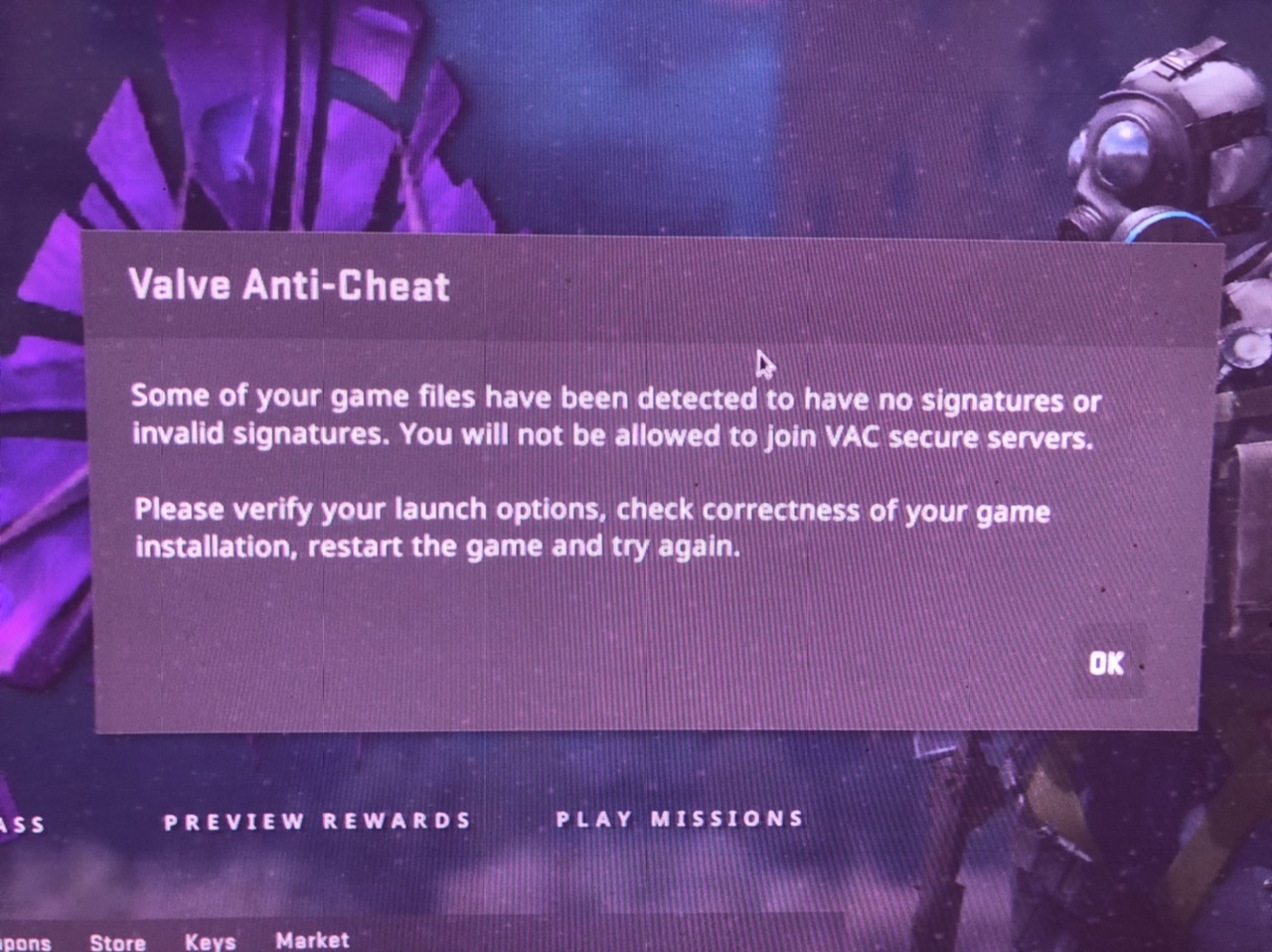
Reproduction
Launch the game
@qmmp123
LOGS:
steam-730-d9vk.log "PROTON_USE_D9VK=1"
steam-730.log
Demo viewer from pre 2013 is not working
Issue transferred from ValveSoftware/csgo-osx-linux#2176.
@Adenis890 posted on 2019-09-13T04:40:06:Your system information
- System information from steam (
Steam->Help->System Information) in a gist: https://gist.github.com/Adenis890/51f0c2f46b54ee44d2966713d640481d- Have you checked for system updates?: [Yes/No] Yes
Please describe your issue in as much detail as possible:
Describe what you expected should happen and what did happen. Please link any large pastes as a Github Gist.
So I wanted to try the old csgo from 2013 (on steam, right click csgo, properties, beta and the demo viewer). After i installed it, i tried opening it and it gave me an error and when i tried it with Proton the game opened and it was just a black screen. I remember on Windows i had to open it from the steam folder csgo.exe but here you can't do that. I know it's not a big issue, and it's no longer a supported version but i was thinking that maybe someone knows a solution.
demo_viewer - for pre 2013/1/9 demos dont work
Issue transferred from https://github.com/ValveSoftware/csgo-osx-linux/issues/2530.
@tanjilk posted on 2020-09-14T08:54:17:
-
System information from steam in a gist: https://gist.github.com/tanjilk/a15210f9c81c1d41171bddf42cbb9c16
-
Have you checked for system updates?: Yes
Please describe your issue in as much detail as possible:
Hello, id like to play the old csgo selecting the beta as here

I forced the use of specific Steam Play compatibility tool with Steam Linux Runtime as here

And if i run the game it appears that

Also, i tried with all proton versions

And if i run the game with proton, i recieve an blank screen and it exits after like 30 seconds.
I am getting a FATAL ERROR: Failed to connect with local Steam Client process! error with any proton version. I validated / reinstalled the game, but it didn't do the trick.
I am getting a
FATAL ERROR: Failed to connect with local Steam Client process!error with any proton version. I validated / reinstalled the game, but it didn't do the trick.
Any other games works?
Well I tried TF2, and although I get the common "insecure mode" error message when trying to connect to a server, the game at least launches... Outer Wilds works too, but I don't know if that game even checks for the Steam client.
@tanjilk ya I get the same error when I try to run the game via proton after I discovered that the native linux version also broke. The latest update really did a number on the game.
@tanjilk ya I get the same error when I try to run the game via proton after I discovered that the native linux version also broke. The latest update really did a number on the game.
Are you talking about the counter strike old version?
@tanjilk No CSGO
Native version got updated today. Seems fixed now.
@kisak-valve is it a general problem with overwatch or is it just broken on linux?
I can download and click "review evidence" then it loads the map and as soon as it should open the game I'm back on the main menu.
already re-validated files.
**** Unable to localize '#SFUI_Lobby_StatusAwaitingLocalAc' on panel ''
**** Unable to localize '#SFUI_Lobby_StatusAwaitingLocalAc' on panel ''
**** Unable to localize '#SFUI_Lobby_StatusAwaitingRemoteA' on panel ''
**** Unable to localize '#SFUI_Lobby_StatusAwaitingRemoteA' on panel ''
**** Unable to localize '#SFUI_Lobby_StatusAwaitingRemoteA' on panel ''
**** Unable to localize '#SFUI_Lobby_StatusAwaitingRemoteA' on panel ''
Unknown command "spec_autodirector"
**** Unable to localize '#matchdraft_phase_action_wait' on panel 'id-map-draft-phase-wait'
**** Unable to localize '#DemoPlayback_Restart' on panel descendant of 'HudDemoPlayback'
**** Unable to localize '#DemoPlayback_Back' on panel descendant of 'HudDemoPlayback'
**** Unable to localize '#DemoPlayback_Pause' on panel descendant of 'HudDemoPlayback'
**** Unable to localize '#DemoPlayback_Slow' on panel descendant of 'HudDemoPlayback'
**** Unable to localize '#DemoPlayback_Play' on panel descendant of 'HudDemoPlayback'
**** Unable to localize '#DemoPlayback_Fast' on panel descendant of 'HudDemoPlayback'
**** Unable to localize '#DemoPlayback_Next' on panel descendant of 'HudDemoPlayback'
**** Unable to localize '#Panorama_CSGO_Spray_Cursor_Hint' on panel 'RosettaInfoText'
ChangeGameUIState: CSGO_GAME_UI_STATE_MAINMENU -> CSGO_GAME_UI_STATE_LOADINGSCREEN
Playing demo from myassignedcase.evidence.
PNG load error Interlace handling should be turned on when using png_read_image
Error: Material "___fillrate_0" uses unknown shader "FillRate"
Error: Material "___debugnormalmap_1" uses unknown shader "DebugNormalMap"
Error: Material "___debugdrawenvmapmask_2" uses unknown shader "DebugDrawEnvmapMask"
Error: Material "___debugdepth_3" uses unknown shader "DebugDepth"
Error: Material "___debugdepth_4" uses unknown shader "DebugDepth"
Error: Material "debug/debugluxels" uses unknown shader "DebugLuxels"
Error! Variable "$phongboost" is multiply defined in material "models/player/custom_player/econ/body/tm_jungle_raider/tm_jungle_raider_body_varianta"!
CMaterial::PrecacheVars: error loading vmt file for fmpone/newcache/nc_cinderblock/dizzy_cinderblock_color
CMaterial::PrecacheVars: error loading vmt file for models/darnias/practice_map/3dsky/gray
CMaterial::PrecacheVars: error loading vmt file for models/darnias/practice_map/3dsky/white
CMaterial::PrecacheVars: error loading vmt file for fmpone/newcache/nc_bluedoor/nc_bluedoor
CMaterial::PrecacheVars: error loading vmt file for fmpone/newcache/nc_bluedoor/nc_bluedoor2
SignalXWriteOpportunity(3)
ChangeGameUIState: CSGO_GAME_UI_STATE_LOADINGSCREEN -> CSGO_GAME_UI_STATE_INGAME
ChangeGameUIState: CSGO_GAME_UI_STATE_INGAME -> CSGO_GAME_UI_STATE_INGAME

Host_Error: DataTable_ParseClientTablesFromBuffer failed.
EDIT: 1392 fixes it, thx a lot
@kisak-valve @alexvalve @jeffmvalve @VivekValve
the latest update 1395 breaks Linux compatibility and CSGO doesn't start anymore.
works on 1391(beta) and 1392(release).
using Arch Linux with latest (testing repo) packages. works flawlessly with older versions.
(1391)https://gist.github.com/romanstingler/036610d877e086fed0d5372fa034b968
(1395) https://gist.github.com/romanstingler/77dd654cf696be32d4f6646d30b39e7f
on the first glance the latest version does not output
failed to dlopen /home/blackout/.local/share/Steam/steamapps/common/Counter-Strike Global Offensive/bin/shaderapidx9_client.so error=/home/blackout/.local/share/Steam/steamapps/common/Counter-Strike Global Offensive/bin/shaderapidx9_client.so: wrong ELF class: ELFCLASS32
 failed to dlopen /home/blackout/.local/share/Steam/steamapps/common/Counter-Strike Global Offensive/bin/localize_client.so error=/home/blackout/.local/share/Steam/steamapps/common/Counter-Strike Global Offensive/bin/localize_client.so: wrong ELF class: ELFCLASS32
Created D3D9 device successfully
but outputs
No cached sticky mapping in ActivateActionSet.Installing breakpad exception handler for appid(steam)/version(1638464786)
It would also be much easier if you could open the console and there wouldn't be like 10000 lines of error during 1 short match
PS: verifying files doesn't help :)
Apparently someone forgot to add
panorama_gl_client.so
https://github.com/ValveSoftware/csgo-osx-linux/issues/2868
CS:GO won't launch on proton
Issue transferred from https://github.com/ValveSoftware/steam-for-linux/issues/8749.
@superSTA101 posted on 2022-08-18T15:40:40:
Distro: EndeavourOS (based on arch)
CS:GO won't launch via proton and replies with a error message (attachment).
Yes i have everything up to date.

CS:GO won't launch on proton
Issue transferred from ValveSoftware/steam-for-linux#8749. @superSTA101 posted on 2022-08-18T15:40:40:
Distro: EndeavourOS (based on arch)
CS:GO won't launch via proton and replies with a error message (attachment). Yes i have everything up to date.
same issue. same distro. everything is up to date
Using the steam flatpak because of glibc for rogue company eac
Any updates?
Counter-Strike 2 is receiving a VAC warning and crashing on the loading screen when launched in practice mode.
Issue transferred from https://github.com/ValveSoftware/Proton/issues/7068.
@aarshparashar posted on 2023-09-02T13:47:32:
Console output
aarsh@aarsh-Mi-NoteBook-Horizon-Edition-14:~$ steam
steam.sh[14433]: Running Steam on ubuntu 23.04 64-bit
steam.sh[14433]: STEAM_RUNTIME is enabled automatically
setup.sh[14501]: Steam runtime environment up-to-date!
steam.sh[14433]: Steam client's requirements are satisfied
[2023-09-02 19:09:22] Startup - updater built Jul 28 2023 18:44:09
[2023-09-02 19:09:22] Startup - Steam Client launched with: '/home/aarsh/.steam/debian-installation/ubuntu12_32/steam' '-nominidumps' '-nobreakpad'
09/02 19:09:22 Init: Installing breakpad exception handler for appid(steam)/version(1690583737)/tid(14568)
[2023-09-02 19:09:22] Loading cached metrics from disk (/home/aarsh/.steam/debian-installation/package/steam_client_metrics.bin)
[2023-09-02 19:09:22] Using the following download hosts for Public, Realm steamglobal
[2023-09-02 19:09:22] 1. https://client-update.akamai.steamstatic.com, /, Realm 'steamglobal', weight was 1000, source = 'update_hosts_cached.vdf'
[2023-09-02 19:09:22] 2. https://cdn.cloudflare.steamstatic.com, /client/, Realm 'steamglobal', weight was 1, source = 'update_hosts_cached.vdf'
[2023-09-02 19:09:22] 3. https://cdn.steamstatic.com, /client/, Realm 'steamglobal', weight was 1, source = 'baked in'
[2023-09-02 19:09:22] Verifying installation...
[2023-09-02 19:09:22] Verification complete
XRRGetOutputInfo Workaround: initialized with override: 0 real: 0xf08a49c0
XRRGetCrtcInfo Workaround: initialized with override: 0 real: 0xf08a31f0
GetWin32Stats: display was not open yet, good
GetWin32Stats: display was not open yet, good
steamwebhelper.sh[14576]: Runtime for steamwebhelper: defaulting to /home/aarsh/.steam/debian-installation/ubuntu12_64/steam-runtime-heavy
steamwebhelper.sh[14576]: glibc >= 2.34, partially disabling sandbox until CEF supports clone3()
CAppInfoCacheReadFromDiskThread took 18 milliseconds to initialize
/usr/share/themes/Breeze/gtk-2.0/widgets/entry:70: error: unexpected identifier 'direction', expected character '}'
/usr/share/themes/Breeze/gtk-2.0/widgets/styles:36: error: invalid string constant "combobox_entry", expected valid string constant
BRefreshApplicationsInLibrary 1: 1ms
BuildCompleteAppOverviewChange: 186 apps
RegisterForAppOverview 1: 7ms
RegisterForAppOverview 2: 7ms
fsync: up and running.
wine: RLIMIT_NICE is <= 20, unable to use setpriority safely
/bin/sh\0-c\\0/home/aarsh/.steam/debian-installation/ubuntu12_32/reaper SteamLaunch AppId=730 -- /home/aarsh/.steam/debian-installation/ubuntu12_32/steam-launch-wrapper -- '/home/aarsh/.steam/debian-installation/steamapps/common/SteamLinuxRuntime_sniper'/_v2-entry-point --verb=waitforexitandrun -- '/home/aarsh/.steam/debian-installation/steamapps/common/Proton - Experimental'/proton waitforexitandrun  '/home/aarsh/.steam/debian-installation/steamapps/common/Counter-Strike Global Offensive/game/bin/win64/cs2.exe' -steam -vulkan\\0
chdir "/home/aarsh/.steam/debian-installation/steamapps/common/Counter-Strike Global Offensive"
ERROR: ld.so: object '/home/aarsh/.steam/debian-installation/ubuntu12_32/gameoverlayrenderer.so' from LD_PRELOAD cannot be preloaded (wrong ELF class: ELFCLASS32): ignored.
ERROR: ld.so: object '/home/aarsh/.steam/debian-installation/ubuntu12_64/gameoverlayrenderer.so' from LD_PRELOAD cannot be preloaded (wrong ELF class: ELFCLASS64): ignored.
ERROR: ld.so: object '/home/aarsh/.steam/debian-installation/ubuntu12_32/gameoverlayrenderer.so' from LD_PRELOAD cannot be preloaded (wrong ELF class: ELFCLASS32): ignored.
ERROR: ld.so: object '/home/aarsh/.steam/debian-installation/ubuntu12_32/gameoverlayrenderer.so' from LD_PRELOAD cannot be preloaded (wrong ELF class: ELFCLASS32): ignored.
ERROR: ld.so: object '/home/aarsh/.steam/debian-installation/ubuntu12_32/gameoverlayrenderer.so' from LD_PRELOAD cannot be preloaded (wrong ELF class: ELFCLASS32): ignored.
fsync: up and running.
wine: RLIMIT_NICE is <= 20, unable to use setpriority safely
Setting breakpad minidump AppID = 730
Steam_SetMinidumpSteamID:  Caching Steam ID:  76561198047706689 [API loaded no]
Using breakpad crash handler
Setting breakpad minidump AppID = 730
Forcing breakpad minidump interfaces to load
Looking up breakpad interfaces from steamclient
Calling BreakpadMiniDumpSystemInit
Looking up breakpad interfaces from steamclient
Calling BreakpadMiniDumpSystemInit
SteamInternal_SetMinidumpSteamID:  Caching Steam ID:  76561198047706689 [API loaded yes]
SteamInternal_SetMinidumpSteamID:  Setting Steam ID:  76561198047706689
Setting breakpad minidump AppID = 2347771
Fossilize INFO: Overriding serialization path: "/home/aarsh/.steam/debian-installation/steamapps/shadercache/730/fozpipelinesv6/steamapprun_pipeline_cache".
Fossilize INFO: Overriding serialization path: "/home/aarsh/.steam/debian-installation/steamapps/shadercache/730/fozpipelinesv6/steamapprun_pipeline_cache".
09/02 19:09:57 Init: Installing breakpad exception handler for appid(gameoverlayui)/version(20230728184426)/tid(15260)
09/02 19:09:57 Init: Installing breakpad exception handler for appid(gameoverlayui)/version(1.0)/tid(15260)
Fontconfig warning: line 86: saw string, expected number
Fontconfig warning: "Z:\home\\aarsh\\.steam\\debian-installation\\steamapps\\common\\Counter-Strike Global Offensive\\game\\csgo\\panorama\\fonts\\../../../core/panorama/fonts/conf.d/41-repl-os-win.conf", line 148: Having multiple values in
<test> isn't supported and may not work as expected
Fontconfig warning: "Z:\home\\aarsh\\.steam\\debian-installation\\steamapps\\common\\Counter-Strike Global Offensive\\game\\csgo\\panorama\\fonts\\../../../core/panorama/fonts/conf.d/41-repl-os-win.conf", line 160: Having multiple values in
<test> isn't supported and may not work as expected
CAppInfoCacheReadFromDiskThread took 3 milliseconds to initialize
dlmopen steamservice.so failed: steamservice.so: cannot open shared object file: No such file or directory
Setting breakpad minidump AppID = 730
SteamInternal_SetMinidumpSteamID:  Caching Steam ID:  76561197960265728 [API loaded yes]
SteamInternal_SetMinidumpSteamID:  Setting Steam ID:  76561197960265728
Looking up breakpad interfaces from steamclient
Calling BreakpadMiniDumpSystemInit
SteamInternal_SetMinidumpSteamID:  Caching Steam ID:  76561197960265728 [API loaded yes]
SteamInternal_SetMinidumpSteamID:  Setting Steam ID:  76561197960265728
Setting breakpad minidump AppID = 2347771
e\game\\bin\\win64\\cs2.exe: ../src-wine/dlls/ntdll/unix/virtual.c:1571: create_view: Assertion `!((UINT_PTR)base & page_mask)' failed.
pid 15116 != 15115, skipping destruction (fork without exec?)
Game 730 created interface STEAMAPPLIST_INTERFACE_VERSION001 /
Game 730 created interface STEAMAPPS_INTERFACE_VERSION008 /
Game 730 created interface STEAMHTMLSURFACE_INTERFACE_VERSION_005 /
Game 730 created interface STEAMHTTP_INTERFACE_VERSION003 /
Game 730 created interface STEAMINVENTORY_INTERFACE_V003 /
Game 730 created interface STEAMMUSICREMOTE_INTERFACE_VERSION001 /
Game 730 created interface STEAMMUSIC_INTERFACE_VERSION001 /
Game 730 created interface STEAMREMOTESTORAGE_INTERFACE_VERSION016 /
Game 730 created interface STEAMSCREENSHOTS_INTERFACE_VERSION003 /
Game 730 created interface STEAMUGC_INTERFACE_VERSION016 /
Game 730 created interface STEAMUSERSTATS_INTERFACE_VERSION012 /
Game 730 created interface STEAMVIDEO_INTERFACE_V003 /
Game 730 created interface SteamAppDisableUpdate001 /
Game 730 created interface SteamController008 /
Game 730 created interface SteamFriends017 /
Game 730 created interface SteamGameCoordinator001 /
Game 730 created interface SteamGameStats001 /
Game 730 created interface SteamInput006 /
Game 730 created interface SteamMatchGameSearch001 /
Game 730 created interface SteamMatchMaking009 /
Game 730 created interface SteamMatchMakingServers002 /
Game 730 created interface SteamNetworking006 /
Game 730 created interface SteamUser023 /
Game 730 created interface SteamUser023 / User
Game 730 created interface SteamUtils010 /
Game 730 created interface SteamUtils010 / Utils
Game 730 method call count for IClientUGC::AddRequiredTag : 1
Game 730 method call count for IClientUGC::ReleaseQueryUGCRequest : 1
Game 730 method call count for IClientUGC::SendQueryUGCRequest : 1
Game 730 method call count for IClientUGC::CreateQueryUserUGCRequest : 1
Game 730 method call count for IClientHTTP::ReleaseHTTPRequest : 8
Game 730 method call count for IClientHTTP::GetHTTPResponseBodyData : 8
Game 730 method call count for IClientHTTP::GetHTTPResponseBodySize : 8
Game 730 method call count for IClientHTTP::GetHTTPResponseHeaderValue : 1
Game 730 method call count for IClientHTTP::SendHTTPRequest : 8
Game 730 method call count for IClientHTTP::CreateHTTPRequest : 8
Game 730 method call count for IClientGameStats::GetNewSession : 1
Game 730 method call count for IClientGameCoordinator::RetrieveMessage : 11
Game 730 method call count for IClientGameCoordinator::IsMessageAvailable : 22
Game 730 method call count for IClientGameCoordinator::SendMessage : 8
Game 730 method call count for IClientRemoteStorage::FileExists : 2
Game 730 method call count for IClientRemoteStorage::GetFileTimestamp : 12
Game 730 method call count for IClientRemoteStorage::GetFileSize : 4
Game 730 method call count for IClientRemoteStorage::FileWriteAsync : 1
Game 730 method call count for IClientRemoteStorage::FileRead : 2
Game 730 method call count for IClientRemoteStorage::FileWrite : 14
Game 730 method call count for IClientUserStats::DownloadLeaderboardEntries : 8
Game 730 method call count for IClientUserStats::FindLeaderboard : 8
Game 730 method call count for IClientUserStats::GetStat : 244
Game 730 method call count for IClientUserStats::RequestCurrentStats : 1
Game 730 method call count for IClientAppManager::GetCurrentLanguage : 1
Game 730 method call count for IClientAppManager::GetLaunchCommandLine : 2
Game 730 method call count for IClientAppManager::GetAppStateInfo : 34
Game 730 method call count for IClientAppManager::BIsDlcEnabled : 1
Game 730 method call count for IClientUtils::RecordSteamInterfaceCreation : 134
Game 730 method call count for IClientUtils::FilterText : 22
Game 730 method call count for IClientUtils::InitFilterText : 1
Game 730 method call count for IClientUtils::IsSteamChina : 1
Game 730 method call count for IClientUtils::SetOverlayNotificationInset : 2
Game 730 method call count for IClientUtils::SetOverlayNotificationPosition : 2
Game 730 method call count for IClientUtils::GetLauncherType : 1
Game 730 method call count for IClientUtils::GetSteamUILanguage : 1
Game 730 method call count for IClientUtils::GetAPICallResult : 27
Game 730 method call count for IClientUtils::GetAppID : 145
Game 730 method call count for IClientUtils::GetImageRGBA : 42
Game 730 method call count for IClientUtils::GetImageSize : 42
Game 730 method call count for IClientUtils::GetServerRealTime : 3
Game 730 method call count for IClientFriends::GetProfileItemPropertyString : 12
Game 730 method call count for IClientFriends::RequestEquippedProfileItems : 41
Game 730 method call count for IClientFriends::GetFriendPersonaName_Public : 29
Game 730 method call count for IClientFriends::GetFriendSteamLevel : 4
Game 730 method call count for IClientFriends::RequestFriendRichPresence : 12
Game 730 method call count for IClientFriends::GetFriendRichPresenceKeyByIndex : 177
Game 730 method call count for IClientFriends::GetFriendRichPresenceKeyCount : 12
Game 730 method call count for IClientFriends::GetFriendRichPresence : 177
Game 730 method call count for IClientFriends::SetRichPresence : 220
Game 730 method call count for IClientFriends::RequestUserInformation : 42
Game 730 method call count for IClientFriends::GetClanActivityCounts : 3
Game 730 method call count for IClientFriends::GetClanTag : 3
Game 730 method call count for IClientFriends::GetClanByIndex : 6
Game 730 method call count for IClientFriends::GetClanCount : 2
Game 730 method call count for IClientFriends::GetFriendGamePlayed : 378
Game 730 method call count for IClientFriends::GetFriendByIndex : 378
Game 730 method call count for IClientFriends::GetFriendCount : 3
Game 730 method call count for IClientFriends::GetMediumFriendAvatar : 21
Game 730 method call count for IClientFriends::GetSmallFriendAvatar : 21
Game 730 method call count for IClientFriends::GetFriendPersonaState : 127
Game 730 method call count for IClientFriends::GetFriendRelationship : 127
Game 730 method call count for IClientFriends::GetPersonaName : 1
Game 730 method call count for IClientUser::BSetDurationControlOnlineState : 1
Game 730 method call count for IClientUser::BIsSubscribedApp : 34
Game 730 method call count for IClientUser::GetUserDataFolder : 1
Game 730 method call count for IClientUser::GetSteamID : 45
Game 730 method call count for IClientUser::BLoggedOn : 5
Uploaded AppInterfaceStats to Steam

(process:15260): GLib-GObject-CRITICAL **: 19:10:32.677: g_object_unref: assertion 'G_IS_OBJECT (object)' failed
[2023-09-02 19:10:40] Shutdown
Counter-Strike 2 is receiving a VAC warning and crashing on the loading screen when launched in practice mode.
Issue transferred from #7068. @aarshparashar posted on 2023-09-02T13:47:32:
Console output
For anyone having this issue, try sysctl -w vm.max_map_count=1048576 (as root). I was able to successfully load into a map after that.
I'm having a different issue, CS2 crashes as soon as I try to do anything in the menu if I have '-vulkan' in launch options. I wanted to try vulkan cause performance seems much better, at least in the main menu, but it crashes before letting me do anything
Counter-Strike 2 is receiving a VAC warning and crashing on the loading screen when launched in practice mode.
Issue transferred from #7068. @aarshparashar posted on 2023-09-02T13:47:32:
Console outputFor anyone having this issue, try
sysctl -w vm.max_map_count=1048576(as root). I was able to successfully load into a map after that.I'm having a different issue, CS2 crashes as soon as I try to do anything in the menu if I have '-vulkan' in launch options. I wanted to try vulkan cause performance seems much better, at least in the main menu, but it crashes before letting me do anything
It is crashing for me with and without "-vulkan". Can you explain me the steps how to try "sysctl -w vm.max_map_count=1048576"?
It is crashing for me with and without "-vulkan". Can you explain me the steps how to try "sysctl -w vm.max_map_count=1048576"?
just type inside your terminal sudo sysctl -w vm.max_map_count=1048576 and make sure you don't have anything in csgo launch options (at least that's the case for me). It should let you load a map and at least try the game offline.
Note: sysctl -w vm.max_map_count=1048576 is temporary and will be reset after you reboot. You can make it permanent if you paste it inside some .conf file, but I haven't bothered with that
It is crashing for me with and without "-vulkan". Can you explain me the steps how to try "sysctl -w vm.max_map_count=1048576"?
just type inside your terminal
sudo sysctl -w vm.max_map_count=1048576and make sure you don't have anything in csgo launch options (at least that's the case for me). It should let you load a map and at least try the game offline.Note:
sysctl -w vm.max_map_count=1048576is temporary and will be reset after you reboot. You can make it permanent if you paste it inside some .conf file, but I haven't bothered with that
It is loading this time, but crashing after few seconds into the game. Also I've a Nvidia MX350 GPU with 2GB VRAM. Maybe I should wait for the Linux binaries.
It is crashing for me with and without "-vulkan". Can you explain me the steps how to try "sysctl -w vm.max_map_count=1048576"?
just type inside your terminal
sudo sysctl -w vm.max_map_count=1048576and make sure you don't have anything in csgo launch options (at least that's the case for me). It should let you load a map and at least try the game offline.
Note:sysctl -w vm.max_map_count=1048576is temporary and will be reset after you reboot. You can make it permanent if you paste it inside some .conf file, but I haven't bothered with thatIt is loading this time, but crashing after few seconds into the game. Also I've a Nvidia MX350 GPU with 2GB VRAM. Maybe I should wait for the Linux binaries.
yeah, I also forfeited that route. Why tinker when can just wait
Valve you need to fix the Griefing Cooldown system because iam getting those Cooldowns for doing nothing wrong.Iam getting reported for doing nothing wrong and because of that i always get a cooldown for 14 days.Pls fix or remove the Griefing Cooldown and watch the demo if you get a report PLS.
Cant play CSGO any more after downloading Counter Strike 2 > Steam FATAL ERROR: Failed to connect with local Steam Client process!
Issue transferred from https://github.com/ValveSoftware/Proton/issues/7129.
@Cytomax55 posted on 2023-09-25T03:41:37:
Compatibility Report
- Name of the game with compatibility issues: Counter Strike Global Offensive
- Steam AppID of the game: 730
System Information
- GPU: AMD AMD Radeon RX 6700 XT
- Video driver version: Mesa 23.1.7-1
- Kernel version: 6.5.3-1-MANJARO
- Link to full system information report as Gist: https://gist.github.com/Cytomax55/28ed1ce2a30889c4b25b44c3f32f2c17
- Proton version: 8.0-3
I confirm:
- [X ] that I haven't found an existing compatibility report for this game.
- [ X] that I have checked whether there are updates for my system available.
Symptoms
Counter Strike Global Offensive was working perfectly > I finished a match and while in the main menu of CSGO i was offered a slot to try out CS2 so i clicked enroll and restarted steam and it started downloading CS2 > after it installed i restarted my computer and i wasnt able to play CS2 > i found out it doesnt work with Linux so no problem > i then try to play CS GO and it gives me the error i took a screen shot of
Steam FATAL ERROR: Failed to connect with local Steam Client process!
I have been unable to play CSGO since
Reproduction
try to play CS GO, doesnt matter if i try different protons, opengl, vulkan, nothing works
@asier-ochoa commented on 2023-09-25T07:02:01:
I have the same launcher error when using the windows build of CSGO. Still don't have access to cs2 so I can't comment on that. Have you tried disabling proton for CSGO so that steam uses the linux build instead?
@molecula451 commented on 2023-09-25T07:07:23:
CS:GO has native linux supports, why yo should be trying proton?
My mind if foggy but PRIOR to installing CS2, i was having CONSTANT crashing that was random when playing CS GO native OPENGL and then i would have problems getting back into the game once it crashed, i had to like restart the computer etc...
The computer played other graphically intensive games perfectly fine and was not overheating during this same time period
i fixed it 100% by using
-vulkan
I forgot if i ended up using proton or native with -vulkan
anyways after playing for months without a single crash i installed CS2 and i cant even load CSGO, other games work perfectly fine
I will try native CSGO but the type of error i am seeing it seems like its not a graphics issue its something much more deeper and basic
I am now using csgo NATIVE with -vulkan and it seems to be running fine now
After CS 2 update, it runs, but i have to keep my mouse cursor on my main monitor until game appears or it seems to start in resolution of my 2nd monitor that is in portrait mode. but it appears on left side of my main monitor and starts flickering.
There is no sound, im running pure alsa so the fix that worked for some, -sdlaudiodriver pipewire does not help.
Edit: Actually sounds work but i just have to close everything else that uses sound. Maybe i could get it working by switching to pipewire but doesn't change the fact that something is wrong with alsa in this game, as other games have sounds working fine while using discord or watching videos in firefox.
I also tried running it in proton, but could not get it to start, only native starts for me.
I've been trying to launch the editor tools for CS2 using wine / proton -- has anyone had any luck here?
Basically, I've tried installing the windows files manually using download_depot:
download_depot 730 732
And then merging the windows binaries into my usual game folder. When I try to run csgocfg.exe via wine, I seem to get errors regarding virtual memory usage (I should have enough memory I think, at 64 gigs.)
016c:err:virtual:allocate_virtual_memory out of memory for allocation, base (nil) size 80000000
016c:err:virtual:allocate_virtual_memory out of memory for allocation, base (nil) size 40000000
016c:err:virtual:allocate_virtual_memory out of memory for allocation, base (nil) size 20000000
016c:err:virtual:allocate_virtual_memory out of memory for allocation, base (nil) size 10000000
016c:err:virtual:allocate_virtual_memory out of memory for allocation, base (nil) size 08000000
016c:err:virtual:allocate_virtual_memory out of memory for allocation, base (nil) size 04000000
016c:err:virtual:allocate_virtual_memory out of memory for allocation, base (nil) size 02000000
016c:err:virtual:allocate_virtual_memory out of memory for allocation, base (nil) size 01000000
016c:err:virtual:allocate_virtual_memory out of memory for allocation, base (nil) size 00800000
016c:err:virtual:allocate_virtual_memory out of memory for allocation, base (nil) size 00400000
016c:err:virtual:allocate_virtual_memory out of memory for allocation, base (nil) size 00200000
016c:err:virtual:allocate_virtual_memory out of memory for allocation, base (nil) size 00100000
I'll keep experimenting on my end later tonight, but want to know if anyone else out there has had any luck with the Workshop Tools dlc.
I am now using csgo NATIVE with -vulkan and it seems to be running fine now
How are you doing that though? Once I updated to CS2 and I have to turn on compatibility to use Proton in order to use the CSGO beta
Attempting to launch the Workshop Tools under Proton Experimental results in a crash. Not sure where to go from here. GitHub doesn't let me upload the .mdmp files.
steam-730.log
Specs:
Intel Core i5-6500
Radeon RX 6600 (amdgpu)
16GB DDR4-3200
Debian 12 bookworm
Mesa 22.3.6 (yes i know it's old i'm waiting for backports)
Kernel version should be in the log
@Ph42oN -sdlaudiodriver pipewire didn't work for me either despite everyone recommending it. In fact it caused the audio settings to say "audio disabled". Despite the fact that I have pipewire installed, using -sdlaudiodriver pulseaudio did work for me work.
Neither the game or workshop tools run at all in proton. Proton 8-3, Experimental or even GE 8-16 work. Whether using -vulkan or not. When looking inside the mini dumps, scrolling all the way to the bottom in a text editor to the human readable section, it's always this error:
g_pRenderDeviceMgr is NULL. Driver data unavailable
To my understanding, it seems it can't find my GPU at all, which is very strange.
Specs:
CPU: AMD Ryzen 2700X
GPU: Radeon RX 6800 (Mesa 23.1.7)
RAM: 48GB
Distro: Manjaro
Kernel: 6.4.16-1
Log:
steam-730.log
MiniDump:
cs2_2023_1003_194713_0_accessviolation.mdmp.zip
CS2 doesn't launch on Linux Mint
Issue transferred from https://github.com/ValveSoftware/steam-for-linux/issues/10471.
@la-dbs posted on 2024-02-07T07:51:50:
Your system information
- Steam client version (build number or date): not found
- Distribution (e.g. Ubuntu): Linux Mint 20 Cinnamon
- Opted into Steam client beta?: No
- Have you checked for system updates?: Yes
- Steam Logs: not found
- GPU: Intel© Core™ i7-6600U CPU @ 2.60GHz × 2
Please describe your issue in as much detail as possible:
Hello,
I installed CS2 on my computer (using Linux Mint).
Unfortunately, when I launch the game, the game does not open and the button "play" goes to "cancel" or "stop" and then returns to "play".
Have you ever seen this king of issue with CS2 on Linux?
la-dbs
Steps for reproducing this issue:
- Install Steam and CS2 on linux
- Use proton experimental
- Launch CS2
@la-dbs you can't play cs2 on the linux client with proton, you won't get past vac. It's a native title so you should run it normally, without proton. If you want to play the windows version of cs2 on linux you'll have to install the windows version of steam through wine.
cs2 is running but doesn't show up
SO: ubuntu 20.04.6
Processor: 12th gen intel core i5-1235U
Memory: 8 gb ram
Graphics: 1920x1080 intel
i don't know if is possible running cs2 with this system and what i have to do for running in this case.
The game works fine for me when ran in WINE / Proton, however there is absolutely no sound whatsoever. The audio device selection just says "Sound disabled".
Sound works fine in the native build and all other Proton games.
Please consider fixing this as CS:2's Linux build can be literally unplayable at times.
System Information: https://gist.github.com/CNR0706/e453aa38c4ec3dce4a1761f2bcac6cbb
Steam Runtime Diagnostics: https://gist.github.com/CNR0706/e12f63dc649c1aac64c56e689107afe3
I can get the CS2 workshop tools to launch by downloading the windows binary depot (2347771), setting cs2.exe up as a non-steam game and running with -tools flag and under Proton. It will not load if you are using wine, as it won't be able to find the steamworks sdk.
There are problems with using proton however. First roadblock I've encountered was flickery viewports in hammer, where if a viewport wasn't being focused by the mouse it would go completely blank or flicker with strange graphics (2D and 3D). This also happened with S1 hammer, but the fix there was to switch to the system wine and not use proton (I used Lutris to do so). Obviously that isn't the solution here, since it will only launch under Proton.
I don't know if there's a fix to that without asking Valve to fix the issue in Proton, or getting a native linux port. I've tried using PROTON_USE_WINED3D=1, but that caused startup crashing (Could be a solution if we can get it running).
EDIT: I should also point out that the fonts are a bit cut off which makes some menus hard to read
Update with video showcasing the problem with S2 hammer viewports on Proton 9.0-2 (Other proton versions and GE have the same problem)
https://github.com/ValveSoftware/Proton/assets/82429716/376c0656-e66e-4f49-a5a4-f711e3732d24
System Specs:
Operating System: Arch Linux
KDE Plasma Version: 6.1.0
KDE Frameworks Version: 6.3.0
Qt Version: 6.7.1
Kernel Version: 6.9.5-arch1-1 (64-bit)
Graphics Platform: X11
Processors: 16 × AMD Ryzen 7 5700X 8-Core Processor
Memory: 31.3 GiB of RAM
Graphics Processor: NVIDIA GeForce RTX 2060 SUPER/PCIe/SSE2
Manufacturer: Micro-Star International Co., Ltd.
Product Name: MS-7C56
System Version: 2.0
Progress report on getting CS2 tools usable:
So far system wine doesn't seem to be an option. I got close by copying over dlls and exes from a windows steam install, but CS2 complains it can't make the connection to steam because it is not open. Launching steam from inside wine does not seem to change the outcome, nor does making a sym link to the linux steam dir.
-vulkan and/or -forcenovsync takes no effect.
I think the best bet so far is to have it usable within Proton, but for that to happen Valve probably needs to investigate and fix the viewport problem. @kisak-valve If you could let the Proton team know about this problem that would be greatly appreciated, and I think I speak on behalf of everyone here that we would be happy to provide logs or any other necessary information if needed.
Garuda Linux x86_64
Kernel: 6.10.2-AMD-znver3
DE: KDE Plasma 6.1.3
WM: KWin (Wayland)
CPU: AMD Ryzen 7 5800X3D (16) @ 3,40 GHz
GPU: AMD Radeon RX 7800 XT [Discrete]
Memory: 7908 MiB / 32010 MiB
Trying CS2 after a long time and I am just confused and wasting my time with linux again. Proton is not a option because of vac. But using the native version is running terrible. I lose a lot of fps ~60fps in practice deathmatch. If this ever changes wake me up.
If you could let the Proton team know about this problem that would be greatly appreciated, and I think I speak on behalf of everyone here that we would be happy to provide logs or any other necessary information if needed.
Or, better yet, some linux native tools would be a nice work around assuming it isn't a complete pain to compile it or package it.
@SolidBrave
Are you using the "-vulkan" launch option to enable Vulkan API? I would also use "-fullscreen" as well and see if these increase your FPS.
Also try using mesa git master packages and definitely make sure youre using the latest video drivers.
@shoober420
I did a full system update and things seemed to be improved (hits now the 200fps cap in menu). But the fullscreen on start seems bugged either way. top panel is constantly shown.
mesa 24.1.5-arch1.1
using dust2 practice competitive
native: avg ~240fps
proton 9.0.5 ~270fps
would have rather used something like the benchmark map but workshops would also do not work with proton.
Regarding the top panel, is there additionally maybe a issue then I switch to window and then back to fullscreen (select window, apply, select fullscreen apply). I did 2 benchmark runs on native and the games feels off after doing it. Running the benchmarks I did get lower numbers because of it. (235 vs 252)
I guess natives is usable, but I have to select window and then select fullscreen, press apply, on every start...
Overall I am not happy with the performance of cs2 on linux, kinda hoped with proton I get closer to windows. And I rly dont want to use windows dualboot, no fun dealing the grub overwrites.
If you guys are disappointed with the performance CS:2 is giving you on Linux, give this a shot: https://www.reddit.com/r/linux_gaming/comments/1ej0yx2/comment/lgabcdt/?utm_source=share&utm_medium=web3x&utm_name=web3xcss&utm_term=1&utm_content=share_button
It's not ideal, but it has improved performance quite a lot for me.
@SolidBrave
Since Garuda Linux is an Arch based distro, see if you have access to the AUR and install the mesa-git and llvm-minimal-git packages. Install llvm-minimal-git first, then mesa-git.
https://aur.archlinux.org/packages/llvm-minimal-git
https://aur.archlinux.org/packages/mesa-git
Theres a high chance you will see a performance increase using the latest mesa and llvm, especially with new games like CS2.
EDIT:
It looks like Garuda comes pre-packaged with the yay AUR wrapper, so use yay to download llvm-minimal-git and mesa-git.
EDIT2:
I would even install sdl3-git as well. It wouldnt hurt and only increases the chances of better compatibility and performance.
@shoober420 thank you for trying to but you could have warned me. llvm-minimal-git is installing since over 6h... (building cxx obects slow, only 5% cpu load)
I'll edit once is done interesting if does anything at the end.
@CNR0706 maybe I should have tried you options first :D
@SolidBrave
My apologize, I didnt know your PC specs. I would let LLVM compile overnight as your sleeping next time. Its definitely worth it if youre on AMD graphics. I would compile LLVM once a week or so before bed. Thats what I did on my AMD machine.
I have managed to get the editor open but it claims that the csgo folder is read only and I can't save my map there, but I have to save it there to build.
Valve Anti Cheat Warning
Issue transferred from https://github.com/ValveSoftware/Proton/issues/8243.
@10927438 posted on 2024-11-14T15:06:44:
Compatibility Report
- Name of the game with compatibility issues: CS2
- Steam AppID of the game:
System Information
- GPU: Gıgabyte Eagle OC RTX 4070
- Video driver version: 550.120
- Kernel version: 6.8.0-48-generic
- Link to full system information report as Gist:
- Proton version: 9.0-3
I confirm:
- [ T] that I haven't found an existing compatibility report for this game.
- [ T] that I have checked whether there are updates for my system available.
Symptoms
Reproduction
When I enter CS2 with Proton 9.0-3 version and press find a match, I get a Valve Anti-Cheat warning. It asks me to verify the files, I verify them and there is no problem, but it gives the warning again. How can I solve this?
Counter Strike 2 and proton
Issue transferred from https://github.com/ValveSoftware/Proton/issues/8291.
@pavlokozlenko posted on 2024-12-05T23:55:30:
Feature Request
Why didn't Valve add VAC anti-cheat support to proton? I tested it and the game goes perfectly through proton, but why did the developers annoy the players so much? If they can't make a normal port of the game, then why not give you the opportunity to play through proton?
Game:
System info https://pastebin.com/ffmhwwqn
I confirm:
- [ ] that I haven't found another request for this feature.
- [ Yes] that I have checked whether there are updates for my system available that
contain this feature already.
Description
VAC support to proton
cs 2
Issue transferred from https://github.com/ValveSoftware/Proton/issues/8572.
@s1ks0 posted on 2025-03-28T18:26:14:
Compatibility Report
- Name of the game with compatibility issues: cs 2 proton & native
- Steam AppID of the game: 730
System Information
- GPU: Nvidia RTX 4060
- Video driver version: nvidia-570.133.07-0
- Kernel version: 6.13.7-arch1-1
- Link to full system information report as Gist: (https://gist.github.com/s1ks0/7a321697c5d1c57c9215ddbe396eff50)
- Proton version: proton Hotfix, proton Experimental, GEproton 9-26
I confirm:
- [x] that I haven't found an existing compatibility report for this game.
- [x] that I have checked whether there are updates for my system available.
Symptoms
I can't play cs 2 normally. When I try to launch the game through proton, the game gives an error, I quote:
"Some of your game files are unsigned, or their signatures are invalid. You are not allowed to join VAC-protected servers. Please check the game launch parameters and the integrity of the game files, and then try again."
Checking the launch parameters and the integrity of the game files did not help. Everything is normal.
It would be logical to launch the game natively, but then a problem with the mouse appears, when I try to play in a resolution of 4:3, the horizontal axis of the mouse does not work correctly, this is expressed by the fact that if I slowly move the mouse, the movements are simply not displayed on the screen, although everything is normal with the horizontal axis. There is no such problem if I play in the native resolution of the monitor (1920x1080). but specifically here the problem with optimization overtakes, I do not have the most powerful but also the weakest hardware (geforce 4060 & core i5 12400F) on medium and high settings drops to 60 fps. while when running through proton 240 frames are stable.
I use: arch linux, gnome wayland
CS2 crashing when entering main menu after launching and games running slow.
Issue transferred from https://github.com/ValveSoftware/steam-for-linux/issues/12171.
@Ramdlenn posted on 2025-07-06T22:21:45:
Your system information
- Steam client version: 20250630.1
- Distribution: SteamOS
- Opted into Steam client beta?: No
- Have you checked for system updates?: Yes
- Steam Logs: steam-logs.tar.gz
- GPU: AMD
Please describe your issue in as much detail as possible:
I've been having some issues gaming wise, every time i launch Counter Strike 2 (CS2) the game decides to crash right after a few seconds in the main menu, i've used the default Proton to launch it, as well as all the other Proton versions like Proton Experimental, Hotfix, and 9 but it still made the same result of crashing the game, making my cpu go sky high. I've even tried to do something with the advanced launch options, capping the fps to 20 or something, but it didnt work since it was going over the cap.
CS2 and Deadlock are the only 2 games having the same problem, i've also tried TF2, Overwatch2 and DOOM Eternal, and the only thing they have is that the gameplay feels very slow because of the low fps, i even try to uncap from the settings and on the SteamOS performance overlay (example: TF2[High Settings] main menu goes to around 140-180's fps but in online gameplay it goes to max 40; Overwatch2[Low Settings] the same thing plus low rendering; DOOM Eternal [Low Settings] also low rendering, runs with low fps on the main menu and gameplay wise, but while loading into a save it goes around to 160fps on the waiting loading screen)
####Another little problem to which it mostly my fault:
When i was setting up the log in settings of the SteamOS i accidentaly chose the wrong keyboard language, i'd like to know if its also able to change that instead of just typing "setxkbmap pt" every time on Konsole
And while choosing timezone, i chose the one that is somehow one more hour ahead of my actual timezone (pt lisbon time)
I am deeply very sorry for my rookie mistakes when it comes to tech and such, if more info about my specs is needed, heres a pdf, i own a LENOVO IdeaPad Gaming 3 15ACH6
https://psref.lenovo.com/syspool/Sys/PDF/IdeaPad/IdeaPad_Gaming_3_15ACH6/IdeaPad_Gaming_3_15ACH6_Spec.pdf
####I can always go out of my comfort zone if needed some extra information
(first timer on github as well)
[Proton] CS2 VAC unable to verify game files
Issue transferred from https://github.com/ValveSoftware/steam-for-linux/issues/12250.
@Fl0exe posted on 2025-08-05T21:12:07:
System Information
- OS: Arch Linux
- Kernel: 6.15.9-arch1-1
- GPU: AMD Radeon RX 9070 XT (Navi 48, PCI ID 08:00.0)
- GPU Driver: Mesa 25.1.7-arch1.1
- Desktop Environment / Window Manager: Hyprland (Wayland)
- Steam Client Version: 2025-05-01
- Proton Versions Tested: Proton 10, Proton 9, Proton Hotfix
- Steam Runtime: Steam Linux Runtime 3.0 (Sniper)
- Steam Beta Participation: No
- System Up to Date: Yes
Issue Description
Counter-Strike 2 fails to join official matchmaking when using Proton on Arch Linux with Hyprland. The game launches without any issues, but attempting to find a match results in:
“VAC was unable to verify your game files.”
Steps to Reproduce
- Install Steam and Counter-Strike 2 on Arch Linux.
- Set the game to use Proton 10, Proton 9, or Proton Hotfix via Steam’s compatibility options.
- Launch the game and attempt to start official matchmaking.
- Observe the VAC verification failure.
Expected Behavior
VAC should verify the game session successfully under Proton so that matchmaking functions properly.
Additional Notes
- Game works in offline mode and community servers.
- Game functions under Steam Linux Runtime, but resolution issues occur under Hyprland.
- Game files have been verified in Steam — no effect.
- Issue appears to be specific to CS2 + Proton combo.
@ToRRent1812 commented on 2025-08-05T21:39:24:
You can't run multiplayer valve games with Proton. Use linux native versions.
Use the native version instead
This is currently broken for me... ill try it again later
Hello. If the topic is still relevant, it also doesn't log into the official CS2 match and triggers an anti-cheat warning about faulty files - this happens when I log in from any version of Proton. I don't know about others, but I have a bug on the native version of the game, which replaces all Russian characters (especially when typing from the keyboard) with unknown characters - this all happens on the native version and works stably in Proton. I can send you additional information about the hardware and system later, if required. ( I also have minor bugs in the native version of the game, they are related to incorrect operation of the CS2 window and performance-related bugs )
This is currently broken for me... ill try it again later
Update: it fixed itself
I can't start matchmaking in CS2
Issue transferred from https://github.com/ValveSoftware/steam-for-linux/issues/12697.
@rifiktor228-source1 posted on 2026-02-01T20:32:17:
At some point, after the next reboot of the game, due to a bug in the sound, an error appeared when starting matchmaking, in the description there was an anti cheat valve offered to check the integrity of the files and run the parameters, I have nothing to use, and all the files successfully passed the check and solved the problem. I reinstalled the game, changed the compatibility, looked for other starting indicators – nothing helped, I hope your help in CachyOS Linux Derequisite.
Couter strike 2 crash on linux mint
Issue transferred from https://github.com/ValveSoftware/csgo-osx-linux/issues/4343.
@Mikoj-dev posted on 2026-02-26T12:52:49:
Your system information
- Steam client version (build number or date): 1769025840
- Distribution (e.g. Ubuntu): Mint Xfce Edition
- Opted into Steam client beta?: [Yes/No] No
- Have you checked for system updates?: [Yes/No] Yes
- Steam Logs: [generate by running this command in a terminal
tar -zcvf ~/Desktop/steam-logs.tar.gz ~/.steam/steam/logs] console-linux.txt - GPU: Nvidia/Intel/AMD Intel UHD (integration cpu)
Please describe your issue in as much detail as possible:
Describe what you expected should happen and what did happen. Please link any large code pastes as a Github Gist https://gist.github.com/Mikoj-dev/24f7f11a5846c8b24865ec64de168de2
Steps for reproducing this issue:
Workshop tools now fail to launch
System information
-
OS: CachyOS
-
CPU: AMD Ryzen 7 5800X 8-Core Processor
-
GPU: AMD Radeon RX 6750 XT
-
Driver: Mesa 26.0.6-arch2.2
-
Display server: Wayland
-
Have you checked for system updates?: Yes
Please describe your issue in as much detail as possible:
Previously the workshop tools could be launched to perform simple tasks such as updating a workshop asset; this could be achieved by either running Steam exe via Wine, or by adding cs2.exe as a non-steam game on native Steam and launching with -tools
Now however, the tools fail to launch due to missing/corrupt game files. This has been tested by me and a friend also on Linux, both with the same result. Base game launches fine natively or with proton
Steps for reproducing this issue:
- Launch workshop tools via wine or proton
The above tools issue seems to have been fixed, maybe by the minor CS2 patch. Thanks!
I got a strange issue to report.
Something in Proton Experimental broke Mouse Input in Counter Strike 2. When running CS2 under Proton Experimental, the mouse is hardlocked to a tiny square zone, or stiff movement as you call it, but if I run CS2 under Proton 10, mouse input is fixed and I can freely move my camera around.
I am not sure if this is a CS2 update problem or a Proton Experimental problem.
@MyNamesTee Would you be able to provide a log and a few details about the issue? Details such as system specs, the kind of mouse you're using, and your game settings? If this is in fullscreen or windowed, one or two monitors, would be helpful to know.
For the log, you can add PROTON_LOG=+x11drv,+x11settings,+event,+cursor,+win,+message %command% into the Launch Options in the game's Properties menu on Steam. Run the game, hit the issue, and then attach the 'steam-730.log' file from your home directory (and remove the launch option afterward).
Hey there @AnthonySchliesman I have tried to get a log but for some odd reason, Proton did not output a log I can attach. For the other requirements, I am running Fedora 44 Workstation with GNOME 50 using Kernel 7.0.8, I dont have a multi-monitor setup. I tried playing with a controller plugged in and I was able to move my mouse, but if I play without a controller plugged in, my mouse is then hardlocked and being unable to remove. I am able to play normally under Proton 10.
Proton versions
proton experimentalx5 2026-05proton hotfixx2 2025-08proton 9.0-3x1 2024-11proton 9.0x1 2024-08proton 9.0-2x1 2024-06proton 4.11x1 2019-08proton 4.2-4x1 2019-05
Launch options
PROTON_LOG=+x11drv,+x11settings,+event,+cursor,+win,+messagex1 2026-05PROTON_USE_WINED3D=1,x1 2024-06PROTON_USE_D9VK=1"x1 2019-12
Upstream links
- ValveSoftware/steam-for-linux/issues/12697x1 2026-02
- ValveSoftware/steam-for-linux/issues/12250x1 2025-08
- ValveSoftware/steam-for-linux/issues/12171x1 2025-07
- ValveSoftware/Proton/issues/8572x1 2025-03
- ValveSoftware/Proton/issues/8291x1 2024-12
- ValveSoftware/Proton/issues/8243x1 2024-11
- ValveSoftware/steam-for-linux/issues/10471x1 2024-02
- ValveSoftware/Proton/issues/7129x1 2023-09
- ValveSoftware/Proton/issues/7068x1 2023-09
- ValveSoftware/steam-for-linux/issues/8749x2 2022-09
Compatibility Report
System Information
I confirm:
steam-730.log
Symptoms
The process starts but game doesn't show up.
Reproduction
-Go to the game tab
-Force the game to be played via proton 4.2-4
-Download
-Click play
In the log it says:
14595.342:0027:0035:err:ntdll:RtlpWaitForCriticalSection section 0x7bcf7da0 "../../../../proton/wine/dlls/ntdll/loader.c: loader_section" wait timed out in thread 0035, blocked by 0028, retrying (60 sec) .... and the continues to retry.