Melty Blood Actress Again Current Code
Compatibility Report
- Name of the game with compatibility issues: Melty Blood Actress Again Current Code
- Steam AppID of the game: 411370
System Information
Distro: Linux Mint 19.1 Tessa (64 bit)
GPU: Vega 56
Driver/LLVM version: Mesa 19.1.0-devel/9.0.0
Kernel version: 5.0.12-050012-lowlatency
Proton version: 4.2-3
I confirm:
- [X] that I haven't found an existing compatibility report for this game.
- [X] that I have checked whether there are updates for my system available.
Symptoms
Game works fine except that the intro video does not play
- Fullscreen and windowed mode works
- Alt+tab and minimizing/maximizing works
- Nintendo Switch Pro controller works
- Good performance
media_info.txt
steam-411370.log.zip
system_info.txt
In the log i found this:
"10433.364:0028:01c7:fixme:quartz:MPEGSplitter_query_accept MPEG-1 system streams not yet supported"
So looks like another Quartz game to the list #1464, Codecs are MPEG-PS, MPEG-1 Audio+Video
Reproduction
Just launch the game
This issue should probably be renamed "Melty Blood Actress Again Current Code (411370)" to avoid confusion (for reference see https://en.wikipedia.org/wiki/Melty_Blood)
Melty Blood Actress Again Current Code (MBAACC) works with an older proton. I had to go to properties > general > force the use of a specific Steam Play compatibility tool.
Proton 4.11-13 works. I used the nouveau graphics driver on a GTX 770 with reclocking.
With Proton 5.0-9 MBAACC closes while starting.
Hello @namtsui, looks like this is a DirectX 9 game and D3D9 support was integrated into DXVK to translate it into Vulkan. DXVK/D3D9 was enabled by default in Proton 5.0.
Nouveau does not support Vulkan at all, which is why the game failed to run on your system.
You could try adding PROTON_USE_WINED3D=1 %command% to the game's launch options to tell Proton to use wine's DirectX to OpenGL render path, but this is expected to come with a significant performance penalty and is not considered supported.
@kisak-valve Thank you for the explanation.
You could try adding
PROTON_USE_WINED3D=1 %command%to the game's launch options to tell Proton to use wine's DirectX to OpenGL render path, but this is expected to come with a significant performance penalty and is not considered supported.
PROTON_USE_WINED3D allows Proton 5.09 to work with MBAACC. I observe the same performance with Proton 4.11-3 with a consistent 60 FPS with occasional dips during the loading screens.
To get controllers to work I followed this. I successfully tested with an xbox 360 controller and xbox 360 madcatz TE stick.
https://steamcommunity.com/app/411370/discussions/0/1735469327935811956/
Originally posted by bulletclubAdam:
I got it working. This should be paralled to everyone elseRight Click Melty Blood > General Tab > Set the Steam Input Per-Game Setting to FORCED OFF
And it works fine for me!!
Hopefully it works for you all! =)
As far as I can tell, the videos are now played correctly.
When trying this game on the Steam Deck, there's a graphical corruption issue that occurs on certain visual effects (namely when blocking attacks, when characters slam into a wall and when someone activates Heat or Blood Heat -- the last one will corrupt elements across the entire screen). This seems tied to a specific visual distortion effect the game uses, as the visual corruption only seems to occur in those specific instances.
Replication steps:
- Go into training mode (it will occur in any mode, though)
- Select the default characters (it'll happen with anyone) and default (Crescent) style and the default stage.
- Hit the Quick Action (QA) button with no directional input, which should be bound to RB by default. Hitting the A. B and C attack buttons at the same time will also work.
- The character and UI sprites will now all glitch out until the state ends.
This is how the game should look normally: 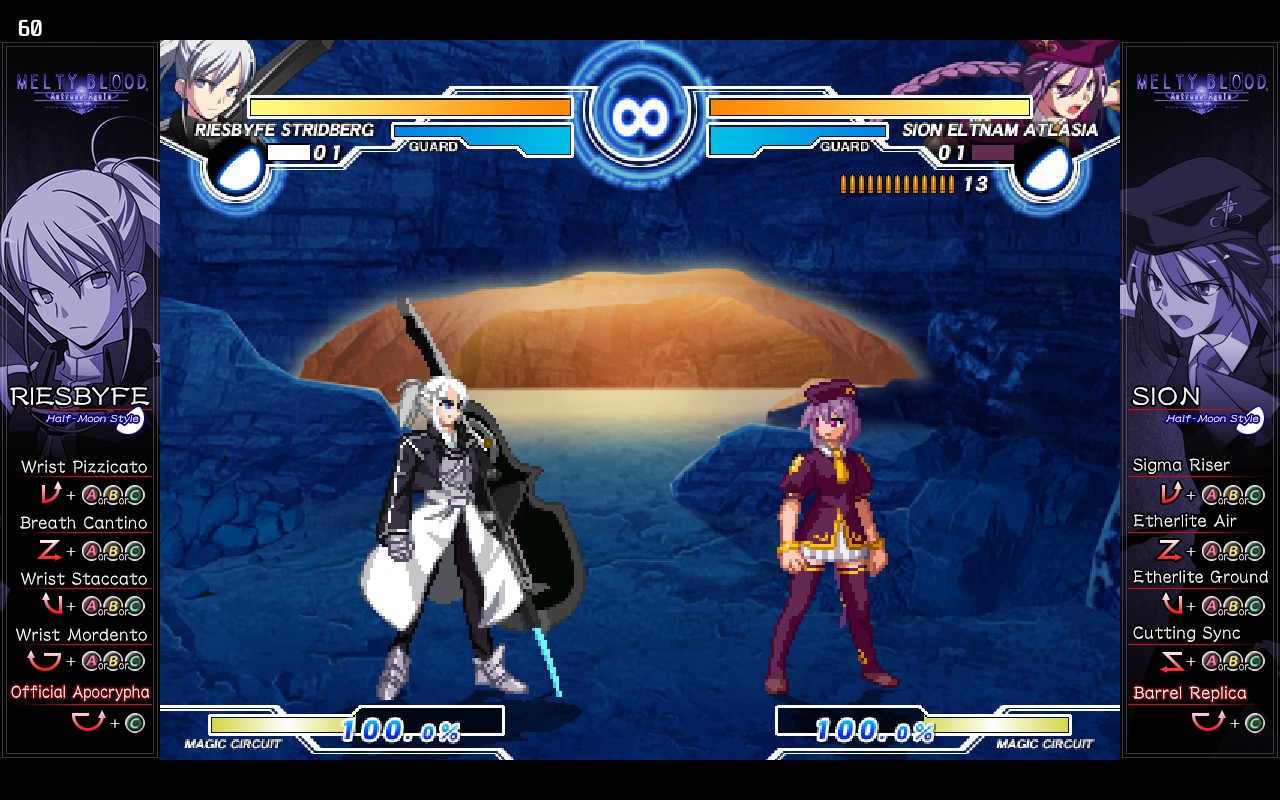
This is how the game looks when running under Proton after activating Heat state: 
Apparently this is an issue that occurs on some AMD GPUs when run under Proton. I haven't verified it myself beyond the Steam Deck but I can directly confirm the issue on the Steam Deck itself.
System details and Proton log, if that's needed or helpful:
@Kumubou I can reproduce your issue on Deck using the Stable channel (System->Os Update Channel). With Beta it looks better but there is still a black square. Can you confirm?
Ok, it's a known issue (D3D9 games using feedback loops with DCC). As a temporary workaround, you can use RADV_DEBUG=nodcc. I will merge https://gitlab.freedesktop.org/mesa/mesa/-/merge_requests/17356 to Mesa main. It will be on the Deck in a couple of weeks when we will update the driver.
EDIT: Fix merged in Mesa main.
@Kumubou I can reproduce your issue on Deck using the Stable channel (System->Os Update Channel). With Beta it looks better but there is still a black square. Can you confirm?
I was able to get the effects to show up as black sometimes on the Beta branch, but it seemed random and when playing it would eventually revert to the behavior originally shown. However, setting RADV_DEBUG=nodcc as a launch option in Steam seems to be 100% effective in addressing the issue on both the Beta and Stable OS branch, so the change to Mesa should fix this issue once that's pushed out.
When trying this game on the Steam Deck, there's a graphical corruption issue that occurs on certain visual effects (namely when blocking attacks, when characters slam into a wall and when someone activates Heat or Blood Heat
I got it to work for me via swapping to Proton Experimental, fixes the weird bugs of R1 forced to be the start button, Select and Start not being able to take inputs, and the visual bugs when going into Heat/Blood heat/effects when hitting someone against a wall.
Granted, I'm using the community version of the game, so it might not work for the official version. I just know these bugs popped up when using Proton 7.0-4
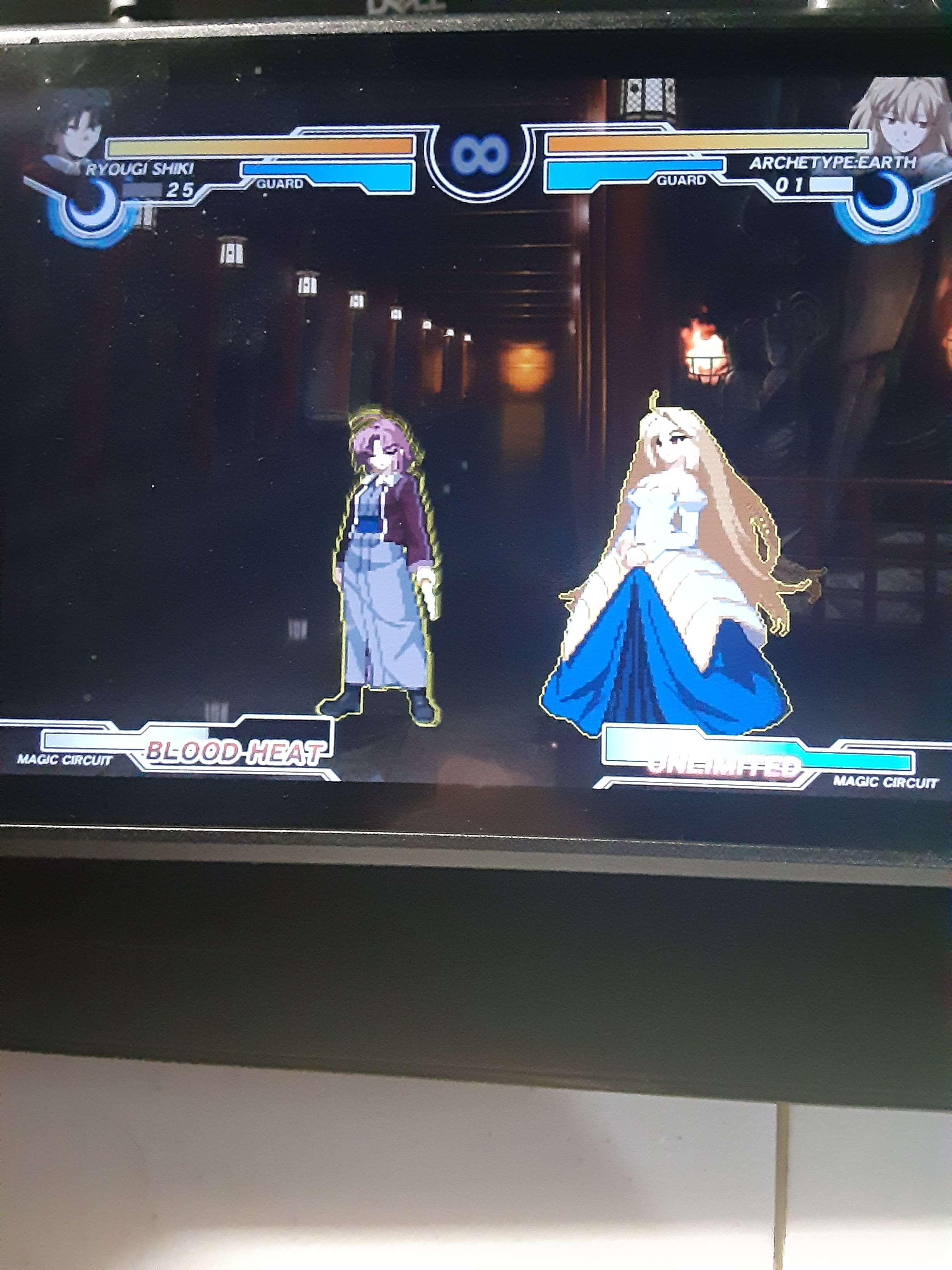
Steam was being a pain about uploading the screenshot, sorry for the quality.
I'm on OpenSUSE Tumbleweed with amdgpu using Mesa-23.0.1 testing the game with Proton 7.0-6 and Experimental.
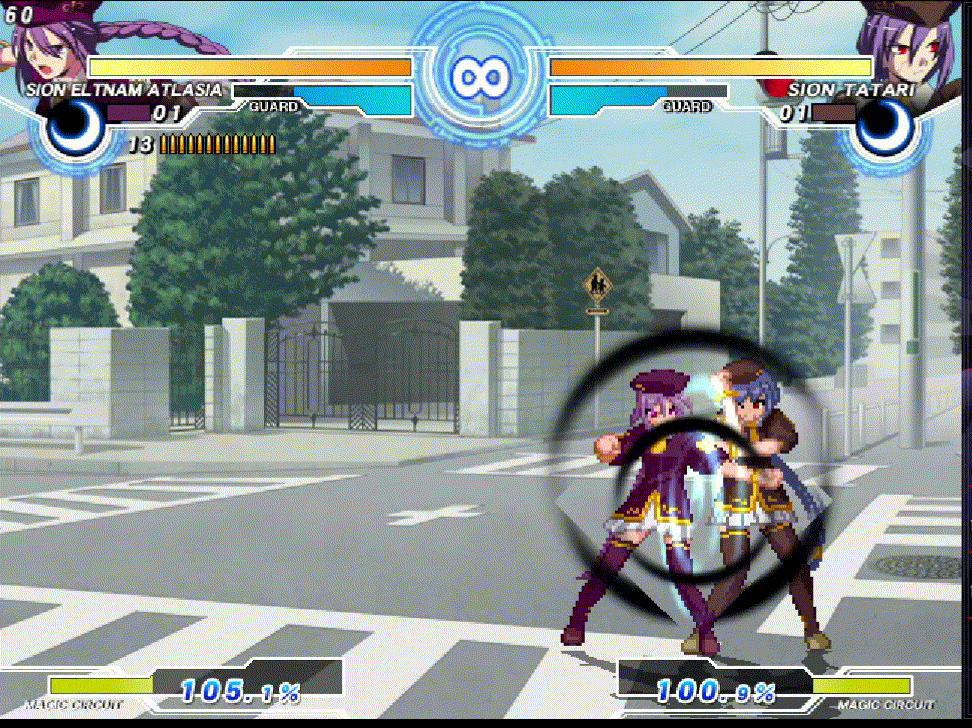
On both Proton versions videos work fine and there is no full screen graphical corruption, however there is still the blocking corruption bug on both versions. Example:
On recent Mesa versions the workaround for this bug was removed since RADV supports VK_EXT_attachment_feedback_loop_layout now, but it needs correct DXVK version.
https://gitlab.freedesktop.org/mesa/mesa/-/commit/9e20977f189118590c5c057856f1a21b1e218315
Is DXVK version in both 7.0-6 and Experimental too old for this? I tried GE-Proton7-55 but game crashed with blackscreen when intro video should play.
steam-411370-Proton-7.0-6..log
steam-411370-Proton-Experimental.log
The graphical artifacts should be fixed in upstream dxvk now.
Edit: now included in Proton Experimental
Gamepad input doesn't work on the current Proton Experimental.
System Information
- GPU: RX 480
- Video driver version: Mesa 26.1.5
- Kernel version: 7.1.4
- Link to full system information report as Gist: Gist
- Proton version: Experimental
I tried enabling PROTON_LOG, but I didn't see a generated log in my home folder when I did.
Proton versions
proton experimentalx4 2026-08ge-proton7-55x1 2023-04proton 7.0-6x1 2023-04proton 7.0-4x1 2022-09proton 4.11-3x1 2020-09proton 5.09x1 2020-09proton 5.0x1 2020-09proton 4.11-13x1 2020-09proton 5.0-9x1 2020-09
Launch options
PROTON_LOGx1 2026-08RADV_DEBUG=nodccx2 2022-07PROTON_USE_WINED3D=1x2 2020-09PROTON_USE_WINED3Dx1 2020-09
Launch lines
PROTON_USE_WINED3D=1 %command%x2 2020-09
This game use mpeg cinematics and work in wine 32bit but not on proton