The Settlers 7: History Edition
Proton 3.7-8, 3.16-9, 4.2-9, 4.11-13:

Proton 5.0-5:

I also see that the Ubisoft launcher is complaining about this:
2020-03-28 19:08:54 [ 153] INFO ProductConfiguration.cpp (148) Reading file C:/Program Files (x86)/Ubisoft/Ubisoft Game Launcher/data/8/config/product_config.yml.
2020-03-28 19:08:54 [ 153] ERROR ProductConfiguration.cpp (156) Failed to open file C:/Program Files (x86)/Ubisoft/Ubisoft Game Launcher/data/8/config/product_config.yml.
~Is it supposed to try to access the C drive? The game itself seems to be installed to the Z drive.~ Edit: this seems to not be an issue.
Comparing the failing launch with a successful launch in Windows the first significant difference (which makes sense in light of the screenshot) in the log files is
2020-03-28 19:08:55 [ 154] INFO SocketFactory.cpp (175) Direct connection failed to 216.98.51.208:13000. Proxy type is automatic. Trying to detect proxy.
2020-03-28 19:08:55 [ 154] ERROR SocketFactory.cpp (199) Proxy detection failed. Cannot create connection to 216.98.51.208:13000. Proxy type is automatic.
2020-03-28 19:08:55 [ 154] ERROR TCPSocketSelected.cpp (342) send failed, error=10038
After looking into network_info.txt of Ubisoft launcher it is clear that none of the detected adapters have the Adapter DNS set.
OK. Please forget all of the above. The Uplay version installed by Settlers 7 in Steam is just too old. I copied over an installed version from my Windows install and can now load the game. Some things (toggle of game language and FPS counter via Uplay) don't work. I guess the games install location is in some config file in the install folder. The game itself works fine (Proton 5.0-5).
Is there a way to install an updated version of Uplay via Steam?
Download UplayInstaller.exe from https://uplay.ubisoft.com/ and then:
STEAM_COMPAT_DATA_PATH=$HOME/.steam/root/steamapps/compatdata/965320 $HOME/.steam/root/steamapps/common/Proton\ 5.0/proton run $HOME/Downloads/UplayInstaller.exe
Adjust paths as needed.
Thanks, @jbg, this did the trick. Initial start after fresh install will hang at the A Service is Unavailable-screen, subsequent start after updating Uplay as shown above succeeds. Sweet!
Linux Mint 20.1
i have the same issue no U play
proton experimental
https://gist.github.com/ioannis120
steam-965320.log](https://github.com/ValveSoftware/Proton/files/6202365/steam-965320.log)
wine does not execute it correctly the UPLAY
same issue here on Ubuntu 20.04. none of adapter with DNS set.
I don't know whether it helps, but I discovered some network issues on Linux systems in conjunction with the Docker interface and wine-based games in multiplayer mode.
So just try to remove the Docker interface and re-check with the connection issue.
The Docker interface will be loaded again after a reboot. No worries.
sudo ip link delete docker0
Proton versions
proton experimentalx1 2021-03proton 5.0-5x2 2020-03proton 3.7-8x1 2020-03
Compatibility Report
System Information
https://gist.github.com/stsp/e9bcfa94704e4ef137652841a270458c
I confirm:
steam-965320.log
Symptoms
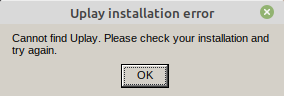
Uplay installation error: Cannot find Uplay. Please check your installation and try again.
Reproduction
Just start the game.