Nights of Azure
This looks like a line of interest from the log:
Unhandled Exception:
System.TypeLoadException: Could not load type of field '<Module>:__m2mep@??4?$gcroot@PE$AAVCQMgr@CQViewer@@@@$$FQEAMAEAU0@PE$AAVCQMgr@CQViewer@@@Z' (510) due to: Could not load file or assembly 'CameraQuakeViewer, Version=1.0.6250.31118, Culture=neutral, PublicKeyToken=null' or one of its dependencies.
got it working Install .NET 4.0 Framework
~/.local/share/Steam/steamapps/compatdata/527280/pfx/winetricks dotnet40
work on startup
update the game controls is all weird
The camera strafes around indefinitely, every other input (cross, square, etc) seems to be working
look for Camera Controls in your setting Game Pad
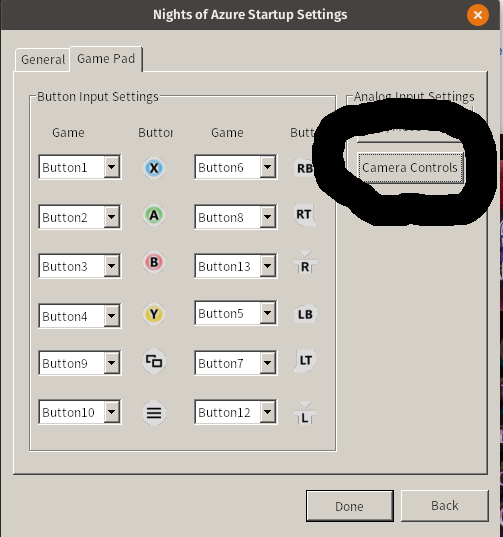
I've installed .Net4.0 via winetricks, but the settings menu (shown in the previous post) claims I don't have a controller connected. I tried with and without using the Steam Controller API. It does seem to work in game though.
Also, it complains about rundll32 being missing or something when I start the launcher. This is not a problem on repeat launches.
When I get in-game, the picture is stretched (I have a 1920x1200 monitor so this may also happen in Windows) and after some opening cutscene the window loses focus. When I tab back in, the screen is white. I turned off AA and tried forcing Proton 4.11-13. This caused the game to crash on start. I tried reinstalling dotnet40, but wine says it's already installed so I deleted the compat directory (for this game) and started over. Didn't help so tried Proton 4.21-2-GE. Didn't work.
So I tried reverting back to 5.0-3, but it still crashes on load, so I started over again. I also noticed that I had been forcing Proton 5.0-3's wine64 when using winetricks which kind of undermines what I did...
Anyways, that didn't work. Game doesn't start up so I assume there is something saved outside the pfx so deleted everything in the game's install directory other than the "Data" directory which I'd rather avoid redownloading.
Unfortunately, that wasn't enough so I uninstalled the game, deleted the compat and common directories for the game, and will start over again later today. I'm done with this right now.
Replying to https://github.com/ValveSoftware/Proton/issues/2737#issuecomment-595977266
Have you managed to get it working?
Proton versions
proton 4.11-13x1 2020-03proton 4.21-2x1 2020-03proton 5.0-3x1 2020-03
Compatibility Report
System Information
https://gist.github.com/trenton4k/300c294e4d8b13988b81c5e45f73fe2a
steam-527280.log
I confirm:
Symptoms
crash on startup
https://www.protondb.com/app/527280