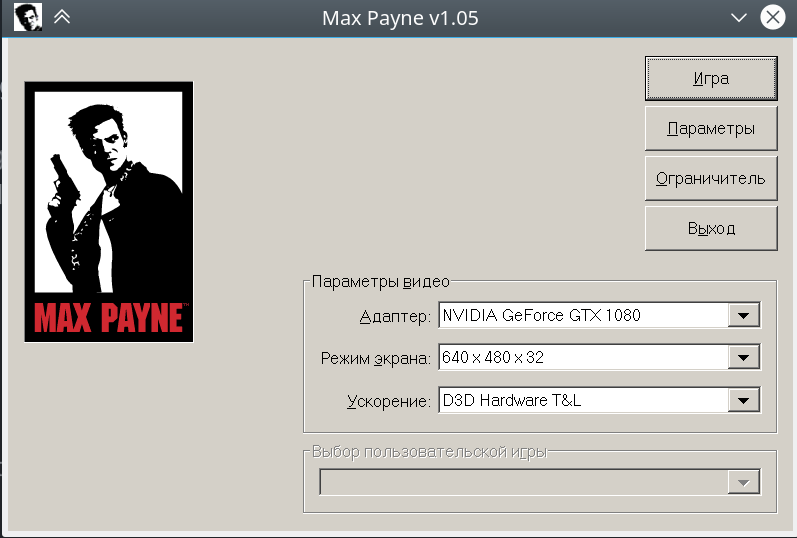
That may be a Wine bug, but I'm not sure. I know I wrote my own Win32 code with an image control that wasn't sized using the dialog sizing methods, so its size was not DPI independent, and appeared smaller on higher DPI modes, especially since the app itself is flagged to be DPI aware. I'm not so sure about this game, or about whether it may actually be a Wine bug.
How to set DPI for now (not a solution but this is the first link Google gives for this problem, sorry for being a little off-topic):
PROTON_VERSION=4.11
PROTON_DIR=~/.local/share/Steam/steamapps/common
export WINEPREFIX="$PROTON_DIR/Proton $PROTON_VERSION/dist/share/default_pfx" WINEARCH=win64
"$PROTON_DIR/Proton $PROTON_VERSION/dist/bin/wine64" 'winecfg.exe'
...and manually change it in Graphics tab.
How to set DPI for now (not a solution but this is the first link Google gives for this problem, sorry for being a little off-topic):
PROTON_VERSION=4.11
PROTON_DIR=~/.local/share/Steam/steamapps/common
export WINEPREFIX="$PROTON_DIR/Proton $PROTON_VERSION/dist/share/default_pfx" WINEARCH=win64
"$PROTON_DIR/Proton $PROTON_VERSION/dist/bin/wine64" 'winecfg.exe'
...and manually change it in Graphics tab.
I can't believe this has gone unaddressed for this long. To me this is a very crucial usability issue that I just made another thread about although I wouldn't have had I found this lol. I guess it's fine because it's so old
bump!
bump!
Still can't believe this is a problem and that more people don't complain about this. Are the vast majority of people still using 1080p monitors or something? I encounter this issue on literally every single Linux device I use. Having to manually change the DPI for almost every single Windows program or launcher I need to use through Wine/Proton via Protontricks almost TEN YEARS after this was initially reported is absolutely absurd.
bump!
Still can't believe this is a problem and that more people don't complain about this. Are the vast majority of people still using 1080p monitors or something? I encounter this issue on literally every single Linux device I use. Having to manually change the DPI for almost every single Windows program or launcher I need to use through Wine/Proton via Protontricks almost TEN YEARS after this was initially reported is absolutely absurd.
do you have any solution about wrong in-game resolution? i have 16" 2560x1600 display, all games think i have 4K monitor or smh
Replying to https://github.com/ValveSoftware/Proton/issues/275#issuecomment-5415512124
I'm sorry to say that even almost 10 years after this issue, you still need to manually change the DPI under winecfg. 200 works for me at 1600p, and 250 is what I use for my 4k display. You can use either Protontricks or the console winecfg to change this manually.
Again, I have no idea how this thread isn't chock full of people complaining, because I CONSTANTLY encounter this issue and it's SUCH an annoyance to still have to manually change the DPI for every newly created Proton prefix. I think only Lutris offers the ability to manually set the DPI for every newly created prefix, which I don't use for other reasons, even if it's great that they actually offer the feature.
I was also looking for a solution to this problem, as changing the DPI every time a new prefix was created was a hassle.
Here is my solution for the Faugus launcher, which ensures that new prefixes are created with a predefined DPI:
step 1.
mkdir -p ~/.config/protonfixes/localfixes
step 2.
cat > ~/.config/protonfixes/localfixes/default.py <<'EOF'
from protonfixes import util
def main():
util.regedit_add(
'HKCU\Control Panel\Desktop',
'LogPixels',
'REG_DWORD',
'192'
)
EOF
I hope this helps.
PROTON_DIRx2 2025-10PROTON_DIR=~/.local/share/Steam/steamapps/commonx2 2025-10PROTON_VERSIONx2 2025-10PROTON_VERSION=4.11x2 2025-10WINEARCH=win64x2 2025-10WINEPREFIX="$PROTON_DIR/Proton $PROTON_VERSION/dist/share/default_pfx"x2 2025-10
Feature Request
I confirm:
contain this feature already.
Description
Currently all wineprefixes use the default DPI (96). Which makes all Win32 windows and fonts look very small on HiDPI monitors, which could be an issue for games with launchers. It would be great if Proton would detect if the Steam client is running in HiDPI mode, and would set wine's DPI accordingly (to 192)
DPI 96:
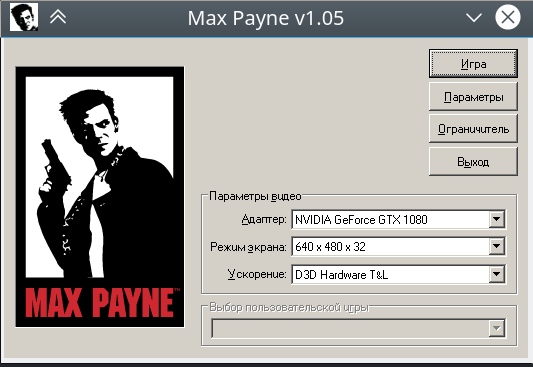
DPI 192: