Through the Woods
I can confirm that I saw the black boxes with reflections enabled but disabling them fixed the issue. Would be nice if we could get it resolved to play with them on if possible.
System Information:
Distro: Manjaro
GPU: RX 580 8GB
Driver/LLVM version: Mesa 19.0.4/8.0.0
Kernel version: 5.1.4-1-MANJARO
Proton version: 4.2-6
https://gist.github.com/Simmonz/ab31e5fa02070e06b9c19b4946ed39f1
- GPU: RX VEGA 56
- Driver/LLVM version: 19.2.0-devel - padoka PPA/9.0.0
- Kernel version: 5.0.13-050013-lowlatency
- Distro version: Linux Mint 19.1 Tessa (64 bit) (Cinnamon Desktop)
- Proton version: 4.2-7
- System information: system_info.txt
I re-tested and the graphical glitches (black boxes) when reflections are enabled are still occurring with Proton 4.2-7 and bleeding edge Mesa drivers.
System Information
- GPU: RX VEGA 56
- Driver/LLVM version: 19.1.0+aco+git1563884390-17d9490cef1-1bionic1 (Valve-Experimental PPA)
- Kernel version: 5.1.19-050119-lowlatency
- Distro version: Linux Mint 19.1 Tessa (64 bit) (Cinnamon Desktop)
- Proton version: 4.2-9
- System information: system_info.txt
Problem with graphics corruptions with reflections enabled remain using a more recent Kernel and Mesa ACO experimental driver
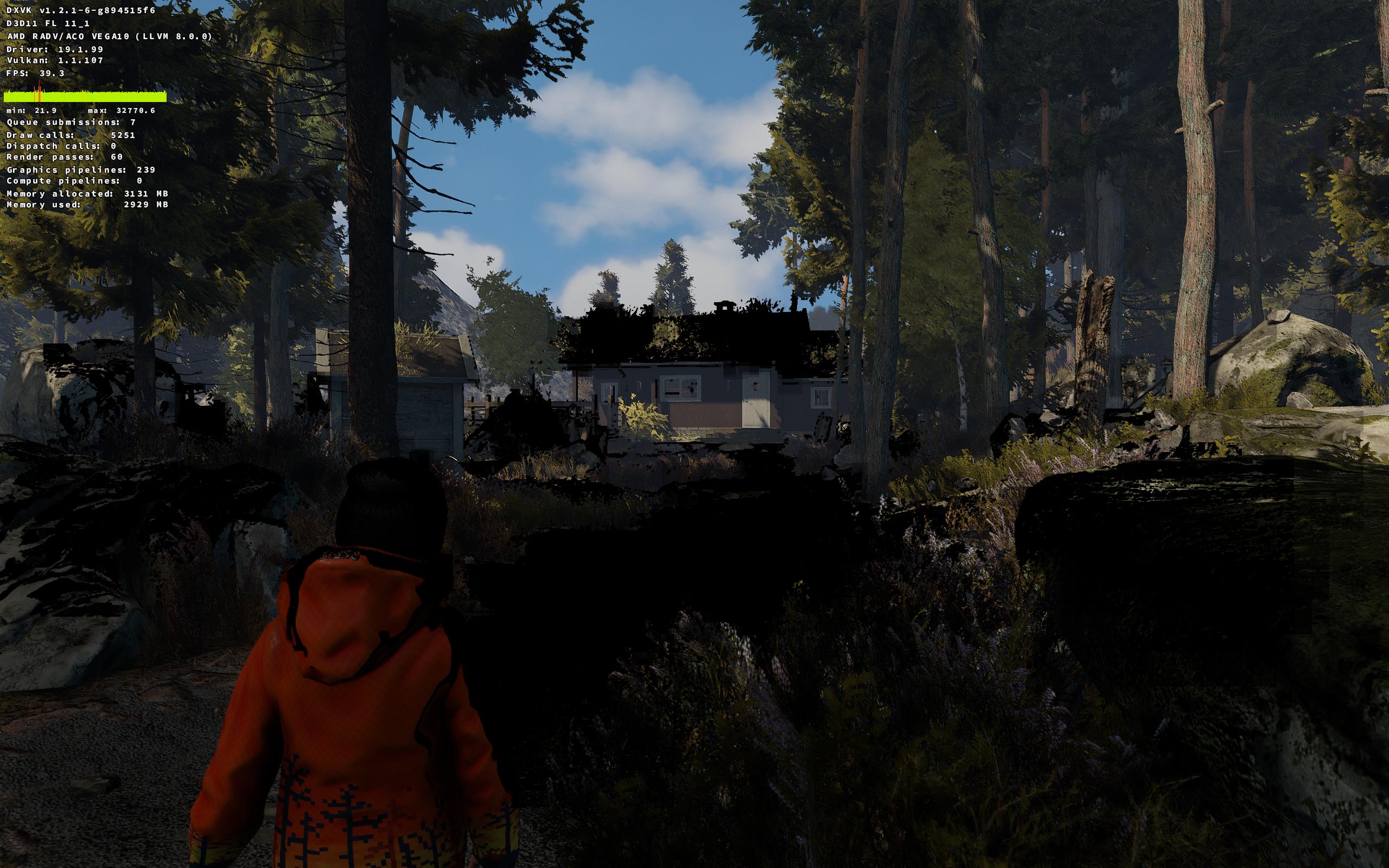
System Information
- GPU: RX VEGA 56
- GPU Driver: 19.3.0-devel (git-7ceafa4 2019-10-20 bionic-oibaf-ppa)
- Kernel version: 5.4.0-050400rc3-lowlatency
- Distro version: Linux Mint 19.2 Tina (64 bit) (Cinnamon)
- Proton version: 4.11-7
Retest Compatibility Report
There seems to be a regression with Proton 4.11-7, the game and the games configuration tool no longer launches, nothing happens.
Changing back to older Proton the game still launches (but with the same graphical glitches as before).
steam-368430-proton-4.2-9.log
steam-368430-proton-4.11-7-conftool.log
steam-368430-proton-4.11-7-game.log
system_info.txt
@AwesamLinux I tried to reproduce what you are seeing, but the game and the configuration tool are both launching fine for me. Do you have a setup not using the custom kernel and oibaf ppa that you could try to confirm if one of those unstable pieces is causing the issue? I tried installing the oibaf ppa on my Ubuntu 18.04 drive which seemed similar to GPU Driver: 19.3.0-devel (git-7ceafa4 2019-10-20 bionic-oibaf-ppa but Steam itself will not launch with that ppa driver installed on an AMD rig.
@AwesamLinux Turns out I was running into a bug that has since been fixed with the oibaf ppa (thank you kisak!) but I am still not seeing the failure with the ubuntu bionic oibaf ppa.
Another option instead of trying on a different setup would be to see if the issue is a Proton change or a dxvk change. You can check this pretty easily by downloading an older release version from here: https://github.com/doitsujin/dxvk/releases. Then unpack it and drop the 32-bit files into ~/.steam/steam/steamapps/common/Proton 4.11/dist/lib/wine/dxvk and the 64-bit bit files into ~/.steam/steam/steamapps/common/Proton 4.11/dist/lib64/wine/dxvk
For reference - Proton 4.11-7 updated from dxvk 1.4 to 1.4.2, and if it is working on 4.2-9, that has dxvk version 1.2.1.
@alasky17 I have the game now up and running with Proton 4.11-7. Not sure exactly what fixed it, changed drivers, kernel and also manually deleted and redownloaded the Proton files. Thanks for the advice.
(the original problem with the graphical glitches with reflections enabled still remain)
@AwesamLinux Thank you so much for letting me know! That is quite a relief on my end since I was never seeing the crashes :)
Made a new discovery:
Setting "d3d11.enableRtOutputNanFixup = True" in dxvk.conf fixes the rendering issue when reflections are enabled.
System Information
- GPU: AMD Radeon RX 5700
- Driver/LLVM version: Mesa 23.0.0-git
- Kernel version: 5.18.8-200.fsync.fc36.x86_64
- Proton Version: proton-7.0-3
system_info.txt
Problem remains with reflections enabled causing graphical glitches. This can still be fixed by making a dxvk.conf with the line "d3d11.enableRtOutputNanFixup = True" in the games installation directory.
Example included (unzip it in the games installation folder):
dxvk.conf.zip
The glitches without the fix can be seen already during the opening cinematic, including log of starting the game where the glitches were visible:
steam-368430.log
Proton versions
proton 7.0-3x1 2022-07proton 4.11-7x3 2019-10proton 4.11x1 2019-10proton 4.2-9x1 2019-10proton 4.2-7x1 2019-06proton 3.16-4x1 2019-06proton 3.7x1 2019-06proton 4.2x1 2019-06
Compatibility Report
System Information
I confirm:
Symptoms
Game works fine except that if reflections are enabled in the graphics options, there are glitches that look like black boxes. I could replicate the issue on different Proton versions, also both with DXVK and WINED3D.
With Reflections:


Without Reflections:
steam-368430-proton-3.7.8.log
steam-368430-proton-3.16-4.log
steam-368430-proton-4.2-5_DXVK.log
steam-368430-proton-4.2-5_WINED3D.log.zip
Note that with WINED3D the log created is massive, the log included is almost 300MB and that is just by launching into the first scene.
Reproduction
Just launch the game and make sure reflections are enabled.