Hello @SergeyLatyshev, we're using one issue report per unofficially supported game title, and it's not immediately obvious if these two games are hitting the same quirk in xinput1_3.dll. Please add a note that you're encountering this behavior on the compatibility reports for these games (#2791 #1026).
The Dark Souls: Remastered log has a stronger indicator with:
wine: Unhandled division by zero at address 0x7fcfc09cb22e (thread 002c), starting debugger...
Unhandled exception: divide by zero in 64-bit code (0x00007fcfc09cb22e).
Backtrace:
=>0 0x00007fcfc09cb22e HID_update_state+0x1fe() in xinput1_3 (0x00007fcfc09cff80)
0x00007fcfc09cb22e HID_update_state+0x1fe in xinput1_3: divq	%rcx,%eax
Thanks for reporting. I tried a wired xbox 360 controller and a Logitech F310 and both worked fine in both games for me. Can you add +xinput,+hid,+hidp,+hid_report,+plugplay to WINEDEBUG in user_settings, gather a log of the crash, and upload it here? Let me know if you need more instructions than that. Thanks!
Thanks for reporting. I tried a wired xbox 360 controller and a Logitech F310 and both worked fine in both games for me. Can you add
+xinput,+hid,+hidp,+hid_report,+plugplayto WINEDEBUG in user_settings, gather a log of the crash, and upload it here? Let me know if you need more instructions than that. Thanks!
Thanks. Looks like we're handling some missing axes badly:
22720.296:002b:002c:warn:xinput:VerifyGamepad Too few buttons, continuing anyway
22720.296:002b:002c:warn:xinput:VerifyGamepad Missing Trigger axes
22720.296:002b:002c:warn:xinput:VerifyGamepad Missing axis ThumbLX
22720.296:002b:002c:warn:xinput:VerifyGamepad Missing axis ThumbLY
22720.296:002b:002c:warn:xinput:VerifyGamepad Missing axis ThumbRX
22720.296:002b:002c:warn:xinput:VerifyGamepad Missing axis ThumbRY
I can fix that, but I'm surprised your joystick doesn't report L and R joysticks.
Any ETA on a fix for this, or perhaps some temporary workaround I can do on my end? Dark Souls Remastered crashes the second I press anything on my xbox 360 (wired) gamepad.
I was able to duplicate these symptoms with a Switch Pro Controller in DMC5, same div by 0 error in syslog. Unfortunately after enabling wine debugging and toggling Proton versions back and forth while testing I can't duplicate it anymore. I also had a PS4 controller wired at the time for testing so it could have been that also.
I've also tried using steam input as a workaround for now. Prevents the game from crashing but doesn't provide any actual input to the game at all. This certainly wasn't an issue a while ago as I have played Dark Souls Remastered with my 360 gamepad in the past on Proton without issue.
Got a log of it crashing in DMC5, I had to remove the +hid* lines above though as they were causing it to crash instantly on boot (which is not the normal symptom).
One weird quirk that confuses me and might be worth a separate bug is that I only get this crash after installing mfplat, which I did via <Link removed by moderator> - not sure what this would do to xinput but my syslog confirms the exact same xinput1_3 crash above the second I hit any button on either of my controllers.
I think this is likely fixed upstream already, but hasn't been pulled into Proton yet. https://bugs.winehq.org/show_bug.cgi?id=46999
I think this is likely fixed upstream already, but hasn't been pulled into Proton yet. https://bugs.winehq.org/show_bug.cgi?id=46999
I can confirm this works for me, I compiled a custom proton-4.12.1 with TKG's scripts and works with the mfplat script & no xinput crash on controller input. Safe to assume the next official Proton release should fix it too. Thanks!
Any update or ETA on this? So many games are practically unplayable due to this, we've not had a Proton release for a while.
@exezin Soon(tm). We're going through a release process right now, but hitting some snags, so it's been taking longer than I'd hoped.
Latest release resolve this issue for me. Good job \o/
Glad to hear it's fixed. If we do another 4.2 release, I will backport it. Is it OK if we close this bug?
Is it OK if we close this bug?
Sure. Thanks everyone involved!
proton 4.12x1 2019-07WINEDEBUGx2 2019-06xinput1_3.dllx1 2019-06
Compatibility Report
System Information
I confirm:
Symptoms
Some games crash as soon as I press any button on my controller (Logitech F710; I tried X360 wired as well). Those game were Borderlands 2 (the Windows version with d9vk) and Dark Souls: Remastered. Every other game I tried does not have this problem.
In Borderlands 2, if it crashes after startup videos, it shows this:
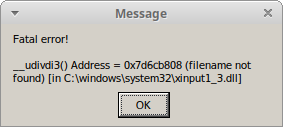
Logs: steam-log.zip
Reproduction