Painkiller Redemption - Fatal Error
Compatibility Report
- Name of the game with compatibility issues: Painkiller: Redemption
- Steam AppID of the game: https://steamdb.info/app/65560/
System Information
- GPU: GTX 760
- Driver/LLVM version: NVIDIA 440.64
- Kernel version: 5.5.9
- https://github.com/shoober420/linux-scripts/blob/main/home/shoober420/sysinfonvidia
- Proton version: 5.0-4
LOG:
steam-65560.log
Symptoms
Crash on launch, no window
@shoober420, same as the rest of your recent comments. You've disabled the Steam runtime and encountered a missing dependency. Disabling the Steam runtime is not supported.
Compatibility Report
- Name of the game with compatibility issues: Painkiller: Redemption
- Steam AppID of the game: https://steamdb.info/app/65560/
System Information
- GPU: GTX 760
- Driver/LLVM version: NVIDIA 440.64
- Kernel version: 5.5.10
- https://github.com/shoober420/linux-scripts/blob/main/home/shoober420/sysinfonvidia
- Proton version: 5.0-4
LOG:
steam-65560.zip
Symptoms
Grey window appears, and another small error window as well. I have to force quit because it freezes this way.
Compatibility Report
- Name of the game with compatibility issues: Painkiller Redemption
- Steam AppID of the game: 65560
System Information
- GPU: AMD Radeon RX 580
- Driver/LLVM version: Mesa 20.1.7
- Distro version: Arch Linux
- Link to full system information report as Gist:
- Proton version: 5.0-9
I confirm:
- [ ] that I haven't found an existing compatibility report for this game.
- [X] that I have checked whether there are updates for my system available.
Symptoms
- Grey window appears, and another small error window as well.
Reproduction
- click Play
Notes:
- I tried the Game Editor too (same issue). But luckily i got some more logs from the Editor.
Logs
so i think that has something to do with: https://bugs.winehq.org/show_bug.cgi?id=45277
Hello
based on this comment https://bugs.winehq.org/show_bug.cgi?id=45277#c61, i did a retest.
System Information
- GPU: AMD Radeon RX 580
- Driver/LLVM version: Mesa 21.0.3
- Distro version: Arch Linux
- Link to full system information report as Gist:
- Proton version: experimental-6.3
Symptoms
- Game doesn't start. Workaround:
protontricks 65560 d3dx9_43 - Most of the Game Window is not visible or it's too small. Depends on the In-Game Resolution you are using. See Screenshots.
Reproduction
- Start the Game.
Screenshots:
- In-Game Resolution DEFAULT:
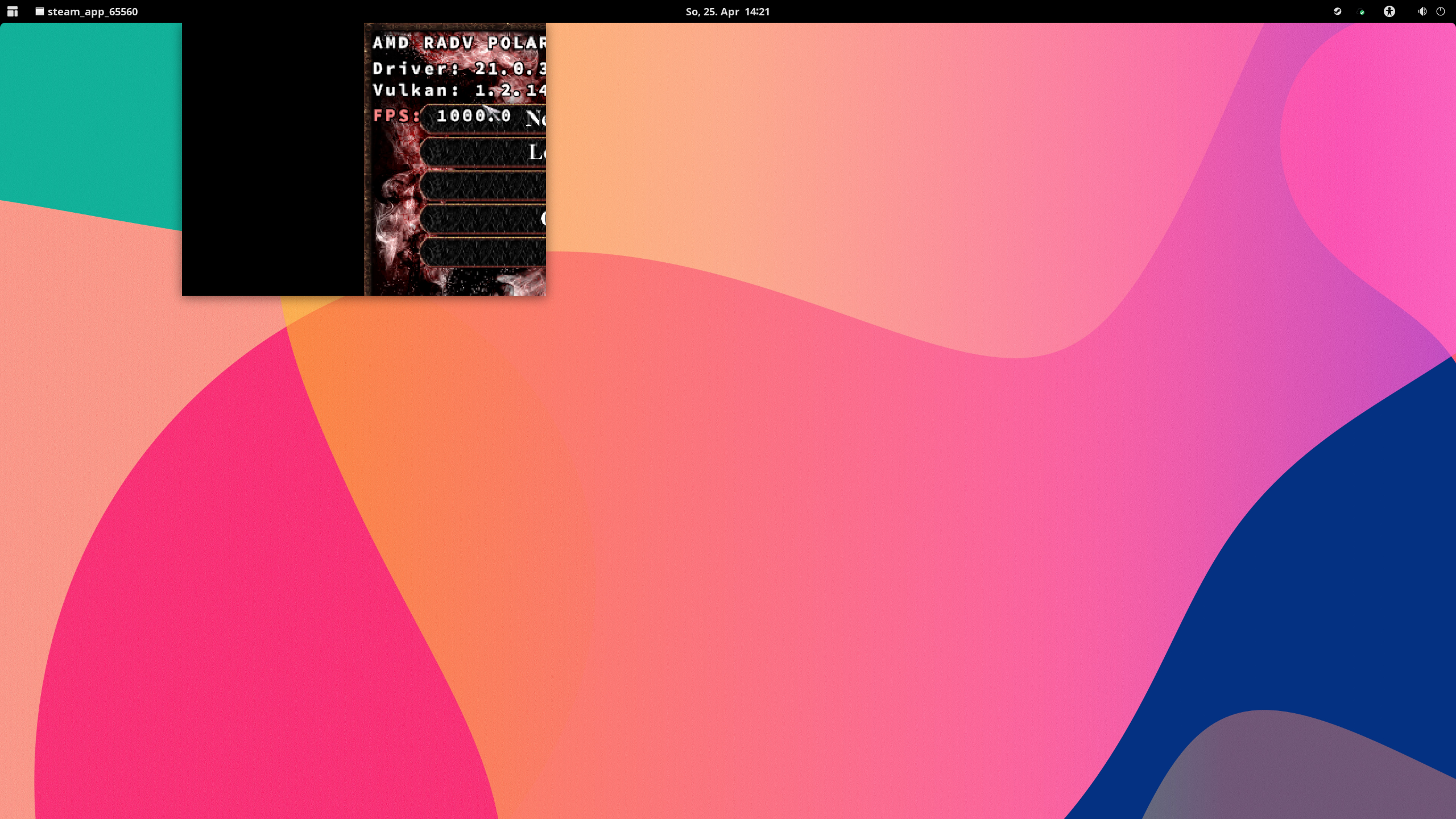
Logs:
steam-65560_without_workaround.log.zip
Snippet:
fixme:d3dx:D3DXLoadSurfaceFromMemory Unhandled filter 0x80004.
fixme:d3dx:D3DXLoadSurfaceFromMemory Unhandled filter 0x5.
fixme:d3dx:d3dx_effect_ValidateTechnique iface 06FD0830, technique 007D3D70 semi-stub.
steam-65560_with_workaround..log
Note
Same for:
- Painkiller: Recurring Evil. https://github.com/ValveSoftware/Proton/issues/2807
Upstream links
- show_bug.cgi?id=45277x2 2021-04
- ValveSoftware/Proton/issues/2807x1 2021-04
Compatibility Report
System Information
I confirm:
Compressed Proton log file: steam-65560.tar.gz
Symptoms
Game starts but an empty grey box appears on the screen. If I alt+tab I can see it's a fatal error box, and pressing enter/return closes the box and thus the game.
Reproduction
Start the game.