Garry's Mod
I tried to launch with latest steam dll and it worked but CEF still not works. CEF patch needs to be merged.
Hello @ardadem, please add a Proton log of the game run with Proton 4.2.
Proton version: 4.2-9
steam-4000.log
Also in-game folder exist chromium log, may useful: chromium.log
GloriousEggroll added wine stagging patches to him custom proton build. Now it's works perfectly with him proton build.
Proton 4.11-3

Proton 4.14-GE-2

VrMod For Garry's Mod
Issue transferred from https://github.com/ValveSoftware/Proton/issues/3777.
@benrob0329 posted on 2020-04-18T04:36:32:
Compatibility Report
- Name of the game with compatibility issues:
- Steam AppID of the game:
Garry's Mod (ID 4000) with the VrMod (https://steamcommunity.com/sharedfiles/filedetails/?id=1678408548)
System Information
- GPU: Nvidia GTX 980ti
- Driver/LLVM version: nvidia 440
- Kernel version: 5.5
- Proton version: 5.0-6
- System Information: https://gist.github.com/benrob0329/6d3aad583d043cc6e10ae2096995525b
I confirm:
- [x] that I haven't found an existing compatibility report for this game. (in this configuration)
- [x] that I have checked whether there are updates for my system available.
Symptoms
The mod is Windows-only, but seems to work for those users just fine. However upon starting it in Proton:
] vrmod_start

[VRMod] lua/autorun/vrutil.lua:390: g_sharedTexture is null
  1. VRMOD_ShareTextureFinish - [C]:-1
   2. VRUtilClientStart - lua/autorun/vrutil.lua:390
    3. unknown - lua/autorun/vrutil.lua:47
     4. unknown - lua/includes/modules/concommand.lua:54

CShaderAPIDX8::BlitTextureBits: couldn't lock texture rect or use UpdateSurface
(these continue for some time)
I have attempted to adjust library overrides, use a real d3d9 library (via Proton tricks) and generally take stabs in the dark but it has not led to any new information unfortunately.
Reproduction
- install Gmod
- Force Use Of Proton
- Install The VrMod As Per Link Above
- Install VrMod Module As Per Workshop Page Instructions
- Use Console To Start VR Mode
I've investigated the behavior of VRMod a little bit and I think I can see where the problem comes from.
As far as I can tell the Lua script component of the addon (vrmod.lua, normally stored inside of a .gma archive and downloaded from the Steam Workshop) calls GetRenderTarget, a function in the Garry's Mod Lua API that gets a render target or creates the render target if it does not already exist. This is used to create the frame that is used for VR. However this function does not return the raw pointer to the resource, which the VRMod DLL (gmcl_vrmod_win32.dll/gmcl_vrmod_win64.dll, downloaded from an external GitHub linked on the workshop page) requires in order to function. In order work around this and to acquire the raw pointer the VRMod DLL uses a library called MinHook to temporarily replace the DirectX 9 CreateTexture function in the shaderapidx9.dll DLL with a thin wrapper. This thin wrapper calls the original CreateTexture function but collects the result for further use in the VRMod DLL. The wrapper is hooked immediately before the Lua script calls GetRenderTarget and unhooked immediately afterwards.
The problem, I suspect, comes from the way the address of CreateTexture is determined. First GetModuleHandleA is used to get shaderapidx9.dll, then GetProcAddress to get a function called CreateInterface, which is then called to create some pointer. The result of CreateInterface is then passed through some fairly complex pointer arithmetic to compute the actual address of CreateTexture. The use of pointer arithmetic (rather than named types, structure members, etc.) and the fact that I cannot find any documentation for the CreateInterface function leads me to believe that this code is interfacing with implementation details which WineD3D/DXVK do not replicate exactly for obvious reasons.
The code in question can be found between lines 143 and 155 of the VRMod DLL source code here: https://github.com/catsethecat/vrmod-module/blob/8df57db09892e18e6b4f0287bc98755f0cf83de5/src/source.cpp
I suspect that modifying the VRMod DLL itself (or perhaps using a native shaderapidx9.dll?) would be the only way to get this mod to work on Linux, as replicating such implementation details of DirectX seems likely to be outside of the scope of the WineD3D/DXVK projects.
Chromium menu still not working, i tried using that proton ge version that was specified but instead of game i get no steamuser error...
Proton GE doesn't fix anything as of now, CEF is still broken.
There seems to be a regression going from proton both 5.0-10 and 5.13-6 have greater performance compared to 6.3-5 and experimental:
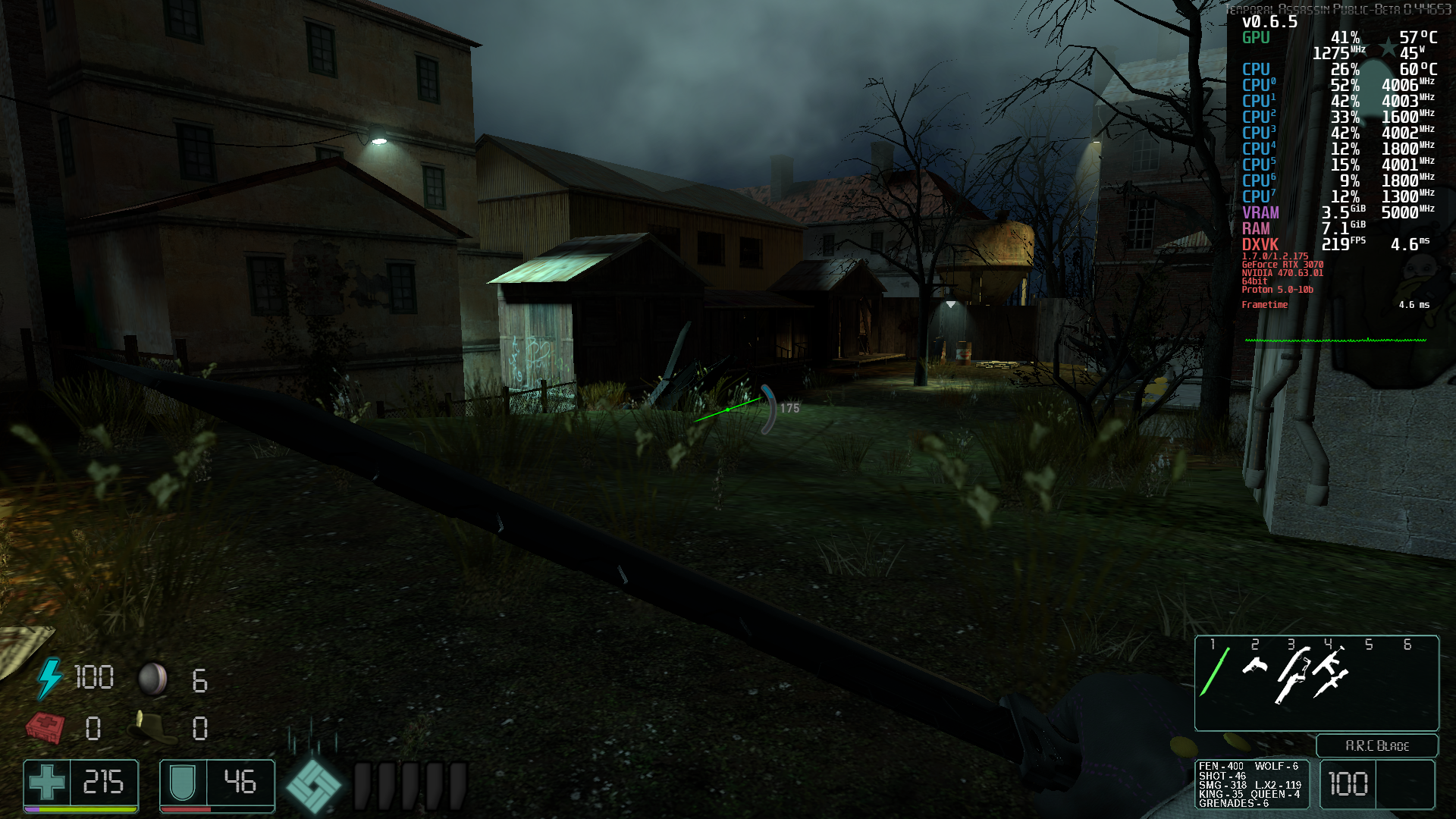

Note it's not related to DXVK as WineD3D has the same issue for the protons, however there seems to be something with Wine/Proton that affects this game and doesn't have proper gpu utilization resulting in awful frame pacing and frame timing it just jumps up and down as you move around the map.
Hello @kodatarule, please add PROTON_LOG=1 %command% to the game's launch options, reproduce the regression with Proton 6.3, and attach the generated $HOME/steam-$APPID.log to this issue report as a file. (Proton logs compress well if needed.) Also, please copy your system information from Steam (Steam -> Help -> System Information) and put it in a gist, then include a link to the gist in this issue report.
The log got incredibly big, but with the log the performance got even worse
steam-4000.tar.gz
And here's the gist: https://gist.github.com/kodatarule/819698738f3b4a07e314c8c5c586455f
EDIT: The log is done by using Proton 6.3-5.
@kodatarule Could you test Proton 6.3-6c and see if the excessive lag is gone? In my testing, it seems like it was fixed due to some improvements in the last release :)
For the main game it seems fixed, but for the mod temporal assassin the regression is still there.
@kodatarule Sweet! Thank you for testing that :) Could you give me a hint about how to get/use the temporal assassin mod? I don't see it in the Steam workshop, and the one server that mentioned temporal assassin was not an open server.
You can git clone it, but it requires git-lfs for the bigger files from their gitlab page and then you just copy and paste files + overwrite - https://gitlab.com/B1gJohnson/temporal-assassin
@kodatarule Thank you for the info! Unfortunately I'm not seeing a big difference between 6.3-6 and 5.13-6 with that mod. The general fps fluctuation when I was on a server was larger than any potential difference that I saw which makes it very hard to dig into :/
I guess it could be something with the mod probably
CEF in the x86_64 branch appears to work okay with stock Wine (main menu works), but it's still broken with Proton. Definitely a Proton bug. Or perhaps something to do with pressure-vessel.
Compatibility Report
- Name of the game with compatibility issues: Garry's Mod
- Steam AppID of the game: 4000
System Information
- GPU: AMD ATI Radeon RX 5500/5500M / Pro 5500M
- Driver/LLVM version: Mesa 21.3.1
- Kernel version: 5.15.7-arch1-1
- Proton version: 6.3-8
I confirm:
- [ ] that I haven't found an existing compatibility report for this game.
- [x] that I have checked whether there are updates for my system available.
Symptoms
Garry's Mod crashes upon startup with the "Steam Error: No SteamUGC" error message every time despite having the Steam client being up to date.
Reproduction
Launch Garry's Mod.
Log file
Helo @ge4rsh0t, err:steamclient:create_win_interface Don't recognize interface name: STEAMUGC_INTERFACE_VERSION016 looks like the line of interest from your log. This hints that the game bumped the version of steamworks they're using and lsteamclient in Proton will need a refresh.
I modified the start script for Proton to bypass pressure-vessel. CEF still failed to start. Unless there's some other sandboxing I'm not aware of, I've ruled that out as being a problem. Last known working version was any Proton before 5.13, particularly the GE fork, but Garry's Mod will no longer start on older Proton versions, and the performance was unacceptable anyway.
Hello @ge4rsh0t, it looks like lsteamclient got an update in Proton Experimental 2022-01-03. Please retest.
@kisak-valve I have compiled this particular version of Proton Experimental and I can confirm that the game is now able to launch with this version of Proton. Thanks.
Here is the log file if necessary:
steam-4000.log
@kisak-valve Proton on x86_64 branch (chromium) doesn't show the main menu due to CEF. Any assistance?
@kisak-valve Proton on x86_64 branch (chromium) doesn't show the main menu due to CEF. Any assistance?
This has been an issue for some time now, would love to know why exactly this happens - Other CEF apps seem to work properly
Compatibility Report
- Name of the game with compatibility issues: Garry's Mod
- Steam AppID of the game: 4000
Tested on both beta branch x86-64 and on normal stable branch.
System Information
-
GPU: NVIDIA GeForce GTX 1650 SUPER
-
Driver/LLVM version: 515.48.07
-
Kernel version: 5.17.14-1-MANJARO 64-bit
-
Link to full system information report as Gist: https://gist.github.com/Fesiug/515fa93d2f6388c8e34b30516fe468f2
-
Proton version: 7.0-2
-
This is done on a BTRFS partition.
I confirm:
- [ ] that I haven't found an existing compatibility report for this game.
- [x] that I have checked whether there are updates for my system available.
steam-4000.zip
Symptoms
Lua auto-refresh doesn't work, making development extremely lengthy and difficult. Editing a Lua file won't refresh the contents in it and requires a long map change.
Reproduction
Putting this file into the GarrysMod/garrysmod/lua/autorun/client directory and then modifying and saving it would change the output in the developer console in Windows versions. This is not done under Proton.
TestFile.zip
Chromium seems to be working on the x86-64 branch with Proton Experimental now.
Edit: Oddly enough it works on my Steam Deck but the menus still don't show up on my PC with an Nvidia card, both running Arch.
Even with Proton Experimental, Garry's Mod still wont show CEF menu on the x86-64 branch. Using Ryzen 5 2600 & AMD RX 5600 XT, Archlinux.
[1216/205251.319:ERROR:sandbox_policy_base.cc(359)] Failed to add sandbox rule.
error = 2, subsystem = 0, semantics = 0, pattern = 'Z:\home\david\.local\share\S
team\steamapps\common\GarrysMod/chromium.log'
[1216/205251.328:WARNING:gpu_process_host.cc(1262)] The GPU process has crashed
1 time(s)
Based on a Google search, this is caused by symlinks on the command-line for CEF. If Proton makes extensive use of them in its sandbox, this could narrow it down and also explain why it works with normal Wine.
Thanks to the above comment. I've only done this once and my girlfriend also confirmed it, but I was able to get the CEF menu on x86-64 working in Proton Experimental. I've tried to type it out in a readable format.
Steps inside of steam are:
- Enable Proton (Experimental or 7.0)
- Choose BETA -> "x86-64"
Steps outside of steam are:
cd /path/to/steam/compatdata/4000/pfx- Move your entire game folder from
/path/to/steamapps/common/GarrysModto the newdrive_c/GarrysMod(C:\GarrysMod) ln -s /path/to/steamapps/compatdata/4000/pfx/drive_c/GarrysMod /path/to/steamapps/common/GarrysMod
The above creates a symlink from the steamapps/common/GarrysMod to the new drive_c/GarrysMod (C:\GarrysMod)
Edit - Removed unneeded steps, added step to enable Proton, cleaned up text
@Sora012 You legend. This works.
So after a bit of more playing around with the prefix last night before I went to sleep. I was able to determine the moving & rsyncing the files aren't even needed! You can simply move the game folder into the prefix and symlink it. I'll edit the original comment to account for this so the unneeded steps are not in it.
The symlink shouldn't be needed for x86-64 CEF, just gamedrive/PROTON_SET_GAME_DRIVE=1 %command%.
Ez launch options:
PROTON_SET_GAME_DRIVE=1 %command%
@WinterPhoenix I will add gamedrive so folks don't have to manually add it - ty! :)
I'm having issues running Garry's mod (taken from a steam support ticket I wrote)
Garry's Mod is complaining about having no SteamUser despite being completely reinstalled (data deleted) and steam and the computer restarted multiple times to no avail.
steam variant is Steam Native, running it through Steam Runtime causes garry's mod to crash instantly. [Library issues and segfaults, I tried remedying it myself without success. Farthest I got was it complaining about not being able to find gmod_audio.]
OS: Arch Linux, kernel 6.6.x (I'm not at my pc right now)
Display server: xorg
Force Proton Experimental: no
Extra addons: none
Are you running the x86-64 beta?
Are you running the x86-64 beta?
Nope, if I was it would've crashed regardless of the steam variant
Try the x86-64 beta + GModCEFCodecFix
tried and gmod says it's missing engine_client.so
AppFramework : Unable to load module engine_client.so!
in comic sans
manually fixing it, ldd bin/linux64/engine_client.so gave me a bunch of dependencies that are missing, i copied over the existing libraries in gmod to /usr/lib (can only turn out well :clueless:) and now i'm compiling an old version of openssl to see if it'll fix it
holy fucking shit it worked
Try the x86-64 beta + GModCEFCodecFix
i would like to note that this appears to be a workaround to get gmod x86_64 to work natively on linux, which works and fixes my initial problem.
but
any other source game I try (e.g. TF2) still has the initial issue I reported (not being able to connect to Steam services through Proton).
I'm not quite sure where exactly to post this because this appears to be a proton issue, but the way the issue templates are structured implies that I can't report a new issue with an existing game or report an issue that covers multiple games under the same engine.
Hello @TheoCGaming, it should be noted that your comments are being marked as off-topic because you're troubleshooting the Linux native variant of this game. In that configuration Proton is not involved which makes that feedback out-of-scope for this issue tracker.
In general, issues with the Linux native variant of games should be reported to the game's dev(s).
Attempting to load a custom player model for a RaidZ server in an experimental build causes a kernel panic.
I haven't tried it with a stable build yet, but the kernel panic doesn't occur with proton-ge, but the model isn't loaded and replaced with an error model.
I tried it on 8.0-4, but no kernel panic occurs, but the result is the same as proton-ge.
@PenguinDOOM A kernel panic is a pretty serious error and likely has nothing to do with Proton or Garry's Mod. What's your kernel version? Are you using nvidia?
And did you actually mean "lua panic", which is an error Gmod could throw?
@PenguinDOOM A kernel panic is a pretty serious error and likely has nothing to do with Proton or Garry's Mod. What's your kernel version? Are you using nvidia?
And did you actually mean "lua panic", which is an error Gmod could throw?
I tried it again and no kernel panic occurred.
But the model isn't loaded.
There is/was an issue with certain models crashing the game:
https://commits.facepunch.com/467638
I tried it on 8.0-4, but no kernel panic occurs, but the result is the same as proton-ge.


This is a problem specific to proton, but it was resolved on the server, so don't worry about it.
Replying to https://github.com/ValveSoftware/Proton/issues/2848#issuecomment-1153324555
This still happens, probably because Proton/Wine doesn't simulate a Windows file update call with the Linux equivalent. Using 'lua_refresh_file' works to refresh a file, but of course, is not automatic. Very cool to see that fonts look just like they do on Windows now!!
latest Arch Linux
Nvidia driver 555.52.04 (GTX 1650 Super)
Kernel version: 6.9.6-zen1-1-zen (64-bit)
Link to full system information report as Gist: https://gist.github.com/Fesiug/3740b58754149a61d5be0ae08fde3906
Proton version: Experimental (6/27/2024)
This is done on a ext4 partition.
Garrys Mod is super glitchy
Issue transferred from https://github.com/ValveSoftware/Proton/issues/9630.
@Alfiestuff posted on 2026-03-30T18:45:45:
Compatibility Report
- Name of the game with compatibility issues: Garry’s Mod
- Steam AppID of the game: 4000
System Information
- GPU: NVIDIA GeForce RTX 4060
- Video driver version: NVIDIA-SMI 595.58.03
- Kernel version: 6.19.9-arch1-1
- Link to full system information report as Gist: (paste Steam System Information + Runtime Diagnostics here)
- Proton version: Proton Experimental
Desktop Environment
- DE: Plasma 6.6.3
- WM: KWin
System Specs Summary
- OS: Arch Linux x86_64
- CPU: AMD Ryzen 5 5600
- RAM: 16GB (15895MiB)
- Resolution: 2560x1440
- Shell: bash 5.3.9
I confirm:
- [x] that I haven't found an existing compatibility report for this game.
- [x] that I have checked whether there are updates for my system available.
Symptoms
- Multiplayer is not working correctly (unable to join servers, disconnects, or servers failing to load)
- Fall damage is not functioning (no damage taken from high falls)
- Texture issues (missing textures, purple/black checkerboards, or broken materials/models)
- crashes alot runs out of memory randomly when memory is free.
Reproduction
- Launch Steam on Arch Linux using Proton
- Start Garry’s Mod
- Attempt to join any multiplayer server
- Observe failure to connect or instability
- Load into a map and observe missing or broken textures
- Jump from a high structure
- Observe no fall damage is applied
ive tried so many things proton GE, gmod patch tools x86-64 version and nothing has worked its just really glitchy
Image Formats IA88 (D3DFMT_A8L8), I8 (D3DFMT_L8) broken
Issue transferred from https://github.com/ValveSoftware/Proton/issues/9714.
@prufaraSS posted on 2026-04-25T15:32:06:
Compatibility Report
- Name of the game with compatibility issues: Source Engine/SDK 2013/Garry's Mod
- Steam AppID of the game: 4000
System Information
- GPU: Intel Arc B580
- Video driver version: 26.2.0_devel
- Kernel version: 6.19.14.zen1-1
- Link to full system information report as Gist:
- Proton version: 11 beta
I confirm:
- [v] that I haven't found an existing compatibility report for this game.
- [v] that I have checked whether there are updates for my system available.
Symptoms
I8(D3DFMT_L8) works as D3DFMT_A8 (shader applies only to alpha channel) (screenshot from Linux with Proton 11):
It should at least fallback to RGBA8888 as provided here (screenshot from Windows system):
D3DFMT_L8 probably should fallback to RGBA8888 too.
It will be nice to get stable D3DFMT_A8L8 (IA88) and D3DFMT_L8 (I8) formats for Gmod and DXVK
It will be nice to get stable D3DFMT_A8L8 (IA88) and D3DFMT_L8 (I8) formats for Gmod and DXVK
yeah
D3DFMT_A8L8 (IA88) works good for DXVK. But D3DFMT_L8 (I8) wrong.
IMAGE_FORMAT_I8 (D3DFMT_L8) works with VK_FORMAT_UNDEFINED, but not works with VK_FORMAT_R8_SRGB.
case D3D9Format::L8: return {
  VK_FORMAT_R8_UNORM,
  VK_FORMAT_UNDEFINED, // was VK_FORMAT_R8_SRGB,
  VK_IMAGE_ASPECT_COLOR_BIT,
  { VK_COMPONENT_SWIZZLE_R, VK_COMPONENT_SWIZZLE_R,
    VK_COMPONENT_SWIZZLE_R, VK_COMPONENT_SWIZZLE_ONE }};
Result:
Proton versions
proton experimentalx7 2026-03proton 6.3-6cx1 2021-08proton 6.3-5x1 2021-08proton 6.3x1 2021-08proton 4.11-3x1 2019-08proton 4.14x1 2019-08proton 4.2x1 2019-07proton 3.15x1 2019-07
Launch options
PROTON_SET_GAME_DRIVE=1x1 2023-07PROTON_LOG=1x1 2021-08
Launch lines
PROTON_SET_GAME_DRIVE=1 %command%x1 2023-07
Upstream links
- ValveSoftware/Proton/issues/9714x1 2026-04
- ValveSoftware/Proton/issues/9630x1 2026-03
- ValveSoftware/Proton/issues/3777x1 2020-04
- ValveSoftware/Proton/issues/2641x1 2019-07
- ValveSoftware/wine/issues/25x1 2019-07
DLLs
gmcl_vrmod_win32.dllx1 2020-10gmcl_vrmod_win64.dllx1 2020-10shaderapidx9.dllx1 2020-10
Compatibility Report
System Information
I confirm:
Symptoms
Game stuck on loading screen.
Reproduction
I found a error line in log:
7092.239:0024:0025:err:steamclient:create_win_interface Don't recognize interface name: SteamMatchGameSearch001
And i searched it. Seems it's fixed in newer version proton -here- but Proton 4.x which is doesn't include CEF patch. Proton developers merged this into -here- Proton 3.15+. Garry's Mod x86_64 uses Chromium Embedded Framework which is game need it to render html main menu and in-game things. (also i tried to play on Proton 4.x. Yes, game launched but CEF not worked as expected)
Log file
steam-4000.log