Dead Space
@kisak-valve wrong label :)
Game works fine for me, but in Steam Overlay my mouse cursor is disappearing.
@arzardk This happens not only in this game. It's something general which is tracked in issue #168
Working fine here too, with a little lag but maybe if I put the graphic in low I cant get more fps.
Arch Linux
Kernel 4.18.3
Proton 3.7
bspwm 0.9.5
CPU Intel Core i3-2350m @ 4x 2.3GHz
RAM 4gb
GPU Intel(R) HD Graphics 3000
Performance is now acceptable with 3.7-5 Beta. Cursor still missing in the Steam Overlay.
flatpak
OpenGL renderer string: AMD Radeon(TM) HD 8800 Series (PITCAIRN, DRM 3.26.0, 4.18.0, LLVM 6.0.1)
OpenGL core profile version string: 4.5 (Core Profile) Mesa 18.1.6
dead space keyboard input dont work after 1 minute on main menu
Issue transferred from https://github.com/ValveSoftware/Proton/issues/1222.
@mrdeathjr28 posted on 2018-09-04T00:30:36:
dead space keyboard input dont work after 1 minute on main menu and after this dont work on game
input works without issues on regular wine
Runs fine, however the "flares" graphic option seems to cause some visual artifacts (seen as early as in the intro scene just after exiting warp)
CPU:  AMD Ryzen 5 2600X Six-Core
GPU: Vega 56

OS: Ubuntu 18.04.1 LTS (64 bit)
    • Steam Runtime Version:  steam-runtime-beta-release_2018-06-14
    • Driver:  X.Org Radeon RX Vega (VEGA10, DRM 3.26.0, 4.18.5-041805-generic, LLVM 8.0.0)
    • Driver Version:  4.4 (Compatibility Profile) Mesa 18.3.0-devel - padoka PPA
The game works fine for me, but the keyboard only works after ALT + TAB out of the game and back in. Gamepad works out of the box.
Hello @mrdeathjr28, @NoXPhasma, what version(s) of Proton are you seeing the keyboard issue with?
@kisak-valve Sorry, forget to mention that, Proton Version 3.16-4. Also my system info: https://gist.github.com/NoXPhasma/9ed85e6b0602b656c812acd013ee121f
@kisak-valve
Keyboard and mouse input works normally in my case with proton 3.16 beta 4
System Specs Used in Test
Nvidia Drivers 410.57 (run package from nvidia drivers homepage)
Xubuntu 18.04 x64 - Kernel 4.17.12 generic (ubuntu mainline) -
CPUFreq: Performance
CPU: Core i3 8350K Tri-Core (Coffelake 14nm) 5.0Ghz + CoolerMaster Hyper T4
MEMORY: 8GB DDR4 2400mhz (4x2) Mushkin (dual channel: 37.5 gb/s)
GPU: Gigabyte Nvidia Geforce GTX 1050 OC (GP107 14nm: 640 Shaders / 40 TMUS / 32 ROPS) Windforce 2GB DDR5 7000Mhz 128Bit (110Gb/s)
MAINBOARD: ASUS Z370-P
Also works fine here. Proton 4.11-11.
Whitelist Request
- Name of the game to be whitelisted: Dead Space
- Steam AppID of the game: https://steamdb.info/app/17470/
System Information
- GPU: GTX 760
- Driver/LLVM version: NVIDIA 440.44
- Distro version: Arch
- https://github.com/shoober420/linux-scripts/blob/main/home/shoober420/sysinfonvidia
- Proton version: 4.11-12
Works great out of the box, even better with "PROTON_USE_D9VK=1".
Hello, is anyone seeing an issue with this game and Proton 4.11 that would block it from being whitelisted?
I've retested it with 4.11-12 and the only issue I've had with the keyboard input is gone now. I don't see any remaining issues.
https://gist.github.com/NoXPhasma/3ff993434fb2b87cdc4304ca4c66e906
I have an Out Of the Box Experience, but I suggests to use:
PROTON_FORCE_LARGE_ADDRESS_AWARE=1 PROTON_PROTON_USE_D9VK=1 %command%
Game works fine with proton 5.0-2.
Has issues on 5.0-3:
- Two cursors show up (in-game one and one from DE);
- Artefacts during opening sequence;
- Saves don't work at all.
Specs:
OS: Solus
KERNEL: 5.5.6-149.current
CPU: AMD Ryzen 5 1600 Six-Core
GPU: Radeon RX 570
GPU DRIVER: 4.5 Mesa 19.3.4
RAM: 16 GB
Hello @FanderWasTaken, can you check if you see the same issues with Proton 4.11?
Proton 4.11
Surprisingly with 4.11-12 Mouse duplication and Saves problem were fixed. Still have artefacts at in the opening sequence though @kisak-valve
P.S. I had to flash bios on my RX 570 because I got it used and drivers on Windows (when I was using it) weren't installing. So these artefacts could be my Card's issue, although I don't experience anything like that in other games I play with Steam Play or Lutris.
@FanderWasTaken i get black squares in intro too, if you talking about these artifacts.
ryzen 7 1800x + rx 560
@soredake, yeah the squares

I'll try with dxvk from master and if i can reproduce it i'll try to record apitrace.
Please add PROTON_LOG=1 %command% to the game's launch options, reproduce the regression, and drag and drop the generated $HOME/steam-$APPID.log into the comment box.
Here, from 4.11-12: steam-17470.log @kisak-valve

Thanks, I was more interested in the save game regression in Proton 5.0, and we need a proton log of the regression before I add the regression label.
Also, some questions about the graphical artifacting:
- Is anyone seeing this issue with an nVidia GPU?
- Does the artifacting look the same with both the DirectX 9 to Vulkan and DirectX 9 to OpenGL render path?
(Proton 4.11's default is OpenGL withPROTON_USE_D9VK=1switching it to Vulkan, and Proton 5.0's default is Vulkan withPROTON_USE_WINED3D=1switching to OpenGL)
Same with dxvk from git.
Okay, this is weird: saves just worked on 5.0-3 for me. They didn't work when I had no saves at all saying "Unable to save game". Now with a save from 4.11-12 present, 5.0-3 saves the game with no problems...
Log: steam-17470.log
No squares with wined3d.
No squares with wined3d.
Indeed, no squares on 5.0-3:
PROTON_USE_D9VK=1

PROTON_USE_WINED3D=1

Light is more accurate with wined3d.
Tentatively added the DXVK/D3D9 label, we'll want to hear from someone using the nVidia driver to help scope that issue.
So, light is fine according to https://github.com/Joshua-Ashton/d9vk/issues/434 https://github.com/Joshua-Ashton/d9vk/issues/268#issuecomment-524736927
Compatibility Report
- Name of the game with compatibility issues: Dead Space
- Steam AppID of the game: https://steamdb.info/app/17470/
System Information
- GPU: GTX 760
- Driver/LLVM version: NVIDIA 440.59
- Kernel version: 5.5.6-zen
- https://github.com/shoober420/linux-scripts/blob/main/home/shoober420/sysinfonvidia
- Proton version: 5.0-3
LOG:
steam-17470.log
Everythings fine with NVIDIA, runs great.
So, light is fine according to Joshua-Ashton/d9vk#434 Joshua-Ashton/d9vk#268 (comment)
Yeah, it seems that with OpenGL brightness slider doesn't even work at all


How are you testing OpenGL? Disabling DXVK and using WineD3D? There's a difference there. WineD3D method doesn't support system gamma at all. DXVK at least attempts to apply it to the image using a shader.
As they said in the topic, the gamma effect won't show up in screen shots from the native Windows game, as it's using system gamma levels to adjust the lighting, and thus it only shows up in the monitor output, and only when the game is full screen.
You'll need to settle for taking photographs of your monitor, or using a video output capture device.
Hi, @kode54. I use «PROTON_USE_WINED3D=1%command%» launch option.
Brightness didn't change for me. Game was fullscreen and brightness slider did nothing. May it be KDE's fault?
No, it's Wine's fault for either disabling it, or not implementing it. Does brightness change with the Vulkan mode? Or are you not capable of testing that mode?
WineD3D, the OpenGL mode, should produce identical screen shots to the Windows D3D9 native mode, at least in brightness. Since it applies it in a post processing (gamma correction) step that doesn't affect the raw pixels, but rather the video signal that reaches the monitor.
The only reasonable way to compare color correctness with D3D9 versus DXVK, is to capture the video signal from the video cable, when running both versions purely in full screen mode. DXVK should also be compared on both Linux and Windows, in case there's something up with the gamma implementation affecting only one or the other. (Yes, the Vulkan wrapper works in Windows, and that's where at least one of the developers works on it, from Windows.)
As said in that topic, digital screen shots won't work for the native Direct3D 9 version on Windows. Needs to be video output capture from the video card, or needs a screen shot tool that is aware of gamma correction and saves the gamma ramp or level to the image for later processing.
Does brightness change with the Vulkan mode?
Brightness changes with "PROTON_USE_D9VK=1". But that causes The Squares™ to show up in the intro.
Oh, crud. I haven't tested since Proton 4.11, and I wasn't aware I was using the OpenGL wrapper. It works perfectly with that, though. I guess this is a DXVK regression, then.
Black squares should be fixed now.
Yes, fixed, thanks!
@soredake @Joshua-Ashton What happend? How was that fixed? Am I missing something here?
For easy reference, the black squares issue was also tracked at https://github.com/doitsujin/dxvk/issues/1484, which points towards https://github.com/doitsujin/dxvk/commit/f6b26b302d9c0c9760b47b881ce6667f8f021424 as the fix.
Oh. Cool!
On Mon, 9 Mar 2020, 5:11 pm kisak-valve, [email protected] wrote:
For easy reference, the black squares issue was also tracked at
doitsujin/dxvk#1484 https://github.com/doitsujin/dxvk/issues/1484,
which points towards doitsujin/dxvk@f6b26b3
https://github.com/doitsujin/dxvk/commit/f6b26b302d9c0c9760b47b881ce6667f8f021424
as the fix.—
You are receiving this because you were mentioned.
Reply to this email directly, view it on GitHub
https://github.com/ValveSoftware/Proton/issues/293?email_source=notifications&email_token=ALUJ6CC3RD42ZQ7H4G4DD33RGT2JTA5CNFSM4FRHGFUKYY3PNVWWK3TUL52HS4DFVREXG43VMVBW63LNMVXHJKTDN5WW2ZLOORPWSZGOEOHBRQI#issuecomment-596515009,
or unsubscribe
https://github.com/notifications/unsubscribe-auth/ALUJ6CAUASP6ZNN3LV2LC4DRGT2JTANCNFSM4FRHGFUA
.
Proton 5.0-4.
double cursor bug is persists:

and after alt-tab (same in dead space 2 on this resolution):

dunno whom to ping so i'll ping d3d9 master @Joshua-Ashton
@soredake Turns out that this is a result of the default prefix changing from win7 to win10. The easiest way to get rid of the extra cursor is to switch back to Proton 4.11-13 temporarily. This will change the prefix back to win7 and the change will carry over when you go back to 5.0-4 (if you delete the prefix or use a different machine you will need to do this again for every location). You can also use winecfg to change the prefix to win7. Thank you for reporting this :)
Weird. Definitely a Wine bug, doesn't happen on Windows 10 with DXVK D3D9.
Same as https://github.com/ValveSoftware/Proton/issues/3651 but only after alt-tab.
steam-17470.log
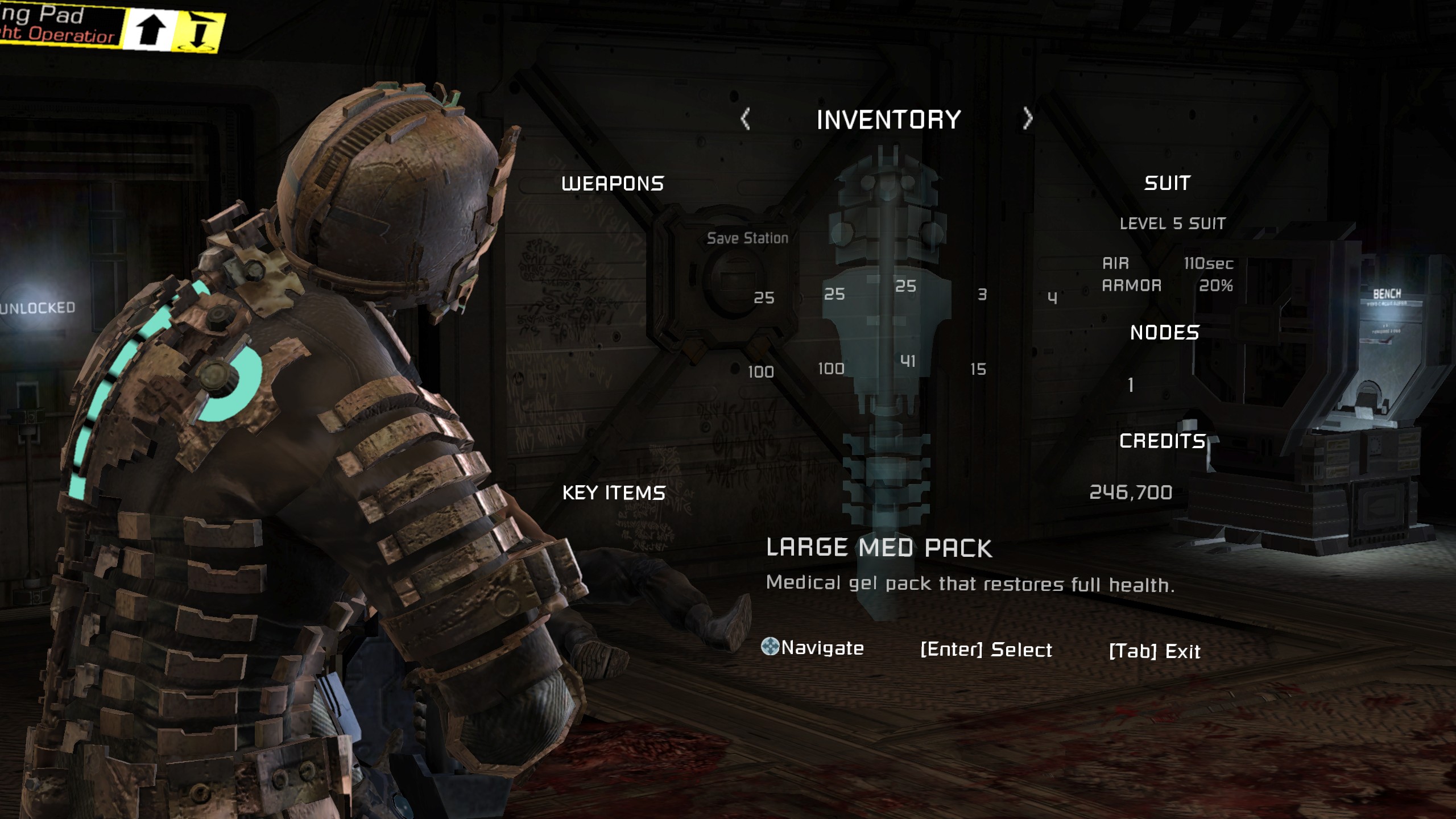
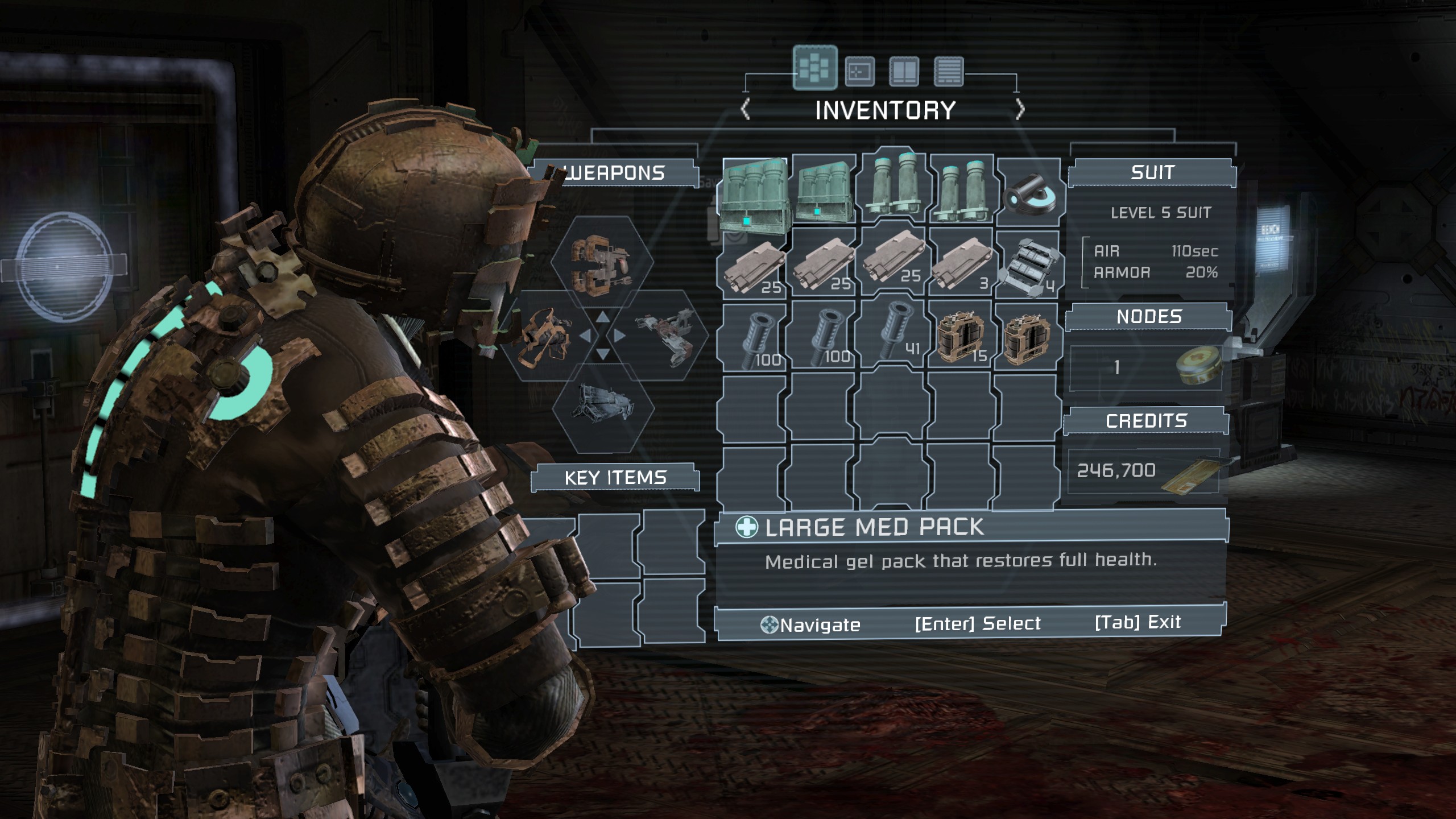
The UI is missing when running on proton experimental, Works fine on proton 6.3.8
Proton Experimental missing UI
Proton 6.3.8 working UI
Operating System: Fedora 34
KDE Plasma Version: 5.22.5
Kernel Version: 5.14.18-200.fc34.x86_64 (64-bit)
Processors: 16 × AMD Ryzen 7 3700X 8-Core Processor
GPU: AMD Radeon RX 5700 XT (NAVI10, DRM 3.42.0, 5.14.18-200.fc34.x86_64, LLVM 12.0.1)
Driver Version: 4.6 (Compatibility Profile) Mesa 21.1.8
Edit:
forgot to include the proton log;
steam-17470.log
@fartboxmk2 I think that this is fixed with the latest experimental release today - could you retest and confirm that?
@alasky17 Can confirm it works on the latest release. Thank you for the fix.
Proton versions
proton 6.3x1 2021-11proton experimentalx1 2021-11proton 4.11-13x1 2020-03proton 5.0-4x1 2020-03proton 4.11x5 2020-03proton 5.0x1 2020-02proton 5.0-2x1 2020-02proton 4.11-11x1 2019-12proton 3.16x1 2018-11proton 3.7x1 2018-08
Launch options
PROTON_USE_D9VK=1".x2 2020-03PROTON_USE_WINED3D=1%command%»x1 2020-03PROTON_USE_D9VK=1**x1 2020-02PROTON_USE_WINED3D=1**x1 2020-02PROTON_USE_D9VK=1`x1 2020-02PROTON_USE_WINED3D=1`x1 2020-02PROTON_LOG=1x1 2020-02PROTON_FORCE_LARGE_ADDRESS_AWARE=1x1 2020-02PROTON_PROTON_USE_D9VK=1x1 2020-02
Launch lines
Upstream links
- ValveSoftware/Proton/issues/3651x1 2020-03
- doitsujin/dxvk/issues/1484x3 2020-03
- ValveSoftware/Proton/issues/1222x1 2018-09
Processor Information:
CPU Vendor: GenuineIntel
CPU Brand: Intel(R) Core(TM) i5-4670K CPU @ 3.40GHz
CPU Family: 0x6
CPU Model: 0x3c
CPU Stepping: 0x3
CPU Type: 0x0
Speed: 3800 Mhz
4 logical processors
4 physical processors
HyperThreading: Unsupported
FCMOV: Supported
SSE2: Supported
SSE3: Supported
SSSE3: Supported
SSE4a: Unsupported
SSE41: Supported
SSE42: Supported
AES: Supported
AVX: Supported
CMPXCHG16B: Supported
LAHF/SAHF: Supported
PrefetchW: Unsupported
Operating System Version:
Ubuntu 18.04.1 LTS (64 bit)
Kernel Name: Linux
Kernel Version: 4.15.0-32-generic
X Server Vendor: The X.Org Foundation
X Server Release: 11906000
X Window Manager: GNOME Shell
Steam Runtime Version: steam-runtime-beta-release_2018-06-14
Video Card:
Driver: NVIDIA Corporation GeForce GTX 760/PCIe/SSE2
Driver Version: 4.6.0 NVIDIA 396.51
OpenGL Version: 4.6
Desktop Color Depth: 24 bits per pixel
Monitor Refresh Rate: 60 Hz
VendorID: 0x10de
DeviceID: 0x1187
Revision Not Detected
Number of Monitors: 1
Number of Logical Video Cards: 1
Primary Display Resolution: 1920 x 1080
Desktop Resolution: 1920 x 1080
Primary Display Size: 20.08" x 11.42" (23.07" diag)
51.0cm x 29.0cm (58.6cm diag)
Primary Bus: PCI Express 16x
Primary VRAM: 2048 MB
Supported MSAA Modes: 2x 4x 8x 16x
Sound card:
Audio device: Realtek ALC887-VD