eFootball PES 2020 DEMO
No evidence of .NET being used in the log.
For me the demo works almost perfect except:
- Every time I start the game proton start to install the dependencies
- Won't safe the settings (guess this is because of the first issue)
- Won't start from steam big picture mode which is annoying since I play it from the steam link.. (might also be because of the first issue)
- Some graphical glitches in the movies, not the game play but I think this can be solved by changing the graphic settings
I have the game in my wish list but hope these issues can be fixed
For me the demo works almost perfect
@guustflater Are you able to play online matches without issue? (eFootball mode)
For me the demo works almost perfect
@guustflater Are you able to play online matches without issue? (eFootball mode)
Did not try online play yet since I have to practice some more before I like to try that ;)
Will take a look today or tomorrow and try to post a log file and system information here
Settings will save now. I did found another issue, in big picture mode with the controller it's not possible to accept the license agreement because it opens some steam overlay window which you can't use with the controller. After accepting the license the settings are being saved now.
Still every time I start the game proton start to perform the first time setup and it won't start from steam big picture mode. Just doesn't do anything.
The graphical glitches looks like their gone after disabling post processing and something like clothes simulation(?).
Attached is the log file for just starting the game. please let me know if there are any questions / tests that I could do.
System information
Processor Information:
    CPU Vendor:  AuthenticAMD
    CPU Brand:  AMD Ryzen 5 1600 Six-Core Processor
    CPU Family:  0x17
    CPU Model:  0x1
    CPU Stepping:  0x1
    CPU Type:  0x0
    Speed:  3200 Mhz
    12 logical processors
    6 physical processors
    HyperThreading:  Supported
    FCMOV:  Supported
    SSE2:  Supported
    SSE3:  Supported
    SSSE3:  Supported
    SSE4a:  Supported
    SSE41:  Supported
    SSE42:  Supported
    AES:  Supported
    AVX:  Supported
    CMPXCHG16B:  Supported
    LAHF/SAHF:  Supported
    PrefetchW:  Unsupported

Operating System Version:
    Ubuntu 19.04 (64 bit)
    Kernel Name:  Linux
    Kernel Version:  5.0.0-31-generic
    X Server Vendor:  The X.Org Foundation
    X Server Release:  12004000
    X Window Manager:  GNOME Shell
    Steam Runtime Version:  steam-runtime_0.20190711.3

Video Card:
    Driver:  X.Org Radeon RX 580 Series (POLARIS10, DRM 3.27.0, 5.0.0-31-generic, LLVM 8.0.0)
    Driver Version:  4.5 (Compatibility Profile) Mesa 19.3.0-devel
    OpenGL Version: 4.5
    Desktop Color Depth: 24 bits per pixel
    Monitor Refresh Rate: 60 Hz
    VendorID:  0x1002
    DeviceID:  0x67df
    Revision Not Detected
    Number of Monitors:  1
    Number of Logical Video Cards:  1
    Primary Display Resolution:  1920 x 1080
    Desktop Resolution: 1920 x 1080
    Primary Display Size: 23.54" x 13.23" (26.97" diag)
                                            59.8cm x 33.6cm (68.5cm diag)
    Primary VRAM: 8192 MB

Sound card:
    Audio device: ATI R6xx HDMI

Memory:
    RAM:  16049 Mb

Miscellaneous:
    UI Language:  English
    LANG:  nl_NL.UTF-8
    Total Hard Disk Space Available:  121022 Mb
    Largest Free Hard Disk Block:  82099 Mb
    VR Headset: HTC Vive detected
- Fixed: performing first time setup every time (by removing installscript.vdf)
- Fixed: big picture mode with the controller it's not possible to accept the license agreement (start in normal steam mode on my pc and accepted it)
- Fixed: full screen issue (https://wiki.sgripon.net/doku.php/run_pro_evolution_soccer_2019_in_fullscreen_mode_on_steam_on_ubuntu_linux)
- Fixed: Won't start from steam big picture mode (not sure but guess by fixing the first time setup or the full screen mode, it works now)
- sometimes the game has graphical glitches (when I change some graphical settings it works but comes back later..)
The game crashes soon after launch.
Here is the log file steam-996480.log
System Information
- GPU: GeForce 930MX
- Driver version: NVIDIA 435.21
- Kernel version: 5.3.0-24-generic
- System Information
- Proton version: 4.11-9
I noticed the issue in the System Information:
    "issues" : [
      "dot-steam-steam-not-symlink"
    ]
Maybe it is the reason.
@jqadev do other Vulkan/D3D11 games work for you?
FWIW the demo works on my end (except for some rendering issue on the team selection screen). Since you seem to be using a laptop, Failed to create swap chain usually means that something might be wrong wrong with your PRIME setup.
@doitsujin Unfortunately, I don't have any native Vulkan games, only OpenGL ones.
I couldn't run any D3D9, D3D10, D3D11 games using Proton and DXVK/D9VK.
Only The Witcher 2 works for me using Proton but only without D9VK.
PRIME setup:
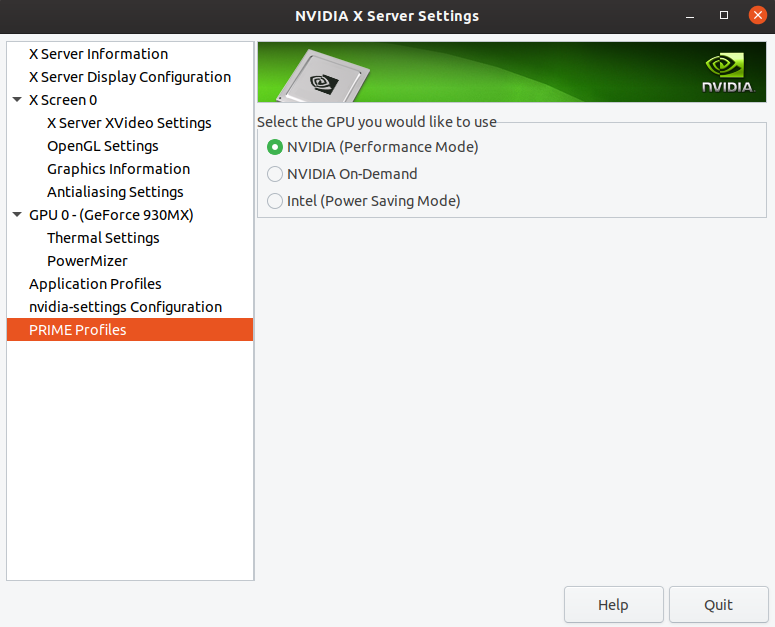
vulkaninfo output contains:
WARNING: [Loader Message] Code 0 : loader_icd_scan: Can not find 'ICD' object in ICD JSON file /usr/share/vulkan/icd.d/nvidia_layers.json.  Skipping ICD JSON
/build/vulkan-tools-IZAxVX/vulkan-tools-1.1.114.0+dfsg1/vulkaninfo/vulkaninfo.c:1528: failed with VK_ERROR_INITIALIZATION_FAILED
Here is the full output: vulkaninfo.txt
@kisak-valve the output from the vulkaninfo should be required in the bug report
@doitsujin
I found the solution here https://github.com/ValveSoftware/Dota-Underlords/issues/1#issuecomment-515776293
It is enough to run sudo vulkaninfo instead of vulkaninfo before running games and games using DXVK/D9VK start working.
vulkaninfo is not installed by default on Ubuntu so I needed to install it using apt install vulkan-utils.
Nothing extracted yet.
Compatibility Report
System Information
I confirm:
steam-996480.log
Symptoms
Consistent connection failures before start of online match (after player selection):
![Screenshot]()
Reproduction
Libraryusing the Steam client and press thePlaybuttonNOTE: Not tested eFootball PES 2020 (AppID 996470)