Final Fantasy VIII Remastered
Hello @Admiral124, please retest with mesa 19.2.0 (a release candidate) or git master.
Thanks for the reply. I installed 19.2.0-rc1 but the issue still persists.
glxinfo | grep 'version'
server glx version string: 1.4
client glx version string: 1.4
GLX version: 1.4
Max core profile version: 4.5
Max compat profile version: 3.0
Max GLES1 profile version: 1.1
Max GLES[23] profile version: 3.1
OpenGL core profile version string: 4.5 (Core Profile) Mesa 19.2.0-rc1
OpenGL core profile shading language version string: 4.50
OpenGL version string: 3.0 Mesa 19.2.0-rc1
OpenGL shading language version string: 1.30
OpenGL ES profile version string: OpenGL ES 3.1 Mesa 19.2.0-rc1
OpenGL ES profile shading language version string: OpenGL ES GLSL ES 3.10
GL_EXT_shader_implicit_conversions, GL_EXT_shader_integer_mix,
Thanks, can you check the iris driver as well by adding MESA_LOADER_DRIVER_OVERRIDE=iris %command% to the game's launch options?
That seems to have done the trick! The game now launches and seems to play without issue.
I'm seeing the same issue on a machine with an Intel HD 4600, which isn't able to utilize iris.
if using mesa-git as of this commit https://gitlab.freedesktop.org/mesa/mesa/commit/9fb45c5bbd11fa54c0777021a236114e414207f8 . the game will now work just fine on gen6+ with the i965 driver. tested with haswell, but the main fixing commit https://gitlab.freedesktop.org/mesa/mesa/commit/fa4d981f6f9fdb9a8d91568f08e5ce813ca76b62 enabled GL_EXT_gpu_shader4 for Gen6+ so the game should also work just fine on ivybridge
Problem
FF8 launcher crashes at start with this error:
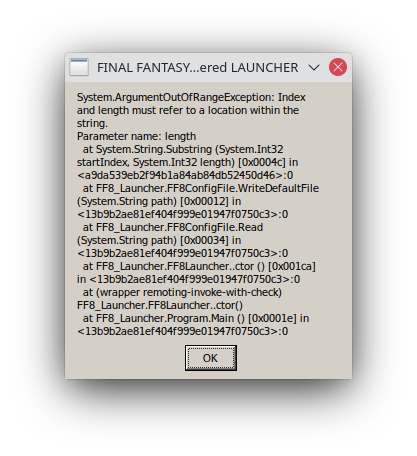
Proton log:
steam-1026680.log
System Information
GPU: RX 6700 XT
Kernel: 5.12.12-arch1-1
Proton: Experimental
Steam system information: https://gist.github.com/minecraft2048/1c26932f3ae1874173dc94649407a493
FINAL FANTASY VIII - REMASTERED (Steam Deck)
Issue transferred from https://github.com/ValveSoftware/Proton/issues/6163.
@maran posted on 2022-09-16T13:15:20:
Compatibility Report
- Name of the game with compatibility issues: FINAL FANTASY VIII - REMASTERED
- Steam AppID of the game: 1026680
System Information
- GPU: Steam Deck
- Driver/LLVM version: Steam Deck
- Kernel version: 5.13.0-valve21.1.1-neptune-02211-gc54cda5a36f3
- Link to full system information report as Gist: https://gist.github.com/maran/4fc11b7cf5868c6cedd39247d62bb128
- Proton version: Tested 5 to 7
I confirm:
- [X] that I haven't found an existing compatibility report for this game. (There is an other one with different issues)
- [X] that I have checked whether there are updates for my system available.
Proton logs: https://gist.github.com/maran/e1ad7190b1ee3b5313f64816ee7f02a8
Symptoms
After sleeping the Steam Deck and going into any menu (main menu / tutorial screen etc) the game graphics engine seems to freeze, sound does keep playing. Only way to fix is to restart.
This does not happen on my Linux PCs with Proton, only on the Steam Deck.
Reproduction
- Start game
- Put Steam Deck to sleep via power button
- Awake Steam Deck
- Go into any menu (for instance by pressing the 'y' button)
- Success (or rather failure)
I would love to learn more about Proton so if I can somehow contribute to this fix let me know.
I can also reproduce/am experiencing the issue that kiask-valve migrated over from maran's original report
I, too, experience this issue.
After sleeping the Steam Deck and going into any menu (main menu / tutorial screen etc) the game graphics engine seems to freeze, sound does keep playing. Only way to fix is to restart.
I am happy to report that this seems to have been solved in the Steam Deck OS 3.4 Update
Tried playing on the Steam Deck using Proton Experimental, but it keeps crashing.
After playing for about 45 minutes, the graphics glitch out and disappear, leaving only the audio. Since you can only manually save at save points, this results in a loss of progress every time this happens.
I had PROTON_LOG=1 enabled because it crashes so often but I can't upload the full log since it's 209MB.
Here's the log's header and some of the exceptions logged when the graphics glitched out.
======================
Proton: 1779444645 experimental-11.0-20260522b
SteamGameId: 1026680
Command: ['/home/deck/.local/share/Steam/steamapps/common/FINAL FANTASY VIII Remastered/FFVIII_LAUNCHER.exe']
Options: {'forcelgadd', 'noxalia', 'gamedrive'}
depot: 4.0.20260415.225012
pressure-vessel: 0.20260414.0
scripts: 0.20260414.0
steamrt4: 4.0.20260415.225012 steamrt4 4.0.20260415.225012
Kernel: Linux 6.16.12-valve21-1-neptune-616-g6e6a05c0d53f #1 SMP PREEMPT_DYNAMIC Wed, 20 May 2026 22:57:44 +0000 x86_64
Language: LC_ALL None, LC_MESSAGES None, LC_CTYPE None
PATH: /home/deck/.local/share/Steam/steamapps/common/Proton - Experimental/files/bin/:/usr/bin:/bin
System WINEDLLOVERRIDES: dxgi=n
Effective WINEDLLOVERRIDES: dxgi=n
Effective WINEDEBUG: +timestamp,+pid,+tid,+seh,+unwind,+threadname,+debugstr,+loaddll,+mscoree
======================
ntsync: up and running.
80379.995:0028:002c:trace:seh:install_bpf Installing seccomp filters.
80379.995:0028:002c:trace:seh:check_bpf_jit_enable enabled 0x31.
83223.215:044c:0450:trace:seh:handle_syscall_fault code=c0000005 flags=0 addr=0xf0460ff1 ip=f0460ff1
83223.215:044c:0450:trace:seh:handle_syscall_fault  info[0]=00000001
83223.215:044c:0450:trace:seh:handle_syscall_fault  info[1]=0000002c
83223.215:044c:0450:trace:seh:handle_syscall_fault  eax=00000000 ebx=e0000422 ecx=00000001 edx=00000000 esi=7a19cdac edi=7a19cd08
83223.215:044c:0450:trace:seh:handle_syscall_fault  ebp=0059f878 esp=0059f820 cs=0023 ds=002b es=002b fs=0063 gs=006b flags=00210202
83223.215:044c:0450:warn:seh:handle_syscall_fault backtrace: --- Exception 0xc0000005 at 0xf0460ff1: /usr/lib/pressure-vessel/overrides/lib/i386-linux-gnu/libgallium-25.3.0.so + 0x741ff1.
83223.215:044c:0450:trace:seh:handle_syscall_fault returning to user mode ip=765f555a ret=c0000005
83223.215:044c:0450:trace:seh:handle_syscall_fault code=c0000005 flags=0 addr=0xf0460ff1 ip=f0460ff1
83223.215:044c:0450:trace:seh:handle_syscall_fault  info[0]=00000001
83223.215:044c:0450:trace:seh:handle_syscall_fault  info[1]=0000002c
83223.215:044c:0450:trace:seh:handle_syscall_fault  eax=00000000 ebx=e0000422 ecx=00000001 edx=00000000 esi=7a19d0ac edi=7a19d008
83223.215:044c:0450:trace:seh:handle_syscall_fault  ebp=0059f878 esp=0059f820 cs=0023 ds=002b es=002b fs=0063 gs=006b flags=00210202
83223.215:044c:0450:warn:seh:handle_syscall_fault backtrace: --- Exception 0xc0000005 at 0xf0460ff1: /usr/lib/pressure-vessel/overrides/lib/i386-linux-gnu/libgallium-25.3.0.so + 0x741ff1.
83223.215:044c:0450:trace:seh:handle_syscall_fault returning to user mode ip=765f555a ret=c0000005
83223.215:044c:0450:trace:seh:handle_syscall_fault code=c0000005 flags=0 addr=0xf0460ff1 ip=f0460ff1
83223.215:044c:0450:trace:seh:handle_syscall_fault  info[0]=00000001
83223.215:044c:0450:trace:seh:handle_syscall_fault  info[1]=0000002c
83223.215:044c:0450:trace:seh:handle_syscall_fault  eax=00000000 ebx=e0000422 ecx=00000001 edx=00000000 esi=7a19d22c edi=7a19d188
83223.215:044c:0450:trace:seh:handle_syscall_fault  ebp=0059f878 esp=0059f820 cs=0023 ds=002b es=002b fs=0063 gs=006b flags=00210202
83223.215:044c:0450:warn:seh:handle_syscall_fault backtrace: --- Exception 0xc0000005 at 0xf0460ff1: /usr/lib/pressure-vessel/overrides/lib/i386-linux-gnu/libgallium-25.3.0.so + 0x741ff1.
83223.215:044c:0450:trace:seh:handle_syscall_fault returning to user mode ip=765f555a ret=c0000005
83223.215:044c:0450:trace:seh:handle_syscall_fault code=c0000005 flags=0 addr=0xf0460ff1 ip=f0460ff1
83223.215:044c:0450:trace:seh:handle_syscall_fault  info[0]=00000001
83223.215:044c:0450:trace:seh:handle_syscall_fault  info[1]=0000002c
83223.215:044c:0450:trace:seh:handle_syscall_fault  eax=00000000 ebx=e0000422 ecx=00000001 edx=00000000 esi=7a19d52c edi=7a19d488
83223.215:044c:0450:trace:seh:handle_syscall_fault  ebp=0059f878 esp=0059f820 cs=0023 ds=002b es=002b fs=0063 gs=006b flags=00210202
83223.215:044c:0450:warn:seh:handle_syscall_fault backtrace: --- Exception 0xc0000005 at 0xf0460ff1: /usr/lib/pressure-vessel/overrides/lib/i386-linux-gnu/libgallium-25.3.0.so + 0x741ff1.
83223.215:044c:0450:trace:seh:handle_syscall_fault returning to user mode ip=765f555a ret=c0000005
83223.231:044c:0470:trace:seh:NtGetContextThread 0xfffffffe: eax=000014bb ebx=7bf3b940 ecx=00000000 edx=00000000 esi=00000002 edi=00000001
83223.231:044c:0470:trace:seh:NtGetContextThread 0xfffffffe: ebp=0627ff38 esp=0627fe1c eip=7b5e1c48 cs=0023 ss=002b flags=00000246
83223.231:044c:0470:trace:seh:NtGetContextThread 0xfffffffe: ds=002b es=002b fs=0063 gs=006b
pid 33188 != 33187, skipping destruction (fork without exec?)
@TraceBullet Did you start the game on deck or elsewhere and then moved to deck? I ask because I played about an hour and half, defeating monsters in the over world and ifrit, and didn't run into any issues with steamos stable and proton experimental, so more details are needed. Maybe the issue only manifests later on into the game, in which case a save file would be useful, or maybe you've modded the game and that's a factor.
So try and share any information you can think of. As for the log, they tend to compress well, you might be able to share it if you zip it first.
@simifor I had Eden Launcher installed so I just reinstalled the game and loaded my save without any mods, and I still ran into the blackout glitch. Running SteamOS on the Beta update channel and Proton Experimental.
Video of the glitch: https://www.youtube.com/watch?v=s4Wza7c89us
It's not consistent but this is what I did prior to the glitch:
- Loaded my manual save in Eshtar
- Went to Lunar Gate and watched the scenes there
- Returned to Eshtar and started the event to board Lunatic Pandora
- Reloaded my save since I missed something before the event
- Redid steps 1-3 at 3x speed
- Hit the blackout glitch
@TraceBullet I think I hit the same issue with your save file, it seems like a random chance with scene transitions. Just to make sure this matches what you see, does the game crash eventually after you hit the black screen? after around 15 seconds I got kicked back to the game's launcher.
It'd also be helpful to know if you've tried the game in a setup different from steamos beta + proton experimental and if you ran into the same issue with those setups.
@simifor I don't remember if the game crashed after the black screen. I just closed the game soon after since it was unresponsive.
I did switch my Steam Deck from the Beta system update channel to Stable and kept using Proton Experimental for FF8, and I haven't encountered this black screen glitch since then.
@TraceBullet haven't had luck reproducing again on beta/experimental, but given that both are moving targets, there's a chance the issue was resolved by an update. Now that steamos beta made its way to stable, and assuming you haven't finished the game again, it'd be good to know if you can still hit this issue.
@simifor Just ran into the issue again on the latest Steam Deck Stable/Proton Experimental updates. Was running around Ultimecia Castle for about 30 minutes and the game crashed when I unlocked the Treasure Vault door while in 3x speed mode. The graphics disappeared leaving only the music, then a few seconds later I couldn't access the Steam Deck's menus and the Deck rebooted itself.
Here's the logs from this session: steam-1026680.zip
@TraceBullet Does that unlock get accompanied by some sort of screen transition? Just curious if a pattern can be established. There's a chance deck itself didn't reboot but steam did, they'd look very similar so it'd be good to confirm which one it was. Steam button > settings > system > create report (near the bottom of the page) > save to desktop. This will create a text file after a few minutes, you can access it in desktop mode in the desktop folder.
Would also be good to know an estimate of how much time you played since the last time you hit the issue previously
@simifor Here's that system report you requested: systemreport-20260701011138.zip
Slight correction on my last report - I didn't have the key at the time, so it just crashed while the locked door text was still on screen.
I started again to recover my lost progress (with 3x game speed enabled) and I hit the crash again on a different map transition. I was able to play for about 30 minutes before that crash. Here's the logfile: steam-1026680.zip
Looking at my achievements, it looks like today was the first time I've played since SteamOS 3.8 got pushed to Stable. I think I had 15 hours of game play progressing through Disc 3 and doing sidequests while on the old Stable update.
Edit: Crashed yet again after 33 minutes, this time in the middle of the final boss battle.
@TraceBullet just to make sure I have details clear, on the previous stable bracnh (3.7.x) the game was working seemingly fine, right?
And what looked like a reboot, was that around 7:20pm? the logs show that gamescope crashed around that time, which would take down steam with it, and the recovery process is going to look a lot like a reboot.
Edit: Try changing your launch parameter to PROTON_USE_WOW64=1 %command%
@simifor That's correct.
I also tried the PROTON_USE_WOW64=1 %command% launch option, and that might solve this issue. I was able to play for 90 minutes all the way through to the ending without encountering this crash.
Ended up here from Google after receiving the same issue around 5 times and was about to put down the game for good. Game would randomly just display a black screen and music would be playing still. No menus would work and would have to back out to steam and start again.
I also feel like it was the upgrade to 3.8 that started this issue but have no hard evidence.
Setting PROTON_USE_WOW64=1 %command% launch options have so far resolved the issue, playing in 2 separate hour log sessions without the issue. Sleeping steam and the game between.
Adding a data point to the 2026 Steam Deck black-screen reports above. Same symptom, same PROTON_USE_WOW64=1 result.
PROTON_USE_WOW64=1 result.System
- Steam Deck LCD, SteamOS 3.8.16 (hangs seen from 2026-07-17 to 2026-07-19). Official Valve Dock with an HDMI TV; also seen undocked. DualSense controller. No mods.
- Proton: default Proton first, then Proton Experimental. Same result with both.
Symptoms
- About 10 hangs in the first 6 hours of play, about one every 30 minutes. No fixed trigger: dialogue, exploration, scene changes.
- The hangs occurred in sessions without suspend/resume.
- Rendering stops (black or frozen screen), audio continues. The performance overlay shows about 1 FPS, GPU about 0%, CPU about 6%. The Steam menu opens and I can stop the game from Steam.
- When docked, the HDMI signal sometimes dropped and came back at the hang. The Deck did not reboot.
- No change: default Proton or Experimental, HDR on or off, 1280x720, Steam Overlay on or off, docked or undocked.
Workaround
PROTON_USE_WOW64=1 %command%, with no other change (SteamOS 3.8.16, Proton Experimental, HDR off, 1280x720, same dock, TV, and controller): 0 hangs in about 8 hours over several days. Suspend/resume also works. This is one device and a before/after comparison, so it does not prove the root cause.
Not tested yet
- SteamOS 3.8.28 (new Mesa) without the workaround.
- No Proton log yet. I can collect one with
PROTON_LOG=1from a session without WoW64 if that helps.
Some context from the Steam forums and Reddit that is not in this issue yet. Dates are 2026 unless marked.
1. Memory data: the virtual address space grows to about 4 GB before the hang
r/SteamDeck: "FF8 Remastered : écrans noirs puis retour à l'écran titre" (the same post is in the Steam Deck Bug Reports thread in point 3, but cut short there)
I monitored the FFVIII process using
/proc/<pid>/statusthroughout gameplay.
[...]
VmSize (virtual address space) increases continuously.
VmRSS (resident memory) remains nearly constant (~350–365 MB).
[...]
Immediately before the crash:
VmSize consistently reaches approximately 4.17 GB.
At the Title screen before loading a save file (50+ minutes):
No crash.
VmSize remains essentially stable.
(BigDemarest, 2 Jul, SteamOS 3.8.13)
Possibly the best clue in this thread: about 4 GB is the address-space limit of a 32-bit process, so this looks like a leak of address space (not of memory), maybe in the 32-bit graphics stack. It can also explain the WoW64 result: in WoW64 mode the host Mesa is 64-bit and does not use the 32-bit address space.
The same thread also has:
Unfortunately this issue is still happening to me and i am on 3.8.16.
(PwPaxi, 15 Aug. The same SteamOS version as my report.)
I forgot to report back here, but this worked for me: [the
PROTON_USE_WOW64=1tip in the FFVIII forum] I've played several hours without any crash.
(Akasuna, 15 Aug)
2. Regression window: SteamOS 3.7.25 to 3.8.10
FFVIII forum: "Steam Deck OLED - Black Screen Followed by Return to Title Screen"
I rolled back from SteamOS 3.8.10 (build 20260617.1) to SteamOS 3.7.25 using the Steam Deck's Image B, and FF8 Remastered has been stable so far.
I was getting black screen crashes every 10–30 minutes before. Since the rollback, I've played for over 3 hours without a single crash or black screen.
(Alinthda, 20 Jun. ASH confirms the same result in the same thread.)
The regression is probably between SteamOS 3.7.25 and 3.8.10 (build 20260617.1). A diff of the Mesa, gamescope, and kernel versions between these two images is a small search range. One user still had crashes after the rollback, but less often (anthonypatrickcrook, 29 Jun, in the thread in point 3).
3. The Proton version has no effect
Steam Deck Bug Reports: "[SteamOS 3.8.10] Final Fantasy VIII Remastered Consistently Crashing"
Tested Proton versions
Proton 7
Proton 9
Proton Hotfix
Proton Experimental
GE-Proton 10
[...]
The behavior is unchanged across all of them.
(BigDemarest, 2 Jul, SteamOS 3.8.13. The same post also reports: "Sometimes the game displays "An unknown exception has occurred."")
Proton 7 to 10 and GE-Proton fail the same way, but only on SteamOS 3.8.x. This points to the SteamOS side (host Mesa or gamescope), not to a Proton release. It possibly fits the 32-bit libgallium fault in the log above, and the WoW64 result: WoW64 uses the 64-bit host Mesa.
4. WoW64 changes the result in other games too
These are different bugs, but they show that WoW64 changes a code path that can cause or stop crashes.
-
Dragon Quest X: crashes on all cutscenes
After 7.5, the game requires PROTON_USE_WOW64=1 added to the launch options for the game to launch at all past the log in screen otherwise it crashes.
(Amarlian, original post)
Updating the launch options for Linux but not for the Steam Deck, seems to fix the issue with v7 areas. Update it to PROTON_USE_WOW64=1 PROTON_LOG=1 WINE_LARGE_ADDRESS_AWARE=1 WINE_DISABLE_FAST_ALLOC=1 [...]
(Amarlian, 5 Jun)
A different bug (cutscene video decoding), but the later fix for crashes in some areas addsWINE_LARGE_ADDRESS_AWARE=1to WoW64, and that option is also about the 32-bit address space. -
Black Mesa: crash after about 20 minutes
the game always crashes after 20 minutes or so, or after a certain amount of loads, and then i usually get an out memory error
(original post, Apr)
PROTON_USE_WOW64=1 PROTON_FORCE_LARGE_ADDRESS_AWARE=1 %command% -oldgameui
(GamertechAU, 10 Apr, from ProtonDB suggestions)
I assumed it was due to the fact that BM still run on the original 32bit Source engine (hence out of memory errors).
(BulletDust, 10 Apr)
The same pattern as FFVIII: a 32-bit game crashes after about 20 minutes with an out-of-memory error, and the suggested fix is WoW64 plus large address awareness. -
TIL: PROTON_USE_WOW64 breaks Easy Anti-Cheat
With
PROTON_USE_WOW64EAC just throws Unexpected error #1.(original post, 30 Nov 2025)
The wow64 mode enables Wine to run 32bit applications without 32bit elf libraries by mapping their calls to 64bit ones.
(krumpfwylg, 30 Nov 2025)
WoW64 is not a safe global default, because it breaks some games, but this confirms what it changes: the 32-bit host libraries (for example the 32-bit Mesa) are not used.
5. Hint: Game Mode vs Desktop Mode
In the Steam Deck Bug Reports thread (point 3):
The game works correctly on SteamOS 3.7.25, but after updating to SteamOS 3.8.10/3.8.11 it freezes on loading after pressing Continue in Gaming Mode.
Desktop Mode works normally.
(mazindenderawi, 29 Jun)
The symptom is different (freeze on load), so this can be a different bug. But if Desktop Mode (no gamescope) works, it agrees with the gamescope crash that was found in a log above. A long session in Desktop Mode without WoW64 is an easy test.
6. Counter-evidence for WoW64
In the Steam Deck Bug Reports thread (point 3):
The launch commands are just placebo the blank screen with music then crashing still occurs
(Swaggles, 6 Sep, SteamOS version not given)
WoW64 does not help every user. It is a strong hint, not a confirmed root cause.
7. SteamOS 3.8.28 (24 Sep), first Stable after 3.8.16
Steam news: SteamOS 3.8.28
These notes contain all changes since the previous SteamOS 3.8.16 stable release.
Updated Mesa graphics driver to a new major release
If the fault is in the 32-bit Mesa, this release can change the result. A retest on 3.8.28 without WoW64 will show it. I have not done this retest yet.
Proton versions
proton experimentalx8 2026-09proton hotfixx1 2026-09
Launch options
PROTON_USE_WOW64=1x5 2026-09PROTON_LOG=1x3 2026-09PROTON_FORCE_LARGE_ADDRESS_AWARE=1x1 2026-09PROTON_USE_WOW64x1 2026-09WINE_DISABLE_FAST_ALLOC=1x1 2026-09WINE_LARGE_ADDRESS_AWARE=1x1 2026-09WINEDEBUGx1 2026-05WINEDLLOVERRIDESx1 2026-05MESA_LOADER_DRIVER_OVERRIDE=irisx1 2019-09
Launch lines
PROTON_USE_WOW64=1 PROTON_FORCE_LARGE_ADDRESS_AWARE=1 %command% -oldgameuix1 2026-09PROTON_USE_WOW64=1 %command%x4 2026-09MESA_LOADER_DRIVER_OVERRIDE=iris %command%x1 2019-09
Upstream links
- ValveSoftware/Proton/issues/6163x1 2022-09
Error codes
0xc0000005x1 2026-05
Compatibility Report
System Information
I confirm:
The APPID.log file > https://gist.github.com/Admiral124/182c7a32fe48cdeb5e7864c8fbc44a71
Symptoms
When trying to launch the game using integrated graphics, the user receives the error: "A program error has occurred error: 38175513 : 620 no OpenGL 3.3 support detected". Intel HD 5500 supports OpenGL 4.0 at the very least. From what I've researched, this error may have to do with changes made in OpenGL 3.0 for compatibility reasons. The game (as well as Steam it seems from the system info report) is pulling the "OpenGL version string" rather than the "OpenGL core profile version string". The output of glxinfo | grep 'version' is:
Reproduction