GreedFall
I'll give this a go sometime soon and report back. (using 1080TI here)
As was pointed out in https://github.com/ValveSoftware/Proton/issues/2966#issuecomment-530110772, fsync is also significantly faster than esync in this game; I can confirm the numbers on my 2700X.
@NTMan Same issue with me as well in GTX 1050 Ti.
Media foundation workaround seems to be resolving the issue for me.
<Link removed by moderator>
Hello @mozo78, @0x221E, the link you posted is legally problematic and has been removed.
Sometimes when we open the Character Development menu to view skills, attributes and talents a severe framerate drop happens. From a solid 50-60 fps it goes all the way down to 5 fps and the whole PC freezes. Is there a workaround for that?
I took a look at the logs using PROTON_LOG=1 but nothing new is printed when this massive slowdown happens. But I noticed something else. I use conky to monitor my NVidia GPU(gtx 1070) and the pci-e bandwidth utilization reported by the NVidia driver jumps from around 2% maybe 4% to almost 30 % when this problem happens. The GPU core usage gets stuck at 100% and the cpu usage drops by a lot. Whatever it is happening it feels like the gpu driver is overwhelmed by something and freezes.
Moving the texture size from ultra to high seems to have fixed the issue I reported above. I played for a few hours today and there was no problem when opening the skills menu. A few Windows users seem to be having other kind of problems when the texture size is set to ultra. This is a sign that the source of this issue may not be on Wine or DXVK.
The game requires at least 11GB of VRAM for Ultra texture quality, High is for 8GB cards. This is indeed more of a general game issue, although probably a lot more noticeable on dxvk than windows.
Resurrecting a dead post it seems,however, using the GOG version (Through Lutris) of this game fails no matter what tinkering I have tried. Attached you will see 2 screenshots from the games crash. 1 is with DXVK off and one is with it on. ESync is on in both instances. I also have had the "Use System Winetricks" enable and disables to no avail. I have feral game mode off currently and ACO shading is also currently off. am currently attempting to run it with Proton-5.9-GE-5-ST, though I have tried standard Proton 5.0 and 4.11 as well. According to ProtonDB this game should run, though it seems like most are running it on Steam which I am not. This is the GoG version. I also I believe attached the crash logs from the Greedfall folder. I am sure there is some silly setting I am missing/overlooking but I figured maybe someone else with a keener eye may be able to find the error. Thanks.
CPU: AMD Ryzen 2700X
Kernel: 5.8.0-050800-generic
backtrace.txt
backtrace2.txt
Here is my GPU information for reference as well.
name of display: :0
display: :0  screen: 0
direct rendering: Yes
Extended renderer info (GLX_MESA_query_renderer):
    Vendor: X.Org (0x1002)
    Device: AMD Radeon RX 5700 XT 50th Anniversary (NAVI10, DRM 3.38.0, 5.8.0-050800-generic, LLVM 10.0.0) (0x731f)
    Version: 20.0.8
    Accelerated: yes
    Video memory: 8192MB
    Unified memory: no
    Preferred profile: core (0x1)
    Max core profile version: 4.6
    Max compat profile version: 4.6
    Max GLES1 profile version: 1.1
    Max GLES[23] profile version: 3.2
Memory info (GL_ATI_meminfo):
    VBO free memory - total: 6128 MB, largest block: 6128 MB
    VBO free aux. memory - total: 8129 MB, largest block: 8129 MB
    Texture free memory - total: 6128 MB, largest block: 6128 MB
    Texture free aux. memory - total: 8129 MB, largest block: 8129 MB
    Renderbuffer free memory - total: 6128 MB, largest block: 6128 MB
    Renderbuffer free aux. memory - total: 8129 MB, largest block: 8129 MB
Memory info (GL_NVX_gpu_memory_info):
    Dedicated video memory: 8192 MB
    Total available memory: 16368 MB
    Currently available dedicated video memory: 6128 MB
OpenGL vendor string: X.Org
OpenGL renderer string: AMD Radeon RX 5700 XT 50th Anniversary (NAVI10, DRM 3.38.0, 5.8.0-050800-generic, LLVM 10.0.0)
OpenGL core profile version string: 4.6 (Core Profile) Mesa 20.0.8
OpenGL core profile shading language version string: 4.60
OpenGL core profile context flags: (none)
OpenGL core profile profile mask: core profile

OpenGL version string: 4.6 (Compatibility Profile) Mesa 20.0.8
OpenGL shading language version string: 4.60
OpenGL context flags: (none)
OpenGL profile mask: compatibility profile

OpenGL ES profile version string: OpenGL ES 3.2 Mesa 20.0.8
OpenGL ES profile shading language version string: OpenGL ES GLSL ES 3.20
Did anyone try this game on proton-5.13-2? At least on my machine it is crashing. Proton log:
steam-606880.log
I was able to make this game launch. I had to use a <Workaround removed by moderator> script updated to proton proton-5.13.
On a side note this game compatibility with the radv driver is really bad. Lots of graphical corruption. But that has nothing to do with proton.
Hello @wwmm, the workaround you mentioned is legally problematic and has been removed.
@mozo78, you've decided to veto a moderator edit before and now I've found another instance of the same thing here. I'm giving you a 30 day timeout and if you do it again, then it will be permanent.
It is probably nothing that proton and dxvk developers do not already know but I think I understand now why it made so much difference to use fsync in this game
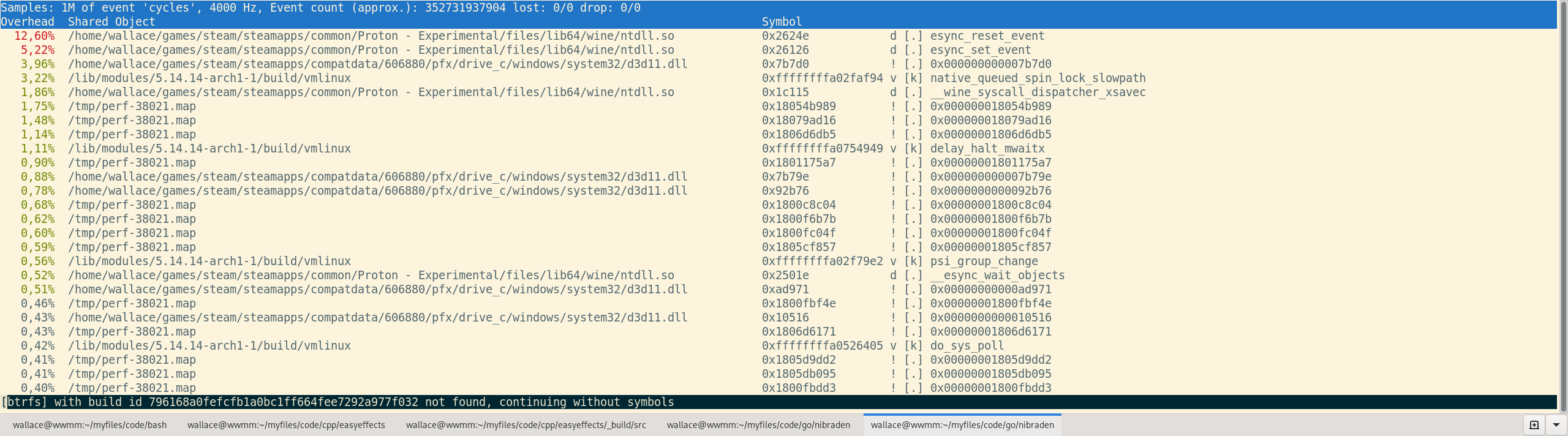
It hits esync really hard. I do not remember the other games I have making the native_queued_spin_lock_slowpath visible in perf output. It is a pity I do not have a fsync kernel to test anymore. I hope fsync gets accepted in the kernel. Patching and compiling a custom kernel sometimes is a little annoying...
The futex-wait-multiple patch set is not going to land in an upstream kernel. Instead, we expect that futex_waitv will land in linux 5.16 to fill this role.
I'll make another note of "not working for me" with log. It is likely nothing that hasn't been said already.
Related threads
- GRIP: Combat Racingprotonopen same upstream bug
Proton versions
proton 5.13x1 2020-11proton 5.13-2x1 2020-11proton 5.0x1 2020-09proton 5.9-ge-5x1 2020-09
Launch options
PROTON_LOG=1x1 2019-09
Upstream links
- ValveSoftware/Proton/issues/2966x1 2019-09
Compatibility Report
System Information
I confirm:
steam-606880.log
Symptoms
The game crashes immediately after launch
wine: Unhandled page fault on read access to 0x00000000 at address 0x18013cfc3 (thread 0034), starting debugger...Reproduction
Just launch the game