Tom Clancy’s Splinter Cell Blacklist
@Apfel users on protondb recommend using wined3d and disabling the U-Play overlay, have you tried these suggestions?
Yeah, I tried that but to no success, however, on an earlier version of proton 4.11 (4.11-1 to be exact) on a earlier version of ubuntu 19.04, it worked quite fine, with some glitches and weird issues. I appreciate your help nonetheless.
To alleviate the stress of testing a little bit, I've done my fair share of testing again on the same machine, just with another OS that I confirmed worked fine before, that being Ubuntu 19.04.
As mentioned before, nothing hardware-related changed, but the OS was swapped:
Operating System Version:
    Ubuntu 19.04 (64 bit)
    Kernel Name:  Linux
    Kernel Version:  5.0.0-31-generic
    X Server Vendor:  The X.Org Foundation
    X Server Release:  12004000
    X Window Manager:  GNOME Shell
    Steam Runtime Version:  steam-runtime_0.20190711.3
The issues, however, stayed the same, even for the Proton update released a while ago, 4.11-6.
However, removing the video files that usually play up front the intro screen showed that the game itself seems to try its best and it even plays the intro music, though crashing a second later.
I've tried reinstalling the prefix and other related stuff so far, like Uplay, I even went as far as to delete some registry keys for the display adapter, without any success.
I'm open for any suggestions in regards to trying to get it to run normally.
Proton 5.0-7 regression for Splinter Cell Blacklist
Issue transferred from https://github.com/ValveSoftware/Proton/issues/3822.
@HenrikHolst posted on 2020-05-02T21:19:20:
Game Info
- Name of the game with issues: Tom Clancy's Splinter Cell: Blacklist
- Steam AppID of the game: 235600
System Information
- GPU: RX480
- Driver/LLVM version: Mesa 19.2.8
- Kernel version: 5.0.0
- Proton version: 5.0-7
With 5.0-7 the game freezes and dies after aprox 5-10minutes of play. 5.0-6 worked perfectly so it must be a regression in 5.0-7 that causes this.
Have attached the proton log from such a crash but unsure if proton created a log for the game that crashed or if it just did it for the launcher (I noticed that the game starts 3 wine-processed [it's a Uplay game]).
I've tried dxvk and that doesn't work either - installing d3d9.dll and d3d11.dll into the directory containing Blacklist_DX11_game.exe throws the following text into the little terminal:
warn:  D3D11CoreCreateDevice: Adapter is not a DXVK adapter
info:  Game: Blacklist_DX11_game.exe
info:  DXVK: v1.7
info:  Built-in extension providers:
info:    Win32 WSI
info:    OpenVR
warn:  OpenVR: Failed to initialize OpenVR
info:  Enabled instance extensions:
info:    VK_KHR_get_surface_capabilities2
info:    VK_KHR_surface
info:    VK_KHR_win32_surface
terminate called after throwing an instance of 'dxvk::DxvkError'
Why this is the case is beyond me.
I've found and fixed a wined3d crash with the overlay, which was the initial issue reported here. It should be available in latest RC (see #3932).
However I still experienced other UPlay related crashes, after exactly 25minutes, as also reported by users on ProtonDB. I have reasons to believe these are DRM related and intentionally caused by UPlay after not being able to validate the Steam serial key, or because Wine is still not able to pass its DRM checks somehow. They happen regardless of whether the overlay is used or not.
I've found and fixed a wined3d crash with the overlay, which was the initial issue reported here. It should be available in latest RC (see #3932).
However I still experienced other UPlay related crashes, after exactly 25minutes, as also reported by users on ProtonDB. I have reasons to believe these are DRM related and intentionally caused by UPlay after not being able to validate the Steam serial key, or because Wine is still not able to pass its DRM checks somehow. They happen regardless of whether the overlay is used or not.
Well it has to be mentioned that the crash after 25minutes when UPLay is active and in online mode is something that happens for Windows users as well. Apparently the key that one is given from Steam is not correct and one have to contact Ubisoft support to request a proper key. There are more info in a steam post that I'm for some reason unable to quickly find right now, where the poster had collected a number of Ubisoft support tickets covering the exact same problem and fix.
In any case, to run the game in total offline mode to avoid this constant 30minute crash then just set the launch option to: "%command% -offline -offline_mode".
However as mentioned in a post above, with 5.0-7 I experienced a regression in Blacklist where the game now quits after roughly 5 minutes even when in total offline mode.
Thanks for the information I didn't now that. The latest RC includes a fix for the overlay crash with wined3d, which usually happened after ~15minutes, and only if the overlay is active. I didn't see any other crashes than these two during my debugging session.
Found a post on the Ubisoft forums describing the 20-30 minutes crash on Windows and that it requires a new key: https://forums.ubisoft.com/showthread.php/820751-Splinter-Cell-Blacklist-Crashes-after-23-or-24-minutes-gameplay?p=11932818&viewfull=1#post11932818
So that one is most likely not wine-related.
Tested 5.0-8 and my previous regression in where the game crashed after aprox 5 minutes is gone. Either the regression got fixed, the regression was just a random fluke on my system or the fix was done in uplay (uplay updated at the same time that I tested 5.0-8). In any case for me now the game works for hours on end again as long as it's in offline mode.
edit: went back in and noticed that I for some reason had the overlay enabled so perhaps that was why 5.0-7 crashed for me, don't remember if I enabled that just to see if that would make any change or not since that should have crashed it in the previous 5.0 versions anyway...
Unredeemable (as it cannot be linked to an Ubisoft account automatically on a game's first ever start) under Proton 5.0-10, 5.13-6 and Experimental-5.13-20210217 at least, after Ubisoft's transition from UPlay Launcher to Ubisoft Connect Launcher. Symptoms are as following.
On the first start of the downloaded game, UPlay Launcher (packaged with a game) starts and tries to update itself, resulting in it being substituted with a newer Ubisoft Connect one. It will fail in the end with an error about libcef (the same happens on Windows, so that's not a Proton/Wine issue).
On the second try, the Ubisoft Connect Launcher starts normally, asks for login credentials (as opposed to Windows, where it would know about linked Ubisoft and Steam accounts and logs you in automatically). After that, it will ask to enter an activation key manually (as opposed to Windows, where it will ask if it's ok to redeem the game on the specific Ubisoft account, the same which is linked to your Steam one, and will add an activation key to your Steam account and run the game, upon completion), which wouldn't be helpful as there is no activation key provided with a purchase of the game (thanks to Steam Support on clarifying this, btw), it's being added only upon your actual activation on Ubisoft Connect Launcher.
Some other symptoms (happen with or without activation of the game):
- Ubisoft Connect Launcher runs in the terminal (Windows
cmdone, if I'm not mistaken), - Ubisoft Connect Launcher ignores "remember me" checkbox and forgets your credentials on every run.
Sadly, I don't have Proton logs for the "activation fail" process as I tried and successfully activated the game using Windows VM using Windows-native Steam client. Thus, this is a current workaround for an issue.
I had the same issue. I could not redeem the game. contacted uplay support but after 3 hours of trying to make it work i had to activate it on freaking Windows VM and even after that the game crashes right after the beggining text.
The one thing i see in logs is: ERROR: Could Not Get Primary Adapter Handle which strikes me as not very great.
I had this problem too, and I could not find a fix for it, until today when I tried to play with the video settings. It looks like anything above SSAA 2x2 ROTATED GRID for Anti-Aliasing causes this issue. I'm not sure how/why this happens, but it is what fixed it for me and I hope this might help some people here as well.
EDIT: Now I'm noticing a crash that occurs randomly, after 10-15 mins in the game. Also every time I launch the game from steam Uplay does not remember my last login, I have to login every time again to connect to it,
I had this problem too, and I could not find a fix for it, until today when I tried to play with the
videosettings. It looks like anything aboveSSAA 2x2 ROTATED GRIDforAnti-Aliasingcauses this issue. I'm not sure how/why this happens, but it is what fixed it for me and I hope this might help some people here as well.EDIT: Now I'm noticing a crash that occurs randomly, after 10-15 mins in the game. Also every time I launch the game from steam Uplay does not remember my last login, I have to login every time again to connect to it,
Could you please send here your config for the game ? Whatever i try it still crashes shortly after opening it.
Replying to https://github.com/ValveSoftware/Proton/issues/3074#issuecomment-636533524
Could you explain what exactly did you do to make it work ? I tried everything mentioned here. Deleted all the videos that play on the start and for some reason i still cant launch it. But when deleting the videos i seem to get to what could be main menu loading and sound. After that it crashes again.
Replying to [#3074 (comment)](https://github.com/ValveSoftware/Proton/issues/3074#issuecomment-810472753)
I remember just turning off dxvk, and that was it, but as you might be able to tell, I outlined more stuff in a more recent comment when I tried Blacklist on a newer version of Proton.
I redeemed the game on a Windows machine when I bought it, so I couldn't test that.
The ERROR: Could Not Get Primary Adapter Handle message seems to just "exist" and not actually have anything to do with the game's functionality in Proton, iirc it prints that regardless of whether it actually runs or not.
Replying to [#3074 (comment)](https://github.com/ValveSoftware/Proton/issues/3074#issuecomment-810472753)
I remember just turning off dxvk, and that was it, but as you might be able to tell, I outlined more stuff in a more recent comment when I tried Blacklist on a newer version of Proton.
I redeemed the game on a Windows machine when I bought it, so I couldn't test that.
TheERROR: Could Not Get Primary Adapter Handlemessage seems to just "exist" and not actually have anything to do with the game's functionality in Proton, iirc it prints that regardless of whether it actually runs or not.
Rather interesting as i did the same. Use windows VM to redeem the game. The game launches and without the videos at start it shows 2 seconds of main menu animation and crashes right after that.
Ofc i disabled esync and dxvk as some people said it works when disabling it. It basically changes nothing for me. The game still crashes few seconds after start.
Hello
If you still suffer from this 20-30min Crash, try this: https://www.pcgamingwiki.com/wiki/Tom_Clancy's_Splinter_Cell:_Blacklist#Game_crashes_without_message_after_20-30min
If the game doesn't start, force DX9 (PROTON_NO_D3D11=1), or protontricks 235600 d3dcompiler_42 for DX11.
System Information
- GPU: AMD Radeon RX 580
- Driver/LLVM version: Mesa 21.1.5
- Kernel version: 5.13.6
- Link to full system information report as Gist:
- Proton version: 6.3-5
Additional Symptoms
- Extra Console Output Window.
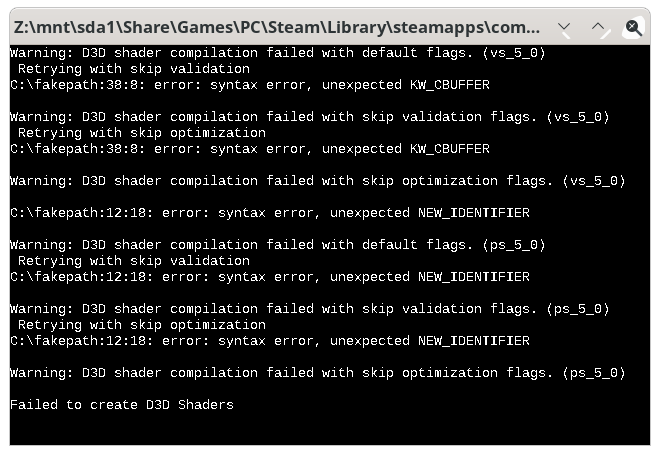
- With Tessellation ON, parts of the npc/player models are missing.
- The Game doesn't close probably after clicking the 'Quit to Desktop' Button. I need to click Stop in the Steam Client.
Reproduction
- Click Play. (You may have to perform the workarounds first).
Logs:
- steam-235600_dx9.log.zip
- steam-235600_dx11_with_tessellation.log.zip
- steam-235600_dx11_without_tessellation.log.zip
Screenshot
- Tessellation OFF:

Found out. On Windows 10, DX11 Mode starts only with the DXVK´s dxgi.dll.
Logs Windows 10:
Blacklist_DX11_windows_10_game_d3d11_with_dxgi.dll.log
Blacklist_DX11_windows_10_game_d3d11_without_dxgi.dll.log
Blacklist_DX11_windows_10_game_dxgi.log
Been a while since anything has been said here, I played the game on a Deck with Proton 8.whatevs and it works just fine. Online is borked on Windows too anyway so no worth talking about that, but the game works just fine
Proton versions
proton 5.0-10x1 2021-02proton 5.0-7x1 2020-05proton 4.11x1 2019-09proton 4.2-9x1 2019-09
Launch options
PROTON_NO_D3D11=1),x1 2021-08
Launch lines
%command% -offline -offline_modex1 2020-06
Upstream links
- ValveSoftware/Proton/issues/3822x1 2020-05
System Information
418.885.2.11-1-MANJARO4.11-5I confirm:
Symptoms
The game shows some information about the used stuff like usual for around 3 seconds (if you don't grab focus of the window, the result is then immediate) and then crashes without any sort of error code whatsoever. Unlike usually, the launcher doesn't correctly exit after launching Uplay, which shows debug output. It doesn't seem to introduce the error though, since on Proton 4.2-9, the log output exits normally but the game crashes just like on 4.11.
The most interesting lines consist of
as well as of
the latter one being missing from the log output.
I couldn't test DirectX 10 or 9 since neither are supported by Uplay and the game doesn't take advantage of DirectX 10.
Reproduction
Just launch the game and make sure you're logged into Uplay, since Uplay can't start the game on itself due to Steam being missing.