Batman: Arkham City GOTY
I just tested on my system with Fedora 28 and a Radeon RX580. Setting the Proton prefix's Windows version to XP caused the game to start running for me.
I suspect this is because .NET 3.5 refuses to install when you set the version to 7 since it is built-in to the OS at that point, so the installer expects it to be there. The game having a Gold rating on WineHQ might be related since the switch to setting Windows 7 as default in upstream Wine is fairly recent.
Just to be clear for those not familiar with how to switch a prefix, I imagine from the command prompt you ran a command like this:
WINEPREFIX="$HOME/.local/share/Steam/steamapps/compatdata/200260/pfx" WINEARCH=win64 wine winecfg
Then you changed the windows version from Win7 to WinXP from the winecfg tool.
I also run Fedora 28 but have a GTX 1060 3G graphics card. Switching to WinXP got it to work for me.
Edited (correction) - originally, it took a long time to prepare the game for the first run. But now it works.
Compatibility Report
Name of the game with compatibility issues: Batman: Arkham City - Game of the Year Edition
Steam AppID of the game: 200260
System Information
GPU: GeForce GT 540M
Driver/LLVM version: NVidia driver 384.130
Kernel version: 4.13.0-46-generic
Link to full system information: https://gist.github.com/grabmateusz/b38a08528372b6856d5805e169884c64
Proton version: 3.7-6 Beta
I confirm:
- [ ] that I haven't found an existing compatibility report for this game. (N/A)
- [ ] that I have checked whether there are updates for my system available. (I will check the game with newest Ubuntu release and newest NVidia Driver, this report IS NOT generated based on newest OS and GPU driver version)
Symptoms
In general I can confirm, what was already written. Downloaded and installed game does not start. After switching OS to Windows XP in winecfg and pressing play there is very long process of installing prerequisite (.NET 2.0 IIRC) which took about 45 minutes on my rig. After that time, splash screen was presented and it was possible to run a game. What's more my saves stored in Steam cloud were recognized.
However, for me game has known bug - [#204](https://github.com/ValveSoftware/Proton/issues/204)
Reproduction
Download, install and try to run a game. After it fails, change in winecfg OS to Windows XP.
In running game try to move and look around.
I remember I was able to play this without .NET2.0, but using winetricks mdx.
Which described under Workaraunds section on AppDB ("See Arkham Asylum", using link you provided).
@lineber Thank you for the workaround, suggested solution works.
So after changing windows version to XP in wine prefix game starts and runs without issues.
System info: https://gist.github.com/jgacas/64704de0370633b265b2970b97ec7d35
Same with setting to XP and after a ridiculous net installation waiting time, the game runs without hick ups. Played for about 1 hour.
@pchome
I remember I was able to play this without .NET2.0, but using
winetricks mdx.
I've noticed Proton prefixes contains no mono (.../drive_c/windows/mono), and I want to clarify that this trick mean for game's requirements: mono+mdx or .NET2.0.
For me the game starts, but doesn't appear in the taskbar or in alt + tab list. When I start the launcher first and from there the game, it still doesn't appear in the taskbar but now I can switch to the game by alt + tab.
https://gist.github.com/NoXPhasma/17aaaab0d5841d6a92dac4d184a9592f
After fix issues related to dotnet I was able to run a first, desktop window, however I see error "Failed to compile global shader FGFxPixelShader<GFx_PS_CxformMultiply2Texture>" when a game is starting. I use mesa from git for my Radeon 580.
@nadrolinux
Game probably require native (windows) d3dcompiler_43.dll
You can use WINEDEBUG=+loaddll to check what exactly loaded (~/steam-200260.log).
@pchome
d3dcompiler_43.dll and d3dx9_43.dll solved this issue. Thanks a lot!
@lineber Thanks for the workaround. It did indeed take a long time for the first time to run, but then it run very well, I was able to play well over 30 min without much of a glitch.
I was able to get the game to run, but I couldnt see the main game window (I could hear the audio however.) system info: https://gist.github.com/redstik/fcd3935b6c78aced0f7b9f340acb1071
Batman: Arkham City GOTY fails to launch
Issue transferred from https://github.com/ValveSoftware/Proton/issues/1773.
@jentrxm posted on 2018-10-18T02:34:16:
I'm on Linux Mint 19 Cinnamon version 3.8.9 (kernel 4.15.0-36-generic).
I'm using an AMD A10-7700K Radeon R7.
I cannot get Arkham City to launch. When I try to launch it from within the Steam client (Big Picture Mode) it tells me it's preparing for first time use, then the entire window turns blue (as in everything vanished but the Steam background), then a moment later everything comes back. Instead of launching, however, it just tells me the game is ready to play. Nothing else happens; the game never launches.
When I try to launch the game directly from the Start Menu it pops up a box saying it is installing the Microsoft .NET framework. The progress bar never moves, though, and after about 30 seconds the window vanishes and nothing else happens.
I have set my Wine version to Windows XP (as has been suggested in previous issue fixes) and am still having no luck.

@NoXPhasma commented on 2018-10-18T03:33:42
There is already an issue for this game: #309
@jentrxm commented on 2018-10-18T03:51:44
I read through that. Multiple people used lineber's suggested solution and it worked for them. I did what lineber said and still can't get it to work.
Game is working fine on i7 7700k Intel HD graphics. I had to follow the tips posted here plus some others.
To run winecfg for the game I did:
WINEPREFIX="/mnt/seagate/Steam/steamapps/compatdata/200260/pfx" \
WINEARCH=win64 \
"/mnt/seagate/Steam/steamapps/common/Proton 3.16/dist/bin/wine" winecfg
I've used the WINE that comes with Steam Proton 3.16 itself instead of installing it standalone on my system just to run winecfg. I've read more about WINE prefixes here.
This was enough to start the game but not enough to run the game's "Configure PC Options" GUI, it crashed when I tried to tweak the graphic settings, I've checked the error message and it was due to D3D11 detection errors. So I've configured "Set Launch Options" in Steam game Preferences to PROTON_NO_D3D11=1 %command%. This fixed the problem with the game configuration GUI, and I could change resolution and tweak graphics without problems.
@oblitum I ran those commands in the terminal and added your line to the Launch Options and still can't get it to open. Arkham Origins opens just fine, but City just won't stop sassing me.
@jentrxm that command won't do anything at all, just launch winecfg. I've used it to be able to do what the thread recommends, which is to set the OS to XP so that the game setup installs the correct .Net Framework. You can simply close Steam, remove the entire compatdata/200260/, recreate it empty, just with the empty pfx directory inside, and run winecfg over it as I've stated previously, it will create a prefix from scratch, you can then set it to XP before the game uses the prefix for the first time, so when you start the game it will consider it's under XP from the beginning and setup .Net there. I didn't need to do this for this game, just setting XP on an existing pfx folder created by the game fixed it for me, but I've done for others.
You should comment on your configuration, provide logs, etc. Just saying it doesn't work won't help.
I had a few problems with iscriptevaluator.exe using 100% CPU and presumably hanging. I'm on Arch Linux, so maybe it had something to do with incompatible versions of Wine or ENV variables. (I also tried the bundled Proton Wine, but that also failed.) As per issue #1717, I used protontricks instead of vanilla winecfg, which got me onto the right path. Hence, I quit Steam, removed ~/.local/share/Steam/SteamApps/compatdata/200260, ran protontricks 200260 winecfg, changed it to XP, started Steam again, and the game worked.
@protist nice to know about protontricks. I'm using the original winetricks script downloaded directly from github to my PATH like this:
WINE="/mnt/seagate/Steam/steamapps/common/Proton 3.16/dist/bin/wine" \
WINEPREFIX="/mnt/seagate/Steam/steamapps/compatdata/200260/pfx" \
WINEARCH=win64 \
winetricks <arguments>
I still prefer that because it avoids having to install wine system wide.
@oblitum I actually found your post above very informative. (Thank you!) I also tried that same command in my testing, with winecfg instead, but that was one of the permutations that failed for me unfortunately.
Working very well under Debian Testing after some trickery with protontricks - arguably even better than Arkham Asylum despite being a more complex game.
My two old SAMSUNG HD502HJ drives are in a RAID0 array with LVM on top.
Downloaded the game files through steam, ran the game (fails to start), closed steam then installed some extra bits with:
protontricks 200260 dotnet20 d3dx9_43 d3dcompiler_43
XBOX360 pad works perfectly with the xpad driver.
Took a few screenshots.
I find that the game generally runs better with DX11 features on (via DXVK) than in DX9 (OpenGL) particularly after the cache has built up - before that happens the game tends to pause briefly as new areas get loaded.
Any newer machine than mine (Ivy Bridge/Ryzen/++) shouldn't have an issue with performance especially if some solid state drives are thrown into the mix as well.
Batman Arkham City GOTY Error Message
Issue transferred from https://github.com/ValveSoftware/Proton/issues/2442.
@SahilPlays posted on 2019-03-21T13:25:40:
So I got the game recently. I had a launching issue which was fixed by one of the solutions i found.
The worked normally, but I wanted to adjust the settings of the game. When I opened it again, it game me this error message after the nvidia intro,

@SahilPlays commented on 2019-03-21T13:36:07:
OS: Ubuntu 18.10 (I used Wine to get the game to work)
CPU: Intel Core i3 4005U @ 1.7 GHz
Ram: 4 GB
GPU: Intel HD Graphics 4400
Hello @SahilPlays, can you copy / paste the launch options you are using with this game? This looks like you forgot to have %command% after the env variable.
Thank You @kisak-valve, I checked the Launch Options and found that the %command% wasn't there.
When i added it, The game ran normally. Thank You.
Hello,
with last Proton 4.2 version, BATMAN Arkham City GOTA still not launch.
I joined you my log file.
steam-200260.log
https://gist.github.com/legluondunet/8570a65372c3f7b9fea9c365c449cc59
I used protontricks to set Proton to Window Xp mode. At the next launch, .Net installed in silent mode (no Microsoft setup window, only the "Steam Client service") during several minutes and finally batman launched.
Batman Arkham City borked with 4.11-6 (worked with 4.11-5)
Issue transferred from https://github.com/ValveSoftware/Proton/issues/3084.
@the-black-wolf posted on 2019-09-24T20:25:17:
Compatibility Report
- Name of the game with compatibility issues: Batman Arkham City
- Steam AppID of the game: 200260
System Information
- GPU: Nvidia RTX2080
- Driver/LLVM version: nvidia 418.56
- Kernel version: 5.0
- Link to full system information report as [Gist]:https://gist.github.com/the-black-wolf/9161867478638fd3016e742a12f67867
- Proton version: 4.11-6
I confirm:
- [x] that I haven't found an existing compatibility report for this game.
- [x] that I have checked whether there are updates for my system available.
Symptoms
It errors out before entering the main menu, as pictured below. It worked properly with 4.11-5, something in v6 broke it.
Reproduction
Just start and wait till the splash videos end.

@the-black-wolf commented on 2019-09-24T20:29:18:
Just switched Steam proton to 4.2-9 and it works. Definitely something to do with 4.11-6
Well, it's still working fine for me on 4.11-6.
@the-black-wolf I get the exact same window only if I enable DX11 Features/Tesselation in the configuration screen. I didn't enable it before, maybe that was the reason. Disabling it and the game works fine.
Well, it did work with high tessellation on 4.11-5 and it does on 4.2-9. I had to step out for today, will try without tessellation to confirm tomorrow.
ok, when I turned off both DX11 features/tessalation then it works in 4.11-6. But its still a regression, because it did work with both turned on on 4.11-5.
@the-black-wolf @kisak-valve I also saw the same behavior and opened a dxvk bug report here: https://github.com/doitsujin/dxvk/issues/1203
Whitelist Request
- Name of the game to be whitelisted: Batman: Arkham City GOTY
- Steam AppID of the game: https://steamdb.info/app/200260/
System Information
- GPU: GTX 760
- Driver/LLVM version: NVIDIA 440.44
- Distro version: Arch
- https://github.com/shoober420/linux-scripts/blob/main/home/shoober420/sysinfonvidia
- Proton version: 4.11-12
Works great out of the box.
Hello, is anyone seeing an issue with this game and Proton 4.11 that would block it from being whitelisted?
Dropping the regression label as fixed in DXVK 1.4.1.
Hello, just tested, the game works very well, is stable, even on my old config.
Just one thing: it tried to install .net each time I launched the game or the config panel.
EDIT: controller is working now too, hadn't reset my PC in a while.
Working great for me with a mouse and keyboard! Thank you. I haven't figured out yet how to get my Steam Controller working, but that seems to be a problem in general for me as it seems to have stopped working with NieR: Automata too.
Stop to work after proton 5.0-1 upgrade.
You mean it was working with a previous version, and not with 5.0? What version were you using previously?
Yes, it was working until 4.11. I've played the game from begining to the end only on steamos.
Hello @mwprado, please add PROTON_LOG=1 %command% to the game's launch options and drag and drop the generated $HOME/steam-$APPID.log into the comment box.
I have remembered to fix sound and slow fps in games like ninja turtles and Batman Arkham City change pulse audio fragment size. I have reported in anywhere(https://steamcommunity.com/groups/steamuniverse/discussions/search/?author=39750703). But when I arrive in my home I will try all possibilities.
Running on proton 4.11
steam-200260.log
Running at proton 5.0 freezed on batman logo
steam-200260.log
Thanks @mwprado, looking at your logs, the most substantial change is that DXVK/D3D9 is now enabled by default with Proton 5.0. The nVidia driver you're using is older than Proton's requirements, and the Intel/Haswell driver has incomplete support for Vulkan, so you may be encountering a driver bug that was fixed a while ago.
If updating to a more recent video driver doesn't work, you can try PROTON_USE_WINED3D=1 to get Proton 5.0 to use the DirectX 9 to OpenGL render path like Proton 4.11, but that's expected to come with a performance penalty and will be considered unsupported moving forward.
I use steamos, so... I will wait for Valve.
For me, game launches and works fine but eventually crashes. Sometimes 20 min later sometimes more but always crashes.
My System: https://gist.github.com/sputniktr02/3f410eb3d6206ab7bd35b70c6a1bb12c
Log:
steam-200260.log
Edit: Same thing with Arkham Asylum, lowering graphics settings or forcing LAA doesn't help.
Edit2: I was able to capture the error that game prints when crashes
Fatal error!
QA_APPROVED_BUILD_JANUARY_2011 424000 11-04-2012 15:05.24 (Wwise: 2011.1.0 #3886) Game
XChangeProperty() Address = 0xf76f7f2c (filename not found) [in ]
Game works fine with proton 5.0-2.
Hi all, I've tried all proton versions to date, and the game runs in the background each time (as a process, with the menu music and all), but it is never actually displayed. There is no icon or window on the toolbar, and since I'm new to Linux and Github, I'm not sure how to find out if it's displaying off-screen somewhere. Arkham Asylum worked fine with no problems, as an example. Advice and help would be much appreciated!
Hello @ConnorA3, you may have some luck trying the game with another desktop environment. What desktop environment are you seeing this behavior with?
Works for me with MATE 1.22, doesn't render with Cinnamon 4.0.
@kisak-valve Many thanks for the quick reply, and your advice is much appreciated! I'm running it with Cinnamon 4.0, however I have literally just got it to work, by sheer chance. I thought there'd be nothing to lose by right clicking Steam on the toolbar, selecting the Big Picture mode and running it there. It loads and plays absolutely fine now!
My game launches, intro plays, batman jumps around and the game appears to be working. The screen says click to start, when I click I get "searching for DLC" then the game freezes with attached error. I've tried different protons, winetricks, d3d launch options etc

Works out of the box.
Proton 5.0-8
AMD KABINI (DRM 3.36.0, 5.6.10-gentoo-b1, AMDGPU, LLVM 9.0.1)
Driver Version: 4.6 (Compatibility Profile) Mesa 20.0.4
Minor issues:
- every time it starts it shows the .NET Framework installation message
- the settings launcher doesn't close on exit (BmLauncher.exe)
Asylum works too with the profile from City with the same launcher issue.
I also had the bug that .NET Framework reinstalls every time you start the game with Proton 5.0-10 but it is fixed with proton 5.13-2 for me. However I still have random crashes (~5 crashes in 8 hours and most of the time during cutscenes):
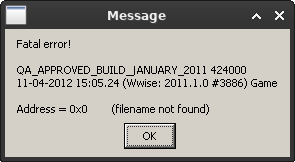

I guess I'll be able to finish the game anyway because after restarting I was always able to continue past the point it crashed before.
Hello @Kreyren, your Terascale 2 generation ATi card and your Sandybridge generation intel graphics chipset do not support Vulkan, which makes your system unsupported by Proton.
Using the PROTON_USE_WINED3D=1 runtime option is not supported and any rendering artifacts you encounter while using that needs to be reproduced with vanilla wine, then reported to https://bugs.winehq.org/ for the wine devs to evaluate.
Please do not ping random people to try to get additional attention for an unsupported system.
try GloriousEggroll/proton-ge-custom
or try installing steam in lutris then you can use the system wine
your gpu is from 2011 and does not supported amdgpu so you cant expect everything to work
Runs with Proton experimental but enabling DX11 features causes flickering/rendering issues in game. Without DX11 (DX9 only) it works fine.
Mesa 21.1.4, kernel 5.13.4, AMD Vega 56/64
Works fine on Proton 7.0, Mesa 21.3.5 and kernel 5.16.10.
Works fine with DX11 features enabled, including tesselation. The strange flickering (recreating window?) at start is gone: works better now.
I'm not sure if this is the correct place to report this issue, but the game doesn't run on the Steam Deck in the default configuration with multiple steps being necessary to access the title screen.
- It's necessary to switch from the default Proton-7.0-2 to Proton Experimental, due to some .Net issues with the launcher on 7.0-2. This doesn't affect anyone running the game for a second time, because the launcher will not open and trigger the problems. I have not observed any issues on 7.0-2 after the launcher issue was taken care of.
- It's necessary to deactivate Fullscreen in the launcher, as otherwise the game will be run in the background. For some reason Gamescope does not pick up the main Window.
Attempting to run the game on Arch, kernel 6.16, Intel i7-3770K and GeForce RTX 3090. The game does not launch at all. I have tried every version of Proton, uninstalling and reinstalling the game each time, I have tried changing winecfg to XP as mentioned above and nothing has worked. From Steam, the launcher itself crashes immediately on being clicked (with black bars in place of the menu options), but I was able to open the launcher with desktop Wine to turn off fullscreen and lower the resolution. None of this has allowed the game to launch.
@MixMastaTJ the game is working normally on my end with proton 9, 10 and bleeding edge, if you still have issues launching the game, bring proton logs for proton 10 and experimental.
Adding PROTON_LOG=1 %command% to the game's launch parameter, will make it so a log file will be created each launch called steam-200260.log in your home folder. Bear in mind that each launch, the log will be overwritten, you can rename it or move it to prevent this before the second launch.
Compatibility Report
- Name of the game with compatibility issues: Batman: Arkham City GOTY
System Information
- GPU:RTX 2060 6GB NVK
- Video driver version: Mesa 26.1.0 git
- Kernel version: 6.18.8
- Link to full system information report as [Gist]https://gist.github.com/pollux78/0cc678c4474d328a989a0589f5e557a4
- Proton version: Proton Experimental
- LOG: steam-200260.log
Symptoms
Game will crash when trying to load into the game
Reproduction
- Use latest mesa git not nvidia proprietary driver
- Try and load into the game
- Watch it crash
@MixMastaTJ the game is working normally on my end with proton 9, 10 and bleeding edge, if you still have issues launching the game, bring proton logs for proton 10 and experimental. Adding
PROTON_LOG=1 %command%to the game's launch parameter, will make it so a log file will be created each launch calledsteam-200260.login your home folder. Bear in mind that each launch, the log will be overwritten, you can rename it or move it to prevent this before the second launch.
Thank you, had a Vulkan driver error code, web searched it to find an Nvidia library I was missing. That fixed a whole suite of games I couldn't run.
Hello @pollux78, similar to your other recent feedback, you should mention your findings to your video driver vendor.
Some lines of interest from your Proton log:
err:   D3D11: Cannot create texture:
err:     Format:  6
err:     Extent:  4096x11x1
err:     Samples: 1
err:     Layers:  1
err:     Levels:  1
err:     Usage:   8
err:     Flags:   0
Proton versions
proton experimentalx3 2026-02proton 7.0-2x1 2022-05proton 7.0x1 2022-02proton 5.0-10x1 2020-11proton 5.13-2x1 2020-11proton 5.0-8x1 2020-06proton 5.0-2x1 2020-02proton 4.11x3 2020-02proton 5.0x2 2020-02proton 5.0-1x1 2020-02proton 4.2x1 2019-03proton 3.16x2 2018-11
Launch options
PROTON_LOG=1x3 2026-02PROTON_USE_WINED3D=1`x2 2021-07WINEARCH=win64x3 2018-11WINEPREFIX="/mnt/seagate/Steam/steamapps/compatdata/200260/pfx"x2 2018-11PROTON_NO_D3D11=1x1 2018-11WINEDEBUG=+loaddll`x1 2018-09WINEPREFIX="$HOME/.local/share/Steam/steamapps/compatdata/200260/pfx"x1 2018-08PROTON_USE_WINED3D11=1x1 2018-08
Launch lines
PROTON_NO_D3D11=1 %command%x1 2018-11PROTON_USE_WINED3D11=1 %command%x1 2018-08
Upstream links
- doitsujin/dxvk/issues/1203x1 2019-09
- ValveSoftware/Proton/issues/3084x1 2019-09
- ValveSoftware/Proton/issues/2442x1 2019-03
- ValveSoftware/Proton/issues/421x1 2019-03
- ValveSoftware/Proton/issues/1773x1 2018-10
- show_bug.cgi?id=34045x1 2018-09
- ValveSoftware/Proton/issues/204x1 2018-09
DLLs
d3dcompiler_43.dllx2 2018-09d3dx9_43.dllx1 2018-09
Batman: Arkham City, which has a Gold rating on Wine's AppDB, fails to launch with Proton. I've attached the terminal output. Also, when I try "Configure PC Options", after the first-run DirectX process, I see a terminal window appear for a fraction of a second, and then nothing happens.
PROTON_USE_WINED3D11=1 %command%has no affect in this case, unlike with Shantae: Half-Genie Hero.Software: Ubuntu 18.04.1 (64-bit), Mesa 18.3.0, LLVM 8.0
Hardware: Intel i5-4690k, Radeon RX 580
arkhamcity.txt