Darksiders Genesis
Looks like this game would benefit from support for Media Foundation maturing.
Read the whole thread:
https://steamcommunity.com/app/710920/discussions/0/1754645970777594912/
4.11-10 - XBox One Controller do not works with Steam Input enabled (needs Forced Off setting). While for example Cat Quest 2 works without disabling Steam Input.
PS: Hmm, more checks with Cat Quest 2 shows that it works without Forced Off only if XBox controller is disabled in Stem Input settings ( "Use your global Steam Input settings (None)" ).
So the controller issue is a bit more interesting with this game than it appeared at first glance. Using proton 6.3-5, both with and without steam input, the controller works perfectly... eventually. It won't register any inputs at all for the first 60-70 seconds after launching the game though. I'm not sure what to make of that, as I've never seen that happen before in any other game. Very odd.
As for the videos, they are now properly replaced with the color bar test, but the ones before and after beating level 6 (Mammon boss fight) for instance will show the test, begin to play audio behind it, then suddenly skip past the video entirely. I'm uncertain if this is a result of the proper videos not being available yet or if it'll continue to be an issue after they are.
EDIT: Strangely, I just came back to test this and grab a log. I did get one log of it, but then subsequent game starts are detecting the controller right away. Log of the delayed start:
steam-710920.log
Darksiders Genesis (710920) - No higher than low textures for NVIDIA and AMD
Issue transferred from https://github.com/ValveSoftware/Proton/issues/5951.
@Patola posted on 2022-07-01T13:50:15:
Compatibility Report
- Name of the game with compatibility issues: Darksiders Genesis
- Steam AppID of the game: 710920
System Information
- GPU: RX 6800 XT (System 1, a desktop PC) with 16 GB VRAM, RTX 3070 Mobile (System 2, a laptop PC) with 8 GB VRAM
- Driver/LLVM version: Mesa 22.1.2 (System 1), NVIDIA 515.48.07 (System 2)
- Kernel version: 5.18.8-tkg-bmq (System 1), 5.18.7-262-tkg-bmq (System 2)
- Link to full system information report as Gist: https://gist.github.com/Patola/e51e3af1be3c7d233b8f14fb21be1aa6 (System 1), https://gist.github.com/Patola/4f8dba624e97724218fb5f1650c292c6 (System 2)
- Proton version: 7.0-3 (also tried with GE-Proton7-16, same results)
I confirm:
- [X] that I haven't found an existing compatibility report for this game. -- I have found an existing compatibility report from 2019 with no activity for a long time and with completely different issues.
- [X] that I have checked whether there are updates for my system available.
Symptoms
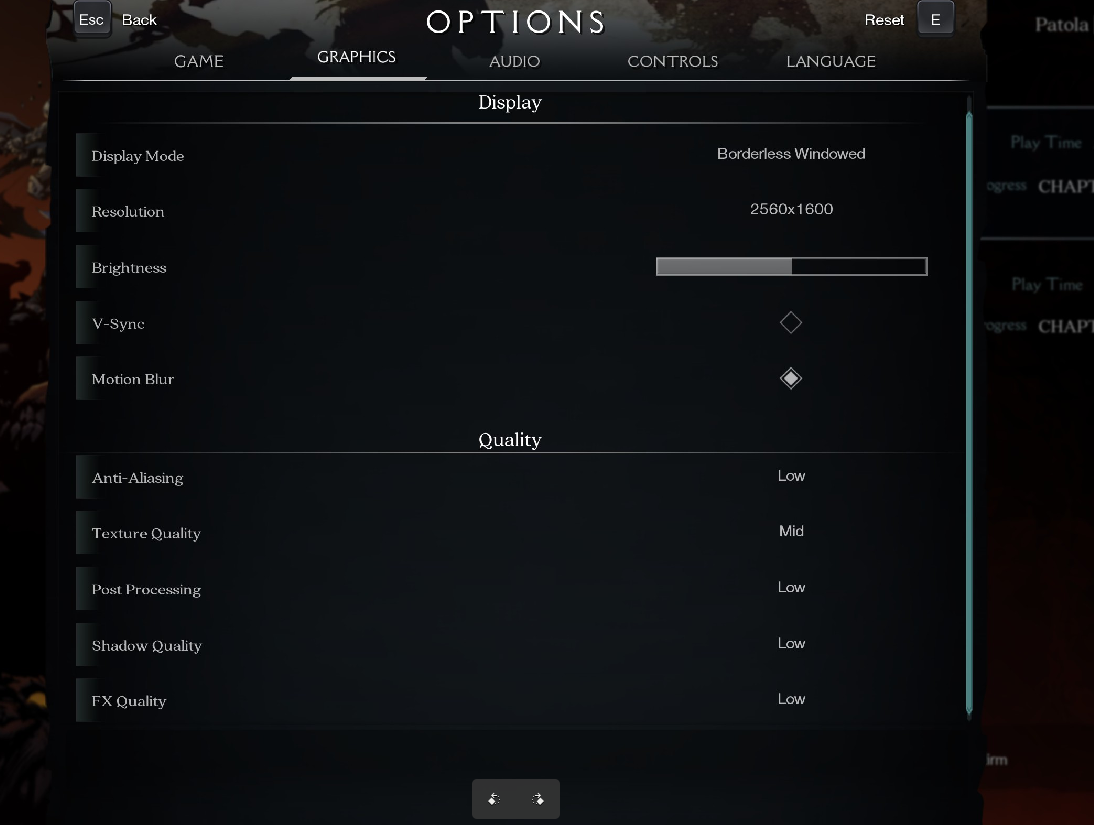
- Darksiders Genesis will hang up at the loading screen when starting a new game or loading an existing savegame if the "Textures" options is "mid" or higher (see screenshot).
Reproduction
- Load the game.
- On graphics options, set the textures option to "mid" or higher (seen screenshot). The other graphics options do not make a difference. Also tried with all display modes (windowed, bordless windowed, fullscreen) and they don't make a difference. Different resolutions also do not make a difference. Tried on two systems.
- The game will hang when starting a new game or load an existing game.
- With the textures set to low, it will fully work.
- For the record, the game works on my Steam Deck in 1280x800 even with all graphics options set to Ultra, but since it has low VRAM it might just be that the game ignores that and loads low-res textures.
The attached logfiles are for the desktop PC (system 1). Two proton logs, one when loading a savegame with textures set to low (steam-710920-low-textures.log) and the other one with the textures set to mid, trying to load the same savegame.
For the note, running htop via ssh on the system at the time. When I try to load the savegame, processor usage goes to 100% on all processors and shortly the machine stops responding. This happens with the laptop and desktop PCs. dmesg does not show any message when this happens.
steam-710920-mid-textures-hang.log
steam-710920-low-textures.log
@Patola commented on 2022-07-01T13:55:45:
Might be of note that once I realised this was happening, I disabled the Steam overlay to prevent any interference from other factors. I am also using icewm on both systems, a window manager that does not have any compositor.
Also I tried changing motion blur and v-sync and they do not make any difference.
The two hosts continue having a "ping" reply when they hang, but any new attempt to ssh to them hangs up.
@Patola commented on 2022-07-01T14:08:24:
Tried with PROTON_NO_ESYNC=1 PROTON_NO_FSYNC=1, no change in behavior.
I think I found the reason. Although it's a 2019 game, it suffers from the same multithreading issue as #603 and in this case it was fixed by using taskset -c 0-5 %command% on the launch parameters. Restricting to 8 cores did not work as well, had to restrict it to 6 cores.
Turns out that while this solution works on my desktop, on my laptop it makes the game hang even in the starting movies. Tried removing the starting movies according to pcgamingwiki and the game still locks up when loading a game / starting a game.
How to diagnose and solve an issue like this one? I know it might not be top priority since it works flawlessly on Deck and it might work even on many people's computers (due to low count of cores) and I made it work on my desktop, but cases like my 8-2x-cores laptop are not so rare. Should I try running on a kernel which has fsync/futex_waitv disabled? Using numactl? Or what?
Proton versions
ge-proton7-16x1 2022-07proton 6.3-5x1 2021-07
Launch options
PROTON_NO_ESYNC=1x1 2022-07PROTON_NO_FSYNC=1`,x1 2022-07
Upstream links
- ValveSoftware/Proton/issues/5951x1 2022-07
Compatibility Report
System Information
I confirm:
steam-710920.log
Symptoms
The in-game movies do not play. This used to be game-breaking as the game would not progress if the movie could not be played. The issue was patched and now not being able to play movies does not affect progression.
Reproduction
Install the game using Proton. Play the game.