Nowhere Patrol
Hello @pizzapappan, please add PROTON_LOG=1 %command% to the game's launch options and drag and drop the generated $HOME/steam-$APPID.log into the comment box.
steam-961660.log
Thanks for responding kisak, here is the aforementioned log. I must inform you that that this log was created on another machine with intel graphics because my original listed machine was unavailable. here are the system specifications: https://gist.github.com/pizzapappan/6a3ca1df526c154b9595ab66772a5570
The same error was observed on this new machine as well, the game window opens for a brief second and closes to spit out an error prompt.
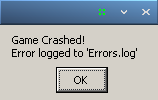
This is what the error prompt looks like.
Errors.log
And here is the Errors.log located in the game files.
Graphics are heavily distorted when playing the game making the game borderline unplayable. Running RX 6800XT, R7 5800X, Kernel 6.4, mesa-git on Arch Linux. The graphical artifacts also happen on Steam Deck, here's a log from my desktop.
steam-961660.log
Hi you can use the enviroment var radeonsi_zerovram=true to work around this issue. The workaround will be merged into mesa in this merge request https://gitlab.freedesktop.org/mesa/mesa/-/merge_requests/24919/
That fixed it, thanks!
Aug 29, 2023, 00:10 by @.***:
Hi you can use the enviroment var > radeonsi_zerovram=true> to work around this issue. The workaround will be merged into mesa in this merger request > https://gitlab.freedesktop.org/mesa/mesa/-/merge_requests/24919/
—
Reply to this email directly, > view it on GitHub https://github.com/ValveSoftware/Proton/issues/3396#issuecomment-1696736304> , or > unsubscribe https://github.com/notifications/unsubscribe-auth/ADGEQOFG5OZT6HLMWP6M433XXVTRXANCNFSM4KBZPBYA> .
You are receiving this because you commented.> Message ID: > <ValveSoftware/Proton/issues/3396/1696736304> @> github> .> com>
Launch options
PROTON_LOG=1x1 2020-01
Compatibility Report
System Information
I confirm:
Symptoms
A black game window opens for a fraction of a second before closing and an error prompt 'Game has crashed' pops up also saying that the error has been logged. In the game files a Errors.log file can be found which reads this:
I have spoken to the developer through a post on /r/SteamPlay and he has given a few insights as to why this may be happening. Link is here:
https://www.reddit.com/r/SteamPlay/comments/ehy7w0/proton_service_request_for_nowhere_patrol_on_steam/
Reproduction