Starting any game doesn't bring up anything
Hello @wisemonkey, ~this issue is already being tracked at #3119. Feel free to add your experience to the existing issue report.~
~Closing as a duplicate.~
Re-opening because #3119 appears to be non-fatal. Can you check if mesa-vulkan-drivers and mesa-vulkan-drivers:i386 are installed with something like apt policy mesa-vulkan-drivers mesa-vulkan-drivers:i386? Also, please add PROTON_LOG=1 %command% to the game's launch options and drag and drop the generated $HOME/steam-$APPID.log into the comment box.
mesa-vulkan drivers are installed from recommended repo (kisak-mesa).
I'll update the comment with exact output for apt-cache policy (not at computer right now)
Last time I tried PROTON_LOG=1 %command% it didn't create any log in home directory, that is why I figured out the terminal run command (but I'll give it a try again), if it creates log I'll pate that as well.
Simply go to game properties -> launch options and enter PROTON_LOG=1 %command% that's it right?
If Proton doesn't generate a log when running a game with PROTON_LOG=1, it hints that the install of Proton didn't get unpacked for some reason.
Simply go to game properties -> launch options and enter
PROTON_LOG=1 %command%that's it right?
Yes.
➜  ~ sudo apt policy mesa-vulkan-drivers
mesa-vulkan-drivers:
  Installed: 19.3.1~kisak~e
  Candidate: 19.3.1~kisak~e
  Version table:
 *** 19.3.1~kisak~e 500
        500 http://ppa.launchpad.net/kisak/kisak-mesa/ubuntu eoan/main amd64 Packages
        100 /var/lib/dpkg/status
     19.2.1-1ubuntu1 500
        500 http://us.archive.ubuntu.com/ubuntu eoan/main amd64 Packages
➜  ~ sudo apt policy mesa-vulkan-drivers:i386
mesa-vulkan-drivers:i386:
  Installed: 19.3.1~kisak~e
  Candidate: 19.3.1~kisak~e
  Version table:
 *** 19.3.1~kisak~e 500
        500 http://ppa.launchpad.net/kisak/kisak-mesa/ubuntu eoan/main i386 Packages
        100 /var/lib/dpkg/status
     19.2.1-1ubuntu1 500
        500 http://us.archive.ubuntu.com/ubuntu eoan/main i386 Packages
Maybe last time I didn't check correctly I do see logs in home
steam-20900.log
steam-292030.log
Both are empty though.
Also should I be able to launch Proton itself, for e.g. Steam Library -> Proton 4.11 click on launch. Does this work ? If it does then it gives me error.
I had a same problem some days ago and all started after I installed the "Steam Linux Runtime" from the tools. The game "Wolfenstein 2" run, but all the other Proton games don't.
Uninstalling the runtime solved the problem.
Interesting issue; I have Steam Linux Runtime installed as well but haven't had any issues with my collection of games. I'm using Manjaro & have been using Proton with non-steam games by manually adding the exe to Steam.
- Is everyone affected using Ubuntu?
- Are you using the Flatpak version of Steam?
- Are your language settings properly configured (check with the
localecommand)?
Thanks,
Removing Steam Linux Runtime doesn't change anything.
For other questions:
- Can't comment on if everyone with Ubuntu is affected.
- I'm not using Flatpak version
- I'll check locale:
➜  ~ locale
LANG=en_US.UTF-8
LANGUAGE=
LC_CTYPE=en_US.UTF-8
LC_NUMERIC="en_US.UTF-8"
LC_TIME="en_US.UTF-8"
LC_COLLATE="en_US.UTF-8"
LC_MONETARY="en_US.UTF-8"
LC_MESSAGES="en_US.UTF-8"
LC_PAPER="en_US.UTF-8"
LC_NAME="en_US.UTF-8"
LC_ADDRESS="en_US.UTF-8"
LC_TELEPHONE="en_US.UTF-8"
LC_MEASUREMENT="en_US.UTF-8"
LC_IDENTIFICATION="en_US.UTF-8"
LC_ALL=
Interesting issue; I have Steam Linux Runtime installed as well but haven't had any issues with my collection of games. I'm using Manjaro & have been using Proton with non-steam games by manually adding the exe to Steam.
I'm on Manjaro too
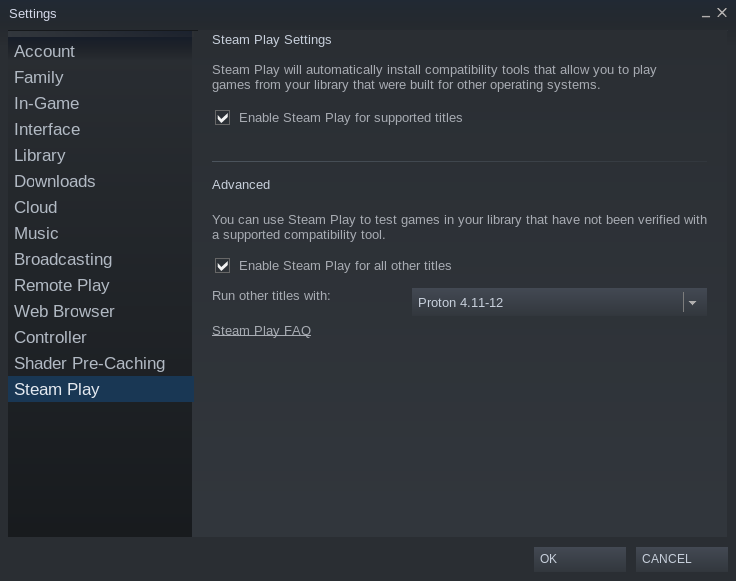
Try open steam settings, in the Steam Play tab you go to "Run other titles with" and change "Steam Linux Runtime" to Proton then launch the game again.
Try open steam settings, in the Steam Play tab you go to "Run other titles with" and change "Steam Linux Runtime" to Proton then launch the game again.
It doesn't even have option of Steam Linux Runtime, It shows Run other titles with: Drop down menu with Proton 4.11-11, 4.2-9, 3.16-9 etc.
@FurtadoPires That fixed it for me. Although I had to right click on my Witcher 3 Steam LIbrary entry. Attaching a video for a better understanding.
cc: @wisemonkey

@FurtadoPires That fixed it for me. Although I had to right click on my Witcher 3 Steam LIbrary entry.
@returntrip Change the parameters in the Global setting and steam will set Proton as default for every game you run with a compatibility tool. This happened because an update which steam make "Steam runtime" as the default option, even if most games don't run with it.
@FurtadoPires That fixed it for me. Although I had to right click on my Witcher 3 Steam LIbrary entry.
@returntrip Change the parameters in the Global setting and steam will set Proton as default for every game you run with a compatibility tool. This happened because an update which steam make "Steam runtime" as the default option, even if most games don't run with it.
in my case it was already set globally but it did not cascade to Witcher 3, I guess this was because it was added as a non Steam game.
@FurtadoPires That fixed it for me. Although I had to right click on my Witcher 3 Steam LIbrary entry.
@returntrip Change the parameters in the Global setting and steam will set Proton as default for every game you run with a compatibility tool. This happened because an update which steam make "Steam runtime" as the default option, even if most games don't run with it.
Already have it like this
I've completely removed Steam, deleted all my games data.
Installed Steam as a flatpak (since it creates isolated area for files), installed games Witcher3 and Wolcen.
Everything works perfectly, no hiccup running those games at all.
Only problem is now games are on my SSD instead of HDD so I can't just keep installing many games, will need to figure out save games
Closing the issue since I got Proton games working through flatpak, I'll not be able to test for previous issue that invalidates the original issue
Proton versions
proton 4.11-11x1 2020-01proton 4.11x1 2020-01
Launch options
PROTON_LOG=1x3 2020-01PROTON_LOG=1`,x1 2020-01
OS: Ubuntu 19.10
GPU: Radeon RX Vega (VEGA10, DRM 3.33.0, 5.3.0-24-generic, LLVM 9.0.0)
CPU: Intel Core i7-6700K @ 8x 4.2GHz
Using GNOME Shell
Enable Steam Play for supported titles is checked.
Enable Steam Play for all other titles is checked
Proton version 4.11-11
Behavior:
Clicking on game goes:
PLAY -> STOP -> PLAY
I've tried Witcher (Enhanced edition) and Witcher Wild hunt
Then I tried starting game with: steam steam://rungameid/20900
I'm not sure exact error:
but I see following few:
File "/usr/lib/python3.7/shutil.py", line 121, in copyfile
with open(dst, 'wb') as fdst:
IsADirectoryError: [Errno 21] Is a directory: '/home/wisemonkey/Steam/steamapps/compatdata/20900/pfx//drive_c/windows/syswow64/'
ERROR: ld.so: object '/home/wisemonkey/.local/share/Steam/ubuntu12_32/gameoverlayrenderer.so' from LD_PRELOAD cannot be preloaded (wrong ELF class: ELFCLASS32): ignored.
[0101/193848.253939:INFO:crash_reporting.cc(270)] Crash reporting enabled for process: renderer
Exiting workitem thread
P.S. Doki Doki works (just tried it from whitelist, will try something else as well and report back)