SD Gundam G Generation Cross Rays
You can fix the squares by forcing it to run in a jp locale. It's also got a MediaFoundation issue to do with the custom audio feature, but that's more of an optional feature being broken than something critical to the game itself.
You can fix the squares by forcing it to run in a jp locale
How does one go about doing this? The documentation to change a game language on Valve's website is outdated. It references using a 'Language' tab in game properties, but no such tab exists:
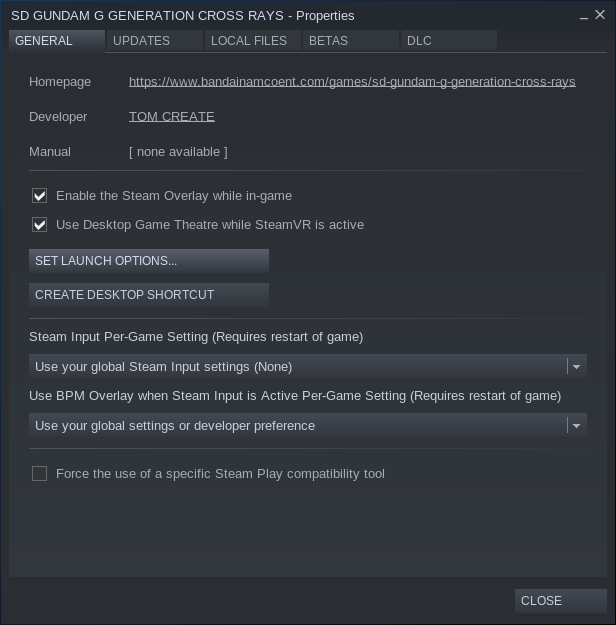
LANG=ja_JP.UTF-8 %command% in the startup options should work.
Hmm, this unfortunately doesn't work for me which is odd because I'd imagine it'd work due to having Japanese language packs installed on this computer to communicate via ibus/anthy. I even went so far as to reboot the computer after setting the startup option. Maybe there's some package for Arch here that I'm missing that's needed...
maybe try using protontricks to install takao and fakejapanese?
Ran protontricks 728530 fakejapanese which also happened to install takao, rebooted, but still get the issue. All the same, your suggestions have been appreciated
Try LC_ALL=ja_JP.UTF-8 %command%
I know there's a way to make it work, I had that part working before I got it refunded because of the xaudio issue, I just can't seem to remember exactly what the locale setting was.
That launch option doesn't seem to work either.
Just for the record of attempted workarounds... it looks like despite using anthy/ibus w/ Japanese on the daily, I was missing the Japanese Locale. Added it, ran WINETRICKS=/home/[user]/.steam/steam/steamapps/compatdata/728530/pfx winetricks allfonts per an alleged workaround for another game with similar issues, and kept LC_ALL=ja_JP.UTF-8 %command%, but unfortunately the issue persists.
Also tried using GloriousEggroll's Proton-4.21-GE-2 to no avail.
I have managed to fix the fonts issue for myself, but it took me a while.
I'm running Proton 5.0-4, I have set LANG=ja_JP.UTF-8 %command%, and I have installed the following source packages via protontricks and the newest version of winetricks: fakechinese, fakejapanese, fakejapanese_vlgothic, opensymbol, sourcehansans, takao, vlgothic, webdings, wenquanyi. I'm not sure which one of them finally did the trick, but it is definitely possible, and with pulseaudio I don't have any audio issues so far.
Using LANG=ja_JP.UTF-8 %command% plus protontricks 728530 allfonts fakejapanese, I have now all characters. I don't think allfonts is really necessary.
Edit: I have remove the directory steamapps/compatdata/728530/pfx to start with a clean proton prefix. Just using LANG=ja_JP.UTF-8 %command% with the locale activated in the system, plus some japanese fonts installed on the system. To confirm, if erasing this directory is enough.
Game properly works now as of Proton 5.13; no □ issue! Not sure if @kisak-valve needs to note that in some Steam/Proton DB before this issue is closed.
I've been getting this issue with the game as it load with pure white blank screen you can hear the sound and menu toggling just can't view what you are selecting .
Also Validation error keeps occurring with every checkup have no Idea why
Also this is the specs of the hardware for reference:
OS: Arch LinuxKERNEL: 5.10.61-1-lts
CPU: AMD Ryzen 7 3700X 8-Core
GPU: AMD AMD Radeon RX 5700 XT (NAVI10, DRM 3.40.0, 5.10.61-1-lts, LLVM 12.0.1)
GPU DRIVER: 4.6 Mesa 21.2.1
RAM: 64 GB
Proton version : 6.3-6c
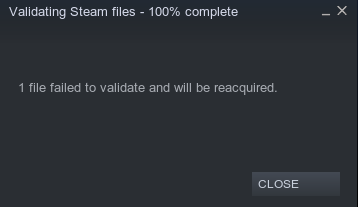
Also getting the blank screen issue. Can also hear sound and menu toggling. No validation error though.
Distro:openSUSE Tumbleweed
Kernel:5.10.12-1-default
RAM:32 GB
GPU Driver:4.6 Mesa 20.3.4
GPU:AMD Radeon RX 5600 XT (NAVI10, DRM 3.40.0, 5.10.12-1-default, LLVM 11.0.1)
CPU:AMD Ryzen 5 5600X 6-Core
Proton version: Test experimental, 7.0-1 and GE-Proton7-9
steam-728530.zip
Fix for the white screen has landed in mesa, you can add force_compat_shaders=true to your launch options or driconf for now as a workaround.
Proton versions
ge-proton7-9x1 2022-04proton 5.13x1 2020-10proton 5.0-4x1 2020-03proton 4.21-ge-2x1 2020-01
Launch lines
LANG=ja_JP.UTF-8 %command%x3 2020-03LC_ALL=ja_JP.UTF-8 %command%x2 2020-01
Upstream links
- ValveSoftware/Proton/issues/768x1 2020-01
Compatibility Report
System Information
I confirm:
Symptoms
Game shows □ on a number of menus, UI's. In the screenshot below during a battle sequence you can see not only the upgrade window has □ all over, but the footer does as well. This makes it impossible to see how many credits a unit costs to produce, etc.
Presumably this is due to missing ideograph support with whatever Unicode support Proton/Wine comes with. It would seems it primarily concerns numbers and special characters based on inference of where it crops up
Reproduction
Launch the game and toggle through the menus like the menu to produce units. You should very quickly come across □ characters. Alternatively, you can go into a Story mission at which point during unit control you can see a footer bar with them as well as them near the string showing selected weapon.